Enable your teams to respond in seconds by bridging the gap between booking confirmation and team notification. No sticky notes, no calendar nudges and no follow-up frenzies. For businesses that rely on scheduled appointments, real-time visibility is a crucial operational need.
Timely automated communication is essential for managing important appointments and bookings. Let's integrate Zoho Bookings with Zoho Cliq via the Cliq developer platform's bots and workflows, ensuring that every appointment confirmation is automated and reaches Cliq chats promptly.
Business Benefits
- Operational Efficiency: This custom solution eliminates the need for manual dashboard monitoring. Booking updates are automatically communicated to Cliq as they occur.
- Enhanced Customer Experience: Faster internal awareness leads to expedited confirmations, better-prepared staff, and a more seamless appointment experience.
- Centralized Communication: All booking activities are consolidated in the same Cliq channel your team uses daily, minimizing context switching and preventing information silos.
- Enterprise-Ready, No Additional Cost: Built entirely on the Zoho Cliq Developer platform, this custom solution requires no third-party middleware. It operates within your existing Zoho subscription framework.
Step 1: Create a bot
- Go to the top-right corner of your profile and click on it.
- Select "Bots and Tools" from the dropdown menu.
- To create a new bot, click on "Create Bot" under the "Bots" section.
- Enter a name and description for your bot and ensure that channel configuration settings are enabled during setup.
- Finally, save the bot.
Step 2: Retrieve the bot webhook URL
- Webhook tokens are listed in the Bots & Tools section along with other internal tools.
- When you access the webhook tokens module, you'll need to authenticate using two-factor authentication (2FA), verify your identity, and then click "Continue."
- After authenticating, you can create, edit, and manage your webhook tokens as needed.
- Generate a webhook token and retrieve the bot's webhook URL as instructed.
Step 3: Generate Cliq bot incoming url
To create the bot's incoming URL, combine the bot's endpoint with the webhook token.
- Navigate to the newly created bot and click on it. A pane will appear showing the bot's URL details.
- Copy your bot's incoming endpoint from this window and append your token to it:
- https://cliq.zoho.com/api/v2/bots/<yourbotname>/incoming?zapikey=<webhooktoken>
Keep this URL handy, as you will need to paste it into the Zoho Bookings workflow later.
Step 4 : Creating a workflow in Zoho Bookings
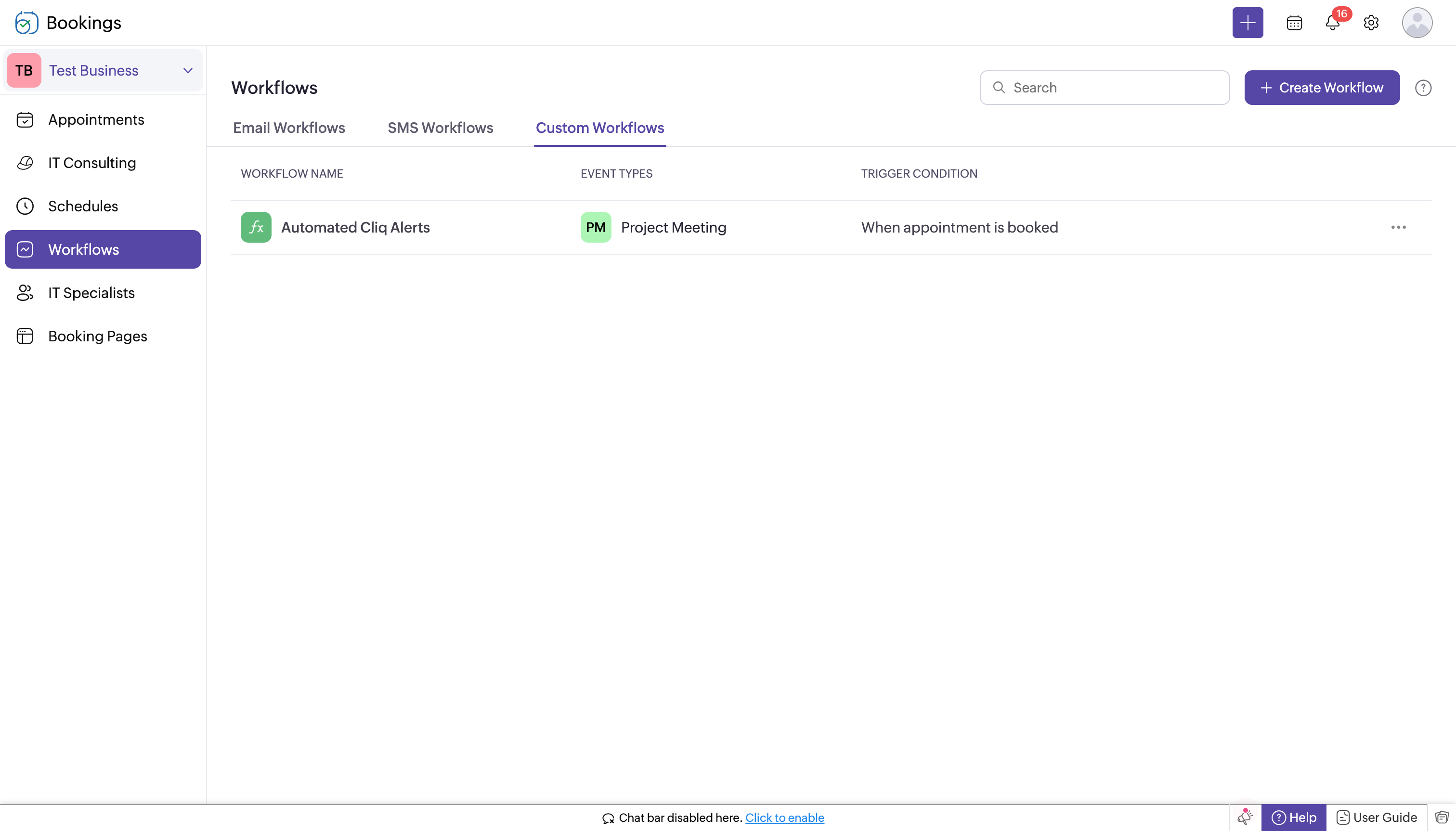
- Log in to Zoho Bookings.
- In the left panel, navigate to one of the following options:
- Workflows → Custom Workflows → Create New Workflow
- or Workflows → Create Workflow → Create New Workflow.
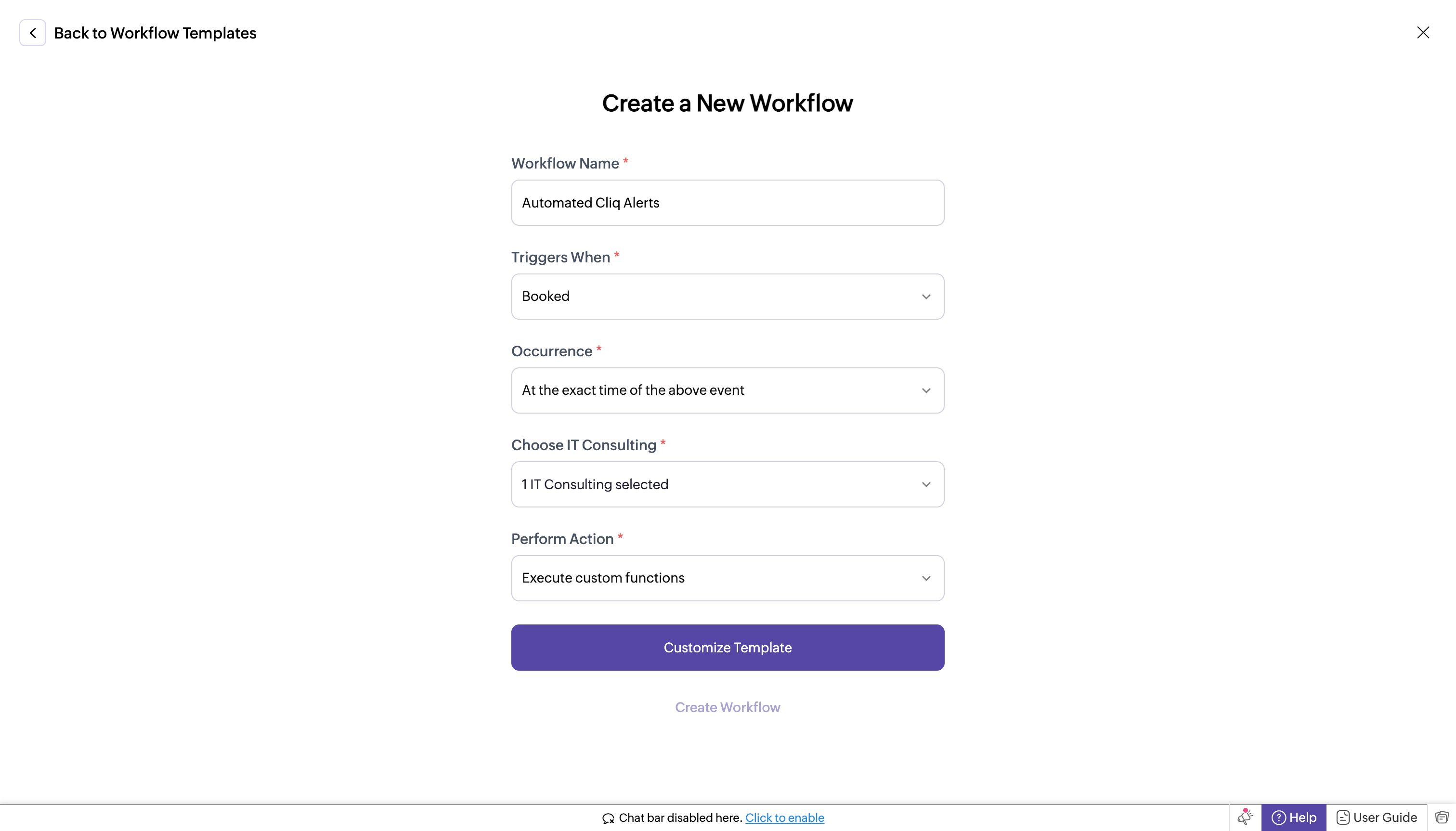
- If you chose Workflows → Custom Workflows → Create New Workflow, complete the following fields:
- Workflow Name: Enter a name for your workflow.
- Trigger When: Select "Booked."
- Occurrence: Choose "Immediately."
- Choose Service (e.g., IT Consulting): Select your Service.
- Perform Action: Select "Execute Custom Functions."
- Customize Template: Paste the following code.
- In the template editor, paste the code, replacing "<bot incoming url>" with the full URL you created in the previous step.
- bookingInfoMap = Map();
- bookingInfoMap.put("BookingInfo",bookingInfo);
- cliqWebhookTrigger = invokeurl
- [
- url : "<bot incoming url>"
- type :POST
- parameters:{"Book Details":bookingInfo} + ""
- headers:{"content-type":"application/json"}
- ];
- info cliqWebhookTrigger;
- Click Create Workflow. With this setup, whenever a new appointment is booked, it will trigger a notification to your Cliq bot's incoming handler.
Step 6 : Setting up bot incoming webhook handler
- Head back to Cliq, locate the bot you created under the "Bots and Tools" section, and access its incoming webhook handler.
- The incoming webhook handler is designed to allow third-party services, such as Zoho Bookings, to post messages directly to your bot.
- Copy and paste the below code, then click "Save".
Pre-requisites before scripting:
Create a Zoho Cliq Default Connection:
Before you begin scripting the code below, you need to create a connection in Zoho Cliq. Once the connection is established, you can use it in Deluge integration tasks and invoke URL scripts to access data from the required service.
Use a unique name for the connection with the scope set to ZohoCliq.Reminders.All.
Note: Refer to the document on Connections in Cliq for more information.
Post Alerts to a Channel:
To post an alert to a channel, you'll need the unique names of both the channel and the bot. This is necessary as we will use the zoho.cliq.postToChannelAsBot Deluge task in the code below. Follow these steps to retrieve these names:
How to Obtain the Channel Unique Name in Cliq?:
- Navigate to the top right corner of your preferred channel and click on the three dots.
- In the menu that appears, select "Channel info." A pop-up will display detailed information about the channel.
- Hover over the "Connectors" section and click on it.
- Under "API Parameters," you will find the channel unique name.
How to Obtain the Bot Unique Name in Cliq?
- Go to "Bots & Tools," and under the bots section, select your preferred bot.
- Copy the API endpoint URL. The bot's unique name is located between "bots/" and the next slash ("/").
Example:
In this example, the bot's unique name is crmupdatesincliq.
Retrieve the Bot Chat ID:
- Open Zoho Cliq and navigate to your bot in the chat window.
- Click on the bot to open the conversation.
- Check the URL in your browser; the bot chat ID is the alphanumeric string that appears after "chats/".
Example:
In this example, the bot chat ID is CT_9874563201845670134_10005673821-B7.
After creating the connection, retrieving the channel unique name, bot unique name, and bot chat ID, keep this information handy for use in the code below.
Script
- response = Map();
- info params;
- info headers;
- info body;
- bookingDetails = body.get("Book Details");
- info bookingDetails;
- bookingID = bookingDetails.get("booking_id");
- workspaceName = bookingDetails.get("workspace_name");
- customerEmail = bookingDetails.get("customer_email");
- startTime = bookingDetails.get("start_time");
- endTime = bookingDetails.get("end_time");
- timeZone = bookingDetails.get("time_zone");
- summaryUrl = bookingDetails.get("summary_url");
- responseMsgCard = {"text":"### 📅 New Appointment","card":{"theme":"modern-inline"},"slides":{{"type":"label","title":"Details","buttons": [
- {"label": "Open Summary","action": {"type": "open.url","data": {"web":summaryUrl}}}],"data":{{"🆔 Booking ID":bookingID},{"🏢 Workspace":workspaceName},{"📧Customer Email":customerEmail},{"🕒 Time":startTime + " - " + endTime},{"🌍 TZ":timeZone}}}}};
- info zoho.cliq.postToBot("<bot unique name>",responseMsgCard);
- //Post to your Bot
- info zoho.cliq.postToChannelAsBot("<Channel unique name>","<bot unique name>",responseMsgCard);
- //It will send to channel with bot permission.
- //--------------------------------- To set reminder -------------------------------//
- eventTimeZone = bookingDetails.get("time_zone");
- info eventTimeZone;
- userTimeZone = user.get("timezone");
- dateTimeObj = bookingDetails.get("start_time").toTime("dd-MMM-yyyy HH:mm:ss",eventTimeZone).toString("dd-MM-yyyy HH:mm:ss");
- info dateTimeObj;
- info dateTimeObj.toTime("dd-MM-yyyy HH:mm:ss",user.get("timezone")).subMinutes(60);
- datetime_30min_sub = dateTimeObj.toTime("dd-MM-yyyy HH:mm:ss",userTimeZone).subMinutes(30).toString("dd-MMM-yyyy HH:mm:ss",userTimeZone);
- datetime_60min_sub = dateTimeObj.toTime("dd-MM-yyyy HH:mm:ss",userTimeZone).subMinutes(60).toString("dd-MMM-yyyy HH:mm:ss",userTimeZone);
- info datetime_60min_sub+"datetime_60min_sub";
- info datetime_30min_sub+"datetime_30min_sub";
- secondsVal_60sec_before = datetime_60min_sub.unixEpoch(userTimeZone);
- secondsVal_30sec_before = datetime_30min_sub.unixEpoch(userTimeZone);
- info secondsVal_60sec_before;
- info secondsVal_30sec_before;
- reminderTimes = list();
- reminderTimes.add(secondsVal_60sec_before);
- reminderTimes.add(secondsVal_30sec_before);
- for each reminderTime in reminderTimes
- {
- param = Map();
- content = "Zoho Bookings Reminder : " + bookingID;
- param.put("content",content);
- param.put("time",reminderTime);
- chatidsList = list();
- chatidsList.add("<Bot chat id>");
- param.put("chat_ids",chatidsList);
- createReminder = invokeurl
- [
- url :"https://cliq.zoho.com/api/v2/reminders"
- type :POST
- parameters:param + ""
- connection:"<your connection name>"
- ];
- info createReminder;
- }
- return response;
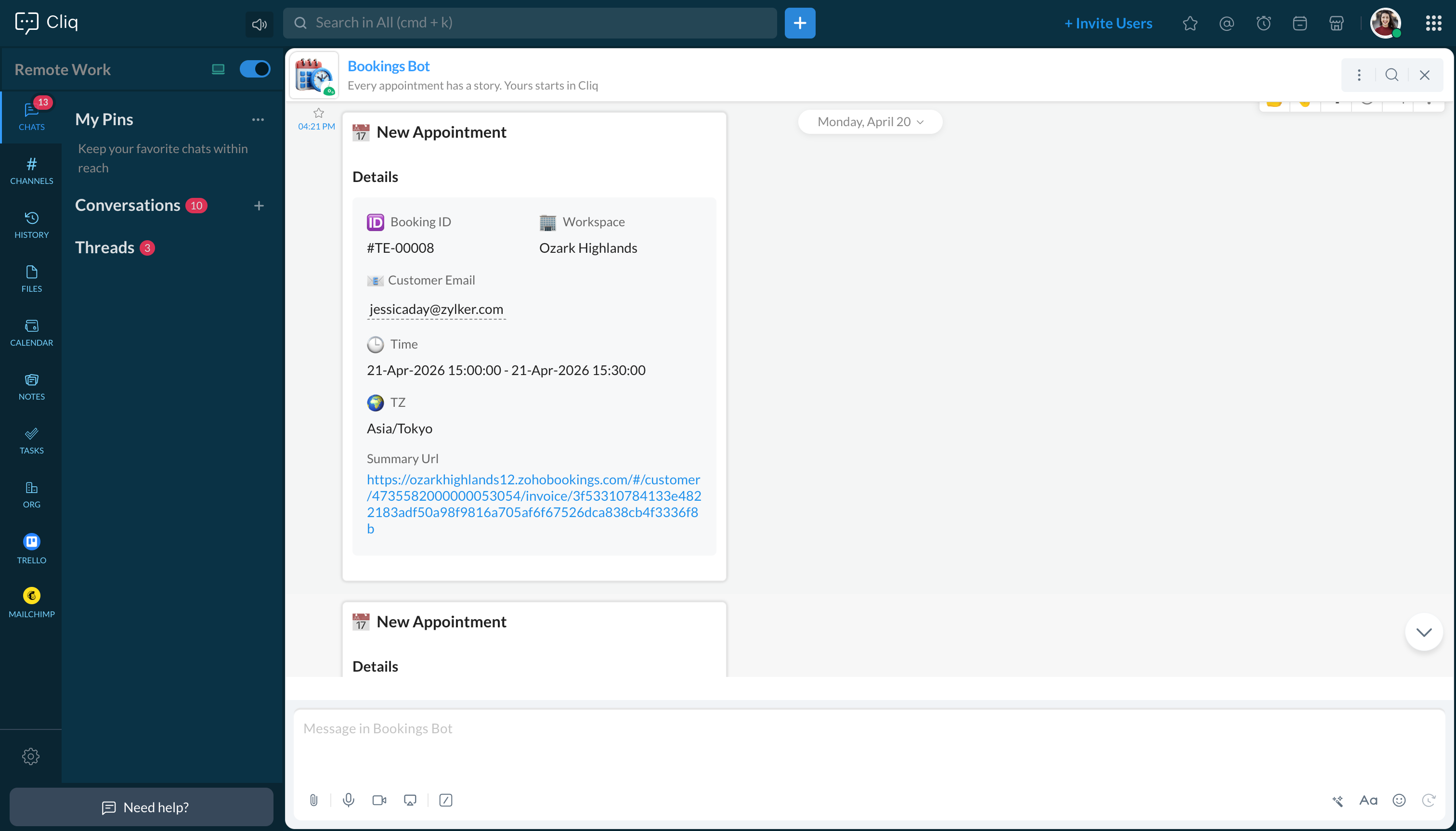
Team responsiveness and operational clarity are critical, and automated booking alerts create a measurable impact. Businesses managing a scalable client base and operating on appointments cannot afford delays in information. Every booking that goes unnoticed is a missed chance to respond and deliver.
This custom solution brings real-time Zoho booking data into the Cliq communication layer, effectively filling the gap, letting teams stay coordinated, respond faster, and deliver a consistently better experience to every customer.
If you have any further questions or need support, please reach out to support@zohocliq.com, and we'll be happy to assist you.
Recent Topics
Ability to select the attachment of a record when sending an email from FSM
Hello FSM Team, FSM allows us to add attachments to any record (Estimate, Work Order, etc.). However, when we're sending an email from FSM, it is currently not possible to choose from the attachment in FSM to add to the email. When sending an estimate,
Function #11: Apply unused credits automatically to invoices
Today, we bring you a custom function that automatically applies unused credits from excess payments, credit notes, and retainer payments to an invoice when it is created. Prerequisites: Create a Connection named "zbooks" to successfully execute the function.
Add spaces to input format
In Zoho Inovices, I am trying to do a custom input format for a custom field. I have tried a few variations, but this is my most recent: ^[a-z][A-Z][0-9][,][-][_][:][ ]$ In this field, I will be entering different alphanumeric information, depending on
Zoho CRM Deal API returning null pipeline in case of default pipeline
Hey team, We are writing to report an issue with the Deals module pipeline API behavior that we believe stems from how the default (Standard) pipeline is handled when no custom pipelines have been configured. When the "Manage Pipelines" page under CRM
Quebec Canada Tax GST and QST
Hello Expert, Whenever we I create invoice for Quebec, Canada, it calculating wrong tax amount, can you please validate Attached the screenshot, which is calculating wrong tax amount on QST
Function #1: Convert an accepted Estimate to Sales Order automatically in Zoho Books
As you’re aware, Zoho Books provides a default option to have the estimates automatically converted to invoices once your customer accepts them. Many of you wanted a similar option for sales orders, so here’s a workflow that converts accepted estimates
Facturation électronique 2026 - obligation dès le 1er septembre 2026
Bonjour, Je me permets de réagir à divers posts publiés ici et là concernant le projet de E-Invoicing, dans le cadre de la facturation électronique prévue très prochainement. Dans le cadre du passage à la facturation électronique pour les entreprises,
Adding Taxes to paid consultations in Zoho Bookings
I created a 'paid' consultation under Zoho Booking and integrated it with payment gateways for online/instant payment before a booking is done. How can I add 'taxes' to the price of consultation? I can add taxes to other Zoho apps (liks Books, Checkout,
What's New in Zoho Forms
Hey there, We've been heads-down shipping and this quarter. Because every update we ship is about making your forms do more, with less effort from you. This quarter too, we expanded what Zoho Forms can do. Here's everything that shipped. Spotlight Forms
Zoho Creator and Bluetooth Beacons?
Hi all, Has anyone developed anything in Zoho Creator that leverages Bluetooth? Specifically to detect bluetooth beacons (iBeacon, Eddystone, etc.)? Thank you, Josh
Zoho Books | Product updates | June 2026
Hello users, Welcome to this month's roundup of what's new in Zoho Books! We have an exciting line-up this time. The highlight is the launch of the all-new France Edition with full ISCA compliance. We're also introducing features such as Layout Rules
API to post drafts for social media
I we want to post draft posts to our zoho social account and then approve and schedule them within Zoho social. is this possible with for example: https://apis.zoho.com/social/v2/post TIA Jon
Updating Zoho Books UI when a field is changed
I have this script to update Quotes Expiry date. estimateID = estimate.get("estimate_id"); numberDaysTobeExtended = 14; estimatedate = estimate.get("date").toDate(); organizationID = organization.get("organization_id"); estDate = estimate.get("date");
What's New in Zoho Inventory | April & May 2026
Hello users, We're excited to roll out the latest Zoho Inventory updates for April and May 2026. These enhancements are designed to make your daily operations smoother and more efficient, from advanced inventory management and flexible pricing to automated
Important update on our transition to the new video platform framework
As part of our ongoing platform changes, users in select regions, including the United States and other supported data center locations, have been migrated to our new video platform framework. Due to this migration, some participants may notice changes
Bullet Charts Stuck Loading Without Data
I have a dashboard with some widgets in bullet chart format, but some of them do not have data. Since there is no data, they keep loading indefinitely instead of displaying “No Data,” as happens with the percentage widget next to them. This issue prevents
How to get Monday as 1st day of the week?
Hi, The first day of the week is Sunday in Zoho Creator calendar.So it is hardly usable as in Europe the 1st of the week is always Monday. How can I get Monday as 1st day of the week? Best regards, Chris
Shall we play a game?
Presenting the very first game created using ZOHO Creator: Tic-Tac-Toe (or noughts and crosses) I made this to challenge myself and employ some of the new features of ZOHO Creator. I must admit that the code is very literal and not too elegant. There are plans to improve on the machine AI and streamline the code over time. Currently the code makes extensive use of functions for the machine "AI" - there are 12 of these. The machine AI can be tricked, so to counteract that I made it exceedingly arrogant
FINALLY! 100% Responsive iFrame for HTML Page Snippet
For the past two years or so I have been battling with Page Snippets' responsiveness (HTML, Embed, and ZML). Furthermore, if you use the native embedded reports, especially more than one report on a page, you have to set a static height because they're
Associate project with timer on iPhone
When I start the timer without first associating a project (on my iPhone), its starts fine but now when I need to associate a project, and click on the link, I get a list of EVERY project I've ever put into Zoho Books. It used to just show active projects.
Check printing alignments always changes
Hello, We have a frustrating problem with printing checks. We use Quickbooks voucher checks, which works okay for us. The problem is the printing alignment for the check's "Date, Pay to the Order of, Amount, and Amount in Words" changes every time we
name change of company in same GSTIN registration . how to retain historical company name for past transactions?
hello I have recently change my company name from BHANU DIAM to BHANUMATI IMPEX in same GSTIN registration number While i have update the company name in profile name that change all my historic data like sale invoices and purchase bill , i would like
iOS Books app shows filtered view after changing to All sales orders
My boss often checks sales orders on his iPhone. The app is mostly working fine, but there's an ongoing issue: When switching between different filters (also called custom views on the web), going back to All doesn't often work. It typically gets stuck
Recurring Invoices
I'm looking to set up recurring invoices on a monthly basis, using GoCardless as a payment gateway. I've done this successfully, however there's a big problem with the Invoice Date and Due Date. We prefer to provide sufficient notice of collection (10
Conditional Drop Downs
Am I the only one that has a problem when setting up the same project for multiple customers - resulting in a HUGE number of projects (e.g. Project A - customer 1, Project A - customer 2, Project A - customer 3 etc.). OR, am I doing it wrong? What results
Layout Rules Don't Apply To Blueprints
Hi Zoho the conditional layout rules for fields and making fields required don't work well with with Blueprints if those same fields are called DURING a Blueprint. Example. I have field A that is used in layout rule. If value of field A is "1" it is supposed to show and make required field B. If the value to field A is "2" it is supposed to show and make required field C. Now I have a Blueprint that says when last stage moves to "Closed," during the transition, the agent must fill out field A. Now
Ability to Use Both AND and OR When Creating Rules (Advanced Conditions)
I'd like to be able to use more complicated logic when setting up rules. E.g. in Zoho Mail, I can choose "Advanced conditions (AND/OR) to create a rule that can be applied to multiple subject lines from the same sender. But in Zoho TeamInbox, I will have
How to record GST amount for Value of Service on Inward remittance charged by bank
Hi please advice I have a situation. 1. I have HDFC bank account 2. I have a customer who has done inward remittance for purcahses from overseas. 3. HDFC is showing Value of Service say $100 and GST @ 18%. 4. Value of Service is not charged. But CGST
Resources - Sort by rows consumed
Please add the ability to sort by the total rows consumed in the Resources section of Settings. I would like to see which table is consuming the most rows by sorting from high to low.
Zoho Books - France
L’équipe de Zoho France reçoit régulièrement des questions sur la conformité de ses applications de finances (Zoho Books/ Zoho Invoice) pour le marché français. Voici quelques points pour clarifier la question : Zoho Books est un logiciel de comptabilité
Editing a bundle
How can I edit a bundle?
Approval escalation
Hi I would like to have an approval escalation if Approver 1 does not approve/reject a request with a certain SLA. Currently I have a status field that changes to "Pending approver 2 approval" after a certain time, however the challenge I am faced with
Referral module for our Zoho People employees
I have been requested to create a user in Zoho Recruit for each Zoho People user to allow them to refer a candidate in Zoho Recruit. Only the interviewer and guest profiles are free. The use of a custom profile is on the paid basis. Any user linked to
Conflicts on zoho project Tasks
Hi We want to use ZOHO Project for scheduling our technicians. We have maintenance contract with our customers. We schedule interventions on customer sites. So we created projects for each contract and task for interventions. So if a technician need to go to customer I create task and schedule them after depending of availibility. When I need to assign a date I use start Date and due date on the task. But I realized there is no conflict management. I called support and they told me it is not developped.
Upcoming webinar : Build high-converting sales pipelines with Zoho LandingPage and Bigin
For small businesses, generating leads is only half the battle. The real challenge is staying organized, following up consistently, and turning those leads into customers. Join us for this webinar to learn how Zoho LandingPage and Bigin can help you create
New UX Improvements in the Zoho Expense iOS and Android Apps
Hello users, We're excited to share the latest updates and enhancements we've made to the iOS and Android apps of Zoho Expense. These updates have been designed to make your day-to-day expense and travel management even simpler. Note: We will be rolling
User Permission Log
Our external auditors are asking for a way to view changes made to user permissions (basically, a user permission change log). Is this feature built into Creator?
What's New in Zoho Billing | May 2026
We're back with another round of updates in Zoho Billing! This month brings new capabilities designed to give you more flexibility and control over your billing operations. From associating price lists with business locations, and including annexures
ZOHO SURVEY to ZOHO CRM integration
I am trying to use the ZOHO SURVEY to ZOHO CRM integration but the integration won't allow me to choose a record layout and that means there is a erquired field that i cannot input, is there any way around this?
Why don't Zia agents support file uploads?
I am trying to build a Zia Agent that allows uploading of a PDF file and uses the GLM5 model to process it and extract information. But agents.zoho.com has no way to enable file uploads on the agent. Additionally, GLM5 based agents keep outputting their
Next Page