Automation#32:Auto Add New Portal Users to the Help Center User Groups

Automation#32:Auto Add New Portal Users to the Help Center User Groups

Hello Everyone,
Introducing a custom function that automates the process of adding new portal users to Help Center user groups, making user management effortless!
By default, Zoho Desk allows you to assign new portal users to groups manually. But with this custom function, the process is completely automated, ensuring seamless categorization.

Why User Groups?

Zylker Techfix was dedicated to helping customers through their Help Center. While they actively supported users, there was one challenge: everyone received the announcements, irrespective of their requirements.
Zylker Techfix wanted a smarter way to engage their users by sending targeted announcements based on individual interests, such as gadgets, office equipment, and operations.
To make this happen, they created user groups and assigned new users accordingly. But manually adding users to the right groups was time-consuming.
So, they automated the process! With a custom function, they streamlined operations, ensuring every new portal user was automatically assigned to the right Help Center user group. More relevance, better engagement, zero manual effort.
Let’s walk through the steps to incorporate this custom function into your workflow.

Prerequisites

1. Create a connection
  1.1 Go to Setup(S) and choose Connections under Developer Space.
  1.2 Click Create Connection.
  1.3 Select Zoho OAuth under Default Connection.
  1.4 Set the connection name as zohodesk.
  1.5 Disable the toggle for User Credentials of Login User. 
  1.6 Under Scope, choose the below scope values:
Desk.contacts.READ
Desk.contacts.UPDATE
  1.7 Click Create and Connect.
  1.8 Click Connect and click Accept.
Connection is created successfully.

Create a Workflow Rule

1. Go to Setup, choose Workflows under Automation. 
2. Under Workflows, click Create Rule.

In the Basic Information section,
3. Select Contacts from the drop-down menu under Module.
4. Enter a Rule Name and Description for the rule.
5. If you want to activate the rule right away, select the Active checkbox. Else, create the rule and activate it later.
6. Click Next

In the Execute on section, follow these steps:
7. Select Field Update. Select field isPortalUser. 
8. Click Next.
9. In the Criteria section, add isPortalUser is and select the checkbox. click Next. 
10. In the Actions section, click the + icon and select New next to Custom Functions.
11. Enter a Name and Description for the custom function. Choose Contacts under Module.
12. Under Argument Mapping, give a desired Method Name. Map the arguments as below:
      12.1 In the Argument Name field, type contactId and select Contact ID under the Contacts Section.
13. In the script window, insert the Custom Function given below:
  1. // ---------------User inputs------------------------------------------
  2. deskUrl = "https://desk.zoho.com/api/v1/"; // replace based on user dc
  3. groupId = "<<GROUP ID>>"; // replace the group id in your desk portal
  4. //---------------------------------
  5. logs = Map();
  6. try 
  7. {
  8. getContactStatus = invokeurl
  9. [
  10. url :deskUrl + "contacts/" + contactId + "/helpCenters"
  11. type :GET
  12. connection:"zohodesk"
  13. ];
  14. contactUserId = getContactStatus.get("data").get(0).get("userId");
  15. if(contactUserId != null)
  16. {
  17. addUserToGroup = invokeurl
  18. [
  19. url : deskUrl + "groups/" + groupId + "/users/add"
  20. type :POST
  21. parameters:"" + {"users":{{"id":contactUserId}}}
  22. headers:{"Content-Type":"application/json"}
  23. detailed:true
  24. connection:"zohodesk"
  25. ];
  26. info "addUserToGroup" + addUserToGroup;
  27. }
  28. }
  29. catch (errorInfo)
  30. {
  31. logs.insert("errorInfo":errorInfo);
  32. }
  33. info "logs: \n" + logs;
  34. if(logs.containKey("errorInfo"))
  35. {
  36. throws "Error happen in the CF execution";
  37. }
User Inputs
a. In Line 2, replace .com in the URL based on your DC. 
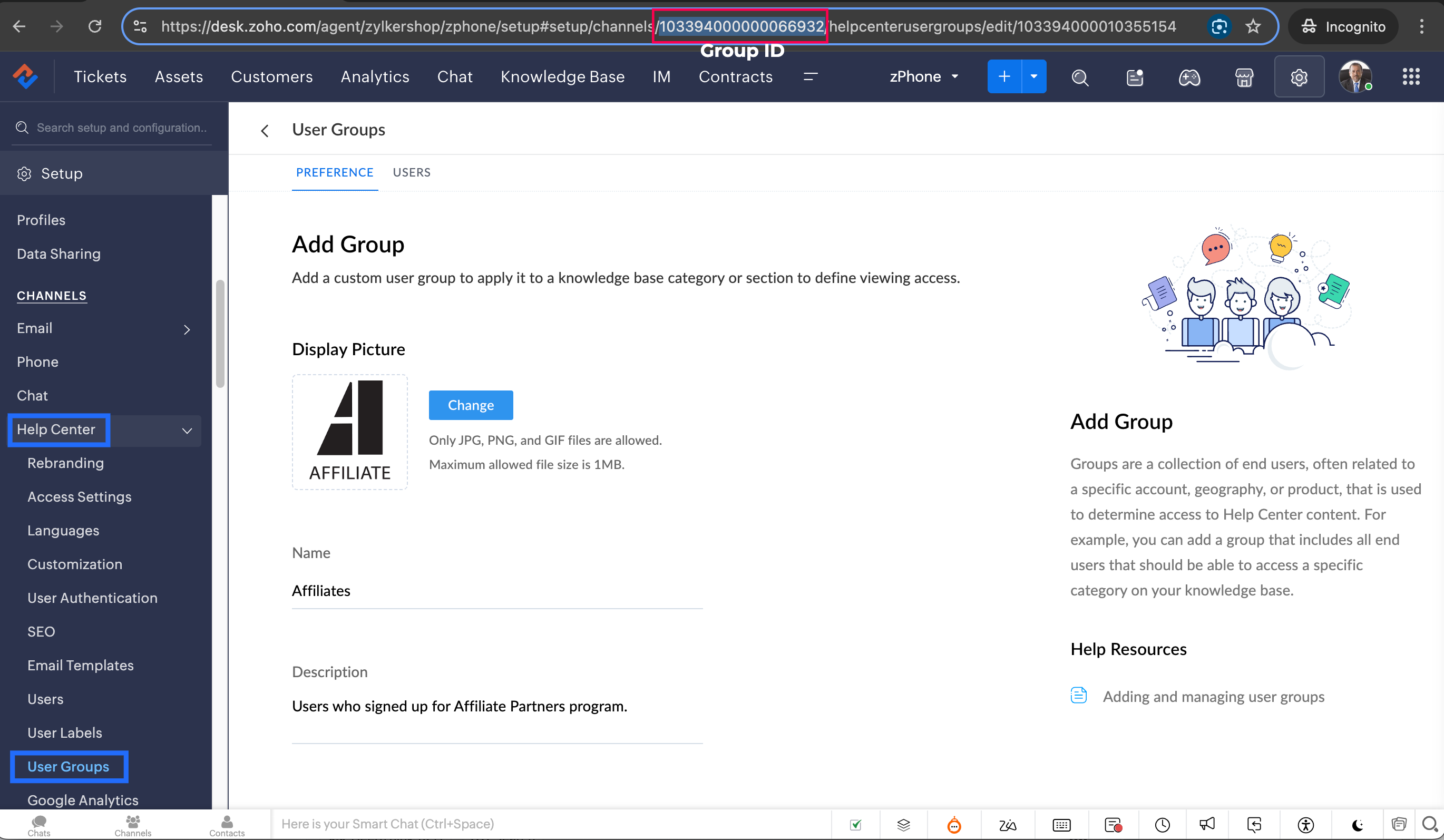
b. In Line 3, enter the group ID to which you would like to add your new portal users. To access group ID, go to Setup >> Help Center >> Select the Department having your preferred User group >> choose User Groups on the left panel >> Select the user group >> The Id in the address bar is the required Group ID. 
Notes
Note: Configure the Workflow for the contacts module in the respective department where you want to add portal users to be added to the User group. 
14. Click Save to save the custom function.
15. Click Save again to save the workflow.

Share with us how this custom function helps you in your operations! Drop a comment below or reach out to us at support@zohodesk.com, we’re just an email away!

Meet you in the next post!
Regards,
Lydia | Zoho Desk

    • Sticky Posts

    • Register for Zoho Desk Beta Community

      With the start of the year, we have decided to take a small step in making the life of our customers a little easier. We now have easy access to all our upcoming features and a faster way to request for beta access. We open betas for some of our features
    • Share your Zoho Desk story with us!

      Tell us how you use Zoho Desk for your business and inspire others with your story. Be it a simple workflow rule that helps you navigate complex processes or a macro that saves your team a lot of time; share it here and help the community learn and grow with shared knowledge. 
    • Tip #1: Learn to pick the right channels

      Mail, live chat, telephony, social media, web forms—there are so many support channels out there. Trying to pick the right channels to offer your customers can get pretty confusing. Emails are most useful when the customer wants to put things on record. However, escalated or complicated issues should not be resolved over email because it's slow and impersonal.  When you need immediate responses, live chat is more suitable. It's also quick and convenient, so it's the go-to channel for small issues. 
    • Welcome to Zoho Desk Community - Say hello here!

      Hello everyone! Though we have been here for a while, it’s time to formally establish the Zoho Desk Community; we’re really happy to have you all here! This can be the place where you take a moment to introduce yourself to the rest of the community. We’d love to hear all about you, what you do, what company or industry you work for, how you use Zoho Desk and anything else that you will like to share! Here’s a little about me. I am Chinmayee. I have been associated with Zoho since 2014. I joined here
    • Webinar 1: Blueprint for Customer Service

      With the launch of a host of new features in Zoho Desk, we thought it’ll be great to have a few webinars to help our customers make the most of them. We’re starting off with our most talked about feature, Blueprint in Zoho Desk. You can register for the Blueprint webinar here: The webinar will be delivered by our in-house product experts. This is a good opportunity to ask questions to our experts and understand how Blueprint can help you automate your service processes. We look forward to seeing
    • Recent Topics

    • Alert if a field is ticked.

      Hi There, We have two modules named Opportunities (Deals) and End Users (CustomModule1), as per the image below. Within Opportunities, we have a lookup field that looks up from the End Users Module. We are looking to get an alert either via email or another
    • Desk DMARC forwarding failure for some senders

      I am not receiving important emails into Desk, because of DMARC errors. Here's what's happening: 1. email is sent from customer e.g. john@doe.com, to my email address, e.g info@acme.com 2. email is delivered successfully to info@acme.com (a shared inbox
    • Pushing GCLID info from Gravity Forms to ZohoCRM

      We are switching to Gravity Forms from Zoho Forms and I cannot find any good info on how to make sure my GCLID tracking info is pushed through to the CRM through my new forms. There was an article in the documentation about placing something within the
    • Zoho OAuth Connector Deprecation and Its Impact on Zoho Desk

      Hello everyone, Zoho believes in continuously refining its integrations to uphold the highest standards of security, reliability, and compliance. As part of this ongoing improvement, the Zoho OAuth default connector will be deprecated for all Zoho services
    • Passing the CRM

      Hi, I am hoping someone can help. I have a zoho form that has a CRM lookup field. I was hoping to send this to my publicly to clients via a text message and the form then attaches the signed form back to the custom module. This work absolutely fine when
    • On Zoho Flow, Record deleted trigger from Zoho Creator

      On creating flow in Zoho Flow, when we select app Zoho created, it provides 3 trigger options - Record created, Record updated and Record created or updated We need trigger on "Record Delete" as well, We have a use case to fire our system api if record
    • Zoho Flow Switch On Not Working

      I have created a flow which is when the mailbox address received the email that meet the condition will auto fetch the contact, account and finally create the ticket by using Zoho Desk. When I do a test and debug on my flow it work well as what I expect
    • MS Teams Flow Integration Question

      Where can I find the chat ID for the "Post message to chat" target?
    • Zoho Flow - Access denied to recover recording from call module - OpenAI

      Hi, I am trying to build a Flow to recover recoding when a new call is saved in my CRM. I have integrated my CRM with ringcentral and the recordings are saved in the event. Trigger: When new module entry Step 2: Fetch module entry (Zoho CRM says "permission
    • Unable to send price in big commerce from zoho flow.

      I am creating a flow from zoho flow to create a product in zoho inventory and sending this to big commerce. But the problem is like when ever i send the price its getting error. it require decimal format value if i am sending ${trigger.sales_rate} the
    • Not sending mail to new lead in zoho flow

      I have created a flow in zoho flow and triggered an action to send email notification when the new lead is created but even after user entering the mail id the email is not going to them
    • Access query string from incoming webhook URL in Zoho Flow

      I have a fairly straightforward use case, but cannot find anything conclusive on this subject. How can I simply access the query string of the incoming webhook request in Zoho Flow? I am attaching the Deal ID to the end of the request like: https://flow.zoho.com/762439902/flow/webhook/incoming?zapikey=1001.0dec2d7dd15080c464a13925275f0129.448c23ee219c545c89f5a178456cfc8b&isdebug=false&dealID=${Deals.Deal
    • Unable to access my Zoho forms account

      For some days now, I haven't had access to my Zoho Forms account. I keep getting an error that says, "You are an inactive user in your organization" via the mobile app and "You don't have permission to access this organization" via the web. I was removed
    • HTML Tags added to Reports with Notes

      Recently Zoho added the ability to markup text within notes. That way, users can change font size, colors, etc. It's a great change. However, since the change, reports that include a column for "Note Content" are printing HTML tags within the report.
    • Custom Fonts in Zoho CRM Template Builder

      Hi, I am currently creating a new template for our quotes using the Zoho CRM template builder. However, I noticed that there is no option to add custom fonts to the template builder. It would greatly enhance the flexibility and branding capabilities if
    • Identify Unused Deluge Functions in Zoho CRM

      Hello Zoho Support Team, I would like to request a feature that helps administrators identify unused or rarely used Deluge functions in Zoho CRM. Currently, Deluge functions are distributed across different areas, and there is no centralized overview
    • User Automation: User based workflow rules & webhooks

      User management is an undeniable part of project management and requires adequate monitoring. As teams grow and projects multiply, manual coordination for updating users & permissions becomes difficult and can give way to errors. User automation in Zoho
    • Update on V2 API End-of-Life Timeline

      Dear Users, Earlier this year, we shared the launch of the V3 APIs and requested users to migrate from the older V2 APIs by December 2025. We have received valuable feedback from our users and partners regarding their migration timelines. We are happy
    • Run a workflow after record merge

      Hello, We are wondering if there is a way to trigger a workflow after two records are merged? We have a sms service that use to text back and forth with Prospects and Contacts. To make it easy for our users, we automatically create them in this other
    • Zoho Books' 2025 Wrapped

      Before we turn the page to a new year, it’s time to revisit the updates that made financial management simpler and more intuitive. This annual roundup brings together the most impactful features and enhancements we delivered in 2025, offering a clear
    • How do I associate pricebooks to a customer?

      I setup a few pricebooks, that worked fine. But now the only thing I can do with it, when I enter a quote or sales order, I can select which pricebook to use, but I have to do this product by product every time I add one. Is there a way to connect a pricebook
    • Live webinar | The Evolution of Zoho Show: 2025 Feature Recap

      2025 has been a year of exciting updates and features for Zoho Show. From advanced design and formatting tools to smarter presentation delivery, enhanced collaboration, and AI-powered features—along with the launch of our desktop apps, Show has continued
    • Batch Tracking custom function

      Hi fellow zoho users, We have our ecommerce site setup to shopify. I have some products I want to add batch tracking too, my only issue is that it breaks our shopify workflow (create sales order, invoice, payment, package) because it requires us to manually
    • Company Multiple Branch/ Location Accounting

      Hi All, anyone know whether company can maintain their multiple Branch Accounting in Zoho  Books. It will be chart of Accounts & Master Data will be same but different report available as per per Branch. Thanks & regards, Vivek +91 9766906737
    • Is it possible to setup bin locations WITHOUT mandating batch tracking?

      Hi fellow zoho users, I'm wondering if anyone else has a similar issue to me? I only have some products batch tracked (items with shelf life expiry dates) but I am trying to setup bin locations for my entire inventory so we can do stock counting easier.
    • System-generated support email added in CC on “Reply All”

      Hi, I recently set up Zoho Desk for a client and we are trying to prevent the Zoho Desk system-generated support email address (not the mailbox used as the department’s "From address") from being automatically added in CC when agents use “Reply All” on
    • Dependent (Conditional) Fields in Zoho Bookings Forms

      Hello Zoho Bookings Team, Greetings, We would like to request the ability to create dependent (conditional) fields in Zoho Bookings registration forms. Current Limitation: There is currently no way to make one field’s available options depend on the value
    • CRM Campaign - how to mass remove contacts?

      Does anyone have a solution for removing all contacts from a CRM campaign. Seems that one by one is the only option. 
    • Support “Other” Option with Free Text in Dropdown Fields

      Hello Zoho Bookings Team, Greetings, We would like to request an enhancement to the registration form fields in Zoho Bookings, specifically for dropdown fields. Current Limitation: At the moment, dropdown fields do not support an “Other” option that allows
    • Report on opportunities showing only the last note added.

      Hi I need to create a report that shows the most recent note added to each opportunity. This is so management can see what the latest update is according to the assigned salesperson. One workaround is to use the status field but this implies added manual work and mistakes as the salesperson would have to copy the existing status to a note before adding the latest status... otherwise the activity history would be lost. My current workaround is a report on Notes with Opportunities as the related module.
    • Zoho CRM Email Templates 100% Width No Background How?

      Hi, On the Zoho CRM Email Templates in setup > customization > templates > new templates > I choose blank template, but still it puts in a gray background and a max width for the email. I just want to make an email that looks like an email I would send from gmail that has no background or max width. How do you do this? 
    • Optimum CRM setup for new B2B business

      Can some advise the most common way to setup Zoho CRM to handle sales for a B2B company? Specifically in how to handle inbound/outbound emails. I have spent hours researching online and can't seem to find an accepted approach, or even a tutorial. I have
    • Include Suggested Articles in New Ticket Email

      When someone creates a new ticket, is there any way to include recommended knowledge base articles (like the ones Zia Suggests) in the email notification to the user? When they're waiting for a reply, it would be nice to have sent them some recommended
    • How to install Widget in inventory module

      Hi, I am trying to install a app into Sales Order Module related list, however there is no button allow me to do that. May I ask how to install widget to inventory module related list?
    • Send out follow-up email in the same thread (threaded conversations in individual emails) from Zoho CRM

      Hi, I'm new to Zoho. I'm trying to send individual emails to my leads one by one. And I'll send out follow up email if I don't hear back from them later. However, instead of sending a new email, I want to reply in the same email thread so that the recipients
    • Mapping a new Ticket in Zoho Desk to an Account or Deal in Zoho CRM manually

      Is there any way for me to map an existing ticket in Zoho desk to an account or Deal within Zoho CRM? Sometimes people use different email to put in a ticket than the one that we have in the CRM, but it's still the same person. We would like to be able
    • Item Bulk Edit - Allow for Reorder Level

      We're implementing a process for using the Reorder Level field for Items, and I have to go through and add this value to a huge chunk of our Items. It's driving me bonkers that I have to do this individually through the UI rather than bulk updating. It
    • Sharing my portal URL with clients outside the project

      Hi I need help making my project public for anyone to check on my task. I'm a freelance artist and I use trello to keep track on my client's projects however I wanted to do an upgrade. Went on here and so far I'm loving it. However, I'm having an issue sharing my url to those to see progress. They said they needed an account to access my project. How do I fix this? Without them needing an account.
    • StatusIQ

      Please add StatusIQ to data sources. We using site24x7 and StatusIQ together and site24x7 integration is already there. Thanks and regards, Torsten
    • Report sorting not working

      I make extensive use of Summary reports and Pivot Tables. Most of these reports are structured such that I have several columns of "information" data that I want displayed, followed by one or more "Data" summarizations. For example, I have the following
    • Next Page