Automation#32:Auto Add New Portal Users to the Help Center User Groups

Automation#32:Auto Add New Portal Users to the Help Center User Groups

Hello Everyone,
Introducing a custom function that automates the process of adding new portal users to Help Center user groups, making user management effortless!
By default, Zoho Desk allows you to assign new portal users to groups manually. But with this custom function, the process is completely automated, ensuring seamless categorization.

Why User Groups?

Zylker Techfix was dedicated to helping customers through their Help Center. While they actively supported users, there was one challenge: everyone received the announcements, irrespective of their requirements.
Zylker Techfix wanted a smarter way to engage their users by sending targeted announcements based on individual interests, such as gadgets, office equipment, and operations.
To make this happen, they created user groups and assigned new users accordingly. But manually adding users to the right groups was time-consuming.
So, they automated the process! With a custom function, they streamlined operations, ensuring every new portal user was automatically assigned to the right Help Center user group. More relevance, better engagement, zero manual effort.
Let’s walk through the steps to incorporate this custom function into your workflow.

Prerequisites

1. Create a connection
  1.1 Go to Setup(S) and choose Connections under Developer Space.
  1.2 Click Create Connection.
  1.3 Select Zoho Desk under Default Services.
  1.4 Set the connection name as zohodesk.
  1.5 Disable the toggle for User Credentials of Login User. 
  1.6 Under Scope, choose the below scope values:
Desk.contacts.READ
Desk.contacts.UPDATE
  1.7 Click Create and Connect.
  1.8 Click Connect and click Accept.
Connection is created successfully.

Create a Workflow Rule

1. Go to Setup, choose Workflows under Automation. 
2. Under Workflows, click Create Rule.

In the Basic Information section,
3. Select Contacts from the drop-down menu under Module.
4. Enter a Rule Name and Description for the rule.
5. If you want to activate the rule right away, select the Active checkbox. Else, create the rule and activate it later.
6. Click Next. 

In the Execute on section, follow these steps:
7. Select Field Update. Select field isPortalUser. 
8. Click Next.
9. In the Criteria section, add isPortalUser is and select the checkbox. click Next. 
10. In the Actions section, click the + icon and select New next to Custom Functions.
11. Enter a Name and Description for the custom function. Choose Contacts under Module.
12. Under Argument Mapping, give a desired Method Name. Map the arguments as below:
      12.1 In the Argument Name field, type contactId and select Contact ID under the Contacts Section.
13. In the script window, insert the Custom Function given below:
  1. // ---------------User inputs------------------------------------------
  2. deskUrl = "https://desk.zoho.com/api/v1/"; // replace based on user dc
  3. groupId = "<<GROUP ID>>"; // replace the group id in your desk portal
  4. //---------------------------------
  5. logs = Map();
  6. try 
  7. {
  8. getContactStatus = invokeurl
  9. [
  10. url :deskUrl + "contacts/" + contactId + "/helpCenters"
  11. type :GET
  12. connection:"zohodesk"
  13. ];
  14. contactUserId = getContactStatus.get("data").get(0).get("userId");
  15. if(contactUserId != null)
  16. {
  17. addUserToGroup = invokeurl
  18. [
  19. url : deskUrl + "groups/" + groupId + "/users/add"
  20. type :POST
  21. parameters:"" + {"users":{{"id":contactUserId}}}
  22. headers:{"Content-Type":"application/json"}
  23. detailed:true
  24. connection:"zohodesk"
  25. ];
  26. info "addUserToGroup" + addUserToGroup;
  27. }
  28. }
  29. catch (errorInfo)
  30. {
  31. logs.insert("errorInfo":errorInfo);
  32. }
  33. info "logs: \n" + logs;
  34. if(logs.containKey("errorInfo"))
  35. {
  36. throws "Error happen in the CF execution";
  37. }
User Inputs
a. In Line 2, replace .com in the URL based on your DC. 
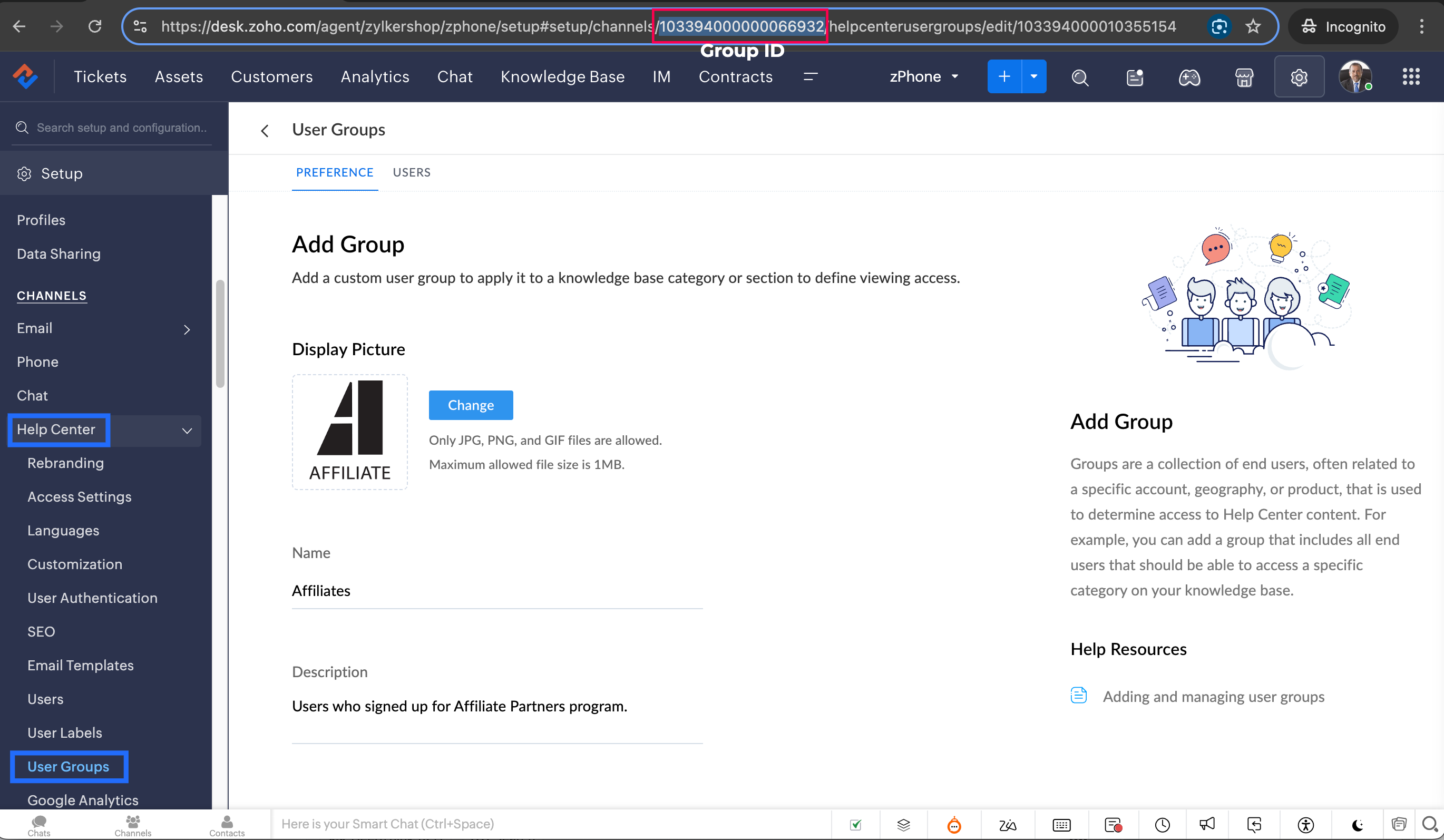
b. In Line 3, enter the group ID to which you would like to add your new portal users. To access group ID, go to Setup >> Help Center >> Select the Department having your preferred User group >> choose User Groups on the left panel >> Select the user group >> The Id in the address bar is the required Group ID. 
Notes
Note: Configure the Workflow for the contacts module in the respective department where you want to add portal users to be added to the User group. 
14. Click Save to save the custom function.
15. Click Save again to save the workflow.

Share with us how this custom function helps you in your operations! Drop a comment below or reach out to us at support@zohodesk.com, we’re just an email away!

Meet you in the next post!
Regards,
Lydia | Zoho Desk

    • Sticky Posts

    • Register for Zoho Desk Beta Community

      With the start of the year, we have decided to take a small step in making the life of our customers a little easier. We now have easy access to all our upcoming features and a faster way to request for beta access. We open betas for some of our features
    • Share your Zoho Desk story with us!

      Tell us how you use Zoho Desk for your business and inspire others with your story. Be it a simple workflow rule that helps you navigate complex processes or a macro that saves your team a lot of time; share it here and help the community learn and grow with shared knowledge. 
    • Tip #1: Learn to pick the right channels

      Mail, live chat, telephony, social media, web forms—there are so many support channels out there. Trying to pick the right channels to offer your customers can get pretty confusing. Emails are most useful when the customer wants to put things on record. However, escalated or complicated issues should not be resolved over email because it's slow and impersonal.  When you need immediate responses, live chat is more suitable. It's also quick and convenient, so it's the go-to channel for small issues. 
    • Welcome to Zoho Desk Community - Say hello here!

      Hello everyone! Though we have been here for a while, it’s time to formally establish the Zoho Desk Community; we’re really happy to have you all here! This can be the place where you take a moment to introduce yourself to the rest of the community. We’d love to hear all about you, what you do, what company or industry you work for, how you use Zoho Desk and anything else that you will like to share! Here’s a little about me. I am Chinmayee. I have been associated with Zoho since 2014. I joined here
    • Webinar 1: Blueprint for Customer Service

      With the launch of a host of new features in Zoho Desk, we thought it’ll be great to have a few webinars to help our customers make the most of them. We’re starting off with our most talked about feature, Blueprint in Zoho Desk. You can register for the Blueprint webinar here: The webinar will be delivered by our in-house product experts. This is a good opportunity to ask questions to our experts and understand how Blueprint can help you automate your service processes. We look forward to seeing
    • Recent Topics

    • Announcing new features in Trident for Windows (v.1.43.5.0)

      Hello Community! This release includes a collection of enhancements and feature updates aimed at making your email and collaboration experience smoother. Let’s dive into what’s new! Zoho Desk email notifications as Smart Mail. Zoho Desk Smart Mail is
    • How to Manage Two GST Numbers / Two Companies in a Single Zoho Inventory Organization?

      Hi Team, We currently have two separate legal entities: A Proprietorship Firm with its own GSTIN A Private Limited Company with a different GSTIN However, operationally, both companies deal with the same products, and we would like to manage the physical
    • How To Implement an Auto-Check-out Feature for Attendance?

      If an employee forgets to check out, the system should automatically check out the employee at 6:30 PM
    • Convert an Existing Single Item into an Item with Variants

      Hello Zoho Team, Introducing variants is a great addition to Zoho Inventory. However, we would like to request an option to convert an existing single item into an item with variants. For example, Item A initially comes in only one colour, so we create
    • IP Address List > Sigma

      We have developed a ZohoCRM extension that utilizes API calls to our server from Deluge scripts and Widgets. Our API server has IP restrictions in place. To ensure successful communication, we require a list of IP addresses utilized by Zoho's platform
    • Default Country list suggestions on CRM is different then on Book; how do/did others address this?

      So I already have a support ticket in for this and waiting for a response but figured I'd ask the community also to see if others experienced the same problems and/or how they went about addressing it because sometimes I feel like I'm going crazy with
    • Object-level edit permissions

      Hi, we are currently running into a limitation with permissions inside larger workspaces. Our use case is a central Analytics workspace that contains many tables, Query Tables, reports and dashboards used by different teams. We would like to allow certain
    • Convert Sales order to Delivery Challan

      Dear Developer Team, In Zoho books we cannot convert sales order into delivery challan before making invoices. As a service business we have to get the delivery note signed then only we can make the invoice. In Some cases we don't receive a purchase order
    • What's New in Zoho Inventory | September 2026

      Hello users, September brings a range of new features and enhancements across Zoho Inventory. From improved inventory operations and reporting capabilities to greater customization, automation, and enhancements to Delivery Challans, there’s plenty to
    • Mirror Component in Zoho CRM: Access real-time related data without leaving your record

      Hi everyone, This feature is now available for the JP, CA, SA, UAE, and AU DCs. We're excited to bring to you Zoho CRM's mirror component, which presents relevant data on a record's details page and keeps everything users need in one place without having
    • All new Address Field in Zoho CRM: maintain structured and accurate address inputs

      Availability Update: 29 September 2025: It's currently available for all new sign-ups and for existing Zoho CRM orgs which are in the Professional edition exclusively for IN DC users. 2 March 2026: Available to users in all DCs except US and EU DC. 24
    • Create custom rollup summary fields in Zoho CRM

      Hello everyone, In Zoho CRM, rollup summary fields have been essential tools for summarizing data across related records and enabling users to gain quick insights without having to jump across modules. Previously, only predefined summary functions were
    • How to mix different types of inputs (such as dropdown list and textbox)

      Hi, I'm creating a form called "Room Reservations" for a company. I created a "table" using "Matrix Choice". I created "Room 1", "Room 2" and "Room 3" with the "Questions". I would then like to create two columns with the "Answers", one called "Department"
    • Feature Request: Render Markdown (.md) files in Zoho Cliq

      Hi, We regularly share Markdown (.md) files in Zoho Cliq. However, when we open these files in Cliq, the content does not render as Markdown—it displays as plain text. This forces us to copy/paste the content into an external Markdown viewer to read it
    • Dealing With One-Time Customers on Zoho Books

      Hello there! I am trying to figure out a way to handle One-Time customers without having to create multiple accounts for every single one on Zoho Books. I understand that I can create a placeholder account called "Walk-In Customer", for example, but I
    • Cash Basis VAT RETURN REPORT Required in Saudi Arabia

      Zoho Books in Saudi Arabia not showing TAX RETURNS report on CASH Basis.. It only showing accrual basis. Oforur requirement is both reports (Cash Basis and Accrual Basis ) , same like indian Edition of Zoho Books showing. CASH BASIS RETURN is our Basic
    • Tips & Tricks Series - #4 Customize your manual PDF before export

      Hello everyone! We’re back again with our Tips & Tricks series. Today, we’ll look at how you can customize your manual PDF before exporting it. With Zoho Learn, you can personalize the exported PDF with options such as headers, footers, colors, and custom
    • Digital Marketing Agency: Transforming Your Brand's Online Presence

      Imagine trying to build a house on your own without the necessary tools or expertise—it’s overwhelming, right? Digital marketing is the same.
    • Introducing Zoho Key Service, a simpler way to access LLMs without API keys

      Available in the Professional, Enterprise, and Ultimate editions in the US, IN, AU, JP, and CA DCs. Hello everyone, We are excited to bring Zoho Key Service (ZKS) in Zoho CRM, a simpler way for organizations to access and use third party LLMs. You can
    • Reach us through our official support channels

      Dear Customers, Thanks a lot for choosing Zoho! Our applications are built to help achieve your day-to-day business goals. We are committed to engaging with you, to understand and develop solutions that enhance your productivity. We are happy and ready
    • I cannot add user to my account

      I have an account, I deleted a user from the account and I have one unused licence which lasts for 23 days, I tried adding a new user and it said This user is not allowed to add in Zoho. Please contact support-as@zohocorp.com for further details, please
    • Domain Activation Issue

      I purchased a domain through Zoho, and as I understand it, you were supposed to send me a domain activation link. However, I never received it. As a result, I was unable to activate the domain, and it is now suspended. Because of this, I am not receiving
    • Grouping by Stage *type* in widgets

      Hi Can I ask for a new feature? I'd like to be able to group by stage type in a Deal widget. That is by whether the Deal is in an Open Stage, a Closed Won Stage, or a Lost stage. Currently I can group by Stage, but if we have 10 open stages and one Closed
    • Please release domain bravovietnam.com from an old account

      Hello Zoho Support, I am trying to set up Zoho Mail with my domain bravovietnam.com on my account office@bravovietnam.com. Every time I add the domain, I get: "This domain is already associated with this account" — pointing to a DIFFERENT, older account
    • ChatGPT Plugin / MCP Server auth error

      Hi all I'm trying to connect the ChatGPT plugin for Zoho CRM but after username stage of the auth process, I get this error from the URL https://mcp.zoho.eu/mcp-client/ {"error_description":"Invalid request url, Request is not as per defined in oauth
    • Creator -Dynamic addition of Customer Portal User Licenses

      Hi, We have a Creator App for B2C about to get released. We are experiencing the Portal User license challenge. Unable to predict the number of users who will download and Subscribe. When a User is about Subscribe and the portal licenses does not exists,
    • Need Multiple currency for Suppliers and Buyers

      Hello, We need multiple currency support for buyer and suppliers, We are doing international business and we often sell goods in foreign currency as well as local currency, However zoho does not support this, I am trying Free agent and xero they support all currencies for suppliers Bills & expenses as well as buyers invoices, Kindly work on this feature will be great help to decide using zoho books Thank you
    • Enhanced Zoho CRM and Office 365 calendar synchronization features!

      Dear customers, We're excited to share some significant improvements to our Office 365 calendar synchronization features, aimed at providing you with more control and a more personalized experience. What’s new Choose your Office 365 calendar: During the
    • Zoho Books Support

      Dear Team, Zoho Books offers a demo before you purchase zoho books. But after that when he actually purchases the product he has to rely on toll free number or help documents. But this might get frustrated in the initial period. Specially in initial period.
    • How to add a fee based on payment method

      I currently accept both ACH payments and credit card. I want to add a 3% fee to a number of my subscription plans if the customer chooses to use a credit card (and not ACH/checking). How do I do this? Is there an in-built feature, or would i have to create
    • What's New in Zoho Invoice | July – September 2026

      Hello everyone! We're back with the latest updates and enhancements we've rolled out in Zoho Invoice from July to September 2026. Here's what's new this quarter: Zoho Invoice is Now Available in Nigeria Introducing the Super Admin Privilege E-Invoicing
    • ZohoBooks - "Account transactions" report doesn't have any "Desciptions"

      Hi, I'd like to push for this to be included in ZohoBooks: In a "account transactions" report all the numbers are right, but I'd really like to see the "Description" as part of this report, i.e. the line-item-description as I would see it in the bank statement. Essentially all you see is a list of numbers adding up to the total. It is very difficult to see if things are right without being able to see what exactly each transaction refers to. Going into each transaction one-by-one is not a workable
    • Address limits per customer by edition

      I’m on the Standard edition and have reached a limit of 30 addresses under a single customer. Before I move to an annual Professional subscription, I need to confirm the following: What is the maximum number of addresses allowed under one contact, and
    • Export from List view

      I'm constantly having the issue where my users are building lists in ListView for various objects and then realising they cant export the data, then they have to go and build the data set in reports to export. I would like to see the ability to export to excel/csv from ListView.
    • Cannot apply tags to multiple items at once

      It is very frustrating needing to apply tags to notes individually. Even worse that it takes multiple clicks to do it. Can there please be an update to: 1.) Allow us to apply tags to batches of notes in one go. 2.) Make it less clicks to add a tag 3.)
    • Get all hiring updates via Zoho Cliq bot notifications

      We’re introducing a new way to stay updated on recruitment activities: Cliq Bot notifications. Now you can receive Zoho Recruit notifications directly in Zoho Cliq—alongside your existing in-app alerts and emails. Whether it’s a candidate status change,
    • Notes Acknowledgement

      It would be great to have emojis that can be used for Notes. Emojis such as Thumbs Up to let someone know you agree with them or a emoji for thanks. It's a simple way to acknowledge that you read someone's note. Moderation update: Emoji reactions for
    • Is it possible to log text messages from iphone into Zoho CRM

      My team is more and more utilizing text messaging to communicate with clients. Does Zoho have a solution for logging these text messages when clicking "Send Text Message" from the Zoho app. Much like when you call, you get prompted to log a call, can
    • Project Finances: Fully Accessible within Projects

      Project finances and work items are now on the same screen and it transforms the way you run your project. Managing your project finances is now much easier and in the same screen as your work items. Access quotes, invoices, bills, sales orders, and purchase
    • UI / UX Improvements

      Please consider changing the Dependency Details window from a column-based layout to a list-based layout, or allowing users to choose their preferred layout. The current column-based view uses screen space inefficiently and makes navigation difficult,
    • Next Page