Workflows vs Macros in Zoho Desk: Key Differences, Use Cases & Best Practices

Workflows vs Macros in Zoho Desk: Key Differences, Use Cases & Best Practices

Workflows vs Macros in Zoho Desk: Choosing the right help desk automation
InfoThis post is part of the "Desk Automation Series," Chapter 1. Through this series, we will help you choose the right automation type in Zoho Desk by comparing commonly confused automations through real scenarios and business processes, so you can clearly see what to use, when, and why.
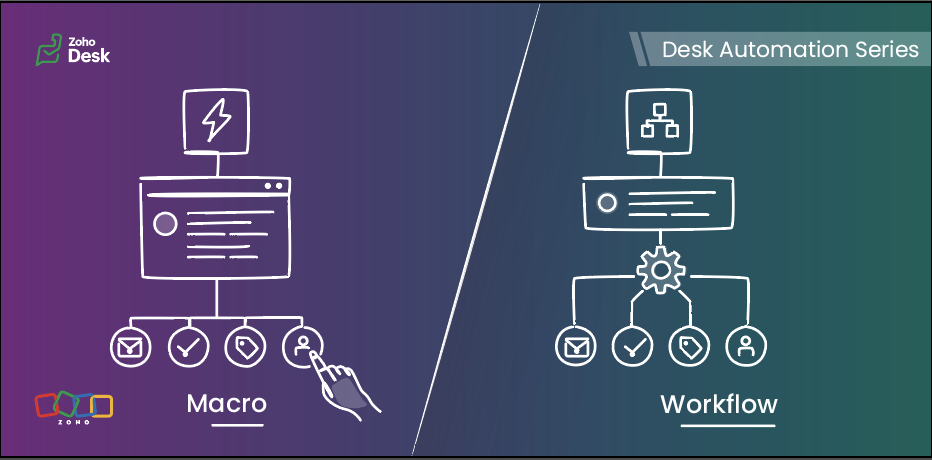

When you are running support at scale, not every task should be handled manually, and not every action should be fully automated either. Some steps need to happen instantly in the background, while others are better left to agents after they review the ticket.

That is exactly where workflows and macros in Zoho Desk make a difference.

In simple terms, workflows are meant for automatic actions based on ticket data, whereas macros help agents complete repeated actions faster after reviewing the ticket.

This guide will help you understand the difference between the two, so you can decide:

  • what your system should handle automatically 
  • what your agents should trigger while working on a ticket 
Quote


Workflows run automatically when defined criteria are met, while macros are applied by agents as they work on a ticket.

Workflows  

Workflows help businesses bring structure, accountability, and momentum to support operations. When defined conditions are met, Zoho Desk executes actions automatically in the background, enabling teams to handle volume with more control, fewer process gaps, and stronger execution quality.

How workflows work  :

A workflow consists of three parts:

When — the trigger
 (ticket created, ticket edited, field update, etc)

If — the criteria

(The criteria used to filter records that meet specific conditions)

Then — the actions
(update fields, assign tickets, send notifications, change status, call custom functions)

Once active, the workflow runs for tickets that meet its criteria.


When to use workflows
  

Use workflows when:

  • An action must run whenever specific conditions are met
  • The action should not depend on an agent remembering to do it
  • Needs to be ensured that the same action is taken for every similar scenario
  • Trigger actions the moment conditions are met, without waiting for manual input 
  • Reduce operational load and keep processes moving without adding effort 
  • Keep critical actions running reliably in the background 

Typical examples:

  • Assigning tickets based on category or department
  • Setting priority for specific customer types
  • Updating fields when a ticket is modified
  • Reassigning tickets to another team based on defined rules
  • Using Zia actions in the workflow to predict field values from ticket context or extract details such as order IDs, dates, or product names and map them to ticket fields. 

Macros  

Macros allow agents to perform multiple actions on a ticket in a single click. They are available inside the ticket and are applied manually. These operations can be performed on mass tickets as well.

Macros help your agents complete repeated actions quickly, with better speed and consistency, once they know what the ticket needs.


How macros work
  

A macro can:

  • Update fields
  • Send an alert
  • Add tasks
  • Execute custom functions
  • Move ticket to specific department

When to use macros  

Use macros when:

  • Agents need to perform the same manual actions across similar tickets
  • The ticket needs to be reviewed before any action is applied
  • The same set of actions needs to be applied to multiple tickets at once
  • The next set of actions depends on a deeper understanding of the ticket context 

Typical examples:

  • Applying a follow-up response after troubleshooting
  • Ticket transfer to a different department based on agent’s manual interpretation
  • Sending emails and updating ticket fields in a single manual action 
  • Creating follow-up tasks while updating ticket details after review 
  • Applying the same set of field updates across similar tickets  

Macros help agents complete routine updates without performing each step manually.

Key differences at a glance  

Feature

Workflows

Macros

Primary purpose

Automate actions based on predefined conditions to reduce manual effort and standardize processes.

Enable agents to execute a set of actions (emails, tasks, field updates) together after reviewing a ticket.

Triggered by

System-driven events such as ticket creation, updates, replies, or specific field changes.

Manually triggered by agents from within tickets or in bulk view.

Agent involvement

Not required

Required for every execution

How actions are executed

Runs automatically in the background when conditions are met

Runs as per manually selected action

Best suited for

Routing tickets, updating fields, sending alerts, and handling rule-based or event-driven actions

Applying repeated actions such as sending acknowledgement emails, creating tasks, and updating fields during ticket handling

Decision basis

Based on ticket data, conditions, and system events

Based on agent review and ticket context

Choosing the right automation tool  

Use a workflow when:  

  • The action must always run for certain tickets 
  • The criteria matches the ticket context 
  • The action is triggered by ticket events such as creation, updates, or replies 

Use a macro when:  

  • Agents perform the same set of actions frequently 
  • The action is applied after reviewing the ticket 
  • The update depends on agent confirmation before execution

A practical scenario  

Let’s look at how both tools work together in a realistic business scenario using a fictional organization, Zylker Travel.

Zylker Travel handles support for hotel bookings, holiday packages, cancellations, airport transfers, and special stay requests.


New ticket created for a booking with check-in within 24 hours  

Use: Workflow

When the ticket is created and the check-in date falls within the next 24 hours, the workflow:

  • Sets the priority to High
  • Assigns the ticket to the urgent reservations team
  • Sends an internal notification

This happens automatically based on ticket data.


Customer asks to cancel a reservation

Use: Macro

The agent:

  • Reviews the booking type
  • Confirms eligibility
  • Applies the cancellation macro

The macro:

  • Send an email alert to the customer 
  • Update the ticket status 
  • Update a refund-related field, such as refund percentage, if that is available as a ticket field 
  • Move the ticket to the Finance department for the next step
     

Special request completed (late check-out, airport transfer, or room upgrade)  

Use: Macro

After confirming the request is fulfilled, the agent applies a closure macro that:

  • Sends the confirmation message
  • Updates the status to Closed


Refund request crosses a defined value threshold

Use: Workflow
When a ticket is created or updated and the refund amount exceeds a defined threshold, the workflow can:

  • Set the priority to High 
  • Assign the ticket to a senior support or finance queue 
  • Notify the relevant internal team 

This is a workflow because the action is based on ticket data and should happen consistently without waiting for agent action.


Manual transfer after review  

Use: Macro

Sometimes, the right department cannot be determined from the initial ticket data alone. After reviewing the conversation, the agent can apply a macro that:

  • then moves the ticket to the right department 
  • creates a follow-up task 


Booking upgrade request
  

A customer asks to upgrade a confirmed booking.

Use: Workflow and Macro

Workflow:

When the ticket is created with upgrade or booking modification, the workflow can:

  • Assign it to the booking changes team 
  • Set priority based on travel date 
  • Add or update tags for categorization (for example, “Upgrade request”) 
  • Send an internal notification to the team 
  • Update initial ticket fields such as request type or category 

Macro:
After the agent checks availability and pricing, they can apply a macro to:

  • Send the upgrade response 
  • Update the ticket status to Waiting for customer confirmation
  • Update review-based ticket fields such as upgrade status
  • Move the ticket to the next department if required

Why both:
The workflow handles routing and priority automatically. The macro helps the agent complete the response after review.


Workflows vs Macros in common business scenarios  

Scenario

Best-suited automation

Why

Order status replies in e-commerce

Macro

The agent selects the reply after reviewing the ticket

Internal approval escalation for refunds

Workflow

Based on defined criteria

Closing resolved tickets with a standard note

Macro

Triggered when the agent confirms resolution

Follow-up message after troubleshooting

Macro

Sent after agent confirmation


Guidelines for quick selection
  

  • A rule must always run when defined conditions are met Workflow
  • Routing based on ticket data or ticket events Workflow
  • The action is triggered by ticket events such as creation, update, or reply Workflow
  • Repeated manual ticket actions Macro
  • An action needs to be applied after the agent reviews the ticket Macro
  • The next step depends on agent judgment or confirmation Macro

Best practices  

For workflows  

  • Keep conditions specific and business-driven
  • Avoid multiple workflows updating the same field unless required
  • Document the purpose of each workflow
  • Test in a limited scope before enabling for all tickets
  • Review workflows after process changes

For macros  

  • Create team-specific macros
  • Keep response templates easy to edit
  • Use clear naming so agents can find them quickly
  • Remove unused macros periodically
  • Do not use macros for actions that must run automatically


The verdict  

In Zoho Desk, workflows bring control. Macros bring speed.

Put them together, and you get the best of both worlds: structured automation for your business, effortless execution for your teams, and a smoother experience for every customer.

    • Sticky Posts

    • Register for Zoho Desk Beta Community

      With the start of the year, we have decided to take a small step in making the life of our customers a little easier. We now have easy access to all our upcoming features and a faster way to request for beta access. We open betas for some of our features
    • Share your Zoho Desk story with us!

      Tell us how you use Zoho Desk for your business and inspire others with your story. Be it a simple workflow rule that helps you navigate complex processes or a macro that saves your team a lot of time; share it here and help the community learn and grow with shared knowledge. 
    • Tip #1: Learn to pick the right channels

      Mail, live chat, telephony, social media, web forms—there are so many support channels out there. Trying to pick the right channels to offer your customers can get pretty confusing. Emails are most useful when the customer wants to put things on record. However, escalated or complicated issues should not be resolved over email because it's slow and impersonal.  When you need immediate responses, live chat is more suitable. It's also quick and convenient, so it's the go-to channel for small issues. 
    • Welcome to Zoho Desk Community - Say hello here!

      Hello everyone! Though we have been here for a while, it’s time to formally establish the Zoho Desk Community; we’re really happy to have you all here! This can be the place where you take a moment to introduce yourself to the rest of the community. We’d love to hear all about you, what you do, what company or industry you work for, how you use Zoho Desk and anything else that you will like to share! Here’s a little about me. I am Chinmayee. I have been associated with Zoho since 2014. I joined here
    • Webinar 1: Blueprint for Customer Service

      With the launch of a host of new features in Zoho Desk, we thought it’ll be great to have a few webinars to help our customers make the most of them. We’re starting off with our most talked about feature, Blueprint in Zoho Desk. You can register for the Blueprint webinar here: The webinar will be delivered by our in-house product experts. This is a good opportunity to ask questions to our experts and understand how Blueprint can help you automate your service processes. We look forward to seeing
    • Recent Topics

    • Please design a better spam filter

      Hi Team, While I love Zoho Mail for all the awesome features you have designed - this is the one you need to do a lot of work on - Spam Filter. Your spam categorization seems to be very inefficient - any email containing brand images or a tracking pixel
    • Host not reachable when sending

      For few partner that I send regular emails now got error and they don't receive emails Temporary failure fam-xxx.hr/185.xx.xx.xxx Host not reachable. Have more than 20 mails in https://mailadmin.zoho.eu/cpanel/home.do#mailSettings/retryEmail please
    • IP flagged as abusive

      I'm getting the error that 136.143.188.15 is listed as abusive. I've checked with mxtoolbox.com and it is indeed in the list
    • App passwords stop working

      Some of my app passwords appear to stop working after awhile. Seems to happen every 6 months or so. Just had to change one again for the second time in a year. Is this a bug or a feature? Or perhaps changes are being made on the back end on occasion that
    • Duplicate entries for contacts birthdays

      Good morning I have recently started to use my Zoho calendar and noticed that there are multiple birthday events showing for some of my contacts. I have checked my contacts and there were duplicates for some contacts which I have now rectified but the
    • Problem: New Email Consistently Failing to Sync/Display in Inbox

      Recently, I have noticed that my Zoho Email inbox does not indicate I've received a new email, until I go to *another* folder and then return to the inbox. Only then will new emails be displayed. This has happened 100% of the time, during the past few
    • Zoho IMAP Access to mail doesn't sync messages

      As stated in the topic - I have company account email address setup, and it has ( as in the picutre ) ActiveSync and Imap access enabled. However the messages does not show up while logged in in Zoho Mail however when I log in in thunderbird everything
    • Cliq iOS can't see shared screen

      Hello, I had this morning a video call with a colleague. She is using Cliq Desktop MacOS and wanted to share her screen with me. I'm on iPad. I noticed, while she shared her screen, I could only see her video, but not the shared screen... Does Cliq iOS is able to display shared screen, or is it somewhere else to be found ? Regards
    • Temps working custom view in Zoho Recruit

      How do you create a custom view of temps working for this week.  I have tried multiple combinations of job status, start date, end date etc but I am unable to find the correct combinations to show the temps I have working this week?? Any suggestions on how I can do this. 
    • Client Scripts similar to CRM?

      Hi, Is there any plans for Client Scripts to become a feature of Recruit? Feel this will be a great benefit to a number of users. Would be great for example in cases where a Client has banned / blacklisted a Candidate - so that if that candidate is associated
    • Announcing Zoho Sheet desktop app for macOS and Windows (Beta)

      Hello Sheet users, We know you’ve been waiting for this one. It has always been the top priority on our roadmap to provide a single native desktop app for macOS and Windows that works both online and offline. Today, we are excited to announce that the
    • Automated entries past the current month in a calendar report

      Hi all, I have an automation problem. I have a form which on successfull entry adds either 5 or 10 more of these entries with a slight change so our customers can see it throug a calendar report on the webiste. The entry put in manually shows up perfectly
    • Billing Status Update

      Hello Latha, I’m working on a new automation (deluge) to fulfill one of our requirements. In this automation, there is a step to update the Work Order billing status from “Not Yet Invoiced” to “Non-Billable.” I tried to find the API information relevant
    • What's New in Zoho POS - April 2026

      Hello everyone, Welcome to Zoho POS’s monthly update, where we share our latest feature updates, enhancements, events, and more. Let’s take a look at how April went. Access and manage other web applications in Zoho POS with Web Tabs You can now access
    • Many Zoho POS Issues

      Can not apply credits from a customers account as a form of payment. It shows that you can but there is a bug that does not execute the action. Reported many times. Can not view Sessions from Zoho POS WebView, throws a JQUERY error Workflows and actions
    • HOW I CAN GET BETA VERSION FOT TESTING

      HI. ZOHO I AM INTERESTED IN YOUR BETA SOFTWARE TO EXPERIENCE NEW FEATURES.
    • Multiple EAN code for product

      option to add multiple EAN code for product???
    • Issue adding/changing mobile number for OTP

      Hi Zoho Community, I’m trying to add or change my mobile number, but I keep getting this error: “We’re unable to send OTP to this mobile number. Please contact support-as@eu.zohocorp.com” Because of this, I can’t verify my number or continue the setup.
    • Zoho Payroll Canada does not work

      We submitted payroll within the required timelines. The money was withdrawn from our account and our employees have not been paid. Impossible to get a hold of someone at Zoho. I can’t believe the company operates like this. What a bloody disgrace. Shame
    • Enhance Appointment Buffers in Zoho Bookings

      There was previously a long-standing feature request related to enhancing the way appointment buffers work in Zoho Bookings, but it looks like the original post has been deleted. I am therefore adding a new request that Zoho Bookings adjust how appointment
    • Functionality based URL to find records due today or in the next week

      I need to construct a URL to filter a view to records where the evaluation is due soon (i.e. in the next 7 days). To me, that includes today, but Zoho has a different opinion. Zoho defines 39 as NEXT_7_DAYS but this gives unexpected results. https://creatorapp.zoho.eu/...#Report:My_Evaluations?Evaluation_due_by_op=39
    • Allow customers to choose meeting venue and meeting duration on booking page

      My business primarily involves one-to-one meetings with my clients. Given the hybrid-work world we now find ourselves in, these meetings can take several forms (which I think of as the meeting "venue"): In-person Zoom Phone call I currently handle these
    • Event Time Zone in meeting invites are confusing users

      When sending calendar invites to internal and external users, the first section "Event Time Zone" is confusing people and they are automatically declining events. Can this section please be removed??? It already shows the correct time zone next to the
    • Forwarding without verification

      Hi, I use Tripit to keep track of all my business travel. I've recently moved over to Zoho and wanted to set up a forwarding rule to send various travel confirmation emails automatically to plans@tripit.com Obviously this is an email address I don't control,
    • Filter by user in Pivot Chart

      I have a Pivot chart where the data should be filtered by user. The user enters the system and should see only the data that correspond to it. Can anyone help me?
    • All new Address Field in Zoho CRM: maintain structured and accurate address inputs

      Availability Update: 29 September 2025: It's currently available for all new sign-ups and for existing Zoho CRM orgs which are in the Professional edition exclusively for IN DC users. 2 March 2026: Available to users in all DCs except US and EU DC. 24
    • Whatsapp Limitation Questions

      Good day, I would like to find out about the functionality or possibility of all the below points within the Zoho/WhatsApp integration. Will WhatsApp buttons ever be possible in the future? Will WhatsApp Re-directs to different users be possible based
    • Internal mails on our company domain (managed by Zoho) do not get delivered

      Hi last week Thursday and Friday a colleague had sent me two emails which did not show up at all in my inbox, spam or anywhere else. What this a problem with Zoho mail in general or did this affect just us? From the forum is reads like many problems had
    • #2 The Tax Talk Nobody Wants to Have

      "We are also able to manage our GST invoices without worrying about compliance issues. With Zoho Invoice, we are happy, our tax consultant is happy, and so are our customers," rejoices Shivprateek Habib, Partner, Flutterboots Services LLP. That's usually
    • Bulk upload images and specifications to products

      Hi, Many users have asked this over the years and I am also asking the same. Is there any way in which we can bulk upload product (variant) images and product specifications. The current way to upload/select image for every variant is too cumbersome.
    • Workflows fail silently in Zoho CRM and there is no native way to know

      Workflow automation is honestly one of the biggest reasons my clients choose Zoho. But there is one problem I keep running into across almost every implementation. When a workflow fails, nobody finds out. Email alerts hit daily limits and just stop. Custom
    • Zoho Commerce and Third-party shipping (MachShip) API integration

      We are implementing a third-party shipping (MachShip) API integration for our Zoho Commerce store and have made significant progress. However, we need guidance on a specific technical challenge. Current Challenge: We need to get the customer input to
    • Is there a way to update bounce domain after verification process has started

      Hi Zeptomail Team, I've created a domain and we did not update the bounce domain to our custom record... the validation has already started and I am now unable to update the bounce domain. Is there any way to get this updated on the backend without deleting
    • Pre-orders at Zoho Commerce

      We plan to have regular producs that are avaliable for purchase now and we plan to have products that will be avaliable in 2-4 weeks. How we can take the pre-orders for these products? We need to take the money for the product now, but the delivery will
    • How to Customize the Member Portal Login Page?

      Hi everyone, I am currently using the default member portal login page for Zoho Commerce, but I feel it looks quite plain and doesn’t align well with my brand's style. I would like to make it more visually appealing, possibly by: Adding custom colors
    • Picklist values out-of-date in Campaigns

      Hi I use a CRM (Global) picklist set of values for my field "Connection Strength" (see screenshot 1). . I use Campaigns to follow-up and change the Connection Strength value depending on their stage. The picklist values that appear in the dropdown for
    • Refering cell from other sheet

      Hi, If we want to refer any cell in the same sheet its very easy, like suppose if I want to refer cell A2  in P7 I just need to type =A2 in P7, similarly how can I refer a cell present in different sheet ( I mean refer cell A2 from Sheet1 into Sheet2) Thanks
    • How to keep track of bags, cans, drums of inventory?

      We buy and sell products that are packaged in bags 🛍️, cans🥫, drums🛢️, etc. with batch numbers. When we get a shipment of one of the products, how do we track we received (say) 10 cans each of 5L of a product and maybe we received 10 cans of another
    • Global/Overall Reports & Dashboards in Zoho Sprints

      Hi, Do we have an option to refer Global Level Reports & Dashboards in Zoho Sprints? We could see that we have Project specific Reports & Dashboards inside every Project. However, for a management level we want Reports & Dashboards visibility at a Global
    • Important Update: New Fields Addition in Zoho Sprints Integration

      We'd like to inform you of an upcoming update to the 'Timesheets' module in the Zoho Sprints integration from June 3, 2026. To enhance time tracking and reporting accuracy for the Zoho Sprints integration, three new fields - Log Type, Meeting ID, Release
    • Next Page