Create Full-data sandbox now in Zoho CRM
 Latest Update: Full-data Sandbox is now available for all DCs.
But now, with the full-data sandbox, you get the following:
An entire replica of your production data with no limits on the number of records copied from modules.
The ability to test automations and performance on a realistic scale.
A proper simulation of your production environment to make testing truly impactful.
How does it work?
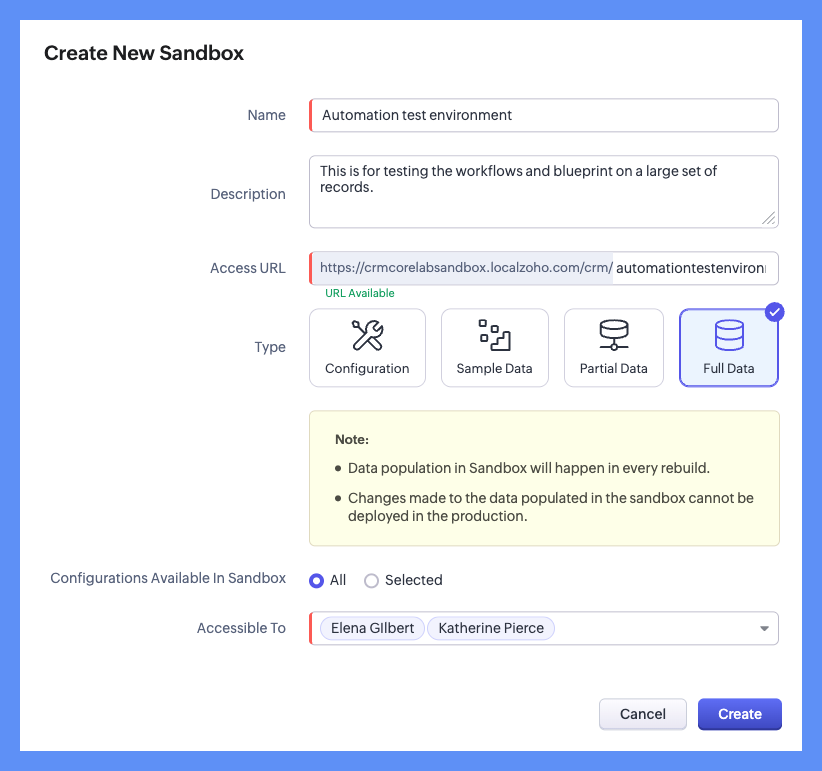
On the Sandbox page, click Create New Sandbox.
In the Create New Sandbox pop-up:
Enter a name for the Sandbox.
Provide a brief description of the sandbox.
Select your sandbox type: Full-data sandbox.
Choose your configuration and grant access to your sandbox users.

Full-data sandbox availability: Available exclusively to organizations on the Ultimate or CRM Plus editions with up to 10GB of storage. For organizations exceeding the 10GB limit, a storage purchase option for full-data sandboxes will be introduced soon.
Rebuild interval: The full-data sandbox can be rebuilt every 30 days.
Sandbox limit: Each organization using the Ultimate or CRM plus editions is allowed to create one full-data sandbox.
Experience unparalleled flexibility and accuracy now in your testing with the new full-data sandbox!
Help resource: Creating Sandbox
Thank you!