Customer Satisfaction (CSAT) Report

Customer Satisfaction (CSAT) Report

From data to decisions: A deep dive into ticketing system reports


The customer satisfaction (CSAT) report helps teams understand how customers feel about their support experience, identify service gaps, and continuously improve the help desk. It turns post‑interaction feedback into actionable insights that lead, and agents can all use.

What is the customer satisfaction report?

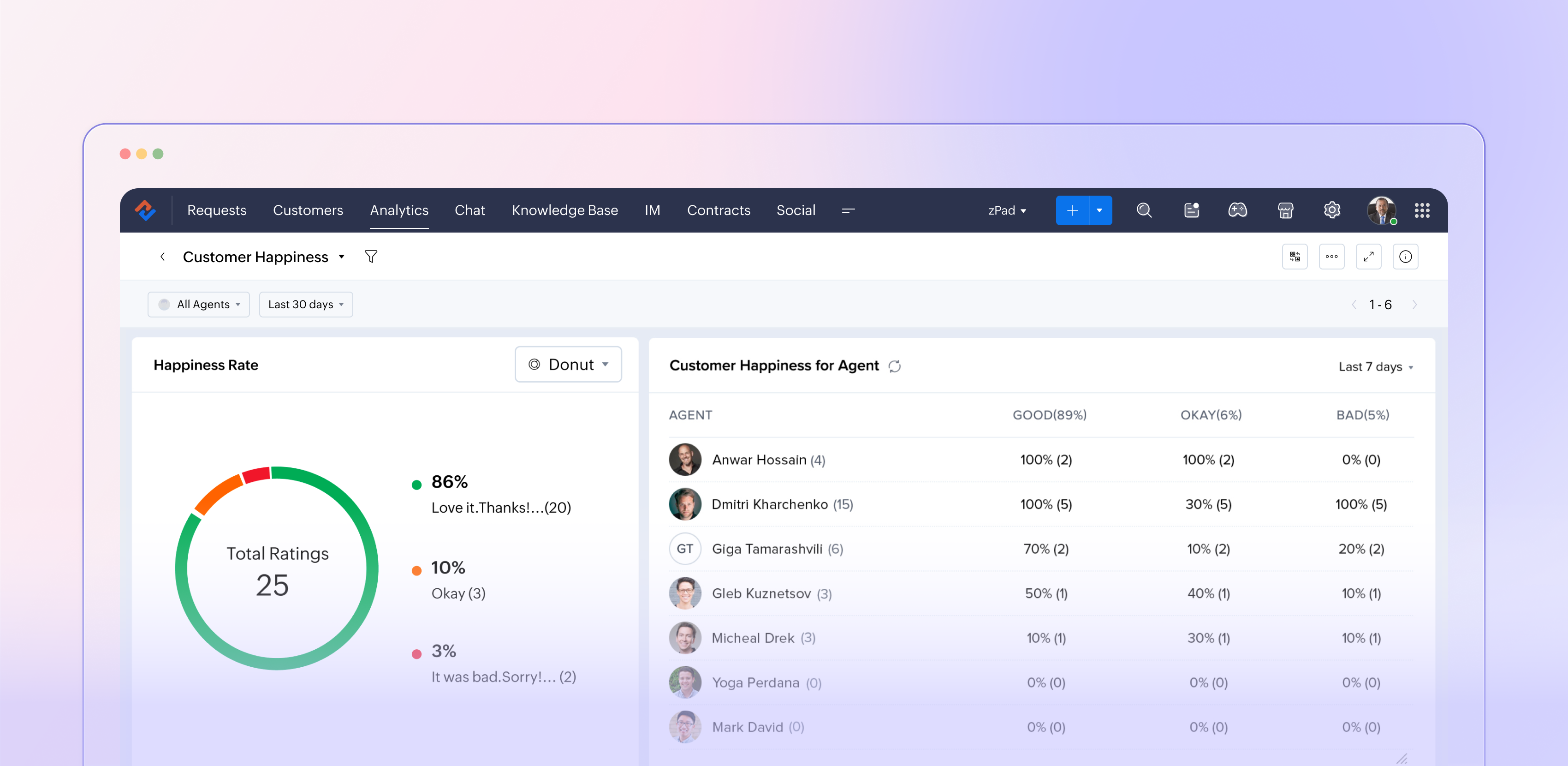
The customer satisfaction report in Zoho Desk (typically powered by the Customer Happiness Rating feature and corresponding surveys) aggregates customer feedback captured after ticket responses or closures. It translates that input into metrics such as positive, negative, and neutral ratings, trends over time, and performance by agents, departments, and channels. This data helps support managers move from guesswork to data‑driven decisions about service quality.

Why customer satisfaction reporting matters

Customer satisfaction reporting is more than just a supplemental dashboard; it plays a crucial role in companies' efforts to shape customers' overall perception of the brand. It indicates whether your support truly addresses customer problems in a way that matters, rather than simply measuring ticket closure. 

This reporting acts as an early indicator of potential churn by highlighting dissatisfied customers and recurring issues. Additionally, it supports the case for investments in training, staffing, and tools by relying on data rather than personal opinions. When utilized effectively, customer satisfaction reports create a link between everyday support activities and long-lasting customer loyalty.

How Zoho Desk captures customer satisfaction  

Zoho Desk lets you initiate a straightforward rating or survey at key moments during the support experience, such as after an agent responds or when a ticket is closed. Customers can quickly express their satisfaction using options such as "Happy / Neutral / Unhappy" and may also leave a comment if they wish. When gathered on a larger scale, these micro-interactions become fundamental to the customer satisfaction report. 

Since this feedback is linked to specific tickets, it allows for in-depth analysis, revealing which agents or teams consistently impress customers, identifying the types of issues or communication channels (such as email, chat, phone, or social media) that lead to dissatisfaction, and observing how satisfaction levels fluctuate with changes in SLAs, new processes, or feature launches. This integration of feedback with contextual information transforms a simple survey into a valuable layer of strategic insights.

Key metrics

  • Overall satisfaction score: Your high‑level health metric, usually expressed as a percentage or rating based on all collected responses for a chosen period.
  • Rating distribution: The Split between positive, neutral, and negative responses helps you see whether a high score is built on many “okay” experiences or truly delighted customers.
  • Trends over time: How satisfaction moves week‑over‑week or month‑over‑month, especially before and after significant changes like feature releases or holiday seasons.
  • Agent and team performance: Side‑by‑side comparisons showing which agents or departments win the most positive feedback and where coaching is needed.
  • Channel performance: Satisfaction by email, chat, phone, and other channels, so you can align staffing and training with where the experience is weakest.

Turning report insights into action  

The real value of the customer satisfaction report comes from what your team does with it. 

Close the loop with customers

Use low ratings and negative comments as triggers for follow‑ups, callbacks, or escalations. This not only recovers at‑risk relationships but also shows customers that their feedback matters.

Coach and celebrate agents

Highlight agents with consistently high satisfaction scores in team meetings and use their interactions as best‑practice examples. For those struggling, use the report to identify patterns across issue types, channels, or time slots, and create targeted coaching plans.

Fix process and product issues

Look for recurring themes in comments linked to low ratings: confusing policies, slow approvals, missing macros, or product bugs. Feed these patterns into internal improvement projects or backlogs so the same pain points don’t repeat.

Experiment and measure

Treat your support process like a product. When you change an SLA, tweak a template, or introduce a new self‑service flow, watch the satisfaction report over the following weeks. If scores move up, standardize the change; if they drop, roll back or refine.

The bottom line

We recommend you use it in a continuous‑improvement loop; Zoho Desk’s customer satisfaction report becomes more than a static KPI board. It becomes a living feedback engine that keeps your support experience aligned with what customers actually feel and expect.


Please stay tuned for more in the Desk Reports series.


Regards,


Kavya Rao

The Zoho Desk Team


    • Sticky Posts

    • Zoho Desk Partners with Microsoft's M365 Copilot for seamless customer service experiences

      Hello Zoho Desk users, We are happy to announce that Zoho Desk has partnered with Microsoft's M365 to empower customer service teams with enhanced capabilities and seamless experiences for agents. Microsoft announced their partnership during their keynote
    • WhatsApp pricing changes: Pay per message starting July 1, 2025

      Starting July 1, 2025, WhatsApp is shifting from conversation-based pricing to per-message billing. That means every business-initiated message you send will count. Not just the first one in a 24-hour window. Pricing updates on the WhatsApp Business Platform
    • Live Webinar - Work smarter with Zoho Desk and Zoho Workplace integration

      Hello customers! Zoho Desk and Zoho Workplace are coming together for a webinar on 14th May, 2024. Zoho Workplace is a suite of productivity apps for email, chat, docs, calls, and more at one single place. Zoho Desk is closely integrated with a few tools
    • Apple iOS 17 and iPadOS 17 updates for Zoho Desk users

      Hello Zoho Desk users! Apple recently announced the release of iOS 17 and iPad OS 17. These latest OS updates will help you stay productive and efficient, through interactive and seamless user experiences. Zoho Desk has incorporated the updates to help
    • Zoho Desk Cheat Sheet For The Year-End

      Check out these Zoho Desk best practices to end this year on a high and have a great one ahead! #1 Set Business (Holiday) Hours - If you have limited working hours, please make sure you restrict your business hours or set them as holidays for the coming days. Let your customers know when you will, and won't, be available. #2 Update the Annual Holiday List - Check the holidays for the new year and update the holiday schedule. Usually, holidays from the current year will be carried over for the next
    • Recent Topics

    • Where is the scheduled report in New UI?

      Hi Team, Seems there is not such a field in New UI, hence I have to switch to old UI to handle request..
    • Approval Workflow for Purchase Orders Abrir

      The requirement is , that all purchase orders greater than or equal to 5000 go through an approval process from certain people, but within books I only see that the approvers can be by levels or any approver but we cannot enter a rule like these. Can
    • WeTravel + Zoho CRM Integration - Has Anyone Built a Connector or Extension?

      Hi all, I'm exploring options for integrating Zoho CRM with WeTravel (booking & payment platform for tour operators). Zapier seems to be the common method but seems limited. I'm wondering if anyone in the community has developed a more comprehensive solution,
    • Option in pipeline deal to select which hotel or branch or store if client has more than one local store

      Hi, I would like to know if there is an option in the deal pipeline to select which hotel, branch, or store a deal is related to—if the company has more than one location. For example, I have a client that owns several hotels under the same company, and
    • Undo article like/dislike

      It seems to be not possible to undo your like/dislike for an article. Would be great if you can. Kind regards, Helen
    • Nested notebooks

      Dear Sir/Madam, I would like to know if it is possible to nest notebooks. It would be very helpful when there are too many, as it would improve organization. Thank you for your response. Best regards.
    • Tax in Quote

      Each row item in a quote has a tax value. At the total numbers at the bottom, there is also a Tax entry. If you select tax in both of the (line item, and the total), the tax doubles. My assumption is that the Tax total should be totalling the tax from
    • Issue with "Send Email" from Quotes not loading Email Template data

      Hi everyone, I'm currently experiencing an issue when using the "Send Email" option from a Quote record in Zoho CRM. What’s happening: When I go to the Quotes module and select a record, then click Send Email, the attached file (Quote) correctly pulls
    • Dynamically Fetching Lookup Field Display Value

      I have an audit trail form, Audit_Changes, that tracks old vs new values across different forms. For lookup fields, the old/new value is the ID, but I also need the display value. What's a best practice for dynamically fetching the display value of the
    • Stop Scrolling, Start Asking: Meet Zia for Your Files

      Hey everyone 👋 The era of 'scrolling and searching' is officially over. Whether it's a dense legal contract or a long meeting recording, searching for specific details is a massive time-sink. We think you should be able to interact with your files, not
    • Introducing a smarter, faster, and more flexible charting experience

      Hello Zoho Sheet users, We're delighted to share the latest news about a major update to charts in Zoho Sheet! The new version supports dynamic data ranges, granular styling options, faster loading, and other interesting enhancements that allow you to
    • How to create a new Batch and update Stock via Inventory?

      Hi everyone, We are building an automation where a user enters batch details (Batch Number, Mfg Date, Expiry, and Quantity) into a Custom Module. I need this to trigger an API call to Zoho Inventory to: Create the new batch for the item. Increase the
    • Can't change form's original name in URL

      Hi all, I have been duplicating + editing forms for jobs regarding the same department to maintain formatting + styling. The issue I've not run into is because I've duplicated it from an existing form, the URL doesn't seem to want to update with the new
    • How do I open MSG files in Microsoft Word?

      If you want to open MSG files in Microsoft Word is not natively supported, as MSG is an email file format created by Microsoft Outlook. However, there are professional approaches to access MSG content in Word. First, open the MSG file in Outlook and copy
    • Unable to charge GST on shipping/packing & Forwarding charges in INDIA

      Currently, tax rates only apply to items. It does not apply tax to any shipping or packing & forwarding charges that may be on the order as well. However, these charges are taxable under GST in India. Please add the ability to apply tax to these charges.
    • How to add packing & forwarding charge in purchase order & quotation???

      Hello Zoho Team I have just started using Zoho for my company and I wanted to make purchase order. My supplier charges fix 2% as packing & forwarding on Total amount of material and then they charge me tax. For example, Material 1 = 100 Rs Material 2
    • How to create a boxplot chart in Zoho Analytics?

      Hi, I'm looking forward to making a boxplot in Zoho Analytics, either with all my data or with a time segmentation. No documentation or YouTube video explaining that was found. I guess this is a feature gap. How feasible would it be to add this to Analytics?
    • What are the create bill API line item requiered fields

      While the following documentation says that the line items array is requiered it doesn't say what if any files are requiered in the array. Does anyone know? API documentation: https://www.zoho.com/inventory/api/v1/bills/#create-a-bill I'm trying to add
    • WorkDrive issues with Windows Explorer Not Responding

      We are using WorkDrive to collaborate on editing video content. We have a lot of files and quite a few are a few gigs. Recently anytime I try and work with the files Explorer freezes for a couple minutes whether it's dragging the files into Premiere or
    • Connecting Zoho Inventory to ShipStation

      we are looking for someone to help connect via API shipStation with Zoho inventory. Any ideas? Thanks. Uri
    • Where is the settings option in zoho writer?

      hi, my zoho writer on windows has menu fonts too large. where do i find the settings to change this option? my screen resolution is correct and other apps/softwares in windows have no issues. regards
    • Using IMAP configuration for shared email inboxes

      Our customer service team utilizes shared email boxes to allow multiple people to view and handle incoming customer requests. For example, the customer sends an email to info@xxxx.com and multiple people can view it and handle the request. How can I configure
    • When Does WorkDrive integrate with Books?

      When Does WorkDrive integrate with Books?
    • POP mailbox limits

      If I am accessing a remote POP mail server using Zoho Mail is there a mailbox quota for the account or is it all related to my mail account storage limits?
    • Warranty Service and Repair in Zoho FSM

      Hi There, We are a retail store that sells products and also performs installations and repairs. Our field technicians handle this work. Some repairs are covered by manufacturers, who reimburse us for both parts and labour. In these cases, we perform
    • Zoho Sheet for Desktop

      Does Zoho plans to develop a Desktop version of Sheet that installs on the computer like was done with Writer?
    • WhatsApp phone number migration

      Hi @Gowri V and @Pheranda Nongpiur, Thanks for implementing the promised enhancements to the integration between Zoho CRM and WhatsApp. The previous discussion has been locked, so I'm opening this new one. I am copying below a specific
    • WebDAV support

      I need WebDAV support so that I can upload/download (and modify) documents from my local file system. Is anything planned in his direction?
    • Suggestions for Improved Table Management and Dashboard Filter Controls in Zoho Analytics

      Dear Zoho Analytics Community, I hope you are doing well. I would like to share a few suggestions based on issues I am currently experiencing while working with visualizations and dashboards. Firstly, when I create a new visualization using the Sales-Order
    • SPF: HELO does not publish an SPF Record

      I am using Zoho mail. Completed all of the required prerequisites from the dashboard to avoid any issues with mail delivery. But when checking on mail-tester.com getting the following error. Can anyone help me solve this?
    • How do I create an update to the Cost Price from landed costs?

      Hi fellow Zoho Inventory battlers, I am new to Zoho inventory and was completely baffled to find that the cost price of products does not update when a new purchase order is received. The cost price is just made up numbers I start with when the product
    • Price Managment

      I have been in discussions with Zoho for some time and not getting what I need. Maybe someone can help explain the logic behind this for me as I fail to understand. When creating an item, you input a sales rate and purchase rate. These rates are just
    • Actual vs Minimum

      Hi all, I am sure I am not the only one having this need. We are implementing billing on a 30-minute increment, with a minimum of 30 minutes per ticket. My question is, is there a way to create a formula or function to track both the minimum bill vs the
    • Generate leads from instagram

      hello i have question. If connect instagram using zoho social, it is possible to get lead from instagram? example if someone send me direct message or comment on my post and then they generate to lead
    • Kaizen #234 - Automating Deal Handoff with Zia Assistant API, Workflow, Deluge, and Widget in Zoho CRM

      Hello all! Welcome back to a fresh Kaizen week. In this post, we will explore how to automate the deal handoff process in Zoho CRM using Zia Assistant API + Workflow + Deluge + Widgets. Here’s how the final output looks when a deal is reassigned 1. Deal
    • How do you print a refund check to customer?

      Maybe this is a dumb question, but how does anyone print a refund check to a customer? We cant find anywhere to either just print a check and pick a customer, or where to do so from a credit note.
    • Ability to assign Invoice Ownership through Deluge in FSM

      Hi, As part of our process, when a service appointment is completed, we automated the creation of the invoice based on a specific business logic using Deluge. When we do that, the "Owner" of the invoice in Zoho FSM is defaulted to the SuperAdmin. This
    • All new Address Field in Zoho CRM: maintain structured and accurate address inputs

      Availability Update: 29 September 2025: It's currently available for all new sign-ups and for existing Zoho CRM orgs which are in the Professional edition exclusively for IN DC users. 2 March 2026: Available to users in all DCs except US and EU DC. Latest
    • Enhancement to ICR’s field prompting: Preferred data extraction using advanced field prompting

      Dear Customers, We hope you’re well A quick background Intelligent Character Recognition (ICR) comes as part of Zia’s optical recognition capability called Zia Vision. When we introduced it last April, the data extraction was training-based and was applicable
    • See a list of all records enrolled in a cadence?

      I am looking for a way to see a list of all leads or contact currently enrolled in a cadence. I do not see any way to do this through the cadence UI.
    • Next Page