Design & Print Data Directly using Canvas Print View

Design & Print Data Directly using Canvas Print View

Hello Everyone,

We are excited to announce a new addition to your Canvas in Zoho CRM - Print View. Canvas print view helps you transform your custom CRM layouts into print-ready documents, so you can bring your digital data to the physical world with ease.

Whether you’re printing labels for shipping, creating personalized forms, or need to document one particular record's information, this feature gives you the control and flexibility to design, customize, and print right from your CRM.

What can you do with Print View?

With Canvas Print View, you can print out a single record's data or a few selected records' data or even the total number of records per page onto physical sheets directly from your CRM account to your hands. Simply :
  1. Design a custom layout using Canvas by pulling details automatically from your CRM modules
  2. Generate a clean, printable sheet of mailing labels
  3. Print information out on standard paper sizes like A4 or Letter from your selected module,
  4. Automatically display cutting lines to guide separation for
  5. Save time and reduce manual errors without leaving your CRM

Scenario 1: Print Shipping labels from your CRM Account

Imagine you’re running a shipping or courier service, and you manage all your customer data within Zoho CRM. Your team needs to generate address labels for daily deliveries. You can use the print view to :
  1. Create a custom mailing label layout using Canvas and get customer contact details automatically from your contact module.
  2. Generate a clean, printable sheet of mailing labels
  3. Choose to display cutting lines to guide label separation
  4. Finally, print them out on standard paper sizes like A4, Letter from your selected module
And, Voila! Your team now has all the address labels they need for daily deliveries.

Look at the GIF below to understand how Canvas Print View works for print mailing labels.


Scenario 2 : Print Service Report Forms in an Auto-shop Repair Firm

Say, you run an automobile service centre, and you use Zoho CRM to track customer vehicles, service requests, complaints, and repair details. After completing a repair job, the technician updates the service record in CRM with details such as the vehicle model, service type, parts replaced, labour cost, and total cost.

Using the Print View feature in Canvas, the service centre generates a Service Report that includes:
  1. Customer name, email, and phone number
  2. Service number and Service date
  3. Vehicle Name, Complaint, and Feedback
Now, you can hand this printed report to the customer as proof of service where both the technician and the customer can be signed for acknowledgment and stored in the customer’s file as part of their service history. This is any day better than giving customers a rough invoice or verbal update, and encourages repeat visits for future services.

The GIF below will help you understand how Canvas Print View works for such scenarios.


Other examples where you can use this feature

Similarly, you can use the Print View feature of Canvas to create printable sheets for other scenarios, such as :

  1. Create academic course sheets, promotion letters and more automatically from the courses module,
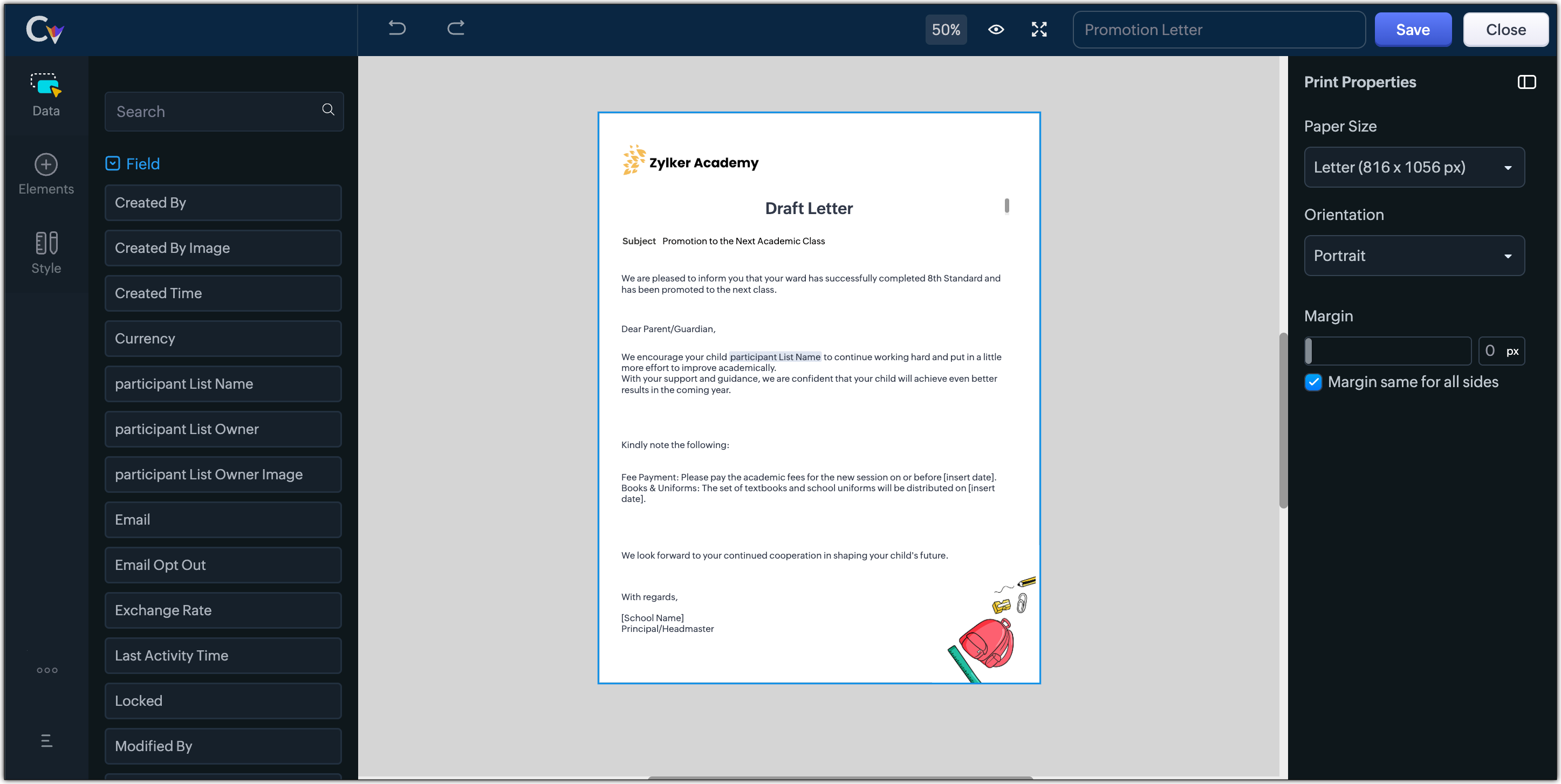


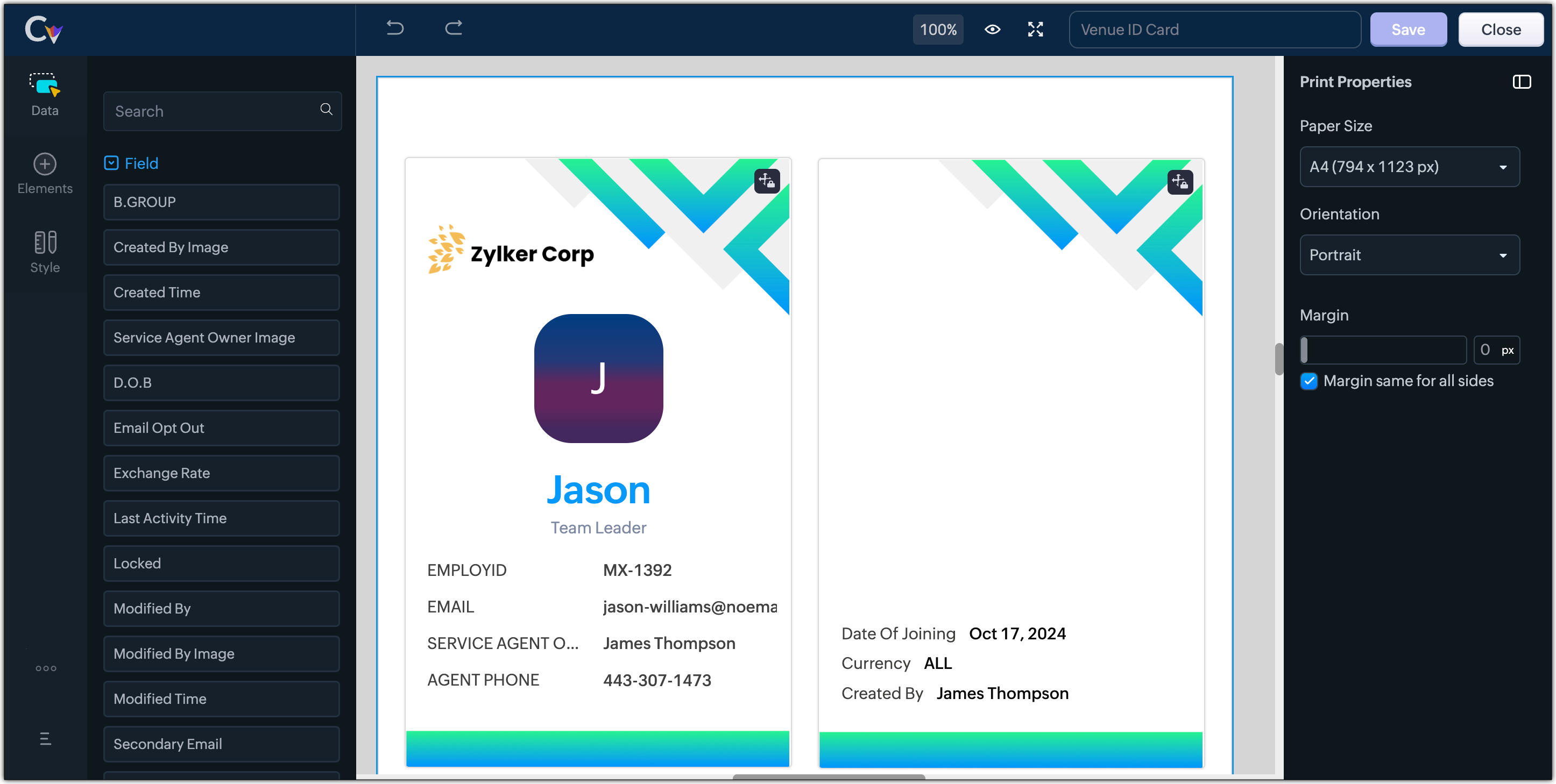
  2. Resume, id card, or other identification forms for marketing activities or related events,


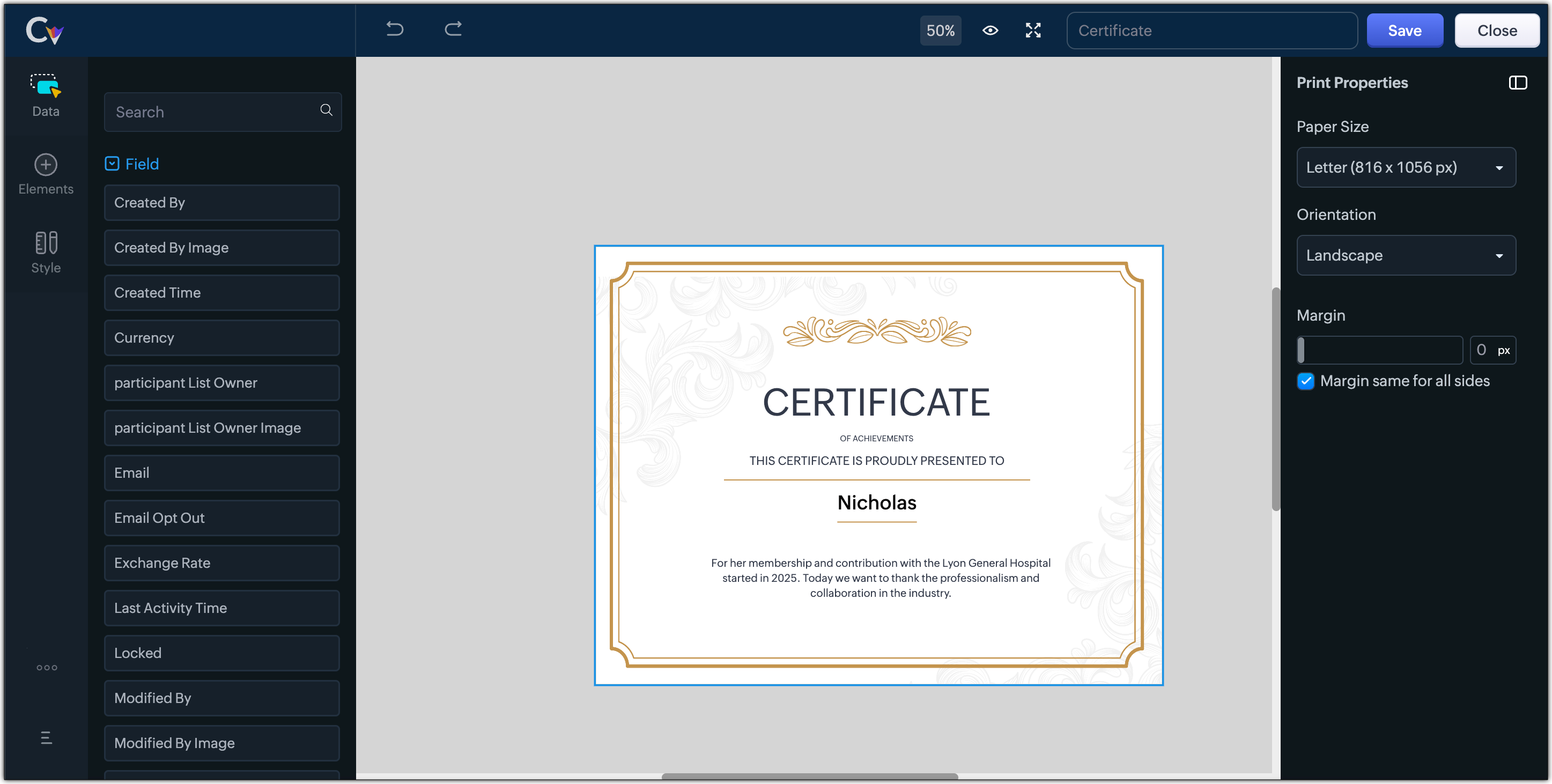
  3. Certificates, contracts, agreements, or guarantees that need to be manually attested by customers

Customization Options to print Mailing labels

Canvas Print View offers a wide range of customization options to help you design exactly how you want to print out your mailing labels. The options available are :
  1. Paper Sizes: Choose from Mailing Label formats based on your printing needs
  2. Orientation: Switch between Portrait or Landscape mode to suit your layout design
  3. Margins: Define precise margins for your printout or apply the same margin on all sides with a single click
  4. Print record in :
    1. Choose to print the mailing labels per page or in a list or in a Grid.
    2. To print mailing labels per page, users can choose the same margin for all sides and align center options.
    3. To print mailing labels in a list, users can choose the same margin for all sides, align center and cutting lines options.
    4. To print mailing labels in a grid, users can choose the same margin for all sides, align center, auto width, and cutting lines options.


Notes
Note :
  1. Align Center : Aligns your content to the center of the page or adjust freely
  2. Auto Width : Enable this setting to fit content dynamically within the layout
  3. Cutting Lines : Add visible cutting guides to clearly separate labels or sections on the page

Customization Options to print A4 or Letter format information

The customization options available for printing information in A4 or Letter paper sizes are :
  1. Margins: Define precise margins for your printout or apply the same margin on all sides with a single click.
  2. Print record in : Choose to print the information per page or in a list.
    1. To print information per page, users can only choose to apply the same margin for all sides.
    2. To print mailing labels in a list, users can choose to apply the same margin for all sides and enable cutting lines to guide separation.


Info
Availability : This feature is available to all users except for IN DC users. It will be opened up for the Indian data centre users shortly.

No more exporting, formatting, or jumping between tools to generate print-ready documents. Canvas Print View can be your print-buddy that can let you tailor documents to suit your business requirements.

Head over to your Canvas builder, select the Print View option, and start creating beautifully customized templates that work on paper just as well as on screen.

Feel free to comment below if you need any assistance from us!

Thanks & Regards
Serena Woolridge

    • Recent Topics

    • Using gift vouchers

      We would like to be able to offer a limited number of gift vouchers, of varying values, to our customers, and are looking for the best way to do this. We have looked at Coupons and Gift Certificates, but neither seem to fit the bill perfectly. Coupons:
    • Customizable UI components in pages | Theme builder

      Anyone know when these roadmap items are scheduled for release? They were originally scheduled for Q4 2025. https://www.zoho.com/creator/product-roadmap.html
    • Importing into Multiselect Picklist

      Hi, We just completed a trade show and one of the bits of information we collect is tool style. The application supplied by the show set this up as individual questions. For example, if the customer used Thick Turret and Trumpf style but not Thin Turret,
    • Please verify my account

      Hi, We have just launched our website and received media coverage in our country. Hundreds of users are signing up for our platform every day. We would like to send them a welcome email, but we are unable to do so because our ZeptoMail account has not
    • Subject character limit increase

      We have an occasional user case where subject lines exceed 500 characters which is the ZeptoMail imposed limit. While I understand long subject lines are not "best practice", these are particular notification emails with specific information for client
    • Conditional Field Visibility in Bigin CRM

      I would like to request support for conditional field visibility within Bigin CRM. This feature should allow administrators to configure show/hide rules for fields based on predefined criteria (e.g., field values, picklist selections, stage changes,
    • Account blocked

      Yesterday I got my Zeptomail account blocked due to too many hard bounces. My account is used exclusively for sending transactional emails (eg. your order has been shipped, a form has been filled, etc) and the sudden blocking impacted hundreds of websites
    • Nested notebooks

      Dear Sir/Madam, I would like to know if it is possible to nest notebooks. It would be very helpful when there are too many, as it would improve organization. Thank you for your response. Best regards.
    • Whats that

      Price?
    • Proactive Alert for Existing Open Tickets per Contact / Account

      Hello Zoho Desk Team, Greetings, and hope you’re doing well. We would like to submit a feature request aimed at improving agent awareness and efficiency when handling tickets in Zoho Desk. Use case When an agent opens a ticket (new or existing), it is
    • Shift-Centric View for Assigning and Managing Shifts in Zoho People

      Hello Zoho People Product Team, Greetings and hope you are doing well. This feature request is related to Zoho People - please don't move it to zoho one! We would like to submit a feature request regarding the shift assignment and management view in Zoho
    • Bring Zoho Shifts Capabilities into Zoho People Shift Module

      Hello Zoho People Product Team, After a deep review of the Zoho People Shift module and a direct comparison with Zoho Shifts, we would like to raise a feature request and serious concern regarding the current state of shift management in Zoho People.
    • Add the ability to Hide Pages in Page Rules

      Hi, We have Field Rules to show and hide fields and we have page Rules, but we can't hide a page in Page Rules so it isn't completed before the previous page (And then have the Deny Rules to prevent submitting without both pages completed), we can only
    • Ticket resolution field - can you add links, video, and images?

      Seems like the ticket resolution fields is just a text field. Any plans to add the ability to add links, images...the same functionality in the problem description box? I would like to send the customer a link to a KB article, a link to our Wiki, embed
    • Ticket Resolution - Add rich formatting, screenshots and attachments

      The resolution field only allows plain text at the moment. Many of our resolutions involve posting screenshots as evidence, it would be great for us to be able to have rich text formatting, be able to paste screenshots and add attachments in the solution
    • Remove the “One Migration Per User” Limitation in Zoho WorkDrive

      Hi Zoho WorkDrive Team, Hope you are doing well. We would like to raise a critical feature request regarding the Google Drive → Zoho WorkDrive migration process. Current Limitation: Zoho WorkDrive currently enforces a hard limitation: A Zoho WorkDrive
    • Setting certian items to be pickup only

      How do we have some items that are pickup only? I have several items in my item's list that I do not ship. But they need to be on the website to be sold, and picked up in store. Need to be able to do this as one of these products is a major seller for
    • Deprecation Notice: OpenAI Assistants API will be shut down on August 26, 2026

      I recieved this email from openAI what does it means for us that are using the integration and what should we do? Earlier this year, we shared our plan to deprecate the Assistants API once the Responses API reached feature parity. With the launch of Conversations,
    • CRUD actions for Resources via API

      Hello, is it possible to perform CRUD actions through the API for Resources? We want to create a sync from Zoho CRM Car record to Bookings resources to create availabilities for Car bookings. For Test drives, not only the sales person needs to be available,
    • Feature Request - The Ability to Link A Customer with a Vendor

      Hi Finance Suite Team, Many businesses buy and sell products from the same companies or individuals. For example, a car sales business may buy a car from a member of the public, and that member of the public may also buy a new car from us. This makes
    • Kaizen #140 - Integrating Blog feed scraping service into Zoho CRM Dashboard

      Howdy Tech Wizards! Welcome to a fresh week of kaizen. This week, we will look at how to create a dashboard widget that displays the most recent blog post of your preferred products/services, updated daily at a specific time. We will leverage the potential
    • Deluge Learning Series – Client functions in Deluge | January 2026

      We’re excited to kick-start the first session of the 2026 Deluge Learning Series (DLS) with Client functions in Deluge. For those who are new to DLS, here’s a quick overview of what the series is all about: The Deluge Learning Series takes place on the
    • Convert Lead Automation Trigger

      Currently, there is only a convert lead action available in workflow rules and blueprints. Also, there is a Convert Lead button available but it doesn't trigger any automations. Once the lead is converted to a Contact/Account the dataset that can be fetched
    • Conditional formatting: before/after "today" not available

      When setting conditional formatting, it only allows me to set a specific calendar date when choosing "Before" or "After" conditions. Typing "today" returns the error "Value must be of type date". Is there a workaround? Thanks for any help!
    • Text snippet

      There is a nice feature in Zoho Desk called Text Snippet. It allows you to insert a bit of text anywhere in a reply that you are typing. That would be nice to have that option in Zoho CRM as well when we compose an email. Moderation Update: We agree that
    • I'm getting this error when I try to link an email to a deal inside the Zohomail Zoho CRM extension.

      When I click "Yes, associate," the system displays an "Oops!! Something went wrong" error message. I have attached a screenshot of the issue for reference.
    • CRM gets location smart with the all new Map View: visualize records, locate records within any radius, and more

      Hello all, We've introduced a new way to work with location data in Zoho CRM: the Map View. Instead of scrolling through endless lists, your records now appear as pins on a map. Built on top of the all-new address field and powered by Mappls (MapMyIndia),
    • Zoho Sheet - Desktop App or Offline

      Since Zoho Docs is now available as a desktop app and offline, when is a realistic ETA for Sheet to have the same functionality?I am surprised this was not laucned at the same time as Docs.
    • ZOHO add-in issue

      I cannot connect ZOHO from my Outlook. I am getting this error.
    • Issues with Actions By Zoho Flow

      Hi, I have a workflow that fires when a deal reaches a stage. This then sends out a contract for the client to sign. I have connected this up through Actions by Zoho Flow. Unfortunately this fails to send out. I have tracked it down to the date fields.
    • Special characters (like â, â, æ) breaking when input in a field (encoding issue)

      Hey everyone, We are currently dealing with a probably encoding issue when we populate a field (mostly but not exclusively, 'Last Name' for Leads and Contracts). If the user manually inputs special characters (like ä, â, á etc.) from Scandinavian languages,
    • Which WhatsApp API works seamlessly with Zoho CRM?

      I’m exploring WhatsApp API solutions that integrate seamlessly with Zoho CRM for customer communication, lead nurturing, and automation. I would love to hear insights from those who have successfully implemented WhatsApp within Zoho CRM. My Requirements:
    • Marketing Automation

      L.S. Marketing Automation is and has always been part of the Zoho One bundle - according to the information provided on the Zoho Website. Why when I open Marketing Automation do I get the following message?: "Your trial has expired. We hope you enjoyed
    • What's New in Zoho Analytics - January 2026

      Hello Users! We are starting the year with a strong lineup of updates, marking the beginning of many improvements planned to enhance your analytics experience. Explore the latest improvements built to boost performance, simplify analysis, and help you
    • Can I convert multiple OLM files to Thunderbird at once?

      Yes, you can convert multiple OLM files to Thunderbird at once using the Aryson OLM file Converter. The tool supports bulk OLM file conversion, allowing users to select multiple OLM files in a single process. It preserves the original folder structure,
    • Translation from Chinese (Simplified) to Chinese (Traditional) is not working. It randomly translated. Google Translate accurately but zoho translate is not working at all

      Hi friends, The newly added language for translation. https://www.zoho.com/deluge/help/ai-tasks/translate.html "zh" - Chinese "zh-CN" - Chinese (Simplified) "zh-TW" - Chinese (Traditional) my original text: 郑这钻 (and it is zh-CN) translated traditional
    • The Social Playbook - January edition: Getting started with content creation

      Social media isn’t just about posting some random content. It’s about why certain content works, how brands stand out, and what makes people pause mid-scroll. The Social Playbook is a monthly community series where we break all of that down. Through real
    • Support for Custom Fonts in Zoho Recruit Career Site and Candidate Portal

      Dear Zoho Recruit Team, I hope you're doing well. We would like to request the ability to use custom fonts in the Zoho Recruit Career Site and Candidate Portal. Currently only the default fonts (Roboto, Lato, and Montserrat) are available. While these
    • Adding bank details to the contact through API

      How to add bank-related information to the contact while creating it using API? The account number needs to be encrypted before sending it through API but not sure how to encrypt and get those values. Please guide me in this.
    • Font breakage in Zoho Mail Desktop Lite application for Mac

      Dear Zoho Mail and Workplace Community, With the latest update of macOS Sequoia and macOS Tahoe, there has been font breakages in the email preview of Zoho Mail Desktop Lite application for Mac. This breakage is due to the corruption of the System fonts
    • Next Page