Function #48: Manage fixed installment payments using Zoho Books

Function #48: Manage fixed installment payments using Zoho Books


Hello everyone, and welcome back to our series!

Businesses offer installment payment options to their customers, particularly for expensive purchases, to ease the financial burden on them. By breaking down the total cost into smaller, more manageable payments, businesses can attract a wider audience who may not be able to afford large upfront payments. This approach not only increases the likelihood of making more sales, but also helps to spread revenue over time, improve cash flow, enhance customer satisfaction and loyalty, and provide a competitive advantage in the market.

We receive numerous requests from our users regarding the handling of these installment scenarios. We heard you loud and clear. Today, we are excited to share a solution that utilizes custom functions to manage installment payments in Zoho Books.

Let's take the example of Mr. John Hector, who wants to buy a 75-inch TV from Zylker Electronics, priced at a hefty $2,300. He is finding it difficult to pay the entire amount upfront. Therefore, Zylker Electronics offers him the option to pay in installments. They mutually decide that John will spread the payment over 5 months, committing to monthly installments of $460 until he settles the entire purchase amount. Let's delve into how this process can be efficiently managed within Zoho Books using custom functions.

Firstly, Zylker Electronics should create a sale invoice of $2,300 in their Zoho Books organization. While creating it, they should input the start date of the installment and the number of installments in two custom fields. For instance, if the sale was made on 01.04.2024 and Mr. John agreed to pay in 5 installments starting on 10.05.2024, the start date should be entered as 10.05.2024, and the number of installments as 5.

Two custom functions will come into play: one to generate the retainer invoices to collect the installment payments and another to apply the retainer payments to the sale invoice.

Based on the number of installments entered the function will determine the amount to be charged as monthly installments.
Installment amount = Total Amount Payable / No of installments = $2300 / 5 = $460.

On the specified start date, the first function will create and send the retainer invoice for the first installment. Once the payment for this installment is recorded, the second function will apply it to the sale invoice, reducing the balance accordingly. The process repeats each month, generating and sending retainer invoices for subsequent installments until all 5 are completed. Each retainer invoice will be for $460 and due on the 10th of every month for 5 consecutive months. As each retainer invoice is paid, the second function will automatically apply it to the sale invoice, thereby recognizing the income.

Prerequisites: 

1. Create a Connection named "zbooks" to successfully execute the scheduler. You can watch the GIF attached below to know how to create the connection.


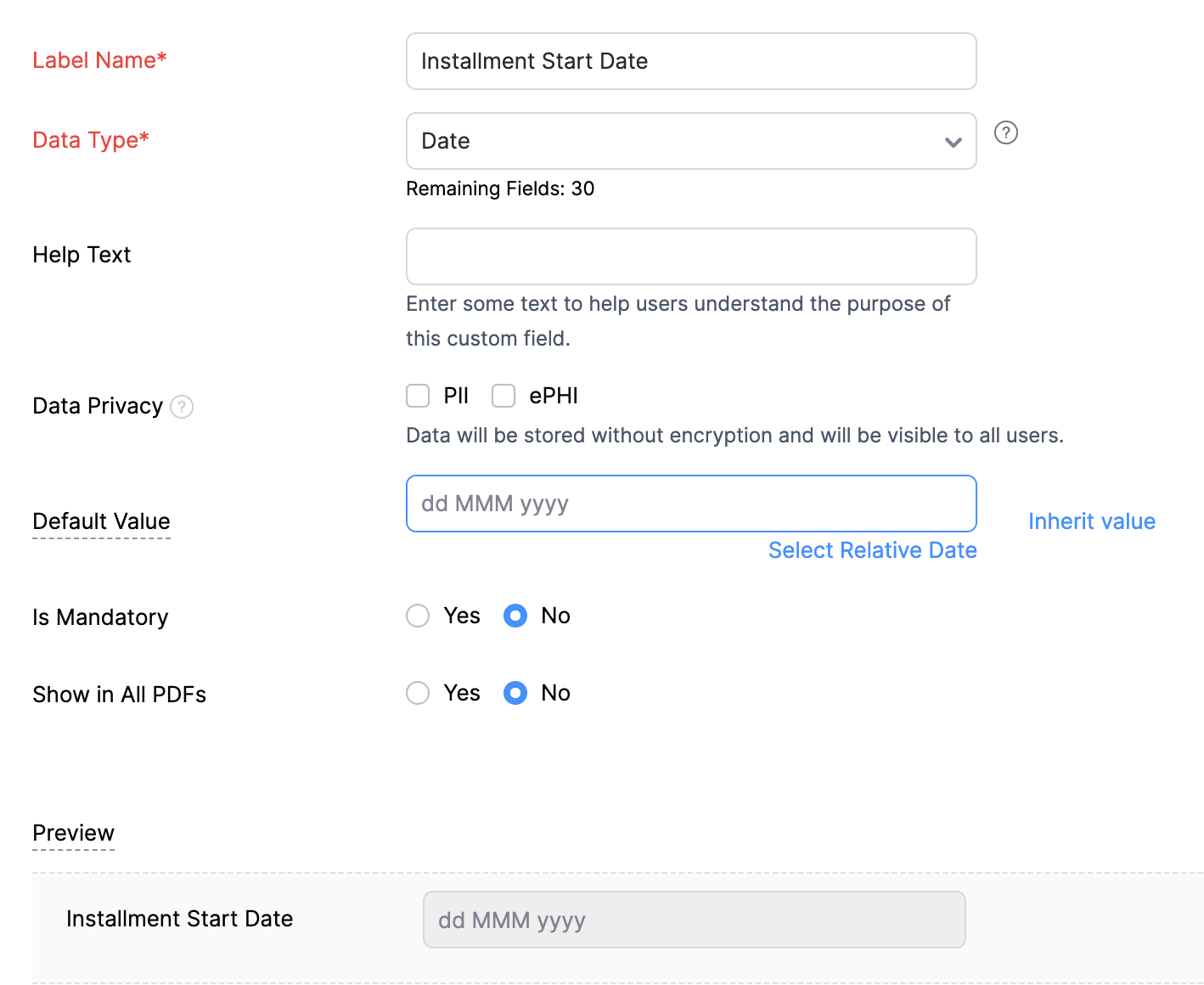
2. Create a Date-type custom field called "Installment Start Date" for the Invoices. This field will be used to input the starting date for installment payments.


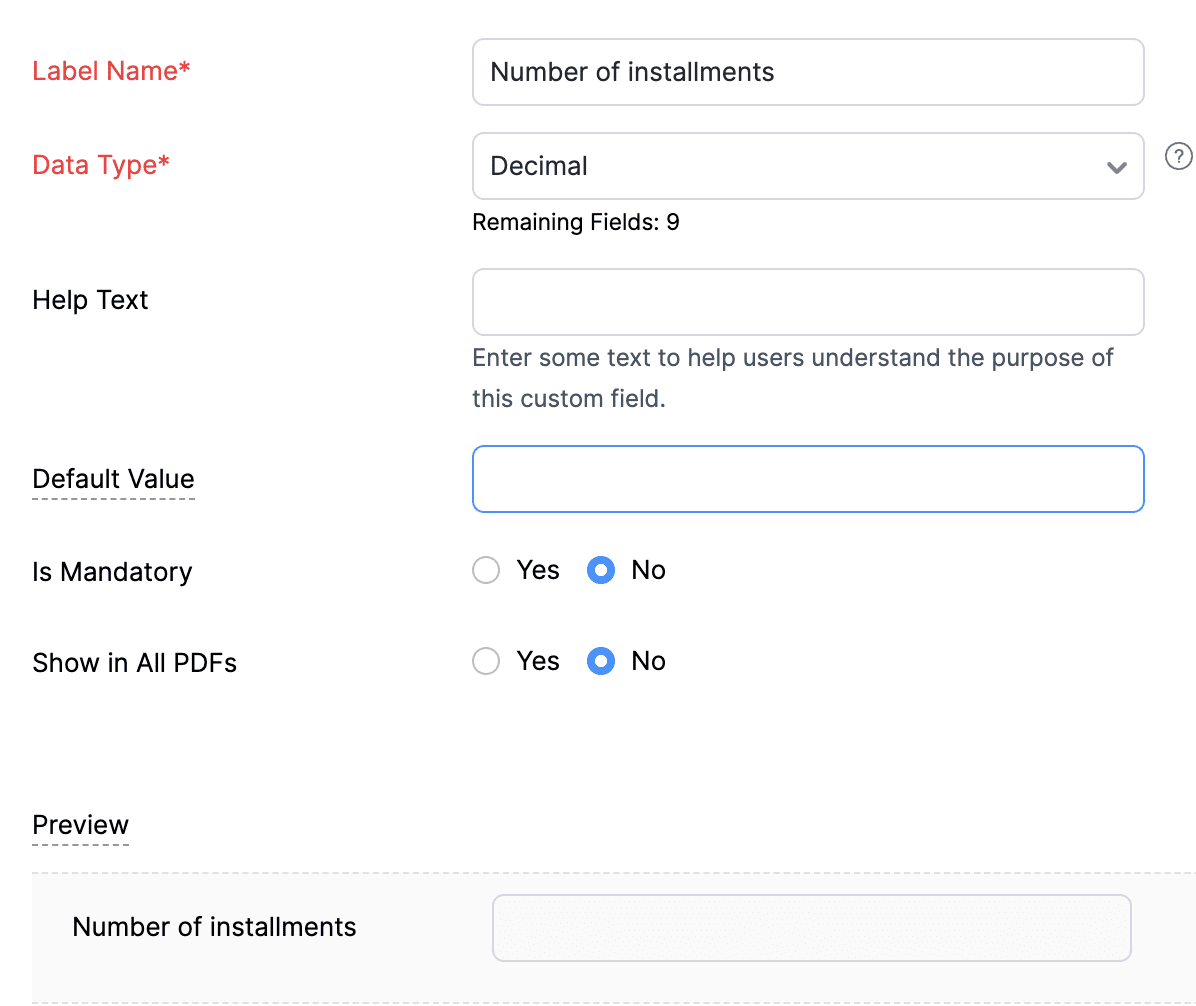
3. Create a Decimal-type custom field called "Number of installments" for the Invoices. Here, you'll specify the agreed-upon number of installments. Using this information and the total invoice amount, the function will determine the monthly installment amount.


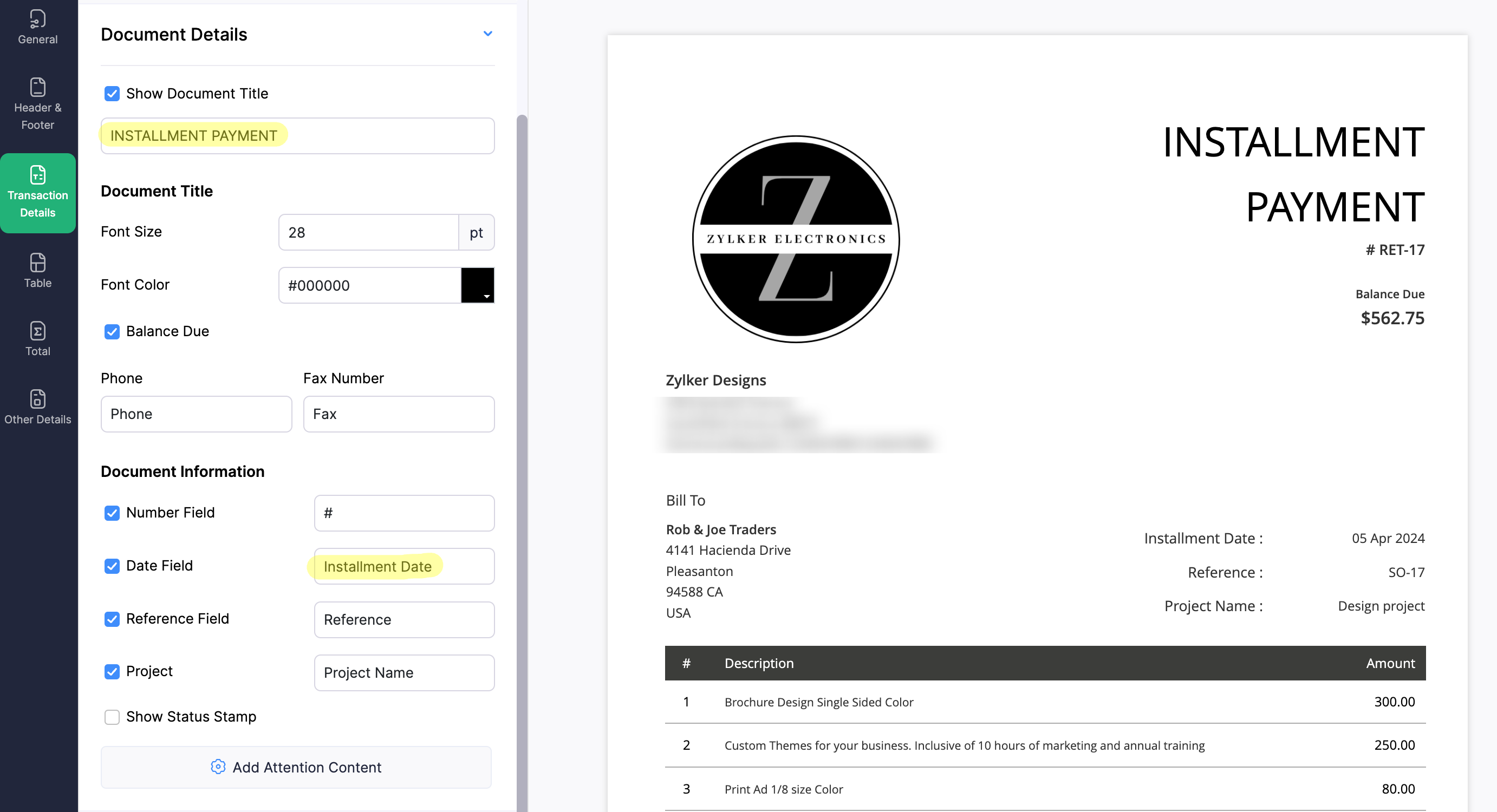
4. Create a new Retainer Invoice template with the document title "Installment Payment". Then, copy the template ID (You can get the ID from the URL of the webpage) and substitute it into line 26 of the first function. This ensures that all the retainers sent for collecting installment amounts are correctly labeled.


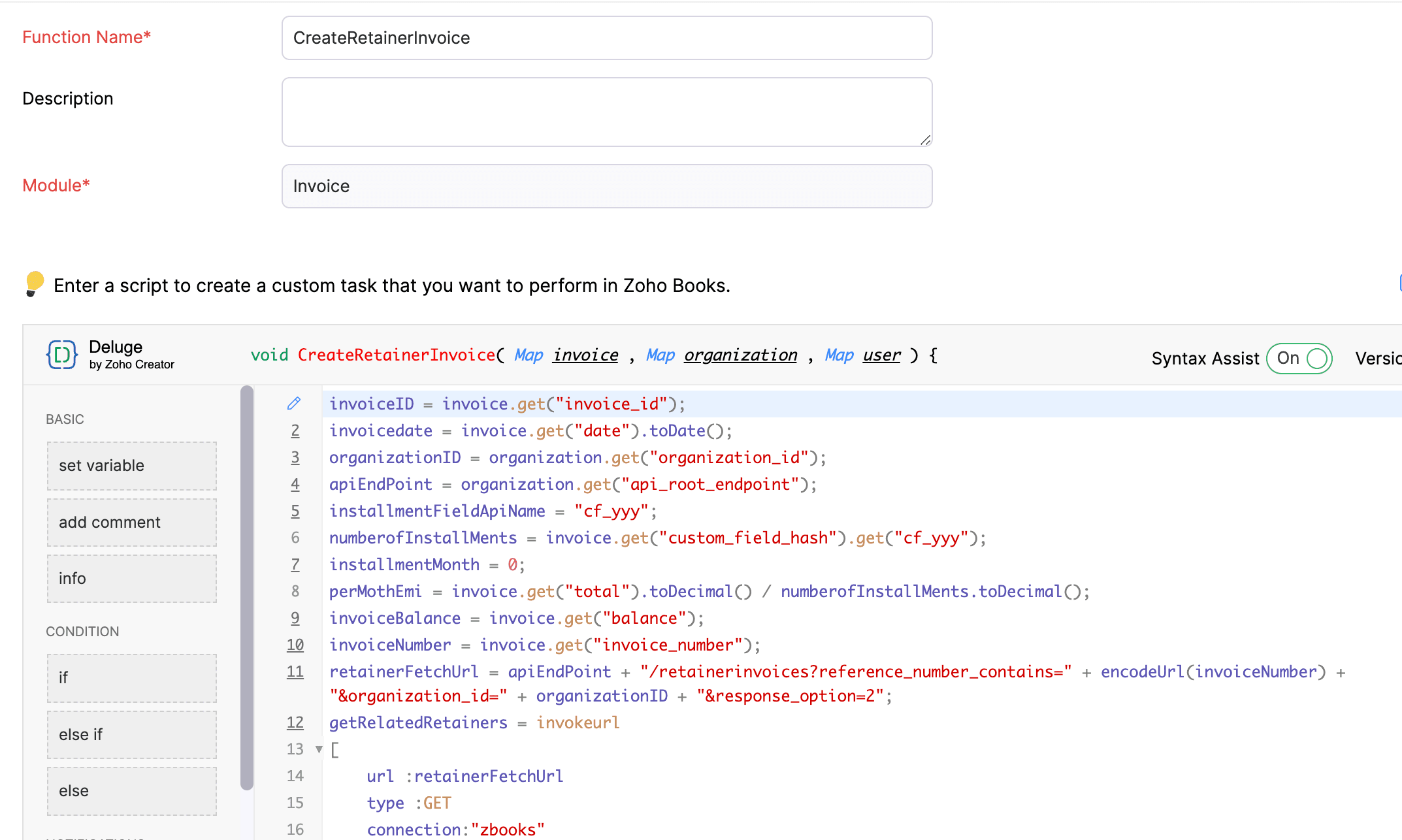
(1) Custom Function to create Retainer Invoices:

Navigate to Settings -> Automation -> Workflow Actions -> Custom Functions -> +New Custom Function -> Module -> Select Invoice -> Add the function code from this
GitHub Link -> Save. 


(2) Workflow Rule to create Retainer Invoices:

Go to Settings -> Automation -> Workflow Rules -> +New Workflow Rule and set up the workflow rule as shown below:-


In the final step of this workflow rule, associate the custom function you created and then hit Save.

(3) Custom Function to apply installment payments to the sale invoice:

Navigate to Settings -> Automation -> Workflow Actions -> Custom Functions -> +New Custom Function- > Module -> Select Retainer Invoice -> Add the function code from this GitHub Link -> Save. 


(4) Workflow Rule to apply installment payments:

Go to Settings -> Automation -> Workflow Rules -> +New Workflow Rule and set up the workflow rule as shown below:-
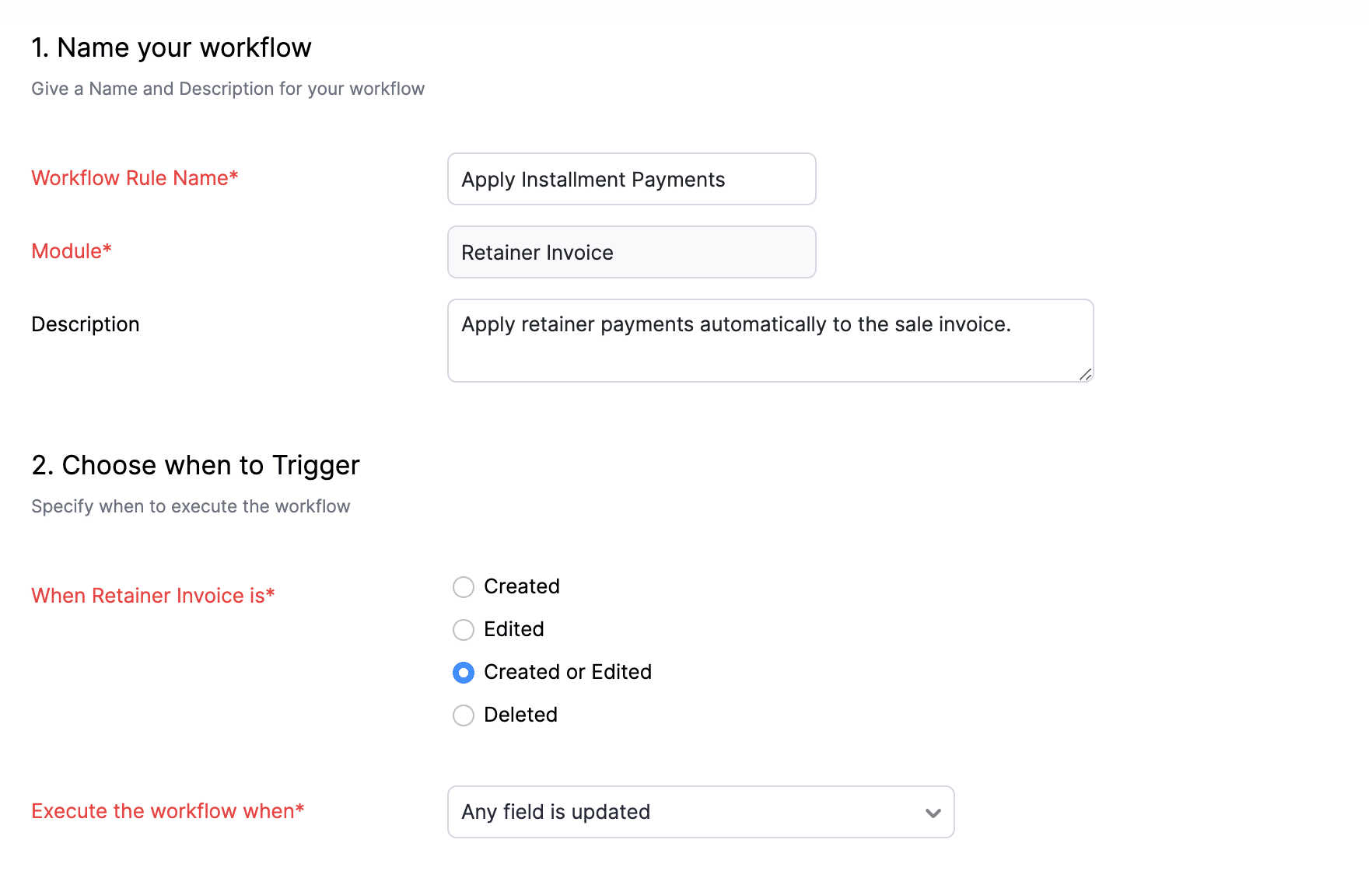
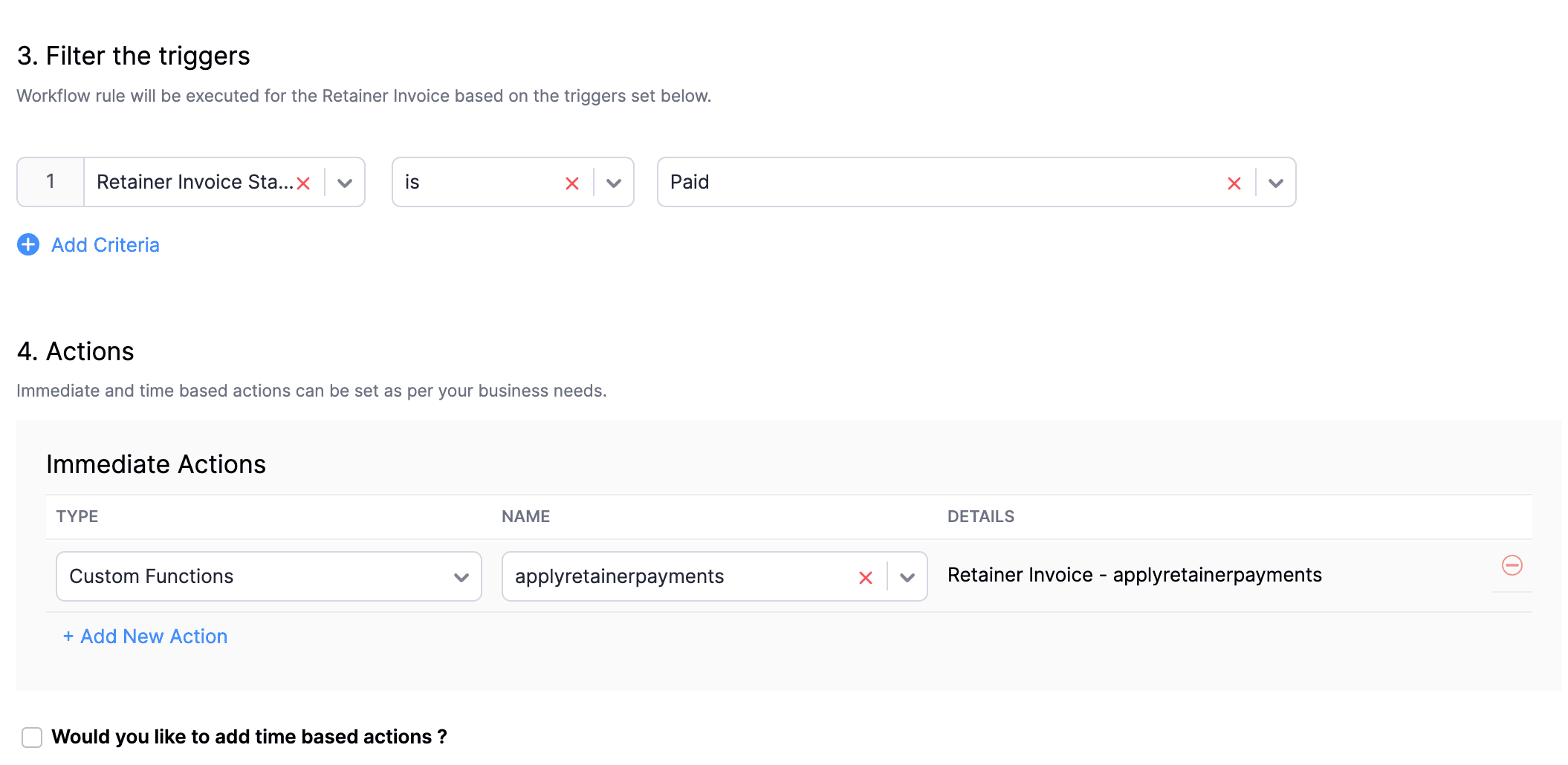


In the final step of this workflow rule, associate the custom function you created and then hit Save.

We really hope that today's functions help you streamline the process of handling installments in Zoho Books. If you need any assistance in customizing the functions to better suit your needs, please do not hesitate to contact us at support[at]zohobooks[dot]com. We are always happy to help you. 

Also, for those looking to collect varying percentages of the invoice total as installments, stay tuned! 

Regards,
Shireen Farhana
Zoho Books

    • Sticky Posts

    • Introducing Invoice Consolidation for Offline Subscriptions

      Hello Folks, Glad to announce the feature of Invoice Consolidation for Offline Subscriptions. If you are having multiple subscriptions for your customers, now, you can send a single consolidated invoice for all the Offline Subscriptions that are getting renewed on the same date. Advantage?  Customers will be receiving single invoice instead of multiple invoices upon renewal. Also reduces your efforts in follow-up with your customers for payment collections. For Example: If Customer has Subscription
    • New feature: Create back-dated subscriptions

      Hello from the Zoho Subscriptions team. :)   We’re happy to announce that today marks the launch of a much-awaited feature: creating back-dated subscriptions!   From here on out, whenever you create a new subscription with an activation date that is earlier than the present date, you’ll no longer get an error. Instead, you'll be creating a back-dated subscription. This means that the subscription started at that earlier point in time. The next billing date will be calculated automatically based on
    • Announcement Regarding Notification Emails

      Hello Everyone! This announcement is regarding the admin notification emails which you've been receiving from the email address "support@zohosubscriptions.com". From the 1st of October, 06:00 GMT, the emails with the following subjects will be sent from "no-reply@zohosubscriptions.com". Unable to send invoice for the profile - {profile_name} Unable to process auto payments. If you have set up any filters or workflow in your email account, please add "no-reply@zohosubscriptions.com” and  “support@zohosubscriptions.com”
    • Zoho Subscriptions plugin for WordPress

      Zoho Subscriptions plugin for WordPress allows you to easily embed your plan specific checkout page in an iframe with just a few mouse clicks and without a single line of code. How can WordPress Zoho Subscriptions Plugin boost your productivity? It's now easier to embed Zoho Subscriptions checkout page in your WordPress site. Forget the old method of logging in to Zoho Subscriptions, copying a URL and scripting to make adjustments. All this can be done automatically through this plugin. A great time
    • Indian GST organisation Migration Guide

      With respect to the new GST regime releasing on July 1, 2017in India, Zoho Subscriptions Indian edition is also gearing up to make your business GST Ready. This article focuses on how to get your existing organisation in Zoho Subscriptions to migrate to the new GST regime.    Note:  Any organisation created on or after July 1, 2017 will already be GST ready. You wouldn't have to migrate your organisation. Migrating your existing organisation to support GST To migrate your existing organisation to
    • Recent Topics

    • Introducing Radio Buttons and Numeric Range Sliders in Zoho CRM

      Release update: Currently out for CN, JP, AU and CA DCs (Free and standard editions). For other DCs, this will be released by mid-March. Hello everyone, We are pleased to share with you that Zoho CRM's Layout Editor now includes two new field formats—
    • POP mailbox limits

      If I am accessing a remote POP mail server using Zoho Mail is there a mailbox quota for the account or is it all related to my mail account storage limits?
    • Warranty Service and Repair in Zoho FSM

      Hi There, We are a retail store that sells products and also performs installations and repairs. Our field technicians handle this work. Some repairs are covered by manufacturers, who reimburse us for both parts and labour. In these cases, we perform
    • Create Receipt of a Donation (not a sale)

      We are a non-profit organization that receives general donations. How do I create a receipt of payment for the donor and categorize the payment as a Gift? I tried the method of creating an invoice; however that automatically created a "Sales" transaction
    • Zoho Sheet for Desktop

      Does Zoho plans to develop a Desktop version of Sheet that installs on the computer like was done with Writer?
    • WhatsApp phone number migration

      Hi @Gowri V and @Pheranda Nongpiur, Thanks for implementing the promised enhancements to the integration between Zoho CRM and WhatsApp. The previous discussion has been locked, so I'm opening this new one. I am copying below a specific
    • What are the create bill API line item requiered fields

      While the following documentation says that the line items array is requiered it doesn't say what if any files are requiered in the array. Does anyone know? API documentation: https://www.zoho.com/inventory/api/v1/bills/#create-a-bill I'm trying to add
    • How do I create an update to the Cost Price from landed costs?

      Hi fellow Zoho Inventory battlers, I am new to Zoho inventory and was completely baffled to find that the cost price of products does not update when a new purchase order is received. The cost price is just made up numbers I start with when the product
    • Price Managment

      I have been in discussions with Zoho for some time and not getting what I need. Maybe someone can help explain the logic behind this for me as I fail to understand. When creating an item, you input a sales rate and purchase rate. These rates are just
    • Actual vs Minimum

      Hi all, I am sure I am not the only one having this need. We are implementing billing on a 30-minute increment, with a minimum of 30 minutes per ticket. My question is, is there a way to create a formula or function to track both the minimum bill vs the
    • Generate leads from instagram

      hello i have question. If connect instagram using zoho social, it is possible to get lead from instagram? example if someone send me direct message or comment on my post and then they generate to lead
    • Kaizen #234 - Automating Deal Handoff with Zia Assistant API, Workflow, Deluge, and Widget in Zoho CRM

      Hello all! Welcome back to a fresh Kaizen week. In this post, we will explore how to automate the deal handoff process in Zoho CRM using Zia Assistant API + Workflow + Deluge + Widgets. Here’s how the final output looks when a deal is reassigned 1. Deal
    • How do you print a refund check to customer?

      Maybe this is a dumb question, but how does anyone print a refund check to a customer? We cant find anywhere to either just print a check and pick a customer, or where to do so from a credit note.
    • Ability to assign Invoice Ownership through Deluge in FSM

      Hi, As part of our process, when a service appointment is completed, we automated the creation of the invoice based on a specific business logic using Deluge. When we do that, the "Owner" of the invoice in Zoho FSM is defaulted to the SuperAdmin. This
    • All new Address Field in Zoho CRM: maintain structured and accurate address inputs

      Availability Update: 29 September 2025: It's currently available for all new sign-ups and for existing Zoho CRM orgs which are in the Professional edition exclusively for IN DC users. 2 March 2026: Available to users in all DCs except US and EU DC. Latest
    • Enhancement to ICR’s field prompting: Preferred data extraction using advanced field prompting

      Dear Customers, We hope you’re well A quick background Intelligent Character Recognition (ICR) comes as part of Zia’s optical recognition capability called Zia Vision. When we introduced it last April, the data extraction was training-based and was applicable
    • See a list of all records enrolled in a cadence?

      I am looking for a way to see a list of all leads or contact currently enrolled in a cadence. I do not see any way to do this through the cadence UI.
    • Limitation in chart of accounts

      There is a limitation of 4000 accounts in chart of accounts  Zoho needs to remove this limit
    • How do I change the account bank charges are charged to?

      I want bank charges charged to my Credit Card Fees account. Is there a way to do this?
    • Real signature in Zoho Expense PDF report ?

      Hello ! Is there a way to put a real signature on the signature line when a PDF report is generated in Zoho Expense? Through Zoho Sign or another way? Can't seem to make it work.
    • Copy paste settings

      Hello all i have 2 organizations running in ZOHO books in one organization i have customised Tax rates, codes and customized templates instead of manually doing again in org 2 can i have some shortcut to copy paste or export and import??
    • Custom TDS on Vendor Credits via API

      Hi, We are using Zoho Books APIs for posting Bills and vendor credits. We are unable to post custom TDS amount posting vendor credits. Can you please share the API spec and Payload that need to be sent for Custom TDS for Vendor Credits.
    • "Unlink" Advance from Bill without Deleting the Payment Record

      I am writing to highlight a significant workflow issue in Zoho Books (India Edition) regarding Vendor Advances and Bills. The Scenario: I recorded an Advance Payment to a vendor. I matched/reconciled this payment in the Banking module. I received a Bill
    • Advance Payment Record Removed When Deleting Applied Credit from Bill

      Hello, So while working with vendor advance payments, I noticed that removing the applied credit from a bill also removes the corresponding entry from the Payments Made section. What I did : Recorded an advance payment to a vendor through Payments Made.
    • What is the best way to convert MSG file to Word format?

      The best way to convert MSG files to Word format is by using a reliable and professional tool Aryson MSG file Converter. Manual methods are often time-consuming and may not preserve email formatting, attachments, or metadata accurately. In contrast, Aryson
    • Address Typeahead Extension for Zoho Books

      I installed the Address Typeahead extension for zoho books but when I went to configure it, it said that that version was deprecated. Is there a newer version somewhere?
    • How to create a new Batch and update Stock via Inventory?

      Hi everyone, We are building an automation where a user enters batch details (Batch Number, Mfg Date, Expiry, and Quantity) into a Custom Module. I need this to trigger an API call to Zoho Inventory to: Create the new batch for the item. Increase the
    • Zoho Projects : Task should auto-update to 'In Progress' if timer started

      Namaskaram. Right now, if a Task's timer is started, the Task stays in 'Not Started' status. One has to manually update it to 'In Progress'. From a #uxdesign standpoint, it is an unnecessarily two step process to start working on a task. It would be better that, if I start the timer on a task, it should automatically change to 'In Progress' status. Crafted with ❤️ Zoho Gurus | Zoho One Practice Team @ CubeYogi Zoho Authorised Partner | 7+ Yrs | 200+ Projects | 100+ Customers
    • Invoice template with sales tax totals

      Hi everyone,  I am trying to edit my invoice template so that only the total sales tax collected for my tax group shows up. Right now, under by sub total, each individual tax shows up and that takes up a lot of unnessary space, so I just want the one
    • Zoho Delayed Posting & Loss of Article Thumbnails on BlueSky

      Hello! I am wondering if anyone else has had the either of the following issues when posting to socials via Zoho and if there is a fix? 1. Post says it is scheduled or it is live when sent off via Zoho but it doesn't show up on socials till some time
    • Connection Not Secure (Certificate Mismatch) Error

      Hi, Just a fyi, when you go to https://bigin.zohocloud.ca/bigin/Home you get a "Your Connection Is Not private" error. (Certificate mismatch to domain.) I get to that page after I have signed up and signed in as a customer and select the Access Bigin
    • Recording the Investment

      Hello, - One Investor Invested to our company, So how do we record investment which we received in our bank in the Zoho books ? - How do we record if we provide shares to the investor in the Zoho books? Thanks
    • Export Invoices to XML file

      Namaste! ZOHO suite of Apps is awesome and we as Partner, would like to use and implement the app´s from the Financial suite like ZOHO Invoice, but, in Portugal, we can only use certified Invoice Software and for this reason, we need to develop/customize on top of ZOHO Invoice to create an XML file with specific information and after this, go to the government and certified the software. As soon as we have for example, ZOHO CRM integrated with ZOHO Invoice up and running, our business opportunities
    • Client and Vendor portal at the same time

      We have companies that serve both as clients and vendors and they are linked. However, we have a problem giving them access to the vendor/client portal. If they accept the invitation from the client portal, when we try to invite them to the vendor portal
    • Integrate Multiple ZohoBooks organization with zoho projects

      We have successfully connected our Zoho Books with Zoho Projects for synronizing timesheet data. Our Business specialty is, that the staff of the Main company (A) is working on several projects, but the Clients are sometimes contracted and paying to a
    • ZOHO CRM Button Integration

      Hi Team, I’m currently working with Zoho CRM along with a custom application where I fetch deal details from the CRM and use them based on my requirements for each deal. Now, I want to enhance this setup. I plan to create a button on the Deal Detail page
    • Ways to calculate the difference form two years or months

      Hi to everyone I have this request: I need to show the difference or variation from two periods (years or months) whether using a Pivot View or a graph, in this is case is better in a Pivot view. In the pivot view I will have the amount or results from
    • Zoho CRM strips whitespace in text fields

      When editing field text with multiple spaces: CRM - both UI and API trim / compress the whitespace to a single space when saving: Is this known / expected / documented behaviour?
    • Career site URL - Suggestion to modify URL of non-english job posting

      Hi, I would like to suggest making a few modification to career sites that are not in english. Currently, the URL are a mix of different languages and are very long. It makes for very unprofessional looking URLs... Here is an example of one of our URL
    • Uplifted homepage experience

      Editions: All editions. Availability update: 17th February 2026: All editions in the CA and SA DC | JP DC (Free, Standard and Professional editions) 23 February 2026: JP (All Editions) | AU, CN (Free, Standard, Professional editions) 27 February 2026:
    • Next Page