How to customize the "Placeholder Text" separately from the "Field Label" on the Booking Form?
Hi,
I am currently customizing the Booking Form for one of my Workspaces in Zoho Bookings, and I need some help adjusting a custom text field.
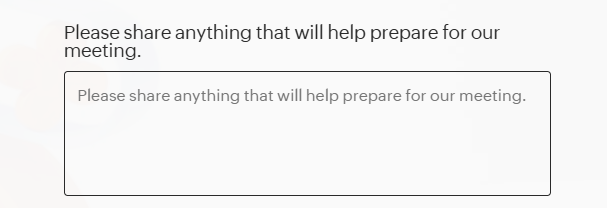
Right now, when I create a custom text field, the gray "placeholder text" inside the text box automatically mirrors the "Field Label" exactly. I would like to make the placeholder text different from the label to give my clients better instructions.
For example (as seen in the attached screenshot):
My current Field Label is: "Please share anything that will help prepare for our meeting."
I want the gray Placeholder Text inside the box to be: "e.g., specific time zone needs, current tech stack, or biggest hiring challenge..."
Could you please guide me on where I can edit the placeholder text so it doesn't just repeat the field label? If this feature is not currently available, please submit this as a feature request to the development team.
Thank you!