Incoming Threads Report
From data to decisions: A deep dive into ticketing system reports

Customers raise questions and issues through multiple channels, such as email, chat, or tickets. To monitor the number of queries received on a specific day from each channel, leads can use the Incoming Threads report. This report enables them to allocate resources efficiently based on ticket volume. For instance, if more queries are received through WhatsApp than email, the manager can reassign some agents from the email team to handle WhatsApp queries, ensuring timely responses and effective customer service.
Purpose
The Incoming Threads report provides visibility into the number of messages (threads) received across all customer channels, including email, chat, web forms, social media, and WhatsApp. Each thread represents a customer interaction—whether a new ticket or a follow-up message—and helps teams determine how busy each channel is on a given day.
What are ticket-based reports?
Ticket-based reports are summaries created from the data collected in a help desk ticketing system. These reports focus on different aspects of ticket management and give insights into how customer support requests are handled and resolved. They usually include metrics like ticket volume trends, response times, resolution times, ticket statuses, agent and team performance, and customer satisfaction scores.
Specific attributes found in the incoming threads report
- Request ID: Zoho Desk identifies and distinguishes tickets using a unique reference number called a ticket ID
- Subject: The ticket subject is typically a summary or description of the issue the customer is experiencing
- Request owner: Owner of the ticket
- Contact name: The customer's contact name
- Event owner: The owner of the event
- From: The from email address
- Received time: The time the request was received
- Response status: The status of the response
- Responded by: The agent who responded to the request
- Agent responded time: The time stamp when an agent sends a reply to a ticket or customer message
- Agent response time: The total time taken by the agent to respond to a ticket; measured from when the ticket or customer message is received until the agent sends a reply
- System response time: The elapsed time between the receipt of a ticket and the first agent’s response, which assures the customer their issue is being addressed
- Is violated: If a ticket is marked as “violated,” it means the required action was not completed within the stipulated SLA period
- Violated time: The data and time the violation occurred
- Owner during the violation: The owner of the ticket when the breach occurred
- Breach time: The time of the breach
- Status: The status of the ticket
- Channel: The channel through which the ticket was submitted
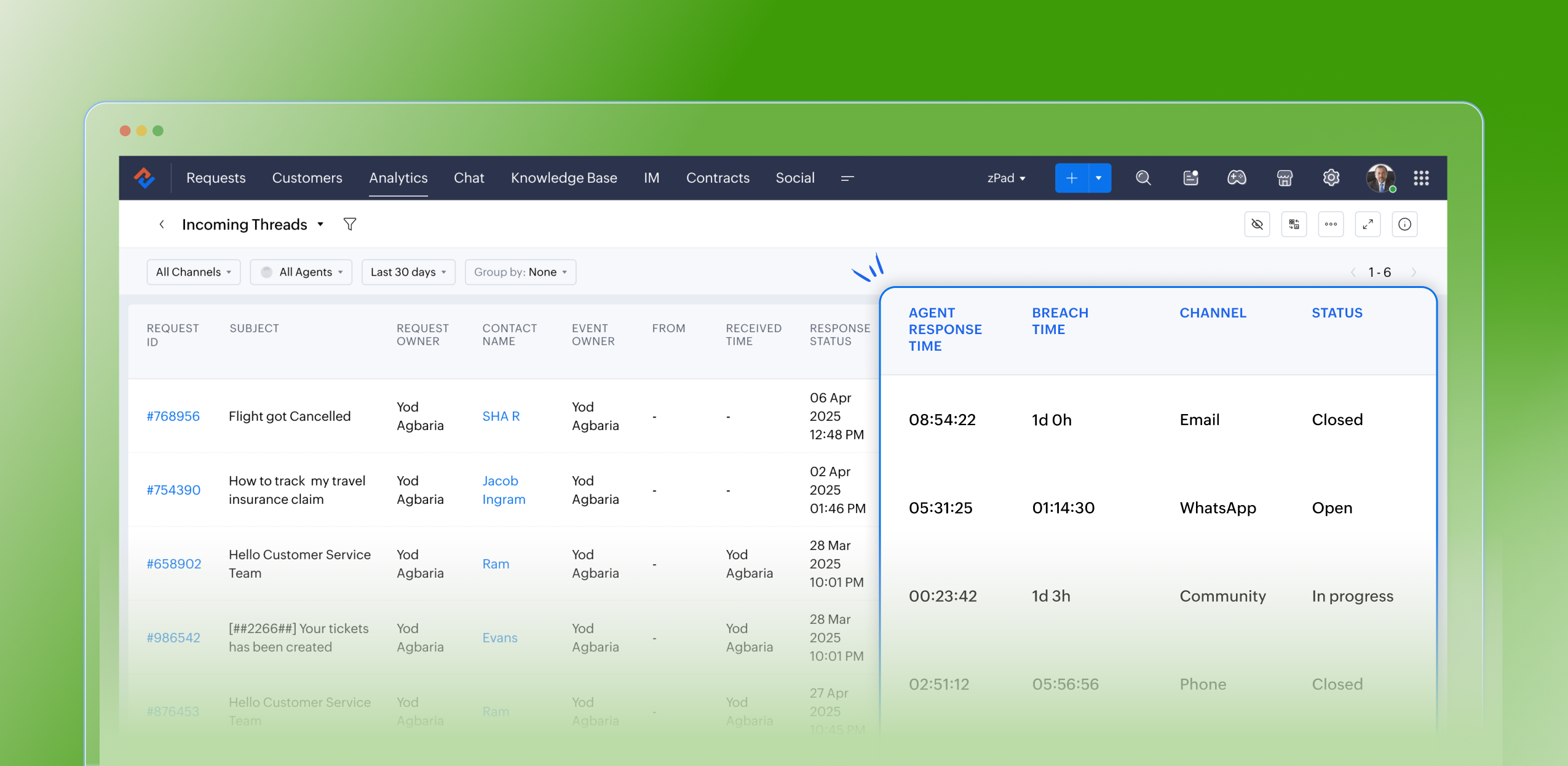
Notable use cases:
- Resource Allocation: Assists managers in reallocating agents based on current workload. For instance, if there's a surge of tickets coming through chat or WhatsApp compared to email, agents can be redistributed to manage the demand effectively.
- Performance Monitoring: Allows for the assessment of agent responsiveness and efficiency across different communication channels.
- Customer Experience Optimization: By pinpointing peak times and identifying channels with increased ticket inflow, managers can ensure prompt responses and uphold SLA commitments.
Advantages
- Assists leads in filtering and analyzing the volume and types of incoming tickets
- Monitors the count of open tickets at any given moment
- Confirms the timestamps for ticket creation and resolution
- Identifies the individual responsible for resolving each ticket
- Greatly optimizes resource allocation and time management
- Boosts team productivity and ensures adherence to service level agreements (SLAs)
Takeaway
The Incoming Threads Report is a useful analytical tool within Zoho Desk that offers a unified view of communication inflow, agent activity, and SLA performance. It empowers support teams to maintain balanced workloads, ensure timely responses, and drive proactive, efficient customer service operations.
Please stay tuned for more in the Desk Reports series.
Regards,
Kavya Rao
The Zoho Desk Team
 Managing a help desk involves complex responsibilities, such as identifying bottlenecks, minimising errors, and evaluating team performance for seamless service delivery. To do this effectively, access to comprehensive analytics and real-time insights is crucial. Zoho Desk streamlines these tasks by also providing detailed analytics and live reports through the Radar app, allowing managers to make informed decisions anytime, anywhere. Download now!
Also read:
Time-based reports
Agent-based reports
Ticket-based reports
Topic Participants
Kavya Rao Addepalli
Sticky Posts
Zoho Desk Partners with Microsoft's M365 Copilot for seamless customer service experiences
Hello Zoho Desk users, We are happy to announce that Zoho Desk has partnered with Microsoft's M365 to empower customer service teams with enhanced capabilities and seamless experiences for agents. Microsoft announced their partnership during their keynoteWhatsApp pricing changes: Pay per message starting July 1, 2025
Starting July 1, 2025, WhatsApp is shifting from conversation-based pricing to per-message billing. That means every business-initiated message you send will count. Not just the first one in a 24-hour window. Pricing updates on the WhatsApp Business PlatformLive Webinar - Work smarter with Zoho Desk and Zoho Workplace integration
Hello customers! Zoho Desk and Zoho Workplace are coming together for a webinar on 14th May, 2024. Zoho Workplace is a suite of productivity apps for email, chat, docs, calls, and more at one single place. Zoho Desk is closely integrated with a few toolsApple iOS 17 and iPadOS 17 updates for Zoho Desk users
Hello Zoho Desk users! Apple recently announced the release of iOS 17 and iPad OS 17. These latest OS updates will help you stay productive and efficient, through interactive and seamless user experiences. Zoho Desk has incorporated the updates to helpZoho Desk Cheat Sheet For The Year-End
Check out these Zoho Desk best practices to end this year on a high and have a great one ahead! #1 Set Business (Holiday) Hours - If you have limited working hours, please make sure you restrict your business hours or set them as holidays for the coming days. Let your customers know when you will, and won't, be available. #2 Update the Annual Holiday List - Check the holidays for the new year and update the holiday schedule. Usually, holidays from the current year will be carried over for the next
Recent Topics
Font Size 11 - Zoho CRM Email Templates
Our company communicates with our vendors exclusively using Calibri Font Size 11, as this is the standard formatting for professional emails. Since the CRM only allows for the selection of font sizes 10 & 12, we have been unable to utilize the CRM emailError 400 Booking
Added a custom domain to Booking. Am Getting a SSL Error that has some other domain on the SSL and giving a 400 error. Followed instructions and it stated it verified our domain.. However it is not working. Please Help!Zoho Projects - Email Notifications for Feed Updates
Hi Projects Team, I'm working with a client who wants a simple way to communicate with their customers on projects. Getting the customer to add comments to Tasks or Bug records is not ideal, as we need a way which is easy with minimal training, and hasZoho Analytics Export API
Hi Team, I’m working on some integration tasks and wanted to confirm if it’s possible to retrieve a Zoho Analytics table as JSON data using a Deluge script. I’ve already stored my custom data from multiple sources and combined it into a single source.Introducing the all-new email parser!
Greetings, We are pleased to introduce to you, a brand-new, upgraded version of the Zoho CRM Email Parser, which is packed with fresh features and has been completely redesigned to meet latest customers needs and their business requirements. On that note,Extracting Images from a Zoho Creator Report into a Pages
If you’ve uploaded images in a form and can see them in your report, you might also want to display those same images inside a Page (custom HTML page). This is useful for dashboards, profile pages, or any place where images should be visible dynamicallyZoho is blocking emails I subscribe to from one sender
About 4 months ago I stopped receiving newsletters that I subscribe to from @thedispatch.com. They tell me that zoho's server is blocking them. I've added them to my contacts list, but they're not even reaching my inbox. I don't know how to troubleshootInactive Items - Make Less Prominent by Default
Currently, when one marks an Item as "Inactive", it really doesn't do much of anything to hide it or get it out of the way. Search and reporting within Finance should, by default, hide inactive Items from standard reports, searches, etc. If one specificallyHow to calculate GST based on "Ship To Address"
We into the interior designing work, providing "Works Contract Services" to our clients across India. We are registered under GST in Maharashtra state. For works contract services as per the GST rule, we need to decide place of supply based on "Ship toI NEED TO NUMBER TO TEXT NO HERE
=NUMBERTEXT NEEEDAuto-fill New Row with Previous Row Values
rowsize = input.Order_Items.count(); for each row1 in input.Order_Items { rowsize = rowsize - 1; if(rowsize == 1) { row.Door_Model = row1.Door_Model; row.Door_Color = row1.Door_Color; row.Materials = row1.Materials;API question - adding a thread to an existing ticket
Hi Is there an API function for the customer to add to an existing ticket thread? example, customer puts in new support ticket. support replies and ask for more details. customer replies with more details -what api function is used for this (will add record append to same ticket number?) ThanksCalendar week view: Today + 6
Is there anyway to have the calendar change dynamically based on the date? Due to the amount of events, we only display a week at a time, but towards the end of the week, we can no longer see ahead to next week (without changing it manually every time).How to restrict user/portal user change canvas view
Hi , I would like to restrict user / portal user change their canvas view because I hide some sensitive field for them. I dont want my user switch the canvas view that do not belong to them But seems Zoho do not provide this setting?How to add to Subforms via Zapier with Zoho Writer?
I have the following layout for a Zoho Writer Document. As you can see there is a repeating subform taking in "Items". I am trying to make a Zapier integration with it, and I can see there is 1 field saying: "Items", but it does not specify how I'm supposedContrôles administratifs granulaires : un atout pour la sécurité des e-mails
La moindre erreur dans votre système de messagerie peut coûter très cher à votre entreprise, tant en argent qu’en conformité et en image de marque. Pour beaucoup d’organisations, ce risque est bien réel. Les e-mails véhiculent quotidiennement des informationsCollections Management: #6 Realign Customers who gets back In-Term
Arun stared at the subscription list on his dashboard. Another account had just been moved to Cancelled status after completing the whole dunning process. Nothing unusual, just that payment failures happen, retries fail, and cancellation is the expectedZoho Mail IP Blacklist
I need problems with send mails: Error: junk mail rejected - sender4-op-o10.zoho.com 136.143.188.10, is in RBL. Spamcop. Please remove FQDN for blacklist. Regards.I can receive but not send emails
Hello, I've been not able to send emails for almost a year now. I been using alternate email to do this. I want to know how to fix this so I can use my zoho account normally again.The challenge of 24/7 connectivity: Being present and meeting customer expectations
Before television entered our homes, radio was our window to the world. We had to tune carefully to catch voices from distant places. When television arrived, the world began to grow smaller. We can watch rocket launches, see the goal that wins our favoriteHow to download all attachments from inbox, send, other folders in one go
Hi All, Appreciate if anyone could help me with steps for below requirement. How to download all attachments from inbox, send, other folders in one go. Even mapping to new folder will help me. Thanks in advance.Cannot connect mail accounts to Thunderbird
Hi Support - I'm attempting to add my mail accounts to Thunderbird but I'm getting an unable to login to server error. I tried to use the password associated with my account I received the unable to login error. So I went into Zoho Accounts and generateAlias Email Id already exists
Hi, I just verified my domain sesque (dot) com and now I am trying to create the admin account using admin (at) sesque (dot) com, but I am getting an error saying "Alias Email Id already exists". I used to have another Zoho account with this email address,Unable to connect to smtp server, connection timed out
Hi Team, I am facing below issue, while sending out emails from thunderbird client. It used to work, facing this issue from morning. Error: Sending of the message failed. The message could not be sent because the connection to Outgoing server (SMTP) smtp.zoho.comKaizen #217 - Actions APIs : Tasks
Welcome to another week of Kaizen! In last week's post we discussed Email Notifications APIs which act as the link between your Workflow automations and you. We have discussed how Zylker Cloud Services uses Email Notifications API in their custom dashboard.DKIM Verification Failed (Namecheap)
Hi! I have already set up the TXT records in Namecheap but I keep getting the "Verification Failed" pop up. Was wondering if I'm the only one who has this problem and can anyone help me with this? Thanks!Emails stuck in Queue
Hi there, Since yesterday I have a few out going emails stuck in a queue. It say it will auto retry sending however nothing is happening. It seems to be affecting roughly 50% of my outgoing emails. Please help ThanksSoft Bounce from transational emails from BREVO (Sendinblue)
I manage the website of a client who uses your EMAIL service for the domain floranativadobrasil.com. And I use the BREVO email service, previously called SendinBlue, to send transactional emails about events specific to the website. All emails sent toGetting an error Address not found Your message wasn't delivered
Hey, I'm trying to configure zoho mail for my website https://businessentity.org/ The email is meredith.karter@businessentity.org I'm able to successfully send the mails but when someone sends an email to above mail, this error shoots up: Address notSupport Uploading YouTube Videos Longer Than 60 Minutes
Hi Zoho Social Team, How are you? We would like to request support for uploading YouTube videos longer than 60 minutes directly through Zoho Social. Your support team informed us that Zoho Social currently cannot upload videos over 60 minutes due to “APINeed Faster Help? Try Live Chat Support
Hello there, We understand that sometimes, whether you’re facing an issue, exploring a feature, or need quick clarification, sending an email and waiting for a response just doesn’t cut it. You need answers, and you need them now. That’s exactly why weCan't deactivate Spell Check
Hi Community, right now I'm using the Zoho Mail Desktop-Software. So far, so good.. many possibilities. Overall very nice. What is extremely annoying right now, is that we are not able to deactivate the Spell Check feature. And we are barely able to focusZoho Toolkit Email Signature Generator
I'm having real issues with the email signature generator with no matter where I host the photo, Zoho doesn't seem to show the photo on the link provided?Company Policy Upload - Request All EE to review and sign
How can I upload policies into Zoho People and have the employees review them and sign off saying they agree, etc.? Also, if I make a revision to a policy, I would like that changed or updated policy to be distributed or have the employees notified thatZoho Sign Global Settings vs. Template and Document
Hello, We are running into an issue on a current use case. We already use Zoho Sign. Now that KBA is available, we want to begin using it in our tax delivery process, by allowing clients to sign electronically, but also download a copy of their returnZoho Mail Desktop Crashes on Linux - Ubuntu 24 LTS
Hi, I have been trying to run the desktop app on Ubuntu for the past few day with no luck. I have tried both the .deb package and the appImage. When I attempt to open the app. It just crashes immediately. The crash error dialog appeared once and I cantZoho IP blocked by SpamCop
Hi, Many of my emails are blocked and I receive this: INVALID_ADDRESS, ERROR_CODE :550, ERROR_CODE :spamcop.mimecast.org Blocked - see https://www.spamcop.net/bl.shtml?136.143.188.51. - https://community.mimecast.com/docs/DOC-1369#550 [DGwIYPPSOfWIServer error when trying to Data > Sort > Custom Sort
Been using Data > Sort > Custom Sort for a while, now it has suddenly stopped working. When selecting the same data range and trying to execute, I get "Sorry! There was a problem saving your last edit. Please try again."TArgets To Accounts (Modules)
How can i set sale target to Customers (Accounts Module)Breaking barriers with multilingual WhatsApp templates in IM
Ever wondered what it feels like to be greeted in your own language by a brand you love? A “Welcome!” feels nice, but a “¡Bienvenido!” or “स्वागत है!” feels personal. In today’s global world, conversations often need to cross both time zones and crossNext Page