Introducing AI Modeler—a no-code approach to adding AI to your business applications
Forward-thinking businesses today are embracing AI to make life easier for themselves, their employees, and their customers. But if you haven't started yet, you might be concerned that your business will be left behind. Or maybe you're worried because you don't know much about AI, machine learning, or data science. Well, you can now relax—we've got you covered on all counts!
We've been hard at work lately, incorporating AI into Creator without deviating from our long-held low-code philosophy. The result of this hard work is an exciting new feature we're announcing today: AI Modeler.
What do you mean by "AI"?
Artificial intelligence is the ability of software to replicate human intellect, such as learning from experience and applying lessons learned while making decisions. While sci-fi enthusiasts and media like to portray artificial intelligence as a scary thing that'll take over the world, the reality is that we haven't reached that stage (yet!).
Instead, the current generation of AI technologies has been adopted in many ways, like providing specific benefits to different industries. In general terms, an AI model provides specific intelligence based on trained data, and can be customized to automate or optimize your business process—all with minimal human interference.
What's in it for me?
Our AI modeler includes a no-code AI builder that helps you harness the power of AI without having knowledge of programming. The AI Modeler feature will be available under the
Microservices
section. From there, you can jump into the world of AI with our ready-to-use models, which we've prebuilt and rigorously tested for your use. You'll only have to choose the application name and the form name to deploy these models—it's that easy!
Custom models allow you to build customized AI models tailor-made for your business, by providing it with unique data based on which it can work. Here, you'll need to provide the model with sample datasets relevant to your business for it to get familiarized with—this is called training
—and then you can test whether it works as intended before deploying it.
Interesting. Tell me more!
While the uses of AI are endless, we've zeroed in on a handful of popularly used models, which we believe will add immense value to your business.
The key capabilities of our AI models are:
-
Prediction
-
OCR (optical character recognition)
-
Object detection
-
Keyword extraction
- Sentiment analysis
Prediction (Custom)
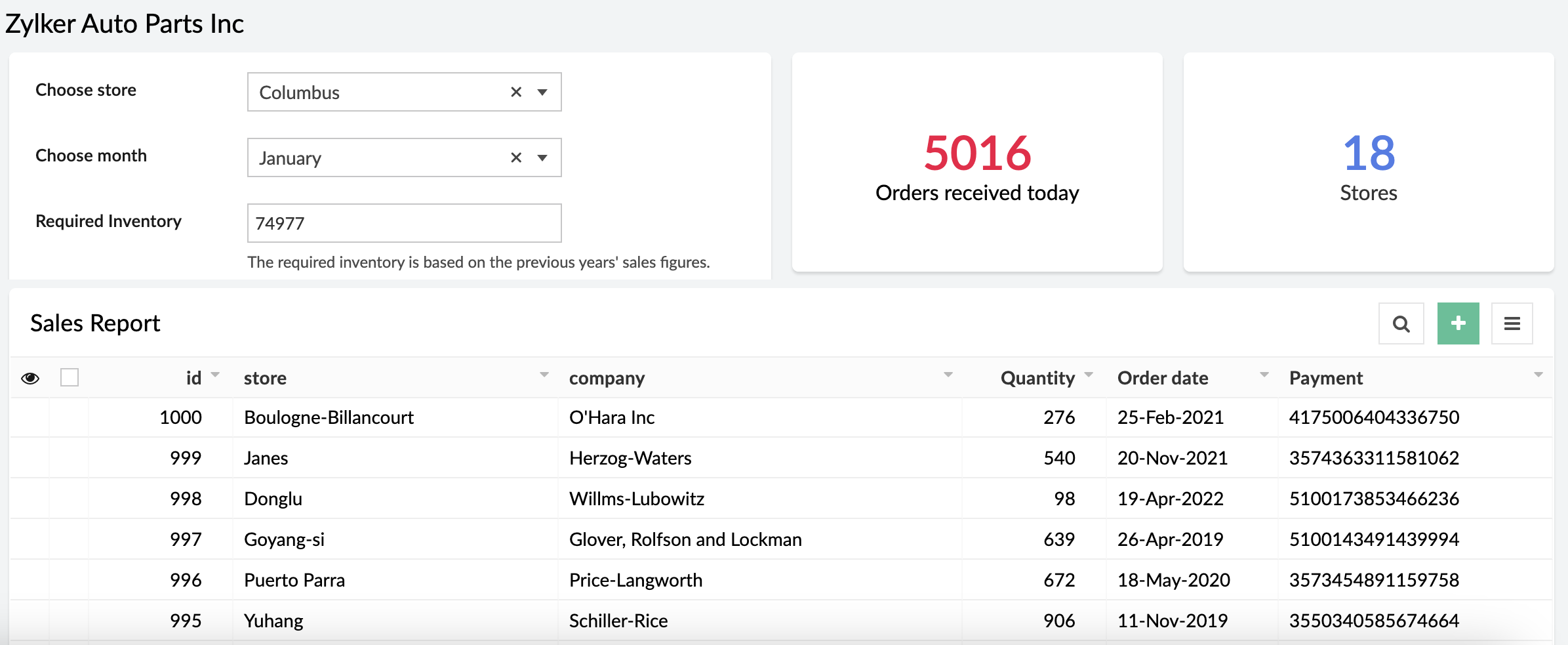
Prediction models process known results from historical data, and try to forecast future outcomes. It allows you to use data from an existing form or CSV file and predict future outcomes with just a few clicks.
Example:
A store can calculate how much inventory they need in order to meet demand during a particular sales period by providing previous years' sales data.
OCR (Ready-to-use and custom)
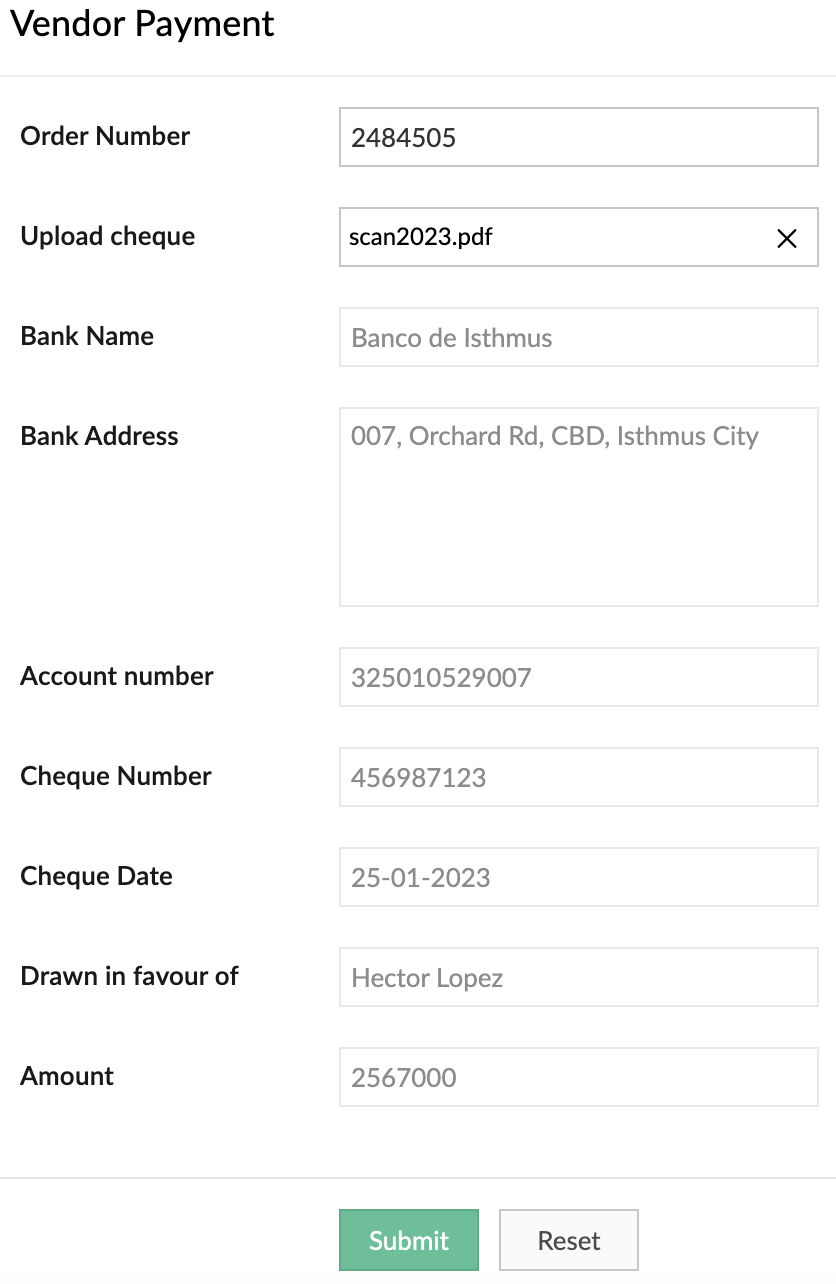
Optimize operations, eliminate repetitive manual tasks, and digitize your business by using our OCR model to extract text from images. The ready-to-use OCR model will extract all the text it identifies in the image, while you can build a custom OCR to extract specific text from images into fields in your forms. Tag the fields to the corresponding values once and eliminate manual data entry forever.
Example:
It's 2023, but many people still prefer to settle payments using checks. A business can use our custom OCR to extract details—like the bank name, check number, amount, date, and more—from the checks.
Object detection (Ready-to-use and custom)
Object detection models are used to identify specific objects in images and use them to optimize business processes. Our ready-to-use model is trained to identify common objects (like people, dogs, cars, etc). Otherwise, you can build a custom model and provide it with the training data for the objects you want to identify.
Example:
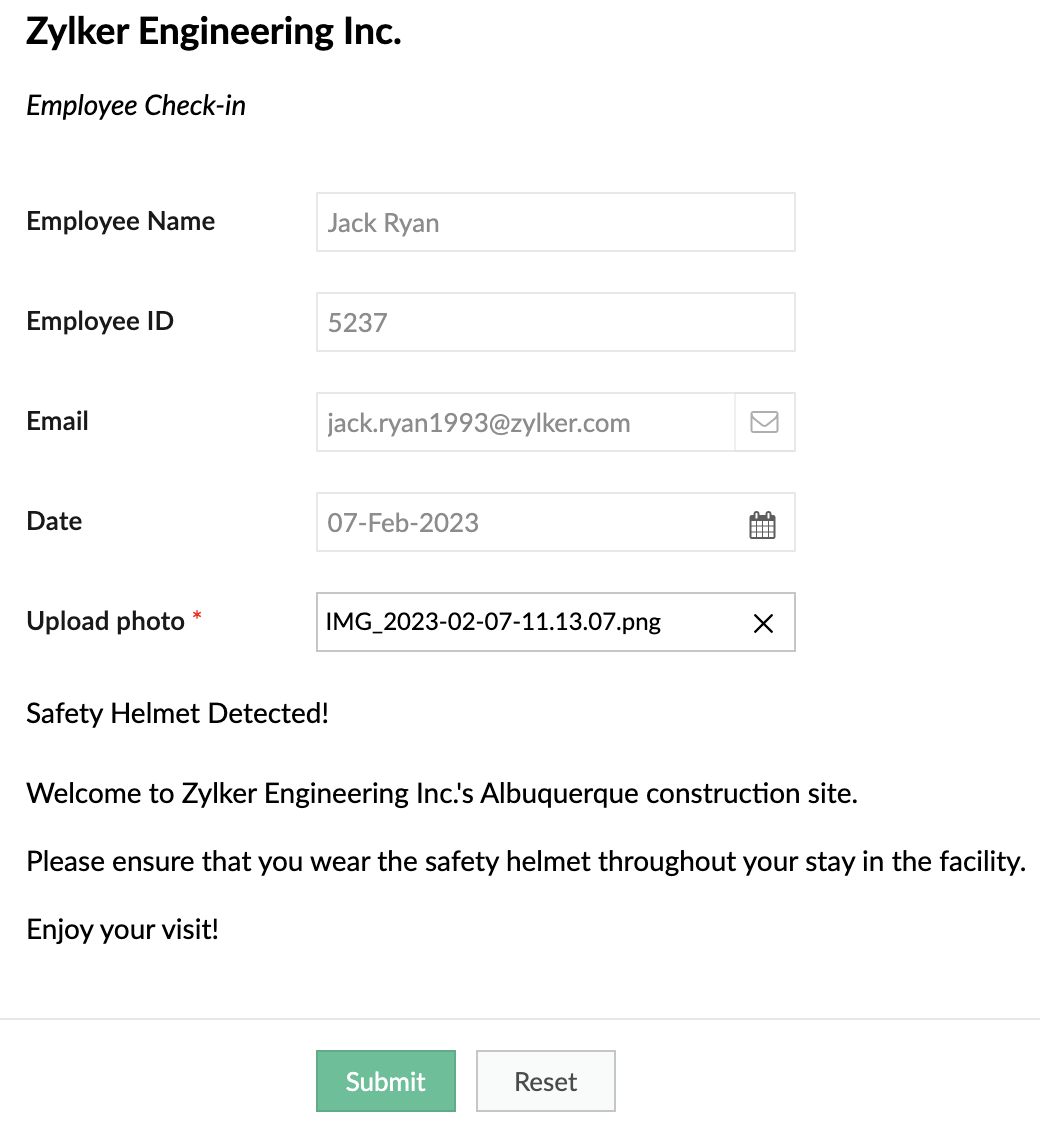
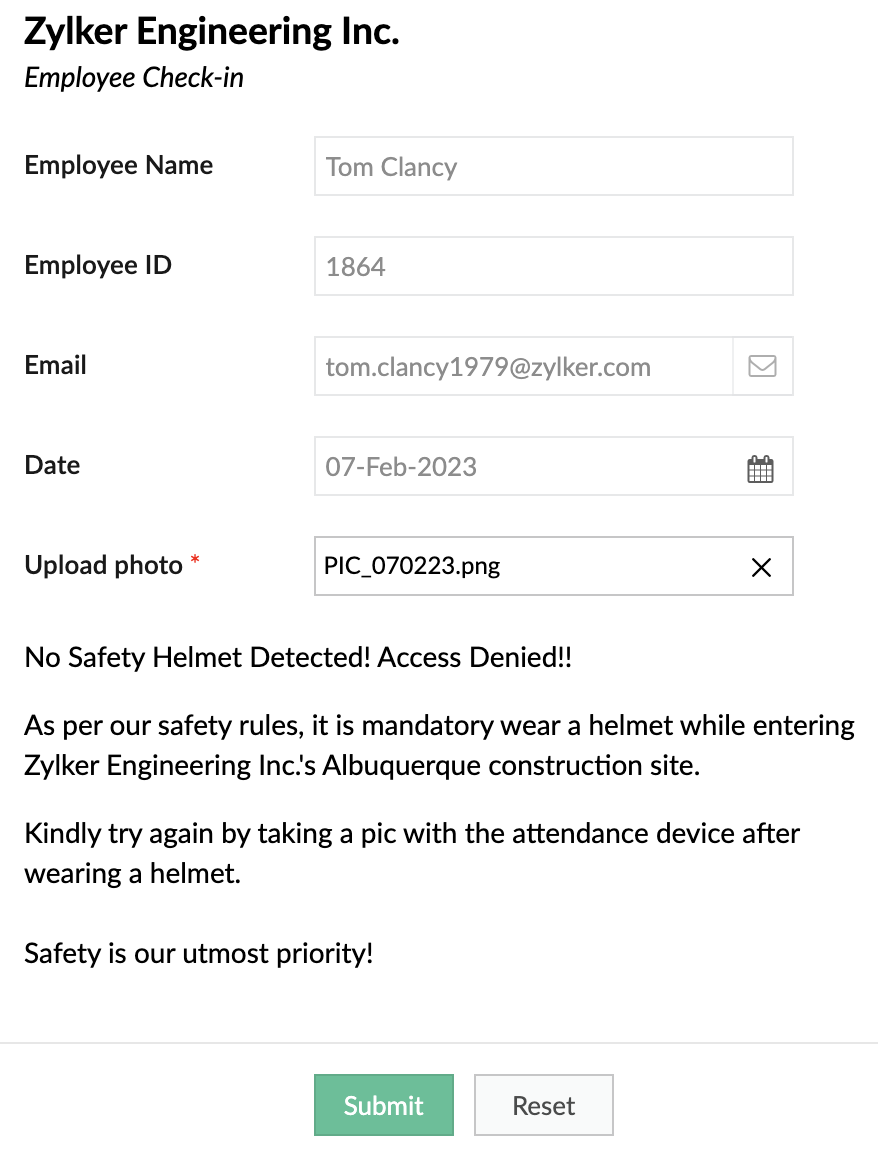
A safety-focused company can use OD models to detect things like whether its employees are wearing a helmet while entering a construction site.
When helmet is detected
When helmet is detected
When helmet is not detected:
Keyword extraction (Ready-to-use)
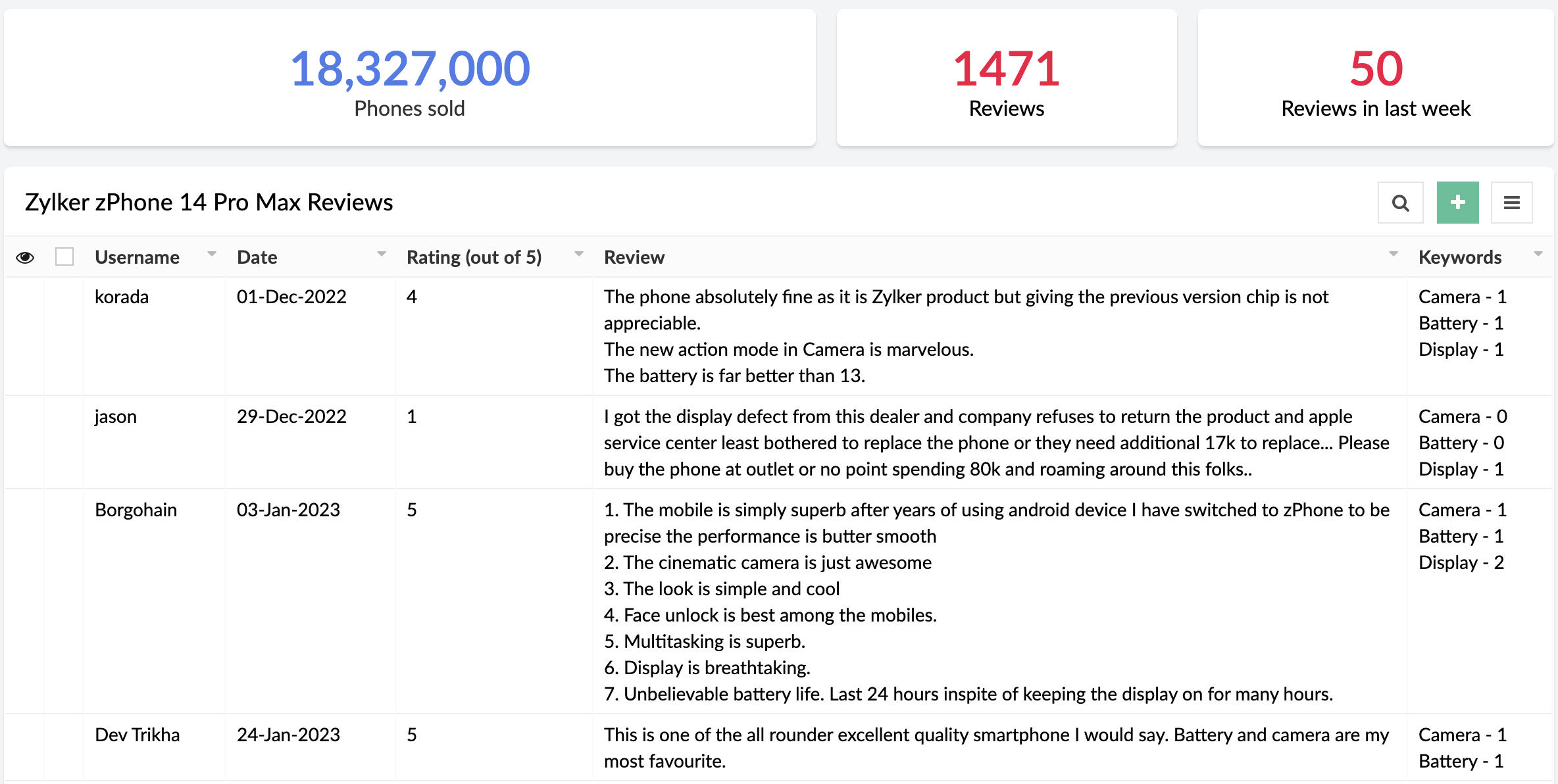
This functionality extracts the most important, representative words/phrases from large amounts of text data. In consumer facing industries, keyword extraction is quite helpful in analyzing customer responses, without having to go through each response manually.
Example:
An e-commerce site that sells mobile phones allows its customers to post reviews after purchase. Instead of manually going through each of the reviews, the site can use keyword extraction to gain insights automatically. They could choose to extract words like "camera", "battery", and "display" to learn more about the most discussed attributes of the product.
Sentiment analysis (Ready-to-use)
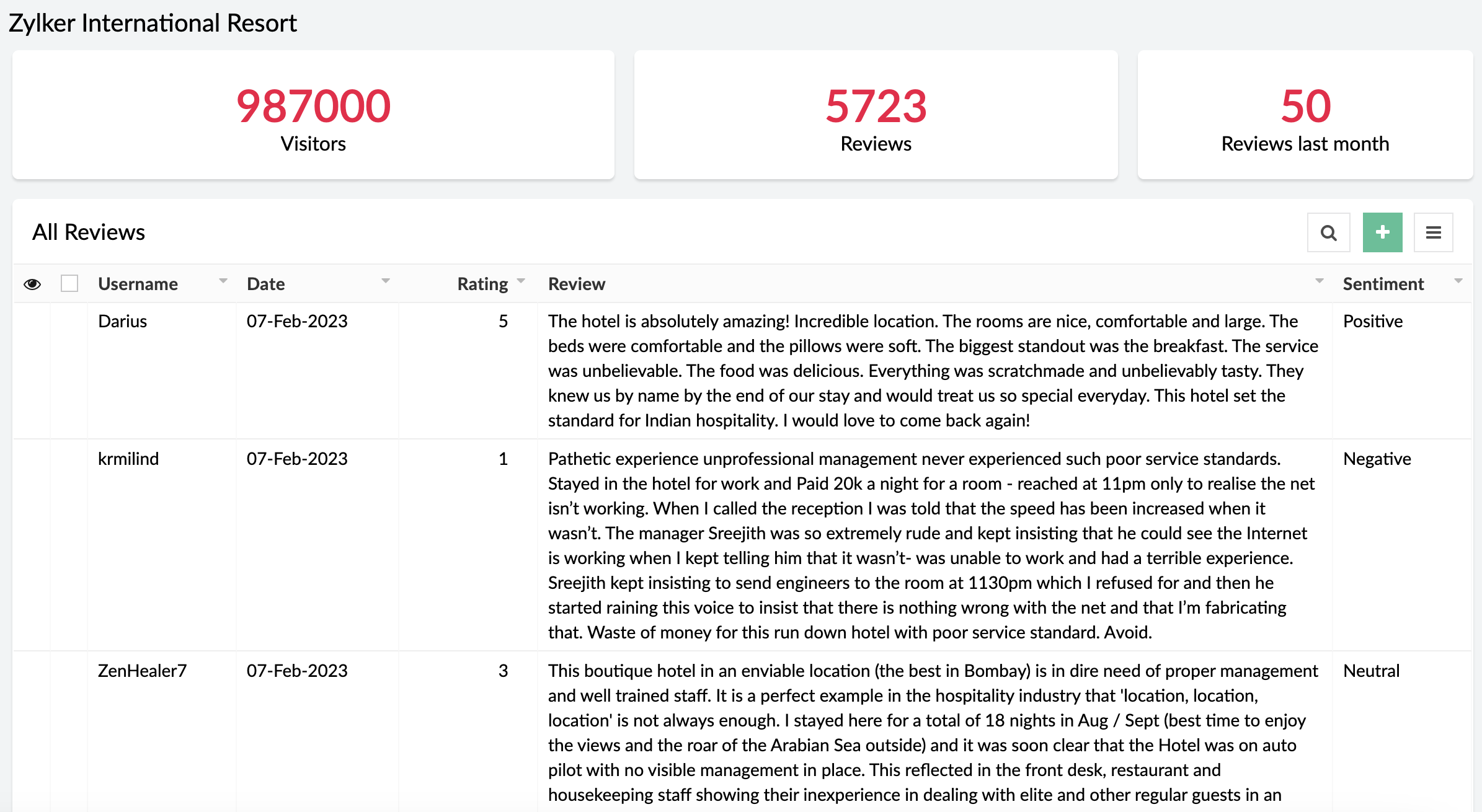
The sentiment analysis model analyzes text and predicts the sentiment expressed (positive, negative, or neutral). Sentiment analysis is widely used across industries to assist in analyzing customer feedback, customer support management, and social media monitoring.
Example:
A business receives a large amount of feedback on its products. It can use sentiment analysis to gather whether its products have been well-received or not.
When can I get my hands on it?
Pretty soon! We're as excited as you are and will be rolling out AI Modeler to C6 users on
February 20, 2023. Once live, we'll pop in a comment below this post and also update our
Release Notes page.
Versions
-
C5
(Ready-to-use models only. Use them via the AI fields in the form builder),
C6 (Both custom and ready-to-use models as Microservices)
C6 (Both custom and ready-to-use models as Microservices)
Pricing
- Ultimate & Professional
100 custom models & 250 ready-to-use with 1,000 free AI calls per month
After exhausting the free AI calls, you'll have to get monthly add-ons for more AI calls. You can choose from the $50(50000 AI Calls / Month), $100(120000 AI Calls / Month), and $200(250000 AI Calls / Month) add-ons based on your requirement.
100 custom models & 250 ready-to-use with 1,000 free AI calls per month
After exhausting the free AI calls, you'll have to get monthly add-ons for more AI calls. You can choose from the $50(50000 AI Calls / Month), $100(120000 AI Calls / Month), and $200(250000 AI Calls / Month) add-ons based on your requirement.
DCs
- US, EU, AU, IN, CN
Help documentation
In the meantime, you can go through our comprehensive set of help docs to learn the nitty-gritty of our AI models.
Our inbox is always open. Feel free to send your feedback to
support@zohocreator.com!
Regards,
Zoho Creator Team
Topic Participants
Ashwin Vishal R
Roberto Ríos
Ideal Calibrations
eminomartin61
Phillip Briski
Sticky Posts
Introducing Zoho Creator's 2025 Release Projection 2
Hello Creators! I'm Prakash, from the Creator product management team, and today I'm delighted to unveil our next set of features as part of Release Projection 2 for 2025. With thoughtful analysis and planning, we've curated powerful new capabilitiesZoho Creator - 2023 Release Projection 1
Hello everyone! A very Happy New Year to you and your family. Hope you're all good and having a great time using Zoho Creator to make your lives easier and your businesses prosper. 2022 was an action-packed year for us at Creator, and we hope to continueZoho Creator User Group meetups in a city near you! - Oct - Nov, 2023
Greetings from the Zoho Creator team! We're hosting a series of Zoho Creator meetups in various cities across the globe, and we'd love to meet you there! Our meetups are a great opportunity to network with industry peers, exchange ideas and best practices,Zoho Creator - 2023 Release Projection 2
Hello everyone! Time truly flies when you're having an incredible journey, and today we mark the completion of an eventful and action-packed six months. It feels like just yesterday when we embarked on this adventure together with the launch of our newUpcoming Updates - August 2022
Hi all, Greetings from the Zoho Creator team! Today we've got news for you on some exciting updates. And rest assured— there’s more to come! In this post, we'll be going over the upcoming features and improvements for this month as mentioned below. A
Recent Topics
Push Forms to CRM
Hello, I created a Form but forgot to integrate to CRM before many of the Forms were filled out. Is it possible to push those entries to CRM or should I just export a CSV then upload to CRM?Zoho Creator Developer Console | Improved Distribution and Lifecycle Management for apps
Hello everyone, We're excited to introduce new enhancements now in the Zoho Creator Developer Console. These updates strengthen private app distribution through licensing controls and extend environment support across all installed apps, helping teamsLogged out
Hi, just been working on a sheet when a pop up box appeared telling me I'm going to be logged out in x number of seconds and if I reload I may lose any edits, or words to that effect. It did indeed log me out and I did indeed lose my last edits. Any idea554 5.1.1 – Mail sending blocked for the domain(s): [gmail.com]
Here's your corrected text: Hello, I hope you are doing well. I was unable to send a message and received the following error: "554 5.1.1 – Mail sending blocked for the domain(s): [gmail.com]" I tried to send and deliver an email but got this error. IYou have reached the maximum limit of bank accounts that can be connected to Zoho Books through token.
I can no longer connect to my bank account to download transactions into Zoho Books. I egt the error message: "You have reached the maximum limit of bank accounts that can be connected to Zoho Books through token. To connect more accounts, write to usFirst Name in Mail
While sending a mail/message to the user, I want only the first name to be displayed—for example: “Hi John” instead of the full name using "Hi ${Name_Field}"Can you import projects into Zoho Projects yet?
I see some very old posts asking about importing project records into Zoho Projects. But I can't find anything up to date about the topic. Has this functionality been added? Importing tasks is helpful. But we do have a project where importing projectsConnectivity issues with Google Calendar and third-party integrations
Description: We are currently experiencing a critical failure with Zoho CRM third-party connections. This issue is heavily affecting our primary workflow. Symptoms: Sync Failure: Existing Zoho CRM to Google Calendar connections have been failing for approximatelyAdd Reauthentication Option for Zoho Bug Tracker Integration in Zoho Desk
Hello Zoho Desk Team, We hope you're doing well. We would like to request an enhancement to the Zoho Bug Tracker integration within Zoho Desk. Current Limitation: At the moment, there is no option to reauthenticate the Zoho Bug Tracker integration inNewby Questions
Q1. The top bar of Zoho Books has a "Search in Banking (/) " field. What is the proper use of this text box? - Searching for Amazon for example has no results but there are transactions. - Is the search case sensitive? - Are regular expressions allowed?Transaction Rule Matching
Q1. Is there a method to have the Transaction Rules applied across multiple Bank Accounts? Q2. To match "contains" text in Transaction Rules, is a wildcard or regular expression required? Is it case sensitive? Would searching for "issue" in the followingNewby Questions - Vendors, Customers, and Income vs. Other Income Clarifications
Q1. For Deposits, there does not seem to be an option for "Income". "Other Income" is an option however. What is the process to add the option to assign a deposit to type "Income"? Q2. In many cases Vendors and Customer are the same. Vendors may purchaseIntroducing parent-child ticketing in Zoho Desk [Early access]
Hello Zoho Desk users! We have introduced the parent-child ticketing system to help customer service teams ensure efficient resolution of issues involving multiple, related tickets. You can now combine repetitive and interconnected tickets into parent-childThree Zoho Billing Limitations Blocking Standard Subscription Operations
After working through Zoho Billing support for over a year on these three issues without resolution, we wanted to flag them to the broader community. We are curious whether other businesses are running into the same walls. 1. Cannot Prepone (Move Earlier)Automation #3 - Auto-sync email attachments to tickets
This is a monthly series where we pick some common use cases that have been either discussed or most asked about in our community and explain how they can be achieved using one of the automation capabilities in Zoho Desk. Most of our customers use emailCan't add a sender adress from zoho campaigns
hi, I need to change the sender address for a campaign. When i try to add it i get a message to say 'duplicated email address found while adding your sender address'. This is the first campaign i'm sending so I don't understand why this message is displayed? Thanks JaneUsing a custom single line External ID form as merge fields in templates
Hey everyone, We're looking to integrate a few external systems better with our Zoho CRM, and we had hoped to use external fields for this purpose. In this case, it would mean being able to use our own inoice system's invoice numbers are a direct id compatibleIntroducing Workqueue: your all-in-one view to manage daily work
Hello all, We’re excited to introduce a major productivity boost to your CRM experience: Workqueue, a dynamic, all-in-one workspace that brings every important sales activity, approval, and follow-up right to your fingertips. What is Workqueue? SalesZoho CRM - Feature Request - Analytics Components Group By Week Alternative Formats
On the Zoho CRM Analytics Components, please consider adding an option to allow group by week format to be changed to other formats such as Week Commencing or Week Ending dates, rather than the current Week Number. This would provide improved usabilityDashboard target enhancements
Often individuals in IT are creating dashboards for their sales team. The ability to create a single dashboard that can be used by multiple people is key. A components for a dashboard have the ability to filter by logged in user which is great. HoweverZoho Campaigns - Feature Request - Re-Send Existing Email Action in Automations/Journeys
Hi Zoho Campaigns and Zoho Marketing Automation teams, I would like to suggest a feature that would make building and managing complex automations significantly easier. The Feature Introduce a “Re-Send” or “Send Existing Email” action within AutomationsCan I write a check in Zoho Books with no associated bill?
This currently does not seem possible, and I have a client that desperately needs this function if I am able to convert them with Quickbooks. Thank you in advance for your reply.ISO 3166-2 Compliant Country and Regions
Zoho should consider implementing ISO 3166-2 standards for countries and regions in address dropdowns. It adds a lot of noise in the data when items added programmatically conform to ISO 3166-2 (e.g., TX for Texas, CA for Canada, etc.), but the few itemsUS State abbreviations in Address fields
In regards to all Address fields within Zoho, Is there a way to change the State field to be the 2 letter abbreviation vs the full spelled out US State name? Example: "Washington" should be WA. I am able to type in the abbreviated state, but it's notZoho Booking - TIN vs ATIN & ITIN
Zoho Booking Vendors allows for TAX ID values of SSN, EIN, ATIN an ITIN. There is no option for TIN. What is the method to properly add TIN to the list of taxable values for companies? For reference: Social Security Numbers (SSN) Individual Taxpayer IdentificationHow to see Statement Details Shown in Unclassified Transactions in All Transactions?
All, The list of Unclassified Transactions show the Statement Details and Descriptions. What is the method to see that column in the All Transactions list? -Thanks!Zoho Books | Product updates | October 2025
Hello users, We’ve rolled out new features and enhancements in Zoho Books. From iOS 26 updates to viewing reports as charts, explore the updates designed to enhance your bookkeeping experience. Zoho Books Updates for Apple Devices At WWDC 2025, AppleBill sent for Payment Approval
Zoho Books currently supports three levels of transaction approval for bills: Draft, Submit, and Approved. We are looking to add a layer of approval like a bill marked for payment before initiating payment requests through HSBC Bank. Can you please guideAsk the Experts - Live Q&A webinar
Hello Community, We’re excited to host our very first Ask the Experts session! Join us on 7 April 2026 from 11 a.m. to 12 p.m. (IST) for this live webinar Q&A session, where you will have an opportunity to connect directly with our product experts, gainAll new Address Field in Zoho CRM: maintain structured and accurate address inputs
Availability Update: 29 September 2025: It's currently available for all new sign-ups and for existing Zoho CRM orgs which are in the Professional edition exclusively for IN DC users. 2 March 2026: Available to users in all DCs except US and EU DC. 24Kaizen #235 - Automating record restoration using Recycle Bin APIs in Zoho CRM
Welcome to another Kaizen week. Here's a question that came up in our developer forum: "I'm working on a piece of software to automate conversion of Leads into Deals based on order status from my company's website. There are some cases where a previouslyOpen PDFs using Zoho PDF Editor
Hello users, In this article, we will be exploring the open PDF capability in Zoho PDF Editor to collaboratively edit PDFs, insert text and images, add fillable and e-signature fields, and more. You can upload PDFs upto 50 MB or 150 pages. Password-protectedOne Contact with Multiple Accounts with Portal enabled
I have a contact that manages different accounts, so he needs to see the invoices of all the companies he manage in Portal but I found it not possible.. any idea? I tried to set different customers with the same email contact with the portal enabled andBank Feeds Breaking Constantly
Hey Everyone, I have already reached out to support about this issue but I am wondering if anyone else is having the same issue. My bank feeds keep breaking within days of me fixing them by updating the credentials. Its been happening for a while andPrint Sales Orders, Purchase Orders or Invoices from API
Hello, Is it possible to use the print option that is available in Sales Orders Purchase Orders and Invoices with the API?. I don't see any information in the docs about this. ThanksTimed addition to segments
Hi there - hoping you can help me figure out a graceful way of doing this: • I want to add contacts to a Segment in Campaigns based on a Stage pick-list field value X in CRM - that bit's fine. The problem is that I only want to add them to the SegmentZoho Developer AI Agent = Claude AI + MCP Server + Zoho Ecosystem
Hello Zoho Community 👋 I’m excited to share a recent integration we’ve worked on at Officehub Tech: ✅Claude + MCP Server + Zoho Creator Zoho Developer AI Agent – an AI-powered Zoho automation platform This solution connects Zoho applications with anDynamic Questions in Zoho Forms
Is it possible to add dynamic questions (like displaying a user’s name) in Zoho Forms? I know this is possible in surveys, but can we implement similar functionality in Zoho Forms?Cliq iOS can't see shared screen
Hello, I had this morning a video call with a colleague. She is using Cliq Desktop MacOS and wanted to share her screen with me. I'm on iPad. I noticed, while she shared her screen, I could only see her video, but not the shared screen... Does Cliq iOS is able to display shared screen, or is it somewhere else to be found ? RegardsGoogle Fonts Integration in Pagesense Popup Editor
Hello Zoho Pagesense Team, We hope you're doing well. We’d like to submit a feature request to enhance Zoho Pagesense’s popup editor with Google Fonts support. Current Limitation: Currently, Pagesense offers a limited set of default fonts. Google FontsNext Page