Release update: Currently out for CN, JP, AU and CA DCs (Free and standard editions).
For other DCs, this will be released by mid-March.
Hello everyone,
We are pleased to share with you that Zoho CRM's Layout Editor now includes two new field formats— Radio Buttons and Sliders for Numeric Fields. These additions will make it easier for your users to fill out forms across all your modules, given the convenience they offer, as well as visual appeal.
Let's take a closer look at how these new elements work.
Radio Buttons
Radio Buttons are ideal when a user has to input a single choice from a minimal set of options that are presented upfront, making selection clearer and faster.
Here are some common use cases where Radio buttons work the best:
Billing cycle, such as Monthly or Yearly
Subscription plan, such as Basic, Pro, or Enterprise
Property type in real estate, such as 1 BHK, 2 BHK, or 3 BHK
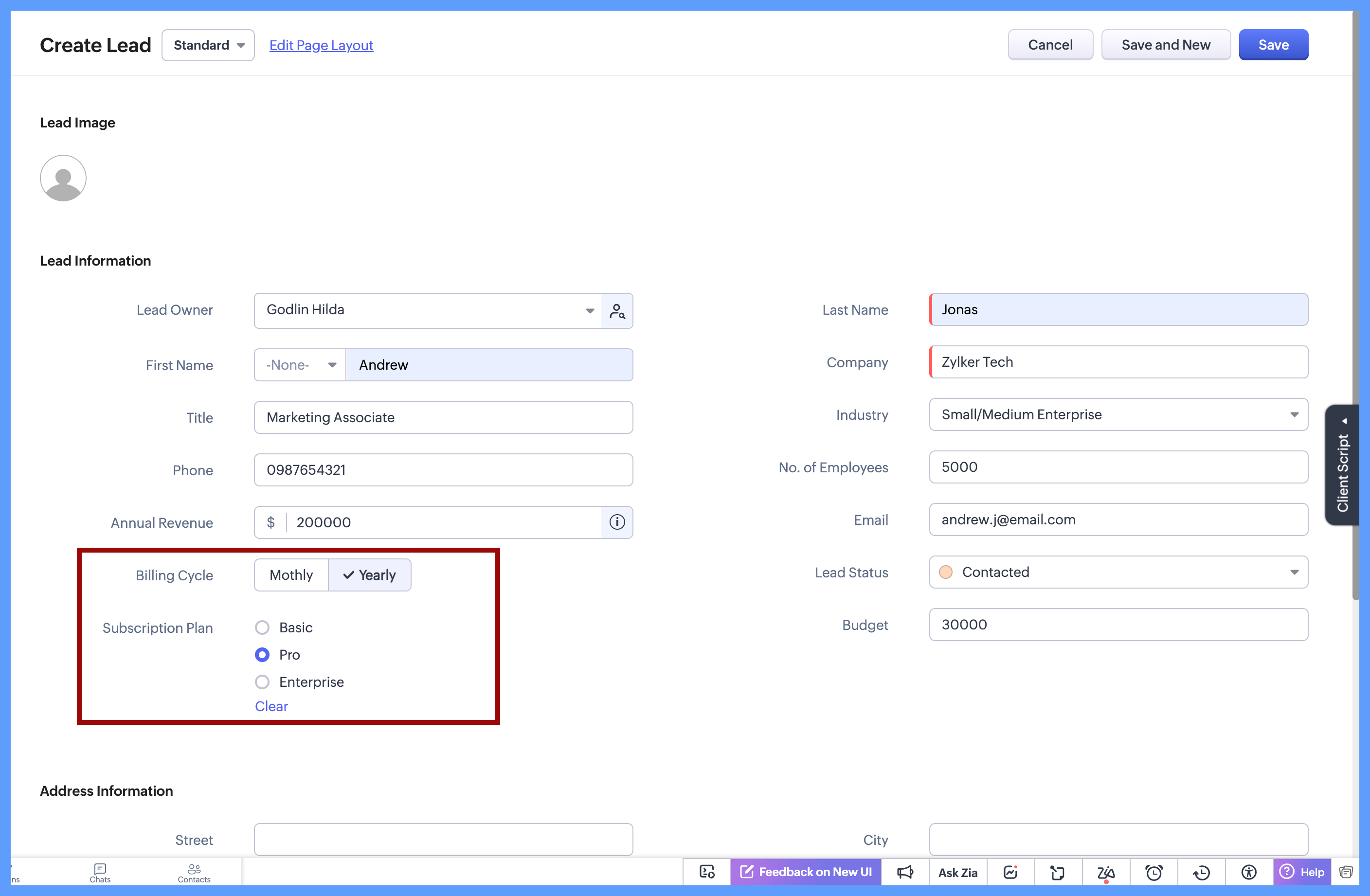
In each of these cases, the choices are limited to 2 or 3 options which are clearly defined, and the user needs to select just one option. Since all options are visible upfront, there’s no need to open a dropdown or scroll, making the selection quick and effortless.
Here's how to configure a radio button on the module's layout page:
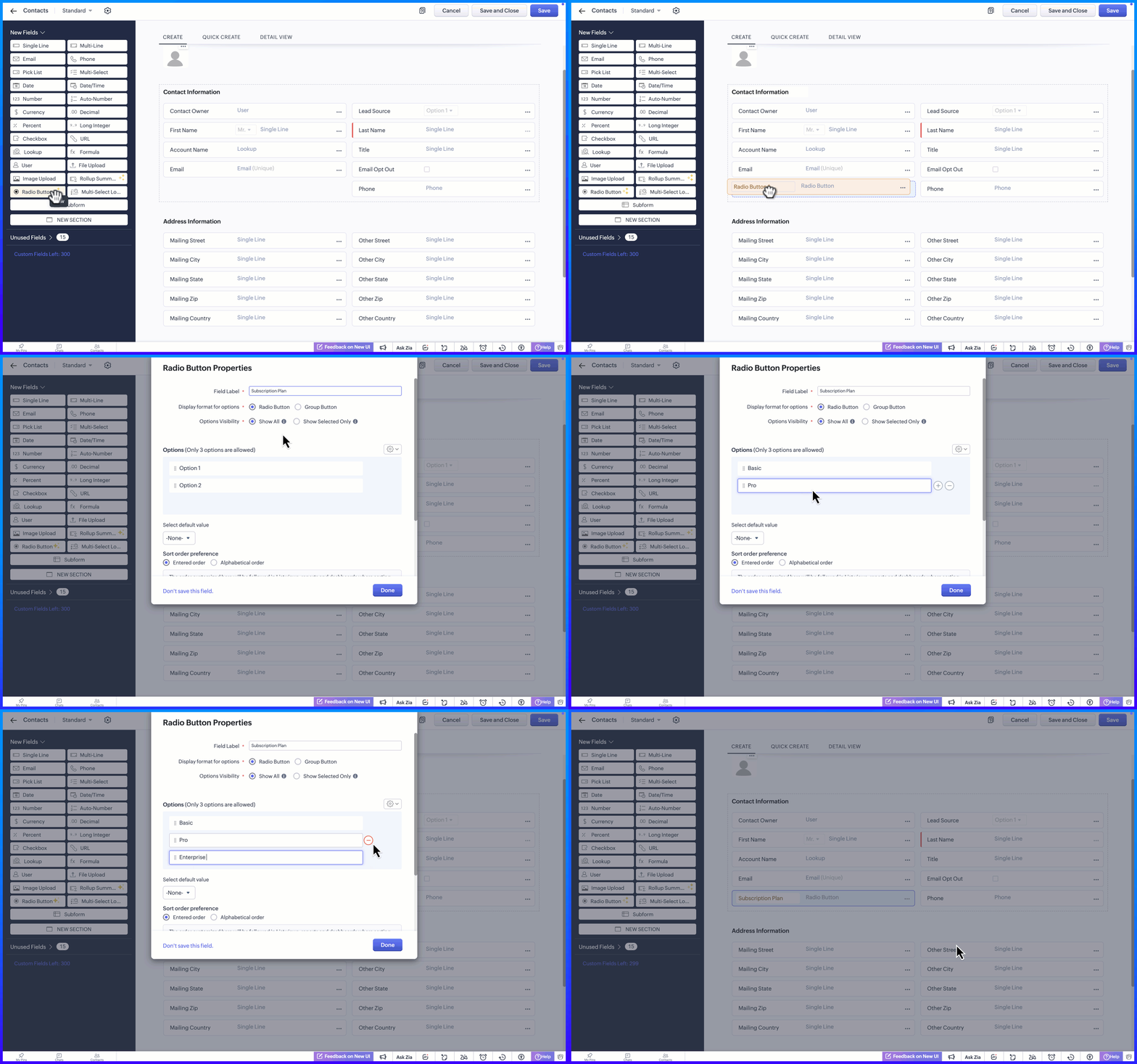
Display Format for options
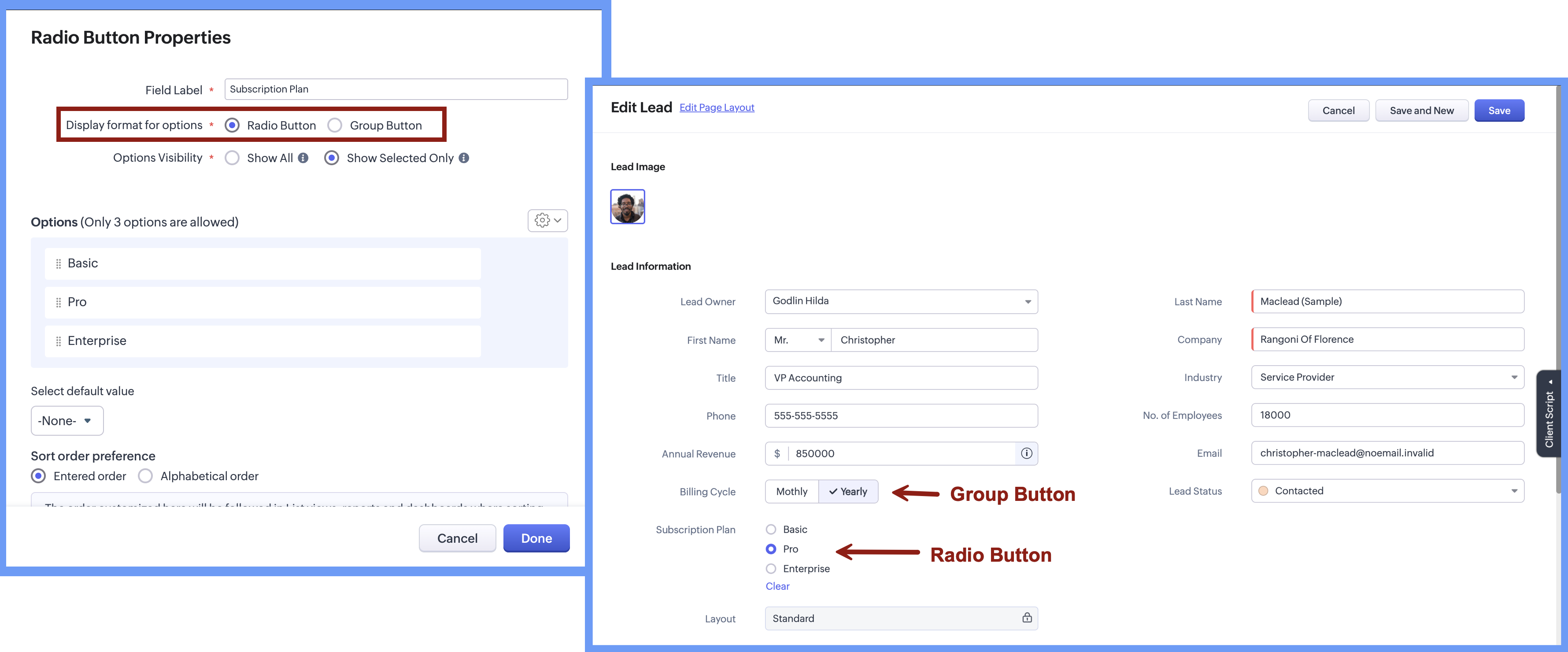
When adding the radio button, the Radio Button Properties pop-up lets you choose how the options appear on the screen. Rather than using a fixed format, you can select a display style that best suits the field, making it easier for users to see and choose from the available options.
There are two display format options:
Radio button, where options are listed one below the other.
Group button, where options appear as a compact set of selectable buttons.
This flexibility helps you design forms that feel clear and easy to use, while letting users quickly understand their choices and select the right option.
Option Visibility
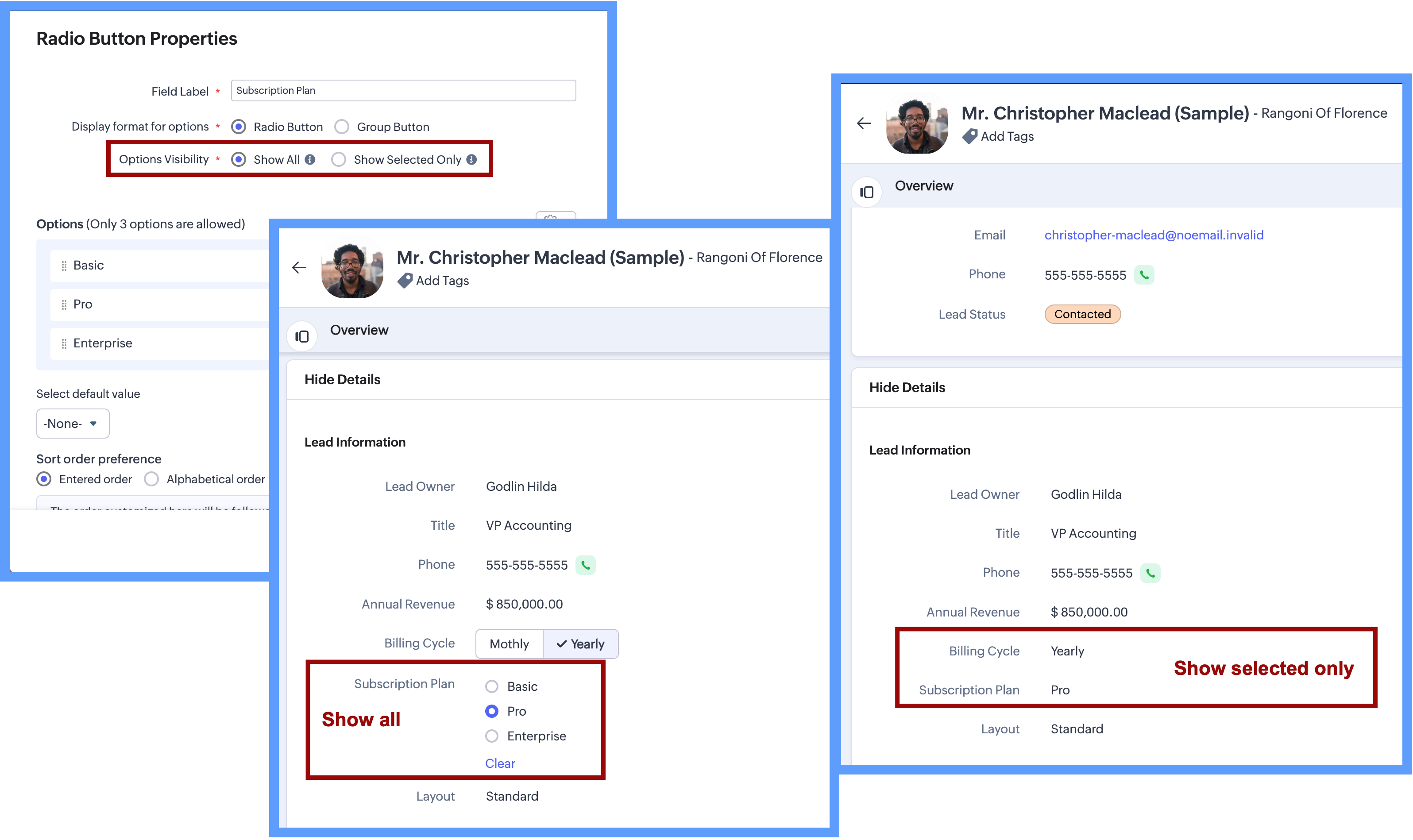
The Option Visibility setting helps you decide how much information users need to see after a value is selected.
Show all: If users need to view all available options at all times and quickly update their choice on the go, you can select Show All. This keeps every option visible on the screen, making it easy to compare options and change the selection whenever needed.
Show selected only: If the field is mainly required during record creation and showing all options later adds little value, you can choose Show Selected Only. In this case, only the chosen value is displayed after selection, keeping the details page clean and focused while still capturing the required input.
Important Notes:Consistent data, every time - Once a Radio Button field is configured with a fixed set of options, users can select only from those defined values while creating or updating records from any source. Any value outside the configured options is not accepted by the system, ensuring clean and consistent data across all records.
Options limit - 3 options per field in each layout. (Excluding Unused options)
Field Limits - This field is included under Text Field limits.
Edition Availability - In all editions except Free.
Modules Supported - Supported in all Modules, except Users.
Range and Sliders for Numeric Fields
Earlier, defining a default range for numeric fields was not straightforward. Users were not aware of what range was expected or acceptable until they saved the form. Let's say, for example, a Customer Satisfaction Score is being captured after a sales interaction. If the score is meant to be recorded on a scale of 1 to 5, there was previously no direct way to enforce or clearly communicate this range upfront.
Now, as we bring the setting of range for numeric fields, you will be able to define the minimum and maximum value for numeric fields. This sets clear boundaries on the values that can be entered, so the users know the expected range before they add any data.
Sliders are another prominent aspect that will help users to visually select a value within a defined range. When you choose to display sliding scale, the user can simply click on any interval or drag the slider to choose a value directly, making the selection more visual and guided.
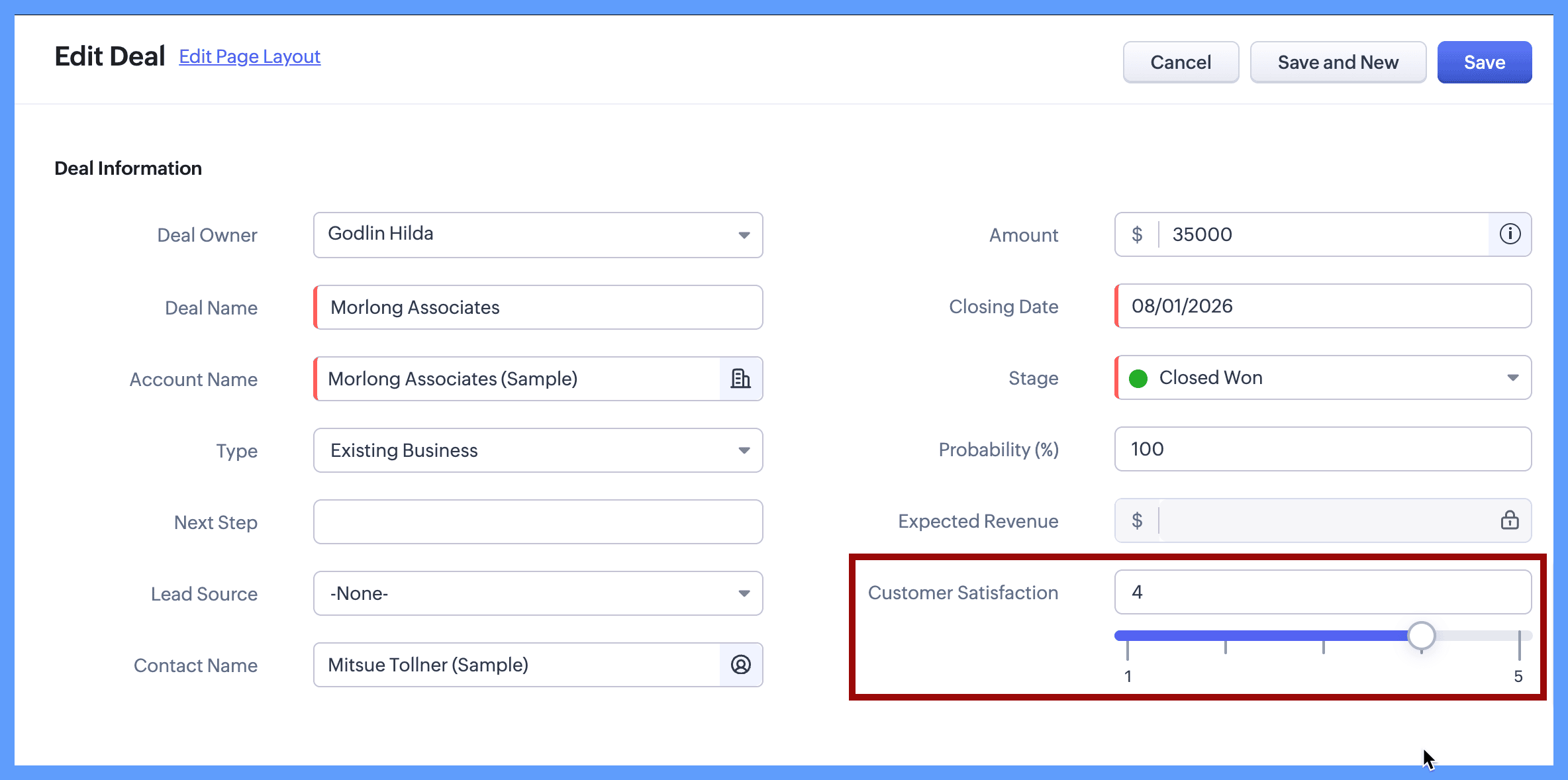
Continuing with the same example, you can define the customer satisfaction score by setting its minimum value to 1 and maximum value to 5. When the users create or edit a new record, they will clearly see that the value must fall within this range and can either type a number or use the sliding scale to select the score visually. The spaced intervals help users quickly understand the scale and choose the right value with confidence.
The same approach works well for other controlled scales, such as:
Here's how to configure a sliding scale for a numeric field on the module's layout page:
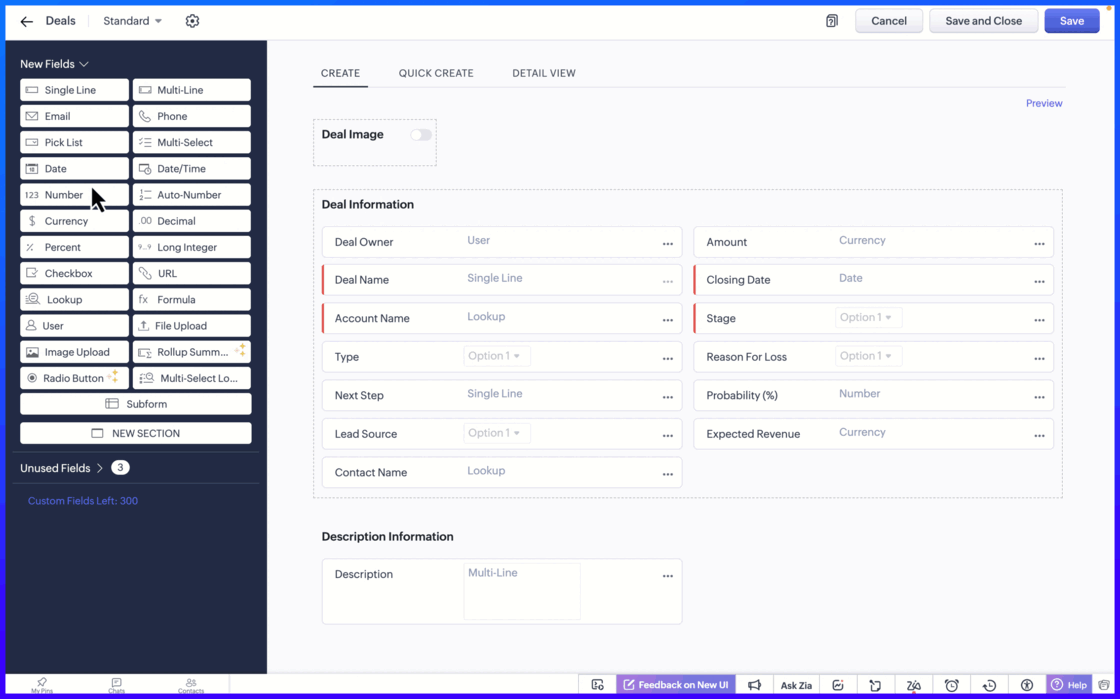
Setting the minimum and maximum limit values ensure that users can only enter values within an allowed range.
Important notes:
Sliding Scale depends on Limit Values: When you enable the Sliding Scale, you must define minimum and maximum liit values. However, Limit Values can be used on their own. If you do not need a Sliding Scale, you can simply set the limits to restrict the allowed range.
If the user tries to enter a value outside the allowed limits, an error message appears, preventing incorrect entries. This helps to keep the data accurate and consistent across records.
Fields Supported: Number, Long Integer, Decimal, Percent, Currency.
Edition Availability: All editions
Module Availability: All Modules
Sliding Scale is not supported for Subforms.
We hope you find this update helpful!
To learn more check out our help resource here.
Recent Topics
Introducing a smarter, faster, and more flexible charting experience
Hello Zoho Sheet users, We're delighted to share the latest news about a major update to charts in Zoho Sheet! The new version supports dynamic data ranges, granular styling options, faster loading, and other interesting enhancements that allow you to
How to create a new Batch and update Stock via Inventory?
Hi everyone, We are building an automation where a user enters batch details (Batch Number, Mfg Date, Expiry, and Quantity) into a Custom Module. I need this to trigger an API call to Zoho Inventory to: Create the new batch for the item. Increase the
Can't change form's original name in URL
Hi all, I have been duplicating + editing forms for jobs regarding the same department to maintain formatting + styling. The issue I've not run into is because I've duplicated it from an existing form, the URL doesn't seem to want to update with the new
How do I open MSG files in Microsoft Word?
If you want to open MSG files in Microsoft Word is not natively supported, as MSG is an email file format created by Microsoft Outlook. However, there are professional approaches to access MSG content in Word. First, open the MSG file in Outlook and copy
Unable to charge GST on shipping/packing & Forwarding charges in INDIA
Currently, tax rates only apply to items. It does not apply tax to any shipping or packing & forwarding charges that may be on the order as well. However, these charges are taxable under GST in India. Please add the ability to apply tax to these charges.
How to add packing & forwarding charge in purchase order & quotation???
Hello Zoho Team I have just started using Zoho for my company and I wanted to make purchase order. My supplier charges fix 2% as packing & forwarding on Total amount of material and then they charge me tax. For example, Material 1 = 100 Rs Material 2
How to create a boxplot chart in Zoho Analytics?
Hi, I'm looking forward to making a boxplot in Zoho Analytics, either with all my data or with a time segmentation. No documentation or YouTube video explaining that was found. I guess this is a feature gap. How feasible would it be to add this to Analytics?
What are the create bill API line item requiered fields
While the following documentation says that the line items array is requiered it doesn't say what if any files are requiered in the array. Does anyone know? API documentation: https://www.zoho.com/inventory/api/v1/bills/#create-a-bill I'm trying to add
WorkDrive issues with Windows Explorer Not Responding
We are using WorkDrive to collaborate on editing video content. We have a lot of files and quite a few are a few gigs. Recently anytime I try and work with the files Explorer freezes for a couple minutes whether it's dragging the files into Premiere or
Connecting Zoho Inventory to ShipStation
we are looking for someone to help connect via API shipStation with Zoho inventory. Any ideas? Thanks. Uri
Where is the settings option in zoho writer?
hi, my zoho writer on windows has menu fonts too large. where do i find the settings to change this option? my screen resolution is correct and other apps/softwares in windows have no issues. regards
Using IMAP configuration for shared email inboxes
Our customer service team utilizes shared email boxes to allow multiple people to view and handle incoming customer requests. For example, the customer sends an email to info@xxxx.com and multiple people can view it and handle the request. How can I configure
When Does WorkDrive integrate with Books?
POP mailbox limits
If I am accessing a remote POP mail server using Zoho Mail is there a mailbox quota for the account or is it all related to my mail account storage limits?
Warranty Service and Repair in Zoho FSM
Hi There, We are a retail store that sells products and also performs installations and repairs. Our field technicians handle this work. Some repairs are covered by manufacturers, who reimburse us for both parts and labour. In these cases, we perform
Zoho Sheet for Desktop
Does Zoho plans to develop a Desktop version of Sheet that installs on the computer like was done with Writer?
WhatsApp phone number migration
Hi @Gowri V and @Pheranda Nongpiur, Thanks for implementing the promised enhancements to the integration between Zoho CRM and WhatsApp. The previous discussion has been locked, so I'm opening this new one. I am copying below a specific
WebDAV support
I need WebDAV support so that I can upload/download (and modify) documents from my local file system. Is anything planned in his direction?
Suggestions for Improved Table Management and Dashboard Filter Controls in Zoho Analytics
Dear Zoho Analytics Community, I hope you are doing well. I would like to share a few suggestions based on issues I am currently experiencing while working with visualizations and dashboards. Firstly, when I create a new visualization using the Sales-Order
SPF: HELO does not publish an SPF Record
I am using Zoho mail. Completed all of the required prerequisites from the dashboard to avoid any issues with mail delivery. But when checking on mail-tester.com getting the following error. Can anyone help me solve this?
How do I create an update to the Cost Price from landed costs?
Hi fellow Zoho Inventory battlers, I am new to Zoho inventory and was completely baffled to find that the cost price of products does not update when a new purchase order is received. The cost price is just made up numbers I start with when the product
Price Managment
I have been in discussions with Zoho for some time and not getting what I need. Maybe someone can help explain the logic behind this for me as I fail to understand. When creating an item, you input a sales rate and purchase rate. These rates are just
Actual vs Minimum
Hi all, I am sure I am not the only one having this need. We are implementing billing on a 30-minute increment, with a minimum of 30 minutes per ticket. My question is, is there a way to create a formula or function to track both the minimum bill vs the
Generate leads from instagram
hello i have question. If connect instagram using zoho social, it is possible to get lead from instagram? example if someone send me direct message or comment on my post and then they generate to lead
Kaizen #234 - Automating Deal Handoff with Zia Assistant API, Workflow, Deluge, and Widget in Zoho CRM
Hello all! Welcome back to a fresh Kaizen week. In this post, we will explore how to automate the deal handoff process in Zoho CRM using Zia Assistant API + Workflow + Deluge + Widgets. Here’s how the final output looks when a deal is reassigned 1. Deal
How do you print a refund check to customer?
Maybe this is a dumb question, but how does anyone print a refund check to a customer? We cant find anywhere to either just print a check and pick a customer, or where to do so from a credit note.
Ability to assign Invoice Ownership through Deluge in FSM
Hi, As part of our process, when a service appointment is completed, we automated the creation of the invoice based on a specific business logic using Deluge. When we do that, the "Owner" of the invoice in Zoho FSM is defaulted to the SuperAdmin. This
All new Address Field in Zoho CRM: maintain structured and accurate address inputs
Availability Update: 29 September 2025: It's currently available for all new sign-ups and for existing Zoho CRM orgs which are in the Professional edition exclusively for IN DC users. 2 March 2026: Available to users in all DCs except US and EU DC. Latest
Enhancement to ICR’s field prompting: Preferred data extraction using advanced field prompting
Dear Customers, We hope you’re well A quick background Intelligent Character Recognition (ICR) comes as part of Zia’s optical recognition capability called Zia Vision. When we introduced it last April, the data extraction was training-based and was applicable
See a list of all records enrolled in a cadence?
I am looking for a way to see a list of all leads or contact currently enrolled in a cadence. I do not see any way to do this through the cadence UI.
Limitation in chart of accounts
There is a limitation of 4000 accounts in chart of accounts Zoho needs to remove this limit
How do I change the account bank charges are charged to?
I want bank charges charged to my Credit Card Fees account. Is there a way to do this?
Real signature in Zoho Expense PDF report ?
Hello ! Is there a way to put a real signature on the signature line when a PDF report is generated in Zoho Expense? Through Zoho Sign or another way? Can't seem to make it work.
Copy paste settings
Hello all i have 2 organizations running in ZOHO books in one organization i have customised Tax rates, codes and customized templates instead of manually doing again in org 2 can i have some shortcut to copy paste or export and import??
Custom TDS on Vendor Credits via API
Hi, We are using Zoho Books APIs for posting Bills and vendor credits. We are unable to post custom TDS amount posting vendor credits. Can you please share the API spec and Payload that need to be sent for Custom TDS for Vendor Credits.
"Unlink" Advance from Bill without Deleting the Payment Record
I am writing to highlight a significant workflow issue in Zoho Books (India Edition) regarding Vendor Advances and Bills. The Scenario: I recorded an Advance Payment to a vendor. I matched/reconciled this payment in the Banking module. I received a Bill
Advance Payment Record Removed When Deleting Applied Credit from Bill
Hello, So while working with vendor advance payments, I noticed that removing the applied credit from a bill also removes the corresponding entry from the Payments Made section. What I did : Recorded an advance payment to a vendor through Payments Made.
What is the best way to convert MSG file to Word format?
The best way to convert MSG files to Word format is by using a reliable and professional tool Aryson MSG file Converter. Manual methods are often time-consuming and may not preserve email formatting, attachments, or metadata accurately. In contrast, Aryson
Address Typeahead Extension for Zoho Books
I installed the Address Typeahead extension for zoho books but when I went to configure it, it said that that version was deprecated. Is there a newer version somewhere?
Zoho Projects : Task should auto-update to 'In Progress' if timer started
Namaskaram. Right now, if a Task's timer is started, the Task stays in 'Not Started' status. One has to manually update it to 'In Progress'. From a #uxdesign standpoint, it is an unnecessarily two step process to start working on a task. It would be better that, if I start the timer on a task, it should automatically change to 'In Progress' status. Crafted with ❤️ Zoho Gurus | Zoho One Practice Team @ CubeYogi Zoho Authorised Partner | 7+ Yrs | 200+ Projects | 100+ Customers
Next Page