Introducing Radio Buttons and Numeric Range Sliders in Zoho CRM

For other DCs, this will be released by mid-March.
We are pleased to share with you that Zoho CRM's Layout Editor now includes two new field formats— Radio Buttons and Sliders for Numeric Fields. These additions will make it easier for your users to fill out forms across all your modules, given the convenience they offer, as well as visual appeal.
Let's take a closer look at how these new elements work.
Radio Buttons are ideal when a user has to input a single choice from a minimal set of options that are presented upfront, making selection clearer and faster.
Here are some common use cases where Radio buttons work the best:
Billing cycle, such as Monthly or Yearly
Subscription plan, such as Basic, Pro, or Enterprise
Property type in real estate, such as 1 BHK, 2 BHK, or 3 BHK
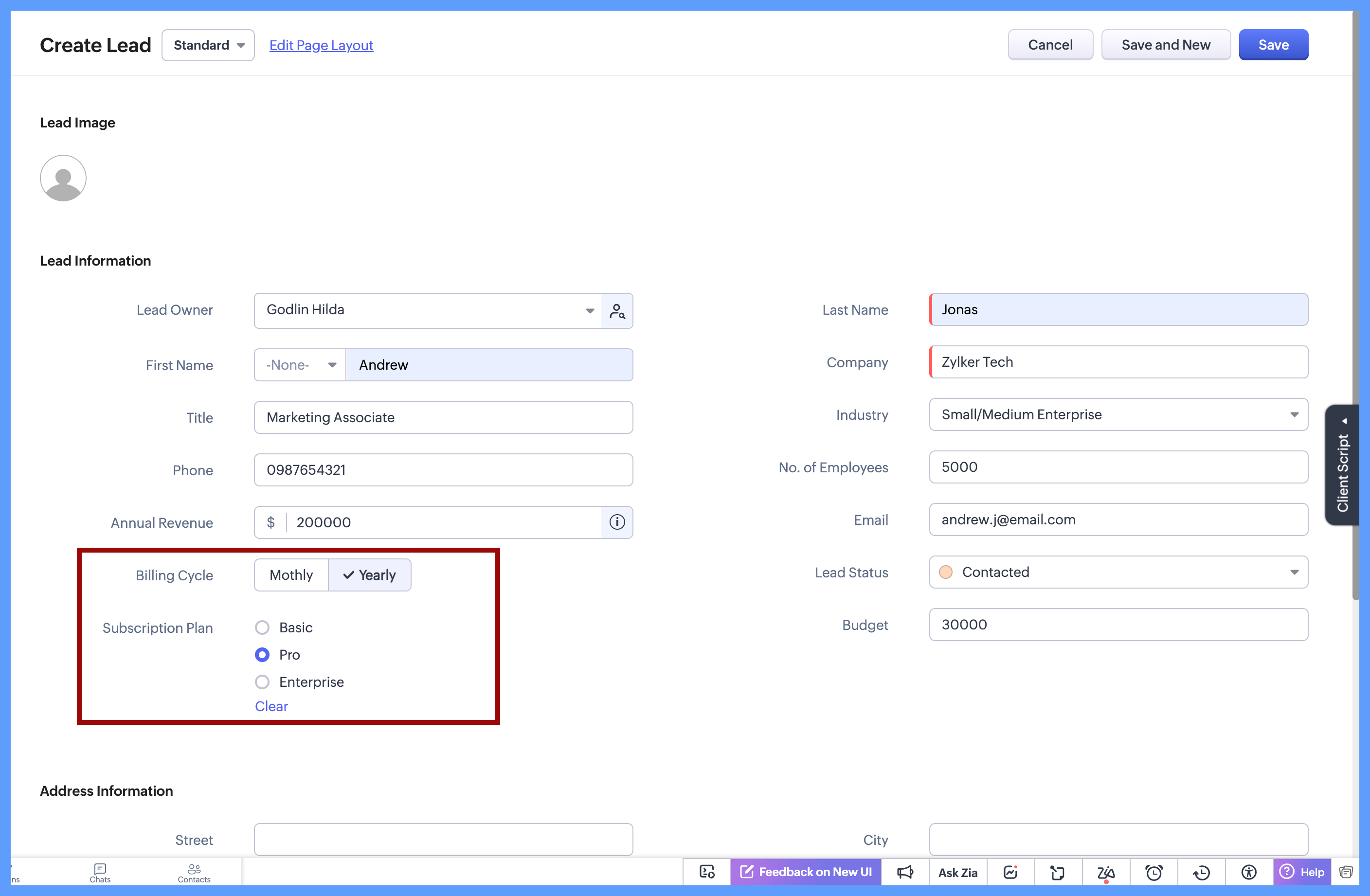
In each of these cases, the choices are limited to 2 or 3 options which are clearly defined, and the user needs to select just one option. Since all options are visible upfront, there’s no need to open a dropdown or scroll, making the selection quick and effortless.
Here's how to configure a radio button on the module's layout page: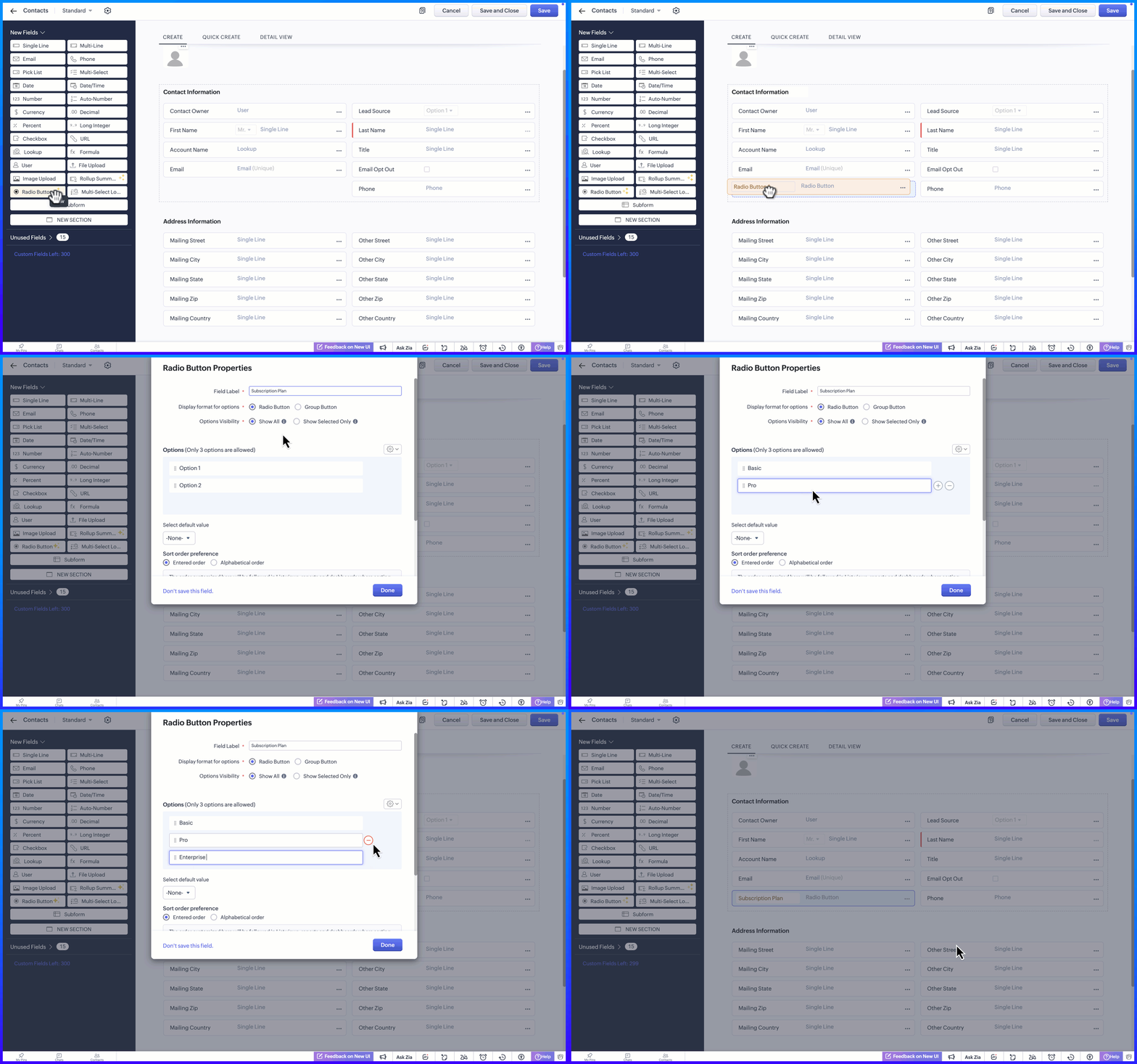
Display Format for options
When adding the radio button, the Radio Button Properties pop-up lets you choose how the options appear on the screen. Rather than using a fixed format, you can select a display style that best suits the field, making it easier for users to see and choose from the available options.
There are two display format options:
Radio button, where options are listed one below the other.
Group button, where options appear as a compact set of selectable buttons.
This flexibility helps you design forms that feel clear and easy to use, while letting users quickly understand their choices and select the right option.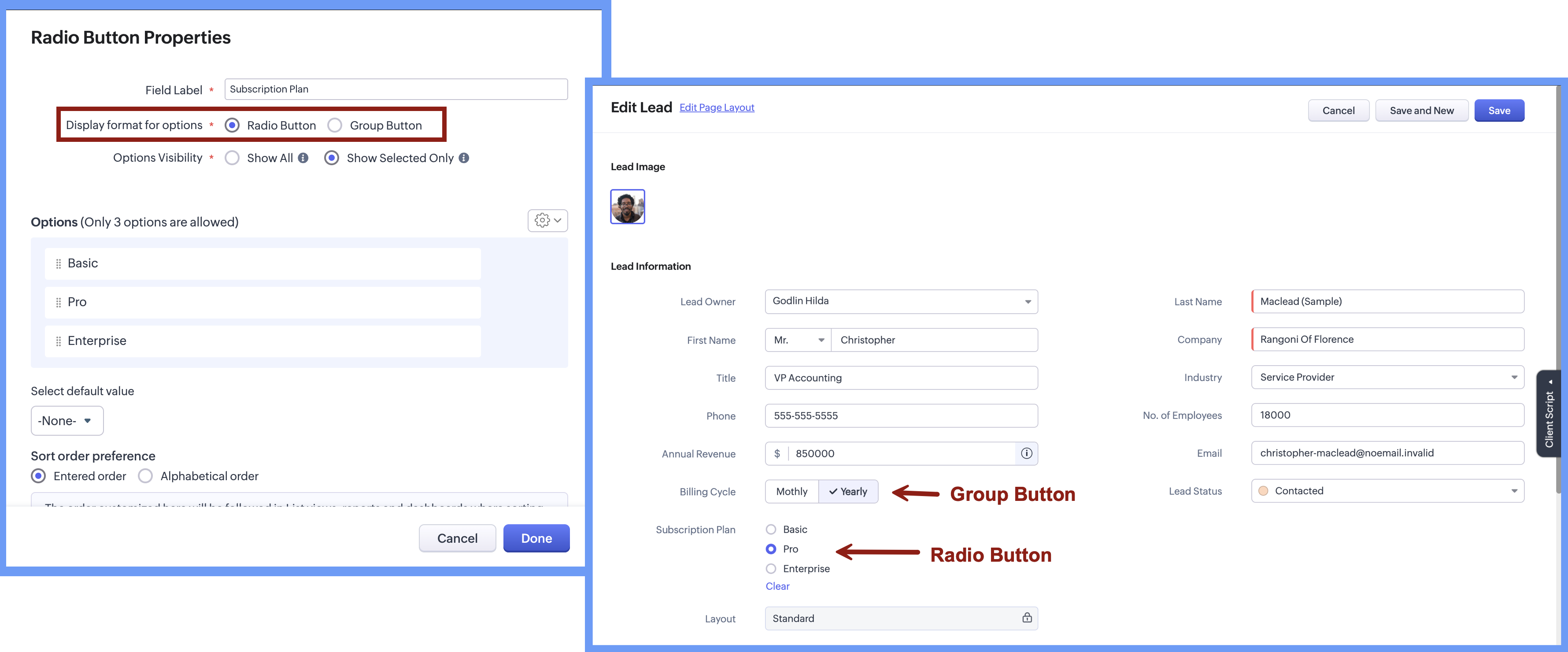
Option Visibility
The Option Visibility setting helps you decide how much information users need to see after a value is selected.
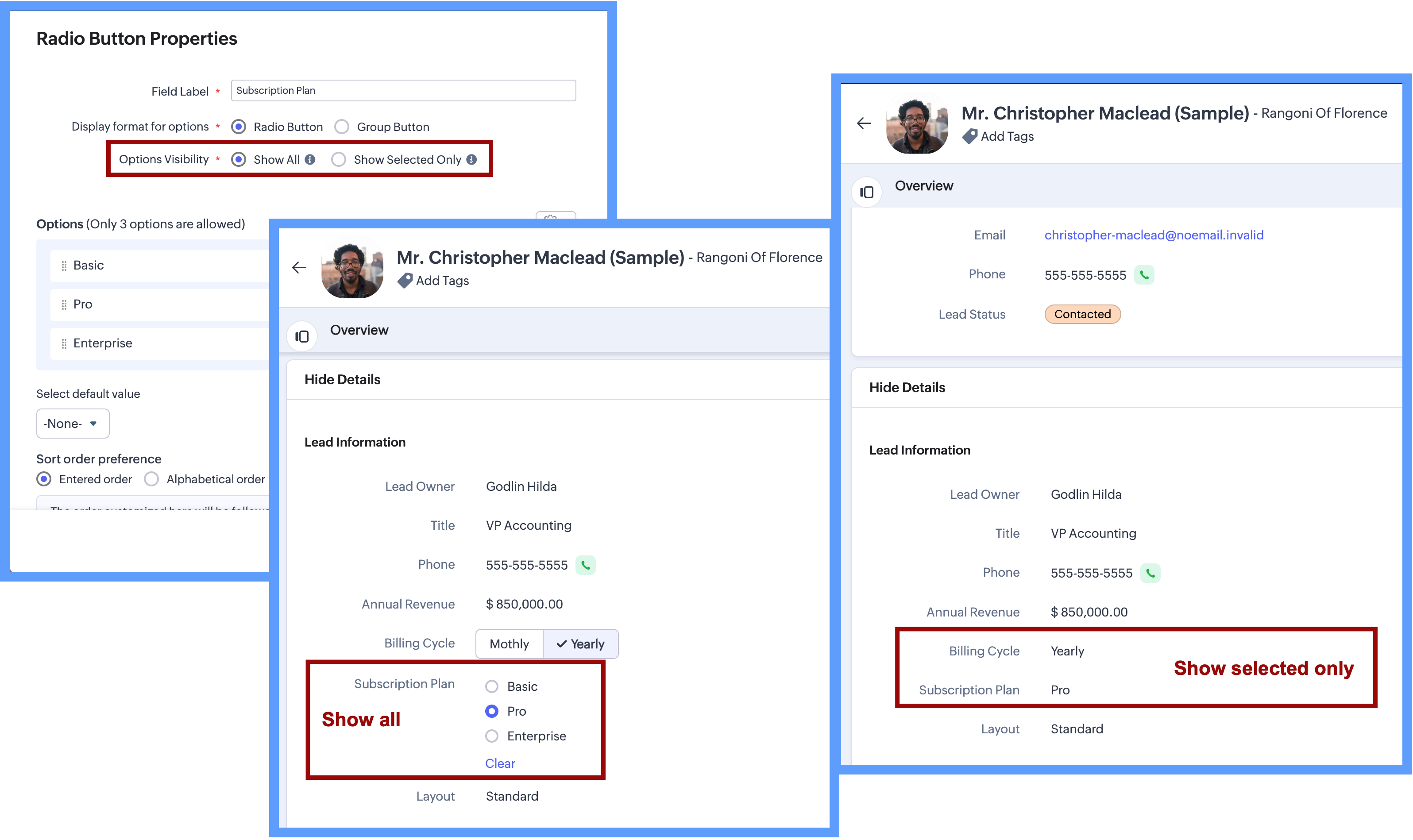
Show all: If users need to view all available options at all times and quickly update their choice on the go, you can select Show All. This keeps every option visible on the screen, making it easy to compare options and change the selection whenever needed.
Show selected only: If the field is mainly required during record creation and showing all options later adds little value, you can choose Show Selected Only. In this case, only the chosen value is displayed after selection, keeping the details page clean and focused while still capturing the required input.
Important Notes:
Consistent data, every time - Once a Radio Button field is configured with a fixed set of options, users can select only from those defined values while creating or updating records from any source. Any value outside the configured options is not accepted by the system, ensuring clean and consistent data across all records.
Options limit - 3 options per field in each layout. (Excluding Unused options)
Field Limits - This field is included under Text Field limits.
Edition Availability - In all editions except Free.
Modules Supported - Supported in all Modules, except Users.
Range and Sliders for Numeric Fields
Earlier, defining a default range for numeric fields was not straightforward. Users were not aware of what range was expected or acceptable until they saved the form. Let's say, for example, a Customer Satisfaction Score is being captured after a sales interaction. If the score is meant to be recorded on a scale of 1 to 5, there was previously no direct way to enforce or clearly communicate this range upfront.
Now, as we bring the setting of range for numeric fields, you will be able to define the minimum and maximum value for numeric fields. This sets clear boundaries on the values that can be entered, so the users know the expected range before they add any data.
Sliders are another prominent aspect that will help users to visually select a value within a defined range. When you choose to display sliding scale, the user can simply click on any interval or drag the slider to choose a value directly, making the selection more visual and guided.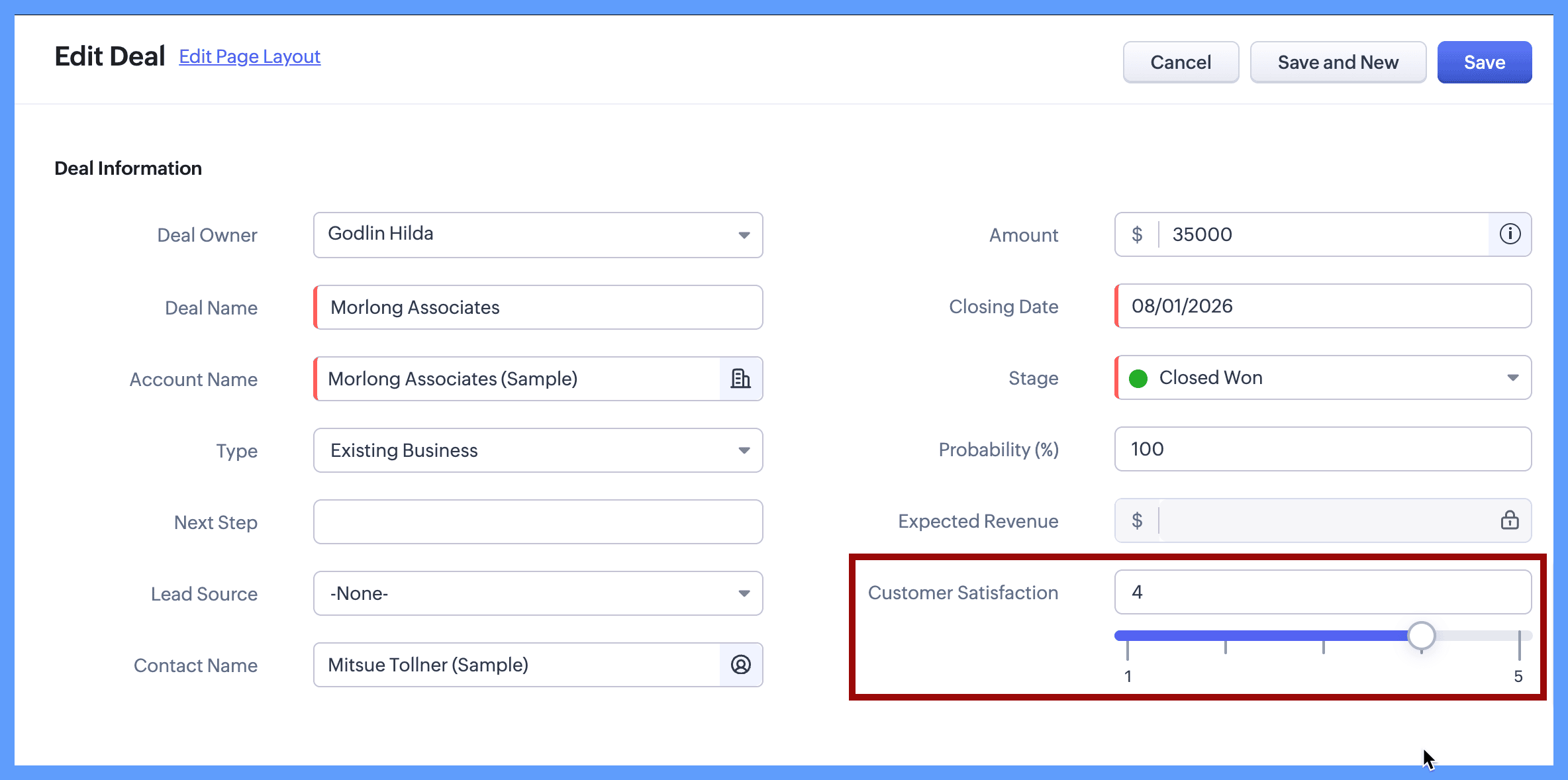
Continuing with the same example, you can define the customer satisfaction score by setting its minimum value to 1 and maximum value to 5. When the users create or edit a new record, they will clearly see that the value must fall within this range and can either type a number or use the sliding scale to select the score visually. The spaced intervals help users quickly understand the scale and choose the right value with confidence.
The same approach works well for other controlled scales, such as:
Setting a budget
Defining a probability range such as 10% to 100%
Defining priority levels on a numeric scale
Here's how to configure a sliding scale for a numeric field on the module's layout page:
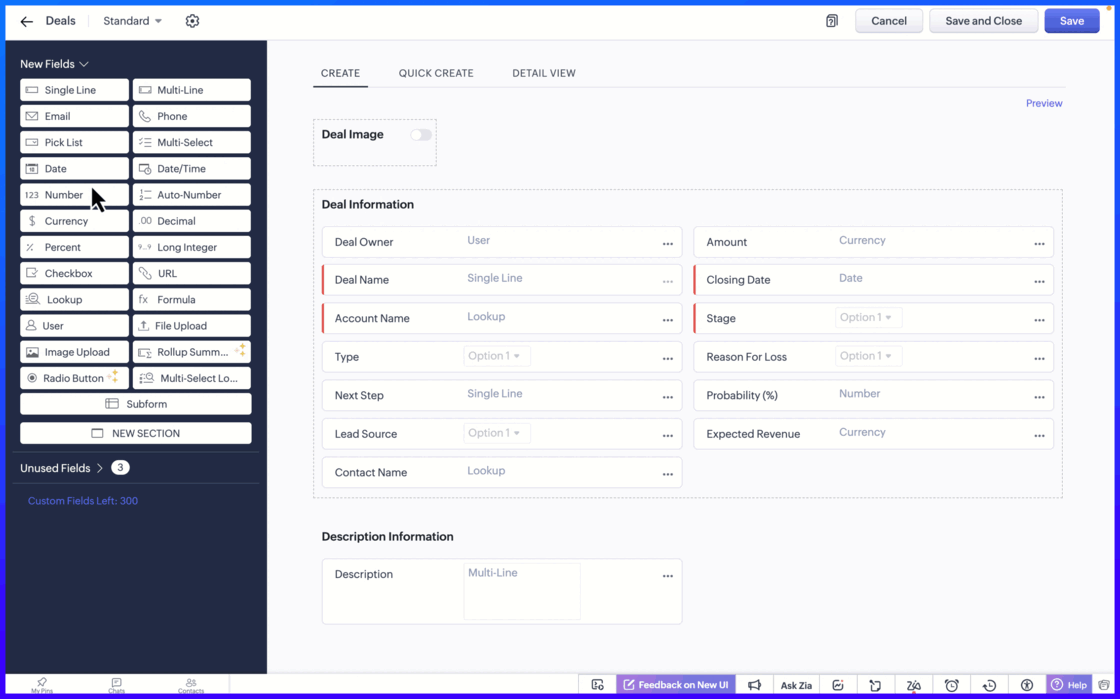
Setting the minimum and maximum limit values ensure that users can only enter values within an allowed range.
Important notes:
Sliding Scale depends on Limit Values: When you enable the Sliding Scale, you must define minimum and maximum liit values. However, Limit Values can be used on their own. If you do not need a Sliding Scale, you can simply set the limits to restrict the allowed range.
If the user tries to enter a value outside the allowed limits, an error message appears, preventing incorrect entries. This helps to keep the data accurate and consistent across records.Fields Supported: Number, Long Integer, Decimal, Percent, Currency.
Edition Availability: All editions
Module Availability: All Modules
Sliding Scale is not supported for Subforms.
We hope you find this update helpful!
To learn more check out our help resource here.
Topic Participants
Ann Antonite Parappurath
Haiku Technical Support
Ishwarya SG
Ivan Staykov
Sticky Posts
Good news! Calendar in Zoho CRM gets a face lift
Dear Customers, We are delighted to unveil the revamped calendar UI in Zoho CRM. With a complete visual overhaul aligned with CRM for Everyone, the calendar now offers a more intuitive and flexible scheduling experience. What’s new? Distinguish activitiesVoC in Zoho CRM is now data savvy: Explore response drilldown, summary components and participation in CRM criteria
VoC has all the goods when it comes to customer intelligence—which is why we're constantly enhancing it. We recently added the following: A customer drilldown component that shows you the list of prospects and customers behind a chart's attribute ExpandedWrapping up 2025 on a high note: CRM Release Highlights of the year
Dear Customers, 2025 was an eventful year for us at Zoho CRM. We’ve had releases of all sizes and impact, and we are excited to look back, break it down, and rediscover them with you! Before we rewind—we’d like to take a minute and sincerely thank youPresenting ABM for Zoho CRM: Expand and retain your customers with precision
Picture this scenario: You're a growing SaaS company ready to launch a powerful business suite, and are looking to gain traction and momentum. But as a business with a tight budget, you know acquiring new customers is slow, expensive, and often deliversCreate and populate a record in an instant: Introducing zero-shot field prompting to Zia's ICR
A couple of months ago, we upgraded our in-house AI image detection and validation tool, Zia Vision, with intelligent character recognition (ICR). By training Zia with sample images, you could create and enrich CRM records with data extracted from standard
Recent Topics
Kaizen #220: Actions API - Webhooks APIs - Part 2
Hello all!! Welcome back to the follow-up Kaizen post of Kaizen #219: Actions API - Webhooks APIs - Part 1. In the previous week, we covered how to configure a basic Webhook and how to include Headers, Body, and URL Parameters using both the POST WebhookStandard Payment Term is not pulled from account to quotation
Hey Team There seems to be something off. I do have "Net 30" as my default payment term in Zoho Books for my customers. If, from the customer overview or quote section, I create a new Quotation, the payment terms field stays blank and doesn't get theManage your invoices from Bigin's mobile app (iOS)
Hello everyone! We're happy to announce that users can now integrate Zoho Books with the latest version of Bigin's iOS app. Zoho Books can be integrated with Bigin only via the web application. Users can view the Zoho Books tab in the detail pages ofSystematic SPF alignment issues with Zoho subdomains
Analysis Period: August 19 - September 1, 2025 PROBLEM SUMMARY Multiple Zoho services are causing systematic SPF authentication failures in DMARC reports from major email providers (Google, Microsoft, Zoho). While emails are successfully delivered dueAccessibility controls and multilingual captcha authorization for Help Center users
Hello everyone, As part of our ongoing effort to improve user experience, we are excited about the accessibility controls and predefined accessibility personas added in the Help Center, similar to what is already available in Zoho Desk. Help Center usersZoho Sign + Zoho CRM : la solution pour simplifier vos accords de vente
La conclusion d’un contrat de vente nécessite de nombreuses étapes : préparation de documents, validations successives et collecte des signatures. Les équipes commerciales passent souvent par plusieurs cycles de collaboration et de révision, tout en assurantItem/service subtotal
Just discovered & really pleased that we can drag to re-order the line items in Sales orders & Invoices, a very nice feature which doesn't seem to be documented? It would be nice to be able to insert a subtotal as a line item to complete this great featureSend email template "permission denied to access the api"
Hello, Per the title, I'm trying to send a Zoho CRM Email template based on the advice given here: https://help.zoho.com/portal/en/community/topic/specify-an-email-template-when-sending-emails-in-custom-functions (I'd prefer to send right from Delugehow to Solve Conflict Invoices in Zoho POS
Hello Team, I am facing a repeated issue in Zoho POS while saving a sale that contains service-based items. My products are intentionally created as Service (Non-Inventory) items because I do not want to track stock for them. However, every time I tryCopy, Paste, Highlighted text
when i copy paste text it gets highlighted. Fix this. WTF is with this black highlight ? Fix copy pasting. Some people pay for using this mail service.Pricing Strategies: #6 Common Mistakes while Configuring Pricing
"Why does this month's billing feel messy again?" That was the exact line Priya muttered while staring at the spreadsheet full of edited pricing, one-off discounts and mismatched subscription details. Her business was growing, but the pricing machinePublish to LinkedIn via API
Hi, Is it possible to publish a job opening to LinkedIn (paid job slots) if creating a job opening via api / deluge function? Or is the user required to manually publish via the job boards process? Many Thanks AdrianFSM - Associating and selecting Contacts based on Service Addresses
Hi FSM team, I've come across an FSM limitation I wanted to share for improvement. I'm currently configuring FSM for a client who provides heating system install and maintenance services. The are often sub contracted by building management companies toDo Unpublished Products in Shopify Sync to Zoho POS?
Will an unpublished product in Shopify sync to Zoho POS? I would like to know how Zoho POS handles products that are in draft/unpublished status in Shopify.Problem in Zoho POS frontend ERP.
We are facing some difficulties in our billing and inventory processes and require your support to resolve them at the earliest. Customer Advance Payments We receive advance payments from customers for upcoming sales. Please guide us on how to recordCategorize Items with Item Headers
Hello customers, Did you ever want to classify items based on specific categories to help your customers understand your invoice better? With the new Item Header feature, you can easily categorize items in your invoices and estimates and give them a common title. Item Headers are available in the Invoices, the Recurring Invoices and the Estimates module. It can be carried forward from estimates to invoices at the time of converting the estimates. To add an item header: Go to the Estimates, InvoicesDiscount on the transaction level in POS
"Is it possible to apply a discount on the total bill before tax in Zoho POS?" I want to apply a discount on the total transaction amount in Zoho POS, but the discount should be calculated before the taxes are applied. Is there an option to do this inSend Automated WhatsApp Messages and Leverage the Improved WhatsApp Templates
Greetings, I hope all of you are doing well. We're excited to announce a major upgrade to Bigin's WhatsApp integration that brings more flexibility, interactivity, and automation to your customer messaging. WhatsApp message automation You can now useJobs at multiple locations
Hi A lot of times we have same job open at multiple locations. So I would like an option where we can create a job and choose multiple locations. Currently we have to create individual jobs for each location. If we can create one job and mention multipleTag Adding Option in Kanban Card Customization Bigin CRM Mobile App
I would like to request an option to add and display tags on Kanban cards in the Bigin CRM mobile app. This feature would make it easier to categorize deals and quickly identify priorities while working on the go.Empowered Custom Views: Cross-Module Criteria Now Supported in Zoho CRM
Hello everyone, We’re excited to introduce cross-module criteria support in custom views! Custom views provide personalized perspectives on your data and that you can save for future use. You can share these views with all users or specific individualsAssociating a Candidate to a Job Listing
Hello, I am trying to use Zoho Forms embedded on my website for candidates to apply for a job opening. I want the form then to tie directly with zoho recruit and have the candidate be automatically inputed into Recruit as well as associated with the specificWhatsApp Voice Message Sending Option in Bigin CRM
I would like to request a feature that allows users to send WhatsApp voice messages directly from Bigin CRM. This would help improve communication efficiency and make it easier for teams to respond quickly to customer inquiries.CRM: hosting a single html file in Zoho and displaying it as a widget
I have seen that CRM offers the option of uploading a web project to Zoho itself and displaying it as a widget in CRM. The instructions then talk about setting a development environment with Node and developing an application to upload to Zoho. But IHow to change position button transtition of Blueprint?
Hi Everyone, Look at my screenshoot, it is possible move the reject button to the right? I couldn't find that setting in the blueprint. Thank you.Multi file upload
Hi, I just wonder if one could upload multiple files in one shot, say between one and three files, without adding multiple File Upload fields? Thanks, AlalbanySorting Descending in a lookup
I have a case number lookup on multiple forms. I need the most recent added to appear at the top of the lookup or as the list of cases grom it's too much to scroll. Is there a way to have a look up sort descending?Auto-upload Creator Files to WorkDrive
Hi everyone, I’m working on a workflow that uploads files from Zoho Creator to specific subfolders in Zoho WorkDrive, as illustrated in the attached diagram. My Creator application form has two multi-file upload fields, and I want—on successful form submission—toAsap Widget 2.0
Where's the documentation for the new ASAP widget? https://www.zoho.com/desk/developers/asap/#introduction this one is outdated How can we dynamically navigate between different views? How can we prefill ticket forms using ASAP 2.0?Can the Trigger be changed?
I'm afraid I already know the answer, but here goes... After activating a workflow (under Campaigns > Automations), Then later choosing to Edit the workflow, Can the Workflow's Trigger be changed? Currently the entire Trigger section + options are goneMarketer's Space: Proven tips to improve open rates – Part I
Hello Marketers! Welcome back to another post in Marketer's Space! In this week's post, we'll discuss the ever-important concept of open rates. This will be a multi-part series, as we have a range of topics to cover. Open rates—which measure the percentageCan't send nor receive emails on my external email accounts since this morning
Greetings, I have two external accounts integrated into Zoho mail through POP3 + SMTP. These accounts have always worked normally since the day I've set them up. Starting 10:30 AM this morning (Western European Time) both suddenly stopped sending andCreating Custom PDF Template from Form
I am trying to create a custom PDF from form submissions. I have the standard subscription and it indicates that PDF forms are included. I cannot find anywhere to create PDF forms. I try to follow the instructions from here: https://help.zoho.com/portal/en/kb/forms/form-settings/pdf-settings/pdf-editor/articles/creating-your-own-pdf-template#Creating_your_template_from_the_scratchImportant Update: Facebook Metrics Deprecation & Impact on Zoho Analytics
Dear Zoho Analytics users, Facebook has deprecated a set of metrics from the Facebook Pages Insights API, effective November 15, 2025. As a result, these changes will affect any reports and dashboards in Zoho Analytics that rely on Facebook Pages data.Introducing Zoho MCP for Bigin
Hello Biginners! We're excited to introduce Zoho MCP for Bigin, a completely new way of interacting with Bigin data using AI. With Zoho MCP, you can securely connect your Bigin account with popular AI agents like Claude, Cursor, Windsurf, and VS Code,MCP > Creator connection failing with Claude
I'm trying to get claude to access any of my Zoho Creator apps and it keeps failing. I have enabled all tools for creator and ensured in claude settings that everything is authorised. Here is what claude says : Unfortunately, the error messages I'm receivingIs it possible to sync data every 5–10 minutes in Zoho Analytics (CRM or Excel imports)?
Hello Team, I want to know if Zoho Analytics supports near real-time syncing of data from different sources. My requirements: I am importing data from Zoho CRM → Zoho Analytics I also have some datasets maintained in Excel/CSV I want both data sourcesFeature Request: Dynamic Dimension Control for zc_LoadIn Popups
As detailed in this community discussion, Zoho Creator's zc_LoadIn parameter is a vital tool for opening components (forms, reports, or pages) in modal dialogs via HTML snippets, Notes, or Rich Text Fields. While powerful, this feature suffers from aSubforms in stateless forms
I think the title says it all. We need to be able to add subforms to stateless forms. Currently the only workaround is to create a Form and delete each record upon submission of the form. I need to build an interface to update our inventory. BasicallyText wrap column headers in reports?
Is it possible to auto wrap column headers so that a longer multi-word header displays as two lines when the column is narrower than the width of the header title?Next Page