Introducing the all-new email parser!
Greetings,
We are pleased to introduce to you, a brand-new, upgraded version of the Zoho CRM Email Parser, which is packed with fresh features and has been completely redesigned to meet latest customers needs and their business requirements.
On that note, the Old Email Parser will reach end-of-life on June 1, 2023. After EOL, old email parser will not be available in your CRM account. In the spirit of preparing for this deprecation, we encourage all of you to try the all-new email parser at the earliest. In this post, we will discuss key pointers on the following:
— the improvements made in the New Email Parser
— how to prepare for deprecation of the Old Email Parser
What is the email parser?
Email parser is a data extraction tool in Zoho CRM that helps an organization in various business functions such as lead generation and information updates. It is designed to automate the process of adding records to Zoho CRM by extracting information from incoming emails.
Now, let's have a detailed look at the functionalities that we have brought with this enhancement.
Enhancements in the New Email Parser
The following are the enhancements you can now see when you switch to the latest version of the email parser:
1. Single parser email ID for all parser rules
Previously, for each parser rule there was a different parser address. It was often tedious to assign and keep track of a new parser ID for each individual vendors. The logistics involved in tracking and maintaining these parser IDs was itself often time-consuming. However, in the new version of the email parser, there's only a single, common parser email ID for all rules, meaning that regardless of how many vendors you're working with or how many rules you create, you can use one parser ID for all. This makes working with the email parser much easier and cuts down your setup and maintenance time significantly.
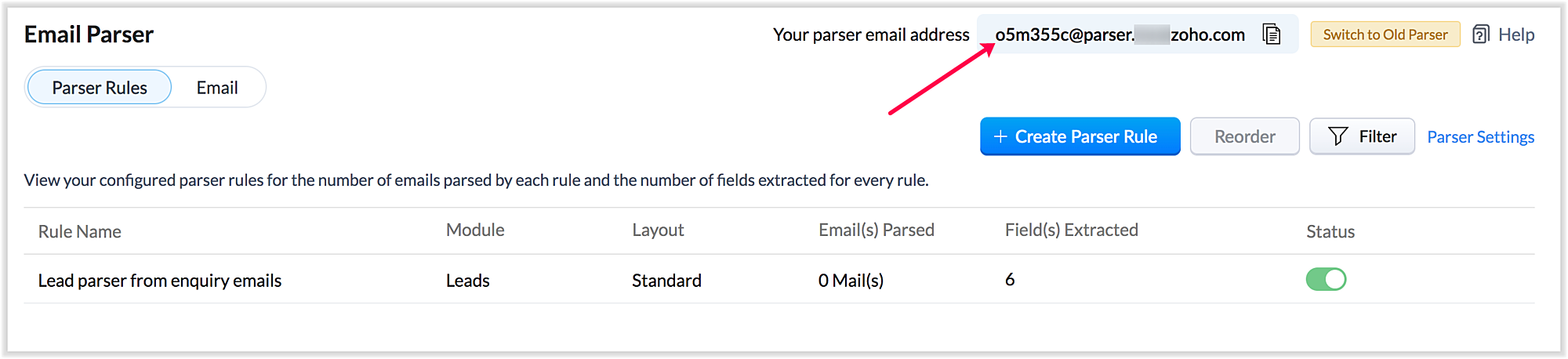
Also, a maximum of five approved parser addresses can be set up in common for all rules early on during the configuration.
2. A more powerful and intuitive configuration interface
In the latest version of email parser, the entire configuration interface allows free parsing and is highly intuitive, powerful, and, most importantly, user-friendly—unlike the previous version, which demanded rigid adherence to delimiters.
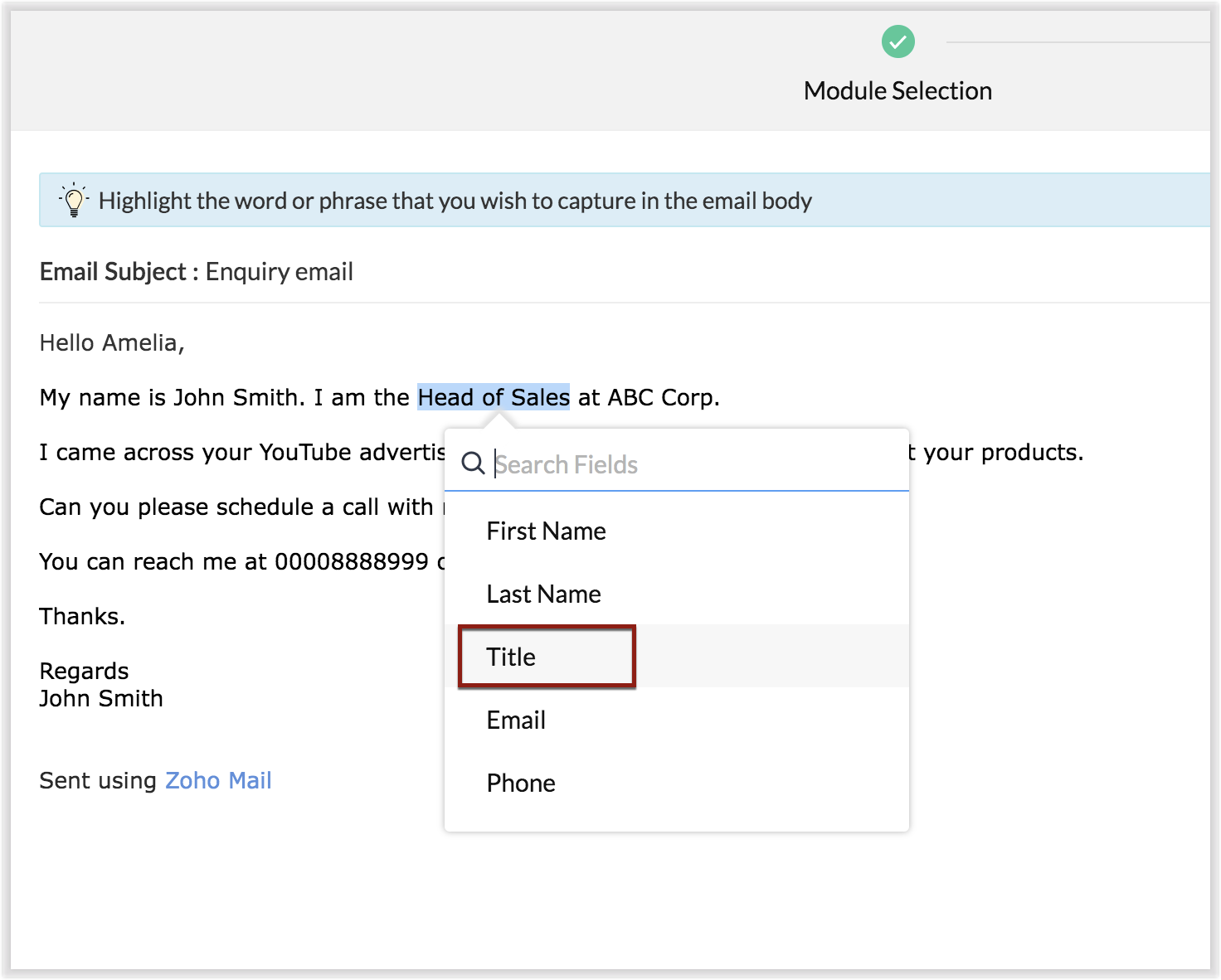
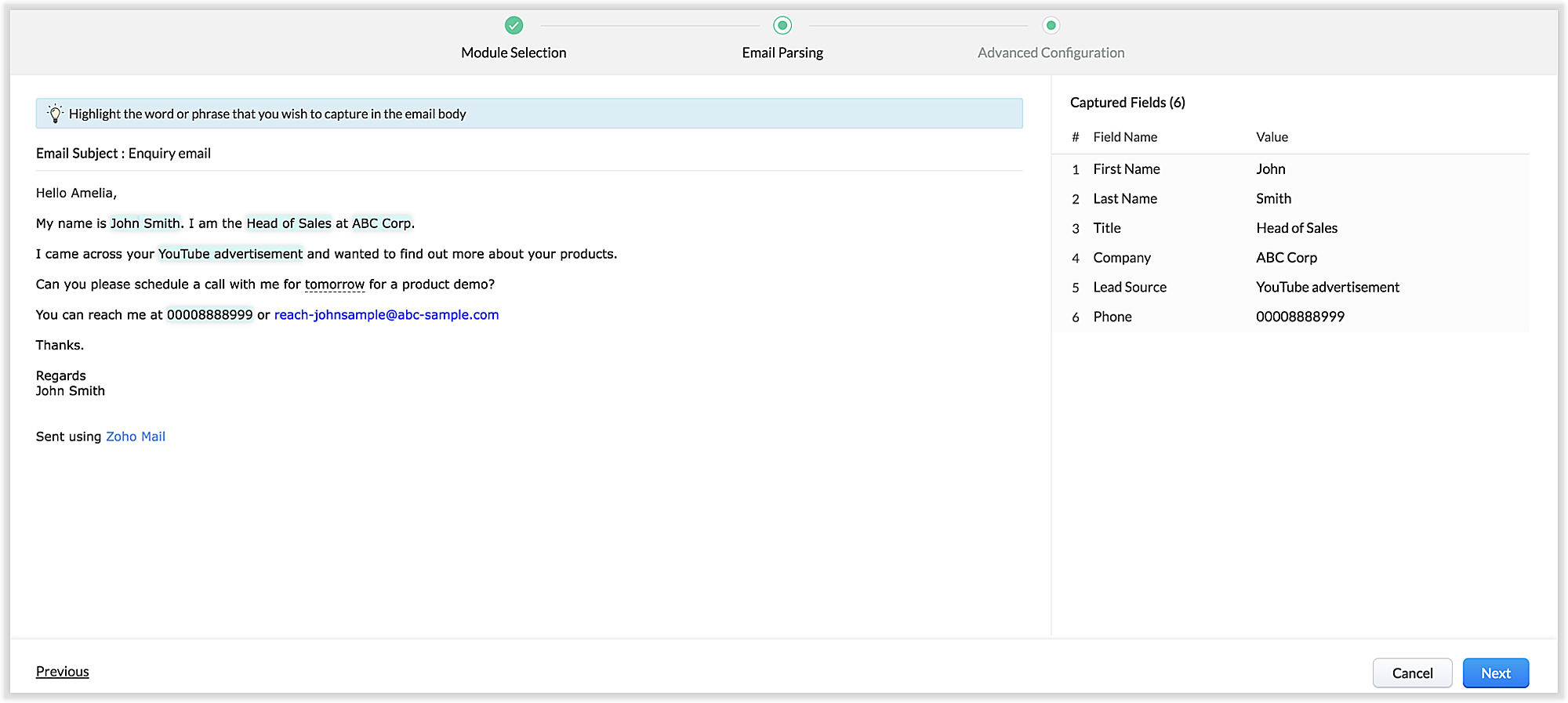
The email parser interface automatically gives you a preview of the parsed data on the same screen where the field mapping occurs, so it's easier to get a snapshot of all the fields that are being parsed.
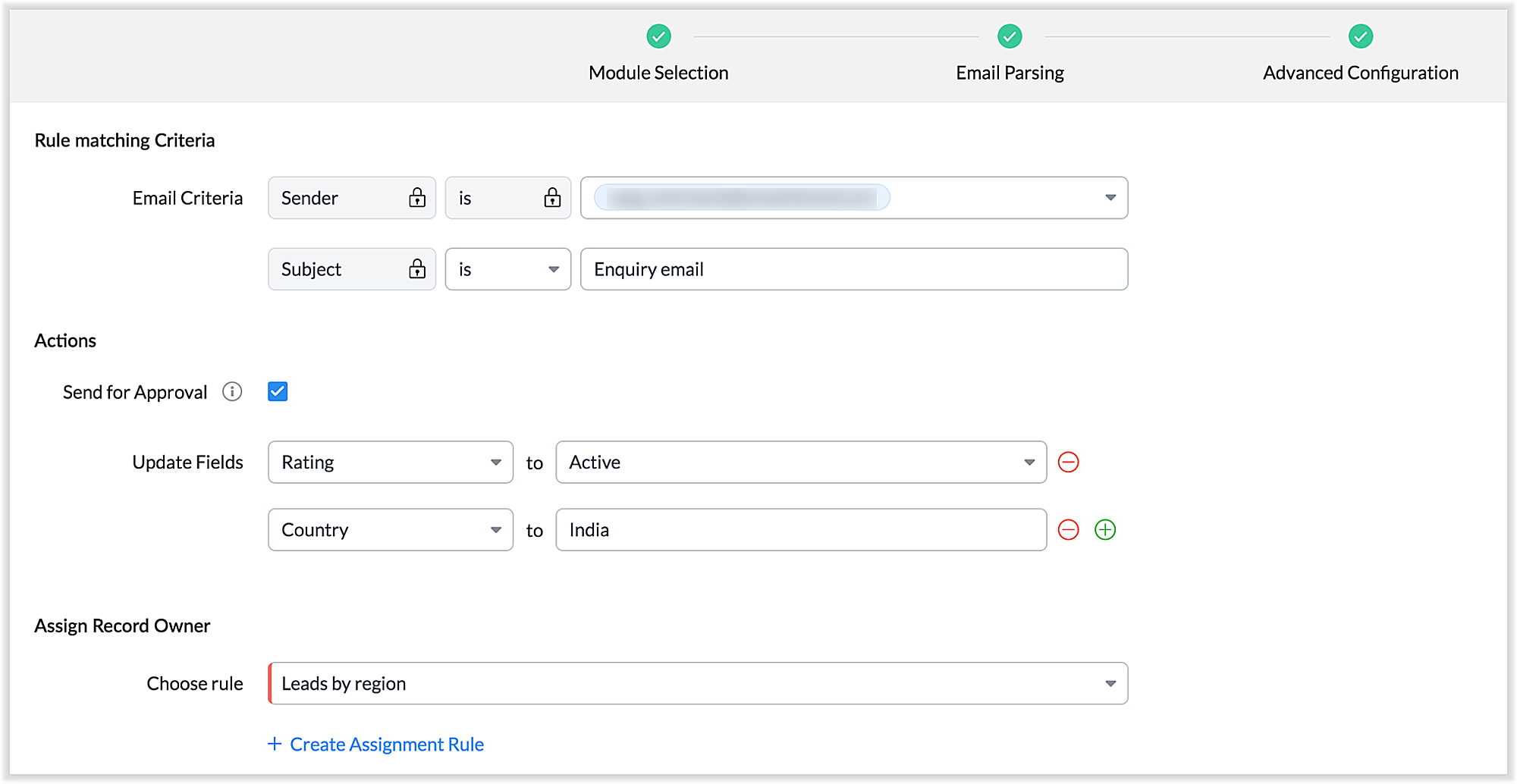
There's also an advanced configuration tab which involves options for filtering emails applicable to the parser based on criteria and associating automated actions, such as sending for approval, updating fields, and assigning records to certain users based on assignment rules.
You can also parse HTML emails directly, as opposed to converting them to plain text emails first—which was necessary for the old parser. You can also create email parser rules for each layout in a module.
3. Custom functions: Configure the email parser without associating a module
The new email parser now supports the execution of custom functions based on parsed data. In this case, the parser rule is not associated with a particular module. Using custom functions helps you with extensibility and interoperability in Zoho CRM. You can extend the email parser function to more than one module within Zoho CRM, and even to connect with other Zoho services. You can also perform ad hoc actions in third-party applications based on the parsed data.
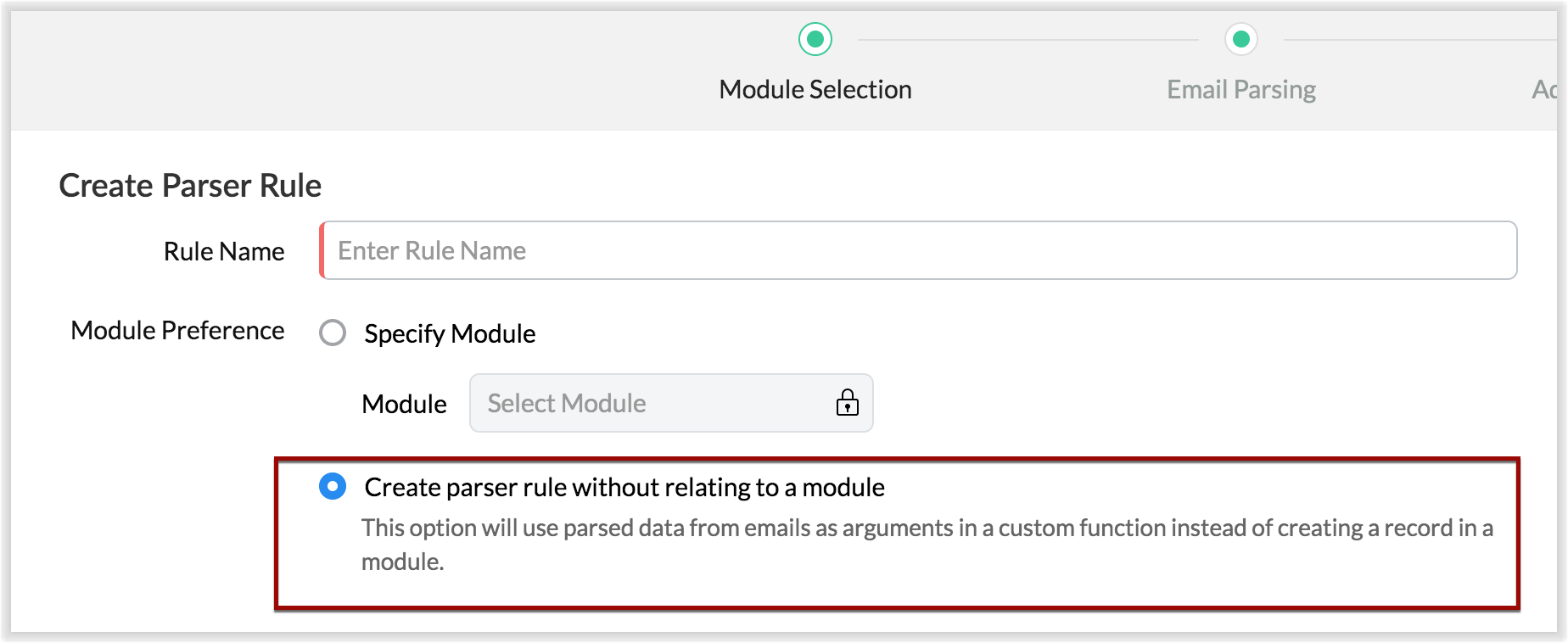
- For example, let's say that based on an incoming email inquiry, a property management company called Zylker wishes to update both Contact and Account records in CRM. The email sender's name, phone number, and address will go to the Contacts module, whereas their company information will go to the Accounts module.
- Let's say also that the same company has another requirement: Based on an incoming email from a customer regarding the status of their property, they want to update corresponding information on a third-party listing website automatically. They can achieve this by using the email parser to execute custom functions.
Once you have the required custom functions written, you can associate them to the parser rule and have the action executed for subsequent incoming emails.
4. Update records and send them for approval
Update Record is a function by which you can update the latest information on a record from an incoming parsed email.
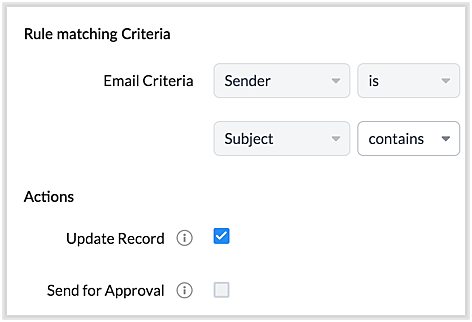
For example, say you receive an incoming email from a prospect named Jane Evans. Normally, a new lead record would be created for a new inquiry email, but if Jane is already in the CRM system, you want the CRM to update Jane's information on the same record as opposed to creating a duplicate record. If this is your expectation, you can check the Update Record option in the parser rule's Advanced Configuration settings.
Note: CRM will use the email field to detect duplicate records. For the Update Record option to show up, you must have first mapped the "Email" field from the email content, which serves as the primary identifier, or a "unique field" for a record.
You can also choose the Send for Approval option—in which case, records parsed via email parser need to be reviewed and approved from the Waiting for Approval tab in the selected module in order to become a part of the CRM system.
5. Informative parser reports
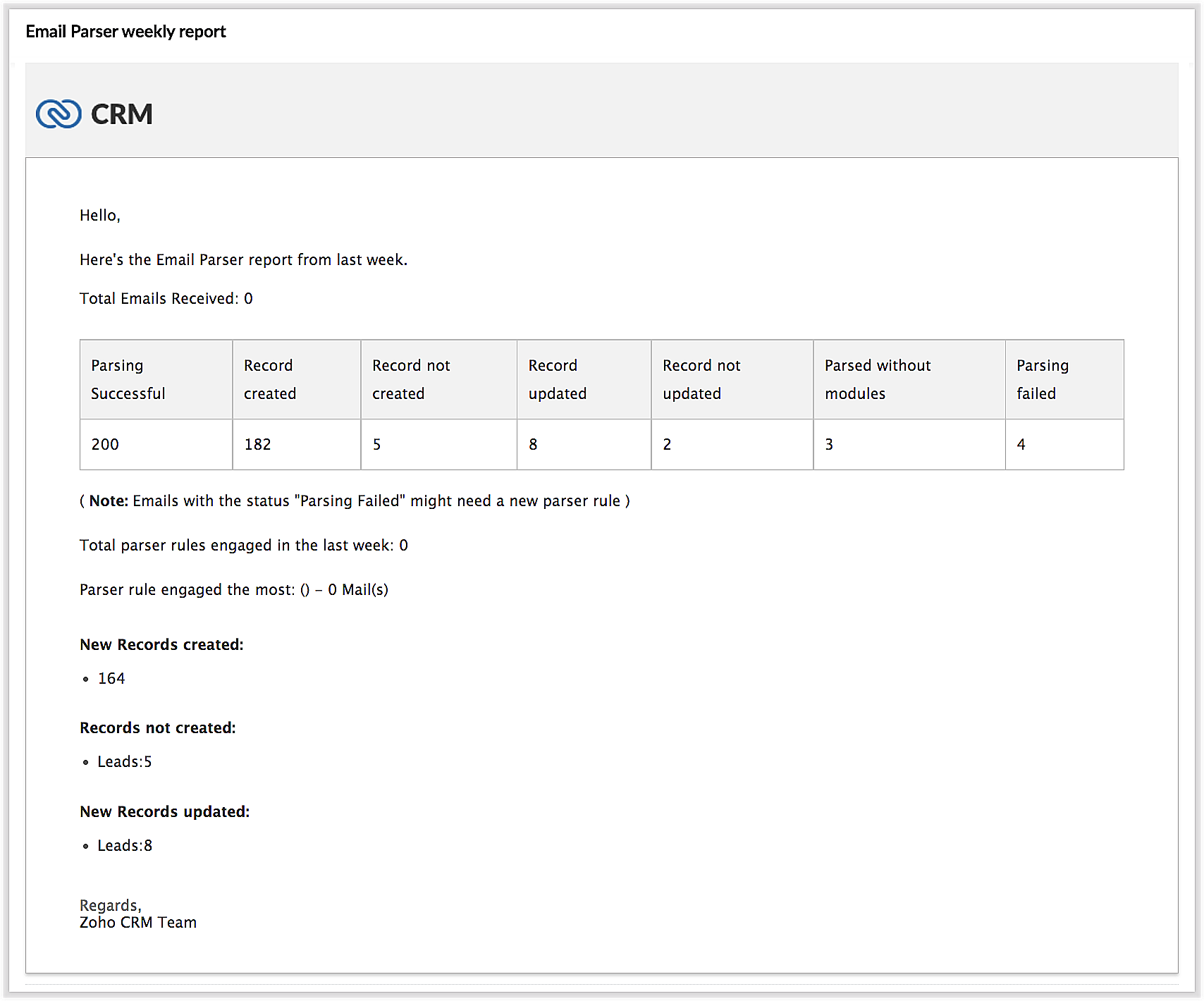
In the new version of the email parser, you're presented with accurate, detailed insights on the number of emails being parsed per rule, the fields extracted, and a list of customized actions associated with the records the parser has created. This detail summary gives you a clear picture of how effective your rules have been and indicates the revisions you may need to make to those rules based on those insights.
Detailed weekly performance reports can be sent to the creator of these rules or a custom email ID. Email reports are also sent upon record creation failure so that the appropriate users can take immediate action.
6. Reorder and filter
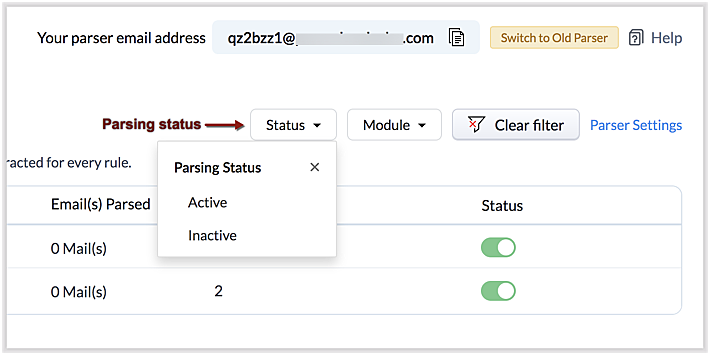
You now have an option to reorder the list of parser rules based on your preferred order. This is important because the email parser system is designed to execute only the very first rule whose criteria an incoming email meets. Therefore, the order of the parser rules becomes essential for effective email parser performance.
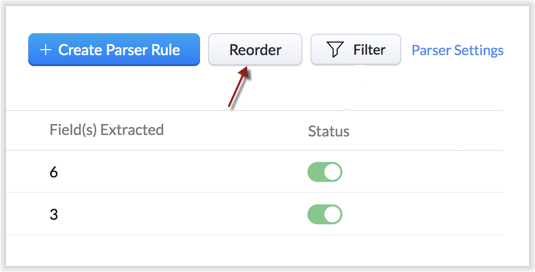
You can also filter rules by status (active/inactive) and also by module.
7. Contextual access to parsed emails
You can view not only the Configuration Info for each parser rule, but also insights based on parsed emails.
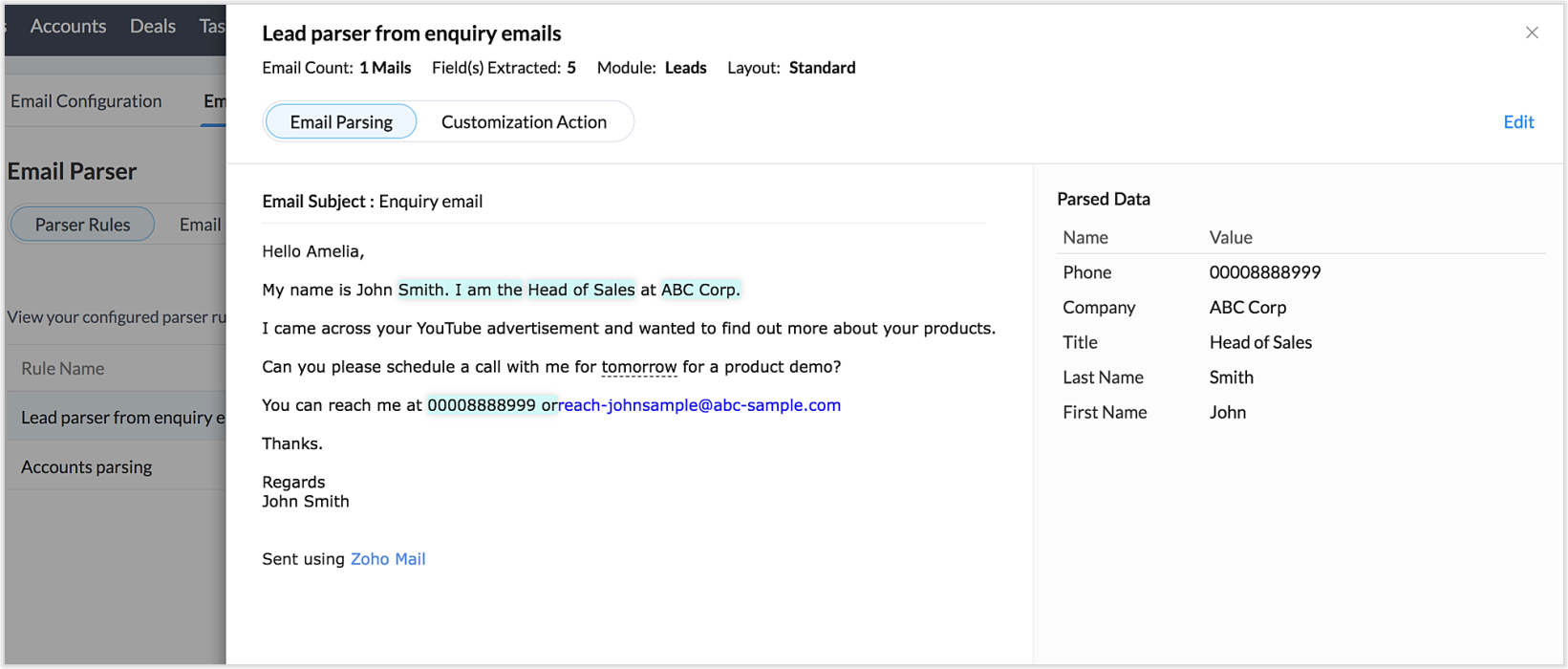
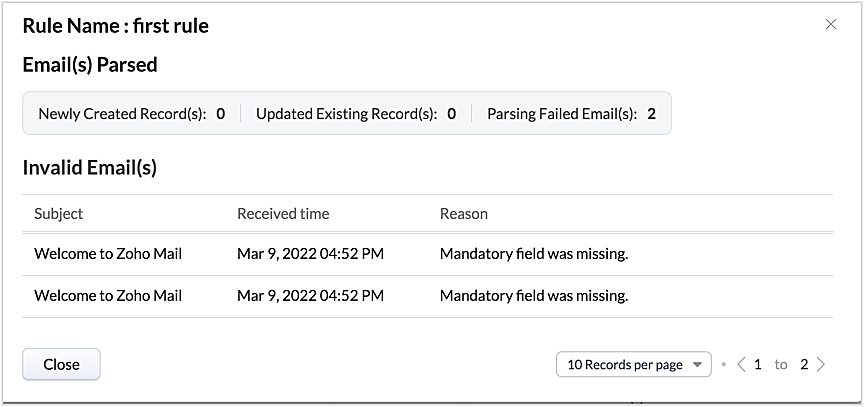
This way, from the perspectives of both parser rules and parsed emails, you can derive useful insights.
The "Email" tab lists the most recent email in your parser inbox, where you can check properties like parsing status, the rule used to parse it, and more. If the email has not met any rule, you may also create a new parser rule contextually from this email page.
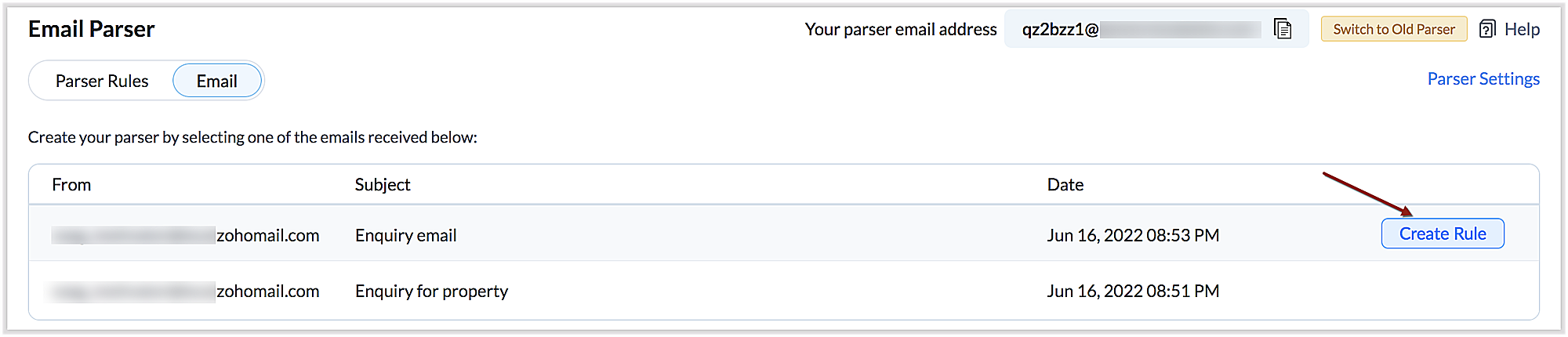
You can also re-run an email in the event of parser failure if there's no match found, as well as parse emails in bulk. (Note that this is applicable only for the emails that have a template match and for which the parsing was unsuccessful.)
Preparing for deprecation of the Old Email Parser
For existing users:
Existing users, who have not already switched to the new parser can do so by clicking on the Switch to New Parser button. Rules available in both the parsers will be working simultaneously until the Old parser is deprecated, but the rules available in the Old parser will not be displayed in the New parser view, and vice versa.

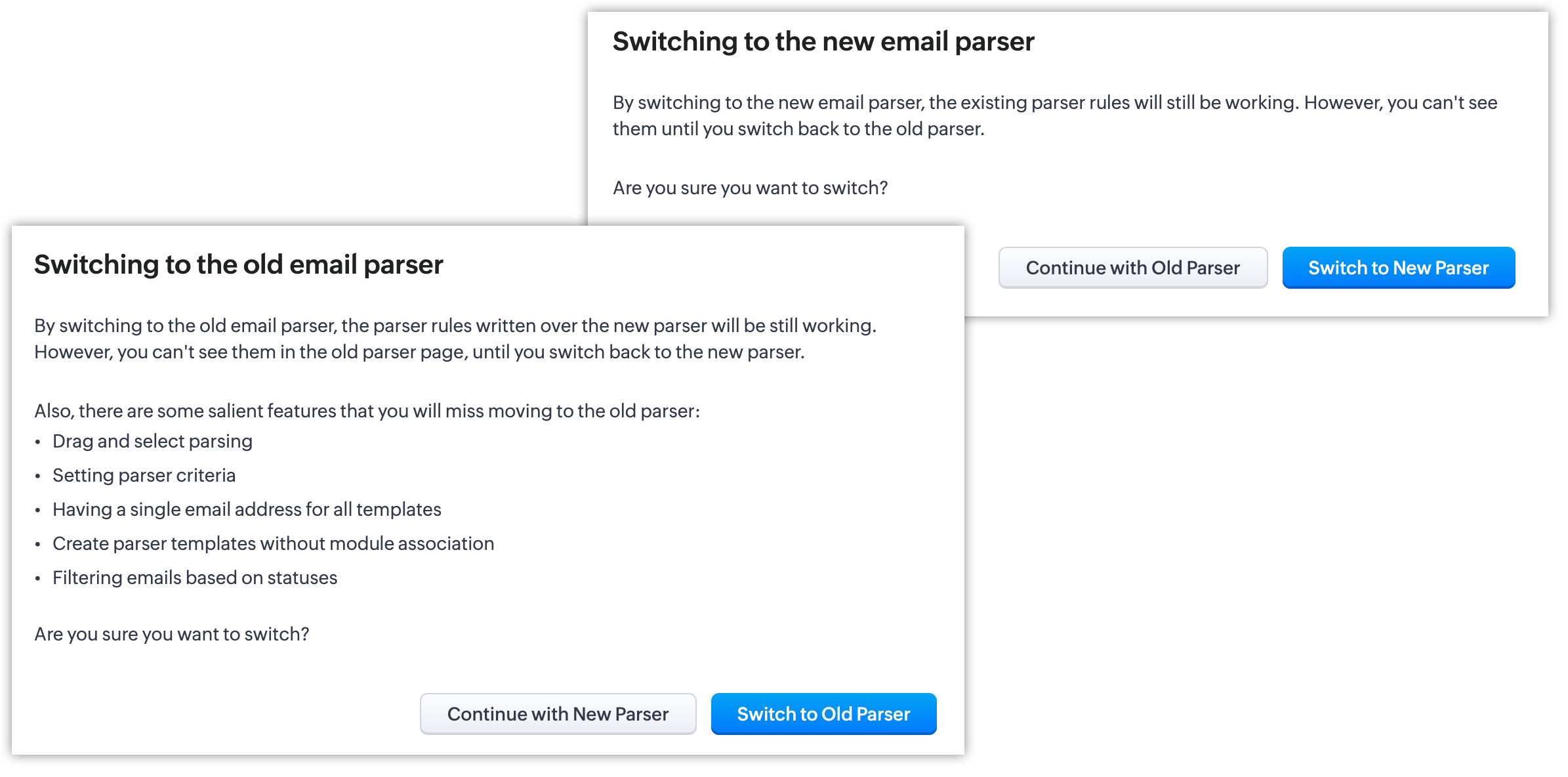
It's essential to manually create the existing rules in the New parser because once the Old parser is deprecated, only the rules present in the new parser will function. Since there won't be any rules from the previous parser available, the new parser will require that you create all rules from scratch.
Please note:
- Until the deprecation of the Old Email Parser on June 1, 2023, both the old and new versions will co-exist, after which, the New Email Parser will become the default version. .
- The rules in the Old Email Parser parser won't be available once it has been deprecated. Therefore, if no rules are added to the New Email Parser , there won't be a parser to run. So be sure to write rules in the New Email Parser before the deprecation. Additionally, keep in mind that once your old rules have become obsolete, they cannot be recovered.
For new signups
For new signups, only the new parser will be available as the default feature, and not the old parser. There is no action required from users in new signups.
Further reading
Thanks, have a great day.
Regards,
Sai Shree | Zoho CRM
Sai Shree | Zoho CRM
Topic Participants
Saishree T K
Ian Imamura
Sunderjan Siddharth
Krizia Tenorio
Emily Bridges
Sticky Posts
Enhancement to ICR’s field prompting: Preferred data extraction using advanced field prompting
Dear Customers, We hope you’re well A quick background Intelligent Character Recognition (ICR) comes as part of Zia’s optical recognition capability called Zia Vision. When we introduced it last April, the data extraction was training-based and was applicableGood news! Calendar in Zoho CRM gets a face lift
Dear Customers, We are delighted to unveil the revamped calendar UI in Zoho CRM. With a complete visual overhaul aligned with CRM for Everyone, the calendar now offers a more intuitive and flexible scheduling experience. What’s new? Distinguish activitiesAccessibility in Zoho CRM: Not just a feature—a way to empower
For instructions on setting up these controls, please check this help document: Configuring accessibility controls. Hello everyone, Today (December 3, 2024), on the International Day of Persons with Disabilities, we begin our journey towards a CRM thatScaling the customer journey: What's new in CommandCenter
Dear Customers, The last time we connected about CommandCenter, it was about the tool's new controls and revamped UI. Personally, the overhaul of the UI from the last update, still excites me. Today, we're here with news about its scalability and addedZoho CRM's sales trend and sales follow-up trend dashboards are now customizable
Dear Customers, We're here with good news! Sales trend and sales follow-up trend are two system-defined dashboards that help you understand trends and anomalies in your sales outreach and conversion efforts. They use Zia's intelligence to identify patterns
Recent Topics
This will be long, Please bear with me - Next Gen Layout - Search
In general, I think that Zoho are going in the right direction with the Next Gen UI. The latest update brings some nice improvements and all-in-all from a user's perspective I think the improvements are generally very good. However, there are some areasSelecting all notes in a notebook
In Windows11, I select a notebook and I get a list of notes, but only 30 notes. If I scroll down to the end, I get an additional 30 notes (and at the top it now shows 60 notes). I can keep doing this to eventually see all my notes but this is a real pain.Filter Records in CRM API
Hi Team, I’m currently working on a task to retrieve expired deals from the CRM. By “expired deals,” I mean deals where the closing date has already passed and the stage is not “Closed Won” or “Closed Lost” (i.e., all other stages). I tried using bothUser Name in Zoho Cliq Not Updating Across Apps?
We updated the name of a user in Zoho. (From Sue to Taylor) Her name has not been updated in Cliq on all apps. When in Zoho One, if I go to Cliq directly, it is correct, but if I am in another app, and the Cliq bar pops up on the bottom, it will be theWhy I can't map Account Name from lead module to Account module?
When I qualify a lead in the bluerprint, I use automated conversion in Blueprint to automatically create Contact, Account and Deal. the Deal record and contact record has been successfully created automatically as I expect, but I can't see any accountPause(1);
I'm using scheduler to invoke an interaction via http post with an external service. The schedule code uses a for-each loop that runs so fast my external application's log files get messed-up (they are named by date-time stamp). What I'm suggesting isRelease Notes | February 2026
We have rolled out another set of enhancements in Vertical Studio during February 2026, bringing improvements to Canvas customization, reporting capabilities, and data access controls. Here is a summary of what was released during February 2026: CanvasAgentic Engineering with Zoho: The Next Evolution of Intelligent Systems
The concept of Agentic Engineering is reshaping how modern systems are designed. It introduces a new layer to the way we think about artificial intelligence and system architecture. For years, most software systems have operated in a reactive way — respondingAdd Webhook Response Module to Zoho Flow
Hi Zoho Flow Team, We’d like to request a Webhook Response capability for Zoho Flow that can return a dynamic, computed reply to the original webhook caller after / during the flow runs. What exists today Zoho Flow’s webhook trigger can send custom acknowledgementsEngenharia Agêntica e as soluções da Zoho
O conceito de engenharia agêntica impacta diretamente como os sistemas são projetos. Este tema inseri mais uma camada a nossa idéia de inteligência artificial. Antes o desenvolvimento de sistemas operavam de forma reativa e dependente de comandos diretos,Effective project and task customization with CodeX
Dear users, Beyond Task Lists is a series of articles aimed at showcasing the various customization capabilities of Zoho Projects. We'll discuss real life project management scenarios, use cases, and requirements that needs combining multiple features.Set expiration date on document and send reminder
We have many company documents( for example business registration), work VISA documents. It will be nice if we can set a expiry date and set reminders ( for example 90 days, 60 days, 30 days etc.,) Does Zoho workdrive provide that option?Debit opening balances of vendors
Dear colleagues: I am looking at the trial balance as on 31st March 2024, and punching opening balances (1st April 2024) in Zoho Books. Vendors have credit balances, by its nature, but some of our vendors have debit balances as well (e.g., we have paidZoho Books emails suddenly going to Spam since 11 Nov 2025 (Gmail + now Outlook) — anyone else?
Hi everyone, We migrated to Zoho Books in July 2025 and everything worked fine until 11 Nov 2025. Since then, Zoho Books system emails are landing in customers’ Spam (first Gmail, and now we’re seeing Outlook/Office 365 also starting to spam them). ImpactedClient Portal ZOHO ONE
Dear Zoho one is fantastic option for companies but it seems to me that it is still an aggregation of aps let me explain I have zoho books with client portal so client access their invoice then I have zoho project with client portal so they can access their project but not their invoice without another URL another LOGIN Are you planning in creating a beautiful UI portal for client so we can control access to client in one location to multiple aps at least unify project and invoice aps that wouldThe Social Wall: February 2026
Hello everyone, This month, we’re bringing you a mix of exciting toolkit enhancements and a few improvements across the web and iOS app, all designed to make your social media management simpler and smoother. File converter Images come in different formats,Zoho Mail and SalesInbox doesn't link to CRM record using Reply-To
Hi, I've just set up SalesInbox, with the intention of using it for sales enquiries (instead of Desk, which I have been using until now). I've noticed that, unlike Desk, SalesInbox only uses the 'From' email address to attempt to link to a CRM contactPoor Search Results on Zoho CRM
The search on Zoho CRM is quite poor. Salesforce has now published a new search, when will get this on Zoho? https://help.salesforce.com/s/articleView?id=data.c360_a_hybridsearch_index.htm&type=5Capture Last check-in date & days since
I have two custom fields on my Account form, these are "Date of Last Check-In" and "Days Since Last Contact" Using a custom function how can I pull the date from the last check-in and display it in the field "Date of Last Check-In"? and then also display the number of days since last check-in in the "Days SInce Last Contact" field? I tried following a couple of examples but got myself into a bit of a muddle!Archiving Contacts
How do I archive a list of contacts, or individual contacts?Every time an event is updated, all participants receive an update email. How can I deactivate this?
Every time an event is updated in Zoho CRM (e.g. change description, link to Lead) every participant of this meeting gets an update email. Another customer noticed this problem years ago in the Japanese community: https://help.zoho.com/portal/ja/community/topic/any-time-an-event-is-updated-on-zohocrm-calendar-it-sends-multiple-invites-to-the-participants-how-do-i-stop-that-from-happeningConversion Rate – Won Deals over Assigned Prospects
Hello, I would like assistance configuring a KPI in Zoho Analytics titled: Objective of the calculation: Number of Won Deals divided by Total number of assigned prospects (not only converted prospects). Important clarification: The denominator must includeFeature Request – Conditional Visitor Information Request in Zoho SalesIQ
We would like to request the ability to conditionally ask for visitor details based on the communication channel used in Zoho SalesIQ. Specifically: When a visitor initiates a conversation through the live chat widget on the website, we want to continueApple Messages for Business in Omnichannel communications?
Hello, Apple launched "Apple Messages for Business" but Zoho CRM or Zoho Desk don't appear in the list of possible integrators. Zoho already promotes https://www.zoho.com/crm/omnichannel.html Omni Channel integration, but Apple Messages does not yet appear.Admin asked me for Backend Details when I wanted to verify my ZeptoMail Account
Please provide the backend details where you will be adding the SMTP/API information of ZeptoMail Who knows what this means?【Zoho CRM】通貨機能のアップデート:為替レートの自動更新やデータ更新オプションなど
ユーザーの皆さま、こんにちは。コミュニティチームの藤澤です。 今回は「Zoho CRM アップデート情報」の中から通貨機能のアップデートをご紹介します。 CRMの複数通貨機能を使うと、地域ごとに通貨を管理し、顧客の現地通貨で記録したデータを自国通貨に自動換算して分析やレポートに活用できます。 従来は、為替レートを管理者が手動で定期更新する必要があり、各データには作成時点のレートが固定されるため、その後の市場変動は反映されませんでした。 本記事では、この問題を解消する「為替レートの自動更新」をはじめ、さまざまな新機能をご紹介します。Can we add zoho sign to a custom module?
i understand out of the box it works with 8 modules. is it possible to add it to a custom module?This domain is not allowed to add in Zoho. Please contact support-as@zohocorp.com for further details
Selected date present employees roster
=CHOOSECOLS(FILTER(A2:E5;(INDEX(C2:E5;0;MATCH(VALUE(B8);INDEX(VALUE(C1:E1));0))<>"OFF")*(INDEX(C2:E5;0;MATCH(VALUE(B8);INDEX(VALUE(C1:E1));0))<>"EL"));1;2;2+MATCH(VALUE(B8);INDEX(VALUE(C1:E1));0)) This way sheet looks lFiltering in Help Center
Hi, our ticket system is based on a set of structured status categories. The customer must be able to filter by these status. How can we add "Status" as filter to the help center. In the same moment we do not need filters e.g. as "channel". How can weCan multiple agents be assigned to one ticket on purpose?
Is it possible to assign one ticket to two or more agents at a time? I would like the option to have multiple people working on one ticket so that the same ticket is viewable for those agents on their list of pending tickets. Is something like this currentlyCRM gets location smart with the all new Map View: visualize records, locate records within any radius, and more
Hello all, We've introduced a new way to work with location data in Zoho CRM: the Map View. Instead of scrolling through endless lists, your records now appear as pins on a map. Built on top of the all-new address field and powered by Mappls (MapMyIndia),Zoho Sign Not Delivering
I have sent several contracts out via Zoho Sign. They do not seem to be getting delivered. I had one person receive it, but the others have not. I had one person tell me they sent it back to me and never got it and doesn't show as signed. I've sentBank Feeds Breaking Constantly
Hey Everyone, I have already reached out to support about this issue but I am wondering if anyone else is having the same issue. My bank feeds keep breaking within days of me fixing them by updating the credentials. Its been happening for a while andAutomatic Matching from Bank Statements / Feeds
Is it possible to have transactions from a feed or bank statement automatically match when certain criteria are met? My use case, which is pretty broadly applicable, is e-commerce transactions for merchant services accounts (clearing accounts). In theseZoho Payroll's USA and KSA editions are available in Zoho One!
Greetings! We’re excited to share that Zoho Payroll, currently available only in India and the UAE, is now introducing the KSA (Kingdom of Saudi Arabia) edition and the USA (United States of America) edition, and these editions are now available in ZohoTip #63- Exploring Technician Console: Elevate to Admin Mode (Windows & Mac)- 'Insider Insights'
Hello Zoho Assist Community! Ever been in a remote support session where you couldn’t complete a task because you didn’t have admin privileges? Maybe installing software, accessing secure system areas, or rebooting into Safe Mode just didn’t work becausePrevent accidental duplicate entry of Customer Ordersome
Zoho Support has confirmed that Zoho currently does not have any method (using Deluge, flow or any other method) to alert a user when a sales order has been entered twice using the same customer reference number (i.e. a duplicate). Most ERP platformsZoho Mail - Email Reminder template (default)
Zoho Mail Users, Does anybody here use the email reminder template? I'm asking Zoho to allow and add us to select which one of our many templates will be our default. It allows us to operate more efficiently. It's a Checkbox. If you feel this can benefitWindows Desktop App - request to add minimization/startup options
Support Team, Can you submit the following request to your development team? Here is what would be optimal in my opinion from UX perspective: 1) In the "Application Menu", add a menu item to Exit the app, as well as an alt-key shortcut for these menusNext Page