Introducing the locking option for CRM records

Introducing the locking option for CRM records

Last modified on 06/04/2023: Record locking option in CRM is now available for all Zoho CRM users in all DCs. Note that it was an early access feature available only upon request. 

Hello All,

Hope you're doing well!

We're thrilled to introduce our latest enhancement to CRM—record locking. 

Certain business scenarios demand that records in your organization's modules be safe from editing or deletion once they reach a certain stage in your sales process or satisfy specific conditions.

For example, if a deal has reached the final stage—"closed won" or "closed lost"—then perhaps it shouldn't be further edited or deleted.

Alternatively, let's say a record is in its proposal or review stage. During such a stage, the details of the record need to be verified, and even though a sales rep may be the record's owner, you can't allow them to update the record while the review is ongoing.

There might also be situations where the record doesn't match certain criteria, but the user dealing with the record might want to lock the record to avoid changes. For example, when a sales rep is in touch with a prospect, they may want to temporarily lock the record while prospecting is in progress to prevent other reps from adding incorrect information to the record.

Zoho CRM's record-locking feature enables you to lock records manually or automatically when certain conditions are met.
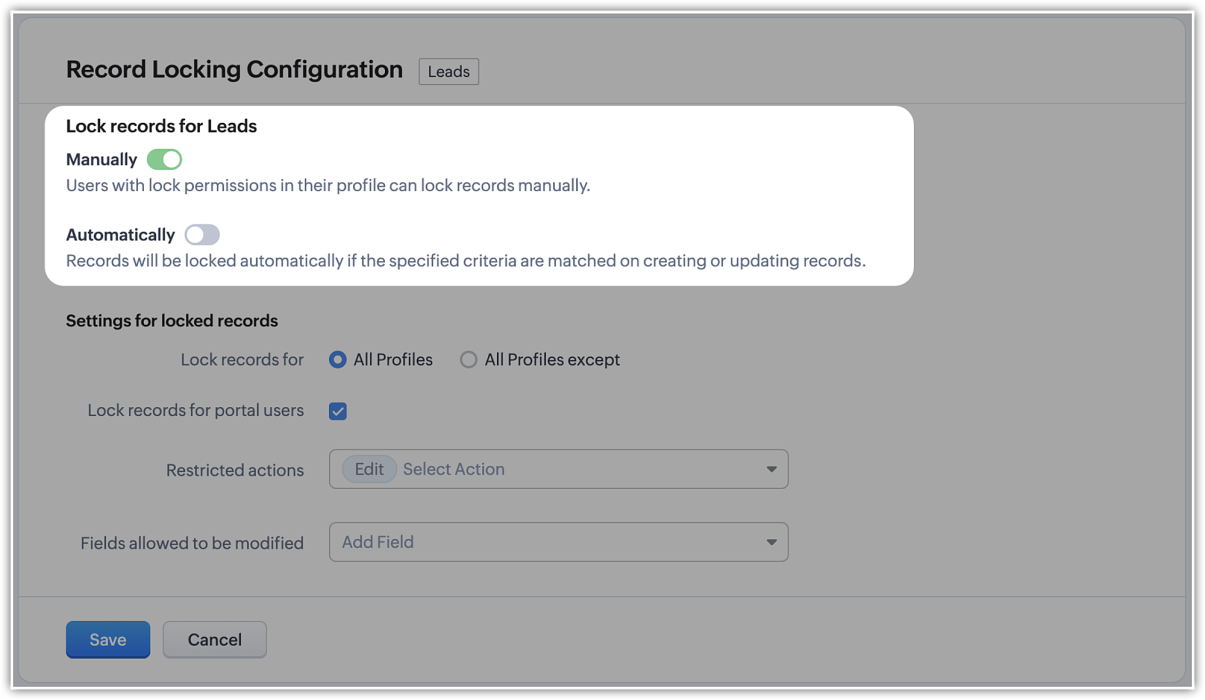
NOTE (added on 02/03/23): The locking configuration must be set up separately for each module. You can navigate to the specific module in Modules and Fields under Customization in your setup page, and you will find the Record Locking Configuration tab.

Record locking configurations
Now that we've established why locking records can be useful or necessary, let's take a quick look at the different configuration options available:
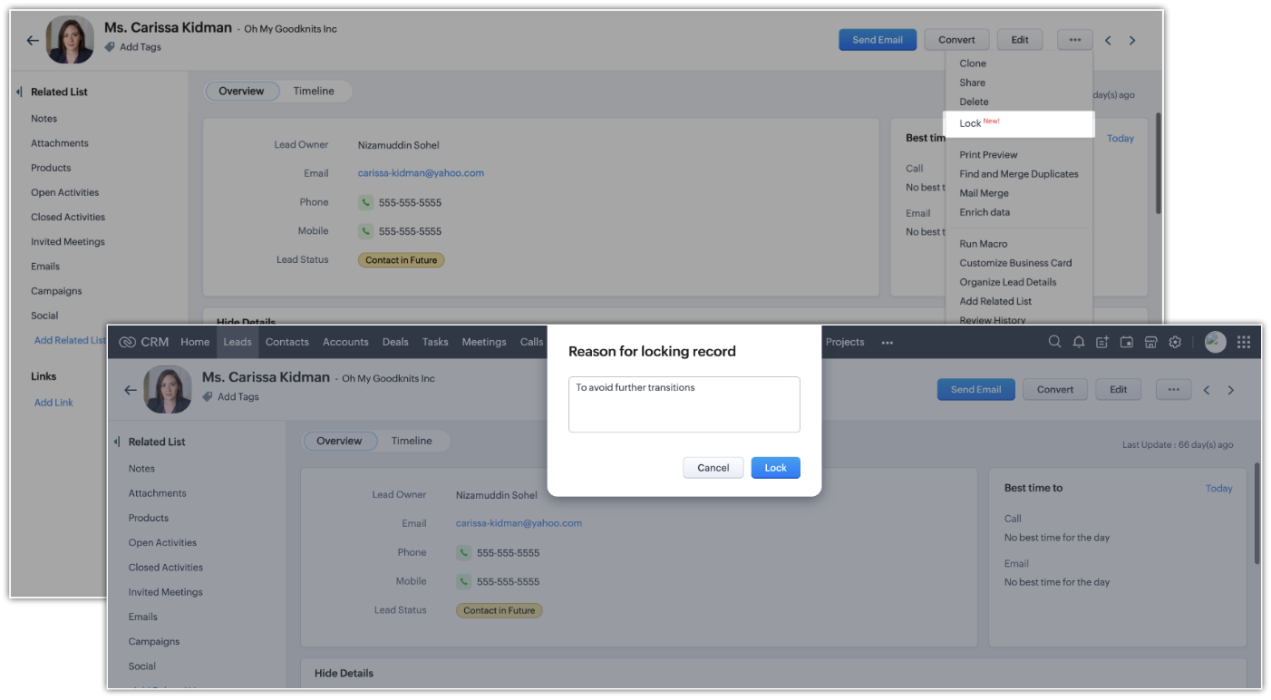
  • Users can lock records manually from the record details page if they have lock permissions.


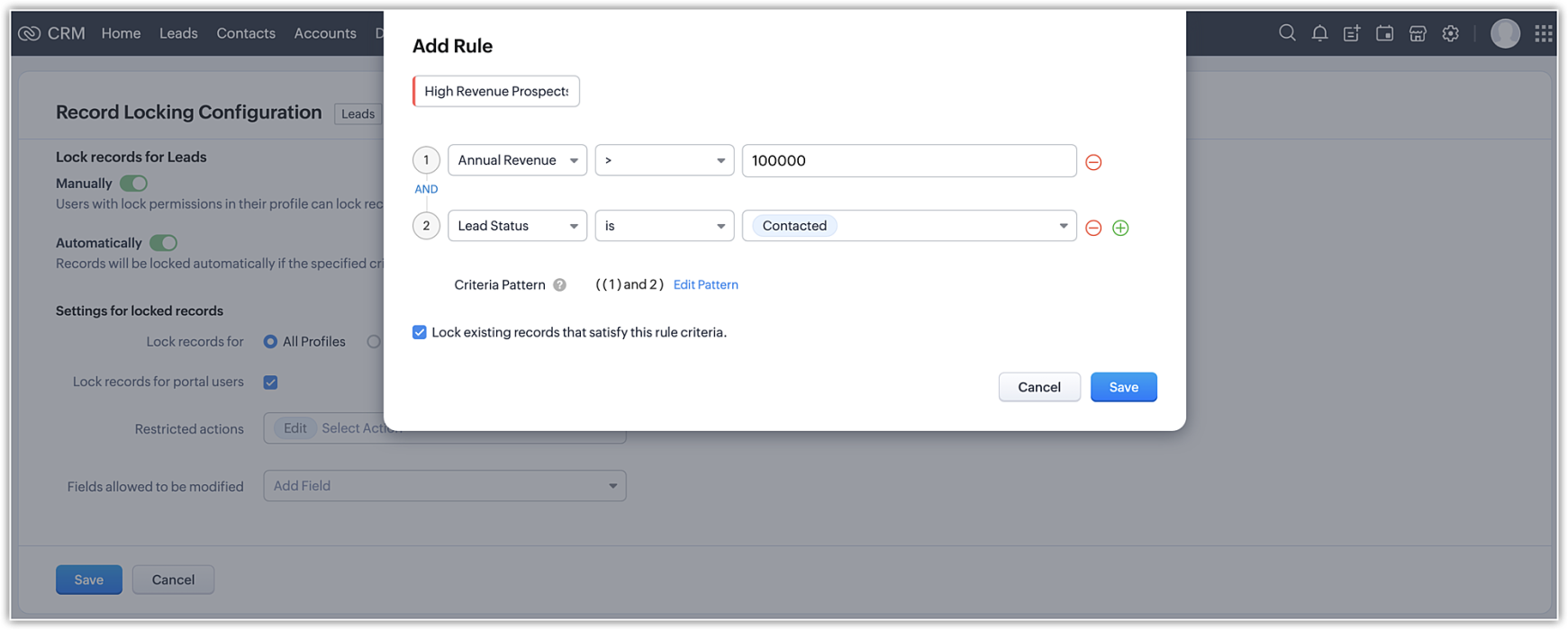
  • You can set up automatic locking by setting some default criteria. Create conditions, name them, and decide whether to apply the conditions and lock existing records, or to restrict the conditions only for newly created records.

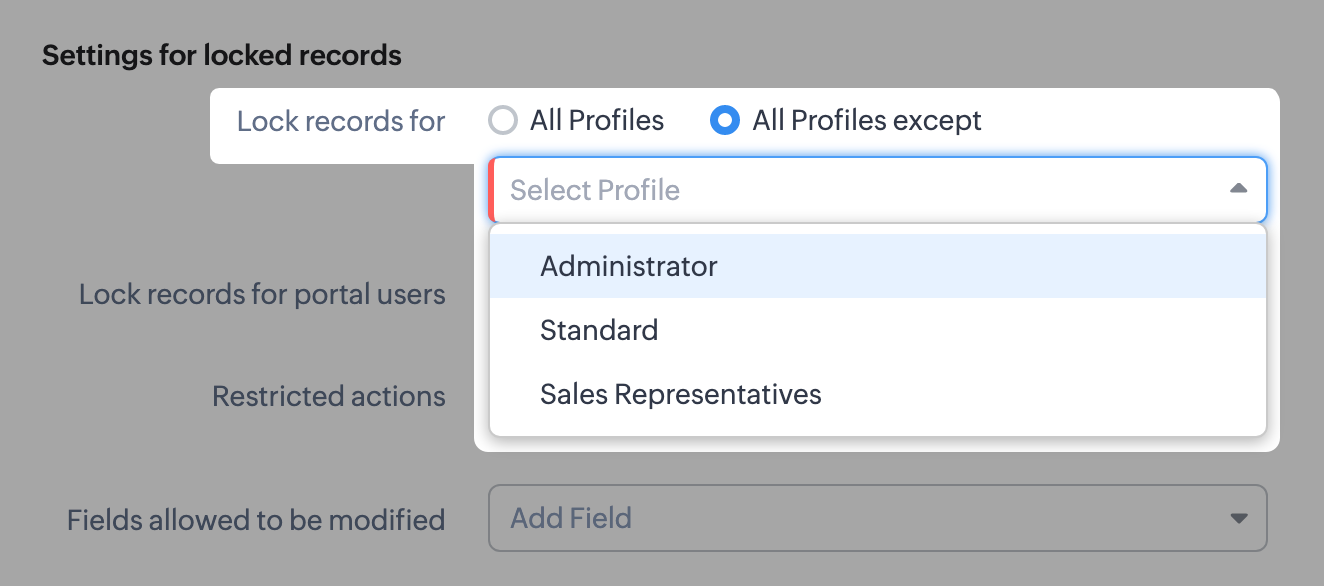
  • There might be scenarios where, say, you want members of the accounts team to be able to edit quotes, but not other profiles. You can simply lock the records for all profiles except those belonging to members of the accounts team, any other set of exceptions using the multi-select menu. Additionally, you can also choose to lock records for all profiles.
  • You can lock the records that are accessible to your portal users.
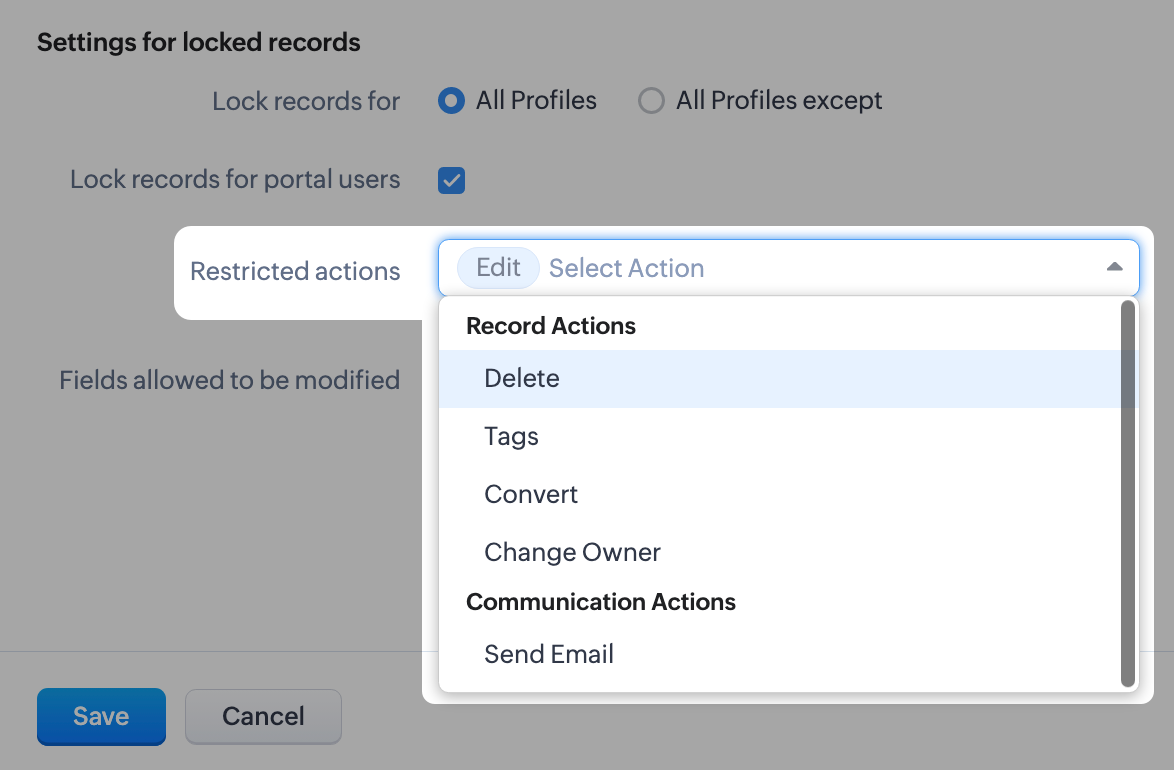
  • For locked records, the edit action is disabled by default, but you can restrict other types of native actions, as well as custom buttons.
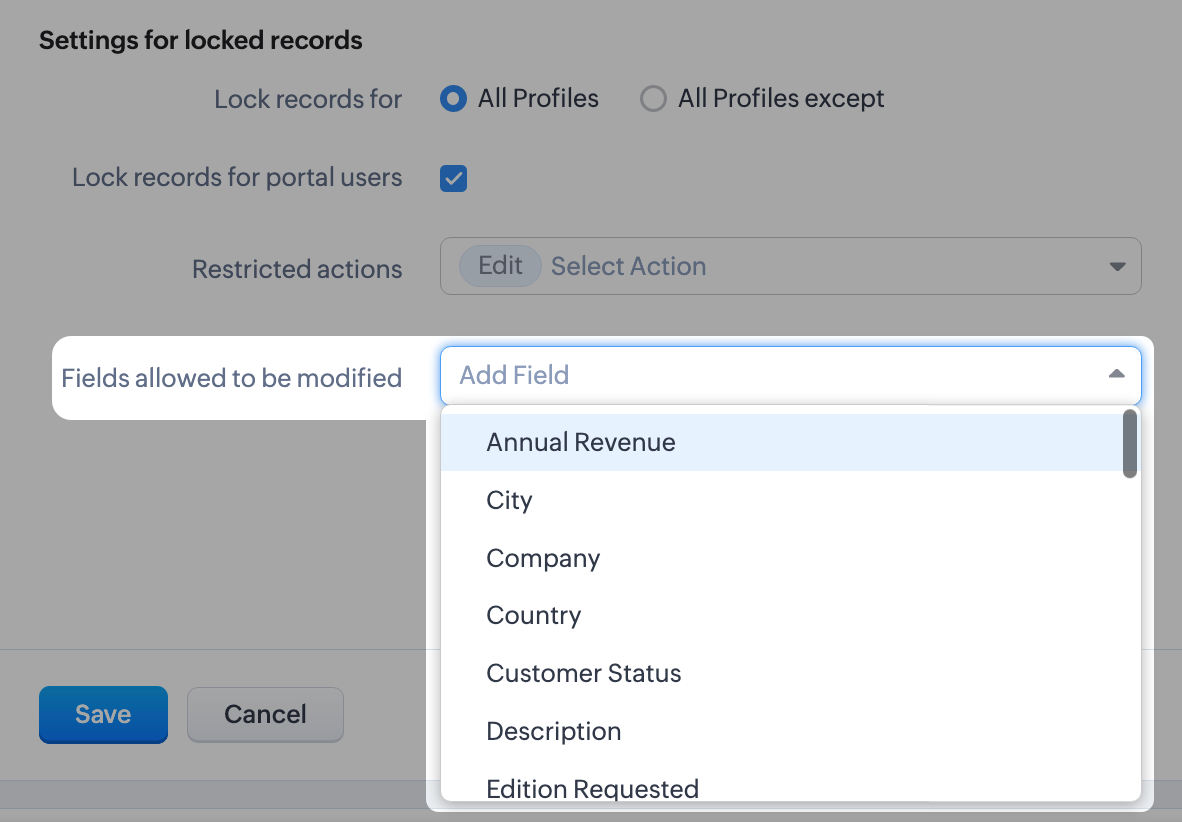
  • Even when a record is locked, you can configure certain fields which don't affect your business process to remain editable. For example, you might want the Description or comment fields to remain editable. You can leave a maximum of 15 fields unlocked. 
What happens when a record is locked?

Once a record is locked, you will see the lock icon on the record image and in the UI of the record detail page itself. Only fields you've enabled will be available to edit.
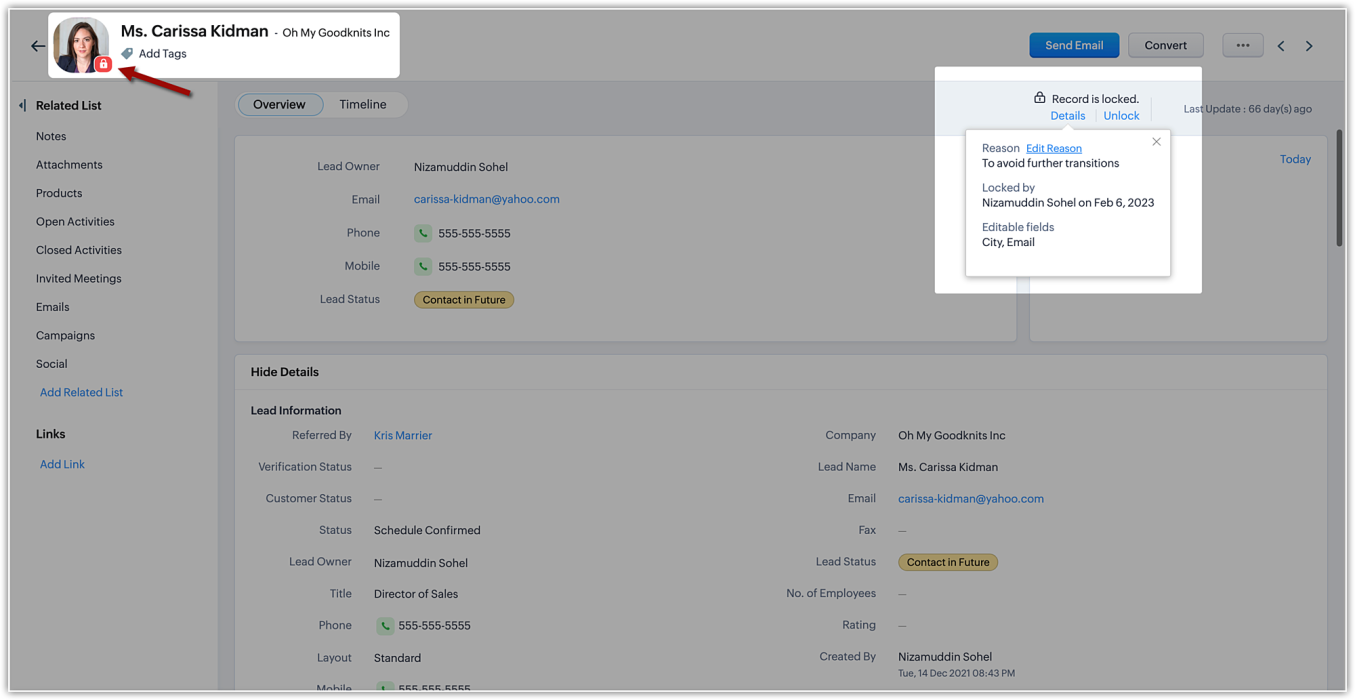


The details of the locking, such as the reason (i.e., the locking condition), locking date, and the fields available for edit will be shown on the details button available on the record detail page.

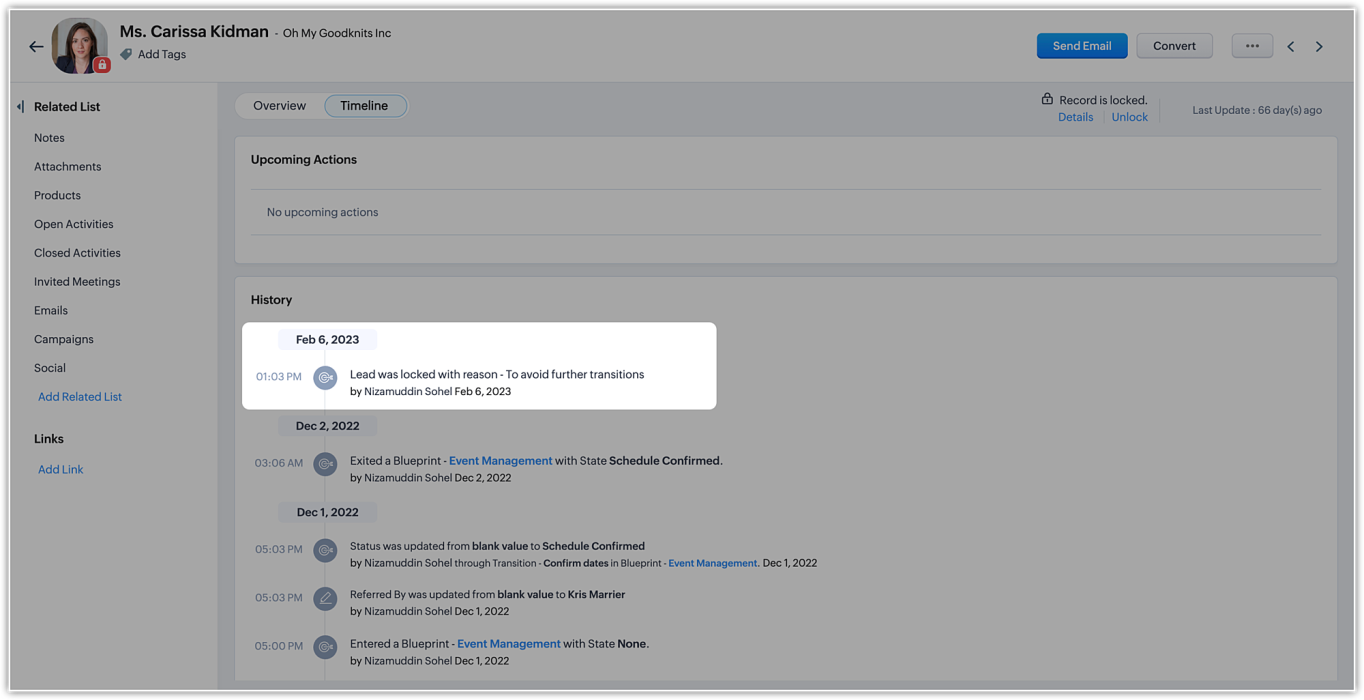
In the record's timeline, you can also see timestamped details like when the record was locked and the condition that was followed.
On the record list view, locked records are indicated by a lock icon.
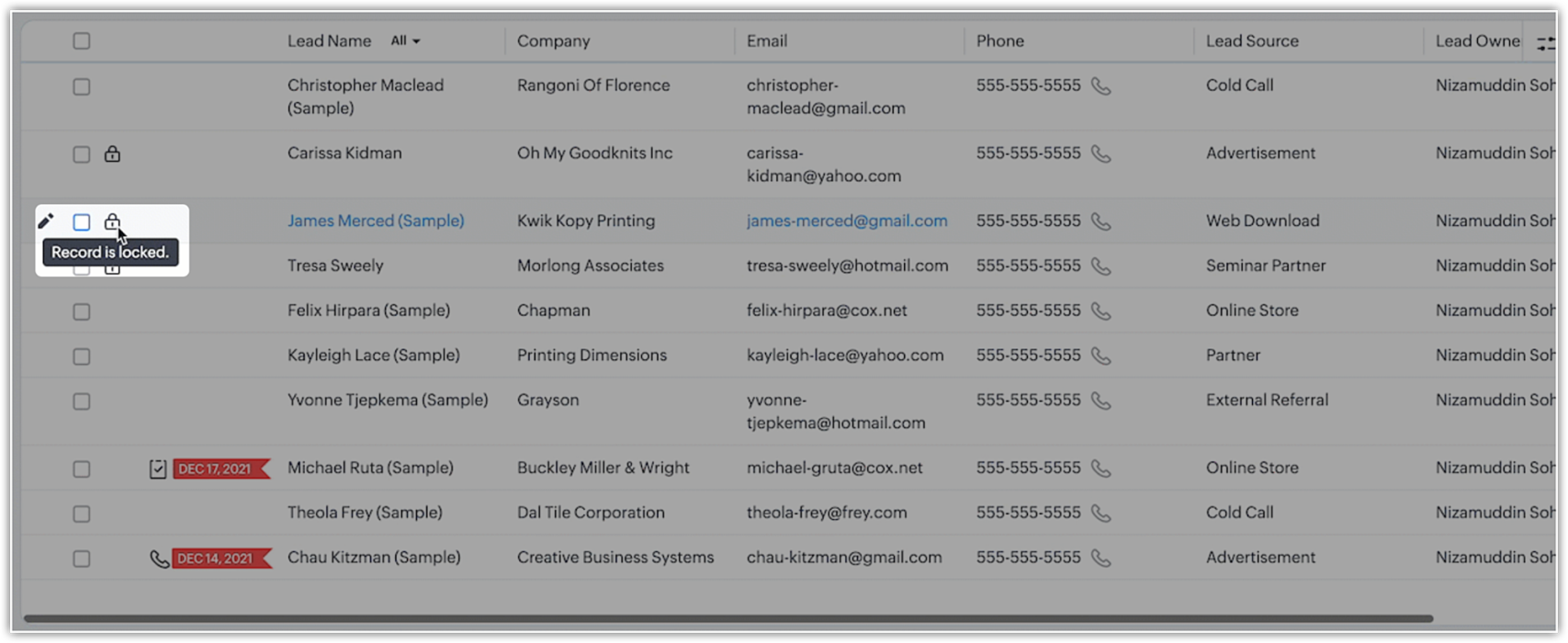
Additionally, you can filter records in the list view based on the pre-defined filter option, as well as based on the system-defined custom view.
Who can unlock records and how is it done?

If a user locks a record manually, they can unlock it themselves. Admins can unlock records, too. On the other hand, automatically locked records will be unlocked only when they're no longer subject to the lock conditions or criteria.

However, deleting a rule or locking configuration will automatically unlock all records the rule or condition had previously locked.

Additional notes
  • Set up to five rules per module. Each rule will have a name that is displayed on the record detail page when a record is locked.
  • System actions like automation and integration syncs will still be performed on locked records, even when a user who is excluded from locking triggers those processes.
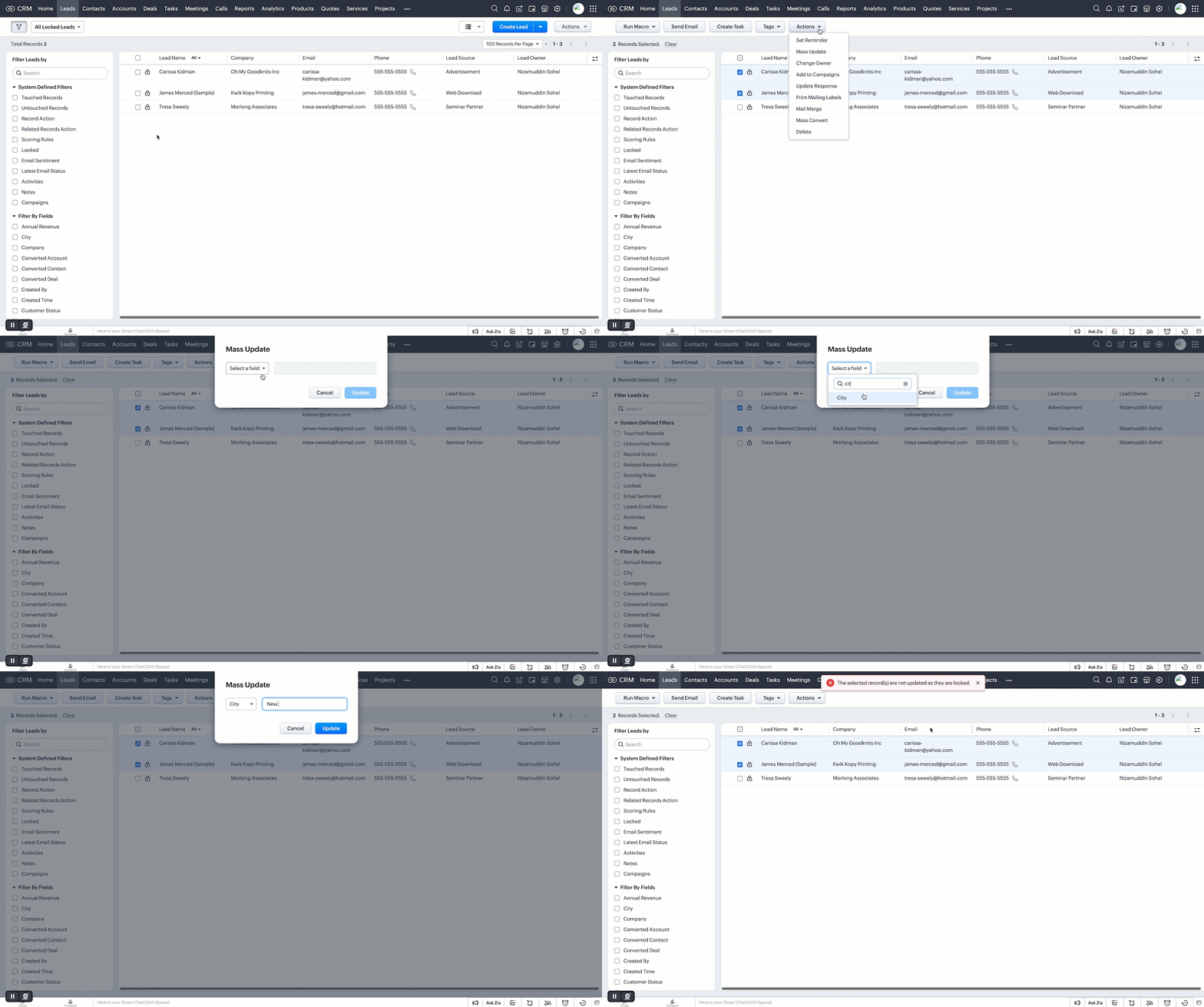
  • Locked records are still displayed in list views. However, bulk actions done from list views are not allowed if the respective action is restricted under the record locking configuration.
  • Record locking configuration is available for enterprise and ultimate editions of Zoho CRM. If an user downgrades from enterprise edition, locking configurations will be ineffective and all records will be unlocked.
Locked status can not be regained upon upgrading back.

That's all for this exciting new enhancement. Read more about the record locking configurations and its usage in our help doc.

Thanks and have a good one!


Note: 
  • Manual locking/unlocking of records is not available for the mobile app as yet. 
  • Auto-locking of records will get reflected on the mobile app, and locked records cannot be updated from mobile app also.
  • The locking configuration must be set up separately for each module.


    • Recent Topics

    • Unified WhatsApp Number Management in Zoho Desk and SalesIQ

      Dear Zoho Desk Support Team, We are currently utilizing both Zoho Desk and Zoho SalesIQ for our customer support operations. While both platforms offer WhatsApp integration, we are facing challenges due to the requirement of separate WhatsApp numbers
    • Change of Blog Author

      Hi, I am creating the blog post on behalf of my colleague. When I publish the post, it is showing my name as author of the post which is not intended and needs to be changed to my colleague's name. How can I change the name of the author in the blogs?? Thanks, Ramanan
    • Zoho FSM API Delete Record

      Hi FSM Team, It would be great if you could delete a record via API. Thank you,
    • How create a draft via workflow?

      I wish to create a workflow rule for specific emails that creates a draft response - not an automatic email reply, but just a draft with a set response ready to be verified by an agent who can then manually select recipients. Alternatively, the workflow
    • Instant Messaging Update | Now migrate your WhatsApp Business phonenumber from another BSP to Zoho Desk | Dec'23

      Hi All, Everything seems to move at lightning speed these days, and time is certainly flying by for the IM team. But we are delighted at how much ground we covered this year. 🚀 For one, we enabled WhatsApp business phone number migration so that you
    • Upload ticket attachments via Drag-&-Drop

      Hello, if you want to upload a file to the ticket attachment you need to click the button and use the file browser to select and upload the desired file. In many cases, it would be much more efficient if you could simply drag the file to the browser window...
    • Can we disable add to cart in Zoho Commerce?

      Hello, Our sales happen on the phone. During the call the customer is directed to our website to inspect the products together with the sales rep. So we need a way to present our inventory. I figured Zoho Commerce is a good fit for this use case. However
    • Introducing WhatsApp integration in Bigin

      Greetings! In today's business landscape, messaging apps play a significant role in customer operations. Customers can engage with businesses, seek support, ask questions, receive personalized recommendations, read reviews, and even make purchases—all
    • Issues with Zoho Sheet in Mac

      I have downloaded the Zoho App from App Store but It is failing to Save As, Open & Download Operations. App Store
    • Zoho One account closure vs deactivation

      I wonder what are the best practices and guidelines around deactivating vs deleting Zoho accounts in organisations? Any practical considerations?
    • Global Search placement in the new UI

      Having a hard time with the global search placement in the UI redesign. Surely I can't be the only one. Previously global search placement was perfect. A bar at the top/center of the page. Exactly where you would expect it to be. Since the new UI has
    • Cliq iOS can't see shared screen

      Hello, I had this morning a video call with a colleague. She is using Cliq Desktop MacOS and wanted to share her screen with me. I'm on iPad. I noticed, while she shared her screen, I could only see her video, but not the shared screen... Does Cliq iOS is able to display shared screen, or is it somewhere else to be found ? Regards
    • Role Management

      I am creating an analytics dashboard for a company that will be utilized by its various departments such as Finance, Marketing, and HR. My goal is to design the dashboard with separate tabs for each department. Additionally, I plan to implement role-based
    • Schedule Zoho CRM reports only on Business Days

      Hello, Is it possible to schedule reports only on business days ? We currently get daily sales reports on weekend which has no value since the sales team doesn't work on weekends. Thanks
    • Missing the "Find & Merge Duplicates" choice

      Hi, I am missing the "Find & Merge Duplicates" choice. I looked under the "More Actions" menu in Contacts, Accounts, Vendors, and Leads and it is not there.  I have full permissions.  Please assist me on finding this feature. Thanks!
    • How to install Widget in inventory module

      Hi, I am trying to install a app into Sales Order Module related list, however there is no button allow me to do that. May I ask how to install widget to inventory module related list?
    • Cannot see Application from Lookup field

      Hi all, I am trying to access data for an application on our account via a lookup field; however, the application doesn't appear in the dropdown at all. Can anyone shed any light on this, please? I have asked Zoho support; however, they're just as confused,
    • Deluge Error Code 1002 - "Resource does not exist."

      I am using the following script in a Custom Button on a Sales Return. Basically, the function takes the information in the sales return (plus the arguments that are entered by the user when the button is pushed) and creates a return shipping label via
    • How to track a contact or customer's past product purchases in Bigin Premiere?

      Hello there. I am the sole user of Bigin for a small company (chess club), and would like to track current and past purchases made by a contact (player) or company (family which includes the player). Players may register for multiple tournaments, take
    • LENTITUD EN RECIBIR MAIL

      Buenas tardes, Estamos experimentando lentitud en la recepción de correos electrónicos.
    • Items should display under specific warehouse

      I have configured the multi warehouse but it show all the items under all warehouse which is not correct according to our business logic, so i want that items should only display under that specific warehouse not under all the warehouses not even with zero quantity. Some items should be common but not all so is there any option for that purpose so i can specific the items to its warehouse. Regards
    • Tracking Non-Inventory Items

      We have several business locations and currently use zoho inventory to track retail items (sales and purchase orders). We were hoping to use zoho inventory to track our non-inventory items as well (toilet paper, paper towels, etc). I understand that we
    • Partial refunds

      I am trying to process refund for a one item invoice, however the refund is partial: i am getting this error while creating credit note, can anyone share some wisdom about this
    • Best practice importing items and matching assemblies

      Hi, I was wondering what would be the best practice to import items and composite items (assemblies) From my backup, what should I import first? The items or the composite items? I am on Zoho one, using inventory and books. Kind regards, Sabine
    • Bulk Fill In & Edit PO/Bill/SO/Invoice

      Hello, I am adding stock in bulk on a PO, the system is automatically populating the Rate (price) and Tax from the item data. Problem is that the bill rate is different from the rate on the item data, so I have to manually erase each and enter the price.
    • Separate Items & Services

      Hi, please separate items and services into different categories. Thank you
    • Items Below Reorder Point Report?

      Is there a way to run a report of Items that are below the Reorder Point? I don't see this as a specific report, nor can I figure out how to customize any of the other stock reports to give me this information. Please tell me I'm missing something s
    • Allocating inventory to specific SO's

      Is there a way that allocate inventory to a specific sales order? For example, let's say we have 90 items in stock. Customer 1 orders 100 items. This allocates all 90 items to their order, and they have a back order for the remaining 10 items which could
    • Cancelled Transfer order problem

      Hello, We've canceled a transfer order, and we can't add the related items to a new Transfer Order. The system tells us that the bin doesn't have the required quantity, but when we check the item, it indicates that there are 2 units in the bin. It also
    • Creating a Chart from a Report

      In Zoho Analytics, is it possible to create a chart from a Pivot View report? We are looking to use Zoho Analytics to replace Excel for Sales reports and would like to be able to show both the table and the chart together.
    • iOS App doesn't refresh for Document Creation

      Hello Zoho team, I have created a workflow to be used on a mobile iOS device which starts in Zoho Creater and ends with a murge and store function that then opens the newly created document within the Zoho Writer app. This process is working great however
    • Client Portal ZOHO ONE

      Dear Zoho one is fantastic option for companies but it seems to me that it is still an aggregation of aps let me explain I have zoho books with client portal so client access their invoice then I have zoho project with client portal so they can access their project but not their invoice without another URL another LOGIN Are you planning in creating a beautiful UI portal for client so we can control access to client in one location to multiple aps at least unify project and invoice aps that would
    • Email Insights included in Bigin emals are marked as SPAM everywhere

      Today I noticed that email recipients who use Office 365 never receive emails sent from Bigin. Further examination showed that all Email Insights links in email headers are marked as spam/phishing by Office 365. Example screen included. The problem is
    • Data Import | Zoho Analytics Custom Query Window Size

      Please increase the window size for the Custom Query Data Import. It's impossible to work with such a small query window.
    • Name changed in settings for mailbox but still not changed when typed in To field

      In the email account secretary@ i have updaetd the new staff members details but the old members name still appears when I type secretary@ in the To field. I cant work out where Zoho is finding the old name from. I have deleted the browser cache. If I
    • Cannot add my name to my domain name

      I want to have My name@mydomain.com and it says my name is linked to another account already. Please fix it since I do not have another account.
    • Invoice status on write-off is "Paid" - how do I change this to "Written off"

      HI guys, I want to write off a couple of outstanding invoices, but when I do this, the status of the invoices shows as "Paid". Clearly this is not the case and I need to be able to see that they are written off in the customer's history. Is there a way
    • Establishing new Zoho email account on laptop

      Good Morning: I am very long time Outlook business user and decided to try your email service last night and had established an account. I am trying to verify my account; how do I establish my Zoho email account on my laptop? I opened the account with
    • unable to send message reason 550 5.4.6 unusual sending activity

      My email account can't send message. It shows unable to send message reason 550 5.4.6 unusual sending activity detected
    • how to add email to existing organization i w

      I am already registered my organization and i have an email id. I need one more email id but i can't find anywhere .i want the cheapest email id . how to add ?
    • Next Page