Invitation-Based User Access in Zoho Analytics

Invitation-Based User Access in Zoho Analytics

Hello everyone, 
We’re rolling out an important update on how users are added to your Zoho Analytics Organization and Workspaces.
Previously, when admins added users, they were automatically added to the organization. Moving forward, to improve security and transparency, users will receive an email invitation and must manually accept it to join the organization.

What’s changing?

When users are added via Organization Settings, Workspace Settings, Groups, or while Sharing Views, they will now receive an invitation email.
They must accept this invite before gaining access to the org or its shared resources.

How can users be added?

Users can be invited to join a Zoho Analytics organization in one of the following ways:
  • Added from the Organization Settings
  • Added from the Workspace Settings
  • Added while sharing tables, reports, or dashboards
  • Added to Groups
Regardless of the method, the new invitation-based model applies.

Access flows based on user type

Existing Zoho Analytics users

  • Invitation is sent via email and in-app notification.
  • Clicking Join Organization from the email opens an intermediate screen where they can review and Accept or Reject the invite.
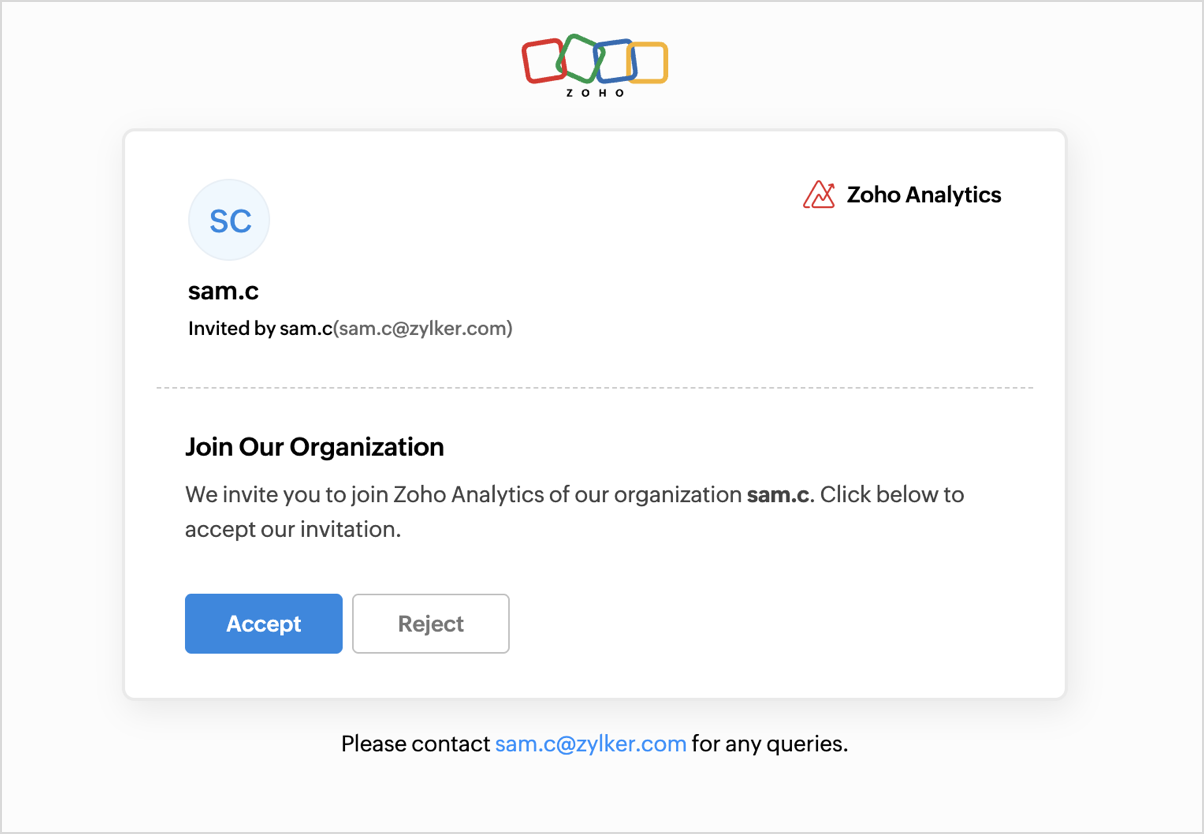


  • Upon accepting, they are added to the organization and taken to the shared org’s home page.

Existing Zoho users (but not part of any Zoho Analytics organization)

  • Invitation is sent via email
  • Clicking Join Organization redirects them to an intermediate page, allowing them to accept or reject the invitation.
  • Clicking Accept adds them to the organization and lands them on the homepage of the shared org.
  • If they try accessing analytics.zoho.com or click a shared view before accepting, they’ll still be directed to the confirmation screen to proceed with joining.


New Zoho users

  • Invitation is sent via email.
  • Clicking Join Organization takes them to a page where they’re presented with two options: Sign up & Accept or Reject.


  • Choosing Sign Up & Accept takes them through the Zoho account creation process.
  • After signing up, they are automatically added to the organization and redirected to the org’s home page.

Tracking Invitation Status

When an admin invites users, whether via Organization Settings, Workspace Settings, Groups, or by sharing views, a Pending label will appear next to the user's name.
This indicates that the user has not yet accepted or declined the invitation.
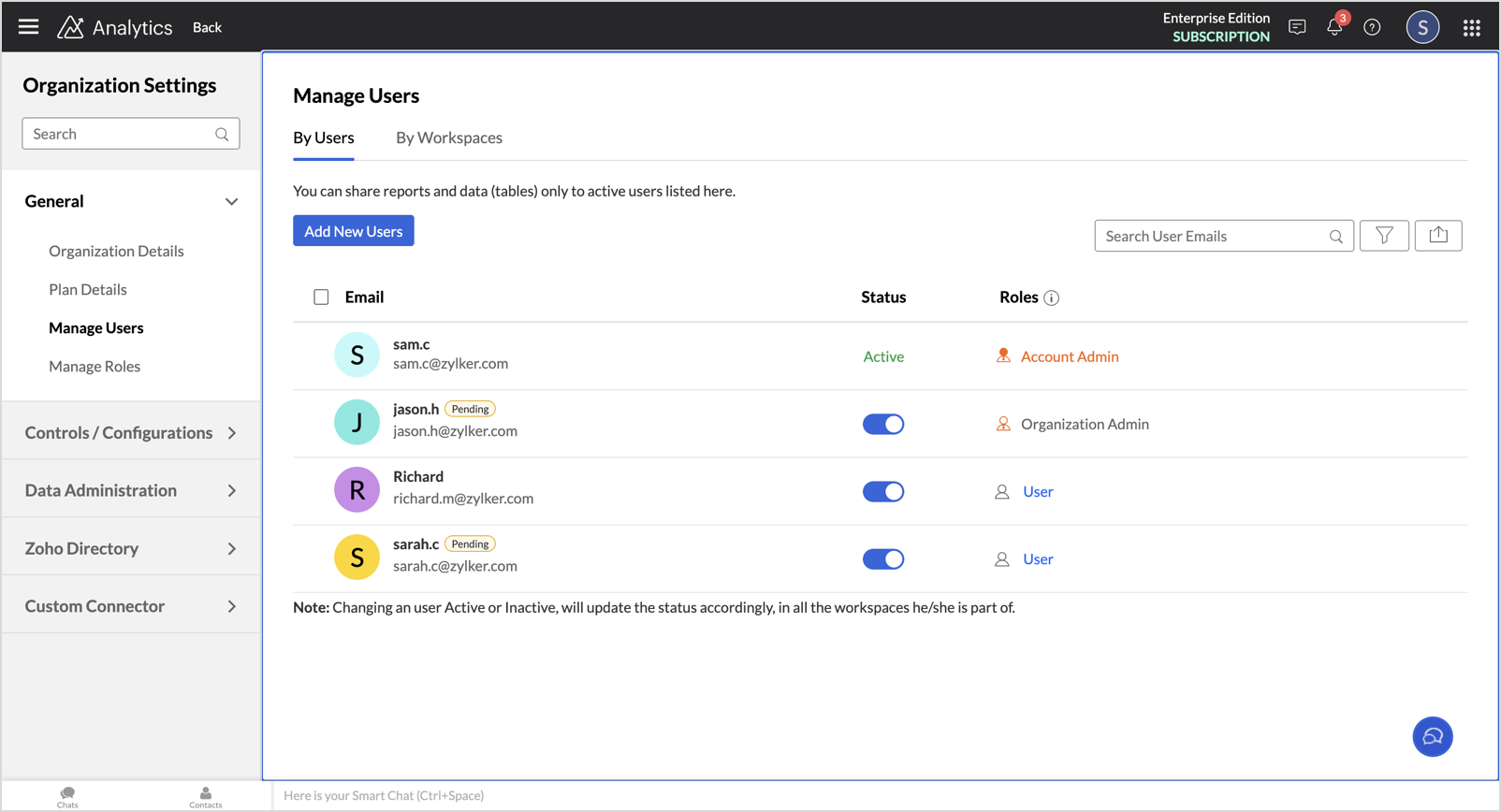


NotesNote for Admins: If a non-Zoho user was added to your organization before this migration, but did not create a Zoho account from the earlier notification email, they will not receive the new invitation automatically. You’ll need to manually re-invite these users after the migration to grant them access.

Additional information

  • Migration Timeline: This update will be rolled out to existing Zoho users in phases starting this week.
  • Invitation Link Expiry: The invitation link sent to users will be valid for 7 days from the date of the email. If it expires, admins will need to resend the invitation.

Got feedback?

We’re here to support you during this transition.
Drop your questions or suggestions in the comments below. we’d love to hear from you!

    • Sticky Posts

    • What's New in Zoho Analytics - August 2026

      Hello Users! This month puts you in control of how your analytics moves: promote content safely between workspaces with Deployment Management, govern data access and sign-in more precisely, and make your forecasts smarter with external drivers. There's
    • What's New in Zoho Analytics - June 2026

      Hello Users! This month is about meeting your data wherever it lives: reaching it from AI assistants, bringing it in from more sources, and keeping it flowing with less manual effort. Here's what's new across Ask Zia and AI, data import, integrations,
    • What's New in Zoho Analytics - February 2026

      Hello Users! We're back with another round of updates for Zoho Analytics. This month's release focuses on giving you greater flexibility in how you visualize, manage, and act on your data - with new features like custom visualizations, remote MCP server,
    • What's New in Zoho Analytics - May 2026

      Hello Users! We're back with another round of updates for Zoho Analytics. This month's release focuses on giving you greater flexibility in how you visualize, manage, and act on your data. We are introducing richer data visualizations, smarter AI-powered
    • What's New in Zoho Analytics - January 2026

      Hello Users! We are starting the year with a strong lineup of updates, marking the beginning of many improvements planned to enhance your analytics experience. Explore the latest improvements built to boost performance, simplify analysis, and help you
    • Recent Topics

    • Moving software

      I need someone to customize zoho for my moving business I need to do the following . 1. Quote comes in from ezemove website or we enter customer details into the system 2. Email quote to customer based on hourly rate 3. Customer accepts quote deposit is taken 4. We convert the quote into a confirmation email and add job to the diary and assign resources to the job 5. Job gets completed and we enter invoice amount into the system and email the invoice Budget : neg | Duration : 1 month To leave a private
    • How To Create a Report with Subforms from Two Modules

      I want to create a report based on data in subforms over 2 separate modules. Can this be done? I tried to do it in Analytics, but one is a date field that needs to be grouped by month, and it doesn't look like Analytics can do this.
    • Introducing Zoho Commerce 2.0 — It's more than just selling!

      Hello! We are proud to launch Zoho Commerce 2.0, a reimagination of how online businesses look, feel, and function. This launch is both timely and symbolic, as we reaffirm our commitment to empowering small and medium enterprises with powerful, yet simple-to-use
    • Domain sparkylab.co.kr still linked to an old Zoho account after ownership verification - release pending 2+ days

      Hello Zoho team, I own the domain sparkylab.co.kr (registered and managed through Gabia, a Korean registrar) and I am trying to add it to my own Zoho organization (SparkyLab) on the Forever Free plan. When I add the domain at mailadmin.zoho.com/hosting?plan=free,
    • Vendor payment unexpectedly routed through Prepaid Expenses instead of Accounts Payable

      Hello, We are investigating an unexpected accounting behavior in Zoho Books. We created vendor bills and vendor payments for two suppliers using what appears to be the same workflow, but the journal entries are different. Vendor 1 – UZ Store (works correctly)
    • What's New in Zoho Billing | September 2026

      September brings new capabilities to Zoho Billing across subscriptions, payments, reports, and the product catalog. From managing subscriptions through the Play Store and App Store to setting usage limits for Hosted Payment Page links and configuring
    • Columns in Reports Showing Count instead of Amounts

      I have a table in a modular where we can add our bill claims. I want to show these in the attached table. The dates are right, but they are grouped by Row Count. I want the amounts showing where the row count numbers are. Anyone know how to do this? I
    • Zoho Mail iOS app updates - Shared Mailboxes, Calendly Integration and other enhancements

      Hello everyone! We're excited to announce the features and enhancements available for the Zoho Mail iOS app. Shared Mailboxes and Calendly integration are now available in the Zoho Mail iOS app, along with a few other enhancements. Let's dive into the
    • Zoho Extensions 101: Building extensions for Zoho People

      Hello developers! Welcome to our new video series on building extensions for Zoho People! If you're new to extension development or looking for guidance on building extensions for Zoho People, you're in the right place. We've curated a series of videos
    • Tags on individual ticket comments and replies, with color coding and a filter

      In Zoho Desk you can tag a ticket, but you can’t tag the individual comments and replies inside it. For teams with long, structured ticket threads, that’s a big gap. The problem Our tickets can easily reach 50+ comments and replies. Many of them are specific,
    • Merge Tickets Directly from Contact Page in Zoho Desk

      Dear Zoho Desk Support Team, We are writing to request a new feature that would allow users to easily merge tickets directly from the contact page in Zoho Desk. Currently, the only option to merge tickets is from the Tickets list view page, which can
    • GrassHopper VOIP Integration

      Does Zoho Plan to integrate with Grasshopper to allow the Telephony hookup in Zoho Desk?  If not, Can this be passed along for consideration 
    • How Do I Refund a Customer Directly to Their Credit Card?

      Hi, I use books to auto-charge my customers credit card. But when I create a credit note there doesn't seem to be a way to directly refund the amount back to their credit card. Is the only way to refund a credit note by doing it "offline" - or manually-
    • Zoho Projects - Linking CRM Deals to Projects via API without sending customer contact email invitation to project portal

      We are using the Zoho CRM and Zoho Projects APIs to automatically create a project in Zoho Projects and then associate that project with the relevant Deal in Zoho CRM. The API process is working in that the project is created successfully and appears
    • Enhancement Request – Allow cashiers to collect payments and partial payments for outstanding credit invoices directly from Zoho POS Billing App

      We are testing Zoho POS for a retail business with multiple physical stores and have identified an important limitation in the cashier workflow. When a sale is completed using Credit Sale, Zoho POS correctly creates an unpaid invoice and the outstanding
    • How Can I Collect Payments for Credit Sales Directly from Zoho POS Billing App?

      We are currently testing Zoho POS for a retail business and have encountered an issue with collecting payments on outstanding invoices from customers who purchase on credit. When we process a Credit Sale, Zoho POS correctly creates an Unpaid Invoice.
    • Zoho POS Mobile Sales Price Conflicts & Pricing Discrepancies

      We are seeing recurring Zoho POS Mobile conflicts tied to the Sales Price field, even though drivers are not manually changing item pricing. We have also noticed small price differences between POS transactions and Books, sometimes only a few cents. Devices
    • Creator -Dynamic addition of Customer Portal User Licenses

      Hi, We have a Creator App for B2C about to get released. We are experiencing the Portal User license challenge. Unable to predict the number of users who will download and Subscribe. When a User is about Subscribe and the portal licenses does not exists,
    • Zoho equipment rental - just like Booqable

      Hi Zoho Team, is it possible to create a module or a system like booqable? our business starts renting our IT equipment assets that have been recently used for Events and Projects, we are having ZOHO books so its easy to integrate if you create one. Booqable
    • Reminder Settings - Time Tracker

      On the time tracker in Reminder Settings I created a reminder according to the Zoho manual. But a manager asked me to change the message that goes in the email. Is it possible to change the message? I didn't find that in the Zoho manual. Another question: I configured to receive the reminder everyone who logged in less than 40 hours. Does Zoho consider less than 40 hours of the current week or the whole month? Another situation, I put it so that I and another specific user would receive the notification,
    • New in Cadences: WhatsApp follow-ups, upgraded limits, and options for add-ons

      Hello everyone, We're rolling out two key updates to help you engage better and scale smarter with Cadences in Zoho CRM. Reach customers on WhatsApp, directly from Cadences Previously, Cadences have enabled you to automate follow-ups through emails, calls,
    • Zoho Mail not updating contacts

      We renamed a large number of users in Zoho Mail Admin Console. The updated names appear correctly in the Admin Console and in the users’ Zoho Account profiles, but Organization Contacts still contain the previous display names. As a result, compose autocomplete
    • This user is not allowed to add in Zoho. Please contact support-as@zohocorp.com for further details

      Hello, I am the Super Administrator of the Zoho Mail organization for carrytrail.com. The domain has already been verified, but when I try to create the user. I receive the following error: “This user is not allowed to add in Zoho. Please contact support-as@zohocorp.com
    • Tip #92 – Organize your support operations with Departments – ‘Insider Insights’

      Hello Zoho Assist Community! As a support team grows, so does the complexity. Different customers, different products, technicians spread across regions, and each group needing its own way of working. When everyone operates from a single shared space,
    • Introducing Zoho Office Desktop

      Hi users, We are excited to announce Zoho Office Desktop, a single app to install, update, and open Zoho Writer, Sheet, Show, and PDF Editor on Windows and macOS. It includes: One home for every app: Choose the apps you want, and a guided installation
    • How Can You Find Broken Internal Links Without Checking Every Page Manually?

      Broken internal links are a common technical SEO issue. They can send visitors to missing pages, interrupt navigation, and make website maintenance more difficult. On a large website, checking every link manually is simply not practical. So, how can you
    • Zoho Writer for Android: Q2 2026 updates

      Hi users, We are excited to announce the Q2 2026 updates for Zoho Writer for Android. This includes: Formatting parity with the web app: Choose from multiple ordered and unordered list styles, adjust line spacing, apply your custom paragraph styles, change
    • ZohoBooks - "Account transactions" report doesn't have any "Desciptions"

      Hi, I'd like to push for this to be included in ZohoBooks: In a "account transactions" report all the numbers are right, but I'd really like to see the "Description" as part of this report, i.e. the line-item-description as I would see it in the bank statement. Essentially all you see is a list of numbers adding up to the total. It is very difficult to see if things are right without being able to see what exactly each transaction refers to. Going into each transaction one-by-one is not a workable
    • Zoho Projects | Q3 Updates

      Hello everyone, Here's a roundup of everything we released from July to September. We have added some new features as well as improved some of the existing ones. Project Financials Finance Integration Integrate your Project with Zoho Books, Zoho Invoice,
    • Meet your customers on Arattai, from inside Zoho CRM

      Hello everyone, Your customers reach you on the apps they already use. Zoho CRM now supports one more: our very own Arattai! When someone messages your Arattai Business number, the conversation arrives in the Messages module in CRM, right beside your
    • Running Balance

      Please add automatically Running balance in ledger view. Taking lot of time, every time to add manually
    • MAKING ENTRY TIME MORE USER FRIENDLY AND FASTER O PREVENT TAB TIME

      I AM CURIOUS TO KNOW IF WE CAN MAKE IT MORE USER FRIENDLY WHILE MAKING BILLS , I MAJORLY USE OVER DESKTOP SO I AM SUGGESTING TO REMOVE TAB TIME WHILE ENTERING BILL OR MAKING INVOICE DIRECT JUMP TO ONLY REGULAR PARTS OF THE BILL . YOURS RAKESH 782866
    • Add Payment Information (like Bank details)

      I am using the Free plan of Zoho Books. I need to add the bank details/ UPI details on the invoice. How can I do that. I have added the details in the Bank Section.
    • account access nahi kar pa raha hoo

      hello sir/maddam, mera naam Indrasen Lodhi hai meri zoho mail id "indrasenlodhi@zohomail.in" hai. main iska authenticator app bhul gaya hu, mere pass bachup code bhi nahi hai. kripya meri madad kijiye.
    • Keep Sensitive Customer Data Private with Field Masking in Zoho CRM

      Hello CRM community, Customer records in your CRM are often accessible across multiple teams, but not every team needs visibility into every field. A non-sales team, for instance, has no real need to see a contact's mobile number, and a support agent
    • Notes - Reaction Buttons

      Using the native notes option within CRM is fine, it works and the RTF features are great, however, would it be possible - if there isnt already something in place, where we can add a reactions button, similar to teams/whatsapp to show that its been read
    • Generate a link for Zoho Sign we can copy and use in a separate email

      Please consider adding functionality that would all a user to copy a reminder link so that we can include it in a personalized email instead of sending a Zoho reminder. Or, allow us to customize the reminder email. Use Case: We have clients we need to
    • Need help with importing expenses

      I'm using the template downloaded from the application. When I try to import my expenses, I get the message: Duplicate entry in the Expense Date column. Ensure it contains unique values. None of the rows will import. There are duplicate dates, but they
    • #12 Bringing In A Second Pair Of Hands

      Meera's studio became a two-person business in month five. Adding the second person took ten minutes. Working out why Meera herself was showing up as Staff took considerably longer. The Usual Way To Do This Covered in our published General FAQ, with the
    • How can I add a Custom Field (or Customer_name) to a picklist?

      Our workflow is Shopify-->SO -->Picklist-->Package-->Shipment. We would like to have the Picklist template to include a custom field "Customer_Notes" (we have created this field already). This way we get alerted when a customer has notes on their account.
    • Next Page