Hello everyone!
Welcome back to another post in the Kaizen series!
This week, we will discuss different client types available in Zoho API Console, and when to use each.
When you register an app in Zoho API Console, you typically choose a client type based on how your application interacts with Zoho services.
Let us discuss the available client types and how authorization is handled for each.
Available client types
- Server-based
- Client-based
- Self client
- Non-browser-based
- Mobile-based
1. Server-based
If you have a web-based application that runs on a dedicated HTTP server and interacts with Zoho services by calling Zoho APIs via that server, you must register your app with this client type.
This client type is for applications that redirect the users to another URL on a web browser to authorize themselves, where they give consent to your application to use their data.
In other words, you must use this client type when you have a front-end web UI and require user intervention before your app can access user data via the dedicated server.
Consider that you are developing a web-based custom application. Users authorize that app via browser to allow their Zoho CRM data to be accessed and used by that application.
During the registration process in Zoho API Console, you would choose the "Web-based" client type.
OAuth 2.0 would be used for user authentication, allowing your app to securely access and interact with Zoho CRM data on behalf of the users.
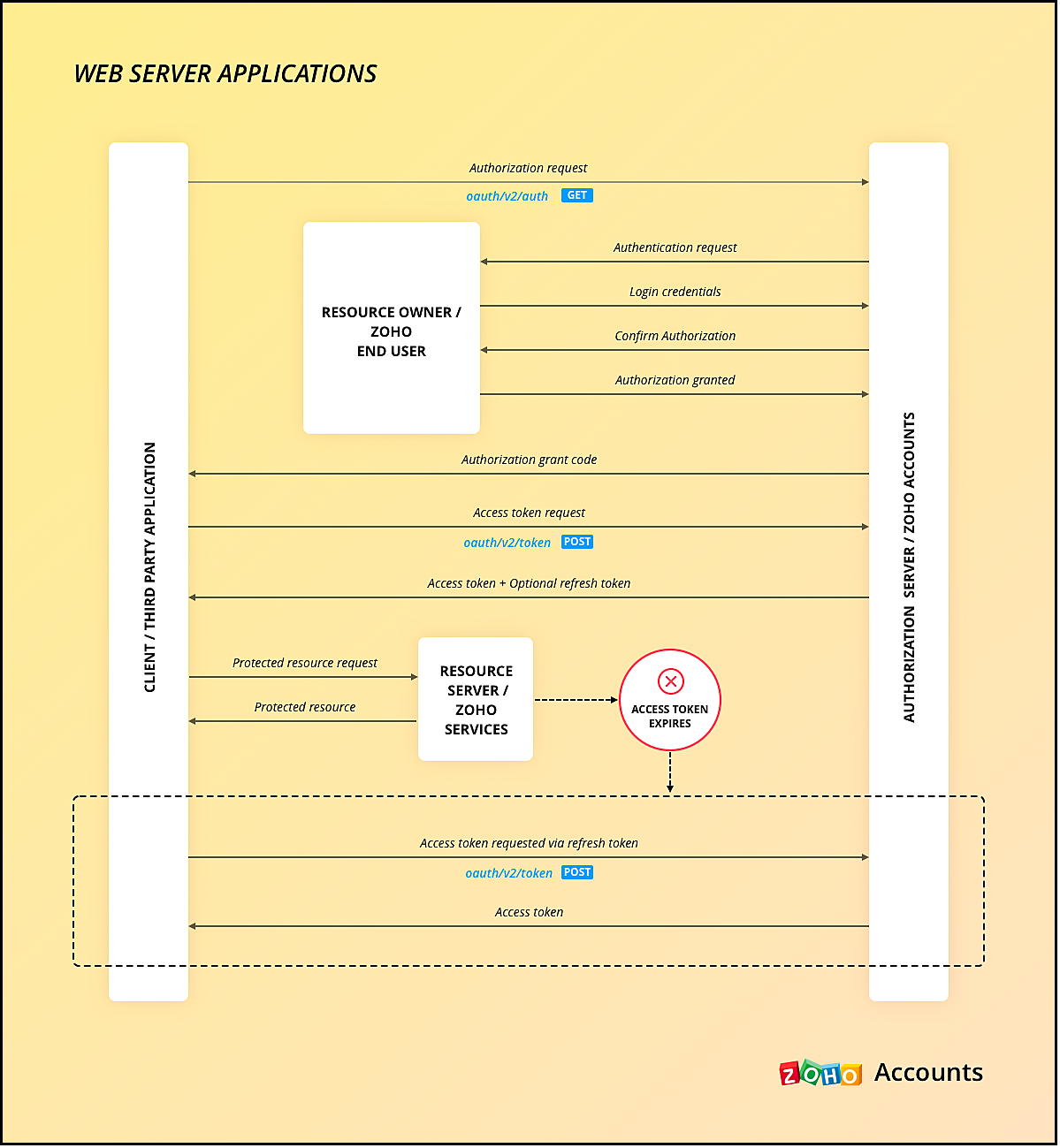
Here is a gist of what happens:
- Users visit your website where you have the Login with Zoho button.
- When a user clicks it, that user will be redirected to accounts.zoho.com with the details of your app such as client ID, scope, redirect uri, access type as the URL parameters.
- Your app must make an API call to Zoho Accounts with the client ID, scope, redirect uri, and access type. Users are shown the data that your application wants to use.
- When users give their consent, Zoho redirects them back to your app.This will be the "Redirect URL" you give while registering your app.
- The redirect URL will have the authorization code(grant token) as one of the parameters, along with the location(user's domain).
- Your app must then make API calls from your web server to Zoho Accounts to generate access and refresh tokens with the generated grant token.
- You must store these tokens in your DB to access that user's data in Zoho CRM. While making API calls, you must send this access token in the header.
- Your app must also have the logic to regenerate access tokens from refresh tokens when the access token expires.
Note that your app must take care of storing user's details like email, organization ID, and tokens.
The following image shows the protocol flow.
When you use our SDK, all you have to do is, generate the grant token and initialize the SDK with the client details and this token. The SDK takes care of access token generation, refreshing it, and token storage.
2. Client-based applications
This client type is for applications that do not have a server and run exclusively on a web browser.
This is also called the Implicit flow as your app makes API calls to Zoho only when users are using your app.
This type of application loads data dynamically on the webpage, and accesses Zoho CRM data by making API calls via Javascript.
Consider the same example where there is a Login with Zoho button on your webpage.
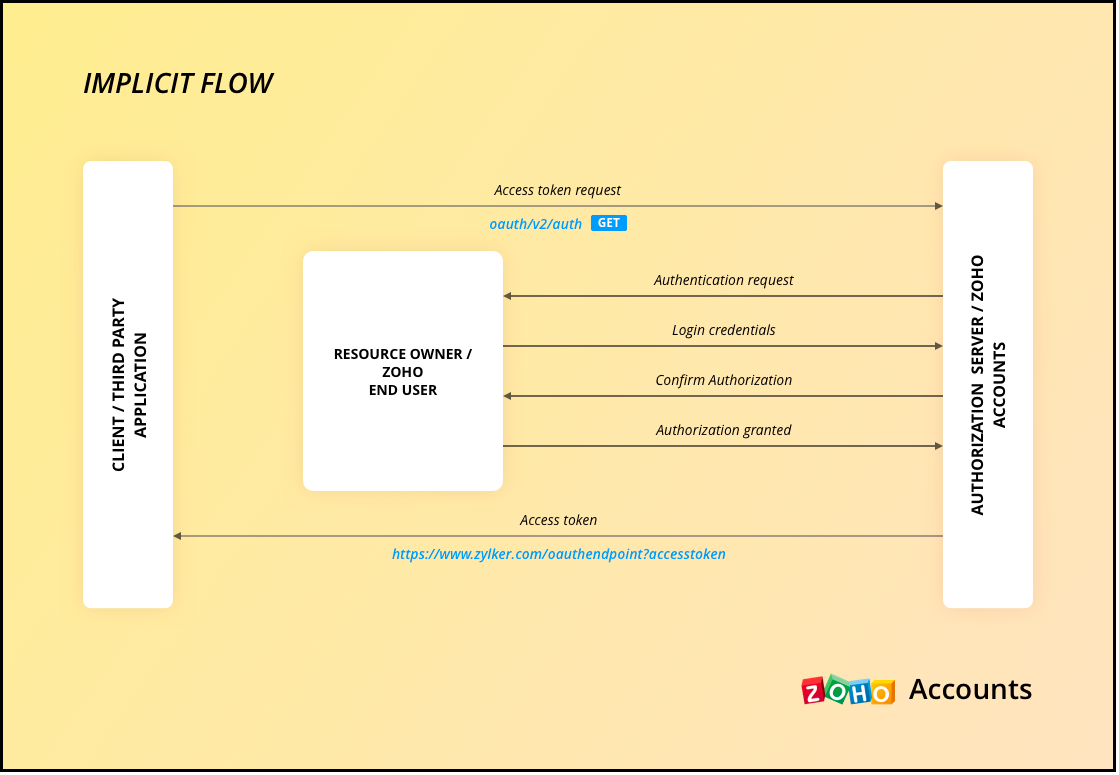
Here is a gist of what happens when a user clicks it.
- Your app redirects the user to Zoho Accounts.
- Your app makes the authorization request with the client ID, redirect uri, scope, and response type as token.
- The user is shown the data that your webpage would use.
- When the user gives consent, Zoho Accounts sends the access token to the redirect uri as a parameter, along with the expiry time and the location of user's data in Zoho's accounts server.
- You can include the "email" in your scope parameter in the access token request to get user's information. The response will have a parameter called id_token that will be in the header.payload.signature format. You need to decrypt the payload section of the parameter using the base-64 decryption algorithm to get user information.
- Your app must then make API calls to Zoho with this access token to fetch data.
- When the access token expires, your app must take care of regeneration and storage.
As the API calls are made from your domain to a different domain(zohoapis.com), for security reasons, the browser will throw the CORS error. So, your domain will be registered while registering your app, and Zoho will know to allow the API calls made from that domain.
As the tokens are available on the browser itself, we recommend handling them with care.
When you use our client-side JS SDK, it automatically generates a new access token upon expiry.
3. Self Client Applications
When your application does not have a redirect URL or a UI, but performs only a backend job, and does not need user intervention, then you must choose this client type.
A self client is often used when the application and Zoho services are operated by the same entity, and you want to enable secure communication between them. For example, you have an internal reporting tool and integrate it with Zoho Analytics. In this case, both the tool and Zoho Analytics are operated by the same entity.
Similarly, consider that you have a legacy product management system and want to perform data sync between Zoho CRM and the system, then you must use the self client.
Here is a gist of what happens.
- You register your app as self client in Zoho API Console.
- You will get the client details such as ID and secret.
- You provide the scopes required for your app to access CRM data.
- You will receive the grant token.
- Your app must then make API calls to Zoho Accounts to generate access and refresh tokens.
- Your app can then use this access token to make API calls to Zoho CRM and use data.
You can refer to our older Kaizen post on this topic for more details.
Note that self client apps can also use any of our server-side SDKs. As already said, the SDK takes care of access and refresh token generation, refreshing the access token, and token storage.
4. Non-browser applications
This client type is for devices that do not have a user agent such a web browser. A TV, for instance.
Let us consider an example involving a smart TV application that integrates with Zoho ShowTime. In this scenario, the smart TV application acts as a non-browser client.
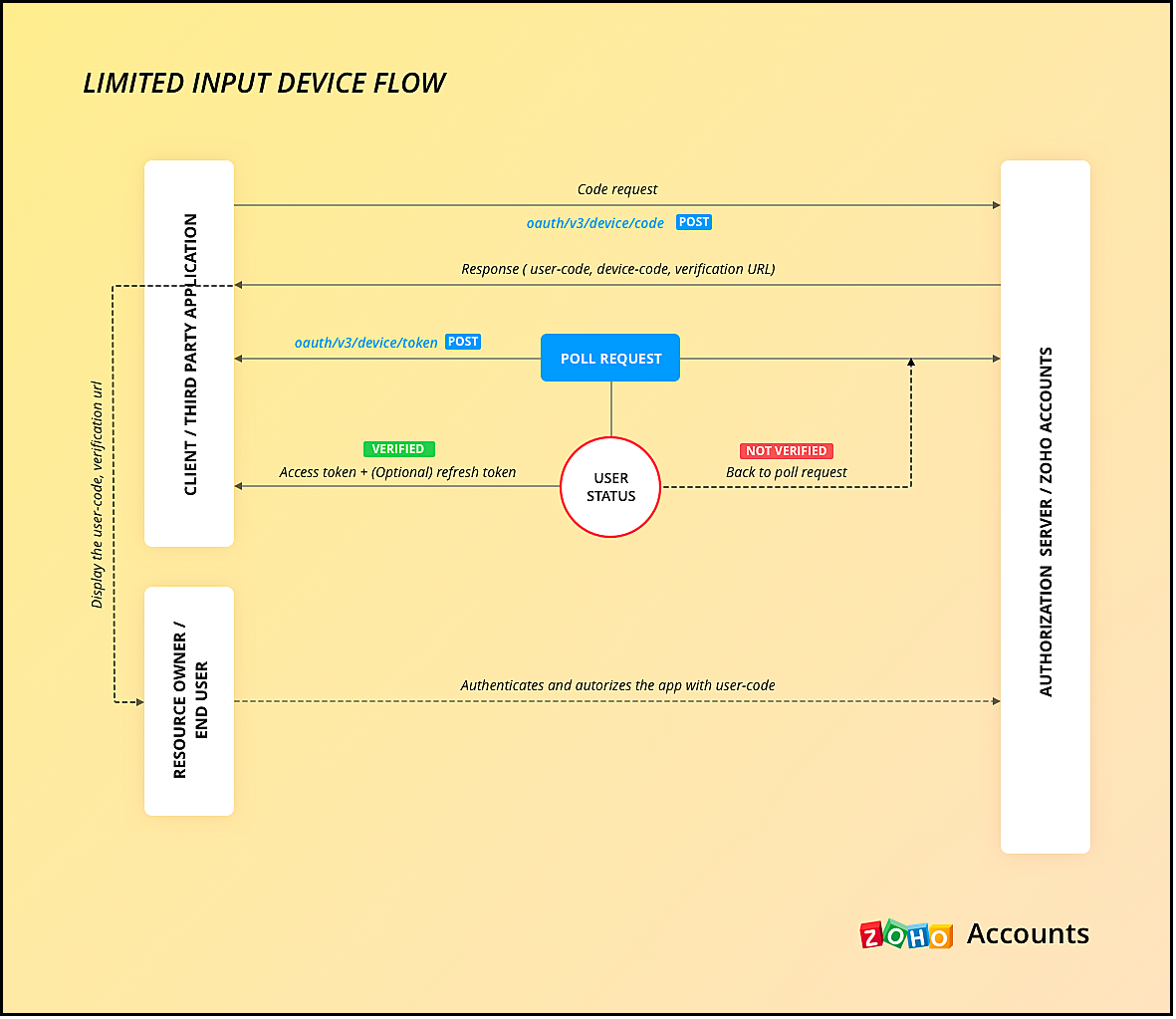
Here is how authentication is handled:
- You must register your smart TV app in Zoho API Console with the type "Non-browser application".
- Users install a dedicated Zoho ShowTime application on their smart TVs.
- When users launch the Zoho ShowTime application on their smart TV, they are prompted to authenticate with their Zoho ShowTime account.
- When they successfully authenticate, Zoho Accounts sends the grant token to your app, along with the user-code, device-code and verification URL,The user must go to this verification URL on a browser and enter the user-code to grant permission to the app.
- Meanwhile, your app must poll the accounts server using the grant token to check if the token has been received.
- When the user enters the user code, Zoho Accounts sends the access token to your app.
- Your app can then use the access token to make API calls to Zoho. Your app must take care of token storage and renewals.
Here is the protocol flow. For more details, refer to this doc.
5. Mobile-based applications
You must use this client type when you have developed an app exclusively for mobile devices. The protocol flow is similar to server-based application where a browser session is required for the users to authenticate.
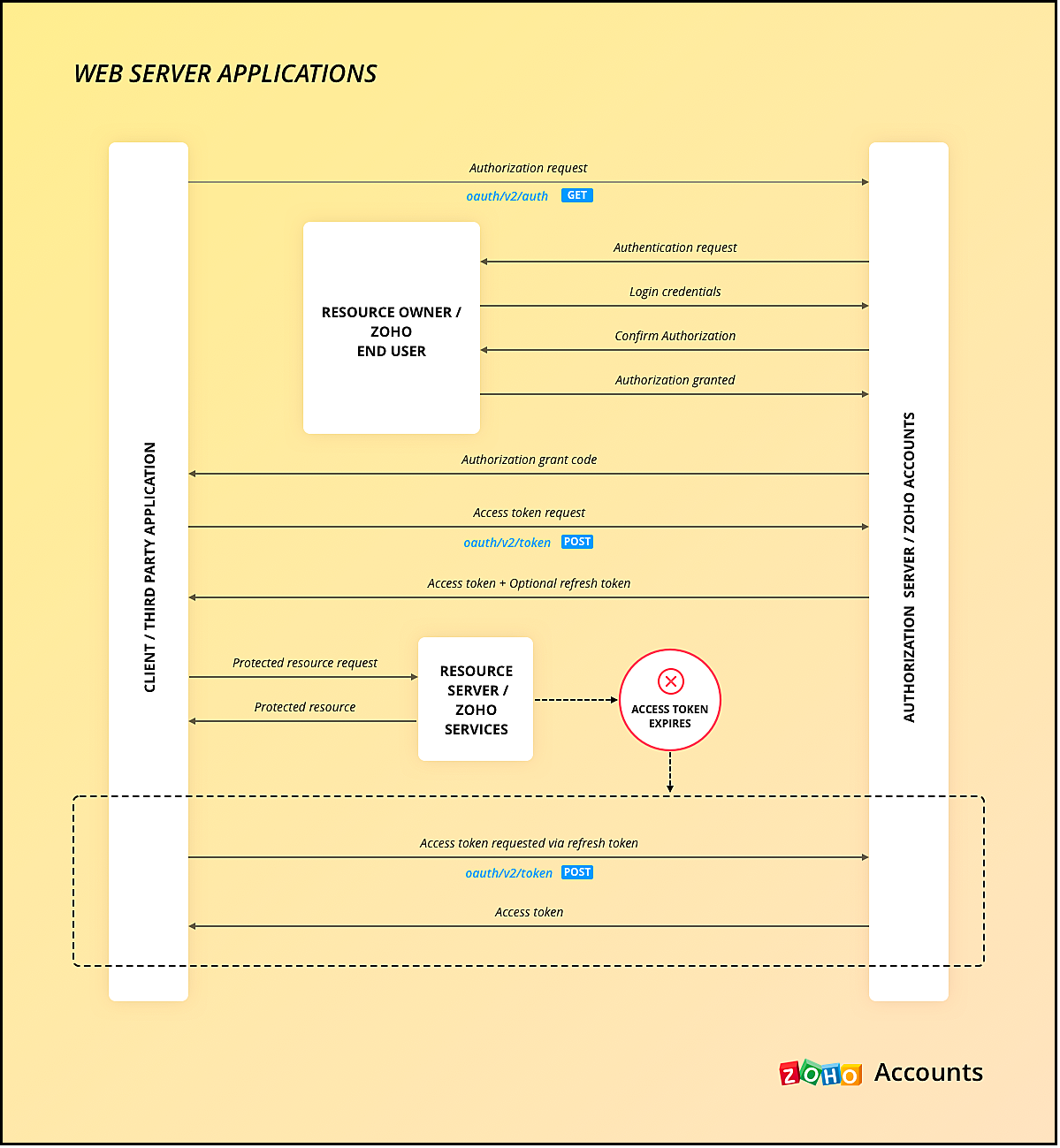
Similar to server-side apps, mobile apps also need to handle redirection, token generation and storage.
If you use any of our Mobile SDKs, the SDK itself handles token generation and storage.
We hope you found this post useful. Let us know your thoughts in the Comment section or write to us at support@zohocrm.com.
Cheers!
Recent Topics
Live webinar | The Evolution of Zoho Show: 2025 Feature Recap
2025 has been a year of exciting updates and features for Zoho Show. From advanced design and formatting tools to smarter presentation delivery, enhanced collaboration, and AI-powered features—along with the launch of our desktop apps, Show has continued
Batch Tracking custom function
Hi fellow zoho users, We have our ecommerce site setup to shopify. I have some products I want to add batch tracking too, my only issue is that it breaks our shopify workflow (create sales order, invoice, payment, package) because it requires us to manually
Company Multiple Branch/ Location Accounting
Hi All, anyone know whether company can maintain their multiple Branch Accounting in Zoho Books. It will be chart of Accounts & Master Data will be same but different report available as per per Branch. Thanks & regards, Vivek +91 9766906737
Is it possible to setup bin locations WITHOUT mandating batch tracking?
Hi fellow zoho users, I'm wondering if anyone else has a similar issue to me? I only have some products batch tracked (items with shelf life expiry dates) but I am trying to setup bin locations for my entire inventory so we can do stock counting easier.
System-generated support email added in CC on “Reply All”
Hi, I recently set up Zoho Desk for a client and we are trying to prevent the Zoho Desk system-generated support email address (not the mailbox used as the department’s "From address") from being automatically added in CC when agents use “Reply All” on
Dependent (Conditional) Fields in Zoho Bookings Forms
Hello Zoho Bookings Team, Greetings, We would like to request the ability to create dependent (conditional) fields in Zoho Bookings registration forms. Current Limitation: There is currently no way to make one field’s available options depend on the value
Support “Other” Option with Free Text in Dropdown Fields
Hello Zoho Bookings Team, Greetings, We would like to request an enhancement to the registration form fields in Zoho Bookings, specifically for dropdown fields. Current Limitation: At the moment, dropdown fields do not support an “Other” option that allows
Report on opportunities showing only the last note added.
Hi I need to create a report that shows the most recent note added to each opportunity. This is so management can see what the latest update is according to the assigned salesperson. One workaround is to use the status field but this implies added manual work and mistakes as the salesperson would have to copy the existing status to a note before adding the latest status... otherwise the activity history would be lost. My current workaround is a report on Notes with Opportunities as the related module.
Zoho CRM Email Templates 100% Width No Background How?
Hi, On the Zoho CRM Email Templates in setup > customization > templates > new templates > I choose blank template, but still it puts in a gray background and a max width for the email. I just want to make an email that looks like an email I would send from gmail that has no background or max width. How do you do this?
Optimum CRM setup for new B2B business
Can some advise the most common way to setup Zoho CRM to handle sales for a B2B company? Specifically in how to handle inbound/outbound emails. I have spent hours researching online and can't seem to find an accepted approach, or even a tutorial. I have
Include Suggested Articles in New Ticket Email
When someone creates a new ticket, is there any way to include recommended knowledge base articles (like the ones Zia Suggests) in the email notification to the user? When they're waiting for a reply, it would be nice to have sent them some recommended
Mapping a new Ticket in Zoho Desk to an Account or Deal in Zoho CRM manually
Is there any way for me to map an existing ticket in Zoho desk to an account or Deal within Zoho CRM? Sometimes people use different email to put in a ticket than the one that we have in the CRM, but it's still the same person. We would like to be able
Item Bulk Edit - Allow for Reorder Level
We're implementing a process for using the Reorder Level field for Items, and I have to go through and add this value to a huge chunk of our Items. It's driving me bonkers that I have to do this individually through the UI rather than bulk updating. It
Sharing my portal URL with clients outside the project
Hi I need help making my project public for anyone to check on my task. I'm a freelance artist and I use trello to keep track on my client's projects however I wanted to do an upgrade. Went on here and so far I'm loving it. However, I'm having an issue sharing my url to those to see progress. They said they needed an account to access my project. How do I fix this? Without them needing an account.
StatusIQ
Please add StatusIQ to data sources. We using site24x7 and StatusIQ together and site24x7 integration is already there. Thanks and regards, Torsten
Report sorting not working
I make extensive use of Summary reports and Pivot Tables. Most of these reports are structured such that I have several columns of "information" data that I want displayed, followed by one or more "Data" summarizations. For example, I have the following
affichage pièces jointes impossible
Bonjour, aujourd'hui je n'arrive pas à afficher ni à télécharger les pièces jointes dans ZOHO CRM. J'utilise Chrome, j'ai vidé les caches et les cookies. Mais cela ne change rien. Merci de votre aide
This site can’t be reached mail.zoho.com took too long to respond
In my office at any system, we couldnt able to login zoho email. it shows " This site can’t be reached mail.zoho.com took too long to respond". please fix it soon.
Why am I seeing deleted records in Zoho Analytics syncing with Zoho CRM?
I have done a data sync between Zoho CRM and Zoho Analytics, and the recycle bin is empty. Why do I see deleted leads/deals/contacts in Zoho Analytics if it doesn't exist in Zoho CRM? How can I solve this problem? Thanks
Zoho Flow + QuickBooks Estimates – Line items not created from CRM subform
Hi everyone, I’m trying to create QuickBooks Estimates from Zoho CRM Quotes using Zoho Flow. I’m aware that Zoho Flow’s native “Create Estimate” action does not support multiple line items, so I followed the community guidance for Invoices using a custom
SAP S/4 HANA Integration via ZOHO Flow
Hi How do I change the SAP Client ID while creating a new connection ? MY client ID is 421. I believe the client id should be an input field for length 3 numbers rather then a drop down to select from a fixed set of values. Thanks
VLOOKUP FUNCTION PROBLEM
Hello, i have a problem with the VLOOKUP function in my sheet http://public.sheet.zoho.com/public/tonimoreno/indicemasacorporal2 in cell D2. This function doesn't work correctly and always returns the last content of the range. Can you help me?
CRM x WorkDrive: We're rolling out the WorkDrive-powered file storage experience for existing users
Release plan: Gradual rollout to customers without file storage add-ons, in this order: 1. Standalone CRM 2. CRM Plus and Zoho One DCs: All | Editions: All Available now for: - Standalone CRM accounts in Free and Standard editions without file storage
Zoho Flow Completely Broken?
Since December 13th, 100% of our flows have stopped working completely. Nothing is working or triggering??? I called support & sat on the line with them for 2 HOURS until they finally concluded it was a back-end problem on their end?? Now i'm calling
Print / Export full Dashboard page
Hello Zoho team, It is currently only possible to print/export one component of a dashboard at a time. Requesting the option to print/export a full dashboard page with all components to a pdf or picture. Doing through the browser doesn't give good results.
emails duplicated in my outlook client
Hello I am just new here and I have a litle problem that I do not find how to solve. I sumarise here after. Your help would be very appreciated. I have just recently contracted this zoho mail servicesservices as an initial evaluation yesterday night. I then: - opened a free account - created 1 initial email address ..........@domain.com - created a second email address ..........@domain.com - proceeded with the config instructions (checking the ownership of my domain, changing MX etc... ) as
How to check task starting time in zoho mobile app?
I am using the Zoho mobile app on my iPhone, and I am not able to see the task's starting and finishing times. When opening the Task information / Details, I can only see the Task start date and due date, but not the time. Is there any way to check a
Creating an extension in Sigma: Zoho CRM isn't selectable as a service
I have 2 Zoho accounts which are part of 2 different workplaces. One workplace is able to select 'Zoho CRM' as a service option when creating a new extension, the other one is not. I'm not sure what the exact differences are between them. What do I need
List of packaged components and if they are upgradable
Hello, In reference to the article Components and Packaging in Zoho Vertical Studio, can you provide an overview of what these are. Can you also please provide a list of of components that are considered Packaged and also whether they are Upgradable?
Cliq iOS can't see shared screen
Hello, I had this morning a video call with a colleague. She is using Cliq Desktop MacOS and wanted to share her screen with me. I'm on iPad. I noticed, while she shared her screen, I could only see her video, but not the shared screen... Does Cliq iOS is able to display shared screen, or is it somewhere else to be found ? Regards
Add Domain
Hello Zoho Support, My Zoho Sites project accidentally auto-added domains with http:// prefix and duplicated domain entries. Current domains list shows: http://www.kinhtethethao.com.vn (Primary – cannot be removed) http://www.kinhtethethao.com.vn (verification
Knowledgebase SEO
We have a custom-domain mapped help center that is not restricted via login. I have some questions: a) will a robots.txt file still allow us to control indexing? b) do we have the ability to edit the sitemap? c) do category URLs get indexed by search
RouteIQ for Zoho FSM
Beste, Zou wel top zijn dat we een RouteIQ hebben voor FSM aangezien we constant moeten zien wat de beste route is voor onze monteurs. Nu moeten we een speciale aparte programma hebben om de beste route te berrekenen voor onze monteurs aangezien de planning
Export Tickets from the Help Center
Hello everyone! We are now allowing end users to export tickets directly from the help center. The ticket export allows users to: Filter tickets by Department, Priority, and Account before exporting. Download files from Export History (Setup > Data administration
Zoho Books Sandbox environment
Hello. Is there a free sandbox environment for the developers using Zoho Books API? I am working on the Zoho Books add-on and currently not ready to buy a premium service - maybe later when my add-on will start to bring money. Right now I just need a
Super Admin Logging in as another User
How can a Super Admin login as another user. For example, I have a sales rep that is having issues with their Accounts and I want to view their Zoho Account with out having to do a GTM and sharing screens. Moderation Update (8th Aug 2025): We are working
Is it possible to remove filtering options?
My CRM has a lot of custom fields that should not be used in filters or views. Fields that are automated and exist only to store temporary values that get used in functions. These create a lot of noise in the list of fields to filter. Isn't there any
Function #18: Associate invoice templates automatically based on customer language
For businesses dealing with a diverse linguistic clientele, it becomes crucial to send out invoices in the customer's preferred language to ensure effective communication. This requirement can be handled in Zoho Books by creating invoice templates in
Changing field types
Question im a Zoho CRM user and curious, if I change a flied type from single or multi line text to a URL field type will i lose the data in the field or will it be converted to website link automatically. Thanks
Quote PDF – Header image stopped rendering suddenly
Hello Zoho Support Team, We are facing an issue with Quote PDF templates in Zoho Books. Previously, images added inside the Quote header HTML were rendering correctly. However, recently the header image is no longer appearing, while header text still
Next Page