Kaizen #121 : Customize List Views using Client Script

Kaizen #121 : Customize List Views using Client Script

Hello everyone! 

Welcome back to another interesting Kaizen post. In this post, we can discuss how to customize List Views using Client Script. This post will answer the questions Ability to remove public views by the super admin in the Zoho CRM and Is it possible to restrict ZCRM user to see only custom views created by administrator?


In this post,
  1. What is a List View?
  2. Use Case - To hide all public views except one
  3. Solution using Client Script
  4. Other ZDKs available to customize List Views
  5. Summary
  6. Related Links


1. What is a List View?

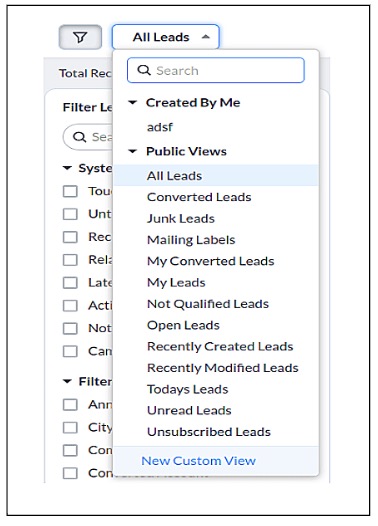
      A List View is grouping of records based on a defined set of criteria. List Views are beneficial for displaying customer specific data according to your business requirements. For example, you may be interested in following-up on the leads created during the last week or reviewing overdue tasks. The best way to handle these scenarios is to filter the records using the list views. Click here for more details on List Views.There are two types of List Views in Zoho CRM -
  • Standard List Views : You can modify the standard views and sort the order of the columns in the list. 
  • Custom List Views : You can create, modify, and delete custom views, and you can also sort the order of the columns in the list.
Often, there are business requirements where you need to customize these views, like hiding a view from certain users or masking a particular column in the view. Let us see how to control the list views visible to a user, using Client Script.

2. Use Case - To hide all public views except one

      Zylker is a manufacturing company that uses Zoho CRM. A Salesman creates records in the custom module named "Orders".The name of the profile assigned to a Salesman is "Sales".  The Admin does not want the "Sales" profile users to view the standard public views except the "My Orders" public view.

3. Solution using Client Script 

      Admin should remove the visibility to all public views for the profile "Sales" and permit only the "My Orders" view. Here are the list of steps to be followed.
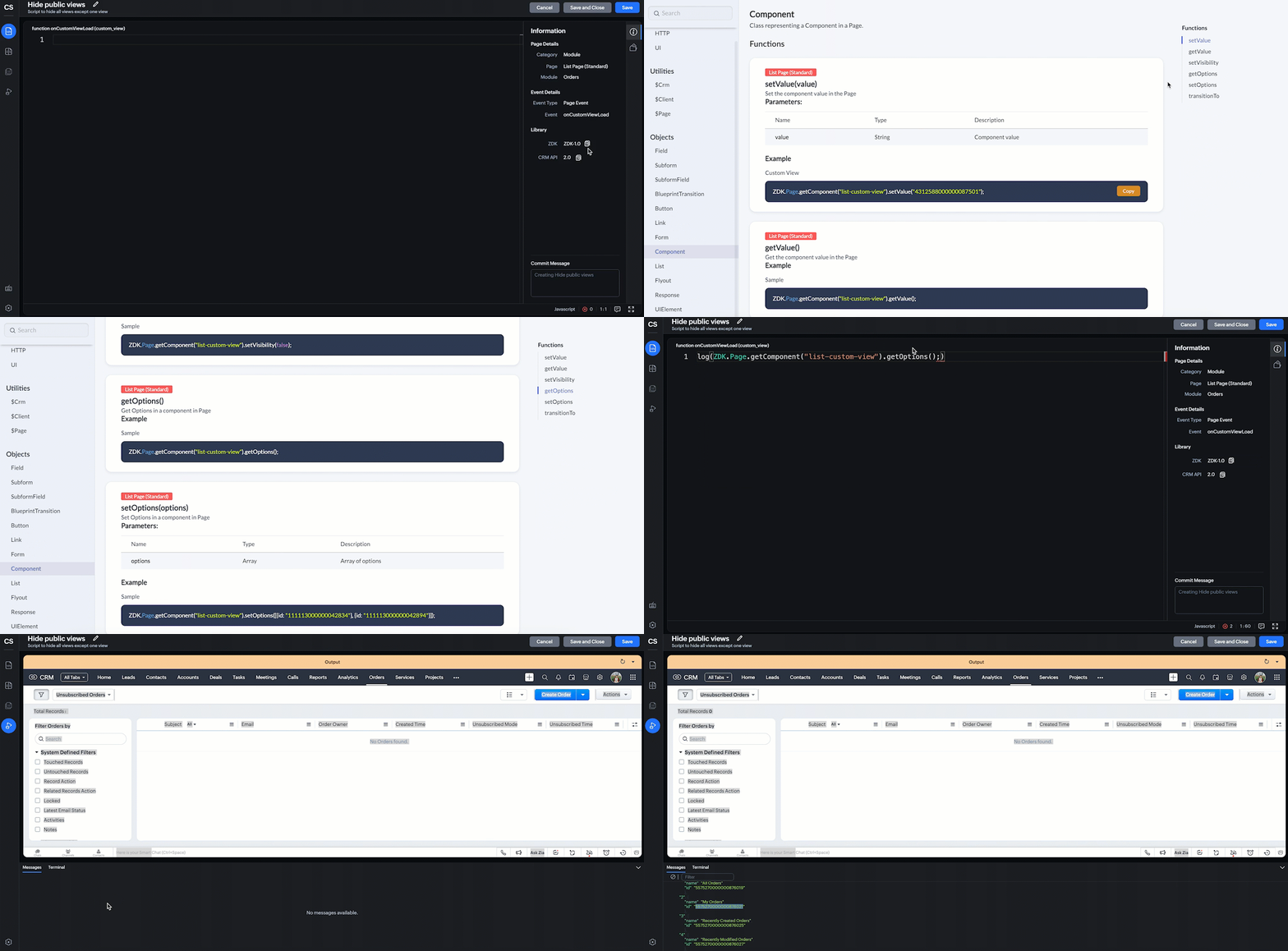
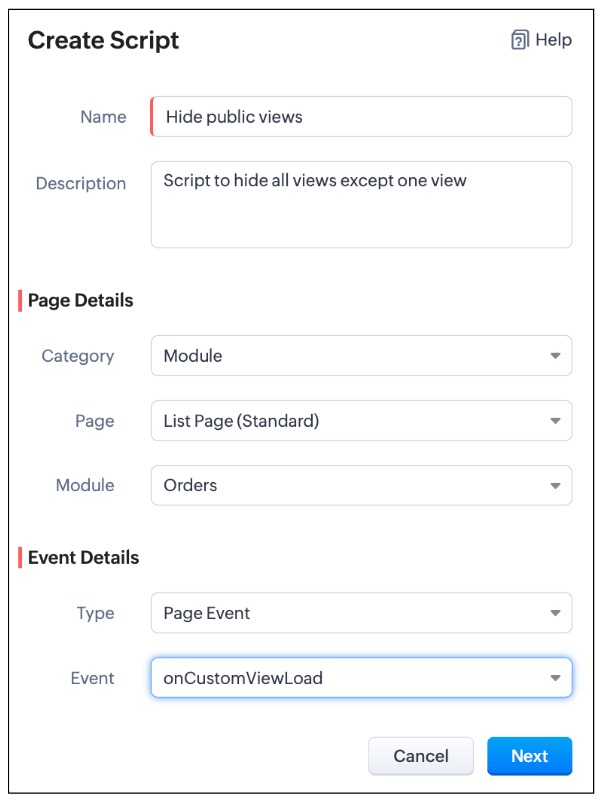
  • Create a Client Script for List Page (Standard) of Orders module and specify the event as onCustomViewLoad.  To know more about how to create a Client Script, click here.


    log(ZDK.Page.getComponent("list-custom-view").getOptions());


  •  Then,  getOptions() will return the options in the component of List Page. Here the component is 'list-custom-view'.
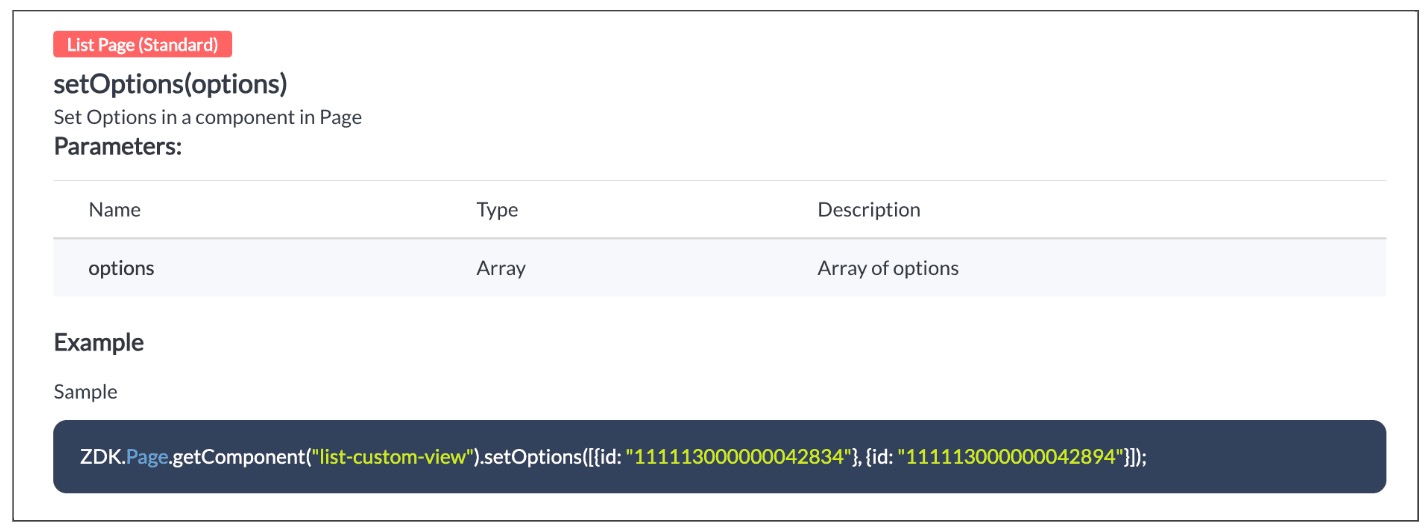
  • Now with  the copied id of "My Orders" view , use  "getComponent.setOptions()" and add the only option on list-custom-view as "My Orders" view, if the profile is "Sales".

var user = ZDK.Apps.CRM.Users.fetchById($Crm.user.id);
if (user.profile.name != 'Sales') {
    ZDK.Page.getComponent("list-custom-view").setOptions([{ id: "5575270000000876021" }]);
}
  • Save the Script.

  • You can now see that only "My Orders" view is visible for the "Sales" profile, and all other public views are hidden.
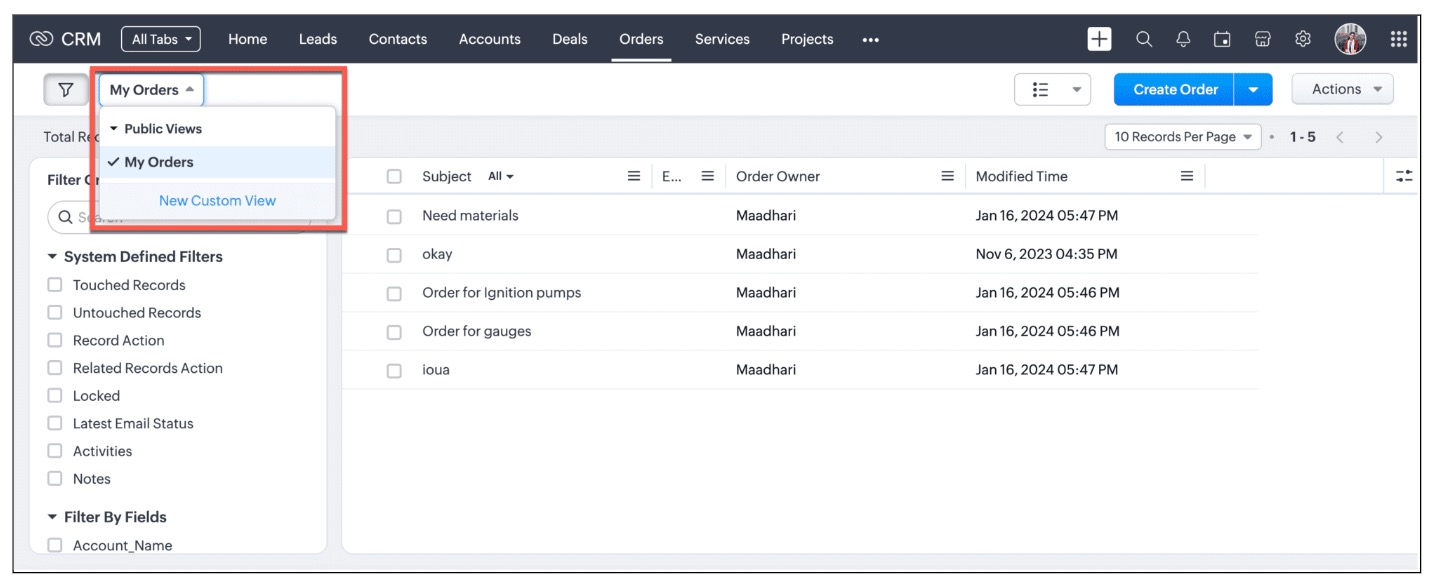
  • For other profiles like Manager and Admin, all public views will be visible as shown below.
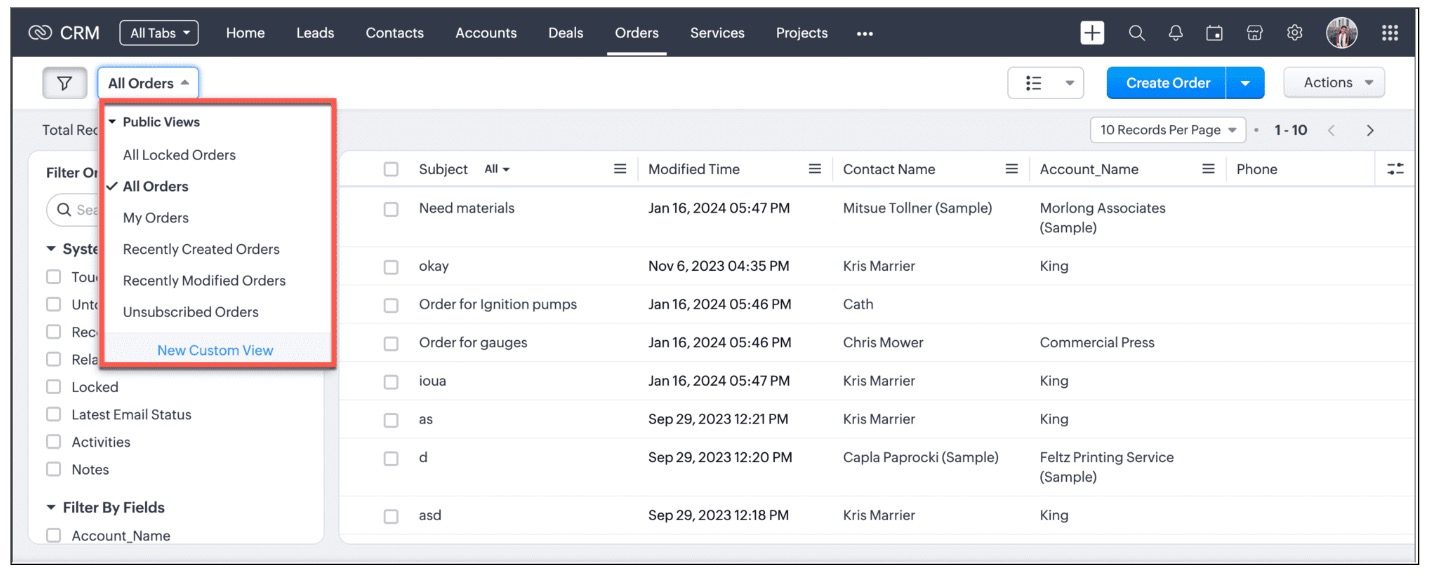
We are working on the other components in the List Page, and will let you know once they are live.

4. Other ZDKs available to customize List Views

Client Script enables you  to customize List Views using the following list of ZDKs and Client Script functions.
  • freezeColumns(option) - You can freeze list view and disable modifying columns.
  • maskField(field_name, (length,character,reverse)) - You can mask fields in the List View
  • sortByField(field_name, option) - You can sort field in the List View
  • getRecords() - You can get Records in the List View
  • selectRecords(criteria) - You can select Records in the List view by criteria
  • selectRecordsByID(ids) - You can select Records in the List view by record ID
  • clearSelection() - You can clear selected Records in the List view
  • style(style_config, criteria) - You can style Records in the List View. Click here to view the related Kaizen post.
  • setValue(value) - You can set the component value in the Page
  • getValue() - You can Get the component value in the Page
  • setVisibility(value) - You can set visibility of the component in the Page
5. Summary:

In this post, we have discussed,
  • About standard and custom List Views.
  • How to control the visibility of List Views using Client Script.
  • How to fetch the list of views available for a module using Client Script.
  • How to set your desired views for users using Client Script.
  • ZDK methods available in Client Script to customize List views

6. Related Links

Notes
Kaizen Collection : 
Click here to view our Kaizen Collection. 
We hope you found this post useful. We will meet you next week with another interesting topic!
If you have any questions, let us know in the comment section.


Cheers!


    • Sticky Posts

    • Kaizen #198: Using Client Script for Custom Validation in Blueprint

      Nearing 200th Kaizen Post – 1 More to the Big Two-Oh-Oh! Do you have any questions, suggestions, or topics you would like us to cover in future posts? Your insights and suggestions help us shape future content and make this series better for everyone.
    • Kaizen #226: Using ZRC in Client Script

      Hello everyone! Welcome to another week of Kaizen. In today's post, lets see what is ZRC (Zoho Request Client) and how we can use ZRC methods in Client Script to get inputs from a Salesperson and update the Lead status with a single button click. In this
    • Kaizen #222 - Client Script Support for Notes Related List

      Hello everyone! Welcome to another week of Kaizen. The final Kaizen post of the year 2025 is here! With the new Client Script support for the Notes Related List, you can validate, enrich, and manage notes across modules. In this post, we’ll explore how
    • Kaizen #217 - Actions APIs : Tasks

      Welcome to another week of Kaizen! In last week's post we discussed Email Notifications APIs which act as the link between your Workflow automations and you. We have discussed how Zylker Cloud Services uses Email Notifications API in their custom dashboard.
    • Kaizen #216 - Actions APIs : Email Notifications

      Welcome to another week of Kaizen! For the last three weeks, we have been discussing Zylker's workflows. We successfully updated a dormant workflow, built a new one from the ground up and more. But our work is not finished—these automated processes are
    • Recent Topics

    • Mise à jour de Zoho Books – France

      Chers clients, Merci pour votre patience et votre soutien continu. Avec les évolutions réglementaires à venir en France nous introduisons de nouvelles fonctionnalités dans Zoho Books pour les clients français. Ces mises à jour ont été conçues pour répondre
    • CRM Developer Update: Mandatory field behavior changes in Zoho CRM APIs

      We are planning a few updates to Zoho CRM APIs that are expected to be rolled out by the end of October 2026. These changes are not live yet. We are sharing this early so developers and partners can review the impact and prepare in advance. What is changing?
    • Show Available Stock as a Column in Item Views (Including by Warehouse)

      It would be very useful to have Available Stock as a standard column in the Items list view. Currently Stock On Hand does not show the real picture for businesses managing orders and inventory. Example: Stock on Hand: 100 Committed to Sales Orders: 80
    • What's New in Zoho POS - July 2026

      Hello everyone, Welcome to Zoho POS’s monthly update, where we share our latest feature updates, enhancements, events, and more. Let’s take a look at how July went. Support for Saudi's ZATCA Phase 2 e-invoicing We have added support for ZATCA (Zakat,
    • How to make Contact a Help Center User

      I see a "IsPortalUser" checkbox on each of the Customer account, but I am unable to check the checkbox. How is this configured?
    • Introducing the new Fields API

      Hello everyone, Greetings from Zoho Desk's API corner! With the rising need for integrations to connect multiple tools in businesses, APIs need to be adaptive, reliable, consistent, and ready for dynamic operations. To support better performance, efficiency,
    • Service locations are tied to contacts?

      Trying the system out. And what I discovered is that it seems that the whole logic of the app is, I'd say, backwards. There is a Customer - a company. The company has contact persons and service locations can be associated with different contact persons.
    • Zoho ResearchStudio Shutdown Notice

      Hi ResearchStudio fam, We are writing to inform you that Zoho ResearchStudio will be discontinued from Oct 5, 2026. Thank you for being a part of our journey and for trusting us with your qualitative research work. What this means for your data: Your
    • SlideShare Downloader PDF not syncing in Zoho WorkDrive

      Hi everyone, I use SlideShare Downloader for save study PPT and PDF files. After download I upload files in Zoho WorkDrive, but sometimes PDF preview not showing or sync take very long time. Small files work okay but some bigger presentation files have
    • メモの保存場所、見直しませんか?― Zoho Notebookで始める情報管理

      ユーザーの皆様、こんにちは。ゾーホージャパンの朝香です。 AIを利用した業務が広がる中、AIによる情報漏洩対策を進めている組織も多いのではないでしょうか。 一方で、日常的に使っているメモの管理については、対策できていますか? 業務中のメモには、重要な情報が含まれていることがあります。 そのため、AIへの入力だけでなく、メモの保存先についても是非確認をおすすめしたいと思います。 そこで今回は、使いやすさだけでなく、セキュリティにも配慮して設計されたZohoのノートアプリ「Zoho Notebook」をご紹介します!
    • Zoho Sheet offline is now live on iPhone

      Hello everyone, We've just rolled out offline support for Zoho Sheet on iOS—you can now create, edit, and analyze spreadsheets on your iPhone without an internet connection. Offline support has been a sustained priority for us. We're on the verge of bringing
    • You can now sync records from Custom Modules in Zoho CRM

      p.MsoNormal, li.MsoNormal, div.MsoNormal { margin: 0.0cm; font-size: 12.0pt; font-family: Cambria; } p.MsoListParagraph, li.MsoListParagraph, div.MsoListParagraph { margin-top: 0.0cm; margin-right: 0.0cm; margin-bottom: 0.0cm; margin-left: 36.0pt; font-size: 12.0pt; font-family: Cambria; } p.MsoListParagraphCxSpFirst, li.MsoListParagraphCxSpFirst, div.MsoListParagraphCxSpFirst { margin-top: 0.0cm; margin-right: 0.0cm; margin-bottom: 0.0cm; margin-left: 36.0pt; font-size: 12.0pt; font-family: Cambria;
    • Zoho ERP | Product updates | July 2026

      Hello users, We're back with another round of updates to help you streamline your operations. This month's release brings new features and enhancements designed to help you work more efficiently. Read on to discover everything that's new in Zoho ERP this
    • Fixed cost per task

      Is there any way to assign a fixed cost per task, but track time for internal reporting? Don't see a way to do this currently.
    • Set custom date creation for ticket using API in Desk

      Hi. all.. I want know if is possible to add ticket with custom creation date via API... This would to be great because we are moving from another platform to Zoho and we have need to keep all statistics for old tickets also. In api docs i didnt see nothing about custom date in ticket creation but i would prefer a confirm from comunity/support. Thank you P.S.: Sorry for bad english language
    • Allow Shopify / marketplace orders to be cloned

      Many businesses now use Shopify as a B2B ordering portal, not just a D2C ecommerce website. For B2B businesses, once these orders are imported into Zoho Inventory, Zoho often becomes the main system used to manage purchasing, stock, fulfilment and customer
    • How to Display a Logo Image on a Public Form?

      I would like to display a logo image in the header of a form. To achieve this, I added an Add Notes field to the form. The code below works perfectly for Zoho users accessing the form. However, when the form is made public, the image does not load properly:
    • Possible to define default font and size in Zoho Campaigns?

      Is it possible to define a default font (font, size and colour) for the text, H1 and H2 in Zoho Campaigns? For example: In a campaign, I add a text block, and the text is automatically century gothic, size 11, grey (6f6f6e) by default? Thank you!
    • Set Custom Colurs/Fonts/Style

      I know I can save blocks as books marks but it would be nice to be able to define a custom colour pallet, the style of the H1, H2 etc to save me having to copy a previous block and set them manually over and over again. Since the colour picker doesn't
    • Stop Zoho Projects From Automatically Adding Client Users

      I have a custom function that creates a Zoho Project for every Quote attached to a Deal when it moves to Closed Won. Everything works fine, except for the fact that connecting a Zoho Project to the CRM automatically takes the Contact associated with the
    • Zoho CRM - Kiosk Studio: Build Once, Execute Multiple Times with Loops

      Hello Everyone, Introducing Loop Functionality in Kiosk Studio. If you've ever built a Kiosk that needed to perform the same action multiple times like updating a list of contacts, scheduling calls for a batch of leads, or processing multiple products
    • Switching from Notebook to another product, too unreliable

      Not only is the spell check worse than useless, now there is a lag AFTER EVERY KEYSTROKE! This makes it impossible to use when there are innumerable products which provide this basic function. I made the mistake of relying on Notebook and have so many
    • Accidentally deleted a meeting recording -- can it be recovered?

      Hi, I accidentally deleted the recording for a meeting I had today. Is there a way I can recover it?
    • Zoho Desk: A Estruturação do Atendimento ao Cliente na era da IA

      O mercado de atendimento ao cliente vem passando por uma transformação que não é apenas tecnológica, é também comportamental. As empresas que antes mediam qualidade de suporte pelo tempo de resposta, hoje precisam medir pela experiência completa, unindo
    • API bookings/v1/json/appointment not adding additional fields he is returning this "customer_more_info": {"booking_form_type": "service"}

      Hi, I'm trying to add additional fields inside zoho booking appointment api and I'm passing same data as you told inside your documentation. He is returning following response "customer_more_info": { "booking_form_type": "service" } I'm using this parameter
    • Basic report- open sales order by item, with filter for customer ..

      HI, we really need a basic report that sorts all open sales orders by Item, so you can see which items in your inventory are awaiting invoicing. Then you need a filter by customer, so you can see all the items a particular customer is waiting for. daily,
    • Record sharing for Activities modules in CRM

      Hello everyone, We've got a few quick enhancements to what we covered in this previous announcement: record sharing is now available for Activities modules. 1. Sharing Tasks, Meetings, and Calls Until now, activity records could only be shared indirectly
    • Stock Count

      The stock count is a nice new feature, but we cannot figure out how to: 1. Use it without assigning to a person, we have a team or one of multiple do stock counts as do most any company. 2. Add any extra fields to what the "counter" sees. The most important
    • Action Required: Update your TLS configuration to ensure uninterrupted access to Zoho WorkDrive

      Hi everyone, To further strengthen the security of Zoho WorkDrive, we’re updating the TLS cipher suites supported across our services. As part of this change, older and less secure cipher suites are being phased out. If your browser, API client, desktop
    • Free webinar: Zoho Sign in Q2 2026 - A quick walkthrough

      Hi there, The second quarter of 2026 has flown by, and the Zoho Sign team has been hard at work releasing features to enhance how you send, sign, and manage documents. Join us for our upcoming webinar, where we'll discuss what's new and what's to come.
    • Kiosk Studio + Zia Agents: Automate renewal risk classification in your CRM | Kiosk Studio Session #10

      Renewal management is vital in a recurring revenue business. Your CRM already knows which accounts are at risk; the signals are present in contact titles, deal stages, call logs, account descriptions, and so on. What's missing is something that reads
    • How to Prefill Data in an Additional Form Submission from the First Form Submission

      We need to prefill data in the second form submission based on the previously submitted form (when using the "Add Another Response" option). We have a form which allows customers to send us files via upload. It requires them to provide name, company name,
    • Enable Credit Note creation for Sales Returns BEFORE receiving goods

      Currently, it is not possible to issue a Credit Note linked to a Sales Return until the goods have been officially marked as "received" in the system. In our business, we often need to issue a credit note to our clients immediately upon the initiation
    • Request to Make Billing Company and Service Company Fields Editable.

      Hello Latha, We noticed that once a Request, Estimate, or Work Order is created, we are unable to edit the Billing Company and Service Company details, as these fields become non-editable. Could you please make these fields editable after record creation?
    • Client Script | Update - Client Script Support For Custom Buttons

      Hello everyone! We are excited to announce one of the most requested features - Client Script support for Custom Buttons. This enhancement lets you run custom logic on button actions, giving you greater flexibility and control over your user interactions.
    • Why associate tickets are just one direction?

      When I associated the ticket #A with #B, in ticket #A I can see that exists another ticket associated. However, when I go to ticket #B, there is no reference that ticket #A is associated to #B. Is there a reason for that? Because it is confused and hard
    • Physical Batch Stock by Warehouse

      We have activated batch tracking in Zoho Inventory. To reconcile our inventory with the physical stock reported by our 3PL, we need a report showing the total physical quantity still present in each warehouse, broken down by batch. This quantity is the
    • No "Import Users" option in Zoho FSM

      I recently noticed that there is no option to import Users into Zoho FSM, and this has become a serious challenge for us. When migrating data, especially technicians or other user profiles, we often have hundreds of users to bring into the system. Currently,
    • Elevate your Radar experience: Best practices part 2

      In the Spotlight: Zoho Desk's Radar app Hello Everyone, In part 1 of Zoho Desk’s Radar app best practices, we explored role-based permissions, exceptions handling for critical alerts, daily toasts for a quick view of tickets, and landscape reports for
    • Suggestions for Improving the Deluge Development Experience

      Hello, I would like to share some ideas that could significantly improve the Deluge development experience, especially for partners and developers building larger solutions across the Zoho ecosystem. Some key areas that would add a lot of value: Deluge
    • Next Page