Kaizen #121 : Customize List Views using Client Script
Hello everyone!
Welcome back to another interesting Kaizen post. In this post, we can discuss how to customize List Views using Client Script. This post will answer the questions Ability to remove public views by the super admin in the Zoho CRM and Is it possible to restrict ZCRM user to see only custom views created by administrator?
In this post,
- What is a List View?
- Use Case - To hide all public views except one
- Solution using Client Script
- Other ZDKs available to customize List Views
- Summary
- Related Links
1. What is a List View?
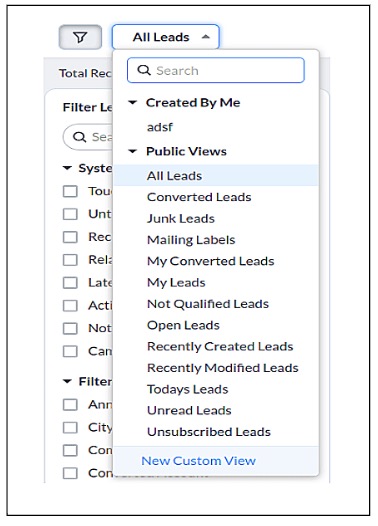
A List View is grouping of records based on a defined set of criteria. List Views are beneficial for displaying customer specific data according to your business requirements. For example, you may be interested in following-up on the leads created during the last week or reviewing overdue tasks. The best way to handle these scenarios is to filter the records using the list views. Click here for more details on List Views.There are two types of List Views in Zoho CRM -
- Standard List Views : You can modify the standard views and sort the order of the columns in the list.
- Custom List Views : You can create, modify, and delete custom views, and you can also sort the order of the columns in the list.
Often, there are business requirements where you need to customize these views, like hiding a view from certain users or masking a particular column in the view. Let us see how to control the list views visible to a user, using Client Script.
2. Use Case - To hide all public views except one
Zylker is a manufacturing company that uses Zoho CRM. A Salesman creates records in the custom module named "Orders".The name of the profile assigned to a Salesman is "Sales". The Admin does not want the "Sales" profile users to view the standard public views except the "My Orders" public view.
3. Solution using Client Script
Admin should remove the visibility to all public views for the profile "Sales" and permit only the "My Orders" view. Here are the list of steps to be followed.
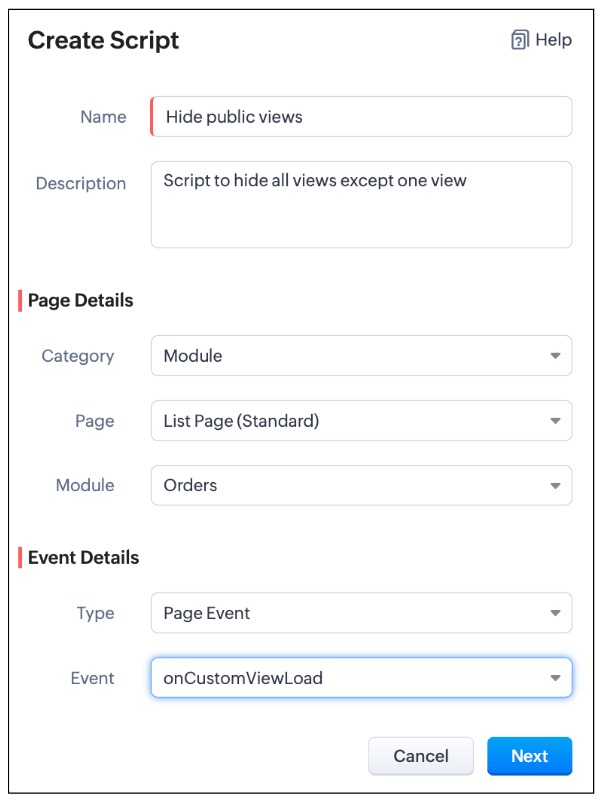
- Create a Client Script for List Page (Standard) of Orders module and specify the event as onCustomViewLoad. To know more about how to create a Client Script, click here.
- Now, using the getComponent.getOptions() , copy the id of My Orders view from the Messages panel in the "Run" component of Client Script IDE as shown below.
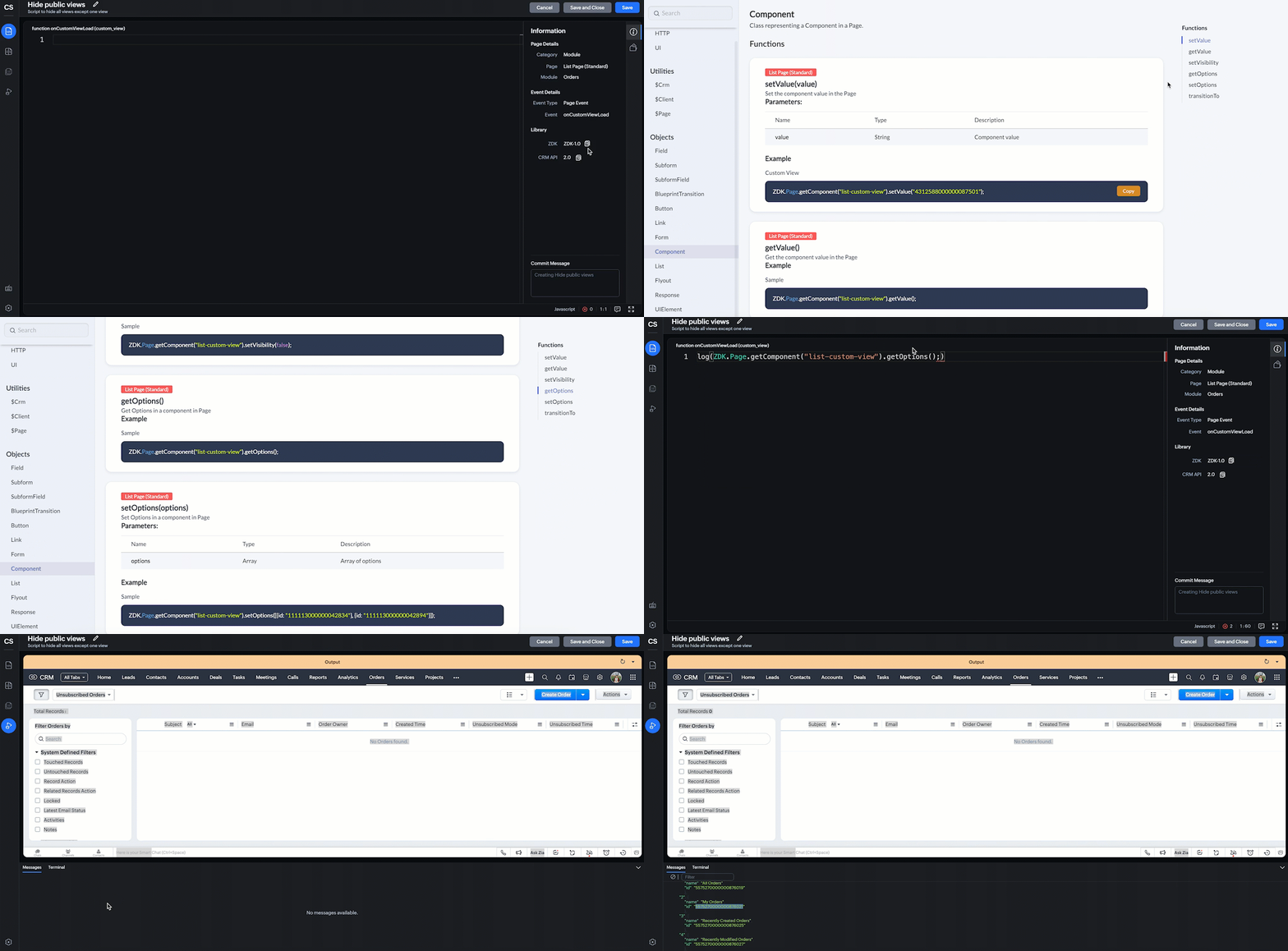
log(ZDK.Page.getComponent("list-custom-view").getOptions()); |
- In this script, ZDK.Page.getComponent("list-custom-view") will get the component that corresponds to the views drop down on the List Page.
- Then, getOptions() will return the options in the component of List Page. Here the component is 'list-custom-view'.
- Now with the copied id of "My Orders" view , use "getComponent.setOptions()" and add the only option on list-custom-view as "My Orders" view, if the profile is "Sales".
var user = ZDK.Apps.CRM.Users.fetchById($Crm.user.id); if (user.profile.name != 'Sales') { ZDK.Page.getComponent("list-custom-view").setOptions([{ id: "5575270000000876021" }]); } |
- Save the Script.
- Here is the syntax for setOptions(options).
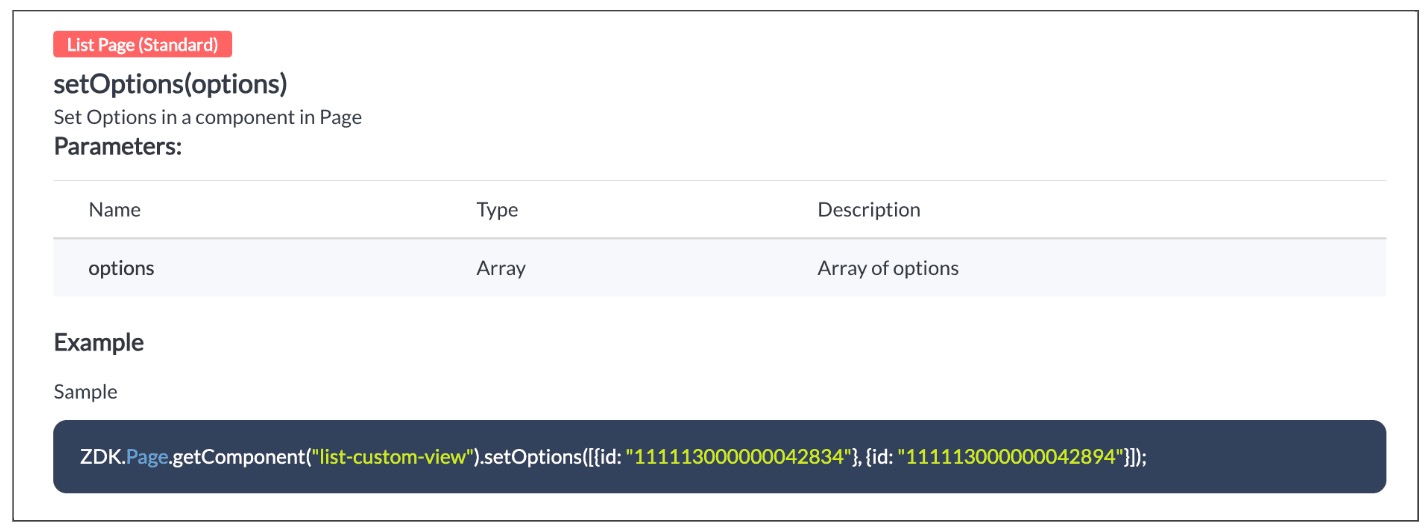
- You can now see that only "My Orders" view is visible for the "Sales" profile, and all other public views are hidden.
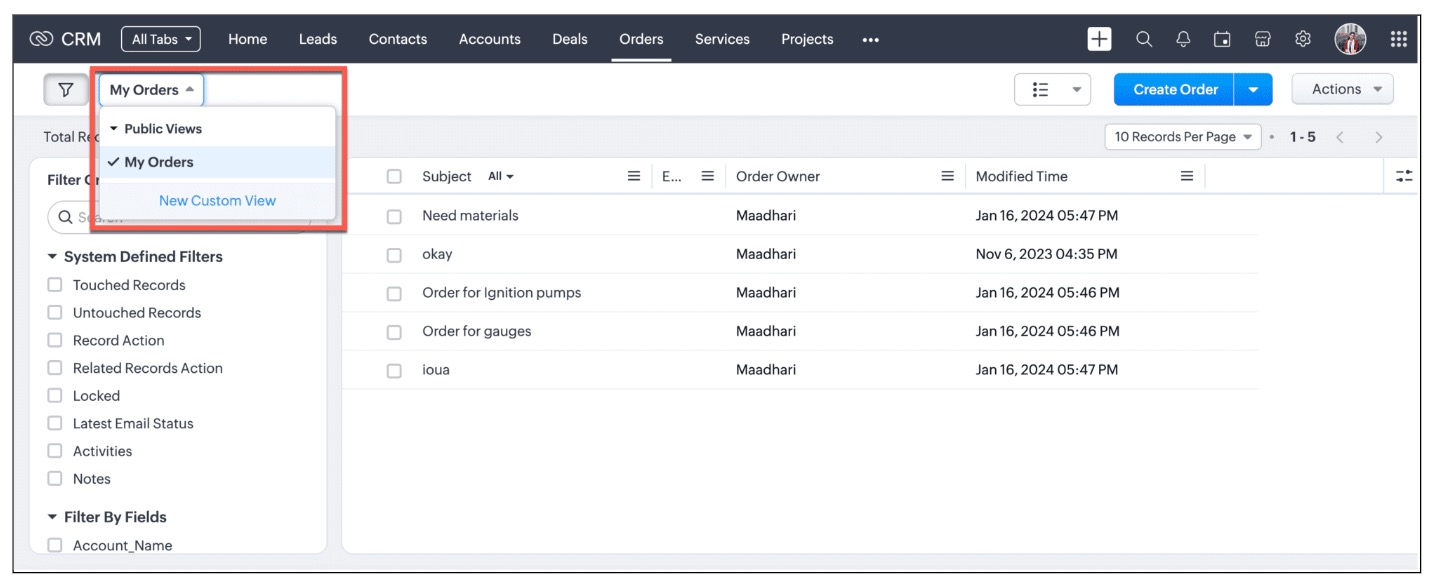
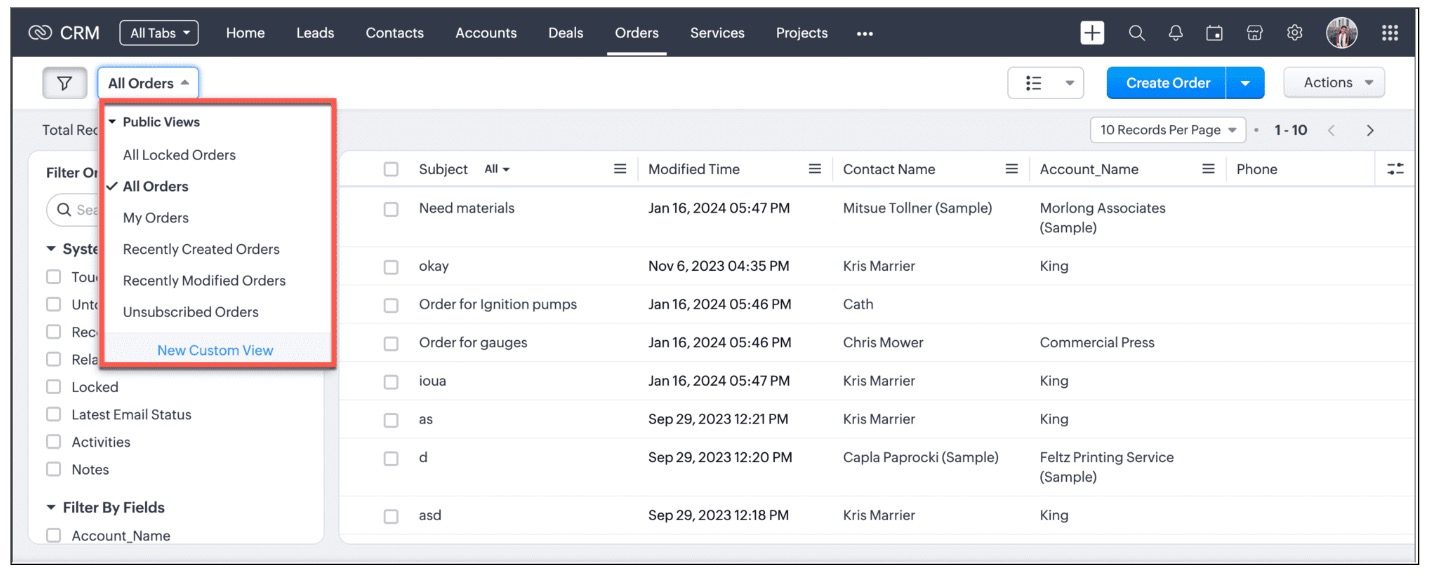
- For other profiles like Manager and Admin, all public views will be visible as shown below.
We are working on the other components in the List Page, and will let you know once they are live.
4. Other ZDKs available to customize List Views
Client Script enables you to customize List Views using the following list of ZDKs and Client Script functions.
- freezeColumns(option) - You can freeze list view and disable modifying columns.
- maskField(field_name, (length,character,reverse)) - You can mask fields in the List View
- sortByField(field_name, option) - You can sort field in the List View
- getRecords() - You can get Records in the List View
- selectRecords(criteria) - You can select Records in the List view by criteria
- selectRecordsByID(ids) - You can select Records in the List view by record ID
- clearSelection() - You can clear selected Records in the List view
- style(style_config, criteria) - You can style Records in the List View. Click here to view the related Kaizen post.
- setValue(value) - You can set the component value in the Page
- getValue() - You can Get the component value in the Page
- setVisibility(value) - You can set visibility of the component in the Page
5. Summary:
In this post, we have discussed,
- About standard and custom List Views.
- How to control the visibility of List Views using Client Script.
- How to fetch the list of views available for a module using Client Script.
- How to set your desired views for users using Client Script.
- ZDK methods available in Client Script to customize List views
6. Related Links
- Client Script Overview
- Creating a Client Script
- Client Script Events
- Client Script IDE
- Use cases of Client Script

Kaizen Collection :
Click here to view our Kaizen Collection.
Also, check our previous post - Kaizen #120 - A Guide to API Calls in Zoho CRM Sandboxes
We hope you found this post useful. We will meet you next week with another interesting topic!
If you have any questions, let us know in the comment section.
Cheers!
Topic Participants
Maadhari M
Irmyahou Azan
Ishwarya SG
Brandon
859953848@zohoclosedAccount.com
Sticky Posts
Kaizen #222 - Client Script Support for Notes Related List
Hello everyone! Welcome to another week of Kaizen. The final Kaizen post of the year 2025 is here! With the new Client Script support for the Notes Related List, you can validate, enrich, and manage notes across modules. In this post, we’ll explore howKaizen #217 - Actions APIs : Tasks
Welcome to another week of Kaizen! In last week's post we discussed Email Notifications APIs which act as the link between your Workflow automations and you. We have discussed how Zylker Cloud Services uses Email Notifications API in their custom dashboard.Kaizen #216 - Actions APIs : Email Notifications
Welcome to another week of Kaizen! For the last three weeks, we have been discussing Zylker's workflows. We successfully updated a dormant workflow, built a new one from the ground up and more. But our work is not finished—these automated processes areKaizen #152 - Client Script Support for the new Canvas Record Forms
Hello everyone! Have you ever wanted to trigger actions on click of a canvas button, icon, or text mandatory forms in Create/Edit and Clone Pages? Have you ever wanted to control how elements behave on the new Canvas Record Forms? This can be achievedKaizen #142: How to Navigate to Another Page in Zoho CRM using Client Script
Hello everyone! Welcome back to another exciting Kaizen post. In this post, let us see how you can you navigate to different Pages using Client Script. In this Kaizen post, Need to Navigate to different Pages Client Script ZDKs related to navigation A.
Recent Topics
Introducing New APIs in Zoho Contracts
We are excited to announce the release of new APIs in Zoho Contracts to help you automate and manage every stage of your contract lifecycle more efficiently. Here’s a quick overview of what’s new: 1. Complete Contract Draft You can use this API to completeVimeo
For me Vimeo is the most important video social channel for media and filmmakers. Would others agree and like it added to Zoho Social.Delete a department or category
How do I delete a Department? Also, how do I delete a Category? This is pretty basic stuff here and it's impossible to find.Organization Emails in Email History
How can I make received Org Emails to show up here?How to setup pricing in Zoho
Hi everyone, I am relatively new here and have just moved from my old inventory system to the Zoho one. I am trying to get my head around how it all works. I am mostly setup connected to a shopify store, but I do manual sales also For manual invoicing,Prefilled Date fields auto-changed and then locked when using “Edit as new”
If a document out for signature has date fields (not SignedDate fields) that were pre-filled before sending, and then you use “Edit as new” to create a new version of the same document, the value of those date fields gets automatically changed to todayIs there a way to update all the start and end dates of tasks of a project after a calendar change?
Hi! Here's my situation. I've built a complete project planning. All its tasks have start dates and due dates. After completing the planning, I've realized that the project calendar was not the right one. So I changed the project calendar. I now haveAccess Phone Field Components (Country Code) Directly
Hello everyone, I'd like to propose an enhancement for the Phone field in Zoho Creator. The Problem: The Phone field captures the country code and local number separately, but stores them as a single string (e.g., +1234567890). To get the country code,Send mass messages through WhatsApp from the Tickets module
Hi Everyone! Effective communication is key to delivering prompt and reliable customer support. Because WhatsApp is one of the most widely used and familiar messaging platforms, it's an effective channel for agents to reach customers who have submittedLead Owner Signature Merge Field
I want to automatically insert a signature (i.e. contact info usually found at the bottom of an email) into an email template, depending on who the lead owner is. What is the merge code for the Signature from a Users profile? CRM > Settings > Customization > Templates There is a popup near the bottom of the edit screen which says: "You can insert a Signature, which is available as a merge field in the users section." It is also referenced on this page: https://help.zoho.com/portal/en/kb/crm/customize-crm-account/customizing-templates/articles/template-builder#Merge_FieldsHow do I create a time field?
I want a field that only records time. I can only see how to create a date-time field. If I do that and enter a time, without a date, nothing is recorded. If I create a number or decimal field, I cannot use it in time calculations. All I want is a fieldAlternating columns - How to reverse order on mobile - Responsive template
Can the order of alternating columns be reversed on mobile so that image comes before the text? Example: Desktop Row 1 column Left (image) , column right (text) Row 2 column Left (text) , column right (image) Mobile Currently Row 1 Image over text RowInvokeURL butchering JSON for OpenAI API calls
My organization works with mostly educational institutions. We have a custom module called "Schools", which is the user-entered school name they put when using our service (which they enter along with their state and zip code). We want to map this toCustom order for Current Stage (Blueprint field)
Hi! I suggest adding the option to set a custom order in reports for the Blueprint field ‘Current Stage’. Currently, these fields can only be sorted in ascending or descending order. Thanks!CRM E-mail Sync from Outlook
We are exploring Zoho as a possible new solution for our company. We are trying to understand further on how e-mail sync works. We use outlook. Our current CRM logs anytime we e-mail a customer so we can see in the CRM the message sent to the customer.Run your help desk on your schedule
In business, time is of the essence. This is especially true in a function like customer service, where KPIs such as response time and agent availability are the measures of success. Perhaps the most crucial consideration one needs to make about time is your hours of operation. These set expectations for your customer and for employees. To make communicating this information easier, we've revamped the way business hours and holiday lists work in Zoho Desk. In order to accommodate teams that workThe Customer Happiness REST API is broken
1. We are unable to extract the customerHappiness ( https://desk.zoho.com/DeskAPIDocument#CustomerHappiness#CustomerHappiness_ListallcustomerHappiness) object using the ticketNumber criteria. We keep getting HTTP 429 even when we limit to 60 calls perZoho Expense and Chase Bank Visa credit cards - Direct Feed?
Our company uses JP Morgan Chase Visa credit cards. We can't be the first to try and use a combination of Zoho Expense + Chase Bank + Visa Credit Cards --- anyone successful with this combination? 1. The direct feed automation isn't working. When I goImpossibile inviare il messaggio;Motivo:554 5.1.8 Indirizzo del mittente bloccato
" Impossibile inviare il messaggio;Motivo:554 5.1.8 Indirizzo del mittente bloccato" Hi need to send email, how can fix this? Thanks, AliceImage inputed in Zoho Form were displayed to small in exported version
Good evening, my name is athallah, i am a trainee in government office Right now, i use Zoho form to digitalize an airfield monitoring form. my problem is, the image were to small to displayed in exported version. it really bad for formal presentationAPI. How do I get responses submitted to the form?
Hi, I'm trying to retrieve a list of form responses via the API. I've created a Self Client application in API Console. What scoup should I enter? What are the endpoints? Is there documentation on this anywhere? I've wasted a lot of time searching. GPTQuestion about Zoho CRM Professional plan users
Hello! I have a question about the Zoho CRM Professional plan. Is the pricing charged per user or per organization? Are there any free users included in this plan, or do I need to pay for each additional user separately? Thank you!Communicating with emojis
On July 17, we celebrate World Emoji Day! We're a bit late 😐 sharing insights about this day. But we just couldn't let it pass without a mention 😊 because emojis have a meaningful connection with customer service 💬 🤝. We do not want to miss out onHelp integrating Aircall into Zoho CRM
Hi all, We are need to get better AirCall integration into Zoho. We have configured in the Aircall dashboard but we have not done the Zoho side. We cannot see Zoho CRM information on incoming calls. And we calls and text's are not being logged. SpecificallyShopify Extension no longer working in CRM
Zoho CRM and Extension are no longer working properly. We have used Shopify Basic for years. All of the sudden it stopped working, then started working again, and now no longer working again. There are several ways for Personal Information to sync fromHow to keep track of bags, cans, drums of inventory?
We buy and sell products that are packaged in bags 🛍️, cans🥫, drums🛢️, etc. with batch numbers. When we get a shipment of one of the products, how do we track we received (say) 10 cans each of 5L of a product and maybe we received 10 cans of anotherEasy third party collaboration: Zoho Flow Integration
Third-party integrations extend your project functionality with improved workflow, and data processing. With Zoho Flow integration you can include multiple third party actions into your project or task automation. Add Zoho Flow action in Workflow rulesIntroducing Configure, Price, Quote (CPQ) in Zoho CRM | Public early access 2023
Greetings Customers! We're excited to announce that the CPQ feature will soon be available in Zoho CRM and accessible to all accounts using the Professional, Enterprise, and Ultimate editions. We've opened this feature to select customers, and it'll behow to edit the converted lead records?
so I can fetch the converted leads records using API (COQL), using this endpoint https://www.zohoapis.com/crm/v5/coql and using COQL filter Converted__s=true for some reasons I need to change the value from a field in a converted lead record. When I tryShare Video Response Card ion Zobot
I am using the zobot codeless bot builder in SalesIQ. I want to share a video but delay the next response card until after the video has finished playing or has been stopped. Is this possible?Zoho Bookings <> CRM integration
Hello Zoho community! We are enabling our Zoho Bookings <> CRM integration. What is the workflow if the integration detects that the contact already exists in the CRM? Does it create a duplicate record? Overwrite the record? Merge the record? (in thisCannot reject empty expense report
Hello, We are currently having issues with two empty expense reports where if we try to reject them, either manually or through the REST API, we get error 114016, which says some of the expenses have already been billed and must be removed. I'd appreciateUse of Zia within Forms
I have noticed that recently you have added Zia to help create forms from scratch. Would it be possible to add Zia functionality to free text fields for form submissions or if this is already on the roadmap an ETA for this please? We have a lot of fieldDefault in fields on Form B based on the user selection in Form A
Hi Everyone, I have added an action button to a form report to bring up a new form based on user selection, see it indicated in red below: Then when the ne form loads, I want to default in some of the fields based on the record the user was selected on.Last activity time is acting like last modified time
When i edit the description or any field in the potential, account, contact and lead, the Last Activity Time is being updated like the Modified Time. This is messing all workflows and reports and we are unable to track real last time of activities likeEnhancements to the formula field in Zoho CRM: Auto-refresh formulas with the "Now" function, stop formula executions based on criteria, and include formulas within formulas
Dear Customers, We hope you're well! By their nature, modern businesses rely every day on computations, whether it's to calculate the price of a product, assess ROI, evaluate the lifetime value of a customer, or even determine the age of a record. WithHEX/RGB Color Input in Visual Editor
Hello Zoho Pagesense Team, We hope you're doing well. We’d like to submit a feature request to improve the color selection options in the Pagesense popup editor. Current Limitation: Currently, to set text colors, users must move the color slider manually.CRM and Campaigns- tags not integrating?
Hi! I am setting up an automation in zoho campaigns and it says the crm is integrated...but when I want to use a trigger of a certain tag I created for people in the crm to denote those who purchased, it doesnt have that tag available as an option inMaximum limit of rows exceeded
I am trying to add a row to a spreadsheets that has fewer than 60 rows. I keep getting an error message that says I have exceeded the maximum limit of 65,536 rows. Any ideas out there?Tip #7: 5 formas de mantener tus listas de correo electrónico
Tips and Tricks #7, adaptado de Susmit Sen ¡Hola, comunidad! Esta semana volvemos con nuestros Tips and Tricks para Zoho Campaigns. En esta ocasión, voy a darte algunos consejos para mantener limpias tus listas de correo electrónico, y empezar el 2021Next Page