Kaizen #202 - Answering Your Questions | Testing and Using REST APIs in Widgets

Kaizen #202 - Answering Your Questions | Testing and Using REST APIs in Widgets


Hello Developers!

Welcome back to a fresh week of Kaizen! 

Thank you for your active participation in sharing feedback and queries for the 200th milestone. This week, we will look at the following queries related to widget:
  • Widget Testing 
  • Using REST API in Canvas Widgets: Make HTTP calls in widgets (e.g., to external tax or product APIs)
Here are the queries that we have already answered for you from this milestone:
  1. Kaizen #200 - Answering Your Questions | Token generation using the Python SDK
  2. Kaizen #201 - Answering Your Questions | Webhooks, Functions, and Schedules

Widget Testing

One of the queries we received was simply stated
Quote
Widget Testing
 without any specific context. Since the user has not provided detailed input, we are assuming this is about how to test a widget during development.

You can test your Zoho CRM widget locally using the Zoho CLI. Run the following command from the root directory of your widget project:

zet run

This launches the widget on a local server where you can validate the UI and functionality before pushing it live.
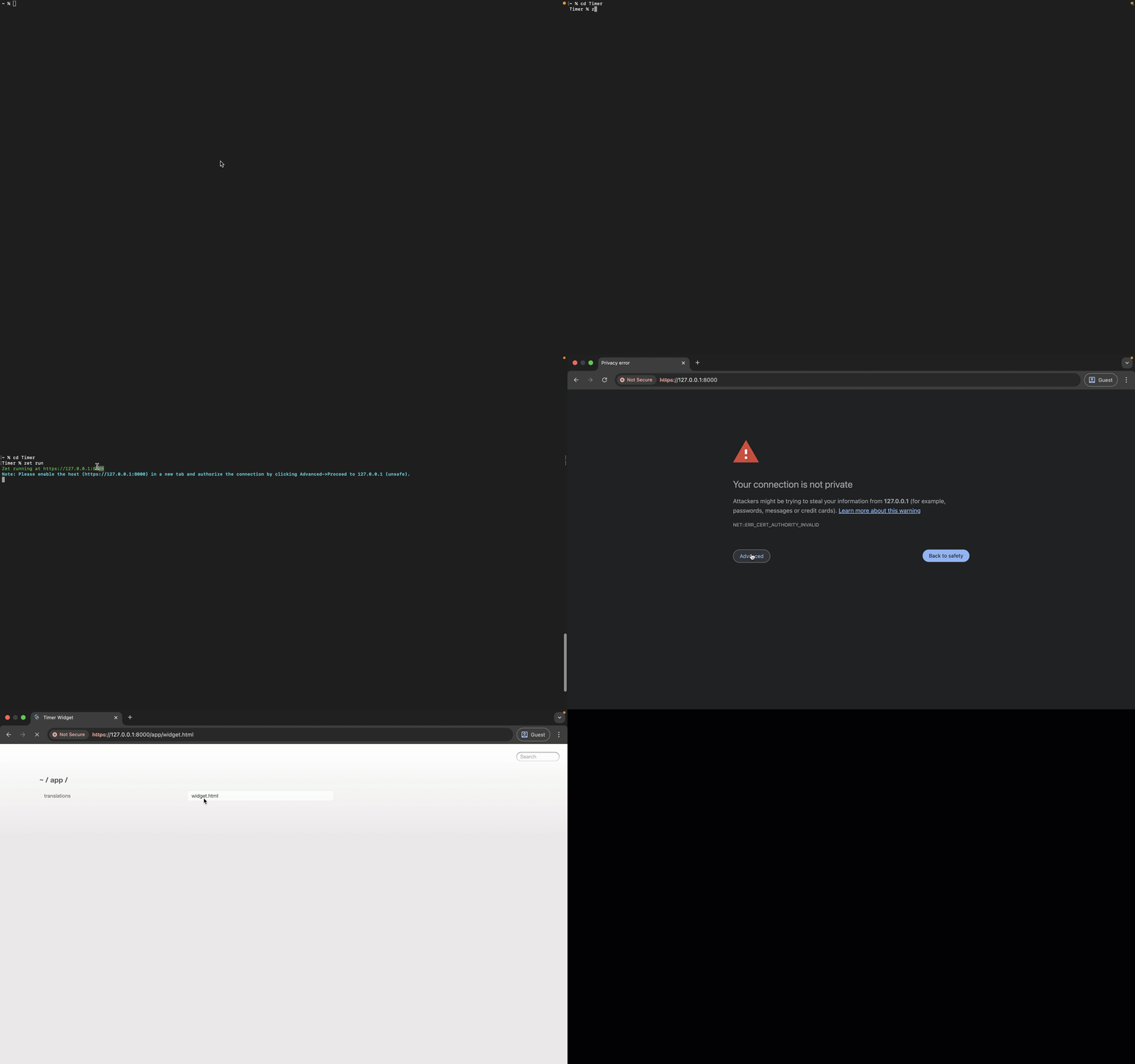

Since the localhost connection opens in a new tab and is not private, you will need to manually authorize it. 

Click Advanced, then choose Proceed to 127.0.0.1 (unsafe) to continue. 

Notes
Note

If your widget needs to access data from your Zoho CRM organization, such as fetching or updating records, it must be deployed within a Zoho CRM iframe. To do this, you should upload the widget through the Zoho CRM Widgets setup page.

We recommend using the sandbox environment in such cases before deploying the widget to your production environment.

Making HTTP Calls from Widget

Following is a query we received from a user:
Quote
Using REST API in Canvas Widgets: Make HTTP calls in widgets (e.g., to external tax or product APIs)
Yes. You can make HTTP requests to external services from any type of Zoho CRM widget using the ZOHO.CRM.HTTP object from the Widget JS SDK.

Canvas Widget - What's Supported? 

Though full widget support within Canvas is on our roadmap, currently, you can invoke widgets from a Canvas view using Client Script. This lets you render widgets inside fly-outs or pop-ups. Here is a quick start guide on how you can achieve it:

Create a Widget

1. Create a widget project and code your logic using Zoho CLI as explained in our widget help page.

2. In Zoho CRM Developer Hub, create a new widget and set the type as Button.


Create a Client Script

3. Navigate to Client Scripts in Developer Hub and click New Script.

4. You can create your script either in the Modules or Commands category based on your use case. 

For assistance, refer to the step-by-step guide on Creating Client Script and Commands.


In the Category Details section, ensure to select Canvas as the page type. Canvas views are supported in the following page contexts: List, Detail, Create, and Clone. 

Choose the one that aligns with where your widget needs to appear.


5. Here is the sample script to render widget in a pop-up

ZDK.Client.openPopup({
api_name: 'Canvas_Widget',
type: 'widget',
animation_type: 4, 
height: '450px',
width: '450px',
},
{
data: 'sample data to be passed to "PageLoad" event of widget'
}); 

Here is the sample script to render widget in a fly-out

ZDK.Client.createFlyout('myFlyout', { 
animation_type: 4, 
height: '600px', 
width: '500px'
}
);
ZDK.Client.getFlyout('myFlyout').open({ api_name: 'Canvas_Widget', type: 'widget' });

For detailed guidance, check out our Client API documentation on Pop-up and Fly-out.

You can also check out the Kaizen #99 on Rendering Widgets using Client Script for a detailed guide based on a real-time use case. 

Using REST APIs from External Applications

The ZOHO.CRM.HTTP object enables you to make secure API calls directly from the Zoho CRM widget. It acts as a proxy, routing requests through Zoho servers, which eliminates the need for external applications to support CORS.

While this SDK is primarily used for integrating third-party services, it also supports Zoho CRM API calls. This provides you with greater flexibility to:
  • Customize header and parameter structures
  • Maintain a consistent calling pattern for both internal and external APIs within the widget.
Here is a basic syntax of the SDK:

ZOHO.CRM.HTTP.<method>({
  url: "<request-url>",
  headers: {
       // Request headers as Key-value pairs
    "Authorization": "Bearer <token>" // example
  },
  params: {
    // Request params as Key-value pairs

   "ids": "1234567890" // example
  },
  body: "<stringified JSON>", // Required for POST, PUT and PATCH
})
.then(function(response) {
  console.log("Response:", response);
});

Supported Methods
  • ZOHO.CRM.HTTP.get({ ... })
  • ZOHO.CRM.HTTP.post({ ... })
  • ZOHO.CRM.HTTP.put({ ... })
  • ZOHO.CRM.HTTP.patch({ ... })
  • ZOHO.CRM.HTTP.delete({ ... })
For more detail check out the HTTP method section of JS SDK help page.

Samples using Zoho CRM Contact Roles API

Let us explore a complete CRUD (Create, Read, Update, Delete) example using Zoho CRM’s Contact Roles API.

These structures have to be used within the JS function where you are executing your code logic. 

POST Contact Roles


// Prepare the API request
        var request = {
          url: "https://www.zohoapis.com/crm/v8/Contacts/roles",
          headers: {
            Authorization: "Zoho-oauthtoken 1000.XXXXXXXXXXXXXXXXXXX265bcf20e4"
          },
          body: {
            "contact_roles": [
              {
                "name": "Sales Lead",
                "sequence_number": 1
              }
            ]
          }
        };
         // Make API call 
        ZOHO.CRM.HTTP.post(request).then(function(data) {
          console.log(data);
 })

GET Contact Roles


// Prepare the API request
var request = {
          url: "https://www.zohoapis.com/crm/v8/Contacts/roles",
          headers: {
            Authorization: "Zoho-oauthtoken 1000.XXXXXXXXXXXXXXXXXXX265bcf20e4"
          }
        };
        // Make API call 
        ZOHO.CRM.HTTP.get(request)
          .then(function(response) {
 console.log(response);
})

UPDATE Contact Roles

// Prepare the API request
        var request = {
          headers: {
            Authorization: "Zoho-oauthtoken 1000.XXXXXXXXXXXXXXXXXXX265bcf20e4"
          },
          body: {
            "contact_roles": [
              {
                "name": "Evaluator",
                "id": "5545974000000006871"
              }
            ]
          }
        };
        // Make API call 
        ZOHO.CRM.HTTP.put(request).then(function(data) {
          console.log(data);
 })

DELETE Contact Roles


// Prepare the API request
        var request = {
          params: {
            ids: "5545974000002617002"
          },
          headers: {
            Authorization: "Zoho-oauthtoken 1000.XXXXXXXXXXXXXXXXXXX265bcf20e4"
          }
        };
        // Make API call 
        ZOHO.CRM.HTTP.delete(request).then(function(data) {
          console.log(data);
 })

We hope you found this post useful. 

Let us know if you have any questions in the comments or drop us an email at support@zohocrm.com.

Cheers!

------------------------------------------------------------------------------------------------------------------------

Related Reading


------------------------------------------------------------------------------------------------------------------------
    • Sticky Posts

    • Kaizen #198: Using Client Script for Custom Validation in Blueprint

      Nearing 200th Kaizen Post – 1 More to the Big Two-Oh-Oh! Do you have any questions, suggestions, or topics you would like us to cover in future posts? Your insights and suggestions help us shape future content and make this series better for everyone.
    • Kaizen #226: Using ZRC in Client Script

      Hello everyone! Welcome to another week of Kaizen. In today's post, lets see what is ZRC (Zoho Request Client) and how we can use ZRC methods in Client Script to get inputs from a Salesperson and update the Lead status with a single button click. In this
    • Kaizen #222 - Client Script Support for Notes Related List

      Hello everyone! Welcome to another week of Kaizen. The final Kaizen post of the year 2025 is here! With the new Client Script support for the Notes Related List, you can validate, enrich, and manage notes across modules. In this post, we’ll explore how
    • Kaizen #217 - Actions APIs : Tasks

      Welcome to another week of Kaizen! In last week's post we discussed Email Notifications APIs which act as the link between your Workflow automations and you. We have discussed how Zylker Cloud Services uses Email Notifications API in their custom dashboard.
    • Kaizen #216 - Actions APIs : Email Notifications

      Welcome to another week of Kaizen! For the last three weeks, we have been discussing Zylker's workflows. We successfully updated a dormant workflow, built a new one from the ground up and more. But our work is not finished—these automated processes are
    • Recent Topics

    • Stop by and explore our six updates in ABM for Zoho CRM

      Dear Customers, We hope you're well! ABM for Zoho CRM is built to sharpen your database so that you engage with the right set of customer accounts. To fine-tune it further, we have six new updates: New access location for ABM Refined account entry criteria
    • Tracking Emails sent through Outlook

      All of our sales team have their Outlook 365 accounts setup with IMAP integration. We're trying to track their email activity that occurs outside the CRM. I can see the email exchanges between the sales people and the clients in the contact module. But
    • Enhancement in Zoho CRM: Introducing New Return Types for String Fields Based on Character Length

      Dear Customers, We hope you’re well! In Zoho CRM, formula field with string return type is used in various scenarios where text is involved like concatenating customers’ first and last names, trimming characters from texts, performing find and replace
    • Cross Module Filtering – Use Fields from Lookup modules in Custom Views criteria and Advanced Filters

      Hello everyone, Zoho CRM now enables you to achieve deeper filtering of records in a module, using fields of a lookup, thereby enhancing your data management experience manifold. This filtering based on lookup module fields is now available in advanced
    • Incoming Rules: Define how incoming emails are evaluated and handled

      As organizations grow, managing incoming emails manually becomes increasingly difficult. Administrators often need more control than what a standard spam filtering can provide. Whether that's enforcing company-wide email policies, handling messages from
    • Zia Emails Summary: Instant context from past emails

      Hello all, Reading all of the past emails associated with a specific record can be tedious, which in turn makes it difficult to understand the context quickly, as these messages often include irrelevant details that waste time. This is true for everyone
    • Boost your CRM communication with new font types, sizes, and default reply-to options while composing emails

      Hello Everyone, We’re excited to introduce a series of impactful enhancements to the email composer settings in Zoho CRM. These updates enable you to personalize and optimize your customer interactions with greater efficiency. So what's new? Add custom
    • Custom Portal URL causing SAMEORIGIN error with embedded Page snippet

      In my app, I have a page that embeds another page. The URL that I have for the embedded page starts with https://creatorapp.zoho.com but the custom domain I have set up is https://kors.kerndell.com. Because the user logged into the app at https://kors.kerndell.com,
    • Automating CRM backup storage?

      Hi there, We've recently set up automatic backups for our Zoho CRM account. We were hoping that the backup functionality would not require any manual work on our end, but it seems that we are always required to download the backups ourselves, store them,
    • Bing ads integration and tracking

      Hi, Is there any way to track Bing ads in the same way that we are able to track google adwords?  It is important for us to be able to determine the conversion rate of our Bing ads.  If this is not possible now, will this feature be added in the future?
    • Zoho Creator Calendar - Sorting Events

      Hi, I have a calendar view to hold the schedule for a group of engineers. I have created a formula field to show the combination of fields I want visible as the title of the event, but I need to be able to sort the list by something other than the event
    • Create a "My saved custom themes" section in Zoho Forms

      Hi! I created lots of forms for my company that we embed on the website with a custon design. It is a pain not to be able to save a custom layout as a template and just not to have to do it again! So could you add a gallery like : "My saved themes" ?
    • Upcoming Update: Disposition Sync for Indeed

      We’re updating our Indeed integration to support Disposition Sync, improving how candidate application statuses are communicated. This change is scheduled to go live on 15 June, 2026. What’s changing? Once enabled, this allows candidate application statuses
    • Joining Two Tables on Multiple Ids

      Hello all, I'm guessing there is an obvious solution for this, but definitely not an expert in sql. On our Deals module, we have two user lookup fields. In Analytics, those fields have the user's ids in those table rows, and I'm trying to create a query
    • auto update of item purchase cost

      Would be nice if, when entering bills, the price of the item varied from the stored item price, we could have a user dialogue "Update item price" | "yes / no". Simple, but saves a lot of additional work !
    • Journeys - How to set up a webhook that triggers when a contact meets the goal criteria?

      Hi there, I'm setting up a journey on Marketing Automation. The main goal of the journey is to get the leads to reply our emails. Is there a way to trigger a webhook when that goal is met? The webhook would then trigger a notification. Is that possible?
    • Latest updates in Zoho Meeting | Personal Meeting Rooms and Zoho Meeting Annotator

      Hello everyone, We’re excited to share a few updates for Zoho Meeting. Here's what we've been working on lately: Introducing Personal Meeting Rooms - Tailored for private discussions, this secure meeting space is yours alone, accessible via a unique link.
    • Canvases Auto-Skewing/Adding Scroll Bars When They Were Not There Prior

      Is anyone else noticing rendering issues in their canvases today? It seems to be mainly icons which now have scroll bars added which makes them all look off, though some fields seemed to revert to squished length as well. Were the icons replaced with
    • New UI for Writer - Disappointed

      I've been enjoying Zoho Writer as a new user for about 6 months, and I really like it. One of my favorite things about it is the menu bar, which you can hide or leave out while still seeing most of your page because it is off to the left. I think this
    • The reason I switched away from Zoho Notebook

      My main reason for switching to Zoho was driven by three core principles: moving away from US-based products, keeping my data within India as much as possible, and supporting Indian companies. With that intent, I’ve been actively de-Googling my digital
    • Introducing the enhanced Zoho People integration

      We're excited to announce an enhancement to the integration between Zoho Recruit and Zoho People, designed to streamline your data management processes and boost efficiency across your recruitment and HR workflows. With this latest update, you can now
    • Zia should track how customer relationships evolve over time

      Here's a feature idea that I've been thinking about The Problem Zia is great at analyzing individual interactions email sentiment, call transcription, best time to contact. But here's what it can't do: tell you how a relationship has evolved over time.
    • Add an option to disable ZIA suggestions

      Currently, ZIA in Zoho Inventory automatically provides suggestions, such as sending order confirmation emails. However, there is no way to disable this feature. In our case, orders are automatically created by customers, and we’ve built a custom workflow
    • Filter our rejected quote items from the inventory quote template

      Hello, I am trying to have rejections at the line level on my quotes so I can track what items are often removed, I do not want to claim the whole quote as lost just the individual items for better data tracking. However I cannot figure out how to filter
    • Error AS101 when adding new email alias

      Hi, I am trying to add apple@(mydomain).com The error AS101 is shown while I try to add the alias.
    • Gamescope is leveling upto Motivator for Zoho CRM

      Hello,   As you are aware, we recently made Motivator for Zoho CRM available for Zoho One, CRMPlus and CRM Ultimate editions. Since Motivator has all the features of Gamescope and even more advanced gamification, we are planning to EOL Gamescope on 30th
    • Print JV of an Expenses in ZohoBooks

      When an expense is created in Zoho Books, the related journal entry can be viewed at the bottom of the expense record. However, when printing the expense, the journal entry is not included in the printed document, and there does not appear to be an option
    • Kiosk waiting for completion breaks previous field updates from occurring, yet timeline of record show changes

      hi 1) I set to statuses on a Get record . 2) Next i run a function and capture the result i.e. wait for completion 3) Then a Screen The record's timeline show the status changes. Yet the record has not changed. I can repeat this. I had another route in
    • Write-Off multiple invoices and tax calculation

      Good evening, I have many invoices which are long overdue and I do not expect them to be paid. I believe I should write them off. I did some tests and I have some questions:  - I cannot find a way to write off several invoices together. How can I do that,
    • Partner with HDFC And Sbi Bank.

      Hdfc and sbi both are very popular bank if zoho books become partner with this banks then many of the zoho books users will benefit premium features of partnered banks.
    • Print shipping label on Zebra Label printer from ZOHO Creator deluge

      Hi All, Allow me to guide you through the process of printing a shipping label from ZOHO Creator to a Zebra label printer (ZD421D). Step 1: To start, configure the SendFileToPrinter API, which enables the transmission of a file to a Zebra Link-OS printer.
    • Zoho Books Placeholder: Inventory Counts

      I was hoping to figure out how to find the placeholders for inventory counts by item. We use Location based inventory tracking, so I dont know if that affects things. I want my PDF and Printed PICK LISTS to show the Quantity Available to Pick. I have
    • Can't delete shared mailbox emails from mobile app

      I have the mobile app on iOS and cannot seem to find a way to delete an email from a shared mailbox. Is there something I'm missing here? Michael
    • Simple Custom Function to Update Candidate status

      Hi folks, We are currently using Zoho Recruit and have sources from where candidates are applying. Currently all candidates are being set to 'Associated' when they apply via 3rd party sources but that is not useful for us under our business process. I
    • Zoho FSM Work Order Creation Failure

      Hello FSM team and Latha, This automation is built in Zoho Creator and is triggered when a “New Repair Order” is created or updated through form submission. Once the form is submitted, the script automatically retrieves the related customer and company
    • A method for renaming tab titles in Creator to display more relevant information

      Hi Zoho Devs, Updates: Rules Export File attached; you can now import this into Tab Modifier instead of manually entering the rules yourself) 2022-06-08: Updated rules so that crm.zoho.com tabs are not affected; uploaded new .json import file 2022-06-09:
    • Options on the New Auto Logged In User Profile for the Name Field

      Hi, I love the new function, but when used it automatically formats the record and therefore the export with comma separated values, so id you enable First Name & Last Name it puts "First Name, Last Name" rather than just "First Name Last Name". Could
    • Zoho Practice Roadmap

      Hi - interested to understand the roadmap for this product. I think a number of people are watching to see if this is receiving investment prior to exploring more - but it appears to be very quiet on the development front.
    • CRITICAL DOWNTIME IN ZOHO PRACTICE!! NO RESPONSE FROM SUPPORT TEAMS

      Dear Team, We are randomly unable to login to Zoho Practice since this morning. All our team members are reporting this issue. Work has come to a grinding halt and we are not getting any support or answers. This is a highly serious matter of concern for
    • Tip 49#: Obtaining global reports in Zoho Sprints

      Zoho Sprints comes with data analysis capabilities like reports and dashboards that enable the project teams to introspect quantifiable information. These reports and dashboards are project specific. Recently, a user contacted us regarding a requirement
    • Next Page