Client Script Support for List Page (Canvas)
Hello everyone!
Welcome to another week of Kaizen. In today's post lets see how Client Script can be used in Canvas List Page to mask sensitive information from specific roles and add colors to Canvas List Page records based on custom criteria.This use case solves the question raised in this post.
In this Kaizen post,
- About Canvas List Page
- Supported Events for List Page(Canvas)
- Supported ZDKs for List Page(Canvas)
- Use Case
- Solution
- Summary
- Related Links
1. About Canvas List Page
The Canvas List Page provides ways to customize the record display in the module list. You can add record images, use custom buttons to represent fields, use specific font style or size for the field labels, change the alignment of field types and more.
2. Supported Events for List Page(Canvas)
You can write Client Script for three different views of the Canvas List page.
You can trigger Client Script on your List Page (Canvas) using the following events.
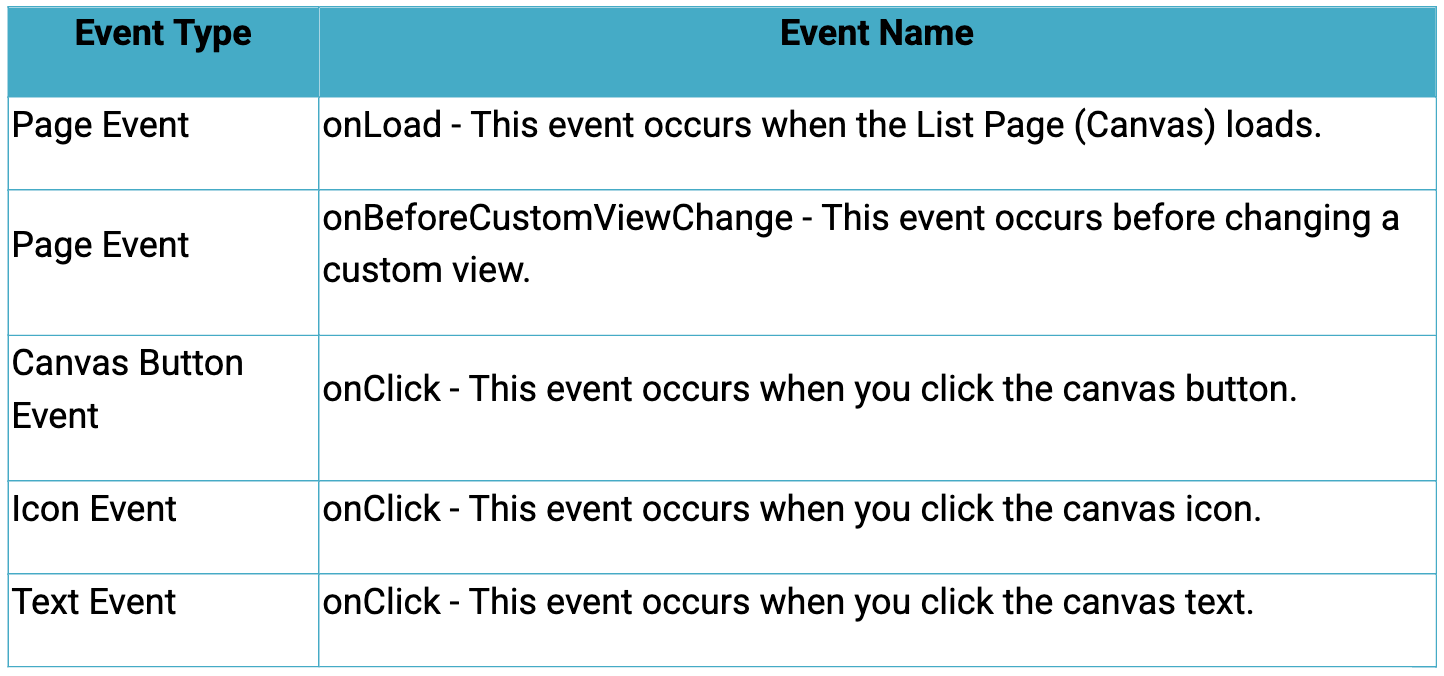
Click here to know more about the Events.
3. Supported ZDKs for List Page(Canvas)
Client Script enables you to customize List Views using the following list of ZDKs and Client Script functions.
- freezeColumns(option) - You can freeze list view and disable modifying columns.
- maskField(field_name, (length,character,reverse)) - You can mask fields in the List View
- sortByField(field_name, option) - You can sort field in the List View
- getRecords() - You can get Records in the List View
- selectRecords(criteria) - You can select Records in the List view by criteria
- selectRecordsByID(ids) - You can select Records in the List view by record ID
- clearSelection() - You can clear selected Records in the List view
- style(style_config, criteria) - You can style Records in the List View.
4. Use Case
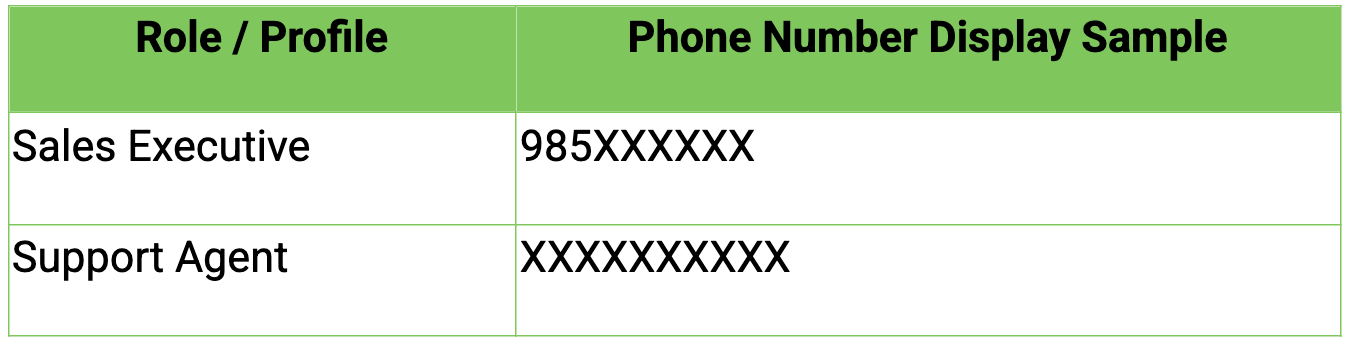
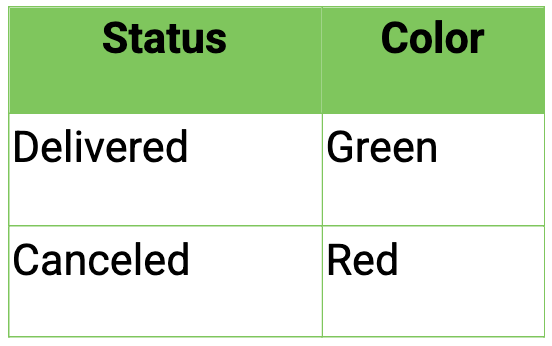
Zylker uses Zoho CRM to manage high-volume orders where customer phone numbers are sensitive data. The CRM Admin wants role-based phone number masking on the Orders List Page (Canvas). To improve visibility and speed, the Admin also wants color-coded order cards in the List View based on order status.
Role-Based Phone Number Visibility
Order Status Color Coding
5. Solution
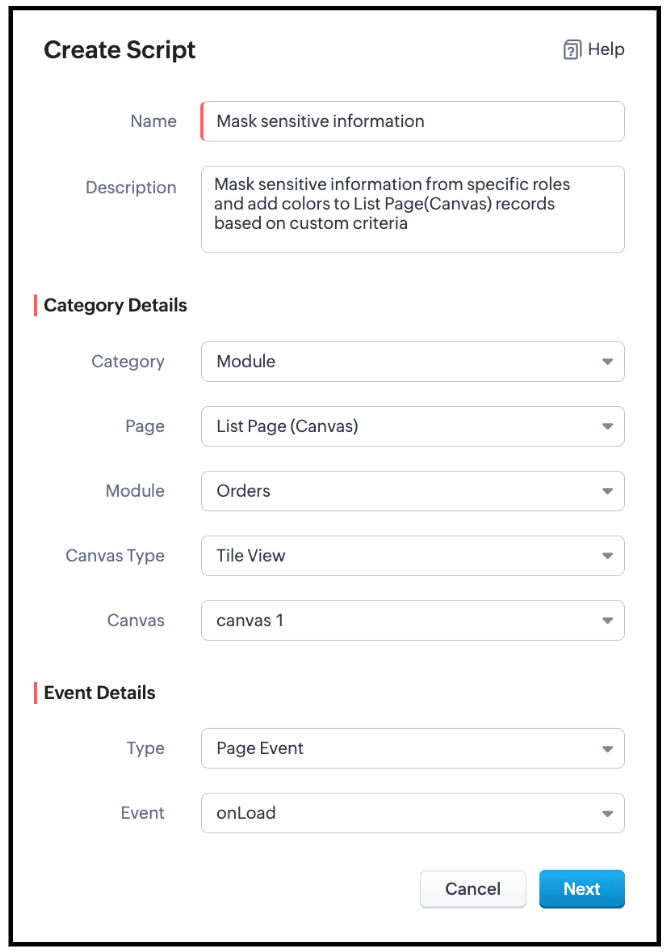
- Go to Setup > Developer Space > Client Script. Click +New Script.
- Specify the details to create a script and click Next.
- Enter the following script and click Save.
- // Mask phone number based on user role
- if ($Crm.user.role.name === "Sales Executive") {
- // Mask 7 digits for Sales Executive
- ZDK.Page.getList().maskField("Phone_Number", {
- length: 7,
- character: "#",
- reverse: true
- });
- } else if ($Crm.user.role.name === "Support Agent") {
- // Mask 10 digits for Support Agent
- ZDK.Page.getList().maskField("Phone_Number", {
- length: 10,
- character: "#",
- reverse: true
- });
} - // Highlight cancelled orders in light red
- ZDK.Page.getList().style({
- record: {
- backgroundColor: "#FFD6D6"
- }
- },
- "(Status:equals:Cancelled)"
- );
- // Highlight delivered orders in light green
- ZDK.Page.getList().style({
- record: {
- backgroundColor: "#D3F9D8"
- }
- },
- "(Status:equals:Delivered)"
- );
- Use $Crm.user.role.name to retrieve the role of the currently logged-in user.
- When the role is Sales Executive, use ZDK.Page.getList().maskField() on the Phone_Number field to mask the first 7 digits, where
- length defines how many characters should be hidden
- character: '#' specifies the masking symbol
- reverse: false ensures masking starts from the beginning, allowing partial visibility.
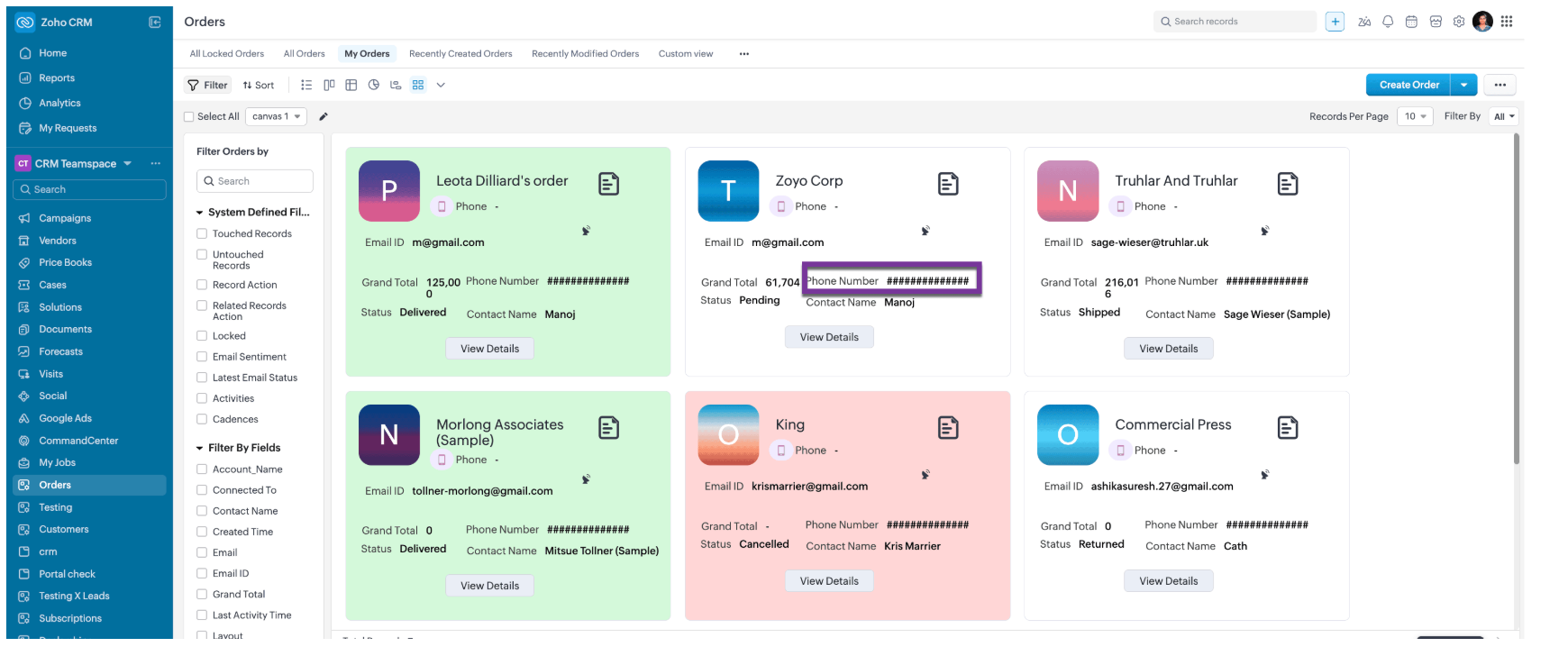
- When the role is Support Agent, use ZDK.Page.getList().maskField() on the Phone_Number field to mask all 10 digits, fully hiding the phone number using the same masking parameters.
- Use ZDK.Page.getList().style() to apply conditional styling to list records by configuring the record parameter to set the row backgroundColor.
- Apply the condition (Status:equals:Cancelled) to highlight cancelled records in light red, and (Status:equals:Delivered) to highlight delivered records in light green, enabling quick visual identification.
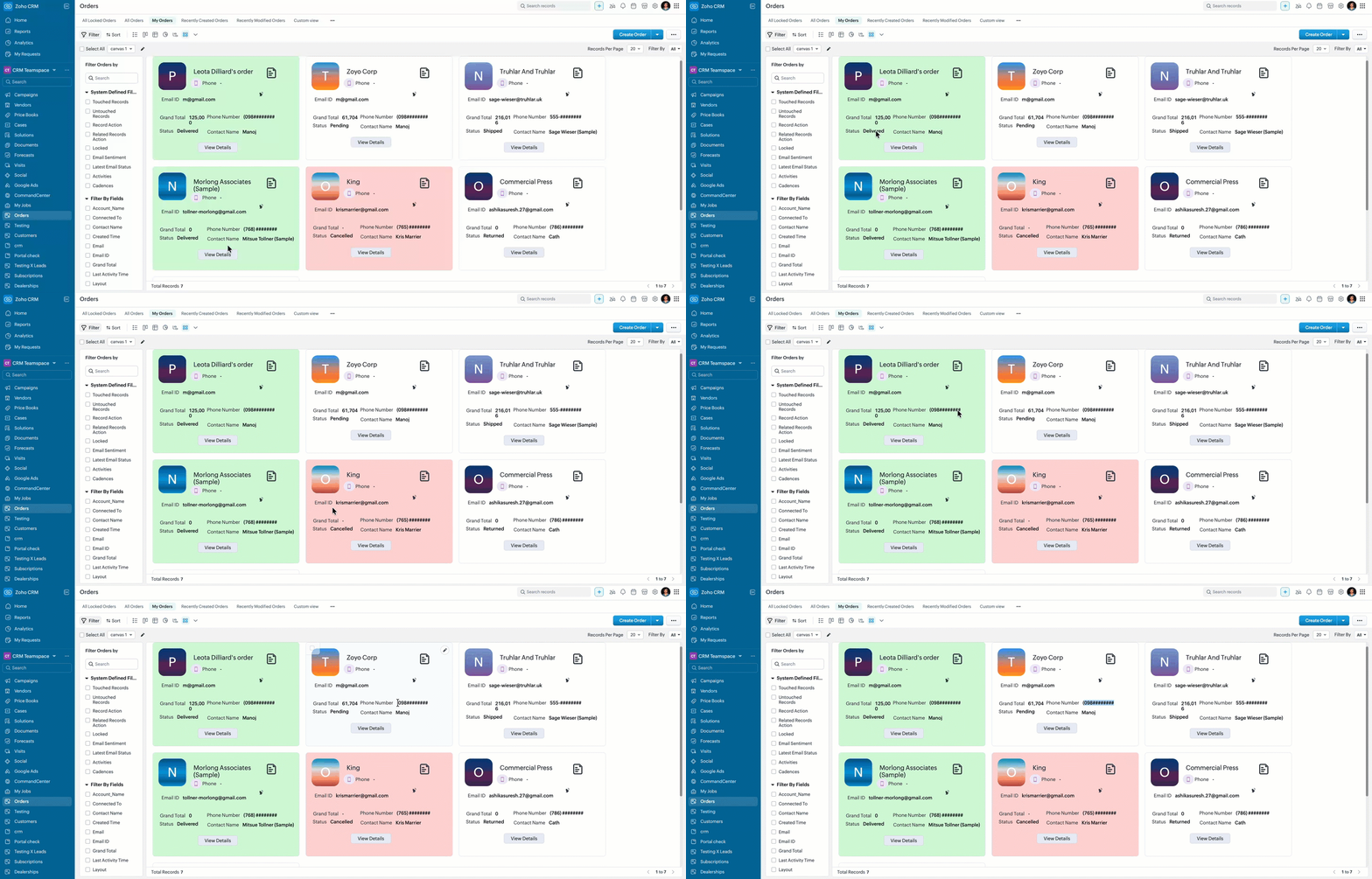
- Here is how the Client Script works for a "Sales Executive".
- Here is how the Client Script works for a "Support Agent".
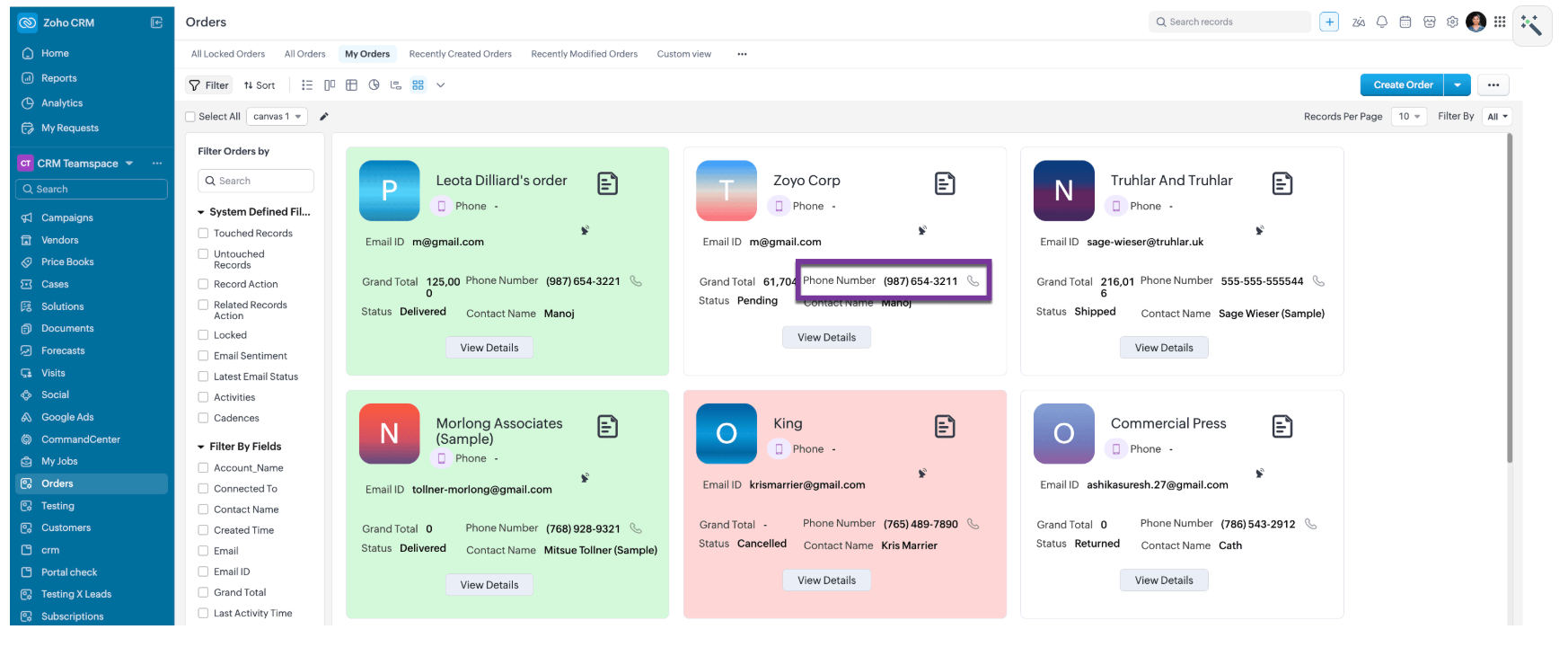
- Here is how the Client Script works for a for other roles like, Manager and Admin.
6. Summary
- Mask sensitive fields dynamically in List Page Canvas
- Apply role-based logic using current user context
- Improve list view readability with conditional record styling
7. Related Links
