Hello everyone!
Welcome back to the Kaizen series!
Many organizations manage workforce data such as employee designations, contact details, salary bands, and joining dates in an HRMS backed by Microsoft SQL Server, while their sales teams work in Zoho CRM. When a deal needs an assigned pre-sales engineer or a CSM hand off, reps must leave CRM, open the HR portal, and manually look up the right person.
This post shows how to use the Queries feature in Zoho CRM to connect to a Microsoft SQL Server database, fetch employee records with a parameterized SQL query, and display them directly on a Deal Canvas without leaving CRM. We will cover source creation, SSL and Read-Only configuration, writing the query, serializing the response, and a brief overview of how the same query can be reused across Canvas, Custom Related List, and Kiosk.
Prerequisites
- Zoho CRM Enterprise or Ultimate edition (SQL sources require Enterprise or above)
- A running Microsoft SQL Server instance with a database user that has SELECT privileges on the EMPLOYEE table
- The SQL Server instance must be reachable from Zoho CRM either publicly or Zoho CRM IP ranges must be whitelisted in the firewall rules
- The SQL Server hostname must be added to Trusted Domains in Zoho CRM (Setup > Developer Hub > Trusted Domains) if using a DNS hostname
- Developer role or System Administrator access in Zoho CRM
- A custom "Employee ID" field (Single Line) on the relevant CRM module (e.g., Deals or Contacts) to store the external employee reference if passing a single employee ID as a variable. Not required if the query fetches the full list (no variable).
Use Case
Sales reps at a professional services firm need to assign internal team members (solutions engineers, CSMs) to deals, but employee contact and designation data lives only in a Microsoft SQL Server HRMS requiring a manual lookup outside CRM every time.
Solution
Connect Zoho CRM Queries to the HRMS database. A parameterized SELECT on the EMPLOYEE table filtered by {{EMP_ID}}, resolved from a custom field on the Deal record, fetches the assigned employee's profile and displays it on the Deal Canvas in real time.
Follow the steps to implement this solution.
Step 1: Whitelist Zoho CRM IPs in SQL Server Firewall
Before creating the source in Zoho CRM, ensure the SQL Server instance can accept inbound connections from Zoho CRM's servers.
- The SQL Server instance must be accessible over the internet on port 1433 (SQL Server default).
- Zoho CRM's IP ranges must be whitelisted in the firewall rules governing the SQL Server. Refer to the Zoho CRM IP Whitelist guide for the full list of IP ranges for your data center.
- Ensure SQL Server Browser service is running and TCP/IP is enabled in SQL Server Configuration Manager.
- If the SQL Server uses a DNS hostname, also add it to Setup > Developer Hub > Trusted Domains in Zoho CRM.
Step 2: Create a Dedicated Read-Only SQL Server Login
On your SQL Server instance, create a login with the minimum permissions needed.
Do not use 'sa' (SQL Server's built-in System Administrator login) or any admin account. 'System Administrator login has unrestricted access to all databases and server settings.
Step 3: Add Microsoft SQL Server as a Database Source
- In Zoho CRM, go to Setup > Developer Hub > Queries.
- Click the Sources tab.
- Click Add Source.
- From the list of source types, select Database.
- From the available database options, choose MicrosoftSQL.
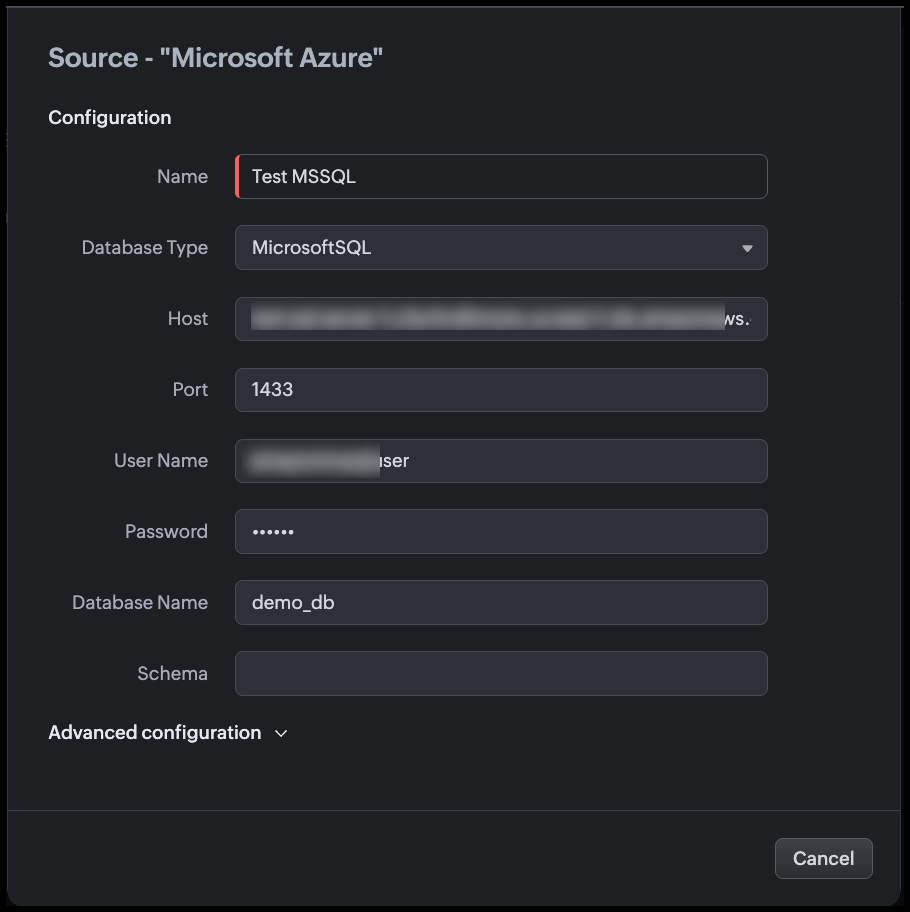
- Fill in the source configuration as shown in the following image.
Step 4: Configure Advanced Settings
Expand the Advanced configuration section before saving.
Use SSL
Enable the Use SSL toggle. This action,
- Encrypts the connection between Zoho CRM and SQL Server using TLS.
- When a DNS hostname is used, the system also validates the server certificate and hostname match before establishing the connection.
- SQL Server supports SSL/TLS natively. Ensure the SQL Server instance has a valid TLS certificate configured or that the certificate is trusted by the host.
Note
- The SSL setting is IMMUTABLE after the source is successfully created. If your SSL configuration needs to change, you must delete and recreate the source.
- If you add the hostname to Trusted Domains, the system bypasses certificate and hostname verification. Only add genuinely trusted hosts.
Read Only
Enable the Read Only toggle. This action,
- Restricts this source to only SELECT operations at the Zoho CRM level.
- Blocks INSERT, UPDATE, and DELETE queries even if the zoho_crm_reader SQL login is later granted write permissions at the database level.
Since this source is used purely to display employee information in CRM views, you must enable Read-Only.
You can change this setting after the source is created, unlike SSL.
Time Zone
Set Time Zone to match the time zone of your SQL Server instance (e.g., UTC, or the server's local time zone).
The DATE_OF_JOIN and MODIFIED_ON columns are stored as DATETIME in SQL Server (without time zone information). Setting the correct source time zone allows Zoho CRM to convert these values to each viewing user's local time zone for accurate display.
Example: If the server stores MODIFIED_ON = 2026-04-15T18:30:00 in IST, a user in UTC will see 2026-04-15 13:00.
Connection Timeout
Set Connection timeout to 10 seconds. This action defines how long Zoho CRM waits for the SQL Server to accept the connection before giving up.
10 seconds accommodates typical network latency while preventing the CRM UI from hanging indefinitely during server downtime or network issues.
Click Validate and Save.
Zoho CRM tests the connection. On success, the source is saved and available for queries.
Step 5: Create the Query
- Go to Setup > Developer Hub > Queries.
- Click Create Query.
- In the dialog box enter the name of the query.
- Click Next.
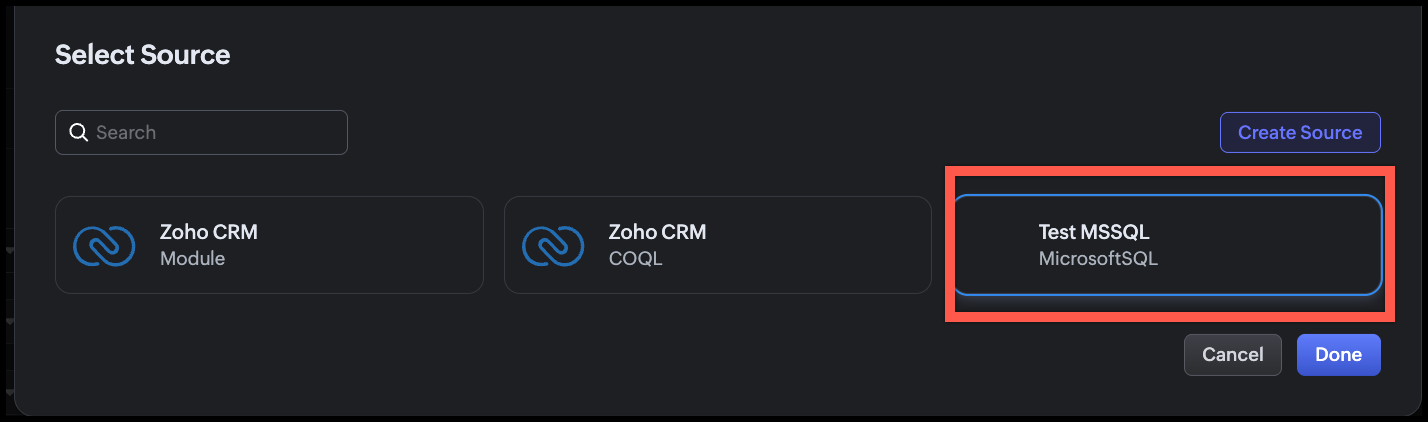
- Under Configuration, click Change and select the source we added.
- Click Done.
Step 6: Write the SQL Query
In the query editor, enter the following query.
SELECT EMP_ID,EMP_FIRST_NAME,EMP_LAST_NAME,EMP_GENDER,EMP_EMAIL,EMP_PHONE,EMP_DESIGNATION,EMP_SALARY,DATE_OF_JOIN,MODIFIED_ON FROM EMPLOYEE WHERE EMP_ID = {{EMP_ID}} ORDER BY EMP_FIRST_NAME |
Zoho CRM automatically detects {{EMP_ID}} as a query variable. At runtime, the value of the "Employee ID" custom field on the Deal record is passed to this variable.
Step 7: Execute and Validate the Query
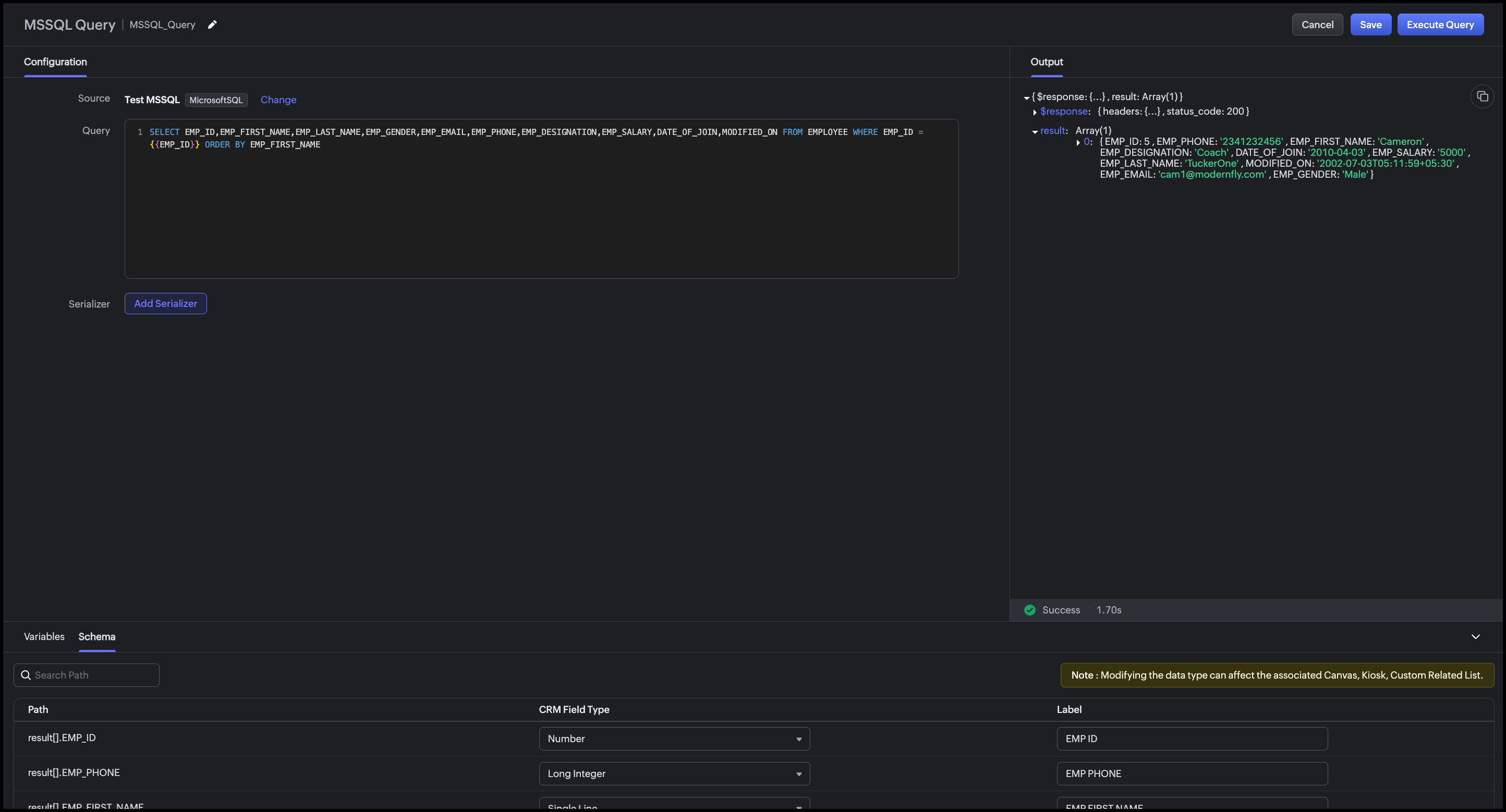
- Click Execute Query.
- Enter a valid employee ID from your SQL Server database.
- Click Next.
- Review the raw response.
- Review the Schema panel and verify CRM Field Type mapping.
Step 8: Add a Serializer
The serializer combines the first and last name, formats dates, and computes the employee's tenure.
- Click Add Serializer.
Enter the following JavaScript.
return result.map(record => { // Compute tenure in years from DATE_OF_JOIN const joinDate = new Date(record.DATE_OF_JOIN); const today = new Date(); const tenureYears = Math.floor( (today - joinDate) / (1000 * 60 * 60 * 24 * 365) );
return { emp_id: record.EMP_ID, full_name: record.EMP_FIRST_NAME + " " + record.EMP_LAST_NAME, gender: record.EMP_GENDER, email: record.EMP_EMAIL, phone: record.EMP_PHONE, designation: record.EMP_DESIGNATION, date_of_join: record.DATE_OF_JOIN ? String(record.DATE_OF_JOIN).split("T")[0] : "N/A", tenure: tenureYears + (tenureYears === 1 ? " year" : " years"), last_modified: record.MODIFIED_ON ? String(record.MODIFIED_ON).split("T")[0] + " " + String(record.MODIFIED_ON).split("T")[1].slice(0, 5) : "N/A" }; }); |
This serializer:
- Combines EMP_FIRST_NAME and EMP_LAST_NAME into a single full_name field
- Computes tenure in years from DATE_OF_JOIN to today, a derived field not stored in the database
- Formats date_of_join as YYYY-MM-DD (strips the time component)
- Formats last_modified as YYYY-MM-DD HH:MM.
Click Execute Query again to preview the serialized output.
Click Save to save the query.
Conclusion
The Queries feature in Zoho CRM makes it straightforward to surface employee records from an external Microsoft SQL Server HRMS directly within CRM without any middleware, scheduled sync, or manual copy-paste. The advanced configuration options (SSL, Read-Only, Time Zone, Connection Timeout) ensure the connection is secure, non-destructive, and accurate across time zones.
With a single parameterized query and a lightweight serializer, sales reps can see the full profile of an assigned employee such as designation, contact info, tenure etc., right on the Deal Canvas when they need it most. The same query can be reused across multiple CRM UI components for different team workflows.
This approach is best suited when:
- The employee data is authoritative in an external HRMS and should not be duplicated into CRM fields.
- Real-time accuracy matters (recently onboarded or transferred employees are immediately visible).
- The organization wants to avoid building and maintaining a custom sync integration.
Associating the query with CRM's UI components
You can associate a query with multiple UI components such as Canvas, Kiosk, Custom Related Lists based on the workflow.
Canvas List View
Associate the query with the Canvas List View of the Deals (or Contacts) module.
Map {{EMP_ID}} to the "Employee ID" custom field on the record. When a sales rep opens a Deal, the assigned employee's full profile, including name, designation, phone, email, tenure etc., appears as an "Assigned Employee" panel on the canvas. Refer to our Kaizen post for associating a query with Canvas List View.
Kiosk
Associate the query with a Kiosk Decision component to build an internal lookup screen, say a self-service screen, where a sales rep types an Employee ID, and the Kiosk fetches and displays that employee's profile from the HRMS. The Decision component evaluates the query response (e.g., checking if EMP_DESIGNATION matches a required role) and branches the Kiosk flow accordingly.
Map {{EMP_ID}} to a Kiosk input variable collected in a preceding Screen component.
Custom Related List
Use a modified version of the query (filtered by ACCOUNT_ID instead of EMP_ID) to display a related list of all employees assigned to a given account on the Account record. This is useful when multiple internal team members like solutions engineers, CSMs, support contacts, are mapped to an account in the HRMS.
Map {{ACCOUNT_ID}} to the Account record's identifier during association, and the related list will show all employees assigned to that account, updated automatically as the HRMS changes.
For step-by-step instructions on associating a query with a Custom Related List, refer to this Kaizen post.
We hope you found this post useful.
Cheers!
=================================================================================
Recent Topics
Invalid value passed for line_item_category
duplicating a previous used invoice and trying to save it (new invoice number / po number used) I keep encountering this error when trying to save the invoice Invalid value passed for line_item_category
What is the different between Zoho invoice and Zoho book
Hi, both product do invoice and Zoho book having all function / feature Zoho invoice, please explain more, thanks
Mastering Zia Match Scores | Let's Talk Recruit
Feeling overwhelmed by hundreds of resumes for every job? You’re not alone! Welcome back to Let’s Talk Recruit, where we break down Zoho Recruit’s features and hiring best practices into simple, actionable insights for recruiters. Imagine having an assistant
Insert Template not inserting
I have been using the "Insert Template" feature for years and I use it every single working day. Yesterday it was working fine. Today, on two different browsers (Chrome and Edge), I can select "Insert Template", select the template I want to insert, but
Option for - CSV Export from Pipeline Deals by Stage (Including Products, Companies, and Contacts)
I would like to know when we will be able to export a simple CSV file from pipeline deals, with the option to select a specific stage within the pipeline. This export should include data for products, companies, and contacts, all in a single view. For
What is the difference between workflows, journeys, and blueprints?
I semi-understand what they are individually but they all say they can be used to automate processes in your CRM. What makes these three different? What are the benefits and cons of using each?
Free webinar! Simplify hiring and HR workflows with Zoho Sign for Zoho People & Zoho Recruit
Hello! Managing recruitment, onboarding, and employee paperwork doesn’t have to be complex or time-consuming. Discover how Zoho Sign, integrated with Zoho People and Zoho Recruit, helps you digitize and streamline your document workflows from hire to
Multiple Blueprints on different fields at the same time.
It looks only 1 Blueprint can run at the same time, it makes sense for many Blueprints on the same field (Eg. Stage). But what about multiple Blueprints on "different" fields? the multiple options must be available. (Eg. Stage, Documents Status, Contract
Edit 'my' Notes only
The permissions around Notes should be more granular, and allow to user to be able to edit the notes he created only. The edit Notes permission is useful as it allows the user to correct any mistakes or add information as needed. However, with this same
Need to make a specific canvas my default view for contacts
Need to make a specific canvas my default view for contacts How do I do it?
Add Zia matching jobs on the main screen of candidates module
It will be good if it is added in the main screen as a column so that we can quickly hover over and see if they match for any job openings. That will save from two additional clicks
Domain Disclaimer: A standardized footer for your entire organization
Every email sent from an organization represents its identity externally. Most teams require consistent line of text at the bottom of outgoing messages. It can be a confidentiality notice, a legal statement, a compliance requirement, or a uniform sign-off.
SalesIQ Email Delivery Issues to Microsoft
Is anyone else having delivery issues to Hotmail, Outlook, and Live inboxes when sending transcripts and replies via email from SalesIQ? We’ve detected that emails sent from SalesIQ to these accounts aren't arriving—they don’t even bounce back; they simply
Zia flags the deal as at risk - but leaves my customers figuring out the rest themselves
I implement Zoho for many businesses. Team sizes vary, some clients have 3 reps, some have 40. But I keep hearing the same complaint across all of them and I figured it's worth raising here. Zia's deal scoring has genuinely improved over the past year.
How do we change system field names?
I found some very old discussions, but looking for more recent. Very confused on mapping the addresses correctly, due to different names for some reason between. for example: leads: city, state, zip etc... as normal contacts: Mailing adddress & Other
Remove "Subject" as a required field on Quotes
Currently, when you create a quote in CRM, the field "Subject" is mandatory. The properties of a system defined field cannot be edited which means we cannot de-select the mandatory requirement. A 'subject' on a quote is a little vague and not something
Adding Multiple Products (Package) to a Quote
I've searched the forums and found several people asking this question, but never found an answer. Is ti possible to add multiple products to a quote at once, like a package deal? This seems like a very basic function of a CRM that does quotes but I can't
Unattended - Silent
How can I hide the tray icon / pop up window during unattended remote access for silent unattended remote access?
What is the Potential field for in expense submissions?
I'm trying out Zoho Expense in Zoho Project so I can record project expenses which aren't time related. On the expense form there is an option called Potential but I don't understand what this is for. When I click the dropdown it just shows the name of
Pasting Images in Zoho Desk ignores cursor location
My team has reported an issue which started recently where when we paste an image into a new or existing reply or comment, the pasted image seems to ignore the current cursor location instead paste itself at the last character present in the reply/comment,
how do i add more than one google my business location?
they are connected to one account, but while connecting social channels it makes me pick one location. I have 3 and growing.
Control Fields on Mobile App
On the mobile app, how do we control which fields appear on the screen for records that have a related list? In the example below I want the Inspection Stage and Inspection Type fields to appear, not the record owner (Dev Admin). I changed the Inspections
Unable to switch existing AWS RDS connection to DataBridge after moving RDS behind VPN
Hi everyone, I’m facing a problem with an existing Zoho Analytics setup and would like to know the best migration path. Originally, my Zoho Analytics connection to AWS MySQL RDS was configured using direct public access to the RDS endpoint. Everything
Hotmail
I am sending an email to a hotmail, and this guy does not receive the email, either in his SPAM nor inbox. Can you help me? thanks!
No Ability to Rename Record Template PDFs in SendMail Task
As highlighted previously in this post, we still have to deal with the limitation of not being able to rename a record template when sent as a PDF using the SendMail Task. This creates unnecessary complexity for what should be a simple operation, and
Updating Sales orders on hold
Surely updating irrelevant fields such as shipping date should be allowed when sales orders are awaiting back orders? Maybe the PO is going to be late arriving so we have to change the shipment date of the Sales order ! Not even allowed through the api - {"code":36014,"message":"Sales orders that have been shipped or on hold cannot be updated."}
How do I change the Subject header when I reply please, it contains Re which I want to remove.
Hi Zohodesk, When a customer logs a call we have amended the Acknowledge on new Ticket template so the subject header has "Ticket Id" at the start of it. When we reply the customer gets Re: and then the Id and I can't see a template for this? Can you
Zia Agent built in ChatKit UI does not render markdown
Hi, You have a major shortcoming in the Zia Agent UI. The test UI that is embedded in agents.zoho.com allows you to test the agent has full support for rendering markdown, but your ChatKit UI does not have support for rendering markdown. If I embed it
Can't add my domain to Zoho zeptomail because of error code DE_150
Hello there, I'm trying to add my domain to ZeptoMail but it's rejected I checked the network tab and I'm getting { "error": { "code": "TM_3601", "details": [ { "code": "DE_150", "message": "Antispam validation failed for your domain in Accounts." } ],
Automated entries past the current month in a calendar report
Hi all, I have an automation problem. I have a form which on successfull entry adds either 5 or 10 more of these entries with a slight change so our customers can see it throug a calendar report on the webiste. The entry put in manually shows up perfectly
[Bug] WebAuthn passkey registration blocked on rpIds with TLDs longer than 6 characters (.accountant, .technology, etc.) — isValidDomain regex too strict
Hi, Filing on behalf of an enterprise customer where Zoho Vault is deployed across the company. The Chrome extension blocks WebAuthn passkey registration on legitimate sites whose Relying Party ID (rpId) has a TLD longer than 6 letters. This affects every
Get Files Associated to Data Template via API
I have a data template with multiple files associated to it, and trying to write a Deluge script that will fetch files associated with this data template. I created the script below based on the WorkDrive API documentation, one request uses the data templates
ZOHO CRM User management or role
I need guidance regarding Zoho CRM licensing and user management. I want to purchase one Zoho CRM license and create multiple team users under the same account with the following hierarchy: Super Admin User Manager User Executive Users (with limited access)
Tip #72 - Exploring Technician Console: Setup Unattended Access - 'Insider Insights'
Hello Zoho Assist Community! You joined a live session, diagnosed the issue, and got the user back on track. Fix delivered, user happy, session closed. But you know this machine. It needs a follow-up. A cleanup, a patch, maybe a deeper maintenance run.
#1 New to Zoho Invoice? Do this First!
"Zoho Invoice has made our company's tax invoices look more elegant and professional. It is effortless to raise an invoice and track payments with it", says Arunkumar Balakrishnan, Director GA Technologies. Generating professional invoices usually begins
Automation Series #5: Supervisor Rule vs Schedule in Zoho Desk
Supervisor Rules vs Schedules: Choosing the right time-based automation This post is part of the "Desk Automation Series," Chapter 1. Through this series, we will help you choose the right automation type in Zoho Desk by comparing commonly confused automations
Error when changing user permission from read only to user.
Hi there, Ive tried to change one of my users to be able to edit, however i kept getting the error user license exceed.
Need Help Preventing Overselling in Zoho Inventory
Hi fellow Zoho Inventory users, I'm reaching out for advice on managing inventory control in our growing business. We've recently encountered situations where sales orders get confirmed despite insufficient stock, creating operational challenges. Our
Conditional Layouts On Multi Select Field
How we can use Conditional Layouts On Multi Select Field field? Please help.
Smart Feature Compatibility Indicators for CRM Field
Zoho CRM offers a wide range of field types and advanced customization options. However, several field types have feature-specific limitations that are currently documented only in help articles. For example, while configuring a Rich Text field, admins
Next Page