Latest updates in Zoho Meeting | Calendar view, Zia integration with OpenAI, edit the recurring pattern in a recurring meeting, device error notifications revamp, and more.

Latest updates in Zoho Meeting | Calendar view, Zia integration with OpenAI, edit the recurring pattern in a recurring meeting, device error notifications revamp, and more.

Hello everyone,


We’re glad to share a few updates and enhancements in Zoho Meeting, including the Calendar view, being able to edit the recurring pattern in a recurring meeting, revamped device error notifications, and other enhancements that you’ll find useful.


Calendar view 
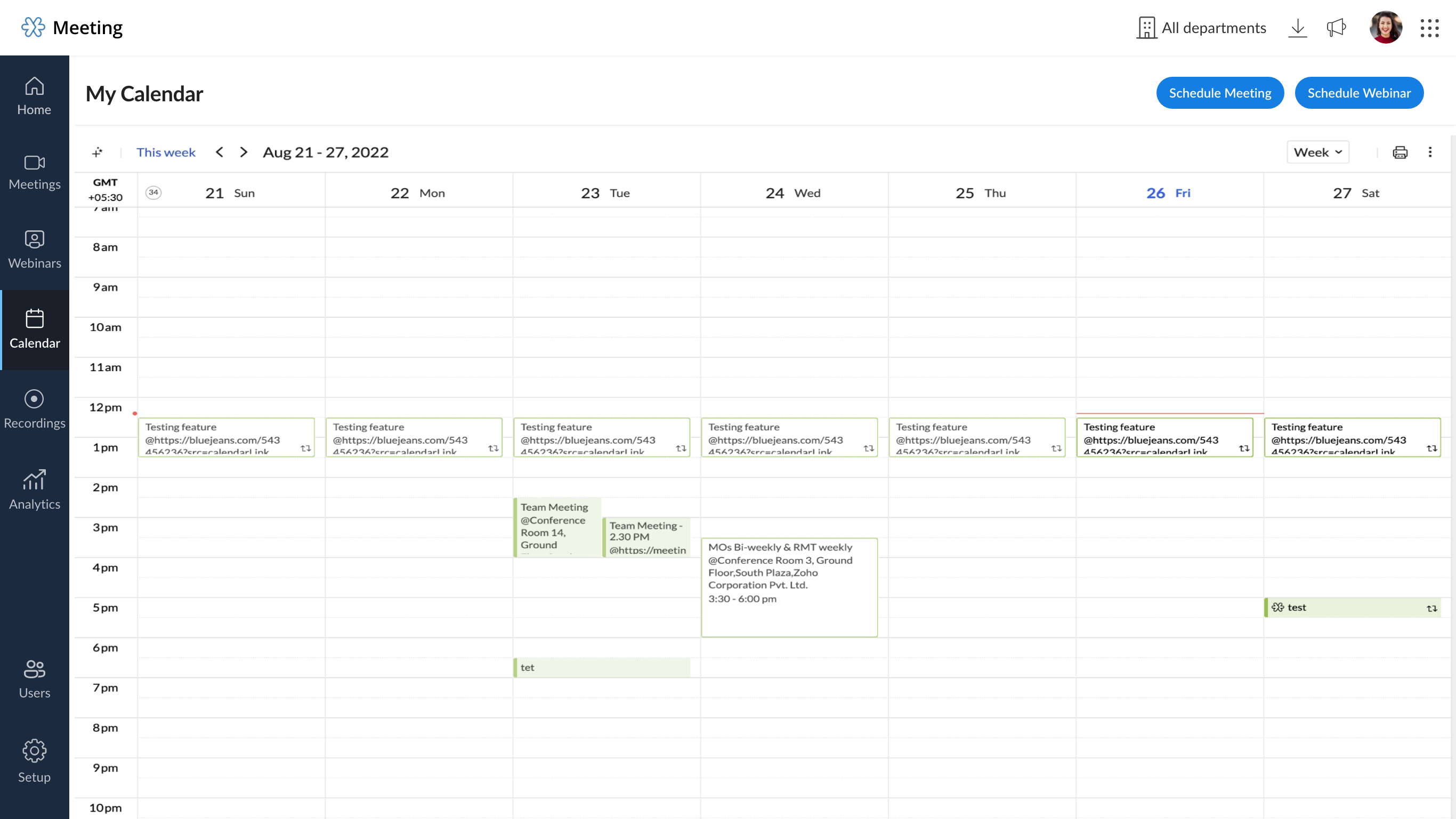
Manage your online meetings with ease using Zoho Meeting Calendar. Check your upcoming events, schedule new meetings and webinars, and stay organized with all of your sessions, all from one place.


Zia integration with OpenAI

Zoho Meeting's Zia integration, in collaboration with Open AI's ChatGPT, helps analyze and condense meeting transcripts into brief, easy-to-read keynotes. This Zia integration will help you increase your productivity with short and quick keynotes generated using the Meeting session's recording transcripts. Learn more

Edit the recurring pattern in a recurring meeting 

You can now change the recurring pattern or add more specifics to recurring meetings, such as new days or sessions.


Revamped device error notifications 

We've worked on enhancing our user interface for device errors, and we'll now notify the meeting host and participants of errors in their microphone and camera devices and walk through solutions during the event.


Other Meeting updates 

Faster reconnection  

We made some enhancements to the connectivity, hence session re-connections will be faster and should only take a few seconds.


Muted and talking notification UI revamp 

We've placed the muted and talking notifications closer to the toolbar mic icon for better usability. It will no longer conceal screen share materials.  


We hope you'll enjoy these updates from Zoho Meeting. If you have any questions or would like to give us some feedback, write to us at support@zohomeeting.com.


Stay tuned with our social handles to get the latest updates: Twitter | LinkedIn

    • Sticky Posts

    • Zoho Meeting is included in Zoho One now!

      Hello Everyone, For those who waited for the integration of Zoho Meeting with Zoho One, here is the good news. The integration has been completed and you can now add the Zoho Meeting application in your Zoho One portal. Edition included in Zoho One License You will get Enterprise plan of Zoho Meeting, using which you can host online meetings with up to 100 participants and webinars with up to 100 attendees. You will also get the cloud storage for 25 session recordings/user. Adding Zoho Meeting application
    • Zoho Meeting Updates: Bug Fixes in Meetings and Webinars, and Desktop App Enhancements

      Hi there, We hope you are all safe and well. Following our previous feature release, we have added some enhancements and bug fixes for the improved functioning of Zoho Meeting. Let's take a look at last month's updates: Online meeting updates The microphone button remained active even when a user switched to phone audio. This issue has been fixed. An error caused the microphone status of participants to be wrongly displayed in the meeting toolbar and the attendees list.This issue has been fixed.
    • V2.7: Introducing webinar co-organizers, enhanced screen sharing quality, choosing external webcam, region based dial-in number display and more.

      Dear All, Here comes the new updates from Zoho Meeting that are recently rolled out! We 're introducing co-organizers in the webinar, done major improvements in screen sharing quality and more.   Introducing co-organizers in the webinar You can now invite co-organizers to help you manage your webinar. Co-organizer can launch polls, answer questions, change presenters during the webinar, record webinar, view all attendees/staff and more. Learn more. Webinar CoOrganizers   Enhanced screen sharing quality
    • Live webinar: A complete overview of Zoho Meeting

      Are you looking for ways to engage and communicate with large audiences? Learn how Zoho Meeting can empower you from conducting online meetings with your team to hosting webinars for your sales leads. Join us for a live webinar this Thursday at 8:30 to 9:00 AM PDT.   In this webinar, you will learn how to: Organize and host webinars Engage your audience with polls and Q&A Generate analytical reports Schedule and attend online meetings Record and share meetings and webinars Co-branding and user management
    • Live webinar: A complete overview of Zoho Meeting

      Are you looking for ways to engage and communicate with large audiences? Learn how Zoho Meeting can empower you from conducting online meetings with your team to hosting webinars for your sales leads. Join us for a live webinar this Thursday. Here's what you can learn: Webinar scheduling and preparation Attendee interaction and engagement In-depth post webinar analytics Scheduling and hosting online meetings Managing your recordings Co-branding and user management Date: Thursday, March 29th, 2018
    • Recent Topics

    • How to create a flow that creates tickets automaticaly everyday based on specific times

      Hi guys Does anyone know how to create a flow that will create tickets automaticaly in ZOHO Desk when a certain time is reached. Im havin a hard time configuring a flow that will create tickets automaticaly everyday during specific hours of the day For
    • ZOHO FLOW - ZOHO CREATOR - ZOHO WRITER : Get Related records

      Bonjour, J'ai besoin que vous m'ajoutiez la solution "Get related Records" dans la liste de choix de zoho creator (sous Zoho flow). En effet, j'ai besoin de récupérer les champs d'un sous formulaire pour l'ajouter à l'impression de mon document. Mer
    • Task Details on task template

      When creating a task template in settings that task details seem to be missing. Is it not possible to set the details of a task, such as the priority, type, reminder settings, and custom field values?
    • Option to Delete Chats in IM

      Currently, there is no option to delete any chats in IM, regardless of their source.
    • Will zoho thrive be integrated with Zoho Books?

      title
    • Connecting email for each department in ZohoDesk

      Hi! Could someone help me to go through connecting emails for each department?
    • How do I trigger a Flow based on a campaign response?

      Is there a way to trgiider a Zoho Flow based upon a lead opening an email sent via Zoho Campaigns? I see that the data is recorded in the 'Campaigns' section of Zoho CRM under 'Member Status' and I want to trgigger a flow based upon that record changing.
    • All Zoho Flows are filtered

      My two flows operate perfectly when I run them as a test, but when they're activated each run ends with a status of neither success, nor fail, but filtered. I haven't set up any filters. I don't see where to turn off filters. When I test run on a sequence
    • Creating Multiple Items on Sales Order

      Hi, I’m trying to automate some processes using Zoho Flow, specifically the creation of sales orders in my Zoho Inventory. However, Zoho Flow's Create Sales Order function can only add one item. I would like to include multiple items in a single sales
    • Problem Connection from Zoho Flow and Gravity Form

      I obtained my API key from Gravity Forms via WordPress. However, when I enter my Zoho Flow, it states: Gravity Forms says, 'You are not authorised to access the API." I tried recreating a new API key, but it is still not working.
    • Eventbrite Email Field in Zoho Flow Returns "Info Requested" Instead of Actual Email

      Hi Zoho team, I'm using Zoho Flow to connect Eventbrite with Zoho CRM. My goal is to automatically add event attendees as leads in Zoho CRM. I’ve set up the flow and mapped the ${trigger.profile_email}} field to the Email field in CRM. However, I'm running
    • "Invalid value passed for Product ID" Error in Zoho Flow "Create Sales Order" Node

      Hello Zoho Community, I’m facing an issue with Zoho Flow while trying to create a sales order in Zoho Inventory using the "Create Sales Order" node. Here’s a detailed explanation of my setup and the problem: What I’m Trying to Achieve I’m building an
    • Associating Project with an Account via Flow

      I'm using flow to create a Project based on a Deal status update using flow. The fields exist to pass the Account Name through properly, but when you view the Projects module in a CRM Account Record it doesn't automatically associate the new Project Record
    • How to follow up a member in a meeting?

      Hello, I make weekly meeting online with a lot of people. I want(I've been using calendly to do it). I want to do a follow-up to it. I want to send messages via Zoho-flow to all the member that participated in the meeting. How can I do it?
    • Setting Delays in Invoice Reminder Flow

      I am currently working on a flow that sends reminders for unpaid invoices. The flow is designed to delay actions until specific intervals before the due date: A reminder should be sent 7 days before the due date. A second reminder should be sent 3 days
    • Get Sales Orders Related to Inventory Item

      Dear Team, I'm just wondering if there is a way to get a list of all Sales Orders related to a specific Inventory Item. I did search all articles but couldn't find any article that could help.
    • Endpoint Central Cloud Asset Update from Fresh Service

      All, Does anyone use the asset management feature in Fresh Service? I'd like some help on building a flow to update asset attributes in Endpoint Central Cloud based off of an update to that same asset in Fresh Service. The trigger is "asset is updated"
    • Zoho Flow Export to Deluge

      It would be great to take a user built zoho flow and export the entire flow as a deluge script including having multiple connected applications (showing the API connections and webhooks) and different functionality in the other applications interacting
    • Action Iteration/Loop using Zoho Flow

      Trying to use Zoho Flow for automating following Context - A zoho form entry which has image upload field with upto 5 images setting and files are saved into Workdrive. After form is submitted need to create folder based on some fields and move files
    • Zoho Flow - Unable to evaluate formatDate with Zoho Invoice Date Field for Calendar Integration

      Hello Community, I'm trying to automate the creation of all-day events in Zoho Calendar whenever a new invoice is created in Zoho Invoice. I'm using Zoho Flow for this automation. My Goal: When an invoice is created with a specific "Event Date," I want
    • Zoho Inventory Sales Order Items

      I'm trying to build automation using Zoho Flow to add items to a Sales Order. In the automation options for both "create sales order" and "update sales order", The item ID is required. However, when I update the Sales Order, it's just replacing the item
    • Permissions for Azure Devops connection

      I am trying to set up a connection with our Azure DevOps org but it keeps giving me this error. On Azure I should be able to have admin-level access to everything. Can you please point me to which permission this is checking for so I can enable it?
    • Restrict Users access to login into CRM?

      I’m wanting my employees to be able to utilize the Zoho CRM Lookup field within Zoho Forms. For them to use lookup field in Zoho Forms it is my understanding that they need to be licensed for Forms and the CRM. However, I don’t want them to be able to
    • Best way to start zoho inventory with bulk openning stock

      We are already using zoho book since long time for cars trading company. Now to streamline more, would like to import the excel data of closing stock of inventory to zoho inventory and to start on. Since we need to track each VIN (unique vehicle id number)
    • Confused by the distiction between matched and categorized when reconciling a bank statement an how to

      I used to use quickbooks. In quickbooks, it was possible to use the check writing feature to add an expense that was on the bank statement that did not go through the AP and check writing process. I would write a check, assign it a number like etf (for
    • Use Zoho Flow Credits for CRM ‘Actions by Zoho Flow’

      Hello Team, We would like to submit a feature request regarding credit usage for “Actions by Zoho Flow” in Zoho CRM. Use Case: We are Zoho One users and actively use Zoho Flow, where our organization has 52,000 Flow tasks per month. In Zoho CRM, we use
    • Passing the CRM

      Hi, I am hoping someone can help. I have a zoho form that has a CRM lookup field. I was hoping to send this to my publicly to clients via a text message and the form then attaches the signed form back to the custom module. This work absolutely fine when
    • Add Full-Screen Viewing for Quartz Recordings in the Client Interface

      Hi Zoho Team, We would like to request an enhancement to the Zoho Quartz client interface when viewing submitted recordings. Current Limitation: When viewing a Quartz recording from the client (user) interface, there is currently no option to switch the
    • WorkDrive for Excel Add on

      Dear Sir/Madam Have installed Workdrive for Microsoft add on But unable to view the same added in Excel
    • Zoho Calendar s’enrichit avec une intégration à Zoho People et Zoho Cliq

      Les journées de travail ne se déroulent jamais exactement comme prévu. Une conversation informelle devient une séance d’échange d'idées, une absence modifie un planning, et votre agenda se retrouve vite décalé par rapport à la réalité. Chez Zoho Calendar,
    • Holidays

      Hi; For defining Holidays, you need to add logic to handle the year as well as the month & day. We need to be able to enter Holidays for the next year. I need to add a holiday for January 2, 2017, but I can't until January 1st, which is a Sunday and we
    • Zoho public comments are confusing and unnecessary

      Hi, we use zoho desk and have issues with public comments. We started using them because the "Reply" option just seemed very clumsy because of the following reasons: - the top "Reply" button starts what seems to be a regular email, showing the entire
    • Introducing parent-child ticketing in Zoho Desk [Early access]

      Hello Zoho Desk users! We have introduced the parent-child ticketing system to help customer service teams ensure efficient resolution of issues involving multiple, related tickets. You can now combine repetitive and interconnected tickets into parent-child
    • Zoho API - ticket creation - Validation failed for the condition : Ticket Status Info should not be empty

      Hi ! I'm trying to create ticket through Zoho API, and I'm getting a 422 response : "Validation failed for the condition : Ticket Status Info should not be empty" My request looks like this : curl --location 'https://desk.zoho.eu/api/v1/tickets' \ --header
    • How to install Widget in inventory module

      Hi, I am trying to install a app into Sales Order Module related list, however there is no button allow me to do that. May I ask how to install widget to inventory module related list?
    • Create static subforms in Zoho CRM: streamline data entry with pre-defined values

      Last modified on (9 July, 2025): This feature was available in early access and is currently being rolled out to customers in phases. Currently available for users in the the AU, CA, and SA DCs. It will be enabled for the remaining DCs in the next couple
    • Zoho Books Sandbox environment

      Hello. Is there a free sandbox environment for the developers using Zoho Books API? I am working on the Zoho Books add-on and currently not ready to buy a premium service - maybe later when my add-on will start to bring money. Right now I just need a
    • Deleting unwanted ticket replies

      Hello, In a Zoho Desk Ticket thread, sometimes one of the recipients has auto-reply activated. This creates a new message in the Ticket thread that not only pollutes the thread, but most importantly cannot be replied properly because usually auto-reply e-mails don't do "reply all", so the other recipients are not included. I want to delete such a message in the Ticket thread. I searched the help of Zoho Desk, but only found a way to mark as Spam (https://help.zoho.com/portal/kb/articles/marking-support-tickets-as-spam)
    • Desk DMARC forwarding failure for some senders

      I am not receiving important emails into Desk, because of DMARC errors. Here's what's happening: 1. email is sent from customer e.g. john@doe.com, to my email address, e.g info@acme.com 2. email is delivered successfully to info@acme.com (a shared inbox
    • System-generated support email added in CC on “Reply All”

      Hi, I recently set up Zoho Desk for a client and we are trying to prevent the Zoho Desk system-generated support email address (not the mailbox used as the department’s "From address") from being automatically added in CC when agents use “Reply All” on
    • Next Page