Let's Talk Recruit: An approval process with zero follow-ups
Let's Talk Recruit: An approval process with zero follow-ups


Welcome back to our Let's Talk Recruit series! Today, the topic of discussion is the Approval process. We’ll discuss how approval workflows function in recruitment, explore real-world use cases, and show how automation in Zoho Recruit can streamline approvals and drive efficiency in your organization.

What is an approval process?

An approval process is a structured workflow used to authorize various stages in the recruitment process, such as job requisitions, candidate approvals, and offer letters. Automating approvals in Zoho Recruit ensures efficiency, reduces delays, and eliminates miscommunication.
For instance, when a recruiter shortlists a candidate for a specific role, the hiring manager must approve the selection before scheduling further rounds. Additionally, once a final candidate is chosen, approval from HR and upper management is required before extending an offer.

Why automate approvals?

It automates the repetitive, cumbersome, and time-consuming tasks

Without Automation

With Automation

Manual follow-ups
Automatic notifications
Delayed decisions
Timely approvals
Miscommunication
Clear approval trials
Lost candidates
Faster hiring cycles
Inconsistent process
Standardized workflows

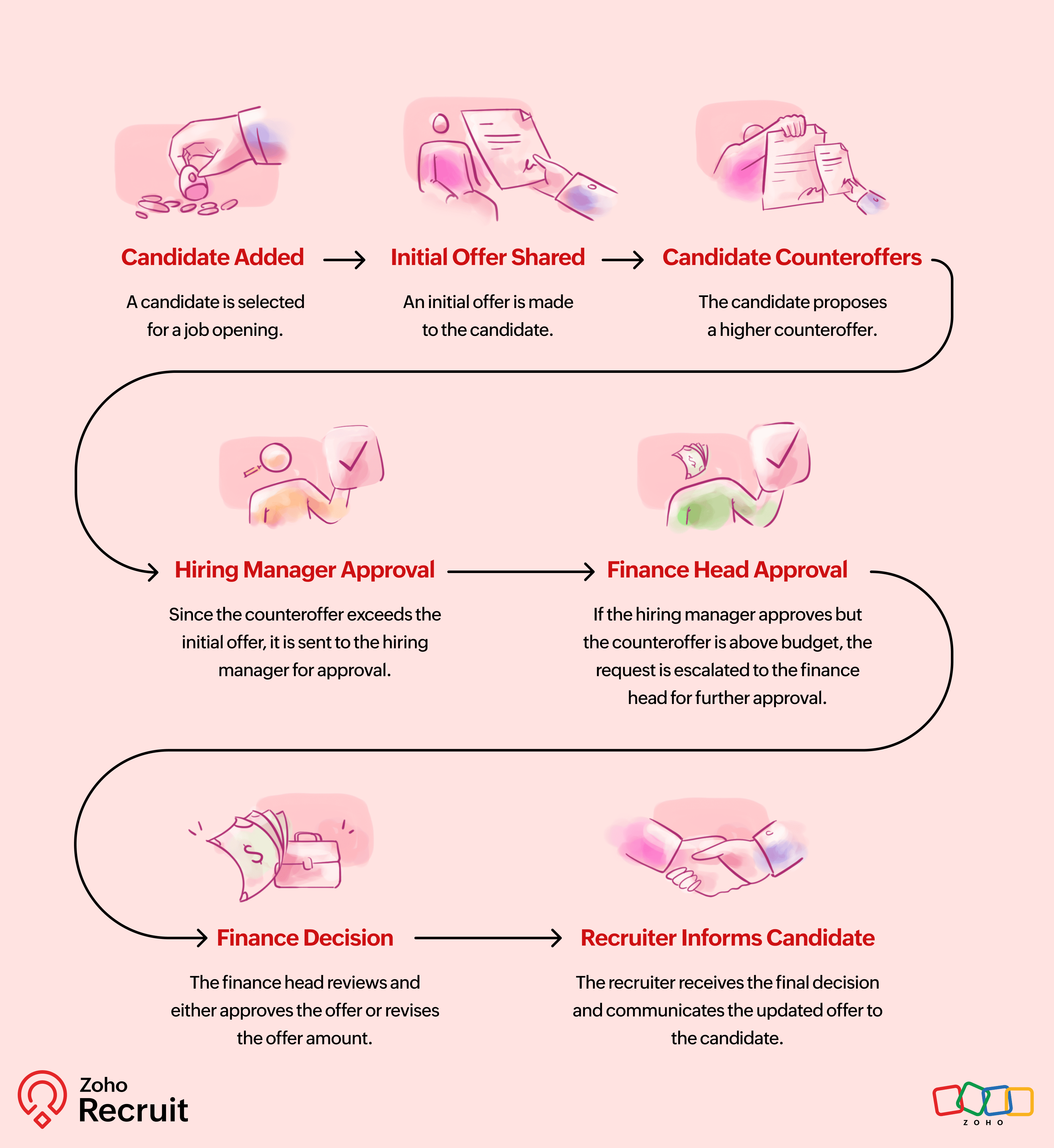
How does the approval process function?

The diagram above illustrates how a typical approval workflow functions in Zoho Recruit:

When should you use an approval process?

Objective:

An organization needs a streamlined process to manage approvals for job offers sent to selected candidates before finalizing the hiring process.

Example Scenario:

An internal recruitment team collaborates with various departments to hire candidates. When a candidate is selected after the final interview, the job offer must be approved internally before it is sent out. The HR manager and finance team must review the offer details, such as salary, benefits, and contract terms, before the final approval.

They want the approval process to be automated so that:
  • Automated Approval Initiation:
    Once a recruiter selects a candidate and generates a job offer, the approval process should start automatically to avoid delays.
  • Multi-Level Approvals:
    The job offer must first be approved by the HR manager to ensure compliance with company policies.☆ If the salary exceeds a predefined limit, it must be reviewed by the finance department to verify budget availability.
  • Pending Background Verification:
    If a candidate’s background verification is still pending, the offer should not be sent until the verification is completed and approved.
  • Final Offer Dispatch:
    Once the approvals are received, the system should automatically send the final job offer via email to the candidate with a confirmation notification.

Here's a challenge for you:

Identify activities that need automatic approvals. Create a rule and set up a trigger. Send approval requests automatically and put it to test
Start small—maybe automate email approvals or candidate shortlisting—and build from there!

Let’s Talk Recruit!

Now Over to You! Have you used approval processes in your hiring workflow? What’s your favourite feature in Zoho Recruit’s approval system? Drop a comment and let’s share ideas! Let’s help each other recruit smarter.
    • Sticky Posts

    • An update to improve email delivery | Email Authentication & Relay

      Update Rollout Latest Update: Enterprise users (8th July, 2025) This update is now live for Enterprise plan users in all regions. This includes People Plus, but not Zoho One, which will be covered in an upcoming update. Professional users (31st May 2025)
    • Zoho Recruit User Group Meet-up | INDIA 2025 (Venue Finalised)

      Hello Zoho Recruit users from India, We’re pleased and excited to announce our 2025 edition of Zoho user group meet-up in India in five cities! In this meet-up, our team of experts will help you understand the intricate nuances to use Zoho Recruit better,
    • Zoho Recruit is coming to the UK | Zoho Community Learning Series

      Customers from the United Kingdom, Exciting news: We will be in London for the Zoho Recruit user meet up. Our team will help you better understand the intricate nuances of Zoho Recruit to help you hire faster, inform about new and upcoming features, and
    • Ask the experts - A live Q & A discussion on Zoho Recruit

      We are delighted to come back with another edition of Ask the Experts community series. This edition, we'll be focusing on everything about Zoho Recruit. The topics will focus on the features that are used/asked by the majority of users and also based
    • Restriction on 'From' addresses with a public domain

      Dear Zoho Recruit Community, We hope this message finds you well. This post is to inform you about some important updates regarding email restrictions within Zoho Recruit. Effective post 31st March 2025, we will be implementing changes to the use of email
    • Recent Topics

    • Using IMAP configuration for shared email inboxes

      Our customer service team utilizes shared email boxes to allow multiple people to view and handle incoming customer requests. For example, the customer sends an email to info@xxxx.com and multiple people can view it and handle the request. How can I configure
    • Radio button data won't update

      Wondering if anyone is experiencing the same problem. I tried bulk updating our data on Zoho Creator using API and noticed that the radio button field wasn't updated. I have tried updating it manually, it didn't work. When I tried updating a text field
    • Register the 'Contact Role' addition and change as a Potential edition so it can trigger Workflows

      We are trying to use "Contact Roles" in Potentials. Contact Roles are special and different than the other Related lists, so, it may have a special behavior. Something to keep in mind is that you will never have 100 Contact Roles as you can have 100 Tasks, Calls, or any other Related list. In our case we will have 2 in average and up to 4 or 5 maximum. The problem is that we need to bring information from 3 key Contact Roles to the Potential and adding a Contact to the Contacts Roles area never trigger
    • Synchronise item image between Zoho Commerce and Zoho Books/Inventory/CRM

      Here is a blindingly simple idea to tie several Zoho products together. Zoho - please include a method to synchronise the item image (or images) from one Zoho application to another. For example, if you upload an item image in Zoho Inventory, a user should
    • Accessing shared mailboxes through Trident (Windows)

      Hi, I have a created a couple of shared mailboxes. The mailboxes are showing up on the browser based Zoho workplace, but I cannot seem to figure out how to access my shared inboxes through Trident (Windows). Am I missing something or is this feature not
    • Introducing Global Sets for easy management of similar picklists in CRM

      Latest update (December 2025): You can now apply color coding to the values inside a global set, the same way you color code values in regular picklist fields. Update (Sep 2024): We've increased the maximum count limit for global sets. These new limits
    • Uploading a signed template from Sign to Creator

      Good day, Please help me on how to load a signed document back into Creator after the process has been completed in Sign. Below is the code that I am trying, pdfFile = response.toFile("SignedDocument_4901354000000372029.pdf"); info pdfFile; // Attach
    • MCP > Creator connection failing with Claude

      I'm trying to get claude to access any of my Zoho Creator apps and it keeps failing. I have enabled all tools for creator and ensured in claude settings that everything is authorised. Here is what claude says : Unfortunately, the error messages I'm receiving
    • No Ability to Rename Record Template PDFs in SendMail Task

      As highlighted previously in this post, we still have to deal with the limitation of not being able to rename a record template when sent as a PDF using the SendMail Task. This creates unnecessary complexity for what should be a simple operation, and
    • New in CPQ: Smarter suggestions for Product Configurator by Zia, and additional criteria in Price Rules

      Hello everyone! CPQ's Product Configurator in Zoho CRM allows sales teams to define structured product bundles through configuration rules, ensuring that the right product combinations are applied consistently in quotes. Admins set up these configurations
    • Feature Request: Dynamic Dimension Control for zc_LoadIn Popups

      As detailed in this community discussion, Zoho Creator's zc_LoadIn parameter is a vital tool for opening components (forms, reports, or pages) in modal dialogs via HTML snippets, Notes, or Rich Text Fields. While powerful, this feature suffers from a
    • Process between CRM and Campaigns to ensure double opt-in contacts?

      I would like to ask for a few clarifications to ensure we fully comply with best practices and legal requirements: According to the documentation (Zoho Campaigns CRM sync – Default option), the best and recommended way to sync contacts is by using the
    • Zoho Books - New Interface keep details with PDF View

      Hello, The Zoho Books Interface has changed for estimates etc... One thing is causing issues though. Before the change, in PDF view you could see the detail information including custom fields entered for the estimate. Now, you have to switch between
    • Tip #52- Zoho Assist Downloads: Everything You Need in One Place- 'Insider Insights'

      Looking to start remote support sessions faster, manage unattended devices effortlessly, or join sessions without any hassle? The Zoho Assist Downloads Center has all the tools you need—across desktop, mobile, IoT, and browser environments. With our range
    • Condition based aggregate fields in subforms

      Hello everyone, We're excited to inform you about the latest enhancements made to our aggregate field capabilities in subforms; create aggregate fields based on conditions! An aggregate field is a column on which a mathematical function has been applied.
    • SalesInbox

      Sorry for saying this but SalesInbox is a really mess. BIG FAIL. Bad UX and VERY bad IMAP sync. I don't know how can someone use this to be more productive. It's just the oposite. I'm trying to use SalesInbox for a while but sales people do not have just sales activities so we still have to came back to the mail app anyway. Folders of SalesInbox are not in sync with folders of mail server (wich syncs Ok to mobile) and vice-versa wich leads to double work as now you have to cleanup 3 inboxes (Mail
    • Print labels on selected view

      How can I print labels for select view. Always defaults to ALL contacts when I select View = Mailing Labels. Thanks!!
    • Update CRM Price Books to include volume discounts as per Zoho Books/Inventory

      Once again, Zoho has 3 great products that all store information in different ways (which is not helpful when you attempt to integrate the 3 products - one of the best features of Zoho). Zoho CRM Price Books are basic at best. Zoho Books/Inventory Price
    • Change in Zoho CRM API?

      Hello, I am using the Zoho API trough the PHP SDK v2.1 Since few days, I noticed that I have to change the way I pass the data to the API when I create, update, or upsert a record. Dates Before I was passing a PHP date object to "$record->addKeyValue(...)",
    • All new Address Field in Zoho CRM: maintain structured and accurate address inputs

      The address field will be available exclusively for IN DC users. We'll keep you updated on the DC-specific rollout soon. It's currently available for all new sign-ups and for existing Zoho CRM orgs which are in the Professional edition. Latest update
    • Tip #40- Strengthen Remote Support with IP-based Restrictions in Zoho Assist– ‘Insider Insights’

      Protecting sensitive data and preventing unauthorized access is a top priority for any organization. With IP-based restrictions in Zoho Assist, you can ensure that only users from trusted networks can initiate remote support sessions. Say your IT team
    • Printing Client Lists

      I was looking for a way to print out client lists based on the account. For example if I want all my contacts from company A on one sheet, how would I do this. Moderation Update (3rd December 2025): There are two challenges discussed in this thread. 1.
    • Qwen to be the default open source Generative AI model in Zoho Desk

      Hello everyone, At Zoho Desk, we will make the latest Qwen (30B parameters) the default LLM for our Generative AI features, including Answer Bot, Reply Assistant, and others. As a subsequent step, we will discontinue support for Llama (8B parameters).
    • ZOHO Blueprint and Workflow

      Hi, Correct me if i'm wrong, Blueprint triggers when a record that meets the criteria is created. It follows a specific transition that you will be setting up. Does blueprint work if the first state was triggered by a workflow? For example, In my custom module 1, I have a field named status. The statuses are 1, 2, 3 and 4. As soon as I create a new record, a workflow triggers that updates the status field to 1. Can a blueprint start from 2? My other concern is, can blueprint transitions work at the
    • Is it possible to sync data every 5–10 minutes in Zoho Analytics (CRM or Excel imports)?

      Hello Team, I want to know if Zoho Analytics supports near real-time syncing of data from different sources. My requirements: I am importing data from Zoho CRM → Zoho Analytics I also have some datasets maintained in Excel/CSV I want both data sources
    • Zoho CRM Participants Automatic - Invite Using Deluge

      Hi Zoho! Is there a way to make the invitations automatic via API? I'm using this one but it doesn't work or reflect in the CRM: participantUser = Map(); participantUser.put("type","email"); participantUser.put("participant",email); participantUser.put("invited",
    • Is there any way to send an Excel received by email to Dataprep?

      Every day I receive an email alert with an Excel file that I want to process through a Dataprep pipeline. To do this, I need to: -Save the file to disk -Open the pipeline -Run the pipeline -Update the source -Several clicks to select and open the saved
    • Whatsapp Connection Status still "Pending" after migration

      Hello, I migrated my WhatsApp API to Zoho from another provider a day ago. So far the connection status is still “Pending”. There is a problem? How long does it usually take?
    • Work Order Assignment for Engineers Handling Their Own Requests

      I’m setting up FSM for a business where there are multiple engineers, but each engineer handles their own process end-to-end receiving the service request, creating the work order, and completing the field service job. I noticed that I must create an
    • Experience Zoho Show on Mac now!

      Work today isn’t tied to a single place, time, or routine. It happens in cafes between meetings, on flights, or late at night when ideas strike. And when ins, your tools need to be ready, wherever you are. That’s why we built the Zoho Show app for Mac.
    • 【開催報告】東京 ユーザー交流会 Vol.4 | Zoho CRM 自動化のコツ ・Bookings のビジネス活用シーンとおすすめ機能を紹介

      ユーザーの皆さま、こんにちは。コミュニティチームの藤澤です。 11月28日(金)に新橋で「東京 ユーザー交流会 Vol.4」を開催しました。ご参加くださったユーザーの皆さま、ありがとうございました。ユーザー交流会の年内開催は、今回が最後でした。 この投稿では、当日のセッションの様子や使用した資料を紹介しています。残念ながら当日お越しいただけなかった方も、ぜひチェックしてみてください😊 ユーザー活用事例セッション:関数やクライアントスクリプトまで、CRMをもっと便利に Zoho CRM には、ワークフローやブループリントなど、さまざまな自動化に役立つ標準機能が備わっています。さらに、関数(Deluge)のようにスクリプトを記述して高度な自動化を実現することもできます。
    • Kiosk Button Actions

      I need to add an action to a Kiosk Button to loop me back to start the kiosk again and I am not sure what that looks like (function, etc.).
    • [Webinar] Automate generation of wills, trusts, POAs, and other estate planning documents with Zoho Writer

      Managing the lifecycle of the estate planning documents such as wills, trusts, and POAs, from client intake to final storage, can be complex and time-consuming. Join our live webinar to learn how Zoho Writer transforms this process by automating document
    • Dependent drop-downs... how?

      Good day. I have 2 different situations where I need a dependent drop-down field. First is for a subform, where I want to show related fields for a specific customer on the main form. In my case it is a parent whose children make use of our school transport
    • Client Portal ZOHO ONE

      Dear Zoho one is fantastic option for companies but it seems to me that it is still an aggregation of aps let me explain I have zoho books with client portal so client access their invoice then I have zoho project with client portal so they can access their project but not their invoice without another URL another LOGIN Are you planning in creating a beautiful UI portal for client so we can control access to client in one location to multiple aps at least unify project and invoice aps that would
    • Reporting Limitation on Lead–Product Relation in Zoho CRM

      I noticed that Zoho CRM has a default Products related list under Leads. However, when I try to create a report for Lead–Product association, I’m facing some limitations. To fix this, I’m considering adding a multi-lookup field along with a custom related
    • Series Label in the Legend

      My legend reads 'Series 1' and 'Series 2'. From everything I read online, Zoho is supposed to change the data names if it's formatted correctly. I have the proper labels on the top of the columns and the right range selected. I assume it's something in
    • Dynamic Signature - Record owner

      Hi everyone, I’m using Zoho Writer merge templates from Zoho CRM and have two questions: Owner signature: How can I automatically insert the CRM record owner’s signature in the merged document? I’m not sure where this signature is stored or how to reference
    • Set Warehouse based on Vendor

      Greetings. I would like to set automaticaly the Warehouse based on the Vendor. Context: I am working on an adaptation of a Purchase Order to be used as a Quotation. I have defined that when a user has to raise a quote the Vendor will be "PROCUREMENT" I would like to set the Warehouse to a predefined value when "PROCUREMENT" is set as Vendor. I have tried to do with the Automation feature using the Field Update option, but Warehouse does not is listed as a field. Can you help? Thanks in advance.
    • search and Smart Bar both missing in Mail

      One of the users on my account does not have the search bar at the top right or the Smart Bar at the bottom left of the desktop Mail app. Any ideas how to get those back?
    • Next Page