New in Cadences: Option to Resume or Restart follow-ups when re-enrolling records into a Cadence, and specify custom un-enrollment criteria
Managing follow-ups effectively involves understanding the appropriate timing for reaching out, as well as knowing when to take a break and resume later, or deciding if it's necessary to start the follow-up process anew. With two significant enhancements to Cadences in Zoho CRM, you now have greater control over both enrolment and un-enrolment, helping you deliver more timely and relevant communication.
Let's get to the details.
Enhancement 1. Resume or Restart progress in Cadences
You can now re-enroll records that were previously un-enrolled — whether due to manual removal, completion, or when the un-enrollment criteria is met. Depending on the Cadence status, you’ll have the option to resume it from where it left off or restart it from the beginning.
For example, say a lead dropped off in the middle of a 5-step nurture Cadence. If you're re-engaging with that lead later, you’re no longer required to start the follow-ups from scratch. Based on your business goals and the lead’s earlier interactions, you can now choose to either resume the Cadence from where it left off or restart it from the beginning.
On the other hand, if a Cadence was already completed, or say the record failed in any of the follow-up steps, you can restart it from the beginning — useful for seasonal campaigns or re-engagement efforts.
Enhancement 2. Define when records should exit Cadences
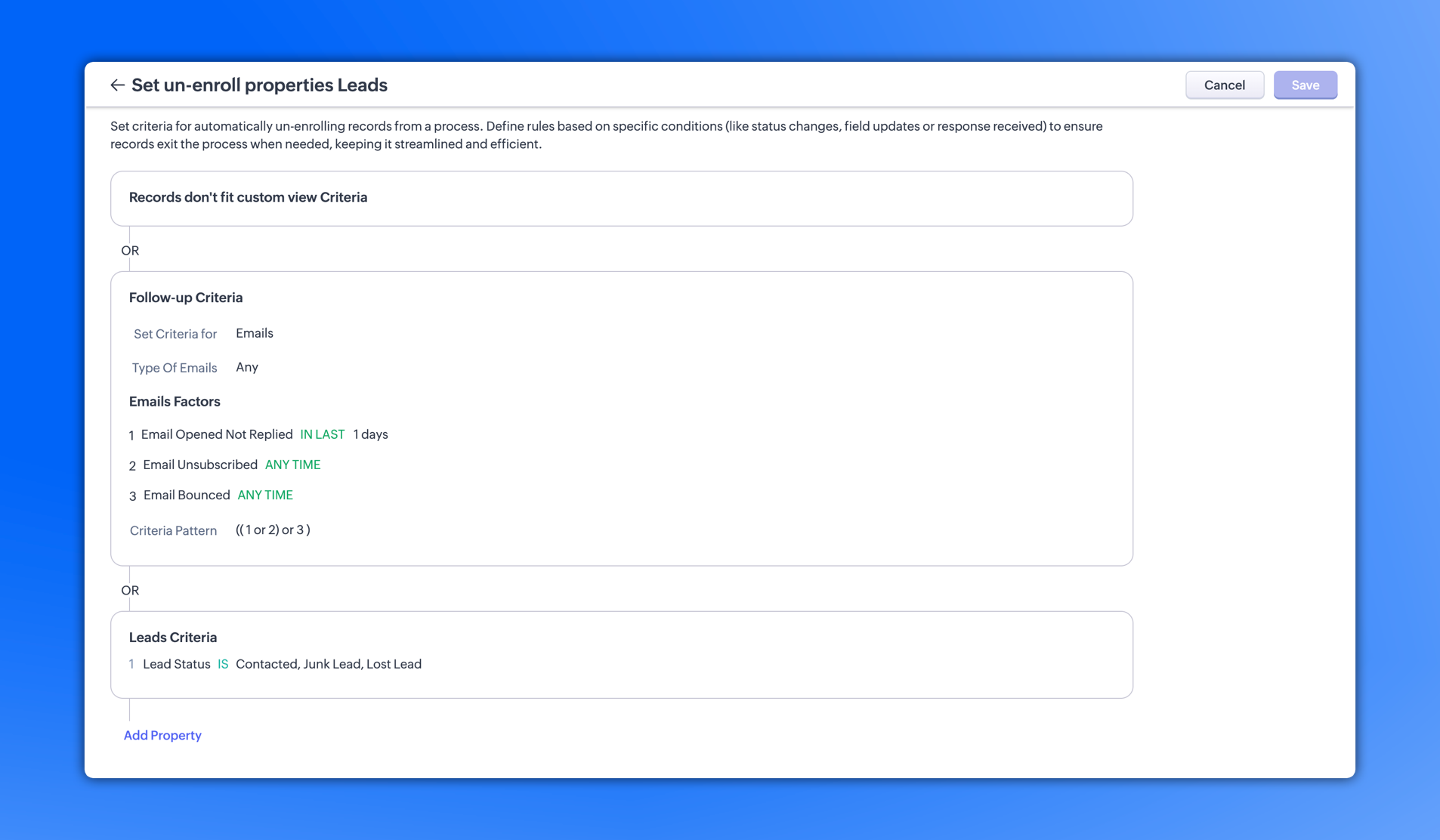
You now have the option to define custom un-enrollment criteria for Cadences — allowing records to exit automatically when they meet specific field values or activity signals.
In addition to existing options like un-enrolling records on a particular date or when they fall out of custom view criteria, you can now use the criteria editor to build tailored un-enrollment conditions.
For instance, in a sales Cadence, for the lead say the Status is marked as Contacted, Junk Lead, or Lost Lead, or if a customer has opened the email but not replied to it in over one day, or say the email was bounced or unsubscribed to, they can be automatically un-enrolled — keeping the Cadence focused on active prospects only.
That’s all for the current enhancement. Let us know your feedback in the comments below.
Resources: Unenrolling records from Cadences, Re-enrolling un-enrolled records
Thanks,
 P.S. These enhancements are being rolled out in a phased manner, and are currently available for all users in all DCs.