Spotlight #10: Collect files securely
Hello everyone!
As part of our monthly Spotlight series, we are going to highlight another WorkDrive feature: Collect Files.

Collecting files from people, whether within a team or from external stakeholders, is often a tedious task.
File collection usually includes these primary tasks: requesting users to submit files, downloading the files to your computer, and uploading the collected files to a folder. Additionally, we may need to organize these files and keep track of who has submitted and who has not submitted yet.
The complexity increases if multiple people communicate and submit files via different apps, such as email, messaging apps, and different cloud storage services.
The Collect Files feature could be useful in many different cases, such as:
- A college professor asks students to submit their assignments before a deadline.
- A print media company asks their editors to submit feature articles for the upcoming monthly edition.
- A venture capitalist firm invites users to submit business ideas and research papers on artificial intelligence.
With the Collect Files feature, WorkDrive users can create custom collection links to allow any number of people to upload their files easily. Once they upload their files, you can view their submissions and easily manage their files from your WorkDrive account.
With this feature, you can easily collect files from anyone, regardless of whether they have a WorkDrive account or not. You can create collection links for internal (team members) or external collaborators (anyone on the internet) with custom link settings.
Receive files in your selected folder
No need to manually sort the submitted files once you get them: when you create the collection link, you can choose the destination folder where all the submitted files will be uploaded.
Set an appropriate file-size limit
If you need to ensure the submitted files are under a maximum size limit, you can set limits for both the number of files upload and the file size while creating the link. You can then update the limits of any active collection link later.
Set an expiration date for the file submission
The creator of the collection link can set submissions deadlines by adding an expiration date to the link. The link will not be accessible past the specified expiration date.
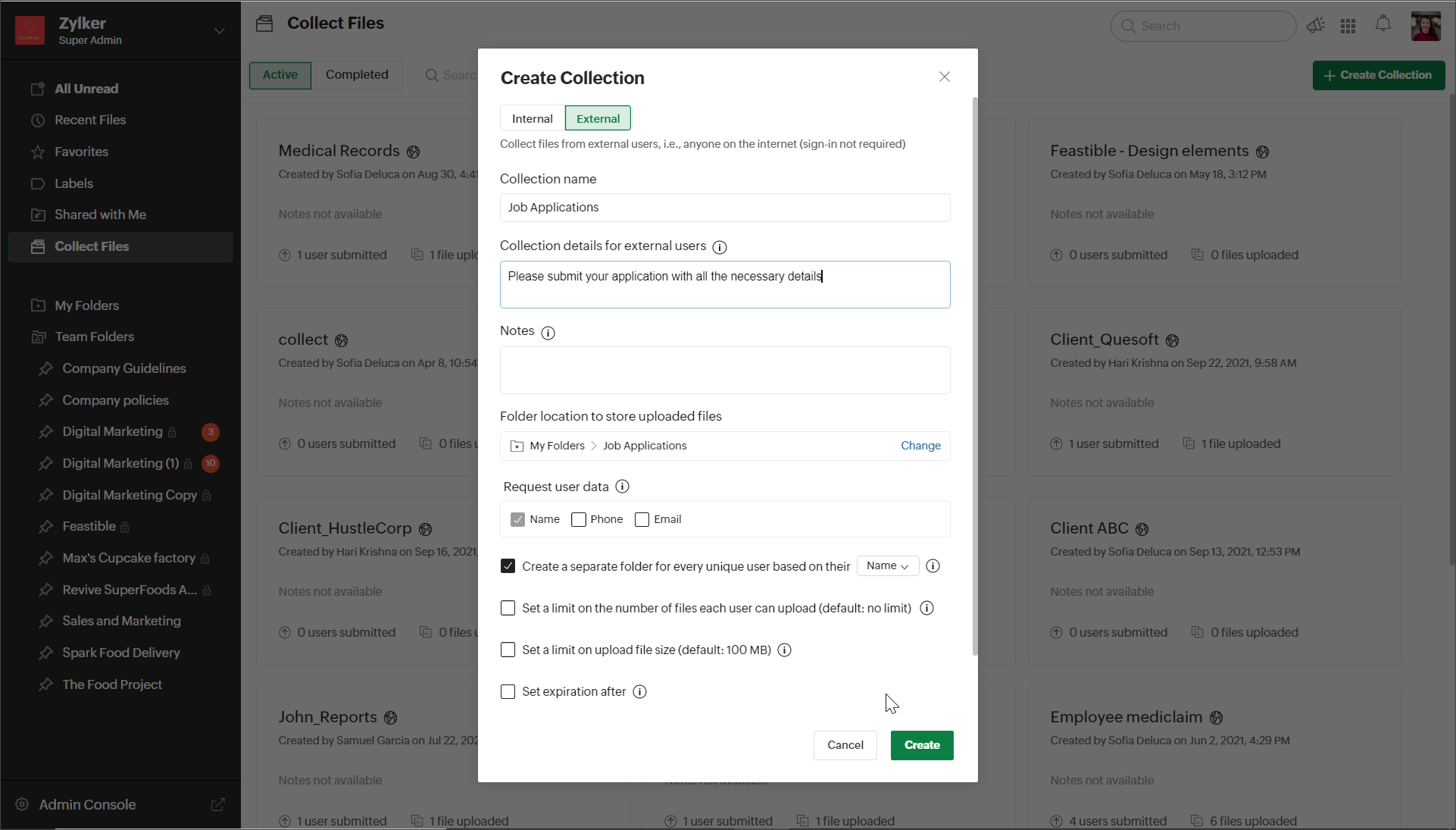
Here are the steps to create a collection link:
- In the left panel of your WorkDrive account, click Collect Files.
- Click the + NEW COLLECTION button in the top-right corner. A New Collection dialog will open.
- Select the Internal or External tab based on the type of collection link you want to create. Enter a collection name and add collection details.
- Choose a folder location to store all files uploaded through this link.
- Under Request user data, Name will be selected by default. You can also request phone number and email address, if needed.
- To create a separate folder for each user, mark the respective checkbox. The uploader's name will be the default folder name. Note: You can also choose the uploader's email address or phone number as the folder name if you've enabled those options in the Request user data field.
- Set the file upload limit, file size limit, expiration date, and notification alerts if needed, and click CREATE.
- Now, copy the collection link and share it with your collaborators.
- To send the collection link via email, you can add email addresses and a message under Email collection link, then select SEND EMAIL.
Managing your collections
From the Collect Files tab on the left panel of your account you can view and manage all the files collected. Here you can see all the active collections and the completed ones. You can view submission details, such as the list of users submitted, their details, and uploaded files.
We hope you found this article helpful! Watch out for this space for more interesting product updates, tips and tricks, and more.
Topic Participants
Buvanesh T
Recent Topics
External download link limit
Can You please help us to understand this For Zoho WorkDrive external users, the download limit is a maximum of 5 GB total download size and a maximum of 50 first-level files and folders What is the meaning of first level? We are using these files inCRM verify details pop-up
Was there a UI change recently that involves the Verify Details pop-up when changing the Stage of a Deal to certain things? I can't for the life of me find a workflow or function, blueprint, validation rule, layout rule ect that would randomly make itCustom templates for calendar report
What about being able to design custom templates for the calendar report, as well as for other types of reports? I think more users are waiting for this.Print a price list or price book
Hi Community. Am I right in concluding that Zoho has no functionality to print a price list from either Zoho CRM, Zoho Inventory or Zoho Books? I won't get stuck on the fact that Zoho doesn't sync price books between Zoho CRM and Books/Inventory (moreDisable payment thank-you emails
Hello, can someone please tell me how to disable sending of the "Payment Thank-You" emails?Maximum tags possible in Contacts Records
I read in some documentation that Zoho allows a total of 200 tags across all records. Is this correct? So is it not possible to have one tag per record for 500 records?Any way to "Pay with Check" or "Refund with Check" for Credit Notes?
When we have a Bill in Zoho Books, we can select the "Pay with Check" option which then allows us to print/cut the check directly out of Zoho Books. When we created a Credit Note and want to refund the customer, is there any way to Refund with Check,CRM Mobile reports
When our engineers finish a job they like to email the customer a job report. This is best done todate as an email template but we can find no way to include an image field from that module. Is there any other options?When Zoho Tables Beta will be open to EU data center
Hello all, We in EU are looking at you all using and testing and are getting jealous :) When we will be able to get into the beta also? We don't mind testing and playing with beta software. Thank you!Start Form on a different page (i.e., hide form pages)?
I have a Zoho form that uses the `Field Alias - Prefill URL` feature. My goal is to have a pre-filled field that directs the user to a specific starting page in the form. For example: The URL will have a field alias that will auto-populate a field withHow can we disable "My Requests"?
We are not using this functionality in our system at all and our users get confused.PayPal payment received recording problem
Hi, A little while back one of our customers used the PayPal payment option to pay an invoice For some reason though the payment is showing up twice within the Payments section of the invoice! Instead of setting the invoice value to ZERO, it now shows a negative value Anyone else face this problem? I've checked PayPal and there is only 1 payment in reality... A bug? Actonia ps: for anyone from Zoho Customer Service or tech team, its Invoice 785 in our accountstring(87) "{"code":"INVALID_TOKEN","details":{},"message":"invalid oauth token","status":"error"} " grtting this error
Using access token i am trying to add sales orders through api but it is throwing errors like the above i have mentioned. Please help me for thatHow to mute chat notification sound by default in Zoho SalesIQ?
We’ve recently embedded the Zoho SalesIQ chatbot on our website, and we’ve noticed that notification sounds sometimes play even when the visitor hasn’t interacted with the chat widget yet. We’re trying to understand two things: Why do these sounds occurKanban View for Projects.
At our organization, we describe active projects with various statuses like "In Proofing" or "Printing" or "Mailing". In the Projects view, one can set these project statuses by selecting from the appropriate drop-down. While this works, it's difficult to view and comprehend the progress of all of your projects relative to each other in a table. Creating a Kanban view for projects where I can move them from one status to another allows me to see where each project is in the order of our workflow.How to Hide Article Links in SalesIQ Answer Bot Responses
I have published an article in SalesIQ, and the Answer Bot is fetching the data and responding correctly. However, it is also displaying the article link, which I don’t want. How can I remove the link so that only the message is shown?Add RECURRING option when adding email to calendar events
When you add an email to a calendar event, there is no option to make that new calendar event into a recurring event. It is counterproductive to make an event from your email to then have to go to your calendar, find the event, and make it recurring.Using Contains as a filter
We are using Zoho Reports, ServiceDesk Plus analytics. I do not see how to create a report filter using Contains comparison of a string values, is one string contained in another. For example, Task Title contains the word Monitor. Is this possible in Zoho Reports? This reporting feature is available in SDP reporting. Thanks in advance, Craig RiceLINE Auto Message Connect to Zoho
When I integrated LINE into the CRM, I was prompted to disable “Chat,” “Auto Response,” and “Greeting Messages,” and to enable the webhook. However, since I have already set up some auto-reply features in LINE, including Rich Messages and greeting automation,Option to block bookings from specific email address or ip adresss in zoho booking
Sometime few of our client keep booking irrelevant booking service just to resolve their queries and they keep booking it again and again whenever they have queries. Currently its disturbing our current communication process and hierarchy which we haveThreaded conversations for emails sent via automation
Hi Guys, I hope you are doing well. Don't you guys think we should have an option in a workflow to notify users either as a new email or the previous email thread. For example, if you have one deal in the process and there are 10 different stages duringAll new Address Field in Zoho CRM: maintain structured and accurate address inputs
The address field will be available exclusively for IN DC users. We'll keep you updated on the DC-specific rollout soon. It's currently available for all new sign-ups and for existing Zoho CRM orgs which are in the Professional edition. Managing addressesCreate folder is fetch fails
coming from zapier... zapier has a google drive task that searches for a specific folder in google drive, and if it fails to find the folder it will create a folder based on the search criteria, and contine along the singluar path of the flow. TryingMeetups de Usuarios de Zoho - Noviembre 2025
¡Hola, Comunidad! Durante el mes de noviembre celebraremos los Meetups de usuarios de Zoho, encuentros presenciales pensados para quienes queráis mejorar vuestras estrategias de lead nurturing y aprender a sacar el máximo partido a herramientas como ZohoIntroducing 7 New Connectors in Zoho DataPrep!
We’ve just made data management even easier - Zoho DataPrep now supports 7 new external connectors to help you build more robust, scalable ETL pipelines. Why it matters: ✅ Broader data access ✅ More automation, less manual work ✅ Smarter pipelines, betterSales Order, Invoice and Payment numbers
Hi zoho friends, it is me again, the slow learner. I'm wondering if there is a way to have it so the Sales order, invoice and payment numbers are all the same? It would be easier for me if they were the same number so there is not so many reference numbersMissing information data Zoho inventory
there some missing data in Zoho inventory connection. pick list stock counts bin location we have requested it via mail and the support team doesn’t gove feedback. has anyone achieve to get these info or to ask other ya lesFirst day of trying FSM in the field.
What we found. 1. with out a network connection we were unable to start a service call? 2. if you go to an appointment and then want to add an asset it does not seem possible. 3. disappointed not to be able to actually take a payment from within the appZoho Desk app update: AI powered features
Hello everyone! We’ve introduced various AI-powered services on the Zoho Desk app. Let's take a look at what's new. Generate Content: Generate Content uses AI to formulate responses based on the your query and provides a ready-to-use reply which can beHow to Automate Email Sequence
I'm having trouble trying to set up a workflow to automate an email sequence. Once a group of emails in a Task has been tagged by a certain tag, I want an instant email template to be sent. After 7 days with no response, another email template would beTurning off the new UI
Tried the new 'enhanced' UI and actively dislike it. Anyone know how to revert back?Zoho Sprints Android v2.0.4 app update: Item reminders, archive Epics, Kanban projects, Epic progress
Hello everyone! In the latest version(v2.0.4) of the Zoho Sprints Android app update, we have introduced various new features. Let's take a look at what's new! Item Reminder Stay organized and never miss an important date with the all-new Item ReminderCredit Management: #3 Setting Credit Limit for Customers
Think about that one familiar customer of yours who always buys on credit. They usually pay on time, maybe a little late here and there, but not alarming. So, you are fine saying, "Sure, pay later." Then, one day, they place a significantly bigger orderCanvas View in Zoho Recruit
Is it possible or would it be possible to have the new 'Canvas View' in Zoho Recruit?Adding Reports to Portals
Is there a way to add Reports to portals so only the user can see report templates relevant to them?Update on the client portal URL for Guest users
We’re updating the way Guest users access their Connect network. As part of this change, all client organization portals used by Guest users will now be accessible through a dedicated domain specific to each data center. The access URLs mentioned herePreserve Ticket Issue Mapping When Migrating from Jira to Zoho Projects
Hello Zoho Projects Team, We hope you are doing well. We are currently exploring a full migration from Jira to Zoho Projects, and we identified a critical limitation during the migration process involving Zoho Desk integration. Current Situation: We useEnhancements to Zoho Maps integration tasks
Hello everyone, We're excited to announce enhancements to the Zoho Maps integration tasks in Deluge, which will boost its performance. This post will walk you through the upcoming changes, explain why we're making them, and detail the steps you need toUnable to see Zoho contacts in Zoho app on ios
Hi Support Team, I am a new user, I have created my account and installed zohomail app on iOS 16 which works. I was also able to import my Gmail contacts into Zoho Contacts, which I can see. The problem is that I can’t see these imported cobalts in ZohomailTask Due Date greater than 10 years.
We use recurring tasks in Projects where every week, month, year etc Some of our projects are greater than 10 years and we are unable to set a new due date because the difference between start date and due date is greater than 10 years. As an exampleNext Page