Building extensions #1: Creating and testing extensions for Zoho Finance Suite applications
Hello developers!
We're excited to announce a new series called "Building extensions" to assist developers in creating efficient extensions for Zoho Finance Suite products. We'll support and guide you through the process of creating an extension and using the features offered in the developer portal.
What are extensions?
Extensions are installable plugins or add-ons that help enhance the existing functionality of your Zoho product or seamlessly integrate and interact with third-party applications for data transmission.
How can you build extensions?
Zoho offers a developer platform called Zoho Developer that allows you to build different types of applications. Sigma is a platform offered within Zoho Developer that is specifically designed for creating extensions for various Zoho products. Throughout this series, we'll look at how to create and develop extensions for the Zoho Finance Suite applications using Sigma.
Get to know all about extensions and building them further in detail.
Sigma extension support
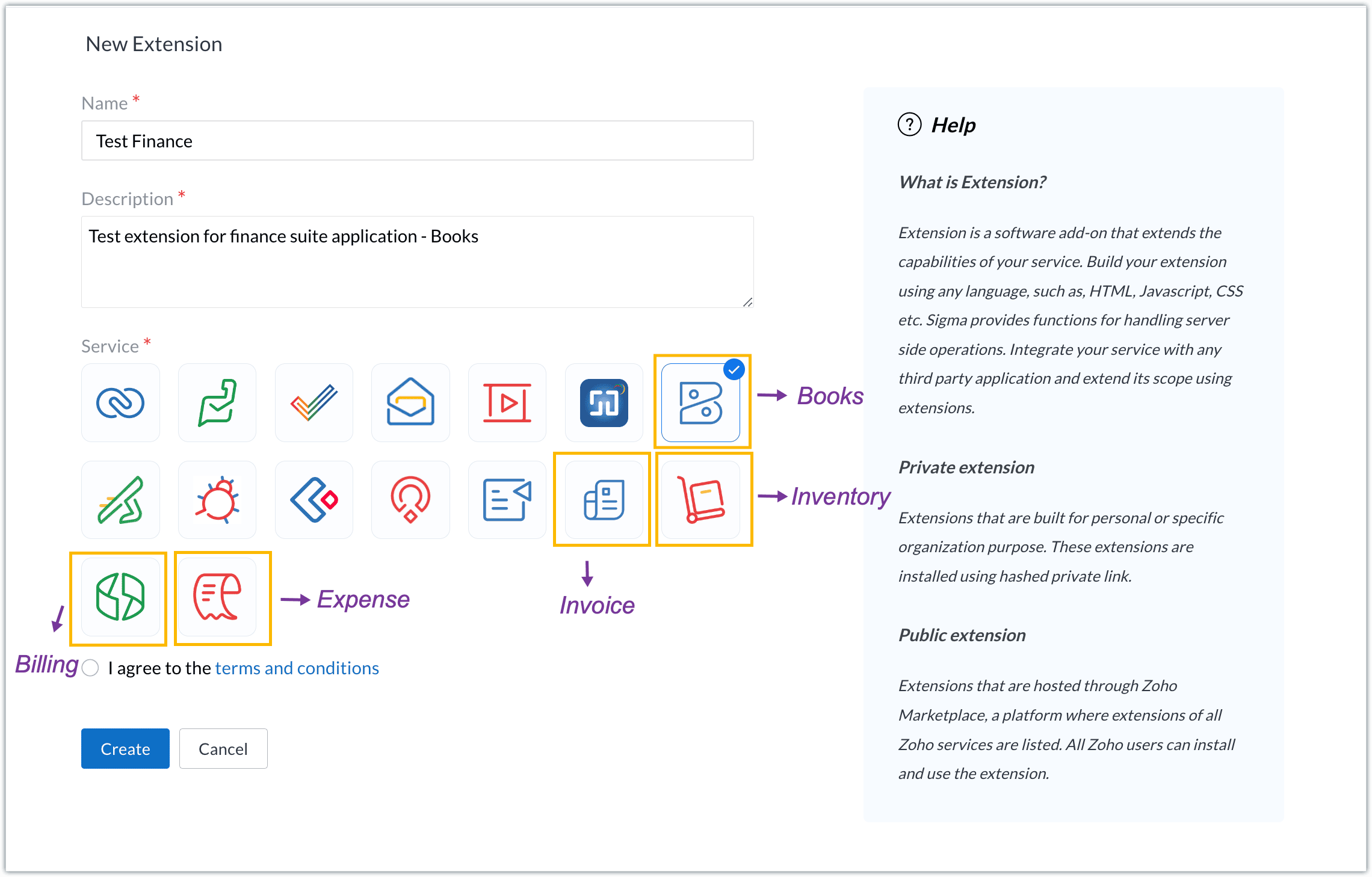
The Zoho Finance Suite consists of seven applications: Zoho Books, Zoho Inventory, Zoho Expense, Zoho Invoice, Zoho Billing, Zoho Checkout, and Zoho Payroll. Currently, the Sigma platform supports creating and building extensions for these five Zoho Finance applications:
- Zoho Books
- Zoho Inventory
- Zoho Expense
- Zoho Invoice
- Zoho Billing
Creating an extension
- Log in or sign up at developer.zoho.com.
- Go to Sigma and access your workspace.
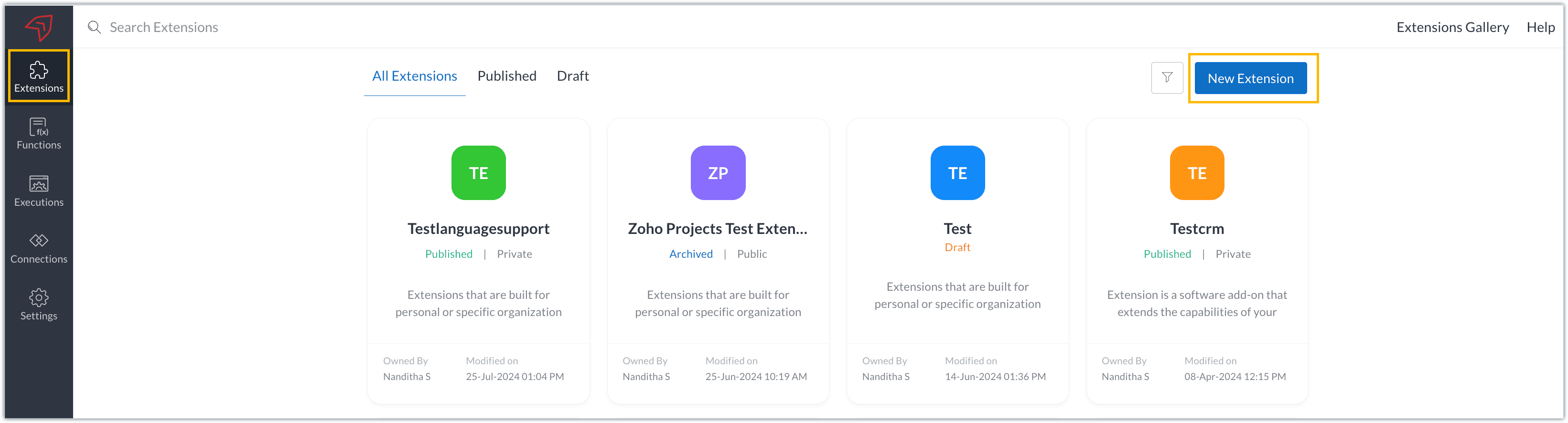
- Once you enter your workspace, you'll be taken to the Extensions section in Sigma.
- Click the New Extension button to start building an extension.
- Enter a name and description for the extension and choose the service you want to build the extension for. As mentioned earlier, Sigma offers support for Zoho Books, Zoho Invoice, Zoho Inventory, Zoho Billing, and Zoho Expense.
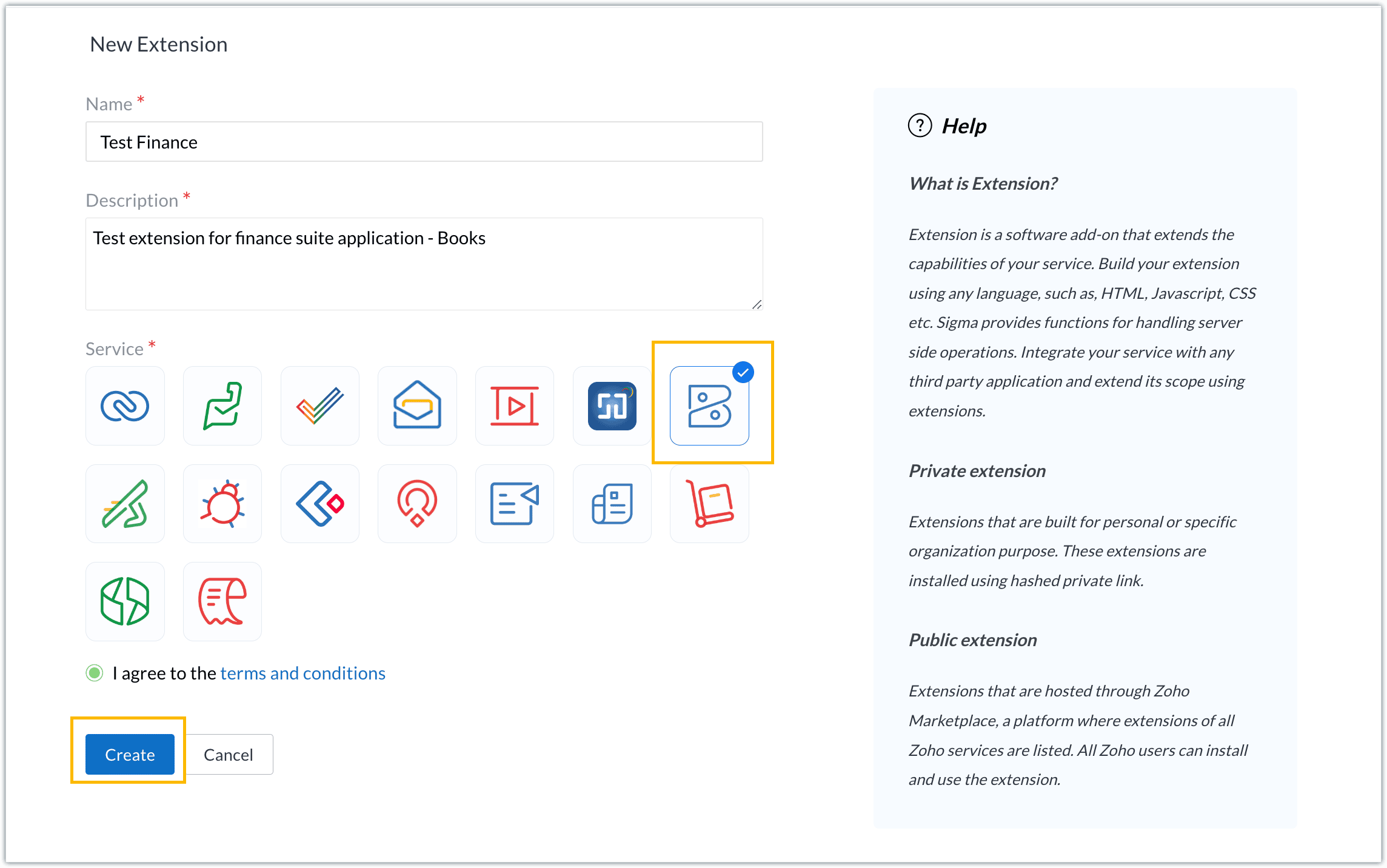
- For our demo, let's choose the service as Zoho Books. Accept the terms and conditions, and then click Create.
- The extension is successfully created. You can click the Extension Details icon to see an overview of the extension.
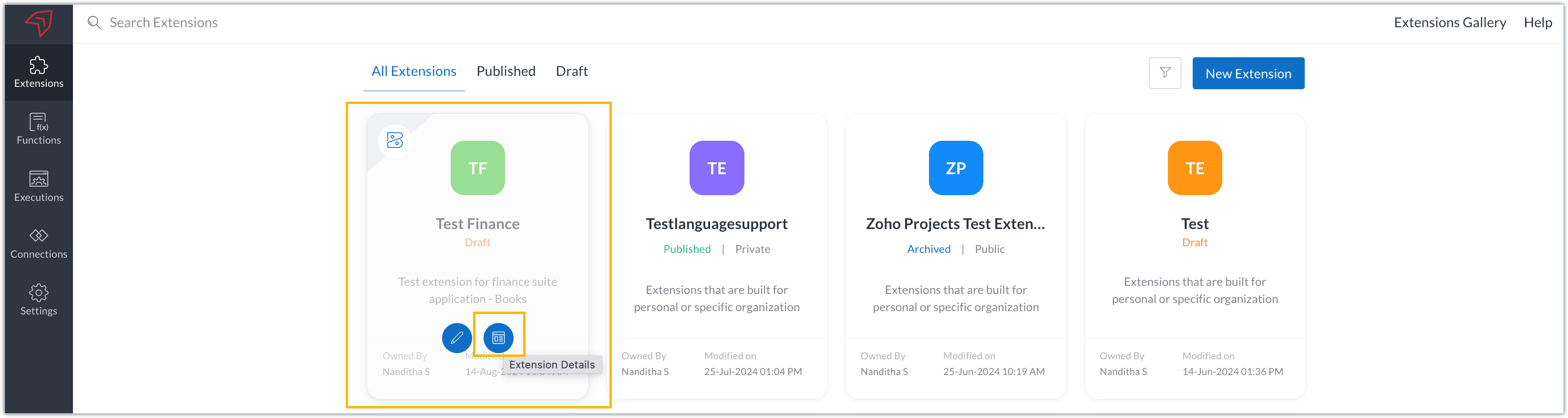
The extension details page shows the general details of the extension, such as creation date, creation time, and version, and allows you to associate developers with the extension.
- Click the Edit Extension icon to start developing the extension.
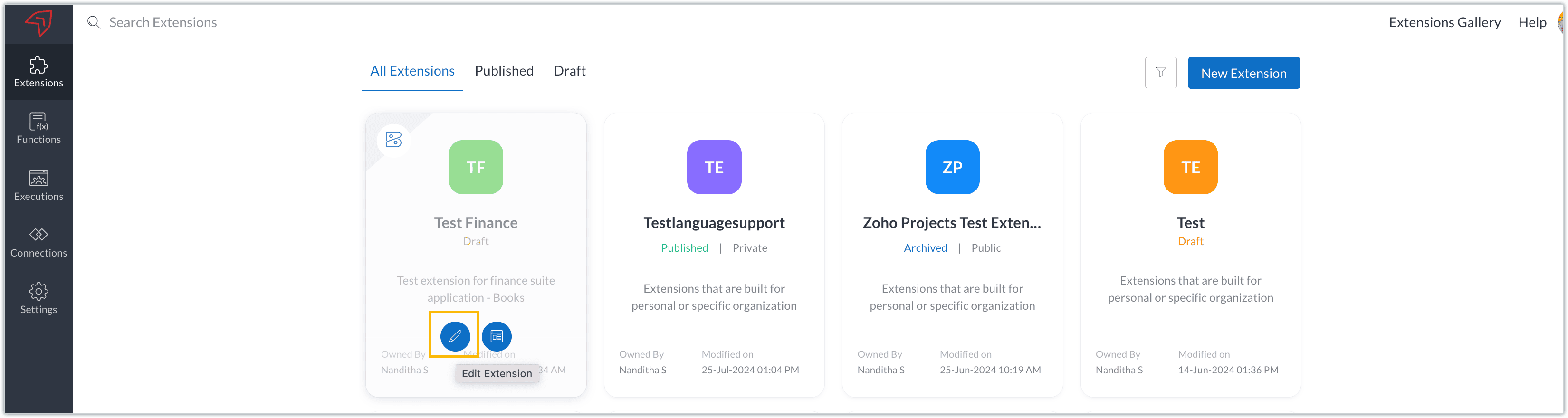
- The Zoho Books Developer Portal opens with the options and native features available to customize, curate, and develop your extension.
Zoho Books Developer Portal sections
The developer portal has four different sections to help customize and build your extension.
Learn: This section lists the native Zoho Books capabilities that can be used to create and develop extensions. Clicking the Set up Now button next to each feature will take you to the feature's development setup page.

Build: This is the development setup section, which includes customization, automation, and components like connections, widgets, schedules, webhooks, and signals. You can customize your extension preferences, establish connections to integrate with other applications, and design custom interfaces to enhance user experience.

Configure: This section assists with handling your extension's required configurations, whether they are generic settings or customizations required from the user. You can add global fields, which can be incorporated as either variables that store static data or through custom widgets that retrieve user inputs. You can also define functionalities that happen during installation and uninstallation.

Publish: Once the extension has been built and configured, you can use this section to publish it for either private or public use. In both cases, the Zoho Books team will review the extension; for public extensions listed on Zoho Marketplace, the Zoho Marketplace approval team will also review them. You can share your privately published extension with other users using the Shared List option.

We will explore more about each of these sections and their features in upcoming posts.
Testing an extension
The Zoho Books Developer Portal offers a dedicated testing environment for each extension, allowing you to test and validate it before publishing.
As a developer, you can use the Test Your Extension option in the top right corner of the portal to access your extension's sandbox environment.

This will redirect you to the sandbox testing environment for the extension you're developing, which is similar to Zoho Books and contains relevant modules to test with.

You can populate necessary data and test your extension functionality. Once everything is validated, you can go ahead and publish your extension for private or public use.
For support or questions related to Zoho Finance Suite extension development, you can email developer@zohofinance.com.
We hope you found this guide useful. Keep following this space for more information!
Topic Participants
Nanditha Somasundaram Somasundaram
Sticky Posts
Building extensions #5: Creating custom connections for extensions
In our previous post, we discussed the significance of connections, identified their types, developed a predefined connection, and demonstrated how it can be integrated with Zoho Books using an example. In this post, we'll walk through the process ofBuilding extensions #4: Integrating Zoho Books with applications using connections
In our last post, we looked at an overview of the key features available for creating a Zoho Books extension, including connections. In this post, we'll go over connections in depth, including their types and applications. What are connections? "Connections"Building extensions #3: Fundamental features of a Zoho Books extension
In our earlier posts, we covered how to create, test, and publish an extension for Zoho Finance suite applications. Moving forward, we'll look specifically at instances relating to one of the products from the Zoho Finance suite: Zoho Books. In this post,Building extensions #2: Publishing an extension
Hello developers, Welcome to our next post about building extensions for Zoho Finance Suite applications. In our previous post, we looked at extensions, their purpose, and how to create and test them. To recap, extensions are installable plugins or add-onsBuilding extensions #1: Creating and testing extensions for Zoho Finance Suite applications
Hello developers! We're excited to announce a new series called "Building extensions" to assist developers in creating efficient extensions for Zoho Finance Suite products. We'll support and guide you through the process of creating an extension and using
Recent Topics
[Webinar] Zoho Writer for the manufacturing industry
Creating, sharing, and distributing complex documents are constant challenges in the manufacturing services industry. That's why our next webinar is focused on how to simplify these document workflows. Join us on May 8, 2025, for a Zoho Writer webinarAdd Comprehensive Accessibility Features to Zoho Writer
Hello Zoho Writer Team, We hope you are doing well. We would like to submit a feature request to enhance Zoho Writer with a full set of accessibility tools, similar to the accessibility options already available in the Zoho Desk agent interface. 🚧 Current[Webinar] Simplifying document workflows in financial services with Zoho Writer
Creating, sharing, and distributing complex documents are constant challenges in the financial services industry. That's why our next webinar is focused on how to simplify these document workflows. Join us on April 10, 2025, for a Zoho Writer webinar[Zoho Writer Webinar] Learn how to simplify your HR operations: Part 2
Hi Zoho Writer users, We're excited to announce the Zoho Writer webinar for July 2024: Learn how Zoho Writer can simplify your HR operations: Part 2. This webinar will focus on how Zoho Writer can help HR teams streamline and automate their entire hiring[Zoho Writer Webinar] Learn how to simplify your day-to-day HR operations
Hi Zoho Writer users, We're excited to announce the Zoho Writer webinar for June 2024: Learn how Zoho Writer can simplify your day-to-day HR operations. This webinar will focus on how to automate your entire hiring process and generate various types ofBranding of native system emails
Make system emails adjustable in terms of branding. We want our system to be completely white label, because it is not a CRM anymore, it's way more than that. We are following the strategy of "CRM for everyone" to use the CRM in all departments, not onlySupport “Never End” Option for Recurring Meetings in Zoho Meeting
Hello Zoho Meeting Team, Hope you are doing well. We would like to request support for creating recurring meetings with no end date in Zoho Meeting. Currently, when scheduling a recurring meeting, Zoho Meeting requires us to select a specific end date.[Important announcement] Removal of Zoho Writer's DocuFiller Add-on
Hi users, Effective 21st Feb. 2025, we will be removing the DocuFiller add-on for Zoho Writer's Fillable Templates. From that point on, the add-on's functionalities, such as sharing or publishing fillable forms for data collection and receiving submissionsWeekly Tips: Manage External Images in Zoho Mail
When you receive emails every day, whether from clients, newsletters, or services, many of them contain external images that automatically load when you open the message. While this can make emails look more engaging, it can also impact your privacy andImplementing a Self-Invoicing/Vendor Portal in Zoho Creator
Hello Zoho Community / Creator Experts, We would like to build a Self-Invoicing Portal (Vendor Portal) in Zoho Creator for our external contractors. Our goal is to allow approved contractors to log in, submit their invoice details (hours worked, projectFunction #32: Schedule low stock notifications on a timely basis to specific users of the organization
Hello everyone and welcome back to our series! For a business that heavily relies on inventory, monitoring the stock levels and getting timely notifications of low stock items will ensure a smooth sail. Zoho Books allows you to always keep a check onSINCH HUB MESSAGEMEDIA with ZOHO DESK
1) what I need from MessageMedia, 2) what I want to confirm on the Zoho Desk Dev Forum. MessageMedia – needs and requirements Goal: Send SMS from a Zoho Desk widget for EU users. Auth: HTTP Basic (API Key + Secret). Keys must not live in the browser.Function #46: Auto-Calculate Sales Margin on a Quote
Welcome back everyone! Last week's function was about displaying the discount amount in words. This week, it's going to be about automatically calculating the sales margin for a particular quote, sales order or an invoice. Business scenario Where there is sales, there's also evaluation and competition between sales reps. A healthy rivalry helps to better motivate your employees to do smart work and close deals faster and more efficiently. But how does a sales rep get evaluated? 90% of the time, it'sInvalid URL error when embedded sending url into iframe for my website when using in another region
Hi team, My site is currently working on integrating your signature feature as part of the system functionality, it's working great but recently there's been a problem like this: After successfully creating the document, i will embed a sending url intoNew features released: Data from Picture for Web, Pattern Fill, and Translation in Zoho Sheet!
Hello Sheet users, In 2024, the Zoho Sheet team focused on research and development to bring new features that add to functionalities like productivity, data management, collaboration, and more. This year, we're all set to roll them out incrementallyKaizen #59 - Creating alerts and custom messages using Client Script
Hello everyone! We are happy to resume our Zoho CRM Developer Community series - The Kaizen series! Welcome back to the new start of Kaizen! This post is about Client Script and its simple use cases involving ZDK Client functions. What is Client Script?Universal search
Hi, it would be useful if the search bar was universal-so if you entered a term, it would bring up results from contacts, candidates, clients etc all at the same time (but broken down under the relevant headings)Attachment reminder?
My team and I often need to attach files to our messages, e.g. an explanatory screenshot or a shipping label. More often that I want to admit I mention the attachment but forget to actually attach it. Some email clients have a check-for-missing-attachmentsZIA in Zoho Cliq
Is It possible to use the ZIA feature from Zoho Analytics in the Zoho Cliq?Automating CRM backup storage?
Hi there, We've recently set up automatic backups for our Zoho CRM account. We were hoping that the backup functionality would not require any manual work on our end, but it seems that we are always required to download the backups ourselves, store them,Multiple upload field CRM
I desperately need the functionality to add more than one upload field to web to contacts form. How can I do this?Collections Management: # 1 Payment Collection is All About Convenience
"Sir, can you come tomorrow? My manager wasn't available for the cheque sign-off", the customer said, avoiding eye contact. Ravi forced a polite smile, but inside, he felt a sense of defeat. He had already visited the customer's office twice in the lastCan the Product Image on the Quote Template be enlarged
Hello, I am editing the Quote Template and added ${Products.Product Image} to the line item and the image comes up but it is very tiny. Is there anyway that you can resize this to be larger? Any help would be great! ThanksAudio/video quality issues with Zoho Meeting – Any roadmap for improvement?
Hi Zoho Team, We’ve been using Zoho Meeting for both internal and external meetings, and unfortunately, the experience has been consistently poor. The video and audio quality are so unreliable that it often renders meetings ineffective—especially withCash based businesses cannot use the new fixed asset module
Hello all, If your bookkeeping is reporting in cash, you cannot use the new fixed acid module, as it does all the depreciation bookings accrual and not cash. This is definitive and you can't turn them into a cash booking. They will never appear in yourZoho Learn & Zoho Connect
Hi, Is there a way to sync the knowledge base we have in Zoho Learn with the manuals section is Zoho Connect? Thanks,Apply Payment Received Amount Zoho Books Invoice
Hello team here is the sample code How can apply the payment received record over a unpaid zoho books invoice. //......................... paymentID = customer_payment.get("payment_id"); organizationID = organization.get("organization_id"); paymentmaplist[Live Webinar] New in Zoho WorkDrive: AI enhancements, Data Loss Prevention, Version Controls, and more
Hello everyone, We're excited to bring you another round of powerful updates in Zoho WorkDrive! Join us on May 15 for an exclusive live webinar where we’ll unveil the latest features designed to enhance your team’s productivity, collaboration, and dataLive webinar: Streamlining legal operations: Leveraging Zoho WorkDrive for law firm success
Hello everyone, Managing legal documents across departments and jurisdictions can be complex, but it doesn’t have to be. Join us on March 6 for an exclusive webinar where we’ll show you how Zoho WorkDrive empowers legal teams to stay compliant, organized,Live Webinar: Optimizing back-office operations in the manufacturing industry to maximize profitability
Hello everyone, We’re excited to invite you to our upcoming live webinar on February 6! Discover how Zoho WorkDrive can help manufacturing businesses optimize back-office operations, improve efficiency, and boost profitability. Our product experts willLive webinar: 2024 recap of Zoho WorkDrive
Hello everyone, We’re excited to invite you to our year-end live webinar! This session will take you through the transformative features and updates we’ve introduced in Zoho WorkDrive this year, helping you streamline document management like never before.Live webinar: Explore WorkDrive's seamless integrations with key Zoho apps
Hello everyone, We’re excited to invite you to our upcoming live webinar, where we'll delve into the seamless integration of WorkDrive with other key Zoho applications! This is a fantastic opportunity to enhance your productivity and streamline your workflowsLive webinar: Getting the most out of WorkDrive in Zoho Workplace
Hello everyone, We’re excited to invite you to our upcoming live webinar, where we’ll explore how to maximize your use of WorkDrive as part of the Zoho Workplace bundle. This is a fantastic opportunity to elevate your productivity and streamline yourLive webinar: Mastering data migration, organization, and team collaboration
Hello everyone, We’re excited to invite you to our upcoming live webinar! Discover how to seamlessly migrate your data, optimize file organization, and boost team collaboration using Zoho WorkDrive’s powerful features. This is a fantastic opportunityJoin our live webinar: Explore the WorkDrive TrueSync application!
Hello everyone, We are thrilled to invite you to a live webinar focused on mastering the WorkDrive TrueSync application. Discover how to seamlessly sync your content between the cloud and your computer, ensuring smooth and efficient file management. OurZoho Creator customer portal limitation | Zoho One
I'm asking you all for any feedback as to the logic or reasoning behind drastically limiting portal users when Zoho already meters based on number of records. I'm a single-seat, Zoho One Enterprise license holder. If my portal users are going to add records, wouldn't that increase revenue for Zoho as that is how Creator is monetized? Why limit my customer portal to only THREE external users when more users would equate to more records being entered into the database?!? (See help ticket reply below.)Envio de mails
Hola! No puedo enviar mails pero si recibirlos. No se como solucionarlo! Mi dominio es chidobebes.com.arERROR CODE :554 - Your access to this mail system has been rejected due to poor reputation of a domain used in message transfer
In my email configuration: The domain's MX Records are pointed to Zoho The domain's SPF Records have been pointed out successfully DKIM is enabled. DMARC Record is pointed for the domain. The domain name is digioorja.in. Still facing the issue of Error:This Operation has been restricted. Please contact support-as@zohocorp.com for further details
l tried to verify my domain (casalimpaeperfumada.com.br) and its shows this error: This Operation has been restricted. Please contact support-as@zohocorp.com for further details.SLOW EMAILS
Is there an issue with the Zoho server? For two days now I've been having issues with very long buffering. Please advise. Thank you.Next Page