An exclusive system for risk management | Tips and Tricks | Zoho Sprints
An exclusive system for risk management | Tips and Tricks | Zoho Sprints

Zoho Sprints' risk management feature gives teams a structured, industry-grade system for identifying, quantifying, and mitigating risks to eliminate probable impact.

Project or product teams that run on Zoho Sprints might be using sprints, work items, and epics to identify, document, track, and complete the items related to the risk to indicate that it has been mitigated.

Here's what risk management offers:
  1. A risk register to record potential threats along with the probability of occurrence and level of impact
  2. A risk matrix to customize the qualification parameters like impact level, probability, and risk class for the risks
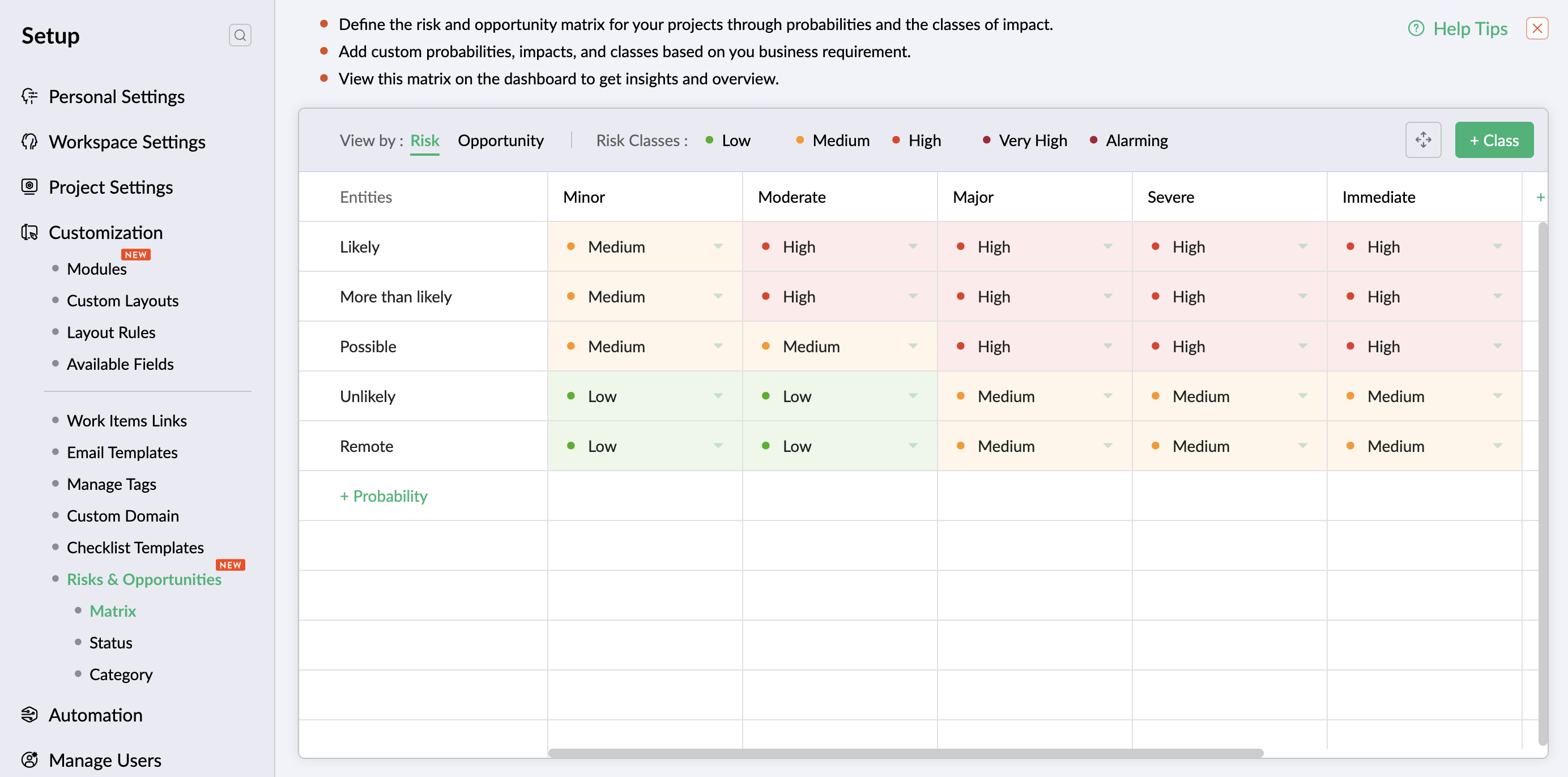
  3. A mitigation control system to add and track the measures taken to bring down the severity of impact
  4. A verification process to review and approve the mitigation efforts
  5. An evaluation mechanism to audit and approve the decrease of impact or probability after due mitigation efforts
  6. A risk dashboard for quantifiable insights and bird's-eye view of progress from initial impact at the time of risk identification (inherent impact) to the final impact after the mitigation and course-correction efforts (residual impact)

Examples of risk management

Financial risks: Cost and budget overruns

Project exceeds the allocated budget due to funds mismanagement, unprecedented scope expansion, and inaccurate budget estimate.

Operational risks: Challenges in talent retention

Organization faces difficulty with retaining skilled resources due to acute workload, inadequate salary benefits, and competitive market.

Reputational risks: Negative customer reviews

Organization's reputation is at stake when customers publish poor ratings and reviews due to dissatisfaction with the product.

Non-compliance risks: Data privacy and security violations

Organization encounters risk of non-compliance due to software that fails to meet GDPR, CCPA, or HIPAA requirements for protecting user data.

Security risk: Critical data breach

Company faces legal implications due to user data being exposed following a vulnerability and non-compliance to legal framework.


Revolutionize your risk mitigation framework and boost the growth of your business. Visit our help page for a thorough understanding of risk management.

Is there a feature you want us to explore more deeply? Let us know in the comments below and we'll try to demystify it for you. For any questions or assistance, reach us at support@zohosprints.com.
    • Sticky Posts

    • Tip #48: An exclusive system for risk management

      Zoho Sprints' risk management feature gives teams a structured, industry-grade system for identifying, quantifying, and mitigating risks to eliminate probable impact. Project or product teams that run on Zoho Sprints might be using sprints, work items,
    • Comprehensive guide to add users

      We've received quite a few questions regarding adding users to the Zoho Sprints workspace. So we decided to address it through a comprehensive post covering the locations (modules or tabs) from which you can add your users. Adding users to your workspace
    • Leverage layout rules to customize workflow

      Layout rules in Zoho Sprints primarily aim to customize the field layout of your creation forms to meet complex requirements. But it doesn't stop there. Its customization can push the boundaries of how your fields behave, how data is gathered, how processes
    • Tip #40 - Control entity and field permissions using profiles

      Building profiles using permission sets equips you with the ability to permit and restrict data access to members belonging to those profiles. Creating different profiles with different combinations of permission sets allows you to set a hierarchical
    • Recent Topics

    • mail did't send for particular email

      mail did't send for particular email
    • Group settings in Zoho Mail: Manage members, moderation, and spam controls for your organization's groups

      When teams rely on group email addresses like team@org.com, hr@org.com, or sales@org.com, managing them without clear controls leads to unapproved senders, flooded inboxes, and no accountability over what gets delivered. Zoho Mail's Group settings in
    • Update to Free plan attendee limit

      Hi everyone! A quick update about Zoho Webinar's Free plan. We’ve adjusted the Free plan attendee limit from 100 to 20 attendees. Everything else in your Free plan stays the same; you'll continue to have access to all your existing features. If your webinars
    • Possibility to modify a standard wedget to create my own customized wedget

      Below is the std wedget available for dashboard which is great to show the the overdue, current, and all tasks as well as issues for each team member. My problem is this; The list of users cannot be edited (there are admin users which are not relavant
    • Feature Request: Include Creator-applicable Deluge updates in the Creator Release Notes

      I'd like to put forward a suggestion about how Deluge updates are surfaced to Zoho Creator developers, and I'm hoping the Creator team will consider it. Zoho Creator is built on Deluge. Every workflow, custom function, validation and schedule we write
    • Add home page or dashboard in CRM customer portal

      is it possible to add home page or dashboard in CRM customer portal?
    • Close task on Completion Date entry

      This discussion is similar to my issue: "backdated-task-completion-date" discussion Scenario: A bunch of tasks have been completed. But, they have not been closed. Time goes by You finally get around to closing those tasks Projects assigns the date the
    • Introducing Color and Order Preferences for Blueprint Transitions

      Blueprints exist to improve the efficiency of your company's processes and ensure compliance — but only if your users follow them promptly. More often than not, your users may find it challenging to adopt your processes and follow through on them, especially
    • Groups and Moderation

      Hi, I have set up a Group in my organisation but am having trouble with moderation. The members are a mix of addresses within the organisation and external emails addresses. The issue is how to set moderation to be off whenever any of the members sends
    • Introducing Radio Buttons and Numeric Range Sliders in Zoho CRM

      Release update: 1. 2 March 2026: Currently out for CN, JP, AU and CA DCs (Free and standard editions). For other DCs, this will be released by mid-March. 2. 26 March 2026: CA, SA, AU, JP, CN DCs - Free, Standard, Professional, Enterprise, Ultimate, CRM
    • Zoho CRM Sandbox now supports integrations

      Hello everyone, We are now expanding Zoho CRM Sandbox to support integrations with other Zoho products. You can connect, configure, and validate the behavior of your integrated tools within a safe, isolated environment - testing end-to-end without touching
    • Archiving Contacts

      How do I archive a list of contacts, or individual contacts?
    • Introducing the New Zoho Assist Quick Support Plugin

      We are thrilled to announce the new Zoho Assist Quick Support Plugin, the upgraded and enhanced version of the Zoho Assist Customer Plugin. This new plugin allows organizations and IT administrators to deploy it directly onto their customers’ devices,
    • What's New - June 2026 | Zoho Backstage

      Hello everyone! We’ve rolled out a new set of improvements across Zoho Backstage to help you manage events more efficiently and provide a better experience for your attendees. Take a look at what’s new in this month’s update. Assign attendees later and
    • More Zia AI capabilities are included across additional Zoho Desk editions

      Hello everyone, We are expanding the availability of AI-powered features in Desk to the other paid subscriptions from 7th July 2026. Right now, the following AI-based features are available for Enterprise edition users: Intelligence: Sentiment analysis,
    • Summer release '26 should be called Enterprise Summer Release '26

      Summer release '26 should be called Enterprise Summer Release '26 because almost all updates or the more useful ones, are limited for Enterprise subscriptions. us with Basic or Premium susbcriptions are basically left in the cold.
    • Previous conversation title on new messenger widget translation

      The title of previous conversations title on the new messenger widget personalisation appears in english even when spanish is selected as default language
    • Export Tickets from the Help Center

      Hello everyone! We are now allowing end users to export tickets directly from the help center. The ticket export allows users to: Filter tickets by Department, Priority, and Account before exporting. Download files from Export History (Setup > Data administration
    • Account Duplication Control in Zoho CRM

      The Goal Prevent users from creating duplicate Account records in Zoho CRM. Accounts should be sourced from ERP and synced into Zoho—no. Allow to create Accounts if they don't exist in our ERP. What I've Implemented removed Account creation permissions
    • Error 1011 saving website personalisation — blocking all changes (corrupted "home_page.content" field)

      When trying to save changes under Settings → Brands → MY COMPANY → Website → Personalisation → Messenger, I receive the following error: "Either the request parameters are invalid or absent" upon checking on the developer console of the browser I get
    • Canvas View: Add font family selection (incl. Google Fonts / Hebrew & RTL fonts)

      Hi Zoho CRM team, The Canvas design suite (List View, Tile View, Table View and Record Detail) currently allows customizing font weight, size, color, alignment and case - but there is no option to choose the font family. All text is rendered in the built-in
    • This user is not allowed to add in Zoho. Please contact support-as@zohocorp.com for further details

      Hello, Just signed up to ZOHO on a friend's recommendation. Got the TXT part (verified my domain), but whenever I try to add ANY user, I get the error: This user is not allowed to add in Zoho. Please contact support-as@zohocorp.com for further details I have emailed as well and writing here as well because when I searched, I saw many people faced the same issue and instead of email, they got a faster response here. My domain is: raisingreaderspk . com Hope this can be resolved.  Thank you
    • Issue embedding image Zoho Books email signature

      I am trying to embed my company logo to my email signature using the image url tool on the settings but I keep getting the following error: Enter a valid public image URL I am using a public link from either WorkDrive or OneDrive and I still get the same
    • E-Mail Distribution List

      How do I create an e-mail distribution list in Zoho Mail?
    • Tip #80- Secure Connect: Add an Extra Layer Before You Connect – 'Insider Insights'

      Tip 80 – Secure Connect: Add an Extra Layer Before You Connect – 'Insider Insights' Hello Zoho Assist Community! Picture this: your support team relies on unattended access to keep the business running. Servers need overnight patches. Remote workstations
    • Business Whatsapp is not Showing

      I’ve attached a screenshot from the Zoho CRM Android app when clicked the call button. It is showing Personal WhatsApp, which is not installed on the phone. Also, the installed WhatsApp Business account is not showing.
    • How to access a unified inbox for more than one zoho accounts (using paid workplace services)

      Hello, we are using zoho for a few months and also suggest your services, setting them up for our clients. Several from our clients, our company as well, use more than 1 email addresses. Using the web version, we are only able to add them as accounts
    • Modify a standard wedget to create my own customized wedget ?

      Below is the std wedget available for dashboard which is great to show the the overdue, current, and all tasks as well as issues for each team member. My problem is this; The list of users cannot be edited (there are admin users which are not relavant
    • Advanced Formatted Resume Templates for Applications

      Advanced Formatted Resume Templates can now be created and used directly from the Applications module, with support for application module fields. Until now, Advanced templates were limited to the Candidates module. That meant resumes generated from Applications
    • Zoho Books | Product updates | July 2026

      Hello users, We’re excited to bring you the latest updates in Zoho Books for July 2026! This month's release introduces Terminal Payments, CMP-08 filing for composition taxpayers, SEPA Credit Transfer support, the new Receipts and Payments Report for
    • Boost your CRM communication with new font types, sizes, and default reply-to options while composing emails

      Hello Everyone, We’re excited to introduce a series of impactful enhancements to the email composer settings in Zoho CRM. These updates enable you to personalize and optimize your customer interactions with greater efficiency. So what's new? Add custom
    • Zoho CRM Community Digest - June 2026| Part 2

      Hello Everyone! Welcome to the second half of our June Zoho CRM Community Digest! We are keeping the momentum going with powerful updates to filter out unnecessary email syncs, a revamped CRM Import tool, smarter follow-up updates in cadences, and Zia
    • Migrate from Zoho Mail to G Suite

      I am unable to find any documentation on how one can migrate from Zoho Mail to another platform, like G Suite or Office 365. Please point me to the right documentation. Thank you.
    • Zoho Desk Android app - Option to set an email template as default

      Hello everyone! We have enhanced the Email Template section in our app by introducing the ability to set a template as default directly from the Zoho Desk Android app, making it easier to access your preferred template without repeated manual selection.
    • Zoho Desk Android and iOS app update: Odia Language

      Hello everyone! We have now brought in support to access the Zoho Desk app in Odia language. Please update the app to the latest version directly from the Play Store/ App Store or using the links below: Zoho Desk - Play Store Zoho Desk - App Store Once
    • How to check Leads with no Task (open activity)

      Hi everyone, I was wondering if there’s a way to view leads that don’t have any tasks assigned or open activities linked to them.
    • How do I migrate from Office 365 to Zoho Mail?

      Check out Advik Email Migration Wizard, this software is specially developed to move mailboxes from Office 365 to Zoho Webmail. In addition you can migrate from Gmail, Yahoo, Rediffmail and 80+ webmail servers to ZOHO MAIL. Isn't it amazing? This is an all in one email migration solution. Steps to export emails from Office 365 to Zoho Webmail are as follows; Run Advik Email Migration Tool in your system. Select Office 365 as source and enter its login credentials. Select mailbox folders and choose
    • Bridging the gap between incident management and project delivery

      As an organization, you can have structured backup plans to handle issues that arise during project execution. Despite best efforts, even efficient processes can fall into an escalation trap where a red flag travels up the tiers but no real action follows.
    • Update on default settings for AI features in Cliq

      Hello all, We'd like to provide clarity on a recent change to AI feature defaults in Cliq. As part of our regular review of AI features conducted in April 2026, we re-evaluated how these features are enabled by default. We've decided that the AI features
    • Associate Zoho Billing Invoices with multiple Zoho FSM Work Orders

      Hello Latha, We are writing a custom Deluge automation script in Zoho FSM to handle monthly consolidated billing. The script successfully compiles line items from multiple completed Work Orders, interfaces with the Zoho Billing API, and generates a single
    • Next Page