Upcoming Features for Zoho Subscriptions
Hello everyone,
Zoho Subscriptions is set to receive a massive update, with a bunch of new features and usability improvements. This update will also provide a shared user experience with other apps from the Zoho Finance suite, such as Zoho Books or Zoho Inventory.
Zoho Subscriptions is set to receive a massive update, with a bunch of new features and usability improvements. This update will also provide a shared user experience with other apps from the Zoho Finance suite, such as Zoho Books or Zoho Inventory.
Here's a quick peek at some of the features that will be available to you soon:
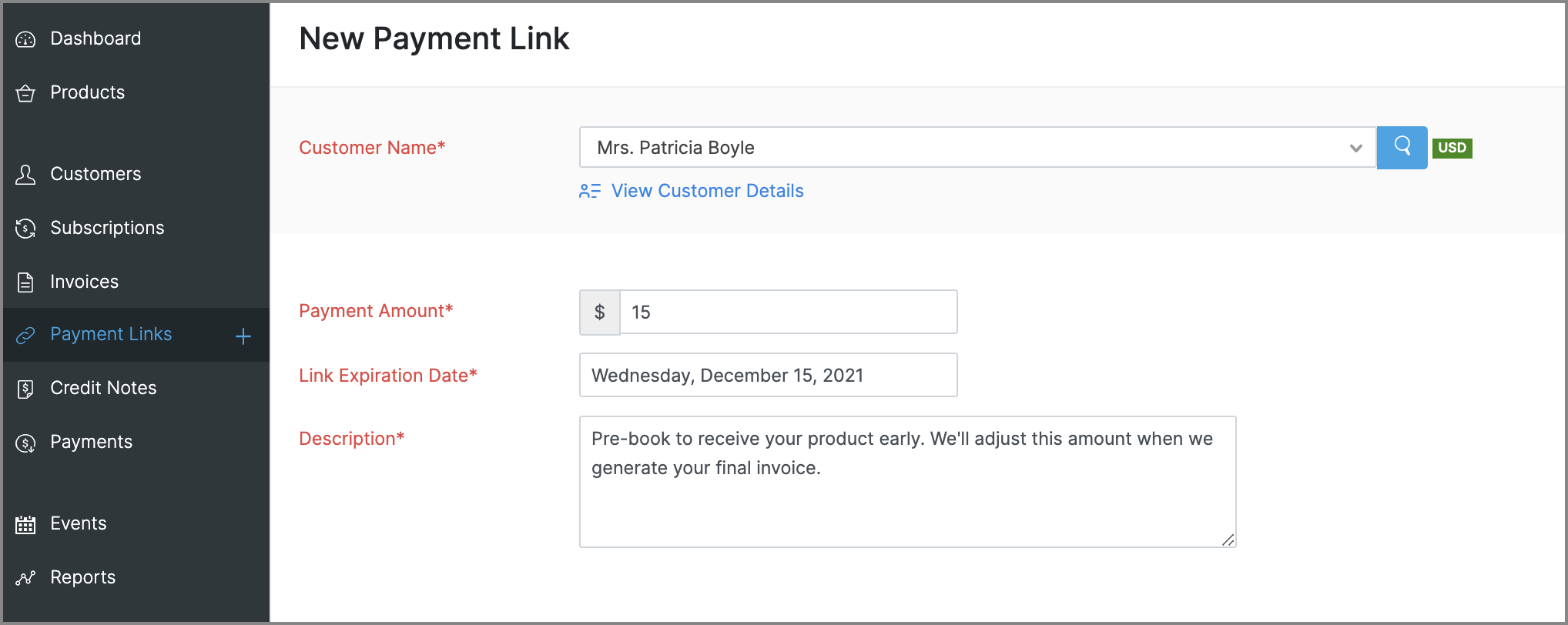
Payment Links for ad hoc payments
This is a new feature that will let you request and accept one-time payments from customers by sending them payment links, which they can use to make online payments to you. These payments can be for miscellaneous reasons that need not be related to any subscriptions, such as an advance payment or a convenience fee.
Enhancements to reports
- Revamped UI: Most reports will get a slicker UI, that's more intuitive and puts commonly used customization features in places that are easier to access. Some reports will also get comparative percentage changes across different periods, along with the option to set expected figures as a benchmark. Here's a glimpse of what the new UI will look like:
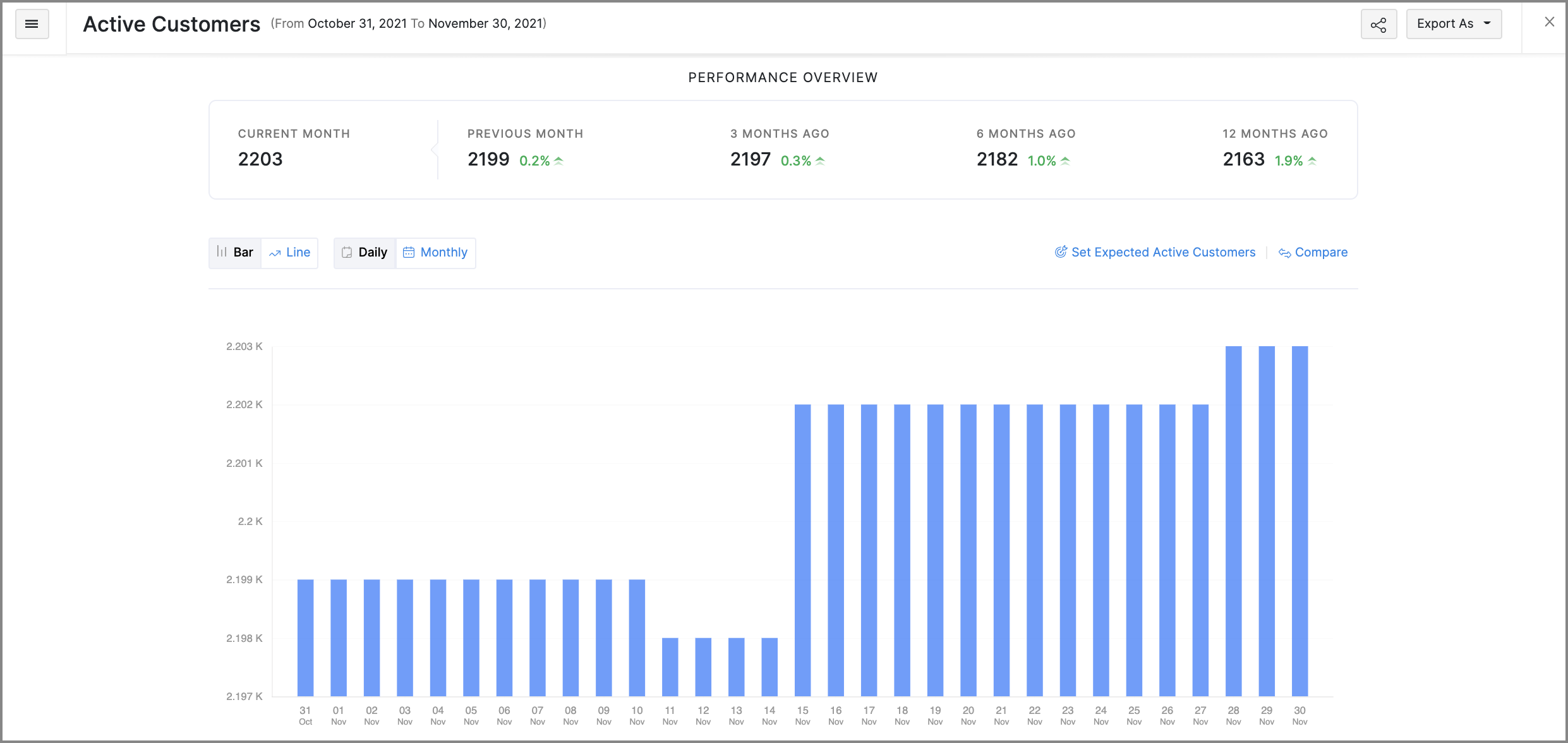
- Favorites: Mark frequently visited reports as favorites to pin them at the top of the Reports module.
- Share reports: You can quickly share the reports that you've generated with other users and set the level of access they have for that report as well.
- Schedule reports: You can schedule some reports to be generated routinely and emailed to the recipients that you choose.
More control for emails
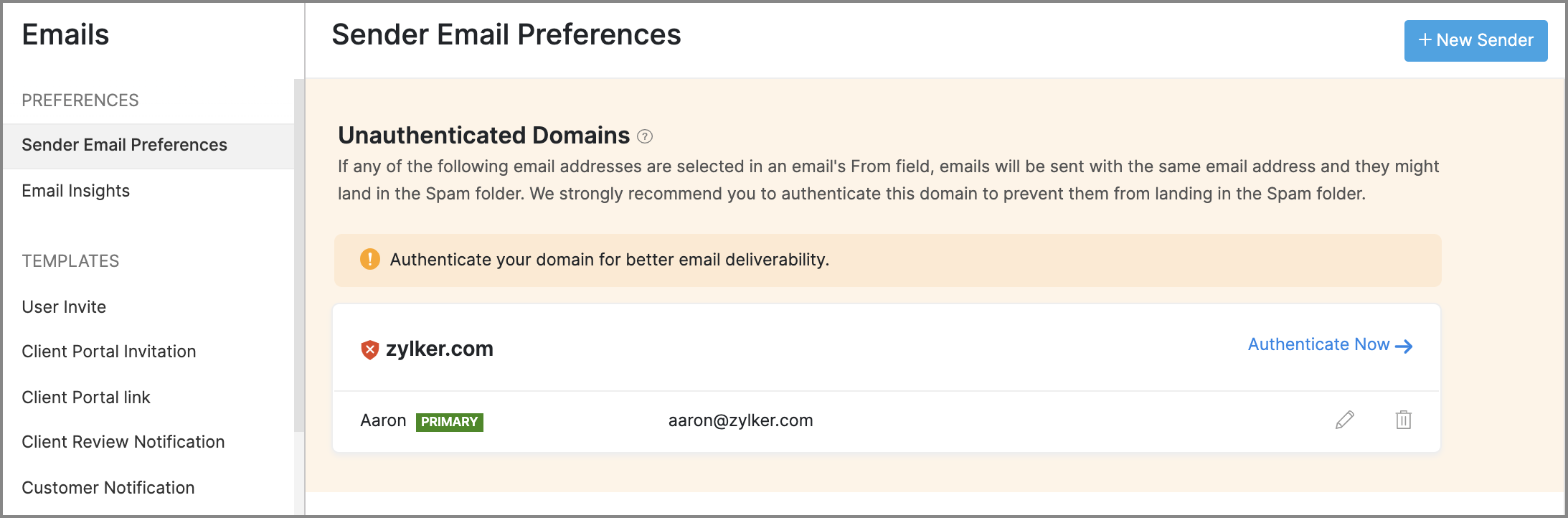
- Sender Email Preferences will allow you to manage the From address of emails that are sent from Zoho Subscriptions. It will also assist you in adding SPF and DKIM records for your domain, to prevent your emails from landing in a recipient's spam or trash folder.
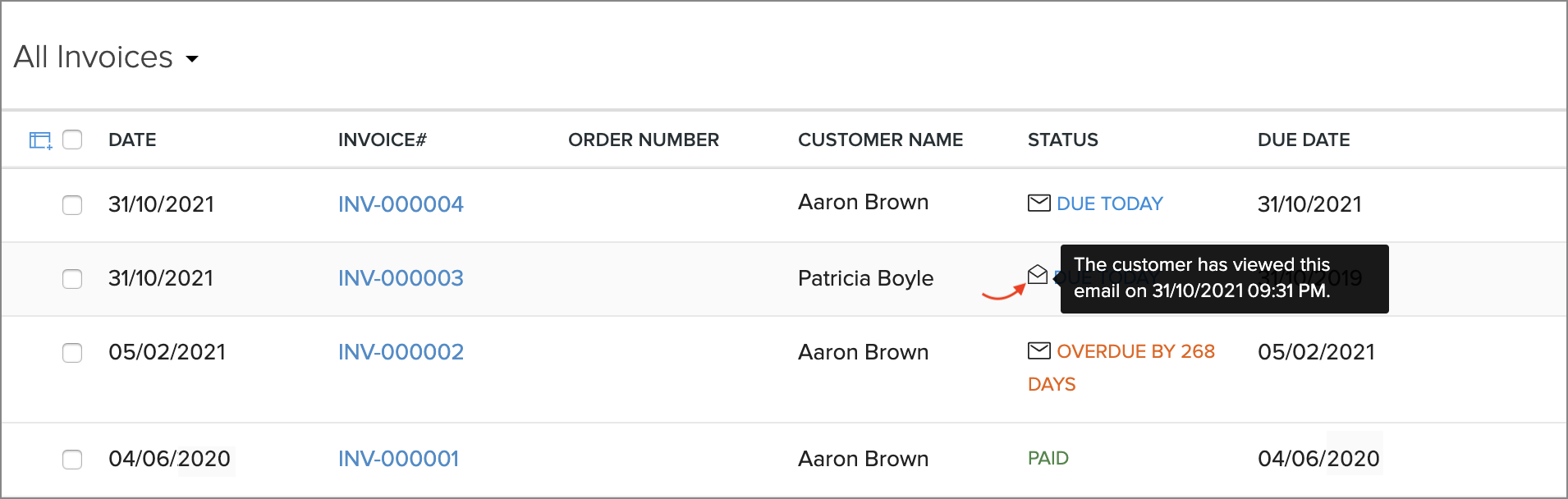
- Email Insights lets you keep track of the notification emails that have been sent to customers. You will be able to know if an email was opened, and exactly when it was opened, which can help in deciding when to initiate follow-up conversations with customers.
Revamped modules
The following modules will receive new features and improvements all-around:
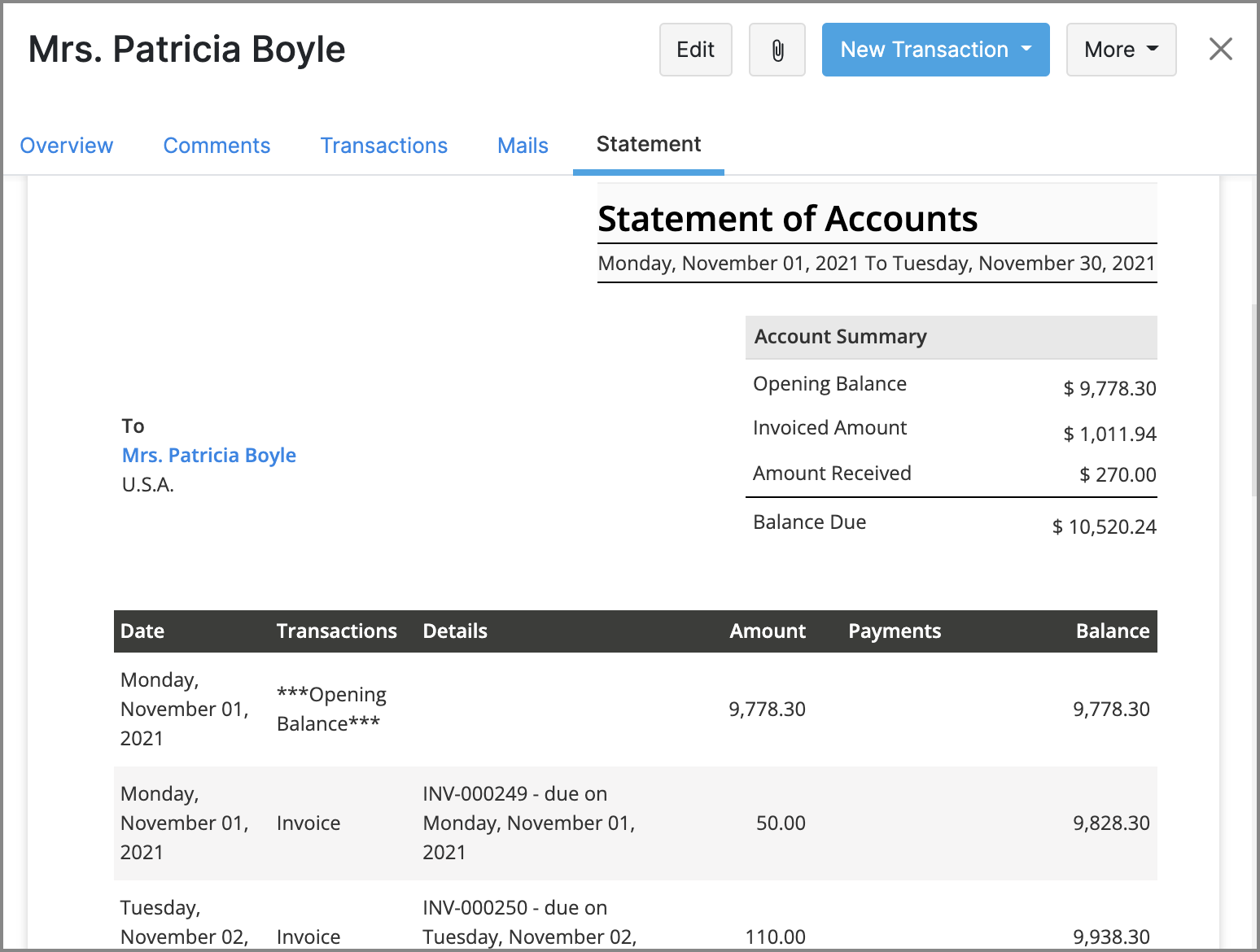
- Customers: You will be able to generate customer statements, send emails directly from Zoho Subscriptions, and find related transactions more easily with an improved Transactions tab.
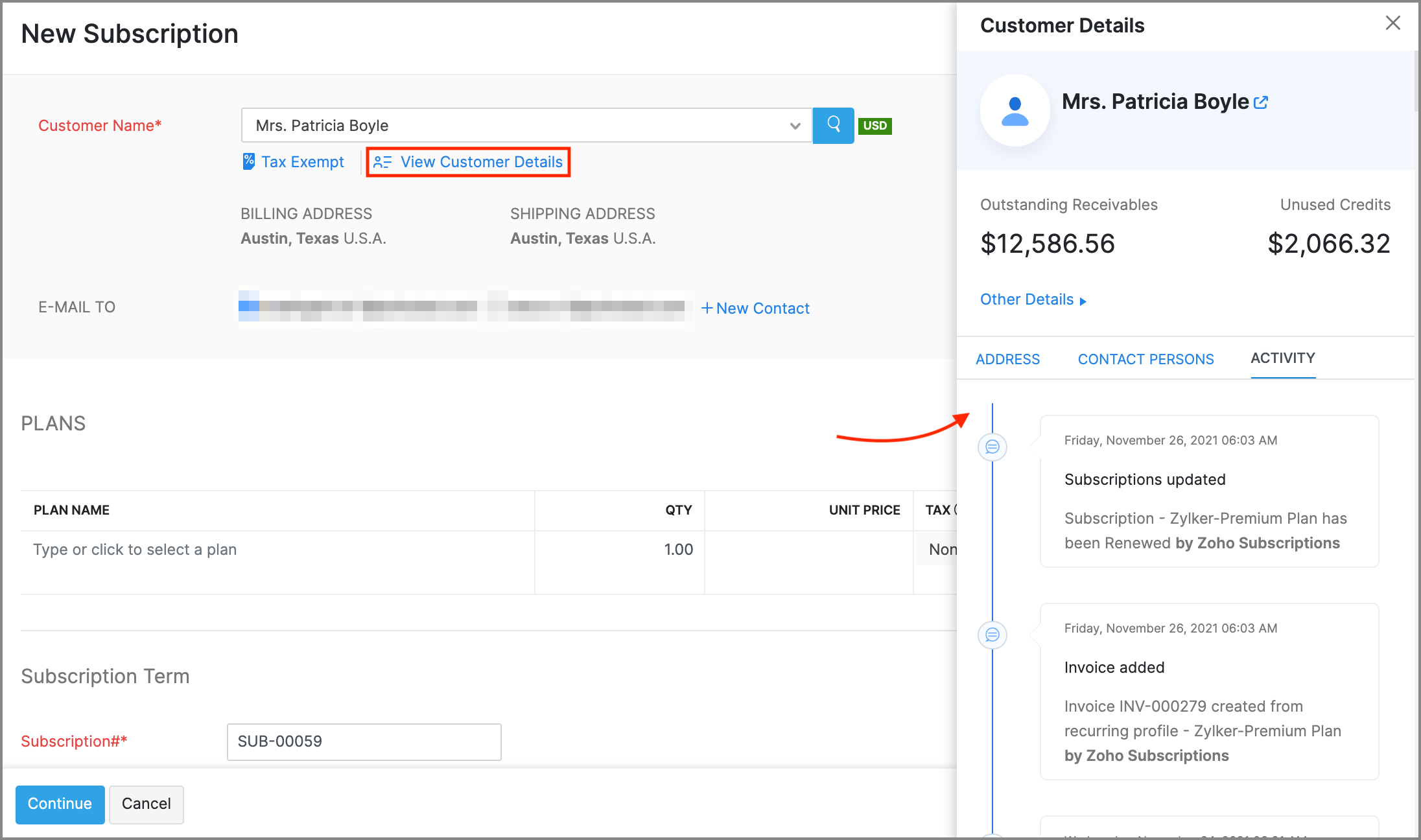
- Subscriptions: New features like creating customers on the fly, contextual customer details, and Advanced Search for customers will make it much faster to create new subscriptions.
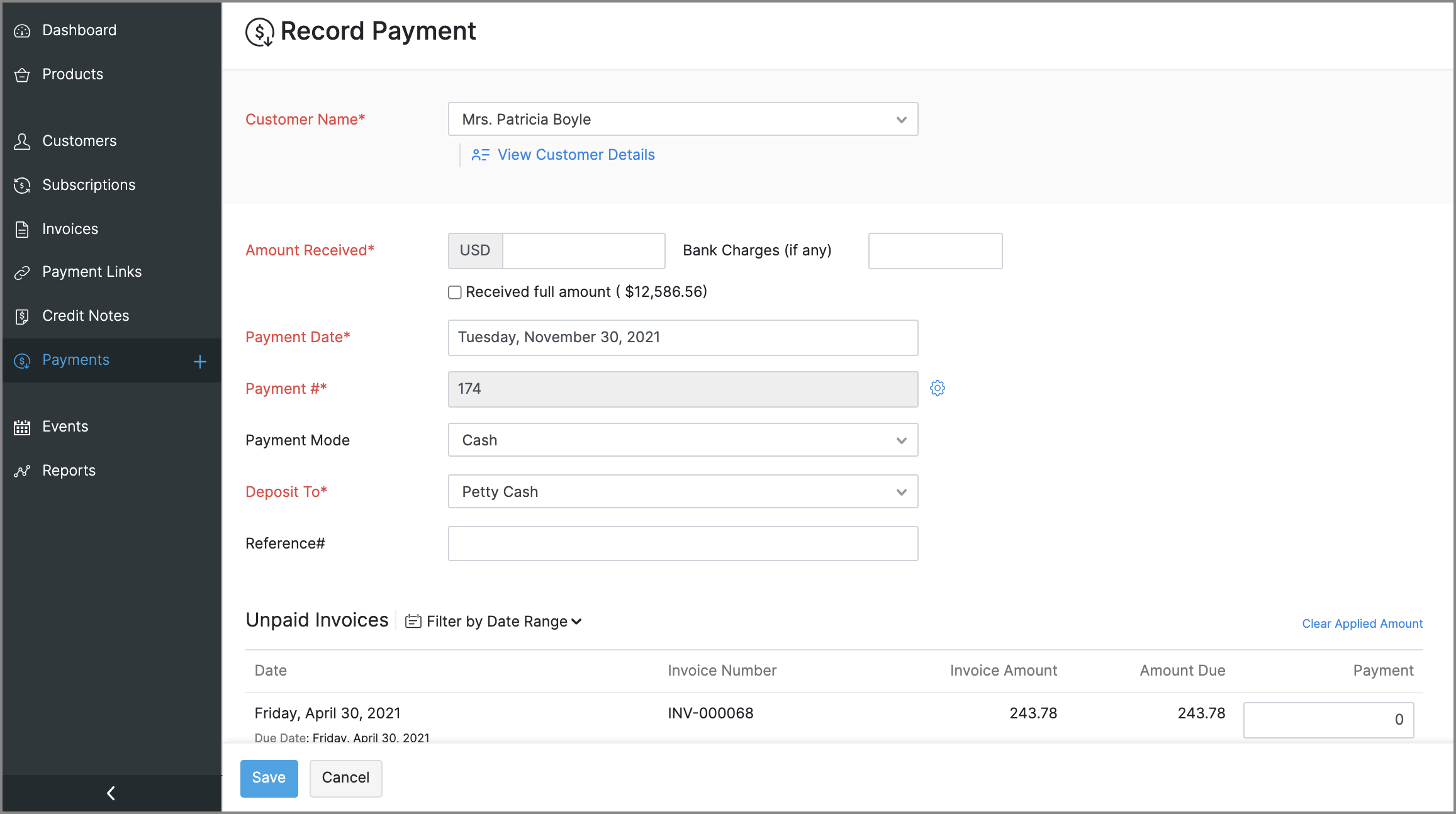
- Payments: The existing Transactions module will be renamed to Payments. You can use it to record or edit payments, view payment receipt PDFs, and perform an Advanced Search to find payments easily.
General usability improvements
Throughout the app, you will find changes that aid with usability and accessibility. Here are some that will be evidently visible:
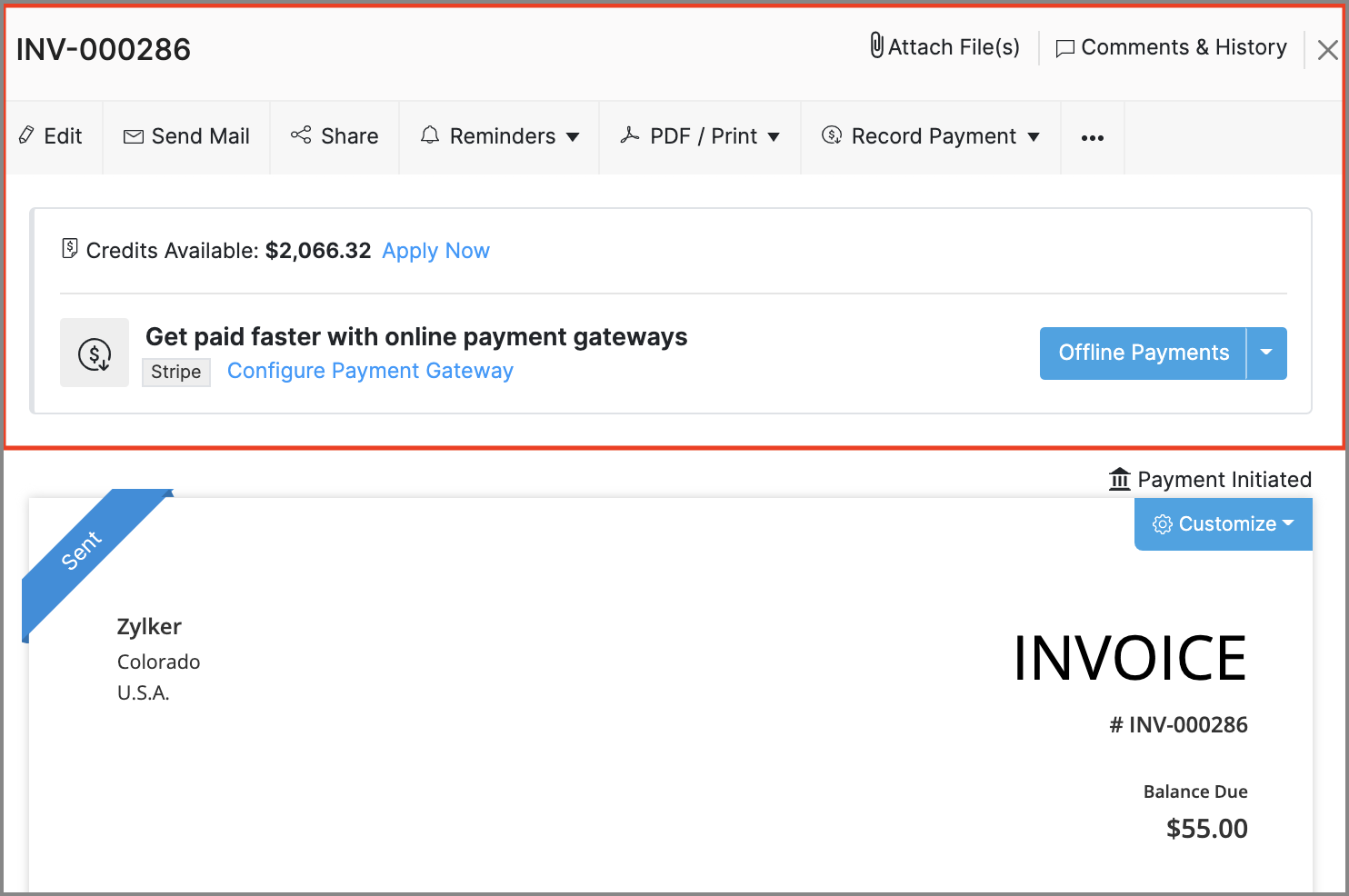
- Invoice Details: The action bar in the invoice details screen has been revamped. The new design adds text to previously standalone icons and also groups certain options to make them easier to find.
- Recent Activities: The recent activities dropdown, that's always present near the search bar will assist in navigation by listing any transactions or customers that have recently been updated, created or visited.
- Online Payments: The Online Payments section in Settings > Integrations, will be moved out to its own spot in Settings, and all the payment gateway integrations that are available will be grouped based on the type of payment methods that they support.
- Right-to-left interface: If your organization's language is set to Arabic, Zoho Subscriptions' entire interface, including navigation bars and other visual elements will be switched to a right-to-left style, so Arabic speakers will feel right at home.
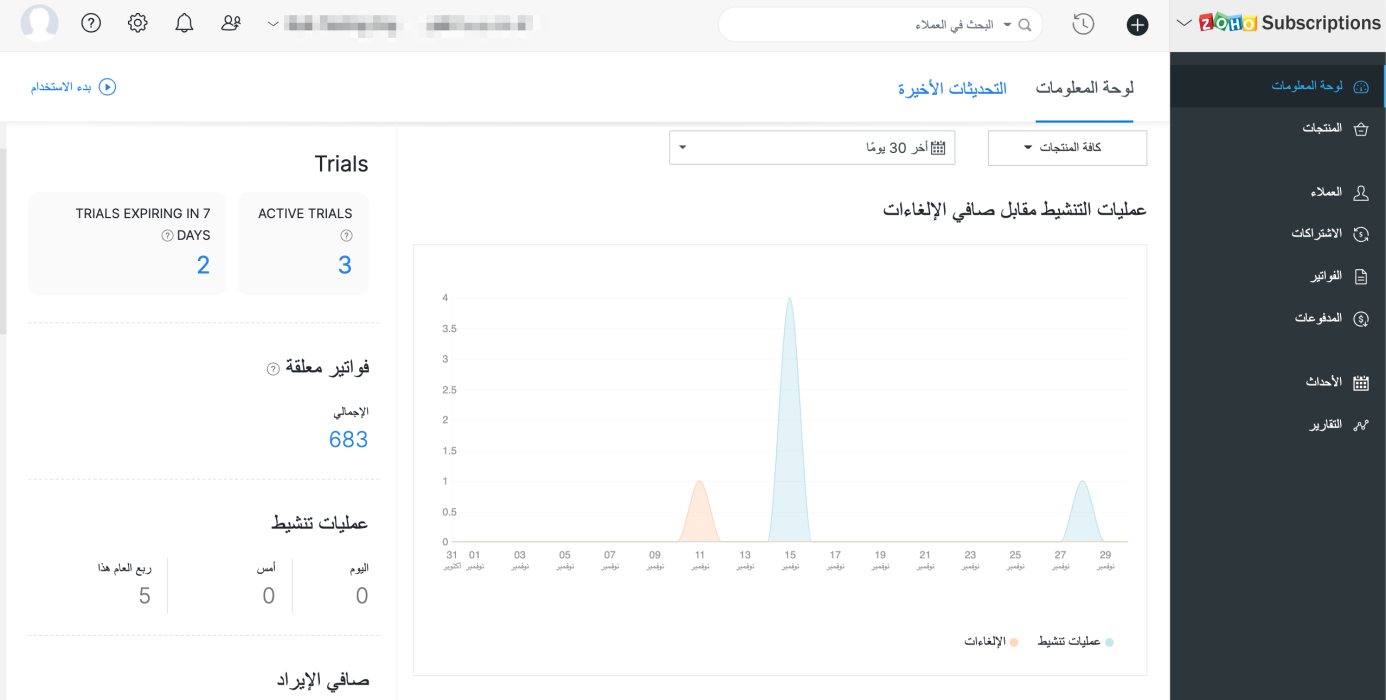
New and improved settings
Apart from bolstering some existing modules with more preferences, there will also be new sections in Settings, to accommodate preferences for the newly added features.
Here's what will change in Settings:
- Users and Roles: You will be provided with an extensive range of configurations for how users can access reports.
- Templates: The existing Templates section will house templates for two new documents: Customer Statements & Payment Receipts. The template editor will also see improvements, such as the ability to add annexure content and adjust the width of individual rows in item tables.
- Reporting Tags: A new section to manage reporting tags will be added.
- Emails: The existing Email Notifications section will be renamed to Emails, and will direct towards Sender Email Preferences, Email Insights, and templates for email notifications.
The following changes will be made in Settings > Preferences.
- General: This is a new section that will contain common preferences, such as options for your organization's address format or PDF attachments in emails.
- Payments: The existing Payments section will be renamed to Payments Received, along with preferences fo custom fields and custom buttons.
- Delivery Notes & Packing Slips: These are two new sections, which will let you configure the layout and label names for delivery notes and packing slips.
- Users: This is a new section which will allow you to configure custom fields for the users of your organization.
These are some of the major features and improvements that will be available in Zoho Subscriptions. We'll reveal a full list of the new features and shed more light on the ones mentioned above soon.
We'll release these features in the weeks that follow. We can't wait for you to try them out! You can also write to us at support@zohosubscriptions.com if you'd like early access to these features. Your feedback is valuable to us, so make sure to let us know what you think about these updates in the comments below!
Best regards,
The Zoho Subscriptions Team
Topic Participants
Varun Steven
OfficeServ Accounts
Jim Kubicek
Trey Shadwick
pmc
Sticky Posts
What's New in Zoho Billing - February 2024
Hello everyone, We are excited to share the first set of updates for Zoho Billing in 2024. Read along to know more about a wide range of updates, from the Aging Summary in customer statements to Apple Pay support in Stripe. One-Time Invoice with PlansZoho Finance Workshop 2023 is coming to the USA. Get exclusive training on Zoho Finance apps, one-on-ones, and more.
Hello all, We'd like to invite you to our biggest Zoho Finance workshop in the United States. After a brief break, we are excited to be back. This year, we're bringing together our customers and community members for two days of curated hands-on sessions,Zoho Subscriptions wins IDC's 2020 SaaS CSAT Award for Subscription Billing
Dear customers, We're excited to share that Zoho Subscriptions has won IDC's 2020 SaaS Customer Satisfaction Award! As a team, we cherish each and every milestone with our customer community. And this particular award, focusing on customer satisfaction,Introducing: SMS notifications via Zoho Subscriptions
Dear customers, We hope you are doing well! We are happy to announce that you can now send SMS notifications to your customers right from Zoho Subscriptions. To facilitate this, we've integrated with Twilio, a leader in the business communication space.What's new this December in Zoho Subscriptions
The year is almost over and we here at Zoho Subscriptions have released new features and updates on the month of November. Let's take a look at the features we have worked on in the past month. Zendesk Integration The Zoho Subscriptions app for Zendesk allows your customer support executive to access customer details in an instant. You will be able to view the customer information from Zoho Subscriptions right from your ticket view. On enabling the integration, you will be able to: Get your customer
Recent Topics
Zoho CRM Case Notes - Share to Customer
Hi team does anyone know the Api to set a note, against a case, to shared with customer? i cant seem to find it cheersSend out follow-up email in the same thread (threaded conversations in individual emails) from Zoho CRM
Hi, I'm new to Zoho. I'm trying to send individual emails to my leads one by one. And I'll send out follow up email if I don't hear back from them later. However, instead of sending a new email, I want to reply in the same email thread so that the recipientsDepositing funds to account
Hello, I have been using Quickbooks for many years but am considering moving to Zoho Books so I am currently running through various workflows and am working on the Invoicing aspect. In QB, the process is to create an invoice, receive payment and thenweb to lead
Can anyone help me how to create web to lead from zoho marketing automationUI issue with Organize Tabs
When looking at the organize Tabs window (bellow) you can see that some tabs are grayed out. there is also a "Add Module/Web Tab" button. When looking at this screen it's clear that the grayed out tabs can not be removed from the portal user's screenI created a signup form in Zoho Marketing Automation with the correct field mapping, but the data is not being reflected under Leads in Zoho CRM.
web to lead from zoho marketing automationPasted Images not being embedded in custom mail
Hi, I'm making a custom report by email based on commentaries. I have the email ready, all working great except for images that are being pasted in the commentaries. Zoho deals with them as temp images and so it requires authentication to view them, somethingKaizen #232 - Building a Ticket Escalation Mechanism from Zoho CRM
Howdy, Tech Wizards! Picking up the thread from last week, we will continue our Zoho CRM and Zoho Desk integration. In Kaizen #231 - Embedding Zoho Desk Tickets in Zoho CRM, we built a Related List widget that displays open Zoho Desk tickets within theInactive License for free account.
I recently upgraded my Cliq subscription not my team (on the free version), are unable to login to their accounts. The error message received is Inactive License Looks like you have not been covered under the current free plan of users. Please contactDeluge scripts
Why is there not a search function to make it easier to find the script of interest when modifications are required.Zoho Sheet for Desktop
Does Zoho plans to develop a Desktop version of Sheet that installs on the computer like was done with Writer?Zoho Books (and other Finance Suite Apps) - Clickable Item Name on Invoices and Reports
Hi Zoho Books team, It would be really helpful if the Item Name on Reports were clicable to take me to the item. The same on Invoices, often I am looking at an invoice and I want to look at the deails of a product. A link here would be helpful to jumpZoho Books - Payment Gateway - Revolut
Hi Books Team, My feature request if to include the popular platform Revolut as a payment collection option on invoices in Zoho Books. Please upvote if you are also looking for this option.Searching for an item from within an invoice should show any item containing the string, not just those that begin with the string.
Hello, I've found myself becoming increasingly frustrated with the limited line-item seach when adding new items to an invoice. The problem is that the characters being typed are only being matched from the beginning of the item name. This might be usableHow to Rank Tables by Row Count in Descending Order
I am trying to understand the consume of lines that grow up so fast in the last week. Is there any way to create a pivot table or query to get TABLE NAME LINES in descending order?Dealing With One-Time Customers on Zoho Books
Hello there! I am trying to figure out a way to handle One-Time customers without having to create multiple accounts for every single one on Zoho Books. I understand that I can create a placeholder account called "Walk-In Customer", for example, but IFeature Request: Render Markdown (.md) files in Zoho Cliq
Hi, We regularly share Markdown (.md) files in Zoho Cliq. However, when we open these files in Cliq, the content does not render as Markdown—it displays as plain text. This forces us to copy/paste the content into an external Markdown viewer to read itCRM Percent custom fields: When will it show the % symbol and behave like %?
1. Actually Percent custom fields fail to show the % symbol. 2. When in formulas Percent fields work like number: 100 x 5% = 5 ideal world 100 x 5% = 500 what happens actually 3. When importing Percent fields the % symbol has to be removed and the dataSubforms and automation
If a user updates a field how do we create an automation etc. We have a field for returned parts and i want to get an email when that field is ticked. How please as Zoho tells me no automation on subforms. The Reason- Why having waited for ever for FSMXero Billing Data (22 instances) - Zoho (CRM) - Single Source of Truth For Client Data & Notes
Hi - I’m trying to build out a CRM for a Single Source of Truth Currently I have 22 Instances of Xero (for legal entity purposes - can’t consolidate to one) How would I be best placed to do this? Is it possible to have all the Xero instances (22) → ConsolidatedSelect CRM Custom Module in Zoho Creator
I have a custom module added in Zoho CRM that I would like to link in Zoho creator. When I add the Zoho CRM field it does not show the new module. Is this possible? Do i need to change something in CRM to make it accesible in Creator?New 2026 Application Themes
Love the new themes - shame you can't get a little more granular with the colours, ie 3 different colours so one for the dropdown menu background. Also, I did have our logo above the application name but it appears you can't change logo placement positionZoho Expense - Bi-Weekly Report Automation
Hi Zoho Expense Team, My feature request is to please include an option to automate creation of reports bi-weekly (every 2 weeks)Zoho CRM Quotes – Subform and PDF/Writer Limitations
Hello, I am encountering the following limitations in Zoho CRM Quotes: Custom product images cannot be uploaded in the subform – the image upload field cannot be added; only the file upload field is available. File upload placeholders cannot be used inStrange behavior in CRM Number Field – Characters allowed but not "e"?
Hi everyone, Has anyone faced this strange issue in Zoho CRM? In a Number field, it is possible to type some characters, but the character "e" cannot be entered. This was really surprising to me. Normally, a number field should restrict all charactersNo background for video recordings, no playback speed, can't even playback longer recordings - have to download…
Hi. We utilize heavily video messages on Slack, but wanted to migrate to Cliq with Zoho One, however very basic yet very frequently used feature is missing: backgrounds for video recordings and playback speed. We were not happy with Slack's 5 minute limitsSupport inefficiency
We have been asking for support for a minor adjustment for 12 days now and we haven't got a single viable resolution from support team despite there are 19 emails going between our HR team and various support emails from Zoho. 1. they do not understandZia capabilities now available in the Professional edition announcement
Hello all! The Professional edition now supports a broader set of Zia capabilities, enabling teams to bring AI into more of their everyday CRM work. From writing assistance and summaries to setup support, predictions, and recommendations, Zia can nowWhere Do I set 24h time format in Cliq?
Where Do I set 24h time format? ThanksThis will be long, Please bear with me - Next Gen Layout - Search
In general, I think that Zoho are going in the right direction with the Next Gen UI. The latest update brings some nice improvements and all-in-all from a user's perspective I think the improvements are generally very good. However, there are some areasSelecting all notes in a notebook
In Windows11, I select a notebook and I get a list of notes, but only 30 notes. If I scroll down to the end, I get an additional 30 notes (and at the top it now shows 60 notes). I can keep doing this to eventually see all my notes but this is a real pain.Filter Records in CRM API
Hi Team, I’m currently working on a task to retrieve expired deals from the CRM. By “expired deals,” I mean deals where the closing date has already passed and the stage is not “Closed Won” or “Closed Lost” (i.e., all other stages). I tried using bothUser Name in Zoho Cliq Not Updating Across Apps?
We updated the name of a user in Zoho. (From Sue to Taylor) Her name has not been updated in Cliq on all apps. When in Zoho One, if I go to Cliq directly, it is correct, but if I am in another app, and the Cliq bar pops up on the bottom, it will be theAbility to Use Both AND and OR When Creating Rules (Advanced Conditions)
I'd like to be able to use more complicated logic when setting up rules. E.g. in Zoho Mail, I can choose "Advanced conditions (AND/OR) to create a rule that can be applied to multiple subject lines from the same sender. But in Zoho TeamInbox, I will haveWhy I can't map Account Name from lead module to Account module?
When I qualify a lead in the bluerprint, I use automated conversion in Blueprint to automatically create Contact, Account and Deal. the Deal record and contact record has been successfully created automatically as I expect, but I can't see any accountPause(1);
I'm using scheduler to invoke an interaction via http post with an external service. The schedule code uses a for-each loop that runs so fast my external application's log files get messed-up (they are named by date-time stamp). What I'm suggesting isRelease Notes | February 2026
We have rolled out another set of enhancements in Vertical Studio during February 2026, bringing improvements to Canvas customization, reporting capabilities, and data access controls. Here is a summary of what was released during February 2026: CanvasAgentic Engineering with Zoho: The Next Evolution of Intelligent Systems
The concept of Agentic Engineering is reshaping how modern systems are designed. It introduces a new layer to the way we think about artificial intelligence and system architecture. For years, most software systems have operated in a reactive way — respondingEngenharia Agêntica e as soluções da Zoho
O conceito de engenharia agêntica impacta diretamente como os sistemas são projetos. Este tema inseri mais uma camada a nossa idéia de inteligência artificial. Antes o desenvolvimento de sistemas operavam de forma reativa e dependente de comandos diretos,Effective project and task customization with CodeX
Dear users, Beyond Task Lists is a series of articles aimed at showcasing the various customization capabilities of Zoho Projects. We'll discuss real life project management scenarios, use cases, and requirements that needs combining multiple features.Next Page