Hi all,
Greetings from the Zoho Creator team! Today we've got news for you on some exciting updates. And rest assured— there’s more to come!
In this post, we'll be going over the upcoming features and improvements for this month as mentioned below. A few of these will be available immediately and the rest are planned for release in the coming weeks.
- Enabling dark mode for Android apps
- Introducing presets
- Customizing display titles for forms
- Launching a revamped UI for customer portals
- Announcing strict validation for the max length field property
In addition to the above, Creator 4 will be deprecated, and all the accounts still using it will be automatically upgraded to Creator 5 by August 31, 2022. Scroll down to know more!
Dark mode for Android
One of our most requested features is finally here: Dark mode!
Dark mode, which is currently supported in our iOS apps, has now been extended to Android apps as well. We have carefully designed every component and screen to have an overall balanced color scheme for your mobile apps. Dark mode will be automatically enabled based on your default system settings and has the following benefits:
- Reduces power usage by a significant amount (depending on your device's screen technology)
- Improves visibility for users with low vision and those who are sensitive to bright light
- Makes it easier for anyone to use their devices in low-light environments

Presets - panel configuration reusability
You can configure aggregates to be displayed on page panels. Currently, if such a configuration needs to be reused on a different panel on the same page or on a different page, it has to be manually reconfigured. With presets, the aggregate configuration can now be saved and used across apps in your Creator account, thereby preventing repeated manual configurations. The created presets will be available as a dropdown inside the panel element.
Presets are required in cases, where a configured aggregate value needs to be displayed in more than one panel, like if a user needs to display the Total Profit value in their dashboard, both as an actual value and as a percentage value. In this particular case, the user will have to manually configure the Total Profit value in two panels and choose a different Show As value (Actual in one panel and Percentage of a number in the other panel) in each panel. Using the preset capability, users can save the configuration and reuse it in different panels with only the Show As value being different.
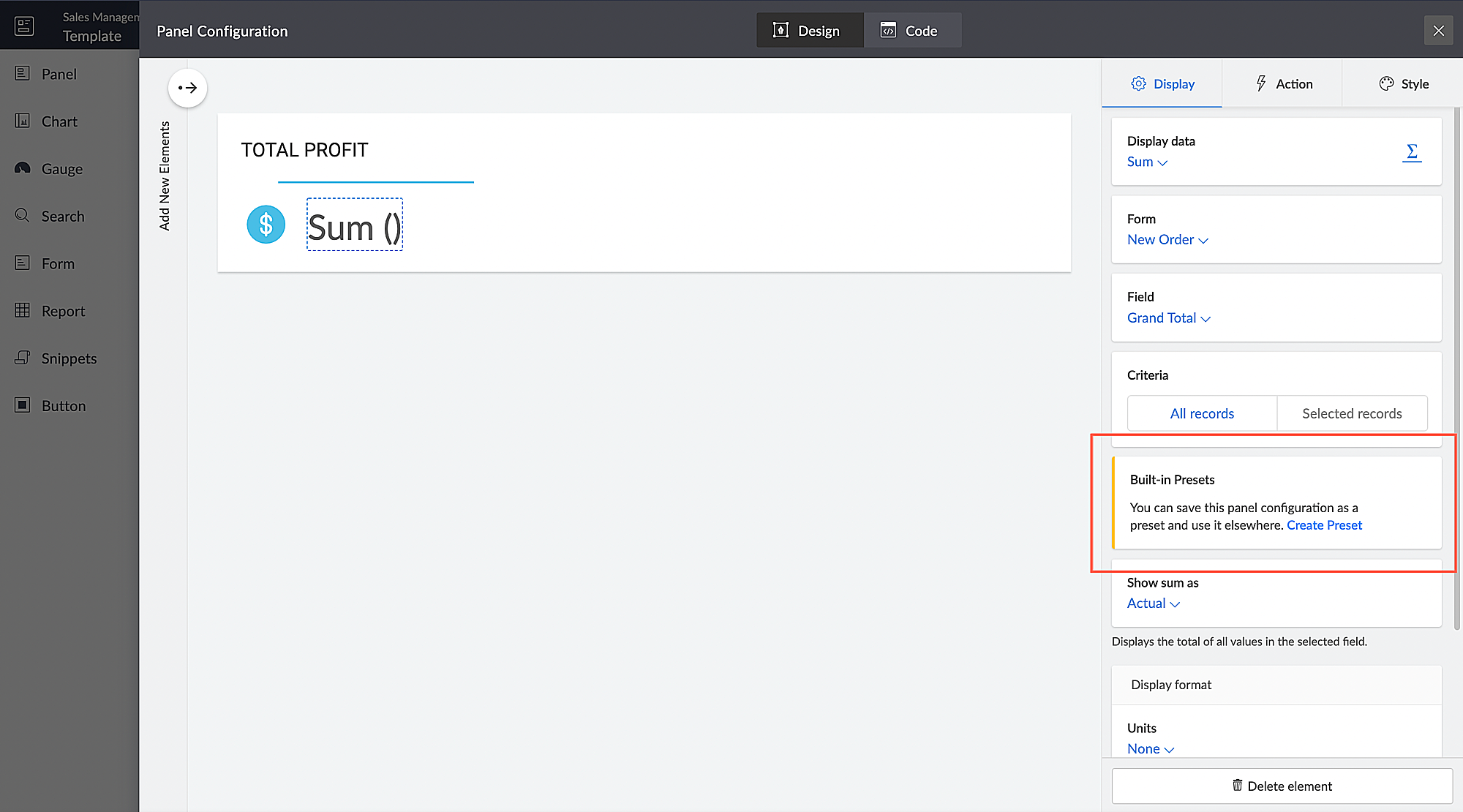
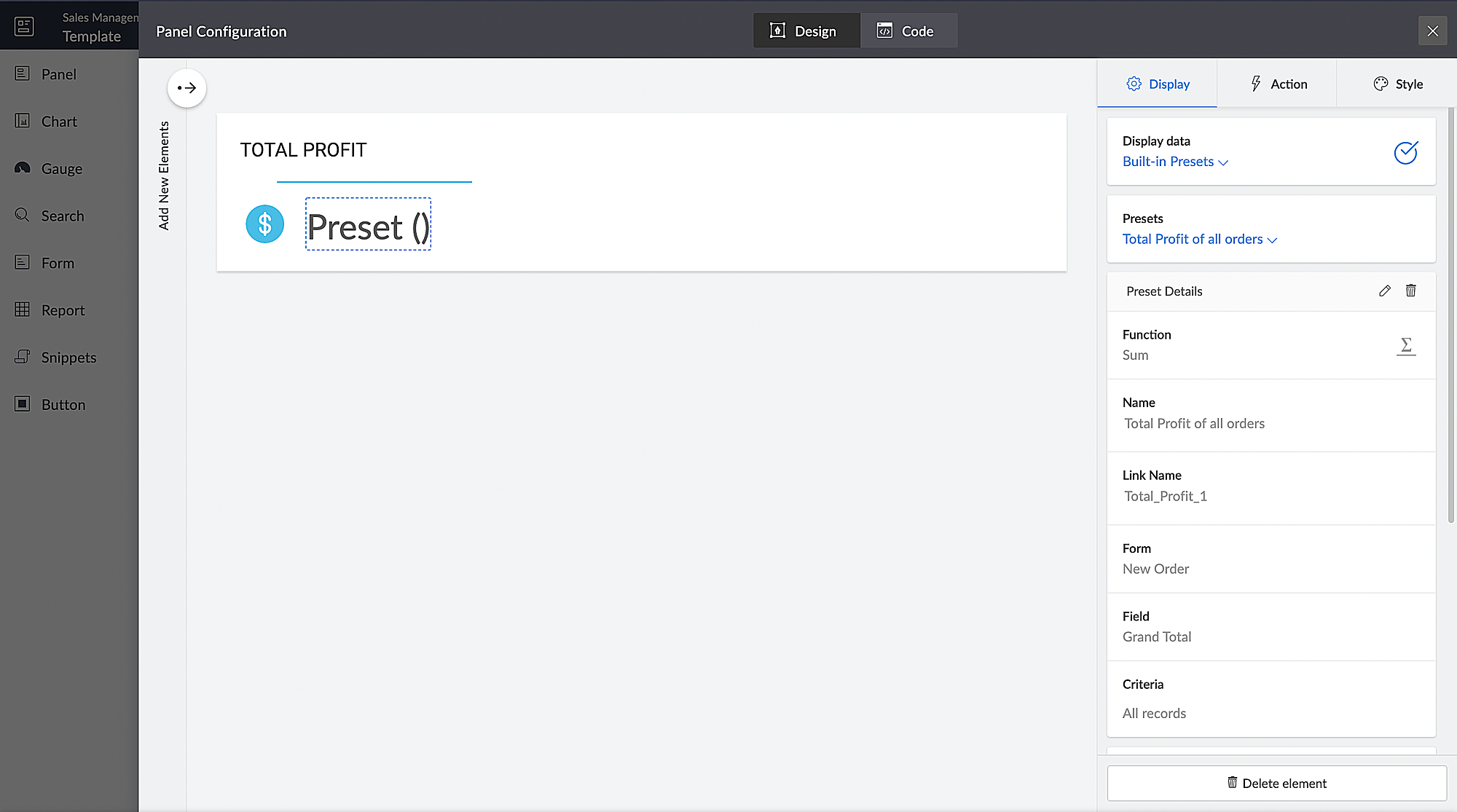
Introducing different display titles for forms
Interacting with forms can become more meaningful when we have contextual information about the actions performed by users. We've introduced form titles that'll enable you to assign different customized titles to the forms displayed when a user is performing the following tasks:
- While adding record - The title that will be displayed when a user accesses the form to add a record.
- While editing record - The title that will be displayed when a user is editing an existing record.
By default, the form title for while adding to the form and while editing the form actions will be the same as the form name. Learn more

Revamped UI for customer portals
We're happy to announce the rolling out of a major refinement to the customer portal UI (sign in, signup, and reset password pages).
Portal users will now be able to use a one-time password (OTP) for signing in to your customer portal. Along with Google and Facebook, federated login can now be set up to allow users to sign in to the portal using their Apple IDs.
These refinements have been designed to ensure compatibility with upcoming features that we are working on. Although the feel and appearance of the new UI will be different from the existing one, we have ensured that it doesn't affect any of your existing portal functionalities. We'll have a separate detailed post on the changes for existing users once the feature is ready to go live.
Announcing strict validation for the max character length field property
In reference to this post, starting from August 31, 2022, maximum character length validation will be implemented strictly across Creator. If a record is added via Deluge, API, or email input, the maximum length property will be validated for all your form fields. This validation ensures that all the records added via various inputs undergo a thorough check for their field characters to ensure they're on par with the predefined character limits that you set, thereby minimizing error handling. After this update, errors might be shown in the following cases:
(i) Existing forms:
While editing/updating a record in an existing form, the maximum length property will be validated for all fields in that form.
(ii) Workflows
- On validate: Following this update, during the execution of the on validate script for a particular record, the maximum length validation will be strictly performed for all the fields that are associated with the script, and an appropriate error will be thrown.
- On success: Following this update, during the execution of the on success script, an exception will be thrown for varchar fields (email, single line) when a new record is successfully submitted to the database or when an existing record is updated or deleted from the database. In the case of number fields, the values will be truncated upon successful submission.
(iii) APIs
While adding/updating record values via API requests, the maximum length property will be validated for all fields.
Additionally, if a record is added via email input, the maximum length property for all the fields will be validated. As an admin, you can minimize errors by suitably adjusting your character limits. We also assure you that we've taken all necessary measures to ensure that the transition is seamless, with minimal impact on your end.
Upgradation to Creator 5
The majority of our users have already migrated to Creator 5 from the previous version (Creator 4). As the final step of this process, we'll be automatically migrating the remaining accounts using the older version to Creator 5 by August 31, 2022.
As you all know, Creator 5 empowers developers to customize traditional web-based apps for smartphones and tablets, opening up new possibilities and ensuring an all-around smoother experience. You will be notified via email prior to the migration and this will not affect the data in your existing Creator apps.
We hope this announcement serves to be helpful in planning your upcoming projects and apps. We'd also like to thank you once again for your loyalty and continued support. Please don't hesitate to reach out to us at support@zohocreator.com if you have any questions or concerns, or need assistance.
That's all for now!
Thanks,
The Zoho Creator Team.
Recent Topics
Mass Update of Lookup Fields not possible
Hello List I've created a custom field for Leads and Contacts 'Current Campaign'. This is very Handy as I can filter leads and then related them to a campaign. Everything ready, but then I realized that mass update doesn't work for lookup fields... a
Dependent / Dynamic DropDown in ZohoSheets
Has anyone figured out a way to create a Dropdown, the values of which is dependent on Values entered in the other cell ?
How do I change the order of fields in the new Task screen?
I have gone into the Task module layout, and moving the fields around does not seem to move them in the Create Task screen. Screenshot below. I have a field (Description) that we want to use frequently, but it is inconveniently placed within the More
Zoho → ShipStation Integration – Sales Order–Driven Fulfilment Workflow
Hello All, I’m reaching out to explore the best way to integrate a shipping tool into our inventory which will speed our process up. We are looking to integrate ShipStation into our existing order-to-fulfilment workflow, as we’re keen to standardise on
IA ou je peux trouver comment utiliser IA
Je voudrais utiliser IA dans l'interface zoho pour m'aider quand j'ai des questions de rôle partage ou autre configuration d'automatisation, j'utiliser ChatGPT externe mais il ne connait pas toujours l'interface zoho et les réponses sont parfois longue
Zoho One account closure vs deactivation
I wonder what are the best practices and guidelines around deactivating vs deleting Zoho accounts in organisations? Any practical considerations?
Data Processing Basis
Hi, Is there a way to automate the data processing for a candidate every time an application arrives from job boards, without requiring manual intervention? That is, to automatically acquire consent for data processing. I've seen a workflow that allows
Disable Zoho Inventory Tracking / Delink Zoho Books & Inventory
We have integrated zoho inventory with zoho books? Now after a long time, we want to disable inventory tracking and delink these 2 modules. Zoho says we cant do it. Anybody else going thru the same ? Any possibility at all? Why does zoho not allow to
Feature Request: Detailed View - Related Block Links!
Desperately need a view record link option on records displaying in the related blocks on a Detail View. For the love of god, please add this feature. Thank you!
UPLOAD A CREATED PDF AUTOMATICALLY
Using the html header pdf+print button, I have managed to find a way to have a user create a pdf using entered form data. Using the schedule button, I can have a "file uploaded" pdf mailed to someone as an attachment. The missing piece is to be able to add the pdf, created in that html page to a file upload field automatically? Right now one has to save it to computer and then upload it in a FILE UPLOAD FIELD. Any help would appreciated !
How create a draft via workflow?
I wish to create a workflow rule for specific emails that creates a draft response - not an automatic email reply, but just a draft with a set response ready to be verified by an agent who can then manually select recipients. Alternatively, the workflow
Desk DMARC forwarding failure for some senders
I am not receiving important emails into Desk, because of DMARC errors. Here's what's happening: 1. email is sent from customer e.g. john@doe.com, to my email address, e.g info@acme.com 2. email is delivered successfully to info@acme.com (a shared inbox
Ticket layout based on field or contact
Hi! I want to support the following use-case: we are delivering custom IT solutions to different accounts we have, thus our ticket layouts, fields and languages (priority, status field values should be Hungarian) will be different. How should I setup
Zoho vault instal on windows
I am trying to use Zoho Vault Desktop for Windows, but I am unable to complete the sign-in process. Problem description After logging in to my Zoho account and clicking Accept on the authorization page, nothing happens. The application does not proceed
Zoho CRM for Everyone's NextGen UI Gets an Upgrade
Hello Everyone We've made improvements to Zoho CRM for Everyone's Nextgen UI. These changes are the result of valuable feedback from you where we’ve focused on improving usability, providing wider screen space, and making navigation smoother so everything
ZOHO GLITCHES
Ok, you guys have done a great job at building a platform that has the potential to surmount the competition but these glitches are becoming more than frustrating! This is beyond annoying, I'm trying draft lawsuits and type up privacy and refund policies
Please, make writer into a content creation tool
I'm tired of relying on Google Docs. I'm actually considering moving to ClickUp, but if Writer were a good content creation tool instead of just a word processor, I would finally be able to move all my development within the Zoho ecosystem, rather than
Notification to customers when I use a Zoho function
Hi all, I tried searching the community but couldn't find anything about it. I noticed that the customer receives the notification of reopening the old ticket but does not receive the notification of opening a new ticket when I use the function: "separate
Whatsapp Connection Status still "Pending" after migration
Hello, I migrated my WhatsApp API to Zoho from another provider a day ago. So far the connection status is still “Pending”. There is a problem? How long does it usually take?
Date Filters in Zoho Desk Dashboard
Hello Team, Currently, in the Zoho Desk dashboard, the date filter is available only for daily, weekly, and monthly views. Could we also add a yearly date filter to allow filtering by an entire year? Additionally, in the custom date filter, it is currently
Mobile app - offline
If I made a couple of forms and my field guys had the mobile app and were somewhere without signal, could they open the app, complete and sumbit a form and have it upload when they are back in signal (we need different info at different jobs and I'm trying
Editing the Ticket Properties column
This is going to sound like a dumb question, but I cannot figure out how to configure/edit the sections (and their fields) in this column: For example, we have a custom "Resolution" field, which parked itself in the "Ticket Information" section of this
Zoho Survey reminder settings are extremely confusing
Hi, I just want to set 3 reminders, one week apart from the first email out. Your form is too confusing and I don't understand. Can you simplify and be more specific regarding the language used on the form ?
[Early-access] Introducing Zoho's CommandCenter - Cross-Zoho business process automation
Resources to help Webinar recording | Documentation Feature Restrictions Currently available on early-access only for US data center accounts Features Role CommandCenter as a Service uses signals across Zoho services to propel the movement of records
Rebranding Options for Zoho One
We need the addition of rebranding and white-labeling settings directly within the Zoho One Admin Panel. This feature should allow organizations to customize the unified portal with their own logo, brand colors, and custom domain mapping (e.g., portal.company.com).
Can I share the drive with another Windows user?
We use the WorkDrive Sync application on a server with several remote desktop users. Our question is: Can the drive created by WorkDrive Sync be shared from one of these remote users with the other users so they can access the files, or do we need to
Zobot drop down list
Hi, I am trying to create a drop down list in Zobot by creating a plug. I think I am close but I just can't get it over the line and was hoping that someone could help me. I had a little bit of help getting the script started (hence the comments) // Deluge
How to compare a subform lookup field that allows multiple entries when edited
I have a form with a subform with multiple fields. One of the fields is a lookup field that allows a multi select. On edit validation, I want a workflow to execute only when the entries in that subform field has changed. The old. function is not working
Translation of Tooltip Messages
The descriptive help messages should be available to provide translations for.
Allow all Company Users to view all projects, but only owner/admins can change projects
I was wondering if there was a permission setting I could adjust to allow all our company users to see all projects created. Then, only the project owners and admins with the change permission. Thanks
Business Day Logic Update: More Accurate Scheduling for Your Workflows
Hello everyone, We’re improving how business-day calculations work in workflows, especially when triggers happen on weekends. This update ensures that offsets like +0, +1, and +2 business days behave exactly as intended, giving you clearer and more predictable
Lead Blueprint transition in custom list view
Hi, Is It possible to insert the Blueprint transition label in a custom Canvas list view? I am using Lead module. I see the status, but it would be great if our users could execute the Blueprint right from the list view without having to enter the detailed
Email Notifications not pushing through
Hi, Notifications from CRM are not reaching my users as they trigger. We have several workflow triggers set up that send emails to staff as well as the notifications users get when a task is created for them or a user is tagged in the notes. For the past 6 days these haven't been coming through in real time, instead users are receiving 30-40 notifications in one push several hours later. This is beginning to impact our daily usage of CRM and is having a negative effect on our productivity because
Internal Error When Accessing Team Inbox.
All our users are seeing this error in teaminbox. Because its a critical tool kindly resolve this issue ASAP.
Is there an equivalent to the radius search in RECRUIT available in the CRM
We have a need to find all Leads and/or Contacts within a given radius of a given location (most likely postcode) but also possibly an address. I was wondering whether anyone has found a way to achieve this in the CRM much as the radius search in RECRUIT
Sub-Form Padding in CSV Export
Hi, When you use the Sub-Form, and for example you have a Date Field on the Main Page, then Option 1 and Option 2 fields on the Subform, when you export this to CSV the Date column will only have the Date in 1 row, the first row, it would be nice to pad
CRM gets location smart with the all new Map View: visualize records, locate records within any radius, and more
Hello all, We've introduced a new way to work with location data in Zoho CRM: the Map View. Instead of scrolling through endless lists, your records now appear as pins on a map. Built on top of the all-new address field and powered by Mappls (MapMyIndia),
Allow Text within a Formula
Hi, I would like to be able to use this for others things like taking an existing Date Field and copying its value, so by entering getDay(Date)&"-"&getMonth(Date)&"-"&getYear(Date) it results in 01-02-2026. And then when the Date is changed so is this
Change Number Field to Decimal Field
Hi, It would be nice to be able to change the field type without having to delete it and create a new one, messing up the database and history. Thanks Dan
Pipeline.Company Name field shows up as numbers! [Bigin Developer Console > Component > URL]
Hi there, I am setting up to invoke URL to send infromation zoho bigin > zoho forms with company name pre-fill in the form. however when I use : ${Pipelines.Company Name} field it shows up as a string of number instead of words. Help.
Next Page