What's New in Zoho Analytics - November 2025

What's New in Zoho Analytics - November 2025

We're thrilled to announce a significant update focused on expanding your data connectivity, enhancing visualization capabilities, and delivering a more powerful, intuitive, and performant analytics experience. Here’s a look at what’s new.
Explore What's New!

Accessibility

Introducing a new Accessibility section in Zoho Analytics. It gives you full control over how you view and interact with your Zoho Analytics interface. This update brings enhanced usability and helps ensure a more comfortable, efficient, and accessible reporting experience.
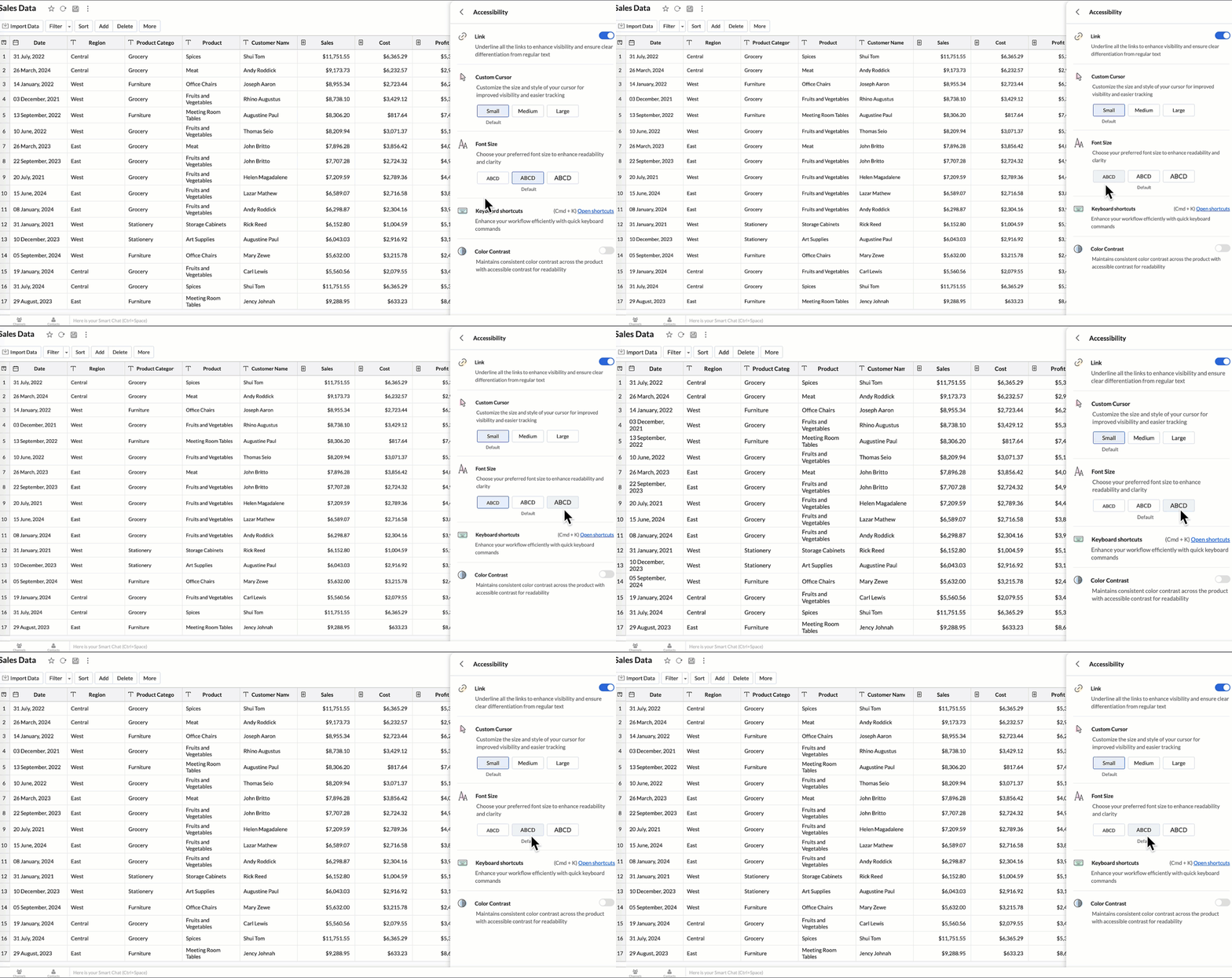
You can now personalize your interface with these new settings:

  • Highlight Links - Underline all links to distinguish them clearly from regular text.
  • Custom cursor - Choose the size of your mouse cursor (Small / Medium / Large) for better visibility and easier navigation.
  • Font size - Adjust the font size of the interface to suit your reading comfort.
  • Color contrast - Enable high-contrast mode to improve readability and support users with visual impairments.
  • Keyboard shortcuts - Access a full list of built-in shortcuts, to speed up your workflow and navigate quickly using the keyboard.
    Learn more.


New Data Connectors

Bring data from more sources into your analytics ecosystem with these new native connectors.

Qntrl Connector

Effortlessly bring workflow and process data from Qntrl into Zoho Analytics. Build reports to analyze task progress, approvals, and operational efficiency.
Learn more.

Asana Connector

Sync your Asana tasks, projects, and workflows seamlessly. Create visual dashboards to track productivity, timelines, and team performance.
Learn more.

Zoho Community Spaces Connector

Import engagement and activity data from Zoho Community Spaces. Analyze member participation, content performance, and community growth trends.
Learn more.

Zoho Finance Connector - New Modules

Gain deeper financial insights with newly added modules, enabling more granular reporting and analysis across your Zoho Finance suite.
Learn more.


Data Sync & Live Connect Enhancements

Incremental Fetch Enhancements

  • From Other Workspaces: Users can now configure incremental fetch for data imported from another workspace, bringing in only new or updated records. This improves sync efficiency and reduces load times.
  • For Custom Queries: Incremental fetch is now supported for data imported via custom queries, retrieving only new or updated records to enhance performance and reduce processing time.

Learn more.


Developer Hub Enhancements

API – Ruby Language Support

Zoho Analytics SDK now supports Ruby, enabling developers to build Ruby-based integrations and automation with native methods.
Learn more.

JS API - Tab Switch

Enhance embedded dashboard navigation. The JavaScript API now allows you to switch between tabs programmatically, enabling a better navigation control and interactive dashboard experiences.
Learn more.


Map & Geo Analytics Enhancements

Map-Layering Enhancements

Map Layering now includes drill-through for individual layers, options to fix unresolved locations, and the ability to use layered maps as filters in dashboards. These updates deliver deeper and more interactive geo-analysis.
Learn more.

Map Chart – Tooltip Enhancements

Map chart tooltips have been refined by removing Latitude/Longitude values. Users now see cleaner, more meaningful data highlights.


Reporting & Visualization Enhancements

Drill Through Enhancements

Drill-through is now supported for both Public Views and Embedded Views, enabling viewers to seamlessly access related reports for deeper data exploration and enhanced analytical context.

Previously, drill-through functionality was limited to shared reports. With this enhancement, viewers can now open linked drill-through reports, provided those reports have also been made Public.
Learn more.

Tooltip / Info Icon in Widgets

Widgets now support tooltips and Info icons to display additional descriptions or context. This helps dashboard viewers understand metrics instantly.
Learn more.

Anomaly Detection for Dimensional Fields

Zoho Analytics now supports enhanced anomaly detection when a dimension field (category) is added to the Color shelf. Users can choose from multiple detection modes to better analyze deviations across different perspectives

  1. Overall data
  2. Each X-Series
  3. Each Color-Series Individually
  4. Each Combined Series of X and Color Columns
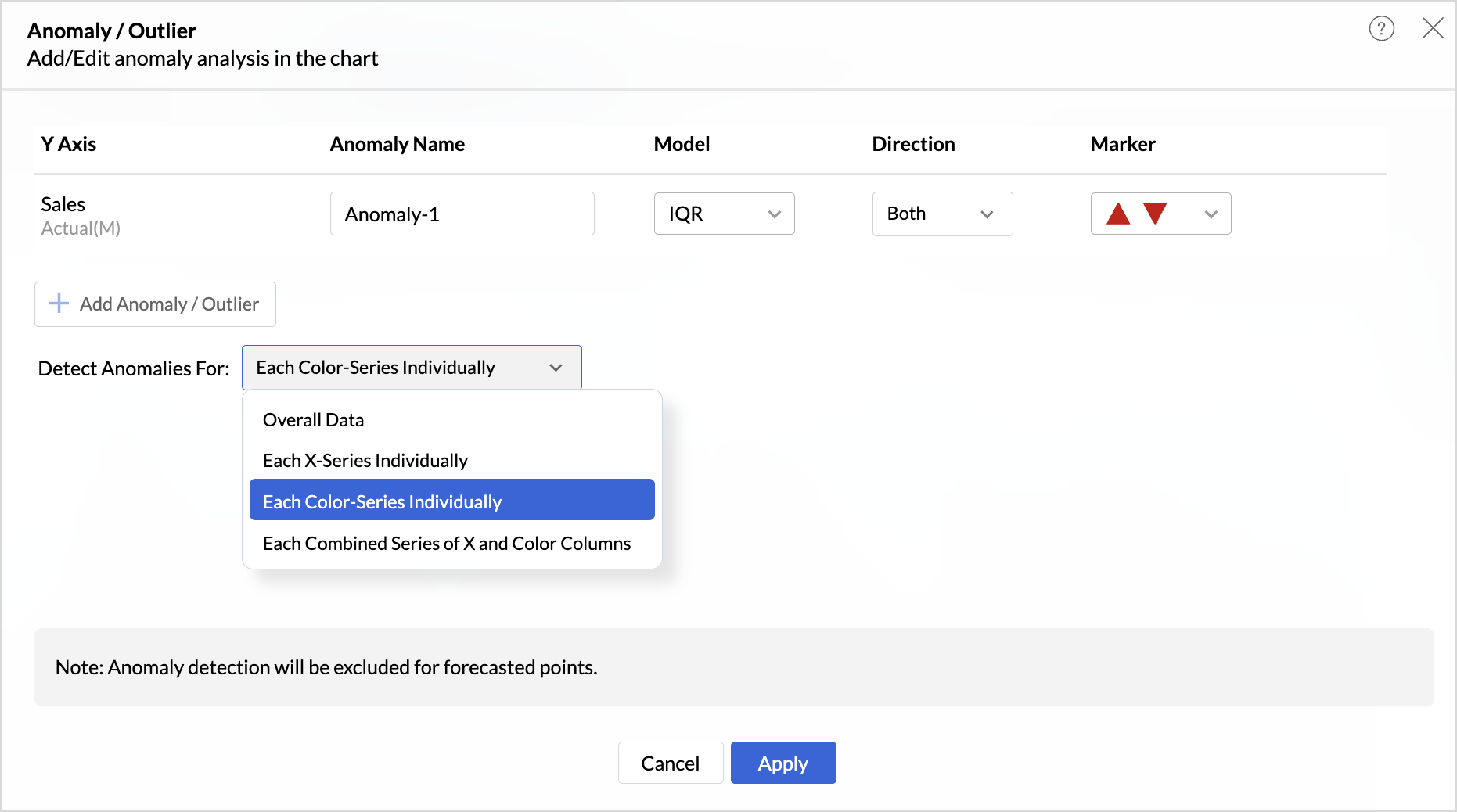


These enhancements offer greater flexibility and precision in uncovering unusual trends and outliers across segmented data visualizations.

Learn more.

Sorting of Values Across Group in Pivot Views

We have added a new option called Sort across Group which helps you apply clearer and more consistent sorting in Pivot Tables.

Earlier, sorting worked only inside each group. With Sort across Group, you can now sort the entire pivot table based on the selected column, regardless of how the groups are arranged.

Freeze Column Support in Pivot & Summary Views

We have added Freeze Column support in Pivot and Summary Views to help you work more comfortably with wide reports. This feature keeps selected columns fixed on the left side of the table while you scroll horizontally, allowing you to compare key columns with other metrics without losing context.

Report-Level Fiscal Year Option

Align individual reports with your organization's financial calendar by defining the Fiscal Year start month at the report level. This setting applies only to the selected report and appears when a date column is used, enabling accurate time-period analysis.
Learn more.

Dynamic Thresholds with Variables in User Filters

Aggregate formulas can now be used with variables inside thresholds. When paired with User Filters, threshold values are calculated dynamically based on each user’s filter selections ensuring every user sees context-relevant threshold boundaries instead of a fixed value.

Datatype-based Variable Suggestions for Default User Filters

When configuring default values in User Filters, only variables matching the filter’s datatype are now listed. This prevents configuration issues such as assigning a text variable to a numeric filter, and ensures accurate default value mapping.
Learn more.


AI & ML Enhancements

AutoML – 128GB Server Support

AutoML now runs on high-power 128GB servers in the US Data Center. This enables faster model training and support for significantly larger datasets.
Learn more.


Zia Insights - Enhancements

Customize Zia Insights 

Users can now tailor Zia Insights by selecting specific metrics and dimension columns for insight generation and choose the types of insights to focus on:

  • Contribution Analysis: Understand key factors impacting outcomes.
  • Time Series Insights: Detect trends, seasonality, anomalies, and forecast future values.
  • Comparison Between Dimensions: Analyze performance and variance across different dimensions.
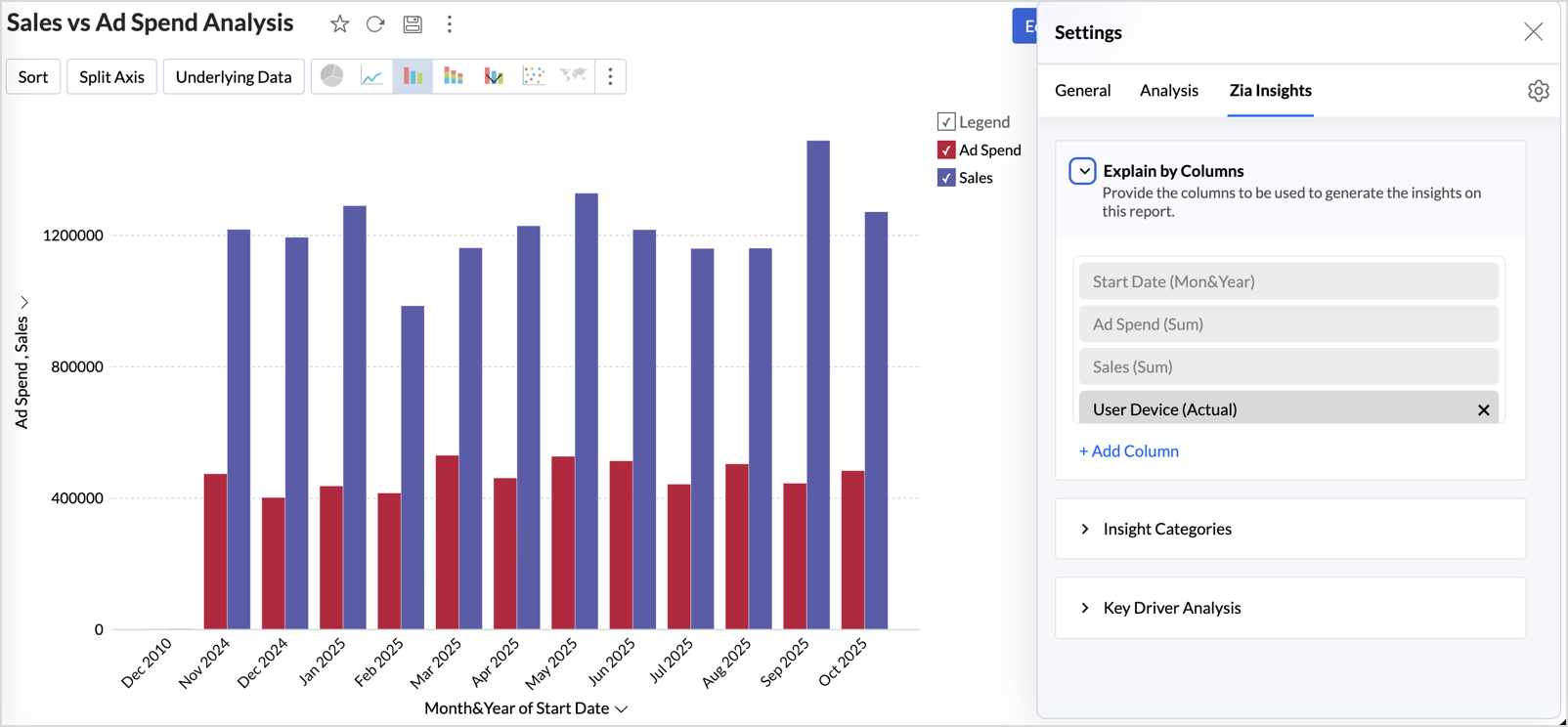

This customization ensures insights are focused, relevant, and tailored to the report’s context.
Learn more.

Diagnostic Insights Now Available for Multiple Time Series Analyses

Previously, diagnostic insights were available only for Recent Time Period Analysis. With this update, users can now access diagnostic insights across multiple time series analyses like, Anomalies/Outliers, Largest Incline/Decline, Period-over-Period Changes, and Start vs End Period Analysis revealing the “why” behind the data for more informed decisions.


Other Updates

Audit Logs for White label Users

Track administrative actions with greater precision. All activities performed in the White Label admin console are now comprehensively logged in the Audit Logs for improved security and compliance.

New Language Support

Zoho Analytics is now more accessible globally, with support for 29 international and 11 Indian languages.
Learn more.


    • Sticky Posts

    • What's New in Zoho Analytics - June 2026

      Hello Users! This month is about meeting your data wherever it lives: reaching it from AI assistants, bringing it in from more sources, and keeping it flowing with less manual effort. Here's what's new across Ask Zia and AI, data import, integrations,
    • What's New in Zoho Analytics - February 2026

      Hello Users! We're back with another round of updates for Zoho Analytics. This month's release focuses on giving you greater flexibility in how you visualize, manage, and act on your data - with new features like custom visualizations, remote MCP server,
    • What's New in Zoho Analytics - May 2026

      Hello Users! We're back with another round of updates for Zoho Analytics. This month's release focuses on giving you greater flexibility in how you visualize, manage, and act on your data. We are introducing richer data visualizations, smarter AI-powered
    • What's New in Zoho Analytics - January 2026

      Hello Users! We are starting the year with a strong lineup of updates, marking the beginning of many improvements planned to enhance your analytics experience. Explore the latest improvements built to boost performance, simplify analysis, and help you
    • What's New in Zoho Analytics - November 2025

      We're thrilled to announce a significant update focused on expanding your data connectivity, enhancing visualization capabilities, and delivering a more powerful, intuitive, and performant analytics experience. Here’s a look at what’s new. Explore What's
    • Recent Topics

    • إلغاء الإشتراك

      أريد إلغاء الإشتراك نهائياً.
    • Opening two notes at once in the Mac app

      Just like the title says - I want two notes open the same time on my Mac Air. AI search seems to think I have the option to open one window, then click on a second one. But of course if one window is open I can't see the others. It also recommended using
    • Department Customization Copy/Paste

      Hello! I love the new customization of the layouts, rules and templates! However, we have several "departments" that operate similar and as I'm updating either ticket layout or workflow rules, I'm finding that I have to do it in each department. I would
    • How do you import mail from Thunderbird into ZOHO mail

      Hi, We have Thunderbird on our Apple Macs and want to transfer the emails from this to our shiny new Zoho mail account. I know using Outlook on a PC you can zip the .eml files up and upload them into specific folders on your ZOHO mail account using this form: mail.zoho.com/mail/jsp/importFolder.jsp However as Thunderbird use mbox files I'm not sure how to do it. Can anyone let me know if they have migrated mail from Thunderbird to Zoho mail and how they did it. I have many folders and emails to transfer
    • How to Open .mbox file in Gmail with Attachments?

      Gmail offer users to backup INBOX folder in .mbox file format via Google Takeout Feature. Howver there is no such option to Restore Gmail MBOX. Thus I would like to suggest you to choose an alternate approach i.e. MBOX to Gmail Wizard. This utility will open .mbox file in Gmail with attachments.  Steps to open MBOX file in Gmail are; Run MBOX to Gmail Wizard Click Add File and add .mbox file. Enter your Gmail login credentials. Click Convert button. Finished! This is how you can open MBOX file in
    • Poor Zoho Support

      Been trying to reach support via telephone and email. The support has always been slow to respond but now its been two weeks without a return call. I have even sent them screen shots of the problem I've having with no results. Is anyone had the same problem.
    • Desk Contact Name > split to First and Last name

      I am new to Zoho and while setting up the Desk and Help Center, I saw that new tickets created or submitted from the Help Center used the Contact Name field. This would create a new Contact but put the person's name in the Last Name field only. The First
    • SalesIQ operators will not receive any messages if customers do not answer the Pre-Chat questions in Flow Controls.

      Hi Zoho SalesIQ Team, I am reaching out to report a issue regarding the Brands > Flow Controls SalesIQ operators will not receive any messages if customers do not answer the Pre-Chat questions in Flow Controls and continue sending messages without completing
    • Add Comprehensive Accessibility Features to Zoho Writer

      Hello Zoho Writer Team, We hope you are doing well. We would like to submit a feature request to enhance Zoho Writer with a full set of accessibility tools, similar to the accessibility options already available in the Zoho Desk agent interface. 🚧 Current
    • Copying a Document with its Citations

      When I copy a document that contains citations using File>Make a Copy from the document's menu the text copies but the citations do not (according to Google they should). Is this the correct way to make a complete copy of a document with its citations
    • Bing ads integration and tracking

      Hi, Is there any way to track Bing ads in the same way that we are able to track google adwords?  It is important for us to be able to determine the conversion rate of our Bing ads.  If this is not possible now, will this feature be added in the future?
    • #20 Your Business Shouldn't Stop Just Because You Do

      Imagine you are on a well-deserved vacation. Your clients are expecting invoices at the beginning of the month, recurring customers are due for billing, and payments are still coming in. Do you carry your laptop everywhere, hoping you don't miss a billing
    • Marketing Tip #26: Optimize product images for SEO

      Product images can do more than make your store look good. They can also help customers discover your products through search. Since search engines can’t "see" images, they rely on text signals to understand what an image is about. Two small actions make
    • Automation Series: Mandatory Time Logging Before Task Closure

      In a project, when users work on multiple tasks simultaneously, they track time in different ways, either by starting a timer or by adding a time log. Sometimes users may forget to add time, which can lead to discrepancies in the timesheet. When timesheets
    • Is there a way to show contact emails in the Account?

      I know I can see the emails I have sent and received on a Contact detail view, but I want to be able to see all the emails that have been sent and received between all an Accounts Contacts on the Account Detail view. That way when I see the Account detail
    • Introducing document visibility in Zoho Sign

      Hello! Complex document workflows often involve multiple stakeholders with different roles. Sending a separate envelope to every person is time consuming and can lead to administrative bottlenecks. With Zoho Sign's document visibility feature, you can
    • Sent email stuck on processing

      My sent emails are stuck on processing, whats going on?
    • [Webinar] What's new in Zoho Analytics: Q2 2026

      Hey data lovers! Our What's New webinar series is bringing you another lineup of exciting features and product enhancements from the past quarter, all designed to help you get more out of your analytics. Get an inside look at new data connectors, Zoho
    • Alterar número de telefone para receber o código OTP

      Boa tarde! Como posso alterar o número de telefone da minha conta para aceder ao meu email corporativo? Estou tentando logar, mas não consigo, pois está sendo enviado o código OTP para o número antigo, preciso aceder urgente meu email, porque e de trabalho.
    • Request to Increase URL Field Character Limit

      Hi Arthi, Hope you are doing well. I'm trying to save a URL in the Work Order (WO) module using the URL field, but I receive the following error message: "Please enter a valid Repair File. Maximum 450 characters are allowed." The issue is that the URL
    • How to change column headings in pivot table?

      Hi, Is there a way to rename the column headers of a pivot table? Now some the columns are named with value labels: 'SUM of .....'. We would like to rename those headers. As of now we couldn't find any direct solution to adjust the headers, besides copying and reformat. We want to avoid these extra steps. Best, Tiemen
    • Undelivered Mail

      I suspect that there are recipient's servers that blocks my emails. I receive the following email from mailer-daemon@mail.zoho.eu : A message that you sent could not be delivered to one or more of its recipients. This is a permanent error. pantelis.sarantos@unipakhellas.gr,
    • Email not loading on PC

      Hello, my email opens on but it doesn’t load on PC. I don’t have other issues with the email, all the configurations are ok and I face with following issue in the photo. It says “ mail.zoho.com refused to connect” I will be very thankful if anyone can
    • Why are bounce/error emails being sent to info@ instead of contact@?

      I have my Zoho Mail and WordPress site configured so that normal website emails should go to contact@hybridbatteryservice.com. However, I keep receiving technical bounce/error emails and delivery failure notifications at info@hybridbatteryservice.com
    • Do Not Disturb status not respected when Cliq bar is enabled across Zoho apps

      Hi Zoho Cliq team, I want to report what appears to be a bug with how the Do Not Disturb status interacts with the embedded Cliq bar in other Zoho apps. **Issue:** When my Cliq status is set to Do Not Disturb, I continue to receive notification tones
    • Zoho Webinar Summer Broadcast 2026

      What if your webinar platform could connect directly with your business tools, automate routine tasks, trigger actions across your workflows, and support every stage of your webinar lifecycle? That’s the question we’ve been answering so far this year.
    • Invalid request when trying to access Mail

      When I click on the red button to access Zoho Mail at https://mail.zoho.com/zm/, I get a big yellow warning triangle with "invlid request, The input passed is invalid or the URL is invoked without valid parameters. Please check your input and try ag
    • Whats the average response time for ticket submitted?

      I submitted a request to unblock my mail accounts. They seem to be blocked for outgoing mail, and I have been waiting for days to have this fixed with no reply. I have submitted 2 tickets and an email. My work has to completely stop. I pay for the service
    • All new Address Field in Zoho CRM: maintain structured and accurate address inputs

      Availability Update: 29 September 2025: It's currently available for all new sign-ups and for existing Zoho CRM orgs which are in the Professional edition exclusively for IN DC users. 2 March 2026: Available to users in all DCs except US and EU DC. 24
    • Is there any way to have Dataprep ingest RSS?

      As stated by the title. Does the Zoho environment offer tools that I can use to, directly or using workarounds, have Dataprep ingest an RSS feed? Thanks
    • Introducing Color Coding of Picklist Values

      Dear Everyone, Greetings!! Zoho CRM is uplifting the user experience. Recently, we had some notable aesthetic improvements in CRM like Kanban View UI enhancement, New List view UI enhancement, color coding of tags, and color coding of picklists in meetings.
    • Important updates to your Widget JS APIs

      Hello everyone, Greetings from Zoho Creator! This is an urgent notice for developers and Partners who use widgets in their Zoho Creator applications. We previously announced an update to the CDN URLs used for loading the Widget JS API, with a deadline
    • Deluge sendmail in Zoho Desk schedule can't send email from a verified email address

      I am trying to add a scheduled action with ZDesk using a Deluge function that sends a weekly email to specific ticket client contacts I've already verified the email address for use in ZDesk, but sendmail won't allow it in its "from:" clause. I've attached
    • Mailbox delegation “Send As” error

      I believe there may be an issue with mailbox delegation. When I create a delegation from the Admin Console, it works correctly if I select Read permissions. However, if I select Send As permission for the delegated user, I immediately receive the following
    • Restrict Zoho Cliq Webinars and Announcements to Admins Only

      Hi Zoho Team, We hope you're doing well. We would like to raise a feature request regarding in-app announcements in Zoho Cliq, such as the recent webinar popup about the Cliq Developer Platform: While these announcements are useful, they are not always
    • how do i get mail.mydomain.com to point to zoho mail web-mail?

      I have started using zohomail, and am loving it. With my previous provider, I used to go to mail.mydomain.com, and it would take me to my webmail. I am not able to find the mapping for zoho's webmail to map to it. It is difficult to go to webmail with
    • Number of decimal places

      Hi Latha, I have added the following three fields to the Company module. Currently, these fields only allow a maximum of 2 decimal places. However, for some of our requirements, we need to enter values with up to 10 decimal places. Could you please help
    • zoho imap connection stopped working 05/28 12pm EST

      Hi, beginning Thursday, 5/28, ~12 pm est imap to siteground stopped working. When I tried to reconnect the account, connection was failing with the following message: Unable to connect SMTP server:gvam1107.siteground.biz, Port: 587. I did notice that
    • User Name in Zoho Cliq Not Updating Across Apps?

      We updated the name of a user in Zoho. (From Sue to Taylor) Her name has not been updated in Cliq on all apps. When in Zoho One, if I go to Cliq directly, it is correct, but if I am in another app, and the Cliq bar pops up on the bottom, it will be the
    • Service currently unavailable

      The Zoho Mail Webmail is working, the Mail Admin Console is not: "Our service is temporarily unavailable, please try after sometime." How long must I wait to retry? edit: To add to this, the Webmail is not working 100% - I can open mail in the inbox,
    • Next Page