April 2026 brings a wide set of updates to Zoho Billing, from updated Payment Links layout and AI-powered billing workflows to smarter subscription quoting, better compliance tools for German Edition users, and more. Here's everything that's new.
Connect Zoho Billing to AI Using Zoho MCP
Zoho Billing now supports the Model Context Protocol (MCP), which means you can connect your billing data and workflows directly to AI models like Claude and ChatGPT. Once set up, you can create invoices, track payments, manage customers, and pull reports using plain-language prompts without opening Zoho Billing at all.
To get started, set up the Zoho MCP server and connect it to your preferred AI model. Learn MoreCustomize Your Payment Links with Hosted Payment Page Settings
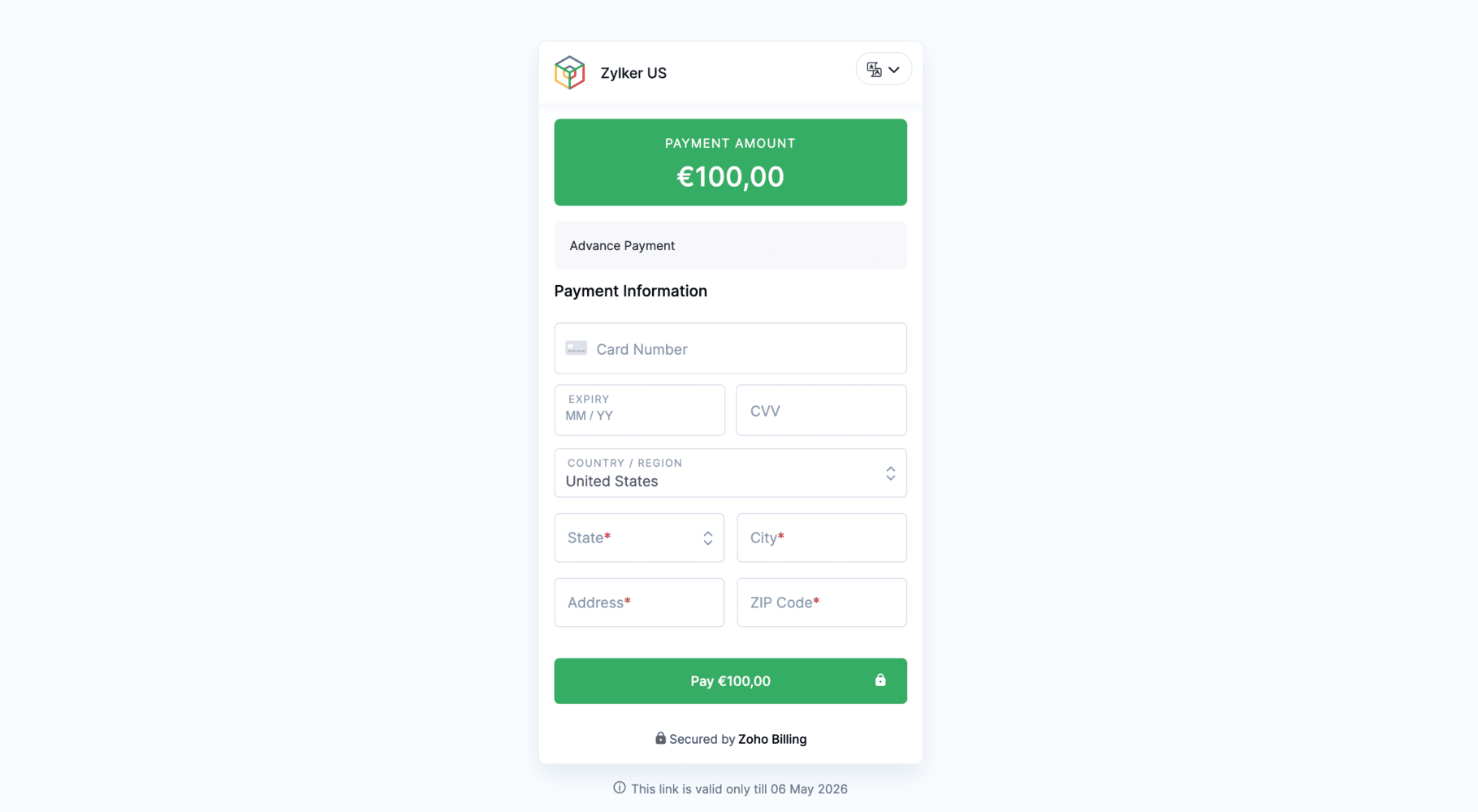
Payment Links previously used a layout similar to the Invoice Secure Payment Page. Now, Payment Links use the same modern layout as Hosted Payment Pages; with smoother transitions, multi-language support, and access to all the customization options available in Hosted Payment Page Settings.

This is enabled by default for new organizations. If you're on an existing organization and want to switch, reach out to our support team at support@zohobilling.com to get it enabled.
Create End-of-Term Quotes for Active Subscriptions
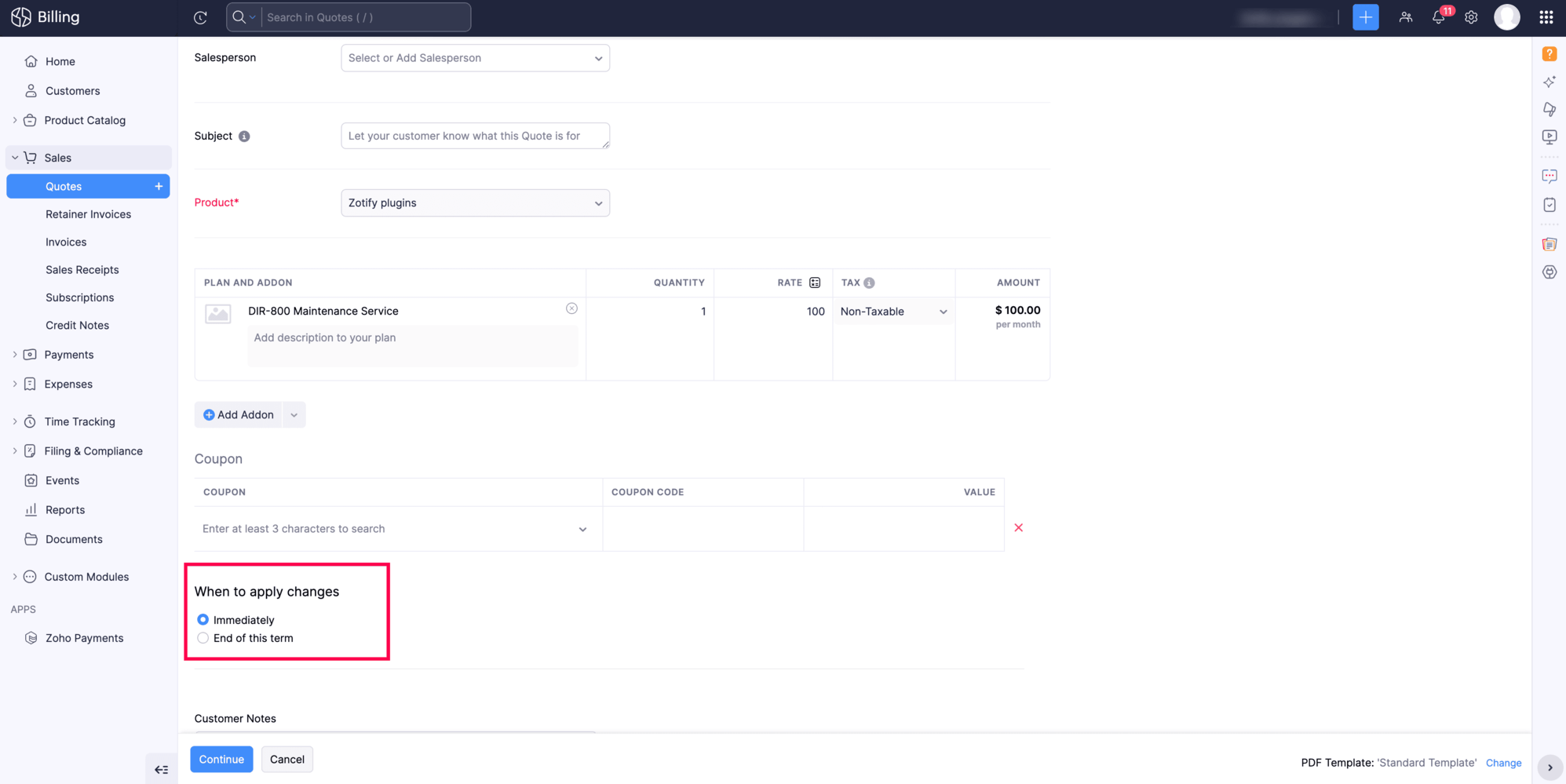
You can now create an end-of-term quote directly from an active subscription. This shows your customers the exact charges they'll see at the end of their current billing cycle, including any mid-cycle changes, before the renewal goes through.
To create one, go to the active subscription, click More > Create Quote, make your changes, and select End Of Term for When to apply changes.
Create Subscription Quotes for Items
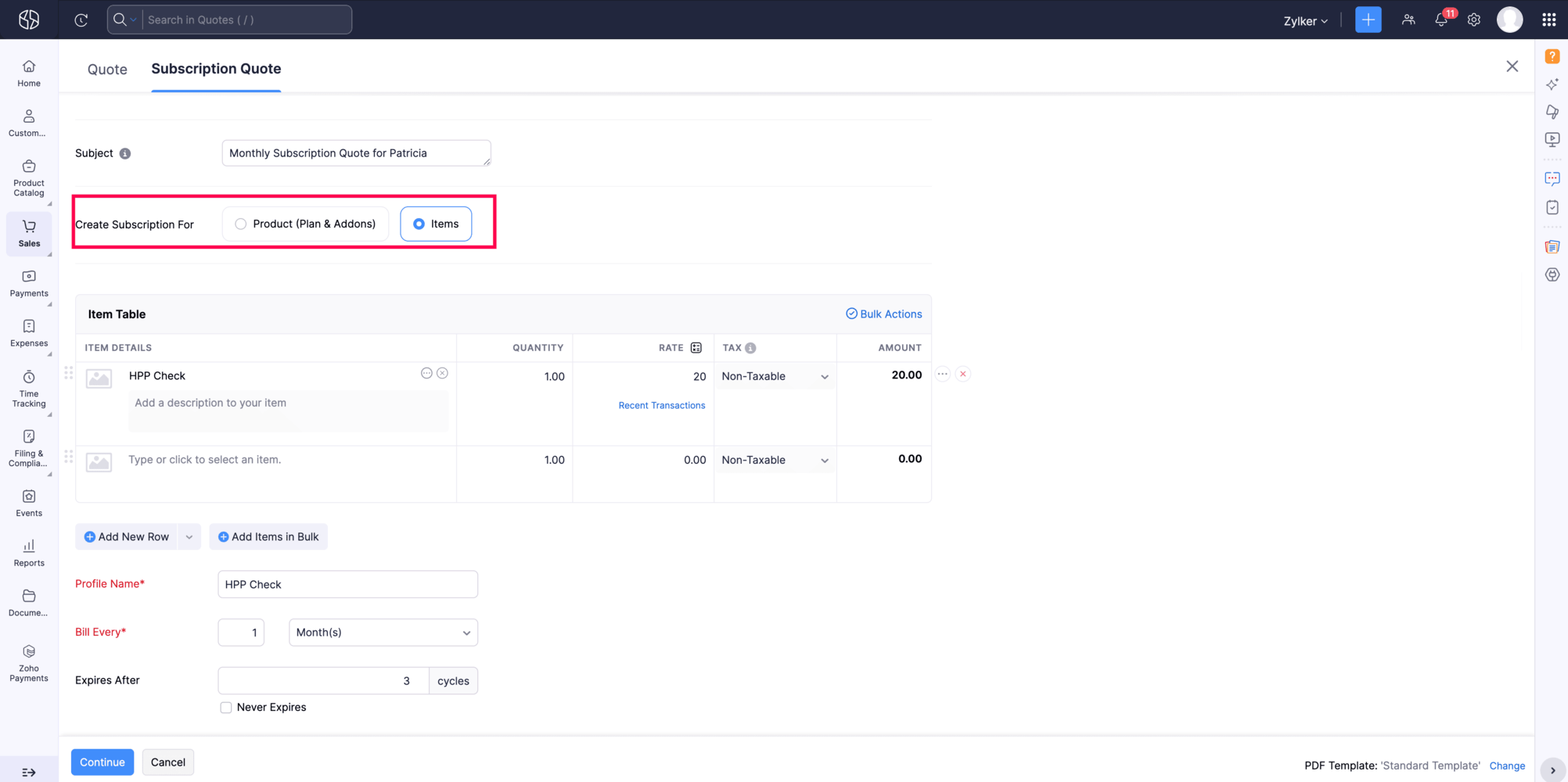
You can now create quotes for item-based subscriptions. You can now create a Subscription Quote for items that includes price lists, billing frequency, and billing cycles all in one document. When the customer accepts the quote, their subscription activates automatically; no extra steps needed.
Note: This feature is available only in certain Zoho Billing plans.
To get started, go to Sales > Quotes, click New Subscription Quote, and select Create Subscription For Items.

Configure Accessibility Preferences
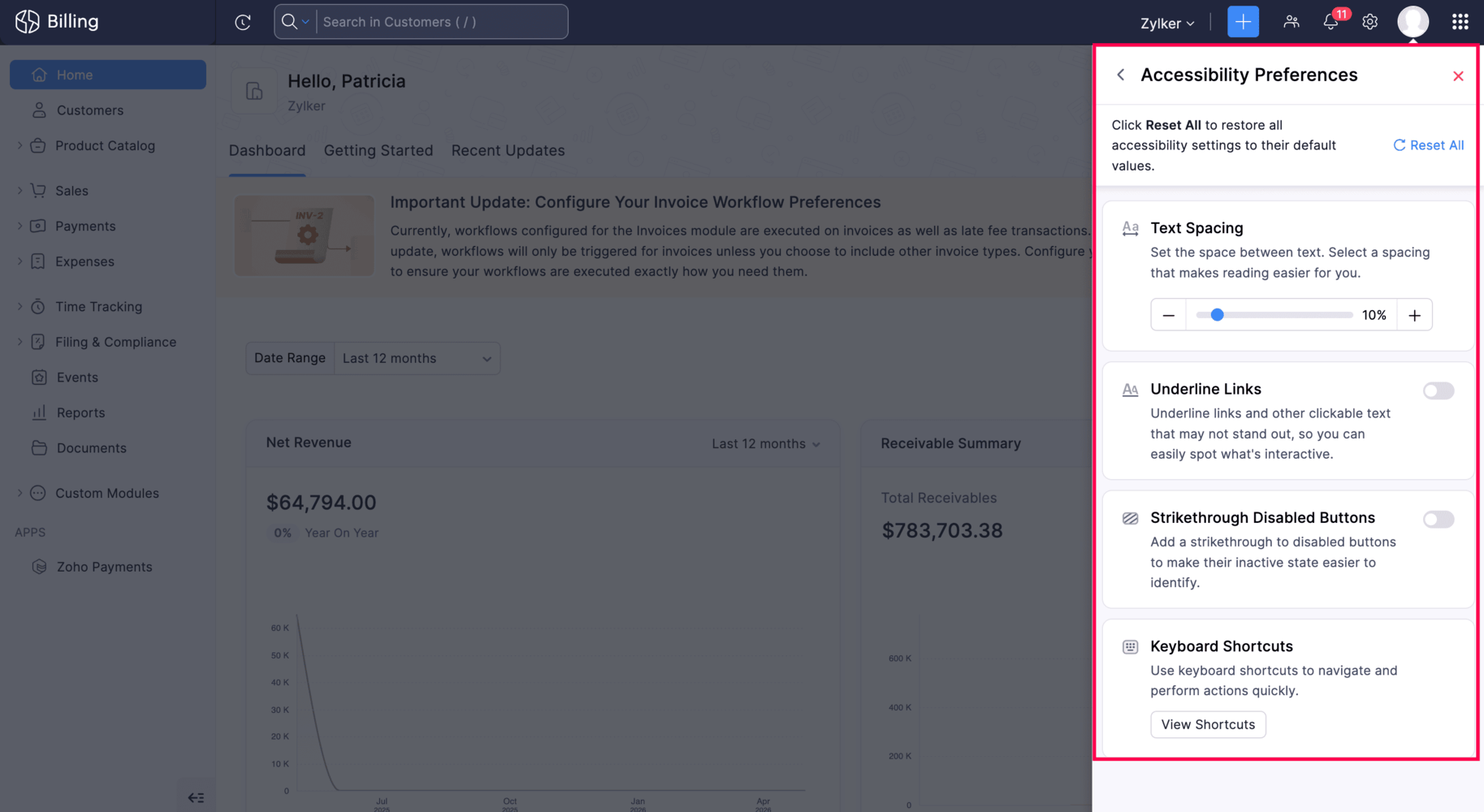
Zoho Billing now includes accessibility improvements to support a wider range of users. You can increase text spacing for more comfortable reading, underline links so interactive elements are easier to spot, and apply strikethrough formatting on disabled buttons so the interface communicates more clearly.
To set this up, go to your profile in the top right corner of your organization and select Accessibility Preferences.
Display Organization Details in Report Exports
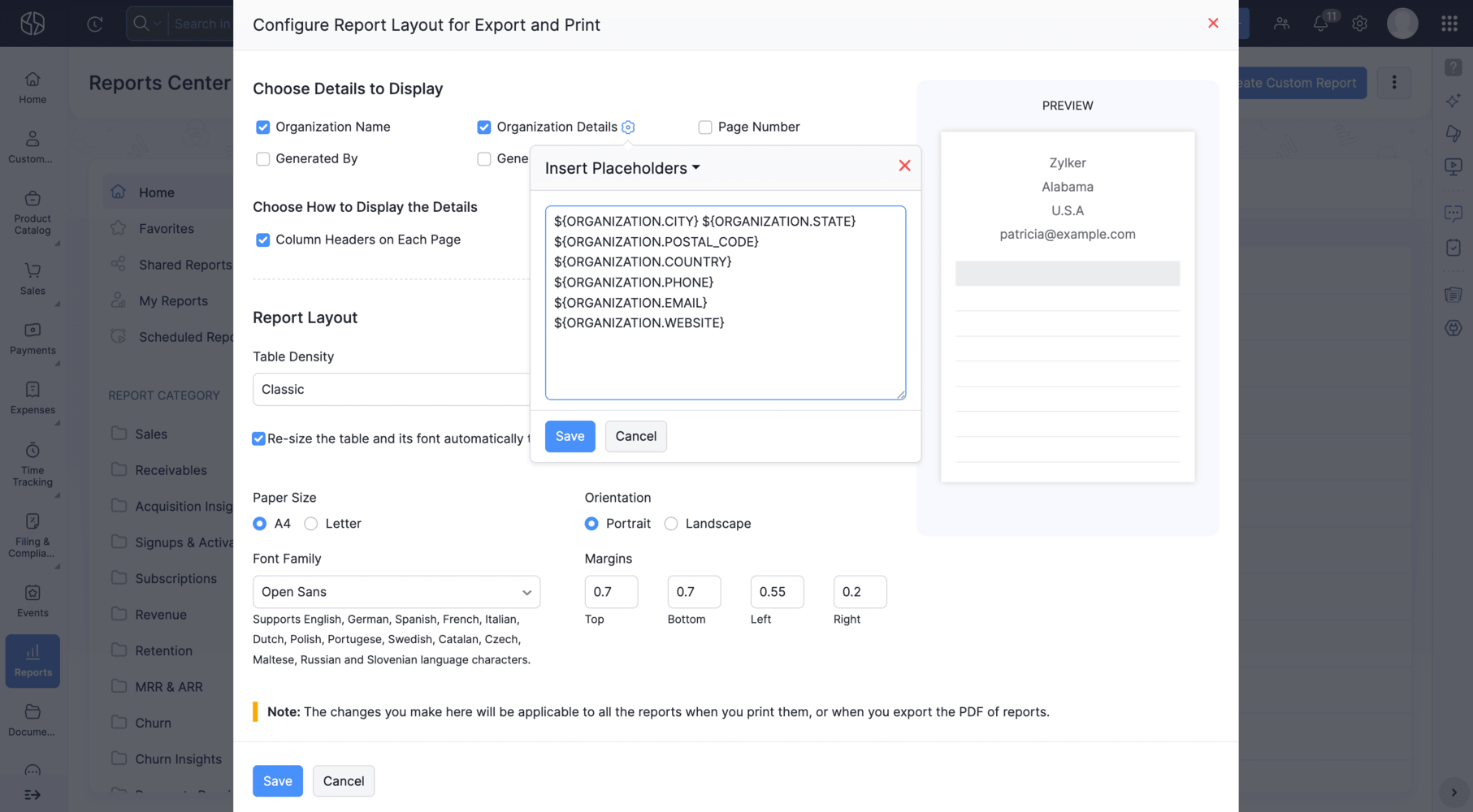
With Zoho Billing, you can now include your organization's information directly in your reports' export file.
To enable this option, go to Reports, click the More icon > Configure Report Layout, check Organization Details, and click the Settings icon.
Record Statutory Dates on Credit Notes [Germany Edition]
Credit Notes in the German edition now support Supply Date, Service Start Date, Service End Date, and Transaction Posting Date as system custom fields. These dates carry over automatically when you convert a credit note to an invoice, create a correction invoice, or generate a cancellation invoice; helping you stay compliant without manual efforts.
To enable these fields, go to Settings > Credit Notes under Sales > Field Customization and select the relevant custom field.
Scan Barcodes to Fill Line-Items in Custom Modules
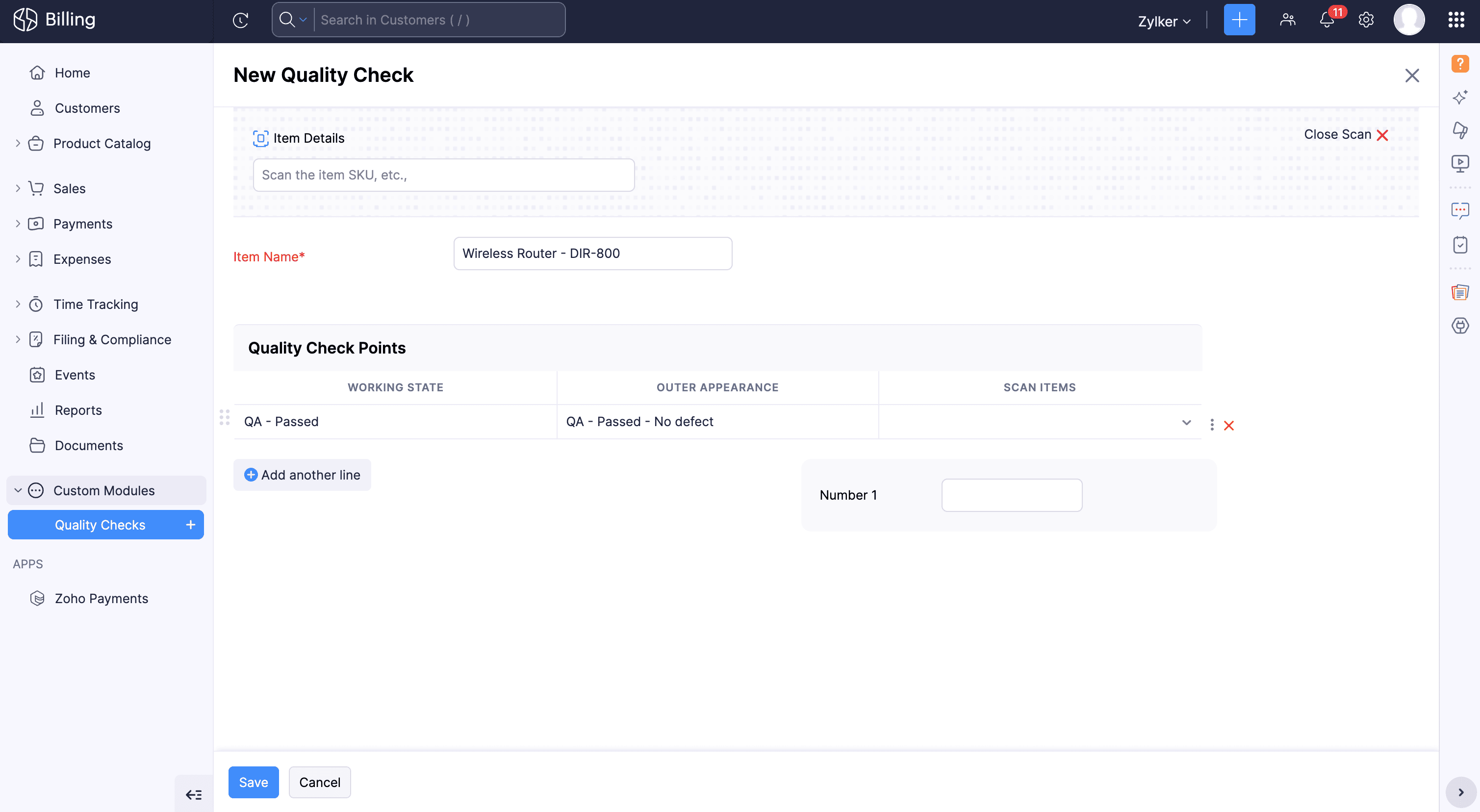
Zoho Billing now supports Scan Item feature for custom tables. Now you can scan a barcode directly within a custom table in a custom module, and Zoho Billing will automatically populate the corresponding item via the lookup field. While creating a record, click Scan Itemabove the custom table to get started.
Note: This feature is available only for plans that supports custom modules.
Here's how you can add this feature to your custom table, go to Settings > Custom Module > Add Lookup as a column to your table. You can also customize the header name and click Save.
Ready to explore? Start trying these out and let us know how they're working for you. Have questions? Our support team at
support@zohobilling.com is here to help.
Recent Topics
Kaizen #250: Introducing write-enabled Queries: Auto-populating lookup fields during Kiosk-driven Blueprint transitions
Hello Everyone, Welcome back to an exceptional edition of the Kaizen series! Today marks Kaizen #250, an exciting milestone in our journey of exploring, learning, and building with Zoho CRM. Over the past 249 editions, we've covered a wide range of features,
How to automatically update a % field according to a dropdown field in the Quote table
Hello there, I have following couples: Success % Status 0% NP 30% No Feedback 50% PR 80% Opp. Concreta 100% A I would like the Success % field (percent) to automatically update based on the item of the Status field (dropdown). The fields are within the
Support for tags on mobile apps?
Hi, please could you suggest when support for tags on the mobile apps is coming?
Zoho Social API for generating draft posts from a third-party app ?
Hello everyone, I hope you are all well. I have a question regarding Zoho Social. I am developing an application that generates social media posts, and I would like to be able to incorporate a feature that allows saving these posts as drafts in Zoho Social.
mail did't send for particular email
Group settings in Zoho Mail: Manage members, moderation, and spam controls for your organization's groups
When teams rely on group email addresses like team@org.com, hr@org.com, or sales@org.com, managing them without clear controls leads to unapproved senders, flooded inboxes, and no accountability over what gets delivered. Zoho Mail's Group settings in
Update to Free plan attendee limit
Hi everyone! A quick update about Zoho Webinar's Free plan. We’ve adjusted the Free plan attendee limit from 100 to 20 attendees. Everything else in your Free plan stays the same; you'll continue to have access to all your existing features. If your webinars
Possibility to modify a standard wedget to create my own customized wedget
Below is the std wedget available for dashboard which is great to show the the overdue, current, and all tasks as well as issues for each team member. My problem is this; The list of users cannot be edited (there are admin users which are not relavant
Feature Request: Include Creator-applicable Deluge updates in the Creator Release Notes
I'd like to put forward a suggestion about how Deluge updates are surfaced to Zoho Creator developers, and I'm hoping the Creator team will consider it. Zoho Creator is built on Deluge. Every workflow, custom function, validation and schedule we write
Add home page or dashboard in CRM customer portal
is it possible to add home page or dashboard in CRM customer portal?
Close task on Completion Date entry
This discussion is similar to my issue: "backdated-task-completion-date" discussion Scenario: A bunch of tasks have been completed. But, they have not been closed. Time goes by You finally get around to closing those tasks Projects assigns the date the
Introducing Color and Order Preferences for Blueprint Transitions
Blueprints exist to improve the efficiency of your company's processes and ensure compliance — but only if your users follow them promptly. More often than not, your users may find it challenging to adopt your processes and follow through on them, especially
Groups and Moderation
Hi, I have set up a Group in my organisation but am having trouble with moderation. The members are a mix of addresses within the organisation and external emails addresses. The issue is how to set moderation to be off whenever any of the members sends
Introducing Radio Buttons and Numeric Range Sliders in Zoho CRM
Release update: 1. 2 March 2026: Currently out for CN, JP, AU and CA DCs (Free and standard editions). For other DCs, this will be released by mid-March. 2. 26 March 2026: CA, SA, AU, JP, CN DCs - Free, Standard, Professional, Enterprise, Ultimate, CRM
Zoho CRM Sandbox now supports integrations
Hello everyone, We are now expanding Zoho CRM Sandbox to support integrations with other Zoho products. You can connect, configure, and validate the behavior of your integrated tools within a safe, isolated environment - testing end-to-end without touching
Archiving Contacts
How do I archive a list of contacts, or individual contacts?
Introducing the New Zoho Assist Quick Support Plugin
We are thrilled to announce the new Zoho Assist Quick Support Plugin, the upgraded and enhanced version of the Zoho Assist Customer Plugin. This new plugin allows organizations and IT administrators to deploy it directly onto their customers’ devices,
What's New - June 2026 | Zoho Backstage
Hello everyone! We’ve rolled out a new set of improvements across Zoho Backstage to help you manage events more efficiently and provide a better experience for your attendees. Take a look at what’s new in this month’s update. Assign attendees later and
More Zia AI capabilities are included across additional Zoho Desk editions
Hello everyone, We are expanding the availability of AI-powered features in Desk to the other paid subscriptions from 7th July 2026. Right now, the following AI-based features are available for Enterprise edition users: Intelligence: Sentiment analysis,
Summer release '26 should be called Enterprise Summer Release '26
Summer release '26 should be called Enterprise Summer Release '26 because almost all updates or the more useful ones, are limited for Enterprise subscriptions. us with Basic or Premium susbcriptions are basically left in the cold.
Previous conversation title on new messenger widget translation
The title of previous conversations title on the new messenger widget personalisation appears in english even when spanish is selected as default language
Export Tickets from the Help Center
Hello everyone! We are now allowing end users to export tickets directly from the help center. The ticket export allows users to: Filter tickets by Department, Priority, and Account before exporting. Download files from Export History (Setup > Data administration
Account Duplication Control in Zoho CRM
The Goal Prevent users from creating duplicate Account records in Zoho CRM. Accounts should be sourced from ERP and synced into Zoho—no. Allow to create Accounts if they don't exist in our ERP. What I've Implemented removed Account creation permissions
Error 1011 saving website personalisation — blocking all changes (corrupted "home_page.content" field)
When trying to save changes under Settings → Brands → MY COMPANY → Website → Personalisation → Messenger, I receive the following error: "Either the request parameters are invalid or absent" upon checking on the developer console of the browser I get
Canvas View: Add font family selection (incl. Google Fonts / Hebrew & RTL fonts)
Hi Zoho CRM team, The Canvas design suite (List View, Tile View, Table View and Record Detail) currently allows customizing font weight, size, color, alignment and case - but there is no option to choose the font family. All text is rendered in the built-in
This user is not allowed to add in Zoho. Please contact support-as@zohocorp.com for further details
Hello, Just signed up to ZOHO on a friend's recommendation. Got the TXT part (verified my domain), but whenever I try to add ANY user, I get the error: This user is not allowed to add in Zoho. Please contact support-as@zohocorp.com for further details I have emailed as well and writing here as well because when I searched, I saw many people faced the same issue and instead of email, they got a faster response here. My domain is: raisingreaderspk . com Hope this can be resolved. Thank you
Issue embedding image Zoho Books email signature
I am trying to embed my company logo to my email signature using the image url tool on the settings but I keep getting the following error: Enter a valid public image URL I am using a public link from either WorkDrive or OneDrive and I still get the same
E-Mail Distribution List
How do I create an e-mail distribution list in Zoho Mail?
Tip #80- Secure Connect: Add an Extra Layer Before You Connect – 'Insider Insights'
Tip 80 – Secure Connect: Add an Extra Layer Before You Connect – 'Insider Insights' Hello Zoho Assist Community! Picture this: your support team relies on unattended access to keep the business running. Servers need overnight patches. Remote workstations
Business Whatsapp is not Showing
I’ve attached a screenshot from the Zoho CRM Android app when clicked the call button. It is showing Personal WhatsApp, which is not installed on the phone. Also, the installed WhatsApp Business account is not showing.
How to access a unified inbox for more than one zoho accounts (using paid workplace services)
Hello, we are using zoho for a few months and also suggest your services, setting them up for our clients. Several from our clients, our company as well, use more than 1 email addresses. Using the web version, we are only able to add them as accounts
Modify a standard wedget to create my own customized wedget ?
Below is the std wedget available for dashboard which is great to show the the overdue, current, and all tasks as well as issues for each team member. My problem is this; The list of users cannot be edited (there are admin users which are not relavant
Advanced Formatted Resume Templates for Applications
Advanced Formatted Resume Templates can now be created and used directly from the Applications module, with support for application module fields. Until now, Advanced templates were limited to the Candidates module. That meant resumes generated from Applications
Zoho Books | Product updates | July 2026
Hello users, We’re excited to bring you the latest updates in Zoho Books for July 2026! This month's release introduces Terminal Payments, CMP-08 filing for composition taxpayers, SEPA Credit Transfer support, the new Receipts and Payments Report for
Boost your CRM communication with new font types, sizes, and default reply-to options while composing emails
Hello Everyone, We’re excited to introduce a series of impactful enhancements to the email composer settings in Zoho CRM. These updates enable you to personalize and optimize your customer interactions with greater efficiency. So what's new? Add custom
Zoho CRM Community Digest - June 2026| Part 2
Hello Everyone! Welcome to the second half of our June Zoho CRM Community Digest! We are keeping the momentum going with powerful updates to filter out unnecessary email syncs, a revamped CRM Import tool, smarter follow-up updates in cadences, and Zia
Migrate from Zoho Mail to G Suite
I am unable to find any documentation on how one can migrate from Zoho Mail to another platform, like G Suite or Office 365. Please point me to the right documentation. Thank you.
Zoho Desk Android app - Option to set an email template as default
Hello everyone! We have enhanced the Email Template section in our app by introducing the ability to set a template as default directly from the Zoho Desk Android app, making it easier to access your preferred template without repeated manual selection.
Zoho Desk Android and iOS app update: Odia Language
Hello everyone! We have now brought in support to access the Zoho Desk app in Odia language. Please update the app to the latest version directly from the Play Store/ App Store or using the links below: Zoho Desk - Play Store Zoho Desk - App Store Once
How to check Leads with no Task (open activity)
Hi everyone, I was wondering if there’s a way to view leads that don’t have any tasks assigned or open activities linked to them.
Next Page