What's New in Zoho Billing - November 2023
Hello everyone,
This month's updates add more flexibility to collecting payments, along with improvements to reports and custom fields. Let's dive in!
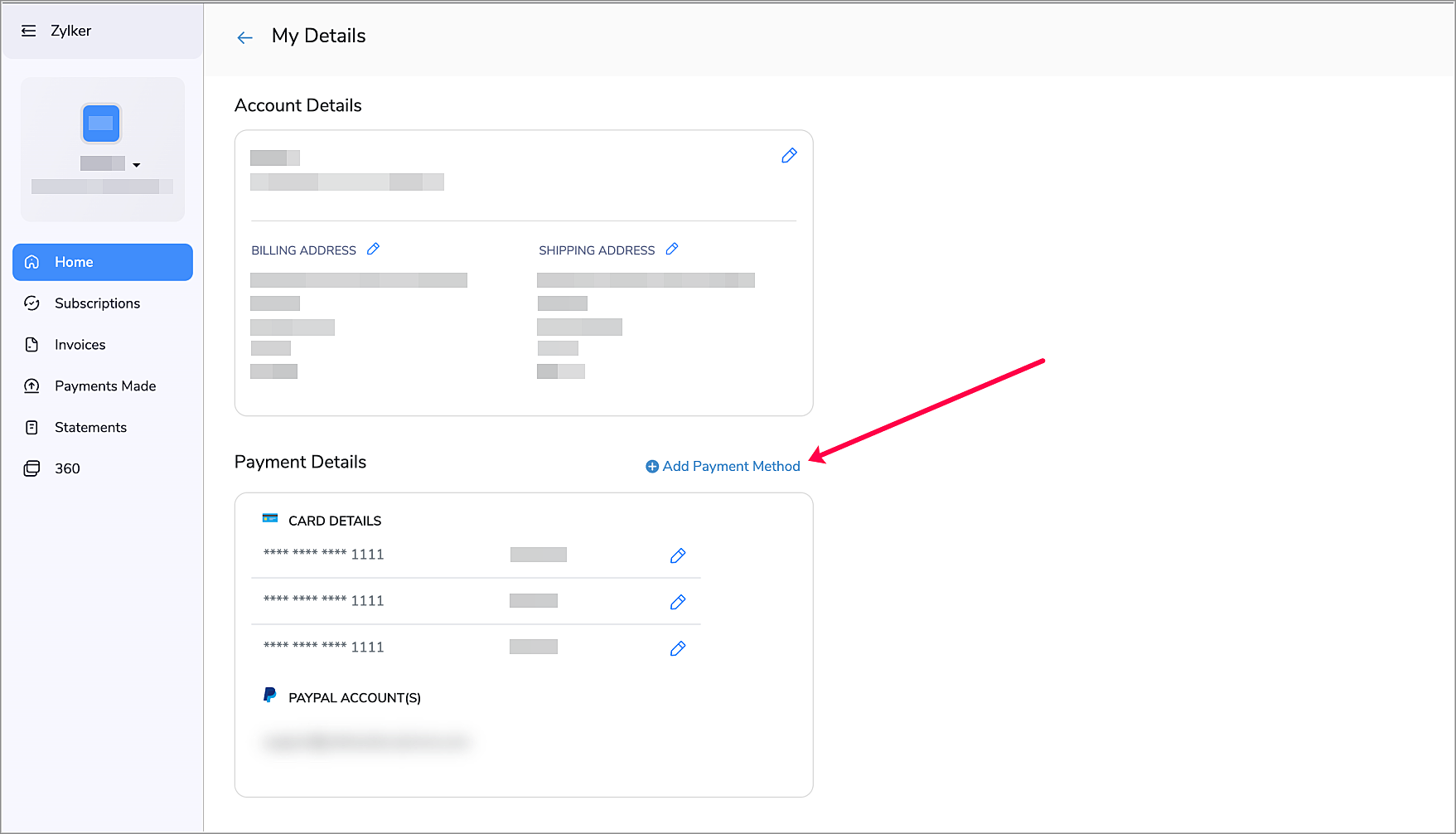
Add Payment Methods from the Customer Portal
Make the payment process more convenient for your customers by allowing them to add payment methods from the Customer Portal. This way, your customers can add new methods when their existing payment methods are about to expire, thus ensuring a smooth auto-charge experience. To enable this:
- Navigate to Settings > Customer Portal > General.
- Enable Allow customers to add payment methods.
Now, your customers will be able to add a new payment method by clicking + Add Payment Method from the Home Screen of their Customer Portal.
Revamped Net Revenue Report

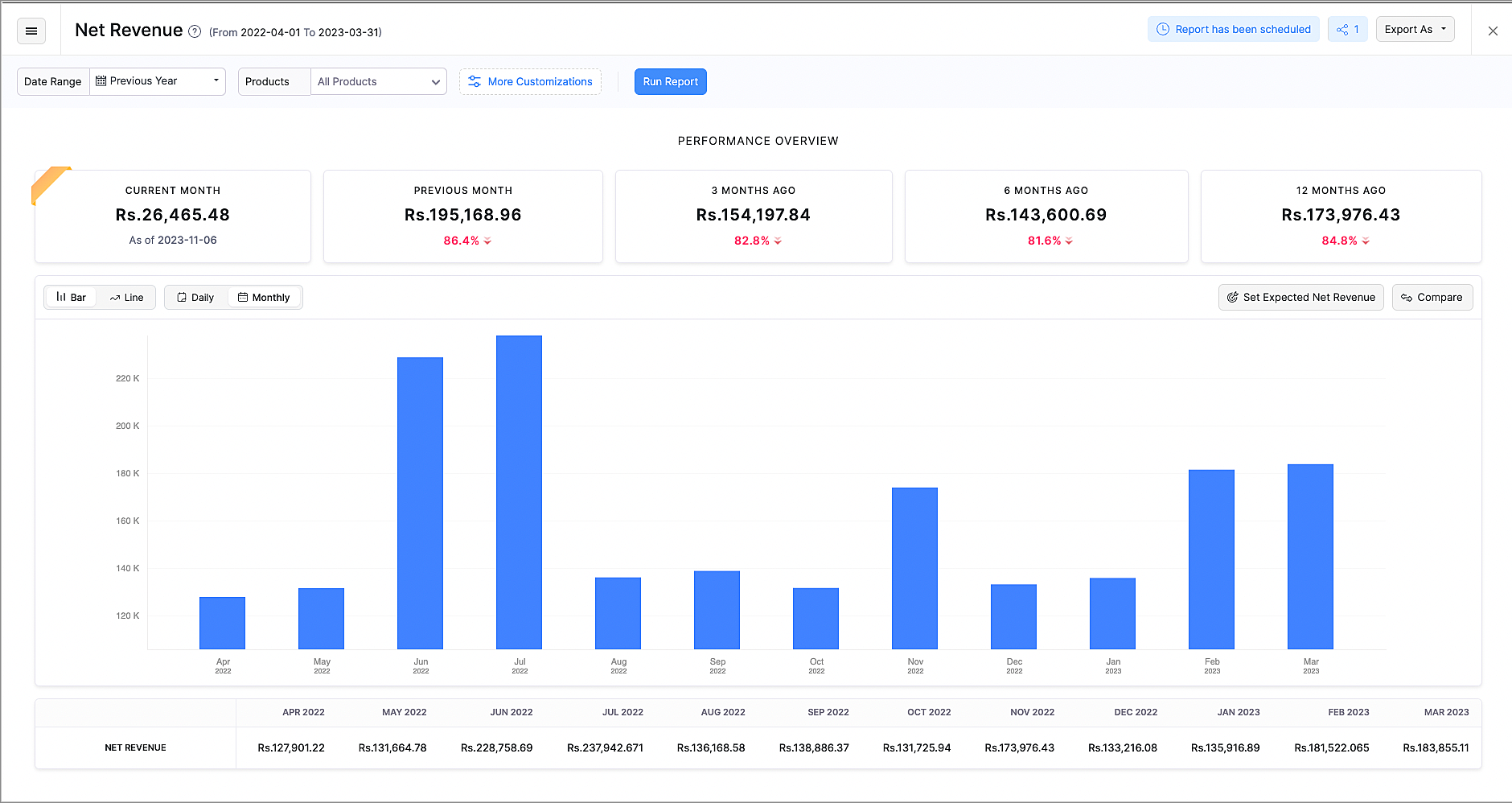
The revamped Net Revenue report gives you more insights about your organization's net revenue.
- The newly added Performance Overview section displays how your business is performing in the current month, compared to the previous months.
- The existing line chart can now also be viewed as a bar chart according to your preference.
- You can also view the data from the chart in the breakdown table below the chart.
- Customize this report with Advanced Filters, such as Country or Customer Name.
- Compare revenue based on products, plans, countries and dates to get further insights.
- You can now export this report as XLS and XLSX, along with CSV.
Make Payments Mandatory for Subscription Updates

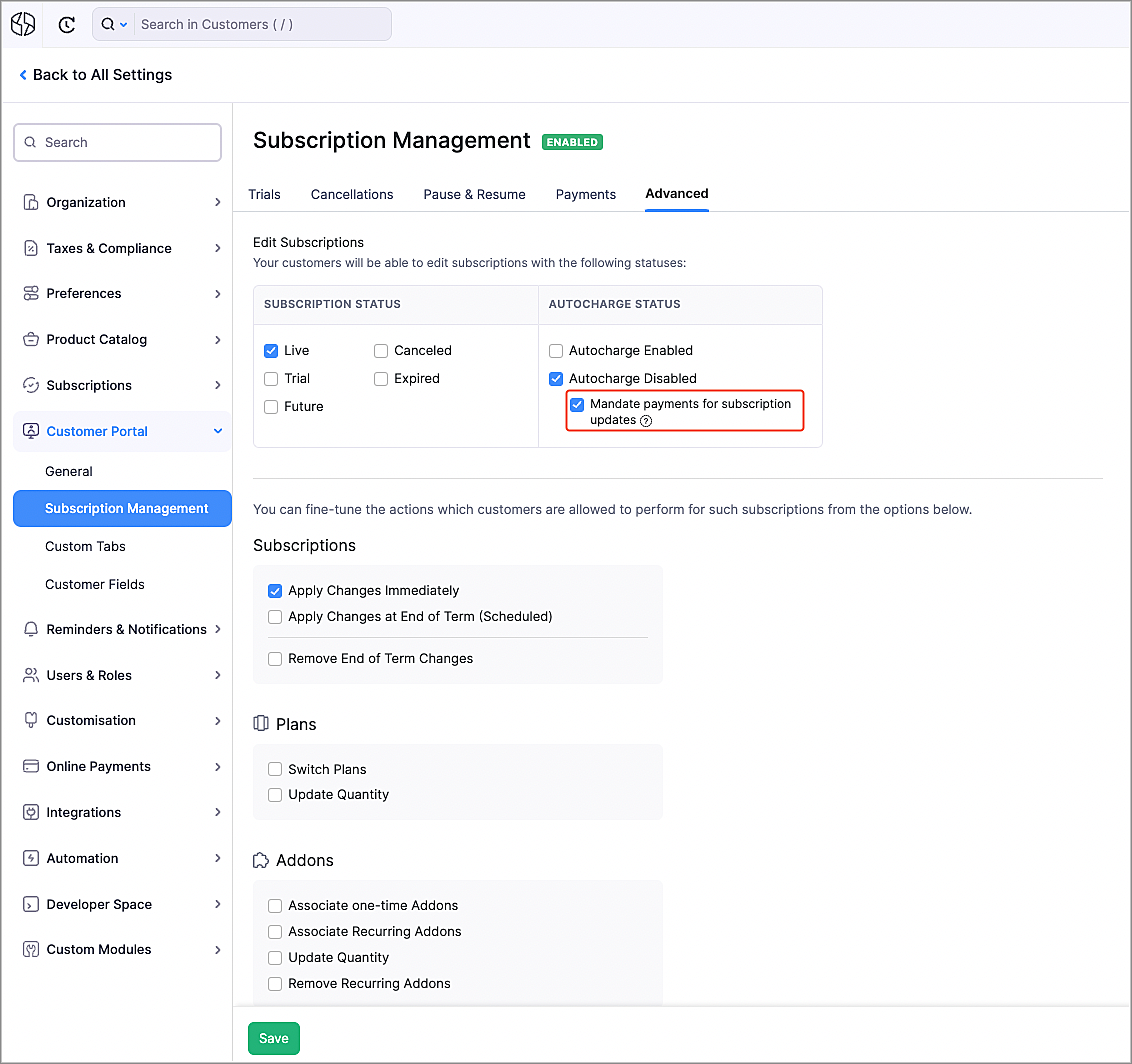
You can get more control over subscription updates in the Customer Portal by making payments mandatory. Once enabled, when your customers make changes to their subscriptions, such as upgrading plans or purchasing addons that would require additional payments, they would have to pay first. To enable this:
- Navigate to Settings > Customer Portal > Subscription Management.
- Go to the Advanced tab.
- Mark the Mandate payments for subscription updates option.
Note: The payment method that is used for such payments will be associated to the subscription. Autocharge will be enabled automatically for this subscription, if the updated payment method supports it.
Prevent Duplicate Values for Custom Fields
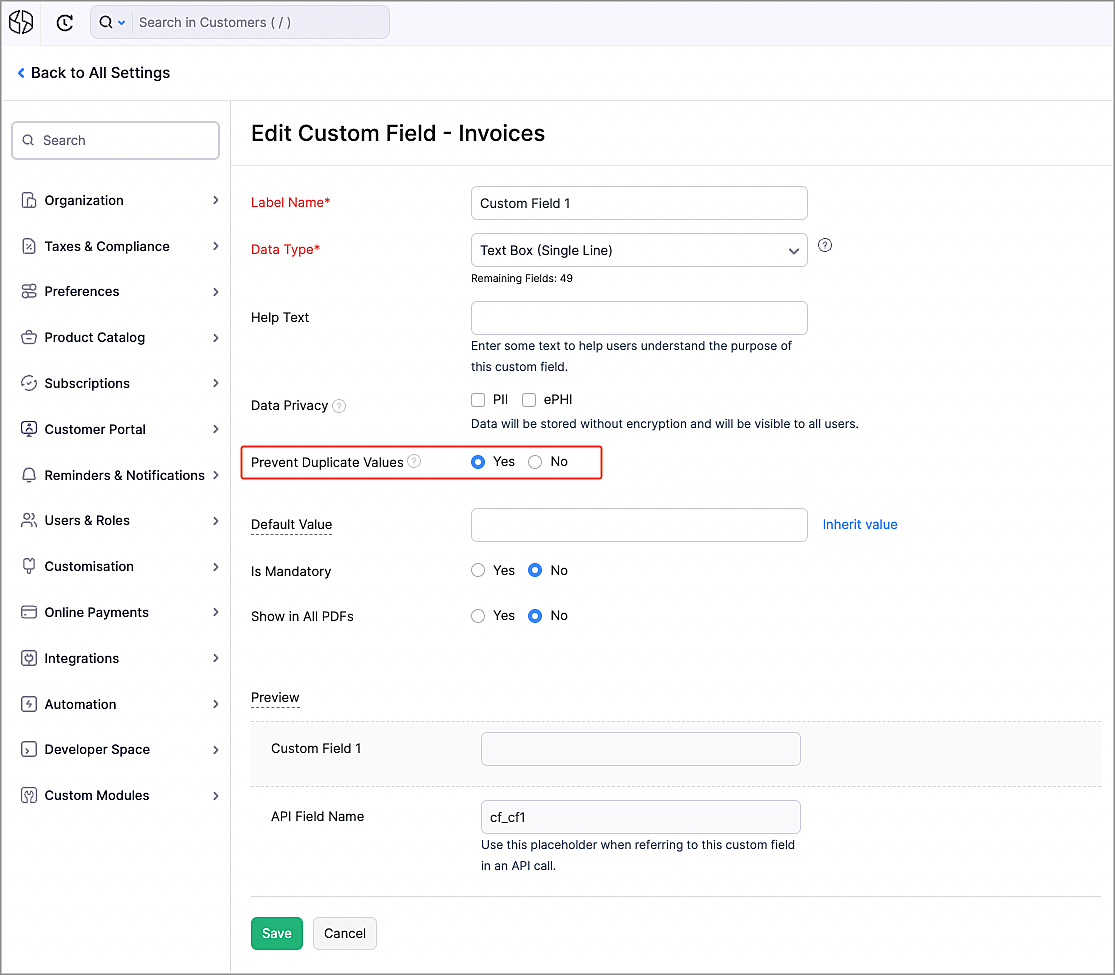
There might be scenarios where you might want unique data for certain custom fields, such as user names or license keys. Now, you can make sure that all the values for the custom fields are unique by selecting Yes next to Prevent Duplicate Values while creating or editing a custom field. Once enabled, when a duplicate value is entered for a custom field, an error will be shown, asking you to enter a unique value.
Zoho Notebook Integration

Zoho Notebook is a general purpose online note-taking app, that lets you organize notes and media in one place. You can now integrate with it to take notes, create checklists, upload images and attach documents to Zoho Notebook directly from Zoho Billing.
To integrate with Zoho Notebook:
- Navigate to Settings > Integrations > Zoho Apps.
- Click Install next to Zoho Notebook.
- Click Install in the popup that appears.
Now, you can add notes from Zoho Billing by clicking the Zoho Notebook icon on the right.

Multi-page Hosted Payment Pages
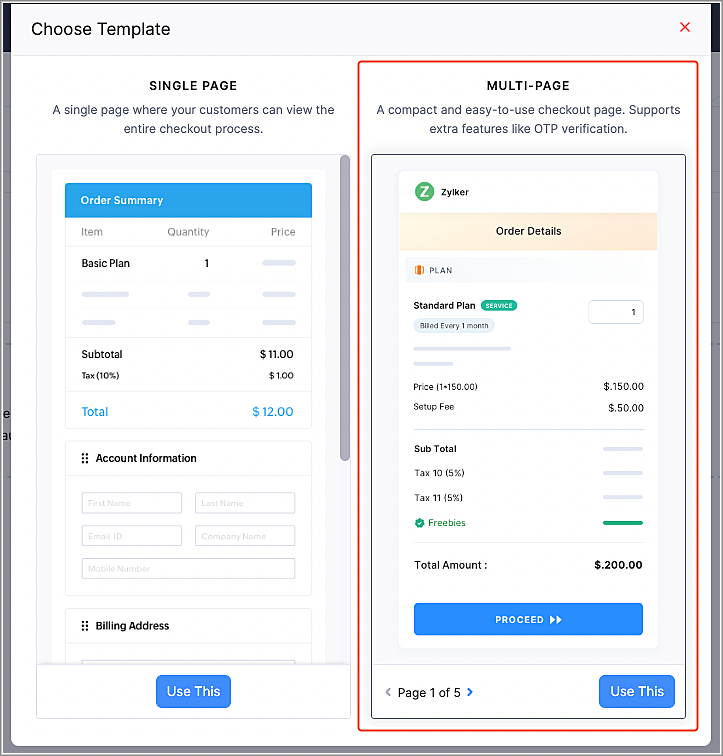
We have added a multi-page template for the Hosted Payment Pages to simplify your payment collection process.
- OTP Verification - You can now mandate your customers to go through OTP verification for their email address. This will help to identify returning customers, ensuring that their payments are processed for the correct customer, instead of creating a duplicate customer. The customer's details, such as their saved payment methods and addresses will also be filled automatically.
- Bite-Sized Pages - The checkout process has been split into multiple, neatly categorized steps, instead of all the information in one page.
- Switch Addresses - If your existing customers have multiple saved addresses, they can switch between them.
Note: You can enable multi-page templates for your organization from Settings > Customization > Hosted Payment Pages. For newly-created organizations, multi-page templates will be the default Hosted Payment Page type.
Hosted Payment Page Enhancements
We have enhanced our Hosted Payment Pages to give you more flexibility in your payment collection process.
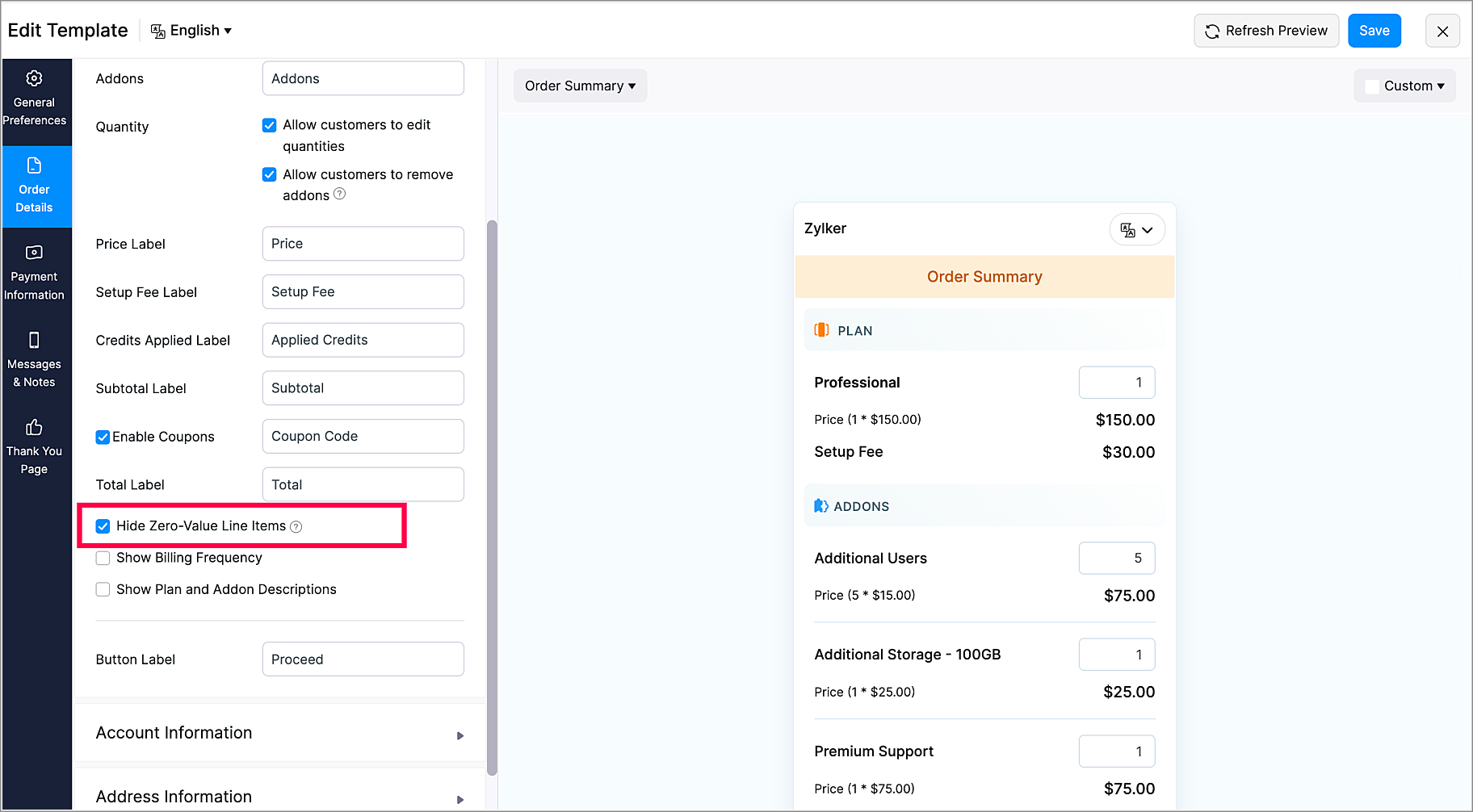
- Show/Hide Zero-Value Items - You can choose to display or hide zero-value plans/addons in the Hosted Payment Pages.
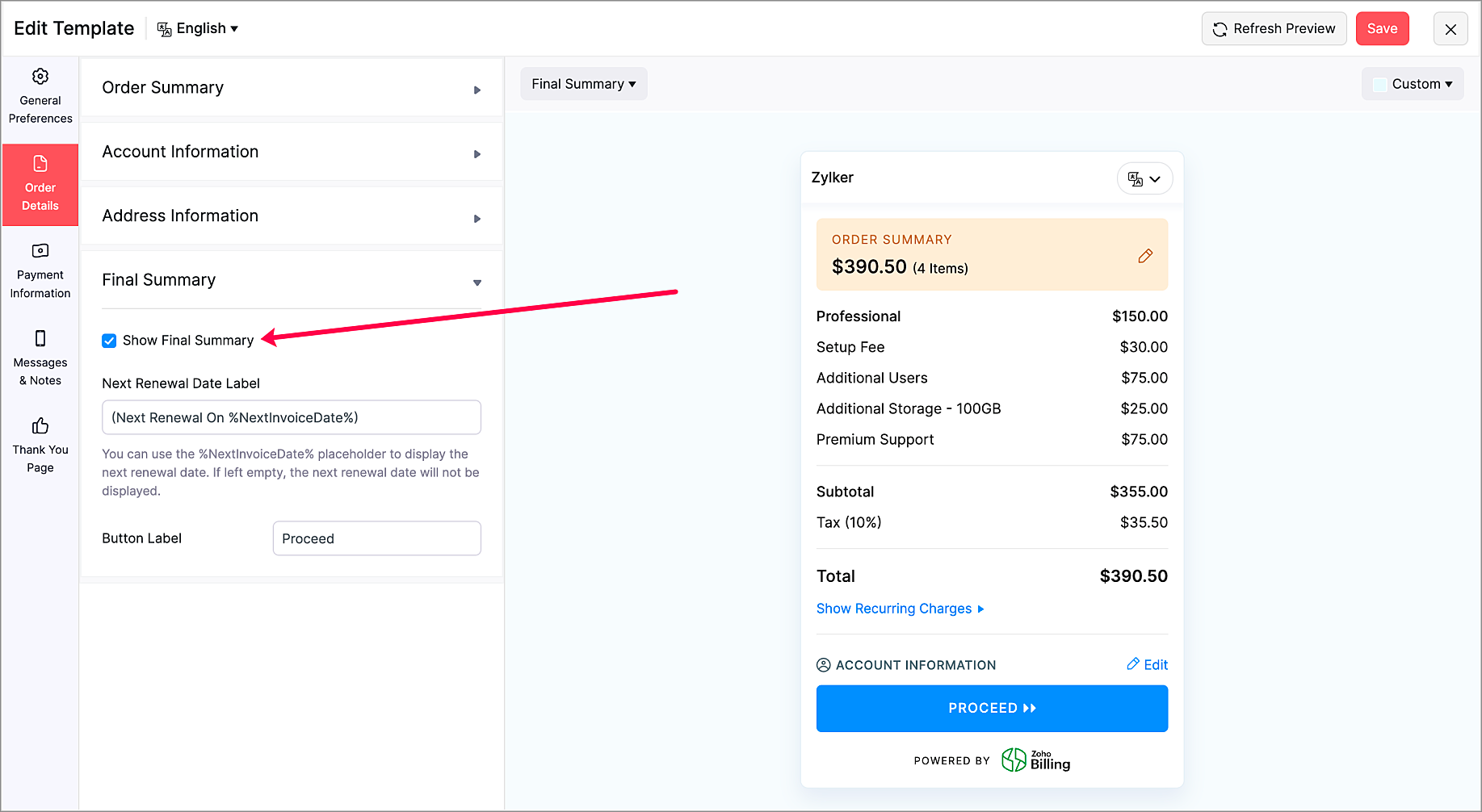
- Show/Hide Final Summary Section - Choose to display or hide the Final Summary section in the Order Details section. This is available only for multi-page Hosted Payment Pages.
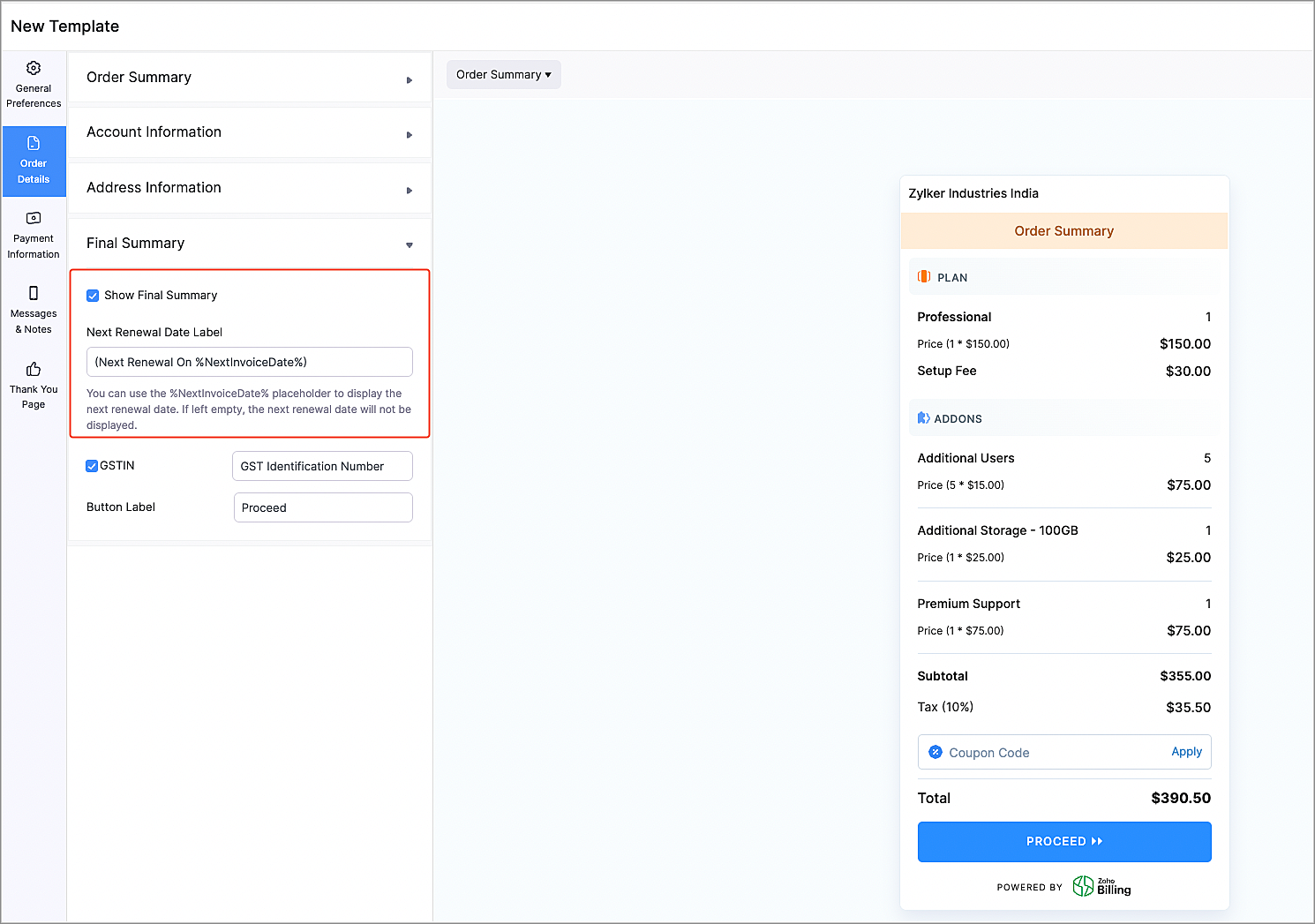
- Next Renewal Date Label Customization - Now, you can choose to display the next renewal date for the recurring charges in the Order Details section. You can also customize the label according to your preferences. This is available only for multi-page Hosted Payment Pages.
Marketplace Extensions
Zoho Cliq Extension
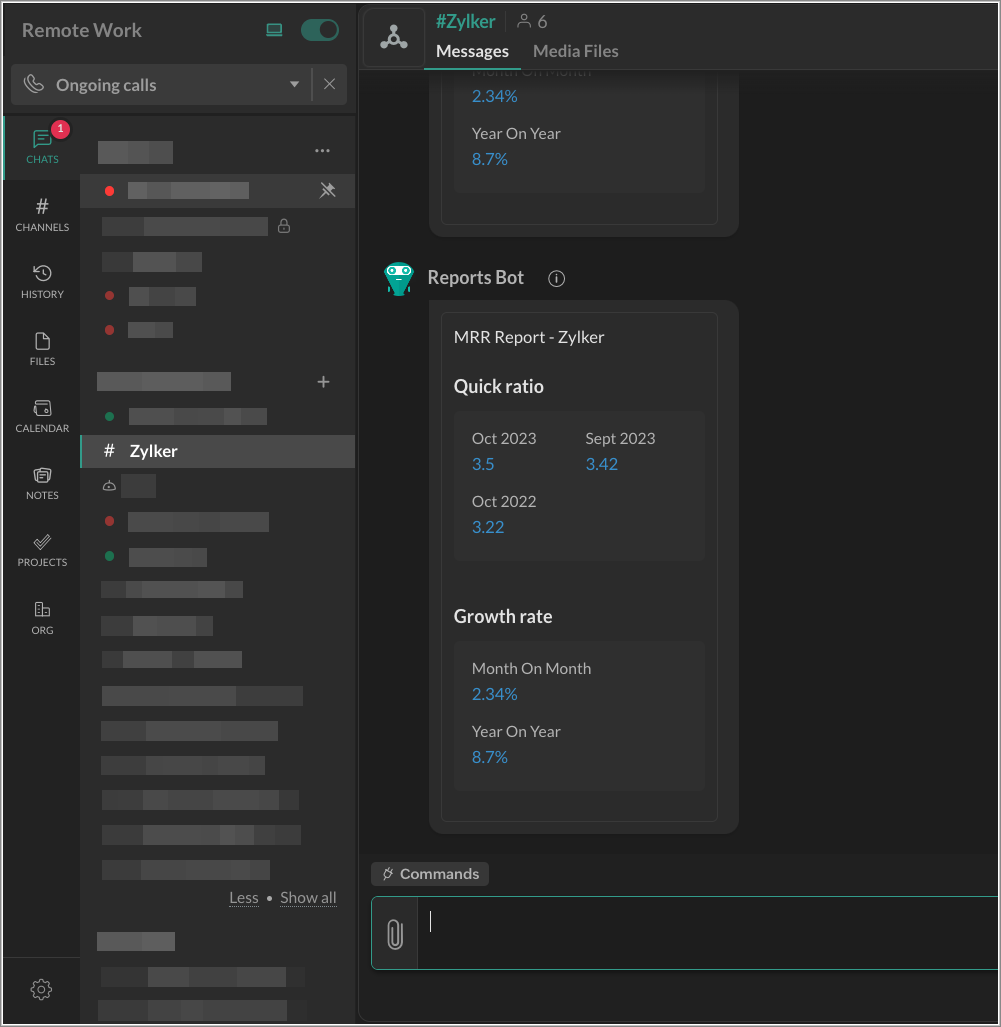
The Zoho Cliq extension for Zoho Billing can show you subscription summary reports for your products in a Cliq channel. Once enabled, you will receive daily notifications about your products' performance for the previous day. You will also receive a short summary of your organization's monthly recurring revenue on the first day of each month.
Telr Extension
Note: This extension was developed by Telr.
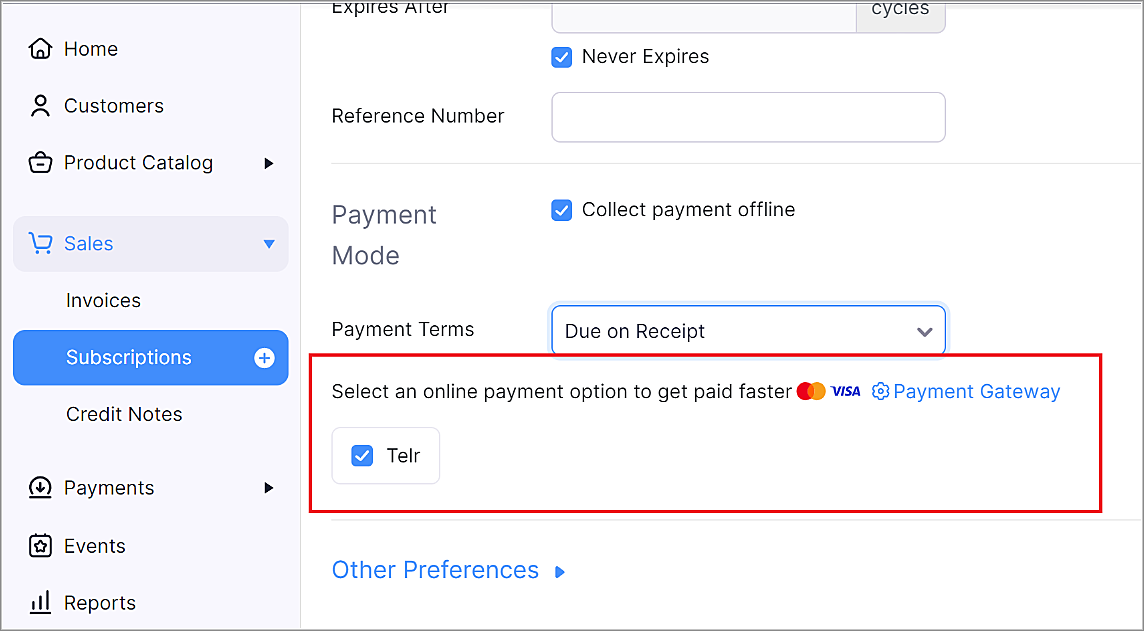
Telr is a payment gateway provider that helps businesses accept and manage online payments. Telr accepts many popular payment methods, such as Visa, MasterCard, American Express, JCB, UnionPay, MADA, STC pay, URPay, SADAD and many more.
Zoho Connect Extension
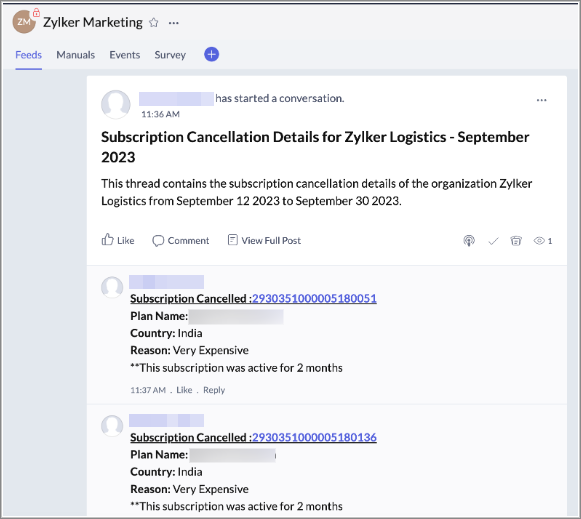
The Zoho Connect extension for Zoho Billing allows your business to track details of subscriptions that were cancelled by your customers in Zoho Connect. Once enabled, every time a subscription has been cancelled, details about it will be posted as a comment in a thread on Zoho Connect.
You can visit our What's New Timeline to view a list of all our previous updates.
We'd love to hear what you think about these features in the comments below. If you require any assistance, please write to our support team at support@zohobilling.com – we'd be happy to help!
Best regards,
The Zoho Billing Team
Topic Participants
Dwaipayan Bose
Mikhail Koval
Hari Hara Sudhan. S
Decorus-Pms
Sticky Posts
What's New in Zoho Billing - February 2024
Hello everyone, We are excited to share the first set of updates for Zoho Billing in 2024. Read along to know more about a wide range of updates, from the Aging Summary in customer statements to Apple Pay support in Stripe. One-Time Invoice with PlansZoho Finance Workshop 2023 is coming to the USA. Get exclusive training on Zoho Finance apps, one-on-ones, and more.
Hello all, We'd like to invite you to our biggest Zoho Finance workshop in the United States. After a brief break, we are excited to be back. This year, we're bringing together our customers and community members for two days of curated hands-on sessions,Zoho Subscriptions wins IDC's 2020 SaaS CSAT Award for Subscription Billing
Dear customers, We're excited to share that Zoho Subscriptions has won IDC's 2020 SaaS Customer Satisfaction Award! As a team, we cherish each and every milestone with our customer community. And this particular award, focusing on customer satisfaction,Introducing: SMS notifications via Zoho Subscriptions
Dear customers, We hope you are doing well! We are happy to announce that you can now send SMS notifications to your customers right from Zoho Subscriptions. To facilitate this, we've integrated with Twilio, a leader in the business communication space.What's new this December in Zoho Subscriptions
The year is almost over and we here at Zoho Subscriptions have released new features and updates on the month of November. Let's take a look at the features we have worked on in the past month. Zendesk Integration The Zoho Subscriptions app for Zendesk allows your customer support executive to access customer details in an instant. You will be able to view the customer information from Zoho Subscriptions right from your ticket view. On enabling the integration, you will be able to: Get your customer
Recent Topics
Extensions 101 webinar series: Build, integrate, and monetize with extensions
Attention developers! Are you ready to take your extension development skills to the next level? We're excited to bring back the Extensions 101 webinar series with an expanded lineup of Zoho products and an introduction to more platform features. LastCustom Related List Inside Zoho Books
Hello, We can create the Related list inside the zoho books by the deluge code, I am sharing the reference code Please have a look may be it will help you. //..........Get Org Details organizationID = organization.get("organization_id"); Recordid = cm_g_a_data.get("module_record_id");Where are recordings stored?
I have hosted a couple of test meeting, used the "record" button to start and stop the recording but I am unable to find where are those recordings saved? Can anybody help? ThanksZoho Desk's integration with Microsoft PowerBI delivers advanced analytics insights
Hello everyone, Gaining advanced insights through reports and dashboards is one of the critical requirements of every business. In addition to key metrics tracked in Zoho Desk, such as agent performance, SLA adherence, and ticket lifecycle, businessesCreate static subforms in Zoho CRM: streamline data entry with pre-defined values
Last modified on (9 July, 2025): This feature was available in early access and is currently being rolled out to customers in phases. Currently available for users in the the AU, CA, and SA DCs. It will be enabled for the remaining DCs in the next coupleIMAP error message in Zoho mail
I cannot send emails today. Everything fine for years until today. Get a message: "You are yet to enable IMAP for your account. Please contact your administrator". Does anyone know how to correct this?IMAP stopped working today
Hello! I've been a paid customer for more than 10 years, IMAP was always working fine. But today this is the error I've got on my iPhone: I've tried toggling the IMAP for my account (Mail -> Settings -> Mail accounts) off and on again, but that did notAre custom portals accessible on the Zoho learn smartphone app?
In other words, can users external to my organisation, once signed up, use the app in the same way as internal users? ThanksZoho Books/Inventory - Update Marketplace Sales Order via API
Hi everyone, Does anyone know if there is a way to update Sales Orders created from a marketplace intigration (Shopify in this case) via API? I'm trying to cover a scenario where an order is changed on the Shopify end and the changes must be reflectedConditional Layouts On Multi Select Field
How we can use Conditional Layouts On Multi Select Field field? Please help.Multiple columns in a form
I am evaluating Zoho Creator. However, I am seeing almost no layout control on a form. Just a basic 1 or 2 column format that is then imposed on the entire form. That's not going to work for many, many real world cases. We need multiple columns per line, and we need each line/section to occupy a single column or be able to span the columns. Someone please tell me that I'm missing something and the capability is actually there.Global search
Hi! I think it would be great to have a global search that would give you results from all records of a database, no only for a single field of a single form as we have now. Thanks!Any insights about API/v2? Having problem for a while.
I don't know why it is throwing a 404 error, my report name is correct. Has someone had this issue and how you fix it?Edit QR code with redirect to form
Guten morgen, wir haben ein Formular Reklamation_erstellen. Dort soll ein QR Code erstellt werden, der im Lieferschein angezeigt wird. Beim Scannen auf dem soll das jeweilige Formular zum BEARBEITEN geöffnet werden. Leider bekomme ich es nur so hin, dassGetting all the ingredients together for baking an app
Good day everyone. After reading a lot of the help docs and watching videos, I now started on my app. To prevent hours and hours wasted on going down the wrong track, I would like some clarification on the following. But first some background: I haveHelp Needed with Configuring ZC Microservice
I'm attempting to create a simple microservice, but am running into problems with scope and auth. Using Custom API Builder, here's my setup: 1. Method: GET 2. Auth: OAuth2 3. User Scope: All users 4. Response: Standard 5. Function: A function that returnsCreator Simplified #10: Predefine Form Field Values and Make Them Read-Only for Users
Hey Creators, Ready for this week's tip in the Creator Simplified series? Today, we will explore how to have read only fields in a form. Use Case: Assume a scenario where the default value for a Department field needs to be English Literature, but youZoho Mail : Email Outgoing Blocked
I suddenly received the following message yesterday. I cannot send any mail. Please resolve as soon as possible, I cannot work without sending email. Dear User, We regret to inform you that your email outgoing has been blocked and you will not be ableCreator and Tables
Good day. I am trying to create my first application. I have imported my data into Tables and am creating my app in Creator. I do not see my tables and cannot see how to write forms data to a table. Even the Workflow just uses the form. In one of thecustomer Name and address details
i created one application there is no customer details in that . how to add customer details andRecalculate every row in the subform
Hello, Can anyone help me with a script, please? I have an issue. Sometimes it happens, that in a multi row subform one of the rows show an incorrect row total value. Not really understand how it can happen, if I have a 20 row subform, 19 rows show correctCreating Repeat Forms that remove redundancies
I wanted to understand if you can make multi-layer forms that reduce the need for users to input information in again and again. We want a form that our suppliers fill out per ingredient they sell, and the end result should have the Ingredient (SectionWhat is the difference between the free plan and the mail lite plan?
What is the difference between the free plan and the mail lite plan? How many emails can I send per day?Unblock email
Hi The outgoing mail from a client of me is blocked. I already made tickets and tickets are send to the EU desk but nobody is responding. The problem is already 4 days! There is absolutely no help from the support. I am really not satisfied at all! CanDomain verification failure
Hello Zoho Support, I purchased my domain directly through Zoho Mail, but the domain verification keeps failing with the message “TXT verification failed.” I’ve already waited and retried several times, but it still won’t verify. Could you please manuallyUnable to send message;Reason:554 5.1.8 Email Outgoing Blocked.
My email account is unable to send emails, and I urgently need to use it. How can I resolve this?If there is anything we have done wrong, please let us know in advance so we can actively cooperate to improve. User ID: 850482493URGENT: Email stopped workin - can't access admin panel
For some reason email sending stopped working. When I try to send an email it fails with "Unable to send message;Reason:451 4.7.1 Temporary system error" I can receive email just fine I see in my notifications some errors about the MX records, howeverCan I associate an invoice to a Project after the fact?
We have generated an invoice but would like to assoicate it to a Zoho Project after the fact. Is there any way to accomplish that? Thanks, ScottEmails I send as a cc or bcc NEVER GO THROUGH TO THA RECEIVER !!
every time i send a cc or bcc copy of an email to anyone when I’m using my zohomail.com email - no one ever gets the cc of bcc copy if the email: why???? And i triple check that the email addresses are correct; then i get back an email message (EVERYTIME)Cannot see correct DNS config for mail after moving domain to another provider
I have moved my domain from one provider to another and after that zoho mail stopped working (expected). Problem is, zoho mail admin panel still shows (10 hours after move) that all records are correct while I haven't changed anything in my domain DNSAdd Support for Authenticator App MFA in Zoho Desk Help Center
Hello Zoho Desk Team, We hope you are doing well. We would like to request an enhancement related to security for the Zoho Desk Help Center (customer portal). Currently, the Help Center supports MFA for portal users via SAML, JWT, SMS authentication,Auto-fill Contacts in Zoho Mail not working for me
We just switched to Zoho Mail for our company, and I am noticing that the "auto fill" feature when composing an email -- where the "to" field is autofilled (like in the attachment) from Contatcts works for everyone except me. Any way I might have madeHow to unlink a SAML user from the existing Zoho Desk user (domain change case)
Hi everyone, I’m trying to understand how to handle a situation where a customer changes their company domain. In our setup, users authenticate via SAML, so when the domain changes, the SAML system treats them as a new user. However, in Zoho Desk, I’dPrice Managment
I have been in discussions with Zoho for some time and not getting what I need. Maybe someone can help explain the logic behind this for me as I fail to understand. When creating an item, you input a sales rate and purchase rate. These rates are justRelated to zoho survey
Hi team. I want to know something regarding zoho survey question builder. I have two questions each of dropdown (One answer) - question type. In the first question, there are 16 answer choices and in the second question, there are 3 answer choices. For60 Days Into Zoho - Tiktok Branding Startup -7 Questions?!
Wsp Everybody I co-own a TikTok Branding / Consulting Startup & have been using Zoho for the past 60 days - Am now looking to make our overall operations & processes more Efficient & Effective! Curious to know how others are using the platform & what'sText Message
When trying to sent a text message, it says its an error i should contact a zoho agentZoho POS is now available for Canadian retailers
Hey everyone, We're excited to introduce the all-new Canadian edition of Zoho POS, which helps retail businesses simplify and manage their end-to-end business operations. Start by signing up and exploring the 15-day free trial. Sign up now How does ZohoPayroll In Canada
Hi, When can we expect to have payroll in Canada with booksMass update to change or shift all project dates and keep project structure + shift all sub-tasks dates with main tasks
Most users would expect that if they change the start date of their project then that will be reflected inside the actual project and any project structure would be retained. Additionally if a task list with associated sub-tasks is moved, most users would expect that those sub-tasks would also be moved along with their parent task. This is not the case. For a total Project shift of dates: * the start and end date from > "Edit Project" page can have a radio button added to "shift all project tasksNext Page