What's New - January 2026

What's New - January 2026

Hello Users!

We are starting the year with a strong lineup of updates, marking the beginning of many improvements planned to enhance your analytics experience. Explore the latest improvements built to boost performance, simplify analysis, and help you extract more value from your data.


Archive Data

No more querying all records while generating reports! Analyze data faster and optimize workspace performance with Archive Data. Move older or less-frequently used records out of active tables, and store them securely.
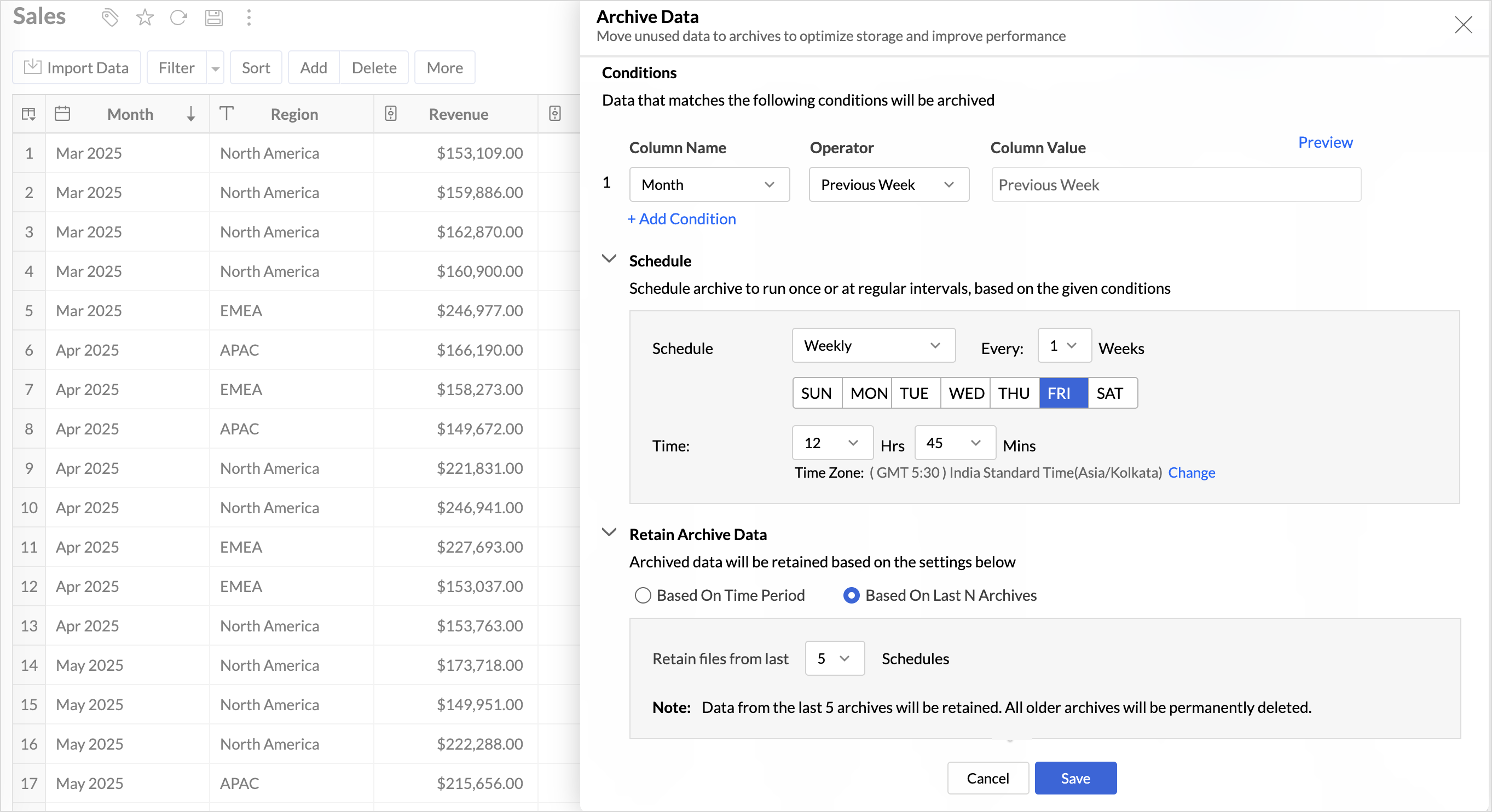

Key Benefits

  • Pay only for what you analyze: Active data is reserved for analysis, while historical data is retained without impacting usage limits.
  • Improved Querying and Faster Analysis: By limiting queries to relevant data, report generation and dashboard loading times are significantly reduced, resulting in faster insights and a more responsive analytics experience.
  • Optimized Storage Usage: Archiving older data helps control table size, preventing unnecessary growth, and better management of row limits.

Learn more.

Organize Views with Tags

Group related views, and manage reports and dashboards effortlessly. Use tags to organize views by teams, departments, projects, or specific use cases, making it easy for users to navigate large workspaces.
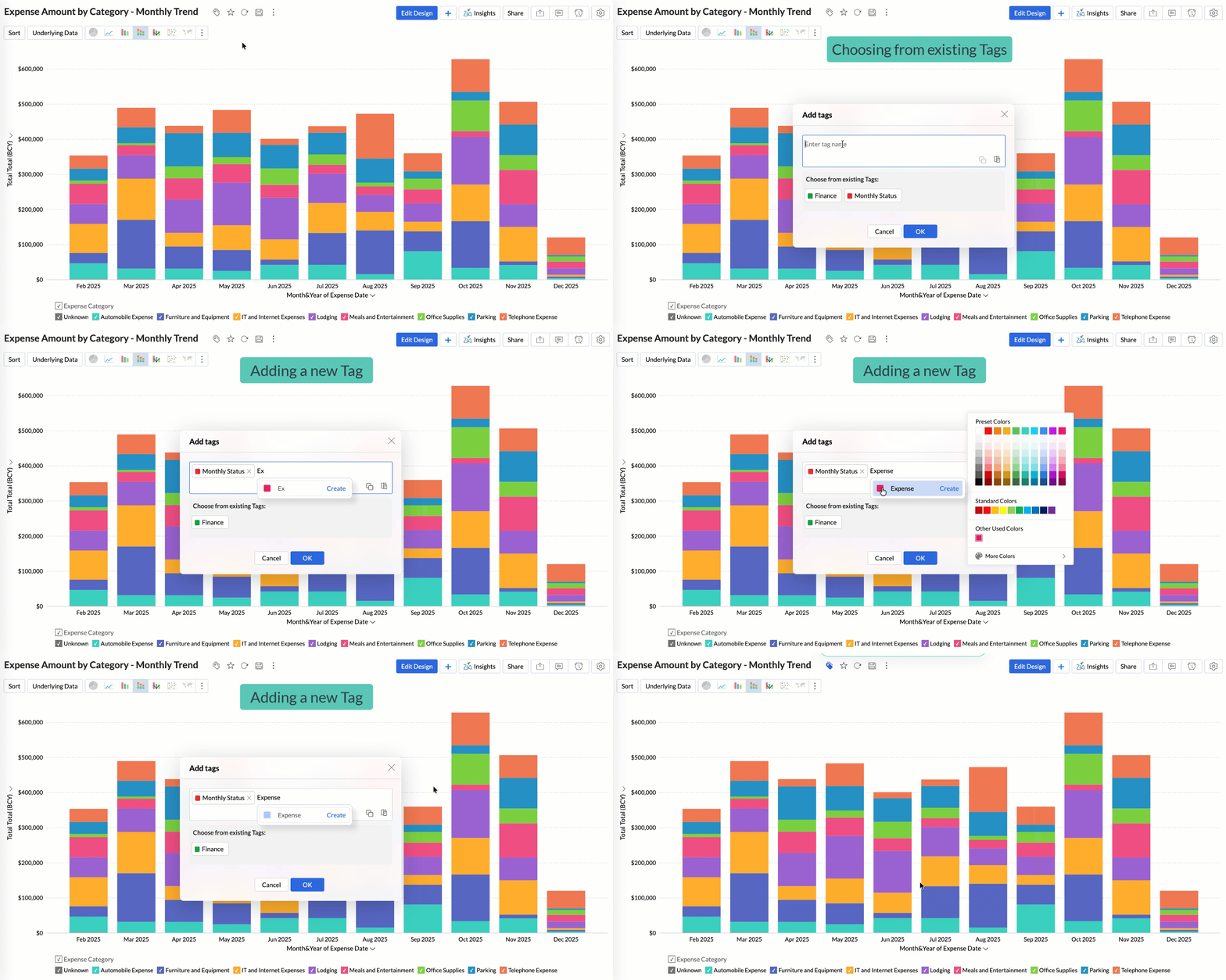
Quickly filter and find the right reports and dashboards, reduce clutter, and ensure teams always have access to the views that matter most to them.

Learn more.

Global Custom Sort

Custom sort was limited to individual reports previously. With recent enhancements, you can now define the sort order for text data types at the workspace level.
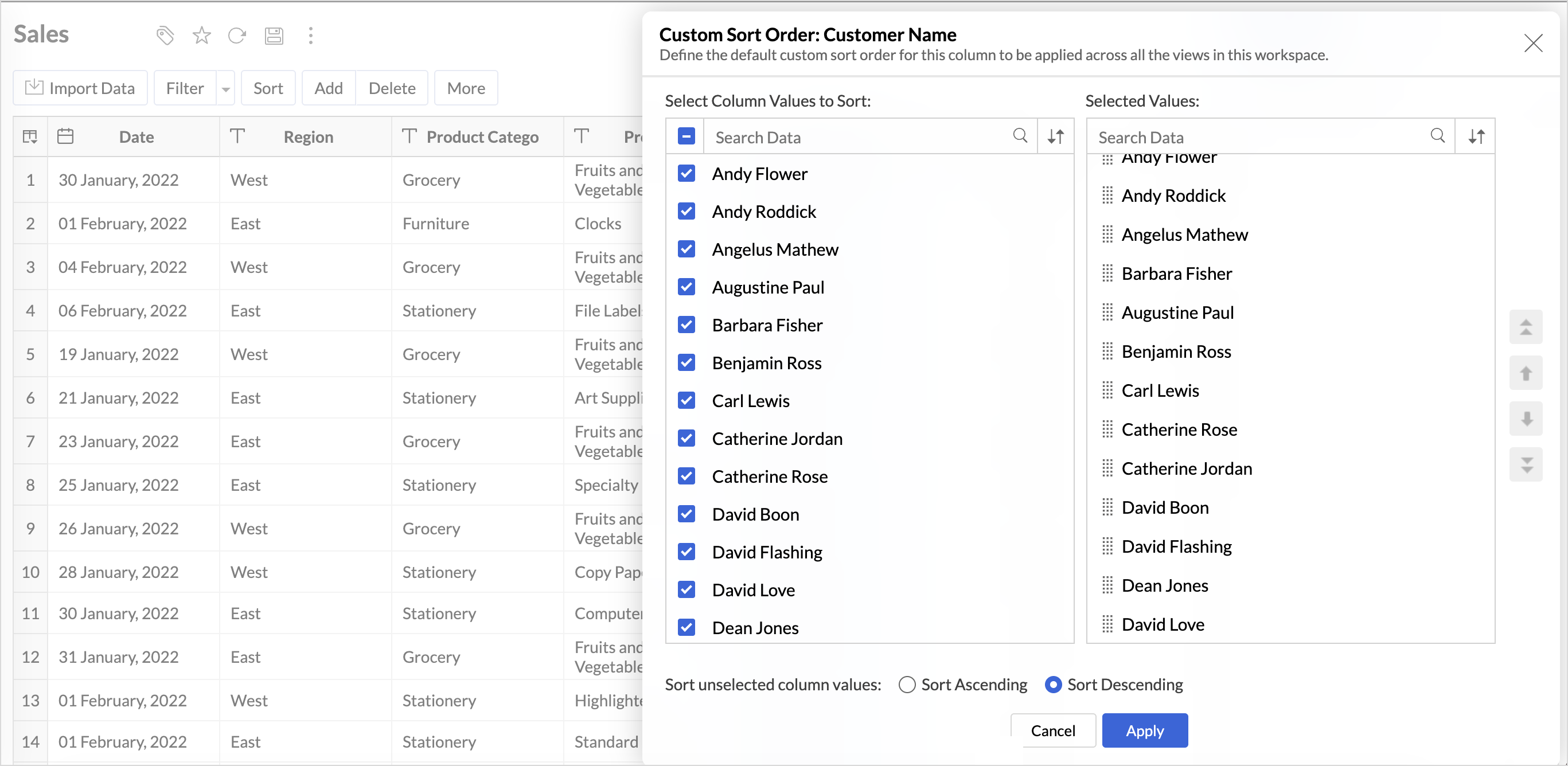

This improvement helps you maintain a consistent sorting across all reports, reduces repetitive setup, and saves time. It also ensures a standardized view of your data throughout the workspace.

Learn more.

Timeframe Selection for Overview Charts

Overview charts now offer flexible timeframe selection, allowing you to focus on relevant periods for deeper trend analysis.
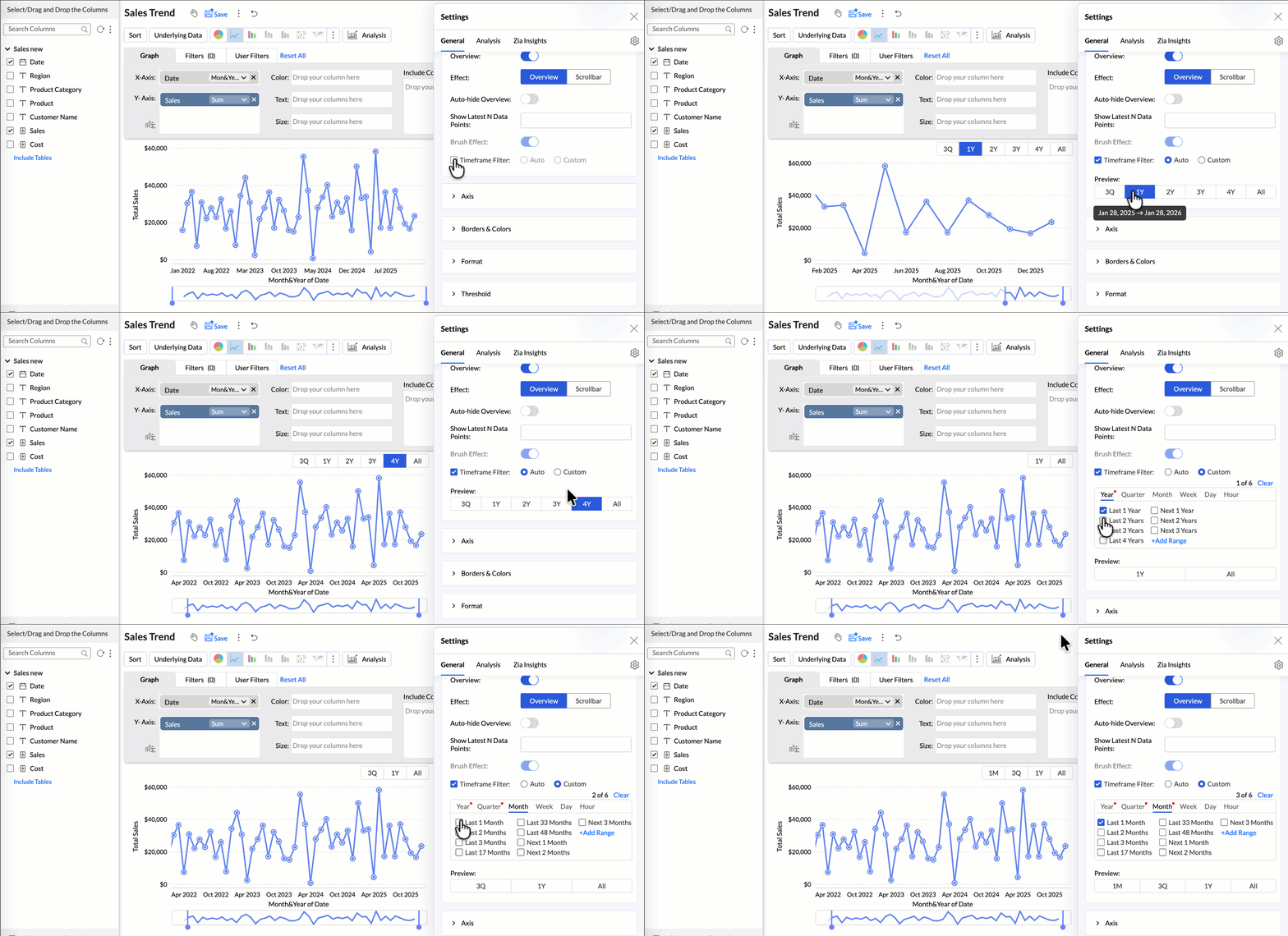
By narrowing the time range, you can better compare performance, identify patterns, and gain clearer insights without distraction from older data.

Learn more.

Customize Zia Insights placement in Dashboards

Choose where and how the insights are displayed, so that they complement your analysis without disrupting your dashboard layout. This gives you greater flexibility to present insights in the way that best suits your audience and reporting style.
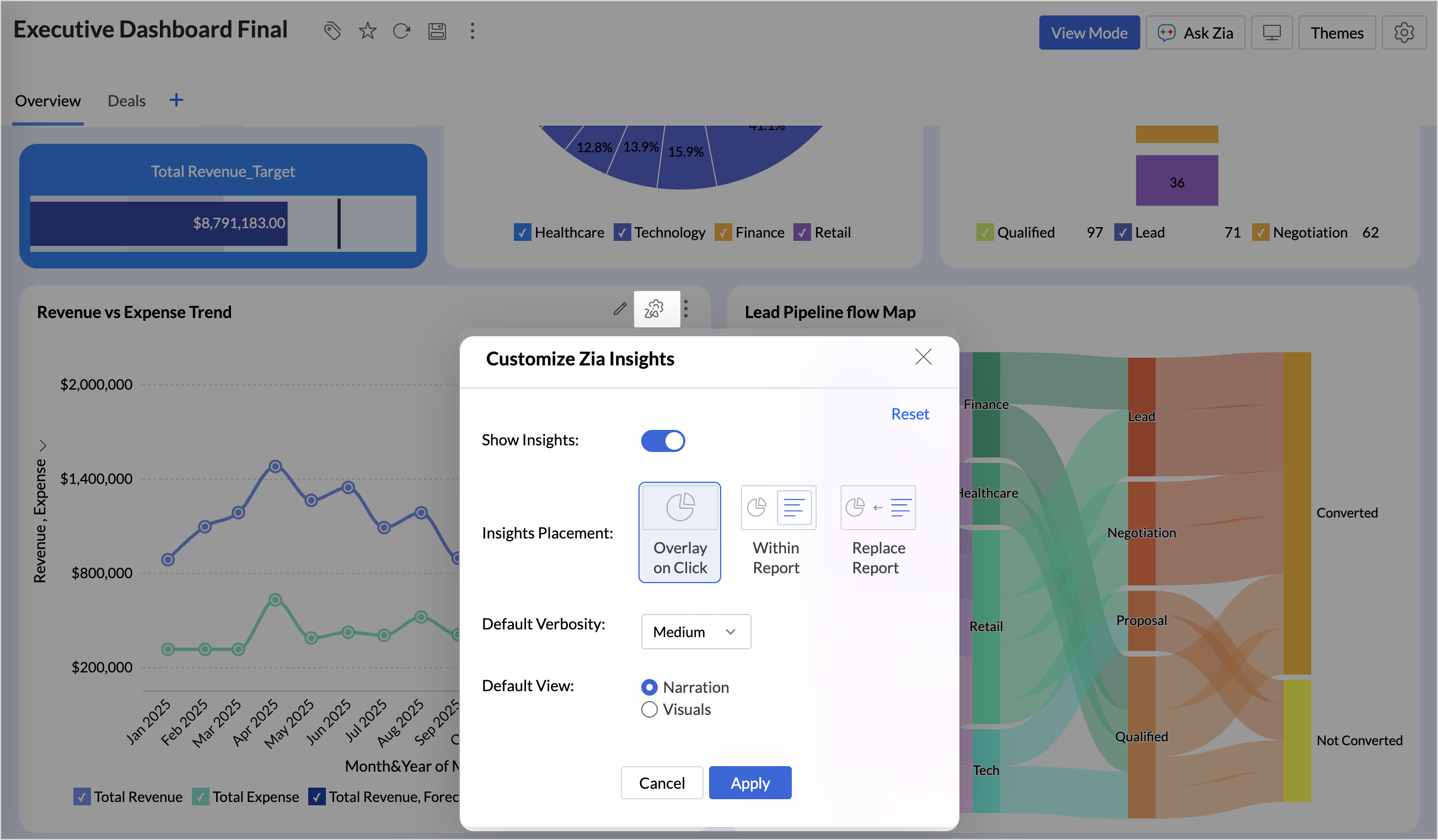

  • Overlay: Displays insights in a floating panel that opens on demand, allowing users to review insights without leaving or altering the report view.
  • Within Report: Embeds insights directly within the report, enabling users to view data and insights together in a single, continuous view.
  • Replace Report: Displays insights as the primary view by replacing the report entirely, offering an insight-first experience focused on conclusions, rather than raw data.

Learn more.

Customize Image Size in Dashboards

Dashboards now support image size settings that let you control how images are displayed.
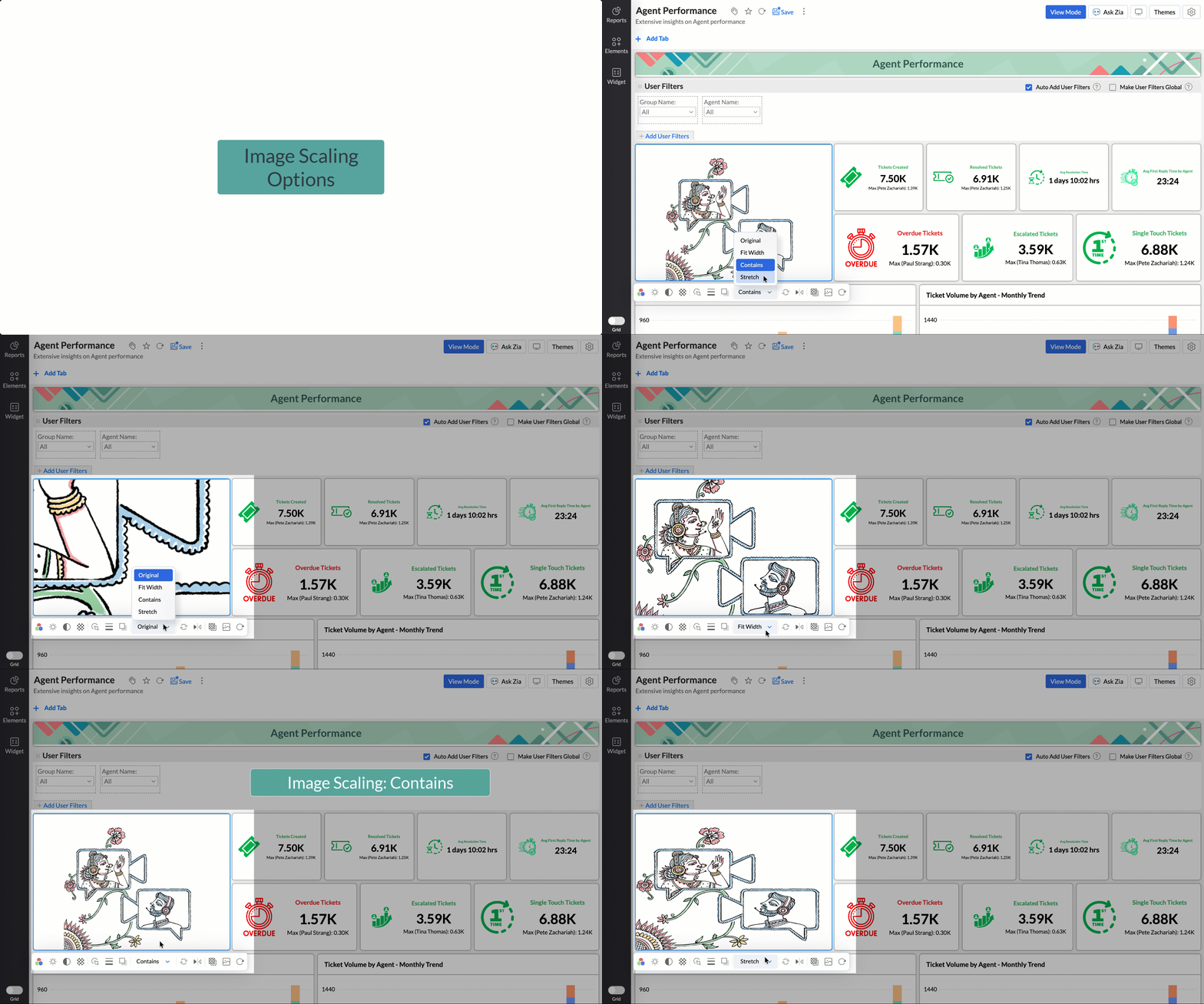
Choose from options like Original, Fit to width, Contain, or Stretch to ensure images align well with your dashboard layout, and thus improve visual clarity.

Learn more.

Tabular View Enhancements

  • With this enhancement, all tables linked via lookup columns are now available in the Filter Criteria tab. This makes it easier to share views with users using associated filters, ensuring the specified criteria are automatically applied to the shared report.
  • You can now customize lookup columns and the join paths used within Tabular View. This enhancement gives you control over how related tables are connected, helps avoid incorrect or ambiguous joins, and ensures more accurate and reliable data representation in your tabular reports.

New Business App Connectors

We have now introduced integration with two new business connectors Zoho FSM and Magento.

Zoho FSM

Connect your Zoho FSM Data with Zoho Analytics to analyze your field service operations in depth. Identify bottlenecks, optimize resource allocation with interactive reports and dashboards. Analyze revenue, service costs, and customer trends to improve profitability and service quality.

Learn more.

Adobe Commerce (Magento)

Analyze sales, orders, customers, and product performance with ready-made reports and dashboards. Track key metrics like revenue trends, average order value, and top-selling products. Gain insights into customer behavior and regional sales patterns. Make faster, data-driven decisions to optimize store performance and growth.

Learn more.

These updates bring enhanced functionality and improved workflows. Explore them in your Zoho Analytics workspace now!

    • Sticky Posts

    • What's New in Zoho Analytics - February 2026

      Hello Users! We're back with another round of updates for Zoho Analytics. This month's release focuses on giving you greater flexibility in how you visualize, manage, and act on your data - with new features like custom visualizations, remote MCP server,
    • What's New in Zoho Analytics - January 2026

      Hello Users! We are starting the year with a strong lineup of updates, marking the beginning of many improvements planned to enhance your analytics experience. Explore the latest improvements built to boost performance, simplify analysis, and help you
    • What's New in Zoho Analytics - November 2025

      We're thrilled to announce a significant update focused on expanding your data connectivity, enhancing visualization capabilities, and delivering a more powerful, intuitive, and performant analytics experience. Here’s a look at what’s new. Explore What's
    • What's New in Zoho Analytics - October 2025

      Hello Users! We're are back with a fresh set of updates and enhancements to make data analysis faster and more insightful. Take a quick look at what’s new and see how these updates can power up your reports and dashboards. Explore What's New! Extreme
    • What’s New in Zoho Analytics – September 2025

      Hello Users!! In this month’s update, we’re raising the bar across multiple touchpoints, from how you bring in data, plan and track projects to how you design and brand your dashboards. We’ve added the all-new Gantt chart for project visualization, expanded
    • Recent Topics

    • Zoho Desk - Support Plan by Time Log Hours

      Hi Desk Team, When creating a Support Plan, it would be great to have an option under Plan Type for Time Based Plan. This would be based on the number of work logs created for a customer account. It's very common to offer a support contract which has
    • Help Center and SEO: Any Benefit to My Domain-Mapped Website Ranking?

      First of, I love the Help Center which I've just decided to integrate into my website to replace its old-fashioned FAQs. So much more to achieve there now! Lots of new benefits to the site visitors and to me in terms of organizing and delivering all the
    • How to set custom Sales Order numbers

      I am trying to create Sales Orders with data from Jotform submissions. Auto number generation is disabled within Books. Whereas the flow Input recognizes the number (40732 in this example), the Output does not. How can I fix this? I'd like the number
    • What's New in Zoho Inventory | January - March 2026

      Hello users, The first quarter of 2026 has been dynamic! We’ve shipped a powerful set of updates in Zoho Inventory to enhance item control, improve warehouse efficiency, expand integration and reporting capabilities. From a unified item creation experience
    • Zoho Commerce - Mobile App Order Creation

      Hi Commerce team, I would like to suggest a feature for the mobile app that would make it much easier to create and process orders on the go. Problem Currently, while it is possible to create a Sales Order in Zoho Inventory, the process is not optimised
    • Inventory "Bulk Actions" button - add more fields to "Bulk Update > Select a field"

      Can we not get a lot more actions that are commonly used by customers into the "More Actions" button on the Inventory list? More fields listed in the Bulk Update > Select A Field? Possible Bulk update Fields Preferred Supplier ( to quickly move items
    • Zoho Mail Android app update: UI revamp

      Hello everyone! We are excited to share that the first phase of the Zoho Mail Android UI revamp is now live. In this update, we have redesigned navigation bar at the bottom to quickly access the Email, Calendar, Contacts, and Settings modules. Also, the
    • Users I've shared the sheet with cannot use the Custom Functions

      Hi, I have a Zoho Sheet worksheet that I shared to 2 colleagues, giving them full access: In that worksheet, I created a button with a custom Deluge function and it works flawlessly for me: For those I shared the worksheet to, when they click the button,
    • Zoho books - Project Module - Itemised expenses

      Hi All, I heavily use the projects function in Zoho books and can work for one client for successive weeks, providing labour and incurring the occasional general expenses.  As an example, during the one purchase, I purchase 10 widgets and of these 10, 
    • Urgent Security Feature Request – Add MFA to Zoho Projects Client Portal Hello Zoho Projects Team,

      Hello Zoho Projects Team, We hope you are doing well. We would like to submit an urgent security enhancement request regarding the Zoho Projects Client Portal. At this time, as far as we are aware, there is no Multi-Factor Authentication (MFA) available
    • Full Module-Level Access Control for Custom Profiles in Zoho Projects

      Hello Zoho Projects Team, We hope you are doing well. We would like to submit a feature request regarding access control limitations in custom user profiles within Zoho Projects. Current Behavior: We created a custom profile intended for support agents,
    • How to save custom report for future use ?

      Dear, How to save custom report for future use ? Thanks & Regards Shamnad 94460055258
    • Need to be able to save Customized Reports

      There are several standard reports in zoho books.  Each of these can be 'customized' with various parameters - BUT, these cannot be saved for re-use later. In several of the zoho modules you can customize a search list (eg for Estimates or Invoices etc)
    • Split Bills/Expsense between multiple projects and/or clients

      I need to be able to split vendor invoices/ expenses between multiple clients. Entering the bill multiple times is not only time consuming, it defeats the purpose of having a unquie identifity bill number and will allow for possible duplicated entry.  Below is an example from Quickbooks Desktop. Splitting costs over various projects is a common job costing function that I am very sad and surprised is not an option in Zoho Books. Unless I am missing it somewhere? Thanks for your help!
    • Vendor bills cannot be assigned to a customer or a customer project?

      I'm confused on how to handle outsourced contractor expenses on a customer project.  Between my business and the contractor, the invoice they send me fits obviously into Zoho Books as a Bill. However, I need to be able record those expenses to the client
    • A few suggestions for Zoho Books

      Hello. I've been evaluating Zoho Books for a small law firm practice. The interface is solid and I like the integration of accounting and time tracking, which is hard to find among cloud based services. I have a few suggestions that would be very helpful in determining whether we can adopt Zoho Books: 1. Be able to assign bills to clients/projects. Quickbooks desktop allows this and is very helpful in keeping track of bills that haven't been paid, but will be invoiced to clients as an expense. Creating
    • Book project costs to tasks

      Hi all, New to zoho but far from new to this sort of platform. I've been scouring the web for a suitable platform for my growing business. I'm currently using Xero and WorkFlow Max but it lacks a key need. I signed up to zoho projects and books to test
    • Project expenses in Zoho Books

      Just the way timesheet is used to calculate labour cost for a particular project, how do i record other expenses against a project such as materials and consumables used for the project? So that under report, I can view the total amount expended on each
    • Supplier Purchase Orders applied to a Project

      We are finding it difficult to decide the best way track project expenses in Zoho books and would like to know how other users are handling this task. We provide Professional Services and engage 3rd party Suppliers on most projects and provide them with
    • Anyone using Books to track Project Profitability? If so, I could use some guidance

      Hello Zoho Community. I am a recent subscriber to Zoho, and its part of an ongoing evaluation.  My company (and my clients) have extensive project-tracking needs.  The Projects module seems to be good from a project management standpoint, but I am perplexed
    • date & datetime client script getInput types

      Please add date & datetime as available types for the getInput client script function. https://www.zohocrm.dev/explore/client-script/clientapi/Client#getInput
    • Opt-out from mailing list means can't email at all??

      It seems that if a contact unsubscribes from a mailing list the only way to email them is to uncheck the email opt-out box first, then re-check after the email has been sent. I've been through a chat with support and they confirmed this. This seems bizarre. Many of my clients don't want to receive a monthly newsletter but they definitely want to be in email communication with me, often on a daily basis. Any thoughts out there?
    • Email Opt Out Question

      Has the problem where if a customer is emailed opt out prevents you sending standard emails? For me this feature is simply to stop any email marketing and should not block people from receiving emails via Zoho mobile, which makes no sense.
    • Multi-currency and Products

      One of the main reasons I have gone down the Zoho route is because I need multi-currency support. However, I find that products can only be priced in the home currency, We sell to the US and UK. However, we maintain different price lists for each. There
    • Approval Workflow Not Triggering When Status Updated via Custom Button

      Hi Team, I’m facing an issue with an approval workflow in my application. I have a workflow that updates a record’s Status field from “Pending” to “Waiting for Approval.” I have configured an Approval Workflow with the condition: Status = "Waiting for
    • Zoho TeamInbox stuck / unusable – possible orphaned organization?

      Hi all, I’m running into an issue with Zoho TeamInbox under Zoho One Trial and wondering if anyone has seen this before. We’re trying to set up a shared inbox for orders (orders@), but TeamInbox appears to be in a broken state: • The app does not load
    • Audio transcript not working in Zoho notebook

      Greetings all! I'm enjoying the Zoho notebook as I tested out over other notebook applications. I would really love the audio transcripts to work as that would save us a lot of time so that we can utilize the notes from an audio recording. Currently when
    • Re: Application Architecture in Zoho Creator — A Platform-Specific Deep Dive

      A recent community post on application architecture made some excellent points about planning architecture early in Zoho Creator projects. The core message is right — Creator applications have a habit of growing organically into maintenance nightmares,
    • Schedule Timeout 5 minutes vs. stated 15 minutes

      I am running into a function run timeout error after 5 minutes for my schedules. The Functions - Limits documents states it should be 15 minutes: Functions - Limits | Online Help - Zoho CRM. What should it actually be? Due to the 5 minute timeout, I'm
    • Cliq iOS can't see shared screen

      Hello, I had this morning a video call with a colleague. She is using Cliq Desktop MacOS and wanted to share her screen with me. I'm on iPad. I noticed, while she shared her screen, I could only see her video, but not the shared screen... Does Cliq iOS is able to display shared screen, or is it somewhere else to be found ? Regards
    • Placeholders in Ticket Templates

      We should be able to use placeholders in ticket templates. When we create a new ticket, our description field is shown to the client in the email they receive.  It would be very handy to be able to personalize that description field in our ticket templates to pull in the name of the client that the ticket is for. Using them in the subject field as well, so we can auto populate Account Names, etc. 
    • Favorite Views list sort order?

      Is there a way to rearrange the Favorite Views list?
    • Will I see emails sent via campaigns in CRM?

      It would be useful for people to be able to see emails sent via campagins in Zoho CRM is that possible?
    • Introducing Product Catalog in Bigin

      Greetings, I hope all of you are doing well. For many small businesses, sharing products and collecting customer interest often involves multiple tools, manual follow-ups, or even building a full ecommerce website. To address this challenge, we're excited
    • Products in Email Template

      I’m a little confused as to how to add the listed products, from within a specific deal, to an email template. I want to generate said email template when a deal reaches a specific stage and include the products that have been selected for the deal in
    • Option for - CSV Export from Pipeline Deals by Stage (Including Products, Companies, and Contacts)

      I would like to know when we will be able to export a simple CSV file from pipeline deals, with the option to select a specific stage within the pipeline. This export should include data for products, companies, and contacts, all in a single view. For
    • Zoho Billing Partial Proration...

      Hi, In Zoho billing, we offer upgrades, downgrades, suspends, and resumes. We use online payment for most subscriptions, but have only a few that are offline, but we treat them the same either way.. We prorate only parts of these changes.. Right now zoho
    • Announcing Zoho Sheet desktop app for macOS and Windows (Beta)

      Hello Sheet users, We know you’ve been waiting for this one. It has always been the top priority on our roadmap to provide a single native desktop app for macOS and Windows that works both online and offline. Today, we are excited to announce that the
    • What is the maximum length/size of a presentation on Apple TV?

      Hello, I have a presentation here that I regularly show on Apple TV. It’s always the same presentation, which keeps getting longer and more extensive over time. Almost every slide contains a graphic or photo that takes up the entire slide. That means:
    • CRM Notes

      Hello, We want to add a Note to the Contact record when a Note is added to a Case or Deal. I wasn't able to do this using a workflow, so I tried using Zoho Flow, but that didn't work either. Does anyone have a suggestion on how we can accomplish thi
    • Next Page