What's New in Zoho Inventory | April & May 2026
Hello users,
We're excited to roll out the latest Zoho Inventory updates for April and May 2026. These enhancements are designed to make your daily operations smoother and more efficient, from advanced inventory management and flexible pricing to automated tax compliance and useful mobile features. These updates help you save time, reduce costs, and manage your inventory more effectively.
Items & Locations Enhancements
Default Inventory Valuation Method
You can now configure a default inventory valuation method (FIFO or WAC) for your items. Once configured, the selected method will be automatically filled when creating new items, ensuring consistency across your inventory records.
The configured method will also be applied when:
-
Importing items without specifying an inventory valuation method.
-
Creating items through API requests without providing the inventory_valuation_method node.
To configure a default inventory valuation method: Settings > General > Items > Default Inventory Valuation Method> Select your preferred inventory valuation method and save the changes.

Similar to customers, price lists can now be associated with business locations for more flexible pricing. When creating a transaction, the price list assigned to the customer is applied automatically. If no price list is assigned to the customer, the price list associated with the selected business location is used.
To configure, go to Settings > Organization > Locations> create or select the location, and associate a price list with the required business location.

Alias Name in Items List View
The Alias Name column is now available in the items list view page. You can enable this in the settings and add it through Column Customization to display in the Items List View page. It makes it easier to identify items by their alternative names.
To enable this, Settings > General> Items> Field Customization > Enable Alias Name
Purchase & Warehouse Operations
Introducing Purchase Returns
We have introduced the Purchase Returns module to manage returns to vendors more efficiently. Purchase Returns helps you initiate return requests, commit stock for return, update inventory, and adjust vendor payables. Once a purchase return is confirmed, you can create picklists, packages, shipments, and vendor credits directly from it. Learn More
To enable Purchase Returns: Settings > General> Purchase Returns
Note: This feature is available in the India, US, and Global editions of Zoho Inventory for Enterprise plans. To enable it, contact support@zohoinventory.com
Filter Items by Warehouse Location in Purchase Receives
When creating a purchase receive from a purchase order that contains items in multiple warehouses for the selected location, you can now filter line items by warehouse location. This makes it easier to identify and receive items for a specific warehouse without manually reviewing and removing unrelated line items. The filter displays only the warehouses associated with the selected purchase order, helping streamline the receiving process and improve efficiency when managing inventory across multiple warehouses.
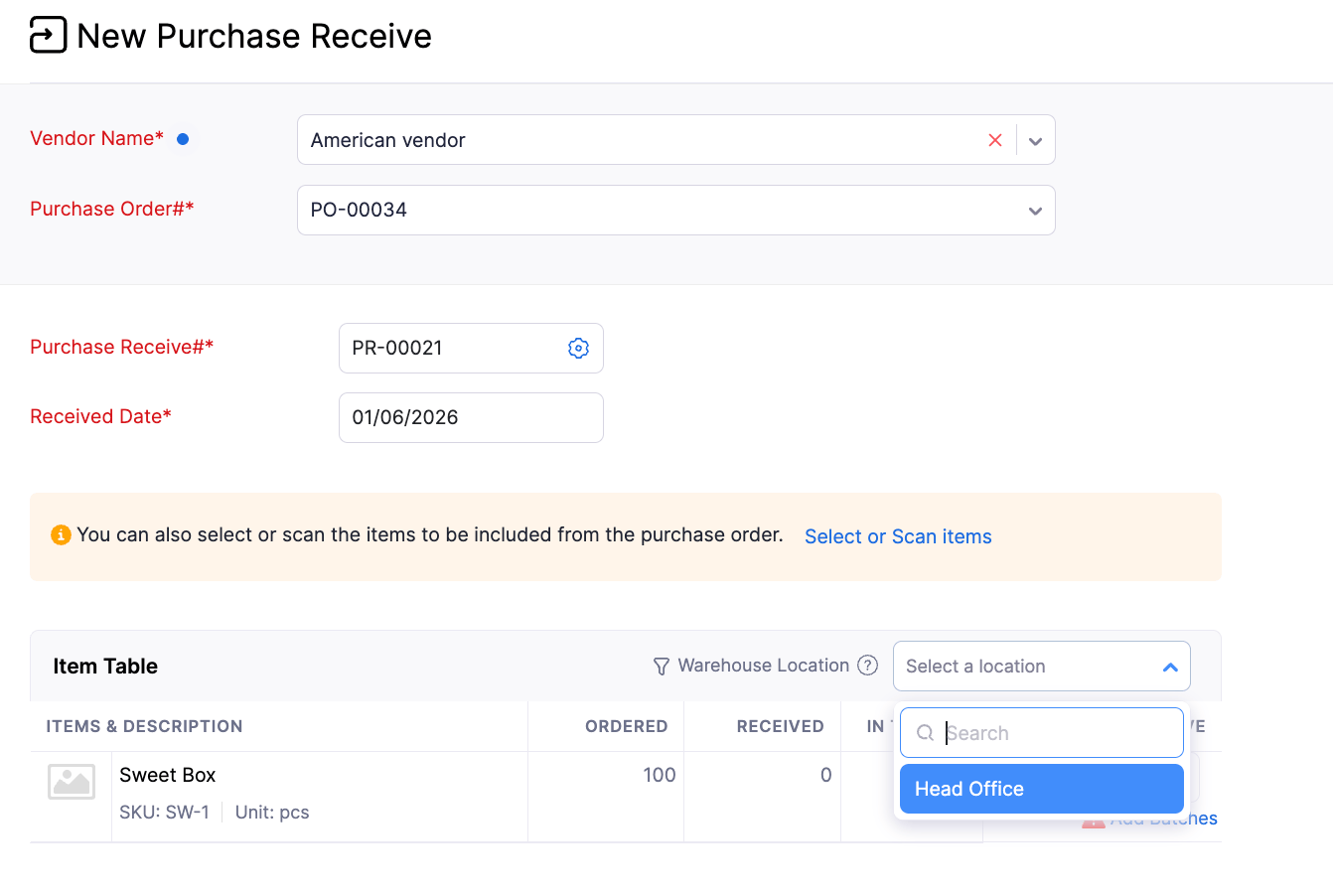
Partial Replenishments
The Replenishments module now allows partial replenishments. This makes it easier to fully restock items when the order quantity parameter Maximum Order Quantity is applied. If an order created from a replenishment task does not fulfill the entire required quantity, the system automatically creates a new replenishment task for the remaining quantity. The new task retains the original replenishment details and provides visibility into the quantities that have already been replenished.
Invoice and Sales Channels Management
Revamped Invoice Details Page
The Invoice details page now opens in a non-PDF view by default, with associated transactions organized into separate tabs. It also displays invoice details, customer information, custom fields, line items, email receipts, and transaction-level reporting tags in a structured layout.
Note: This update is currently available for the France Edition and newly created organizations. It will be rolled out gradually to existing organizations.
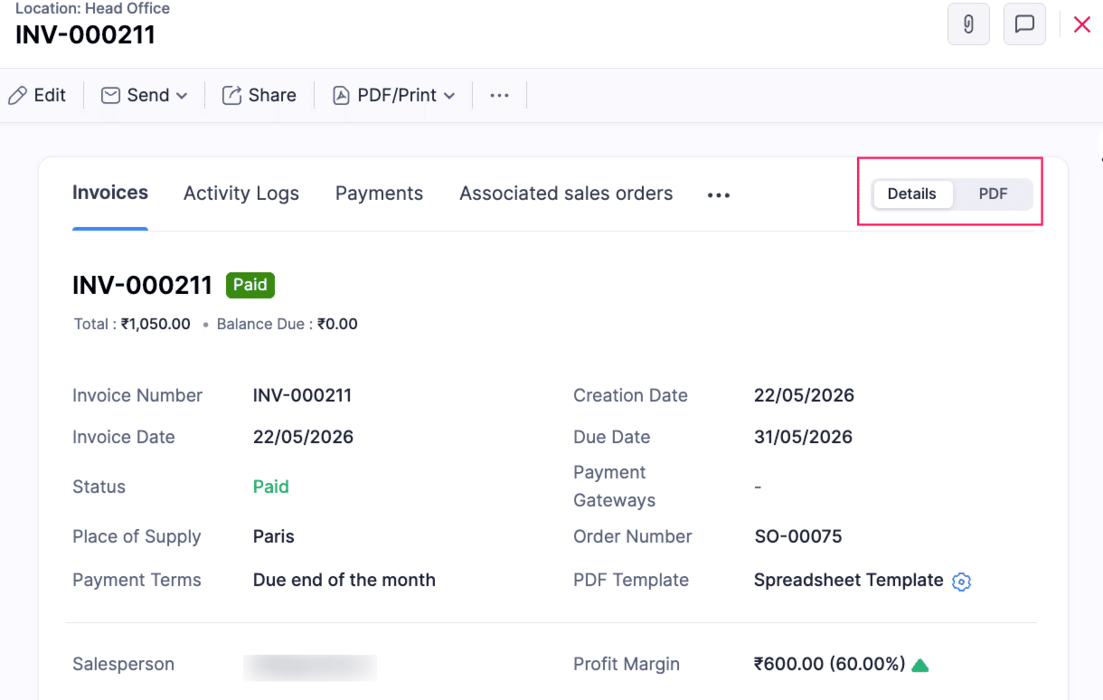
Sync Sales Order and Invoice Numbers from Sales Channels
Two new configuration options have been introduced in the Sales Channel preference page to help maintain the same transaction numbering between sales channels and Zoho Inventory.
-
When the Sync Sales Order Number option is enabled, sales orders synced from will retain the same sales order number from the sales channel instead of using the auto-generated number series in Zoho Inventory.
-
When the Sync Invoice Number option is enabled, Invoices synced from Sales Channels will retain the same Invoice number from the sales channel instead of using the auto-generated number series in Zoho Inventory.
Sales Return Sync in Shopify Integration
Sales Return Sync in Shopify is now available across all editions. Once enabled in the Shopify integration preferences, sales returns and their associated inventory updates are automatically synced to Zoho Inventory. This helps streamline returns management, maintain accurate stock levels, and reduce manual effort in keeping return transactions synchronized across both platforms.
Walmart Integration [US Edition]
You can connect your Walmart seller account with Zoho Inventory either through the Walmart Seller Center or directly from Zoho Inventory. Once connected, items, orders, inventory levels, and shipment updates are synced automatically between the two platforms. Items are mapped based on whether they are single or variant items, while orders are created as Sales Orders in Zoho Inventory. With configurable sync frequency, stock update controls, and customer mapping options, businesses can efficiently manage Walmart sales and fulfillment from a single platform.
To integrate in Zoho Inventory: Go to Settings > Integrations & Marketplace > eCommerce > click Set Up Now under Walmart Integration.
Reporting & Analytics
Include Child Options in Reporting Tag Filters
Advanced Filters in Reports now support Include Child Options for reporting tags. When you select a parent option and enable Include Child Options, the report automatically includes all associated child options. This makes it easier to filter hierarchical reporting tag data without manually selecting each child option.
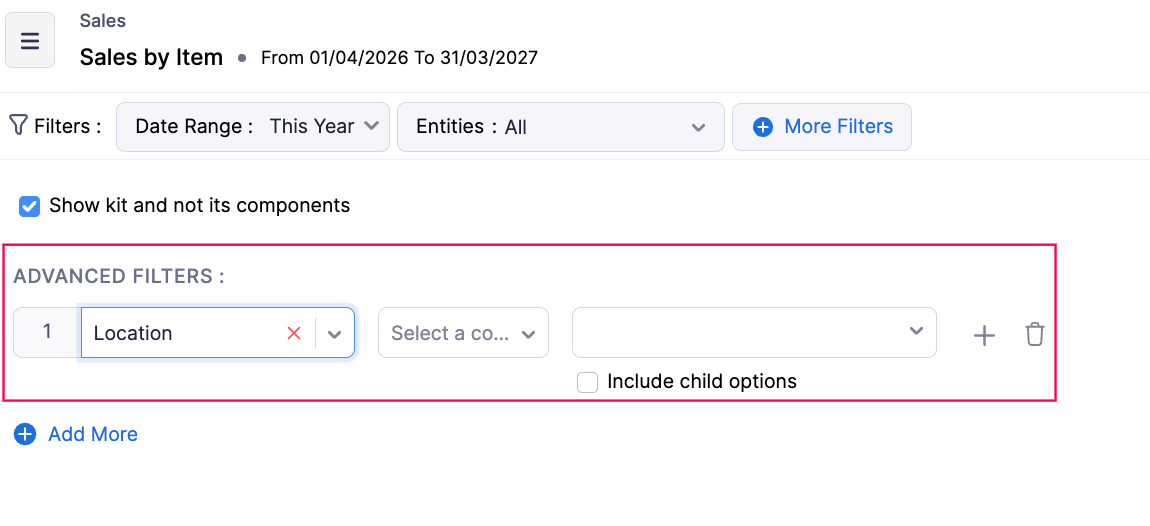
Export reports and custom reports along with organization details by enabling the Organization Details option under Configure Report Layout before exporting.
To enable this, Reports> Category> More icon > Configure Report > Choose Details to Display > Enable Organization Details

Custom Report Enhancements
Custom Report permissions have been enhanced for admin users. Admins can now access, edit, clone, and delete all Custom Reports in the organization, including reports created by other users in the organization. Additionally, admins can now filter custom reports by date ranges directly from the report page without editing the report preferences.
To do this, go to Reports> Select the custom report > Click the dropdown > Select the action
Taxes & Compliance
Introducing Withholding Tax for Customers and Vendors [Kenya]
We have introduced the Withholding Tax preference for customers and vendors. Withholding tax is a direct tax deducted at source on specific payments such as interest, dividends, royalties, and management fees made to residents or non-residents. After enabling this preference for a customer or vendor, you can apply withholding tax at the line-item level in invoices and bills, and record payments after deducting the withheld amount.
To enable this, go to Settings >Organization Settings> Taxes and Compliance >Withholding Tax > Withholding Tax Settings >Slide the toggle to enable Withholding Tax > Select the Customers, Vendors, or both you want to enable withholding tax settings. Learn More

Sales Tax Automation [US & Canada Edition]
Sales Tax Automation is now enabled for the US and Canada editions. This feature automatically calculates accurate sales tax in real time based on where you're registered, what you sell, and where you sell. The system applies the correct tax on every sale, automatically identifies whether an item is taxable, zero-rated, or exempt, and ensures compliance as you expand sales across states. Tax rates update automatically with changing tax rules. You can configure address preferences, verify customer addresses, switch tax modes, recalculate tax, and view detailed tax calculation breakdowns. Check out the help docs available for the US and CA editions to learn more.
Supply Date and Service Period Support in Credit Notes [Germany Edition]
Credit Notes now support Supply Date, Service Start Date, Service End Date, and Transaction Posting Date as system custom fields. These four date fields can be configured from Settings to help businesses capture and manage legally relevant dates more accurately across credit note workflows.
To enable this: Go to Settings > Sales > Credit Notes > Field Customization > Select field > Mark as Active
View Total Amount Before TDS Deduction [India & Singapore]
The Total Amount Excluding TDS option has been added to the invoice details page to show the invoice amount before TDS deduction. This helps clearly view the original total for sharing invoices and accounting reference.
To enable this option: Go to Settings > Customization > PDF Template > Choose the Invoice template > Total > Enable Total Amount Excluding TDS
TDS Columns in Applied Excess Payment Import
You can now import TDS details while importing Applied Excess Vendor Payments. This enhancement helps you accurately apply excess vendor payments to bills along with the associated tax deductions.
Supported columns:
-
India: Bill TDS Amount
-
Global: Bill TDS Amount, TDS Account
-
Australia: Bill PAYG Withholding Amount, PAYG Withholding Account
Early Access Features
Track Record Participants and Non-Participants
The Record Participants and Non-Participants feature helps you track the users associated with a transaction record. Users automatically become participants when they create, edit, add comments, get mentioned in comments, or approve a record. Based on these actions, the system automatically categorizes users as Participants and Non-Participants for better visibility. This feature is currently supported for modules such as Items, Invoices, Inventory Adjustment, Packages, Shipment, Customers, Sales Orders, Delivery Challans, Sales Returns, Vendors, Purchase Receives, and Vendor Credits.
To track the record Participants and Non-Participants in the comment: Go to the module that supports this feature> Details Page> Comment icon > Enter "@" in the message box > You can view the Record Participants and Non-Participant users
Note: This feature is available by default for new organizations. For existing organizations, it is in Early Access. Contact support@zohoinventory.com to enable it
Auto Batch Assignment with FIFO, FEFO, and LIFO Strategies
The Auto Batch Assignment feature automatically identifies and allocates inventory batches for batch-tracked items during outward transactions based on a configured assignment strategy. Businesses can choose from the following allocation methods:
-
FIFO (First In, First Out) – Moves the oldest available stock first.
-
FEFO (First Expiry, First Out) – Prioritizes batches that are closest to expiry.
-
LIFO (Last In, First Out) – Consumes the most recently received stock first.
The system automatically handles batch allocation in the background during sales orders, invoices, picklists, and other outward transactions, eliminating repetitive manual batch selection. This helps improve inventory rotation, reduce stock aging and expiry-related losses, accelerate fulfillment workflows, and ensure consistent inventory handling across warehouse operations.
Note: This feature is available in Early Access for Enterprise plans. Contact support@zohoinventory.com to enable it for your organization.
Other Enhancements & Availability
Feature Availability
-
The Unit of Measurement feature is now enabled by default for all organizations in the Premium and Enterprise plans.
-
The Items Unified Flow has been enabled for all plans except the US and India editions. For the US and India editions, it is currently available for Free Plans.
-
Sales Return and Receive sync functionality in Shopify is now available for all editions.
Minor Enhancements
-
Barcode scanning is now supported in Custom Tables for easier item entry and management.
-
The Packing History Report now supports show/hide columns, advanced filters, custom reports, and current view export.
-
The Profit by Item Report now includes category filters.
-
The Batch Details Report has been enhanced with additional inward, outward, and price-related columns, along with Transaction Date filters.
-
Bulk Update support for Reporting Tags is now available.
Mobile App Updates
Updates for Both Android and iOS
-
Preferred Bin Locations in Picklists
Preferred bin locations are now displayed while adding items in Picklists, helping users pick items faster and more accurately.

-
Sales Return Status Update
Sales Return status now displays as Accepted instead of Approved for clearer tracking. -
Mobile Number with Country Code Selection
Mobile number fields now include country code selection for better global formatting.

-
Custom Fields in Assemblies Module
Custom fields are now supported in the Assemblies module, allowing additional information to be captured during assembly creation. -
Line Item Custom Fields in Purchase Receives & Picklists
Purchase Receives and Picklists now support custom fields at the line item level for more detailed tracking. -
Draft Status in Payments Received
The Payments Received module now supports Draft status, allowing users to save and edit before final submission. -
Tap to Pay Support
Tap to Pay support has been introduced in Australia, Austria, Belgium, Denmark, Finland, France, Germany, Ireland, Italy, Malaysia, the Netherlands, New Zealand, Poland, Singapore, Sweden, Switzerland, and the United Kingdom for faster in-person contactless payments. Payments can be accepted using cards and digital wallets without additional hardware
Android Specific Updates
-
Faster Stock Counts Experience
Users can now start Stock Counts immediately while data loads in the background for improved speed. -
Purchase Receives Enhancements
Purchase Receives now supports editing and simple approval workflows for smoother processing. -
Transfer Order Approvals
Transfer Orders now support simple approval workflows for better control and validation. -
Image Upload in Custom Fields
Custom fields now support image uploads for richer data capture. -
Custom Buttons for Customer & Vendor Modules
Custom buttons are now supported for the Customer and Vendor modules to enable quick actions. -
Revamped Custom Modules UI
Custom Modules now come with a refreshed and improved user interface. -
Sales Returns Draft Support
Sales Returns now support Draft status for flexible editing before finalization. -
Default Inventory Valuation Method at Item Creation
Default inventory valuation methods can now be set during item creation for consistent costing. -
Customer View Status in Documents
Customer view status is now displayed in Invoices and Retainer Invoices to track customer visibility.
iOS Specific Updates
-
Multi-Select Lookup Fields Support
Multi-select lookup custom fields are now supported across all modules that support custom fields. -
Tap to Pay via Stripe Integration
Tap to Pay is now available for organizations integrated with Stripe. Digital payments can be accepted directly on an iPhone using debit cards, credit cards, Apple Pay, and other digital wallets without additional hardware.
We hope these updates empower you to manage your inventory more effectively and deliver exceptional value to your customers. As always, we're committed to continuously improving Zoho Inventory based on your feedback and evolving business needs. If you have any queries, feel free to reach out to us at support@zohoinventory.com. Stay tuned for more updates from Zoho Inventory!
Best regards,
The Zoho Inventory Team
Topic Participants
Rithiga devi S
Nathan
Rithiga
Arian
Sonny Jelinek
Recent Topics
Action Request - Zia Agents - Get Agent API
It would be great if there was a "Fetch Agent" action for Zia Agents. The main use case here is getting the latest version of the Agent to populate the "Trigger Agent Execution" action. That action requires one to specify which version of the Agent isWhatsApp Business Calling API
Dear Zoho SalesIQ Team, I would like to request a feature that allows users to call WhatsApp numbers directly via Zoho SalesIQ. This integration would enable sending and receiving calls to and from WhatsApp numbers over the internet, without the needCalendar Reminders unavailable
For some received meeting invitations, Zoho Calendar’s web interface provides no option to add or edit a reminder. However, I can add a reminder to the same event through the phone app. That reminder then appears in the browser, but still cannot be editedZoho Desk MCP doesn't expose all functions
Hello, I'd like to be able to draft (rather than send) ticket replies using Claude Cowork. However, the Zoho Desk MCP doesn't currently offer that, despite it being available in the API (https://desk.zoho.com/DeskAPIDocument#Threads#Threads_DraftEmailReply).Email-Data Synchronization with Zoho Analytics
Hello, Enterprise Support Community! We're excited to announce the availability of Email Data Synchronization with Zoho Analytics! This highly requested enhancement allows you to sync email data from Zoho CRM into Zoho Analytics, making it easier to analyzeKeeping phone number text format exporting from Books to Sheet
We have a custom function that copies data from our customers in Books to Sheets. In the process the customers' phone numbers (unless they contain a space) get treated as numeric values, so leading zeros get stripped off, and in some cases scientific#22 I Sent It to the Wrong Person
Meera was sending an invoice to a client when she mistyped the email address. She noticed the mistake a week later, when the payment had not come in. She corrected the email address on the customer record and waited for the payment to arrive. But nothingNew Search Function
Hey Team, The search function updated in our CRM about a week ago, so I assume it was an automated update across Zoho. It no longer displays leads/deals etc in Chronological order so that the most recently created or updated is the first to display whichBuild a historical inventory snapshot in Google BigQuery using Zoho DataPrep
Businesses using Zoho Inventory may want to transfer their inventory data to Google BigQuery to maintain an up-to-date data warehouse. While scheduled pipelines help keep BigQuery updated with the latest inventory data, businesses that also need to trackZoho writer tabs
I'm trying to post a list of actions for my team to share online. For this I need to set tabs -- can't find a way of setting tabs anywhere. Would prefer not to go to the formality of a table. Can anyone tell me how to set tabs? greiggAbility to Set Text Direction for Individual Cells in Zoho Sheet
Dear Zoho Sheet Team, We hope you are doing well. We would like to request an enhancement in Zoho Sheet that allows users to set the text direction (right-to-left or left-to-right) for individual cells, similar to what is available in Google Sheets. UseKeep Zoho Books data in sync with Google BigQuery
Businesses using Zoho Books may need to transfer their financial data to a data warehouse like Google BigQuery for reporting and analysis. Zoho DataPrep helps automate this process by preparing Zoho Books data and syncing it with BigQuery at scheduledWhat's New - October 2026 | Zoho Backstage
Hello everyone, The last few months of the year are usually the busiest for events, with more people to reach and more details to manage. This month, we’ve made a few changes that should save you some time and back-and-forth along the way. Here’s what’sIntroducing user-based authentication across Zoho CRM
We have introduced two enhancements to simplify authentication and enable user-specific access when working with Connections and executing CRM operations across different developer tools. 1. Enable user-based authentication for Connections ConnectionsSet connection link name from variable in invokeurl
Hi, guys. How to set in parameter "connection" a variable, instead of a string. connectionLinkName = manager.get('connectionLinkName').toString(); response = invokeurl [ url :"https://www.googleapis.com/calendar/v3/freeBusy" type :POST parameters:requestParams.toString()Allow Multiple usage units to items while adding them to sales/purchase transactions
The usage unit of items added in zoho books are static right now and can not be changed. But certain items are received or sold in multiple usage units. One example is fabric. It can be bought in Meters, inches, kgs or other units. Another example wouldZoho Inventory – Stock Allocation and Warehouse ManagementAs we implement Zoho One in our organization, we are currently facing a challenge with stock allocation and warehouse management. While the wa
As we implement Zoho One in our organization, we are currently facing a challenge with stock allocation and warehouse management. While the warehouse management part can be handled in Zoho Inventory, our main requirement is the customer-wise stock allocationHow to restore deleted campaigns?
I accidentally deleted my first campaign that went out today (08/21/18). How do I restore it?Using IMAP configuration for shared email inboxes
Our customer service team utilizes shared email boxes to allow multiple people to view and handle incoming customer requests. For example, the customer sends an email to info@xxxx.com and multiple people can view it and handle the request. How can I configureNew in Cadences: Option to Resume or Restart follow-ups when re-enrolling records into a Cadence, and specify custom un-enrollment criteria
Managing follow-ups effectively involves understanding the appropriate timing for reaching out, as well as knowing when to take a break and resume later, or deciding if it's necessary to start the follow-up process anew. With two significant enhancementsAutomatic Invoice Number generation for createRecord
Hello, while testing some custom Buttons in my Zoho Books application, I noticed that I get an error that previously did not occur. After some further digging I found that the automatic transaction numbering of invoices no longer work in my organization.Stop completed task lists from disappearing?
Is there any way to stop projects from making tasks lists disappear when all the tasks in the list are completed? That's one of those little things where we're constantly fighting the product. For instance we have some projects which are ongoing - no start and end date. We use Kanban view to show the various task lists. We don't want the kanban list to disappear every time the items on it happen to be closed out. ThanksApproval Processes, Now in Standard and Professional
We encourage existing Approval Process users to switch to the new UI to access enhanced capabilities, including naming each rule and stage, setting stage-specific field updates and tasks, sending email notifications upon rejection, and tracking progressZoho Inventory - Backorder Report
I am requesting a backorder report in Zoho Inventory to show all backorders by Sales Order and/or Customer, including the quantity of each line item ordered and quantity fulfilled. This is important for businesses who operate a lean business model andCan we do Image swatches for color variants?
We want to do something like the attached screenshot on our new zoho store. We need image swatches instead of normal text selection. We want to user to select an image as color option. Is this doable? I don't see any option on zoho backend. Please hEmail-Data Synchronization with Zoho Analytics
Hello everyone, Thanks to Chad and everyone who shared their feedback. We're excited to announce support for email data synchronization with Zoho Analytics. We have been working hard to bring this highly requested feature to life, and we'd like to walkUpdate on Using Extensions in Custom Modules
Extensions in Zoho Projects now support custom modules. You can add extensions to custom module records and configure where each extension appears and who can access it during installation. Supported Extensions: Checklist, Google Drive, SharePoint Configure【初開催】Zoho Mail / Workplace 活用勉強会 |11/27オンライン・無料
ユーザーの皆さま、こんにちは。 ゾーホージャパンの中野です。 11月27日(金)、Zohoコミュニティでは初めてとなる「Zoho Mail / Workplace 活用勉強会」をオンラインで開催します! すでにZoho Mail / Workplaceをご利用中の方はもちろん、Zoho Oneをご利用中で、Zoho Mailの利用を検討している方も歓迎です。 Zoho社員が製品の概要に触れながら、具体的な利用場面に沿って活用方法をご紹介します。 ■ メール対応のミスや手間を減らす 添付忘れや誤送信の対策など、日々のメール業務に役立つ便利機能を取り上げます。Trigger a Workflow Function if an Attachment (Related List) has been added
Hello, I have a Case Module with a related list which is Attachment. I want to trigger a workflow if I added an attachment. I've seen some topics about this in zoho community that was posted few months ago and based on the answers, there is no triggerBreaking Change Announcement: Users API Response Restricted for Client Portal Users
Hi all, We are introducing a breaking change to the Users API when it is accessed by Client Portal users. Status: Live This change is now live in production. Please review your integrations and make the necessary updates. Affected endpoints: GET /usersautomatic email reminder
in need of an email reminder to participants having trained for a course but have not paidSharedmail box access via an api
Hi, I am trying to access a sharedmailbox via an API. I am the moderator and creator of this shared mailbox. I have created a self client but when when i try to get list of all emails, it does not list the sharedmailbox. Help me to resolve this or provideDuplicate Record Creation
Hello Team, I would like to check whether there are any options available in Zoho FSM to prevent duplicate record creation in the following modules: Assets Companies Contacts Ideally, we would like the system to check for existing records before allowingHiding old CRM Contacts in Desk
I have an issue with contacts in Desk. We sync contacts from CRM with DESK and we have old contacts, eg staff members that have left businesses. The issue is when adding a ticket (most of our tickets are raised over the phone), staff sometimes pickCC'd User Receiving Both Regular Email Chain Response & Reply Notification
Hi, I am trying to set up the notifications for users and I'm a bit confused. I'm testing with personal accounts and my Desk agent, and I'm noticing that CC'd users are receiving both the regular email chain that the requester (contact) receives, butDefault View for Email Sent
Hi, can the default view for email sent to candidates be "ALL" instead of the current user? I have to click the dropdown menu every time so that I can see if other recruiters have already sent an email to a candidate. Thanks!KB Articles - Can't See Content or Trigger Immediate Sync
Once a file has been submitted to the KB, there's no way to check what it actually contains. There's also no way to force an immediate sync with the source document. These are issues when one is developing and testing an agent. It makes troubleshootingEnable Screen Recording in Zoho WorkDrive Mobile Apps (Android & iOS)
Hi Zoho WorkDrive Team, How are you? We are enthusiastic Zoho One users and rely heavily on Zoho WorkDrive for internal collaboration and content sharing. The screen-recording feature in the WorkDrive web app (similar to Loom) is extremely useful- however,Add Comprehensive Accessibility Features to Zoho Writer
Hello Zoho Writer Team, We hope you are doing well. We would like to submit a feature request to enhance Zoho Writer with a full set of accessibility tools, similar to the accessibility options already available in the Zoho Desk agent interface. 🚧 CurrentProblem with currency field in Zoho CRM
Hi Guys Zoho Books has a feature in currency fields that automatically converts decimal numbers with commas ( , ) to period format ( . ) when pasting them. For example: R$ 2,50 --> R$ 2.50 Is this behavior available in Zoho CRM? I couldn't find any configurationNext Page