September has been a different month for Zoho Backstage. Instead of rolling out a long list of new features, we focused on something just as important:
Performance, reliability, and stability
The event season is in full swing, and organizers are running larger and more complex events. Our goal this month was simple: make your experience faster, smoother, and more intuitive.
That said, we do have a few updates to share with you.
Tax Rules – South Africa
Accurate tax calculation is vital for ensuring compliance and transparency in event management. With the new Tax Rules feature for South Africa, you can now automatically apply the correct VAT rates to your events, making tax management simpler and more efficient. Zoho Backstage automatically configures tax rules based on your organization and event location, ensuring compliance with the South African Revenue Service (SARS) regulations.
This feature supports in-person, hybrid, and virtual events, helping organizers stay compliant while reducing manual tax management.
How do taxes work on South African events?
VAT registration thresholds
- Businesses must register for VAT if their annual taxable sales exceed ZAR 1 million.
- Businesses may choose to register voluntarily if their taxable sales are above ZAR 50,000.
VAT rates
- Standard rate: 15%
- Zero rate: 0%
VAT terms
- VAT: Value-Added Tax
- VAT Registration Number Label: TIN (Tax Identification Number)
- VAT Registration Number Format: 10-digit number
In-person and hybrid events
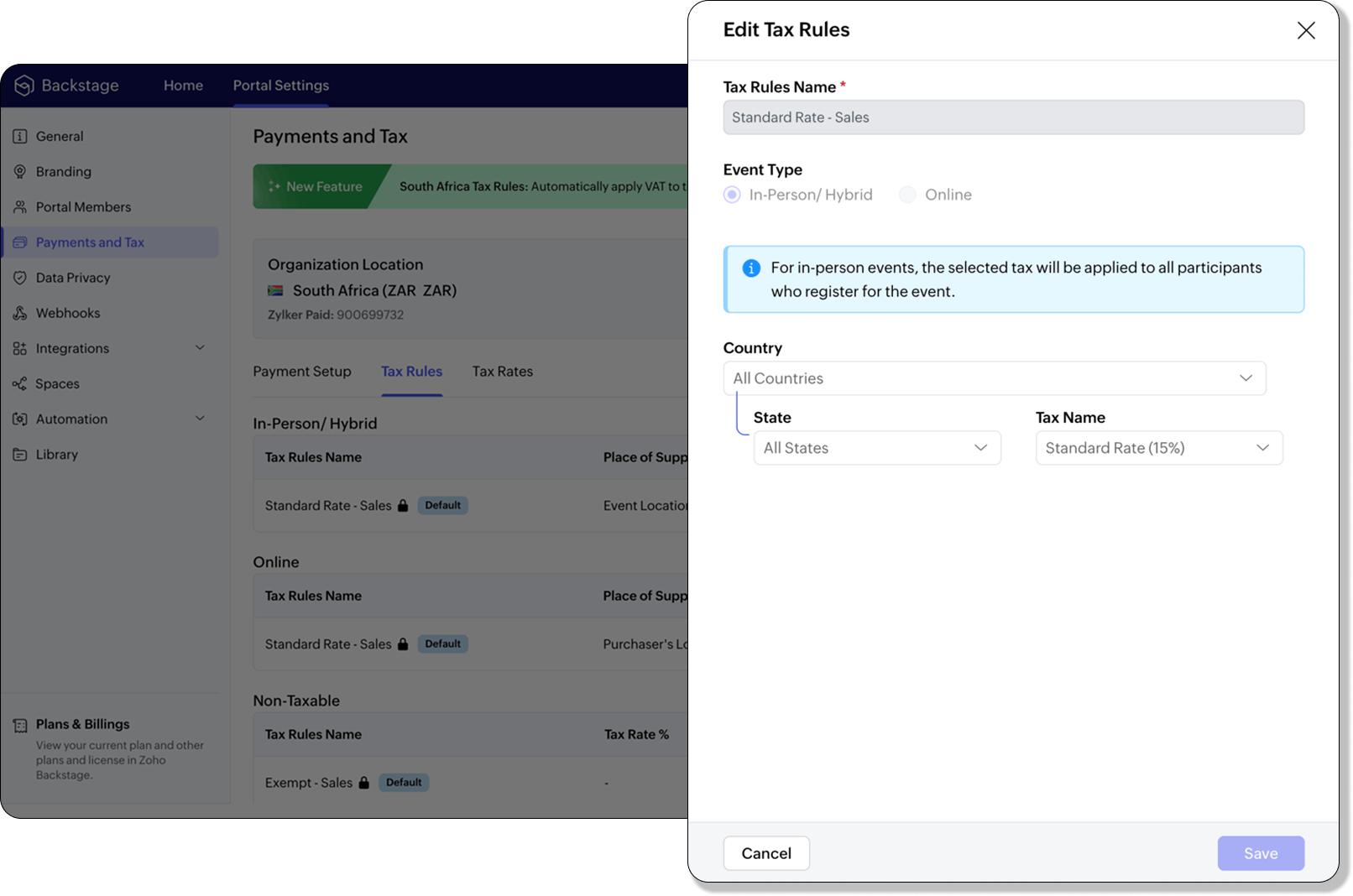
If an event is held in South Africa, the place of supply is considered within South Africa, and 15% VAT must be charged on ticket sales (unless exempt or zero-rated).
Virtual events
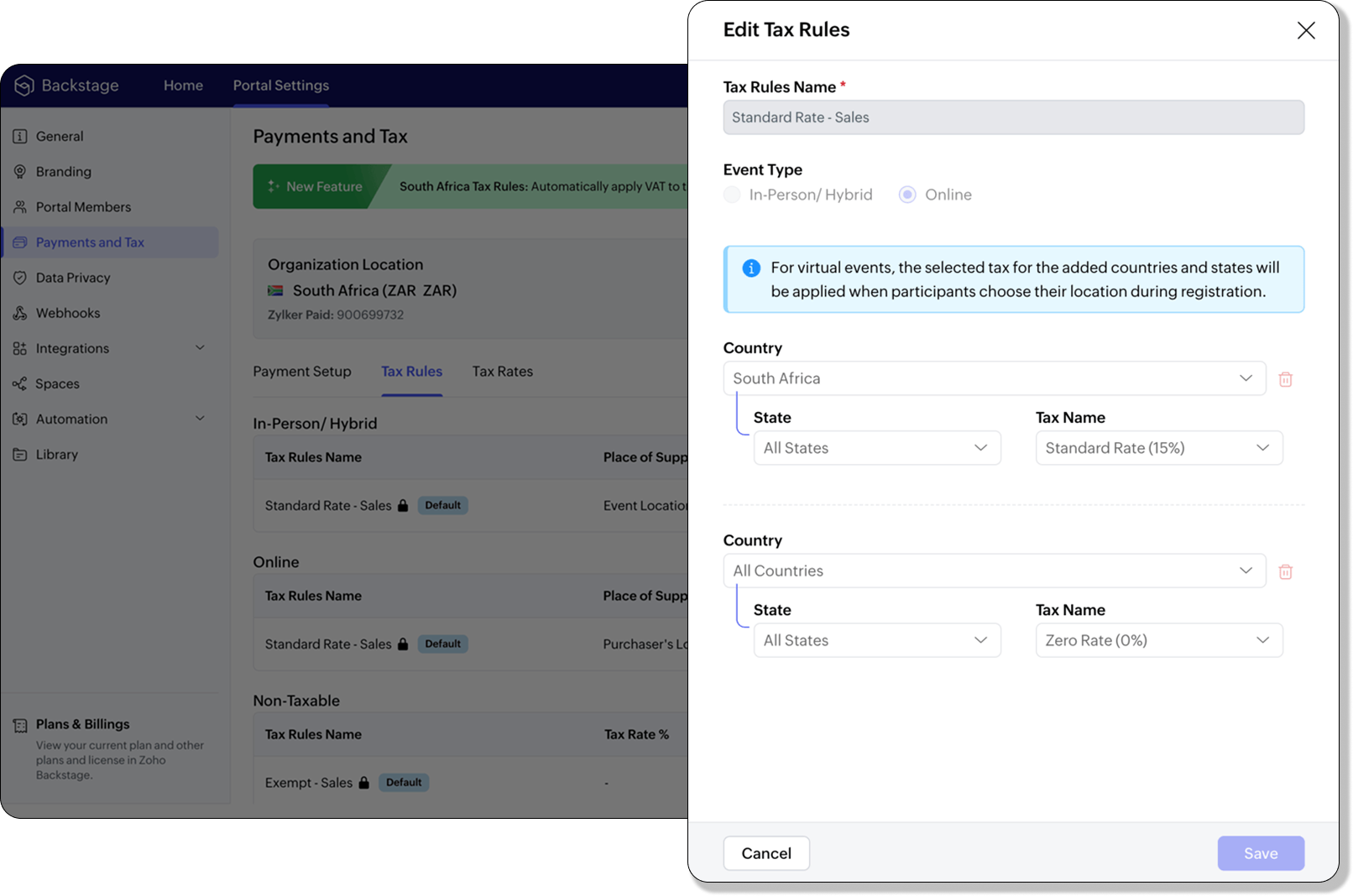
For virtual events, the attendee’s location determines the place of supply. For foreign attendees, the transaction is treated as an export of service and is zero-rated.
How to use
To enable South Africa tax rules, configure your organization’s location:
- Navigate to Portal Settings > Payments and Tax.
- Select South Africa as the organization location.
- The system automatically populates:
- 2 default tax rates (15% and 0%).
- 4 tax rules (in-person/hybrid, virtual, and two non-taxable rules).
Unlike other countries, South Africa Tax Rules are predefined. You can't edit existing rules or add new ones.
Applying Tax Rules to in-person and hybrid events
When South Africa is selected as the organization location, Zoho Backstage automatically applies the correct VAT (15%) to in-person and hybrid events. This ensures compliance with SARS requirements. A preview of the tax to be applied is shown during event publishing, so organizers know exactly what their attendees will be charged.
Applying Tax Rules to virtual events
For virtual events, Zoho Backstage automatically applies the zero-rated VAT rule for foreign attendees. South African attendees are charged the standard 15% VAT. This setup ensures accurate handling of local and international transactions without manual intervention.
- Tax rules in Zoho Backstage are fixed for South Africa. They can't be edited or expanded.
- Organizers can change the applied rule during event setup, but updates only affect new transactions. Existing transactions retain their original tax rule.
- If the event location is set to any country other than South Africa, South African VAT won't be applied.
Plan availability: Included in the Essentials, Premium, and Ultimate plans
Full page floor plan
We’ve taken the exhibitor experience to a whole new level with the introduction of the full page floor plan. This enhanced layout gives everyone including organizers, exhibitors, and attendees a more immersive and detailed view of the event venue.
For organizers, the full-page view provides better visibility and control when managing booth layouts and exhibitor placements. Whether you’re reviewing space allocation or showcasing your setup, the new Fit to Screen option lets you adjust the view instantly, making it ideal for large displays and on-site monitors.
Visitors can explore the floor plan in full-screen mode, view the exhibitor list, and discover details about each exhibitor. Signed-in attendees can further filter exhibitors by category and mark their favorites to plan their visit efficiently. Exhibitors can browse the directory or register directly from the same page, making navigation and engagement effortless.
Plan Availability: All plans that include the Exhibitor management module
Date & Time form field
We’ve enhanced the existing Date field to support time preferences, giving you more flexibility when collecting scheduling details. By enabling the Include Time toggle, you can now capture both date and time within a single field.
Similar to the standalone Time field, organizers can configure properties to accept entries in either 12-hour or 24-hour format and even set restrictions within a specific time range. A default date and time value can also be defined to simplify form submissions.
The default time format for this field automatically aligns with your event’s configuration under Manage > Event Info, ensuring consistent formatting across your forms.
Plan availability: Included in the Ultimate plans
With the event season in full swing, we’re focused on making your experience with Zoho Backstage faster, more reliable, and ready for every challenge. We look forward to bringing you more updates next month.
All the features and enhancements mentioned in this article are available across all Zoho Backstage-supported data centers.
Recent Topics
adding several team members to an Opportunity
How can we add several team members to one opportunity for collaboration? I have researched and only found something called Deal Team which I cannot find in my CRM to configure.
CRM gets location smart with the all new Map View: visualize records, locate records within any radius, and more
Hello all, We've introduced a new way to work with location data in Zoho CRM: the Map View. Instead of scrolling through endless lists, your records now appear as pins on a map. Built on top of the all-new address field and powered by Mappls (MapMyIndia),
PDF Annotation is here - Mark Up PDFs Your Way!
Reviewing PDFs just got a whole lot easier. You can now annotate PDFs directly in Zoho Notebook. Highlight important sections, add text, insert images, apply watermarks, and mark up documents in detail without leaving your notes. No app switching. No
Bulk update Profile Permissions
Dears, What should we do if we add new forms or reports and need to update more than 20 permissions? Updating them one by one feels pretty harsh, doesn’t it?
Feature Request - Ability to Customise Contact Info Card on Ticket Details View
Hi Desk Team, I've added a "Contact Priority" and "Account Prioirty" field and it would be very useful to agents if they could see that information in the Contact Info card on the Ticket Details view. It would be great if we could choose some fields to
Customizable UI components in pages | Theme builder
Anyone know when these roadmap items are scheduled for release? They were originally scheduled for Q4 2025. https://www.zoho.com/creator/product-roadmap.html
Feature Requests - Contact Coloured Picklist Visibility & Field Visibility During Ticket Creation
Hi Desk Team, I have 2 feature requests for you. Since Coloured Picklists are now available in Desk, It would be great if the colours were visible on the Related Details (Contact Information) when creating a ticket. In the screenshot below, I have 2 fields
Unify Overlapping Functionalities Across Zoho Products
Hi Zoho One Team, We would like to raise a concern about the current overlap of core functionalities across various Zoho applications. While Zoho offers a rich suite of tools, many applications include similar or identical features—such as shift management,
Filter in fields from Jira extension
We have installed the Jira extension so we can maken Jira issues from Zoho desk. In Zoho desk I can also see the Jira issue status for example but I can not filter on this field. I would like to setup an filter showing me the closed Jira issues. How can
text length in list report mobile/tablet
Is there a way to make the full text of a text field appear in the list report on mobile and tablet? With custom layouts, the text is always truncated after a certain number of characters.
Zoho Creator customer portal limitation | Zoho One
I'm asking you all for any feedback as to the logic or reasoning behind drastically limiting portal users when Zoho already meters based on number of records. I'm a single-seat, Zoho One Enterprise license holder. If my portal users are going to add records, wouldn't that increase revenue for Zoho as that is how Creator is monetized? Why limit my customer portal to only THREE external users when more users would equate to more records being entered into the database?!? (See help ticket reply below.)
Link Contacts to Billed Accounts
Hello, I want to do a survey on all my customers of 2025. For that I want to select all contacts linked to accounts who where billed in 2025. How to I create this link to I can then use Zoho Survey with this database of contacts?
Export all of our manuals from Zoho Learn in one go
Hi, I know there's a way to export manuals in Zoho Learn, but I want to export everything in one go so it won't take so long. I can't see a way to do this, can I get some assistance or is this a feature in the pipeline? Thanks, Hannah
Bring Zoho Shifts Capabilities into Zoho People Shift Module
Hello Zoho People Product Team, After a deep review of the Zoho People Shift module and a direct comparison with Zoho Shifts, we would like to raise a feature request and serious concern regarding the current state of shift management in Zoho People.
Historical Sales Info - Blend with Finance Invoice Line Items, Access in CRM and Desk
My company has been using Zoho One since 2021, with sales data going back through 2020. However, we have been in business much longer, and we have historical sales information that we want to have at our fingertips when talking with customers (usually
Is there API Doc for Zoho Survey?
Hi everyone, Is there API doc for Zoho Survey? Currently evaluating a solution - use case to automate survey administration especially for internal use. But after a brief search, I couldn't find API doc for this. So I thought I should ask here. Than
Pre-Zoho Sales Info - Best Way to Add to Desk / CRM
My company has been using Zoho One since 2021, with sales data going back through 2020. However, we have been in business much longer, and we have historical sales information that we want to have at our fingertips when talking with customers (usually
Campaigns unsubscribe/manage preferences links
Hi, Where can I edit the unscubscribe and manage preferences link in the footer of the email. I would like it so that when you click 'manage preferences' an form opens up that allows the person to choose what type of emails they do and don't wish to
Shift-Centric View for Assigning and Managing Shifts in Zoho People
Hello Zoho People Product Team, Greetings and hope you are doing well. This feature request is related to Zoho People - please don't move it to zoho one! We would like to submit a feature request regarding the shift assignment and management view in Zoho
CRM function REST API response format
Is there a way to control the JSON response returned by the CRM function REST API? If I call a function using either OAuth or an API key it returns a 200 OK response with a string in the format shown below. I am using a particular feature of an external
Add Employee Availability Functionality to Zoho People Shift Module
Hello Zoho People Product Team, Greetings and hope you are doing well. We would like to submit a feature request to enhance the Zoho People Shift module by adding employee availability management, similar to the functionality available in Zoho Shifts.
Using MPN across multiple SKUs and inventory tracking
I have several different SKU's that share a common MPN and would like to track inventory by MPN. SKU1 has MPN1 assigned SKU2 has MPN1 assigned Here is an example If I start with 5 of MPN 1 in stock I want each SKU1 and SKU2 to show as 5 in stock, If I
Unable to Access Application:
Whenever I try to access my application from the desktop, say I am editing it and want to test something in the desktop environment I get: An error has occurred. An internal error has occurred. Please check the URL , or try refreshing the page I can edit
Cannot see Application from Lookup field
Hi all, I am trying to access data for an application on our account via a lookup field; however, the application doesn't appear in the dropdown at all. Can anyone shed any light on this, please? I have asked Zoho support; however, they're just as confused,
Cannot see correct DNS config for mail after moving domain to another provider
I have moved my domain from one provider to another and after that zoho mail stopped working (expected). Problem is, zoho mail admin panel still shows (10 hours after move) that all records are correct while I haven't changed anything in my domain DNS
Zoho CRM Meetings Module Issues
We have a use-case that is very common in today's world, but won't work in Zoho CRM. We have an SDR (Sales Development Rep) who makes many calls per day to Leads and Contacts, and schedules meetings for our primary Sales Reps. He does this by logging
Multi-currency and Products
One of the main reasons I have gone down the Zoho route is because I need multi-currency support. However, I find that products can only be priced in the home currency, We sell to the US and UK. However, we maintain different price lists for each.
Zoho Books integration sync from Zoho CRM does not work
Hi Zoho Community & Zoho Support We just tried to get a sync some products into Zoho Books from CRM using the native sync and we're getting an error: "It looks like some mandatory fields you're trying to map are empty. Please provide valid field names
P & L Sub-categorized accounts
How can I show sub-categorized Income and Expense accounts on the P & L report?
Report showing Bill Details with Project and Sales Invoice Number
Hi There, I am hoping that someone can help, I am looking for report that can show the bill and expense details along with project its as assigned to and the invoice number that the sales has been raised in. The goal is I can filter a customer/project
Advanced Payment for Inventory Items with serial numbers
Hello, We sell equipment that we track the unique serial numbers on using Sales Orders. We can charge the customers an advanced payment, then the balance on delivery. We cannot figure out a way to do this in Books/Inventory: - Cannot part invoice a SO
Is it possible to restrict ZCRM user to see only custom views created by administrator
I have segmented data in my CRM and I want to allow different users to be able to see only parts of it based on some criteria. I've tried to create and share a custom view, but then there is always an option for user to see all open lead for example.
Issues Logging into ZOHO
Hello, one of my coworkers is having issues logging into ZOHO, she has requested a code when entering and the email is correct but she has not received the code. can you help us with this?
Google Fonts Integration in Pagesense Popup Editor
Hello Zoho Pagesense Team, We hope you're doing well. We’d like to submit a feature request to enhance Zoho Pagesense’s popup editor with Google Fonts support. Current Limitation: Currently, Pagesense offers a limited set of default fonts. Google Fonts
Add Popup Rejection Metrics to Reports
Hello Zoho PageSense Team, We would like to request improved reporting for popup interactions. Current Limitation: PageSense currently provides conversion data, but there is no clear visibility into: Popup rejections Popup closes (✕ button clicks) Dismissals
Ability to Reset / Reinitialize Popup Cookies
Hello Zoho PageSense Team, We would like to request the ability to manually reset popup cookies. Current Limitation: At the moment, it is not possible to initiate a new popup cookie from the our side. Visitors who rejected or closed a popup will not see
Control Popup Cookie Expiration Duration
Hello Zoho PageSense Team, We would like to request an enhancement related to popup cookie management. Current Limitation: Currently, PageSense popup cookies remain active for 365 days, and this duration cannot be modified by us. If a visitor closes or
Clone / Export Popup Design Across PageSense Projects
Hello Zoho PageSense Team, We hope you’re doing well. We would like to request an enhancement that allows popup designs to be reused across different PageSense projects. Problem Statement: Currently, Zoho PageSense allows popups to be duplicated only
Are there settings for hyperlinks?
Clicking a hyperlinked cell in Sheet creates this little pop-up with the actual hyperlink inside. Is it possible to have a 1-click link where if you click the cell it opens the link directly with no pop-up?
Automatically include all ticket attachments in the ticket resolution email
Hello Zoho Community, We are implementing Zoho Desk in a real customer-facing production environment and have run into a limitation that is becoming a blocking requirement for our clients. The problem When a ticket is closed or resolved, Zoho Desk sends
Next Page