Introducing automation and utility conversations in WhatsApp marketing

Introducing automation and utility conversations in WhatsApp marketing

We’re excited to announce the addition of two new features to our WhatsApp integration: Automation and Utility conversations. These enhancements will allow you to streamline your marketing efforts and engage with your customers more effectively by automating messages and providing essential information seamlessly.

WhatsApp marketing has become a prominent player in many marketing strategies, having demonstrated a 44.5% uptick in customers engagement. You can enhance your customer journey using WhatsApp automations to deliver personalized messages at the perfect moments and generate meaningful engagement with your contacts.

Enhanced engagement through journeys

Zoho Marketing Automation's journey builder takes WhatsApp engagement a step further by enabling you to create automated workflows that initiate conversations based on specific customer actions and ensure you trigger various types of interactions throughout the customer journey. The result is a seamless, personalized experience that delivers the right message at the right time.

Benefits for marketers:

  • Holistic customer engagement: Combine marketing efforts with essential service updates for a well-rounded customer experience.

  • Improved customer satisfaction: Foster trust and loyalty by ensuring customers have the information they need, when they need it.

  • Streamlined workflows: Automate routine tasks and free up valuable time for strategic marketing initiatives.


A quick walkthrough 

Trigger 

Similar to an email campaign trigger, if a contact from a WhatsApp campaign meets certain criteria, they will be added to a journey. Only actions can be added as criteria for journey enrollment, however. This restriction ensures that only specific customer behaviors—such as responding to messages or clicking links—qualify them as contacts worthy of inclusion. By focusing on these actions, we can enhance engagement and tailor our communications to those who show genuine interest.
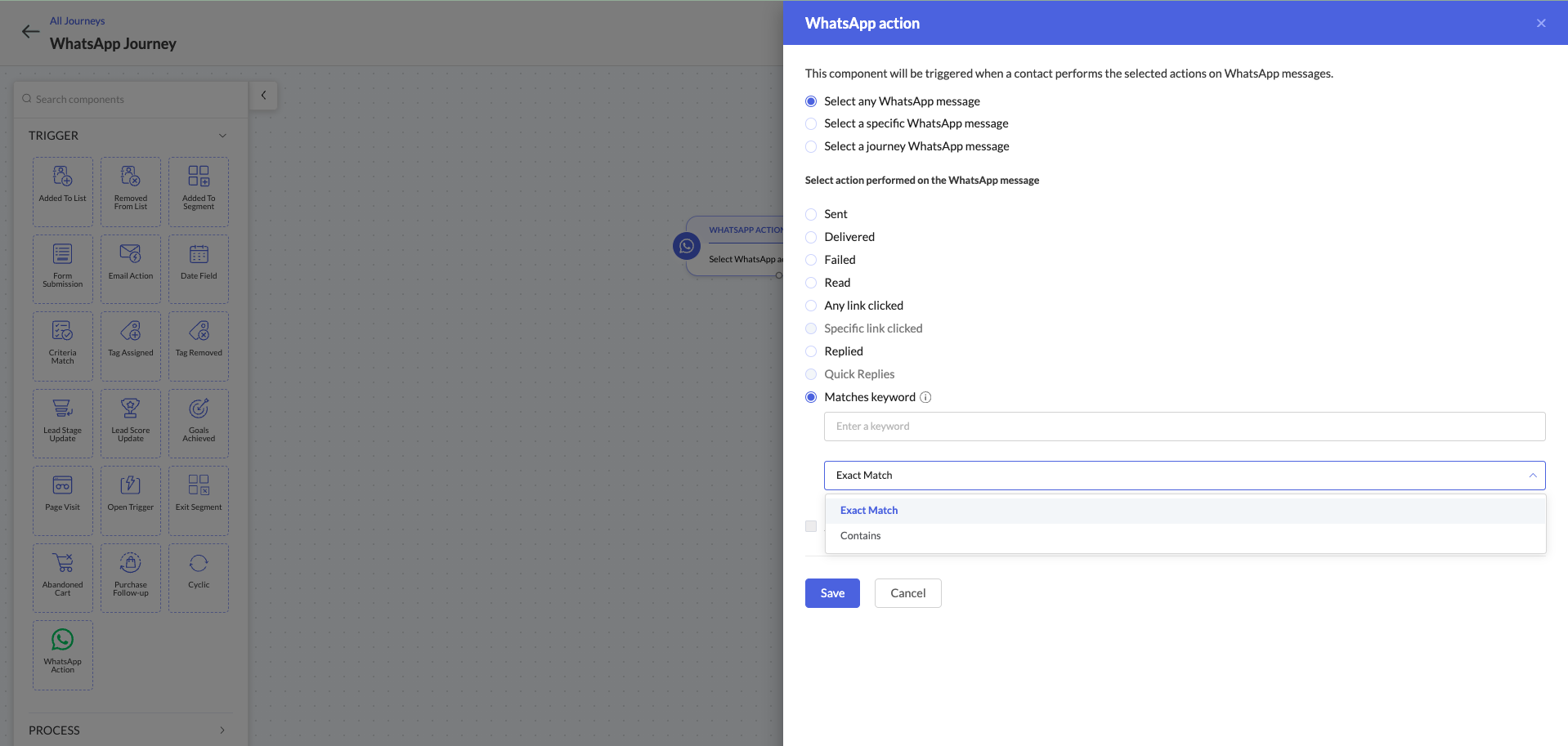

Process 

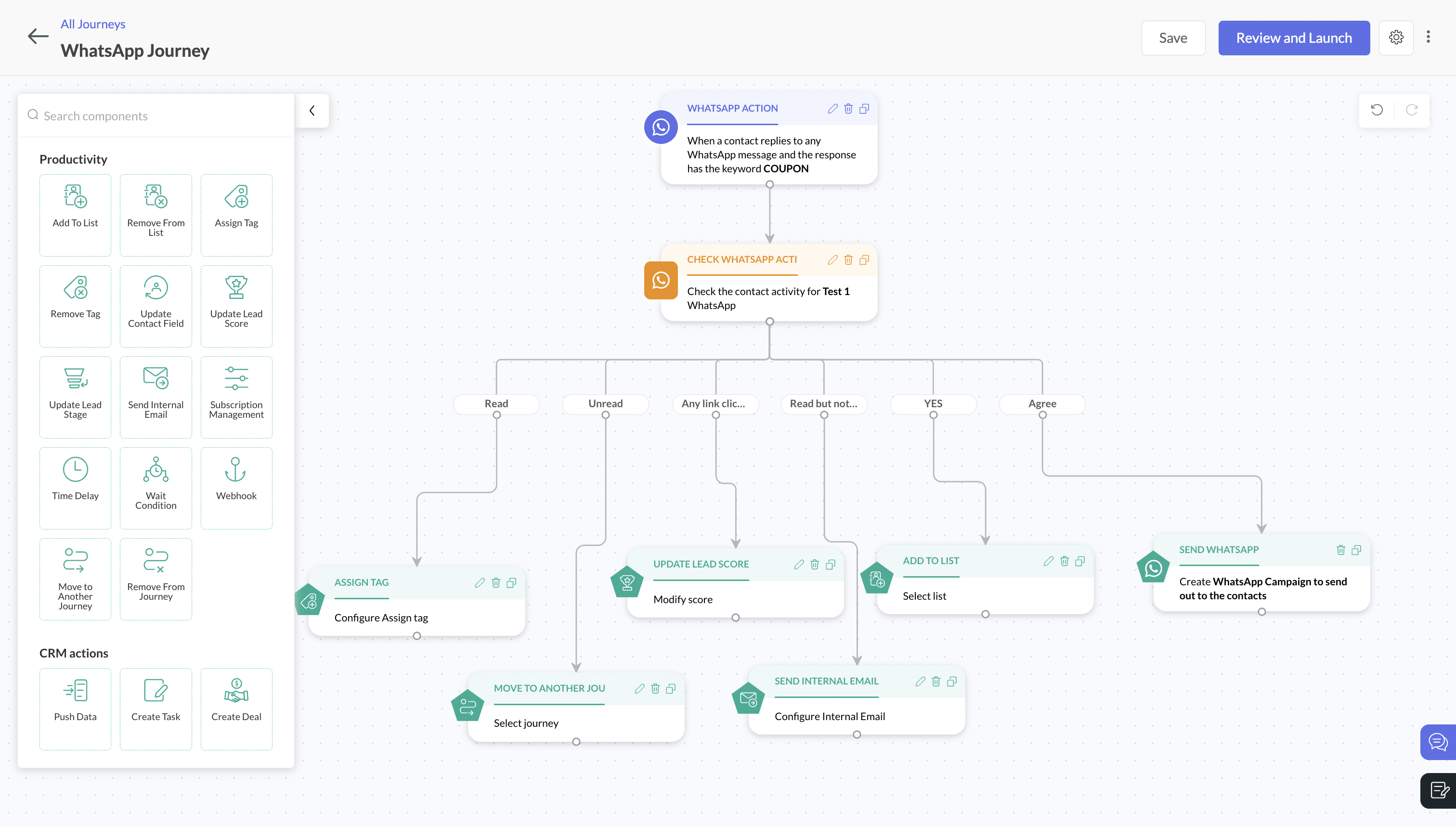
Once a contact is added to a journey, you can define a Process > WhatsApp activity to categorize and send  based on user's activity. In this case, you can choose from multiple activities to associate with a WhatsApp message for greater flexibility and customization in your messaging strategy. 

You can use a single WhatsApp activity component to trigger specific actions based on user interactions. For example, if a user clicks on a specific link in a WhatsApp message, they may automatically move to a different lead stage. Alternatively, if a user responds with a specific keyword, you can automatically send a different WhatsApp message. These use cases highlight how you can engage with users effectively through WhatsApp activities.


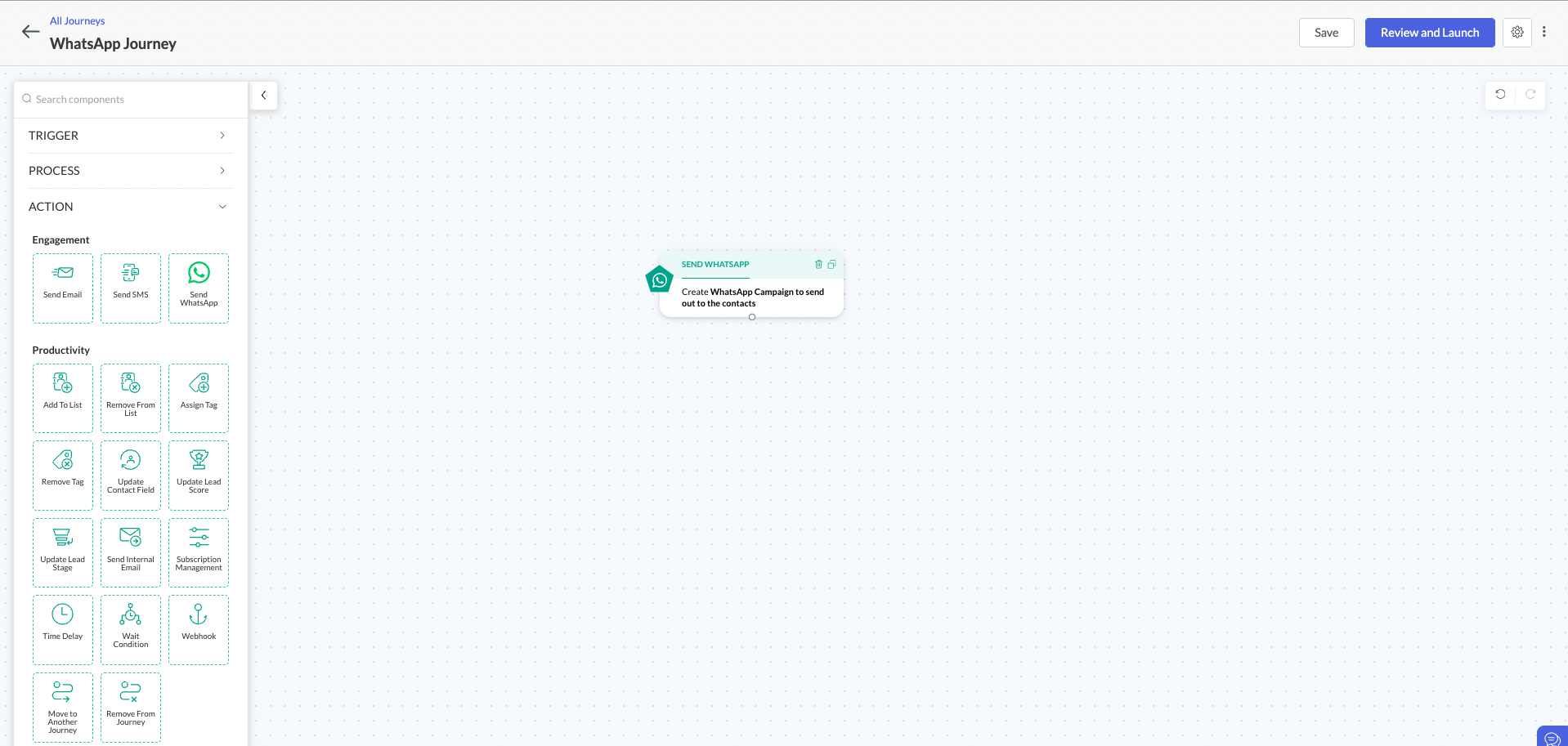
Action 

You can use this action to send a WhatsApp message to all qualified contacts associated with the journey. By delivering personalized messages to contacts associated with a specific journey, you can achieve more targeted and relevant communication. Additionally, creating and sending purchase confirmation and transactional messages, collectively known as Utility Conversations, allows users to automate personalized marketing campaigns based on user behavior.


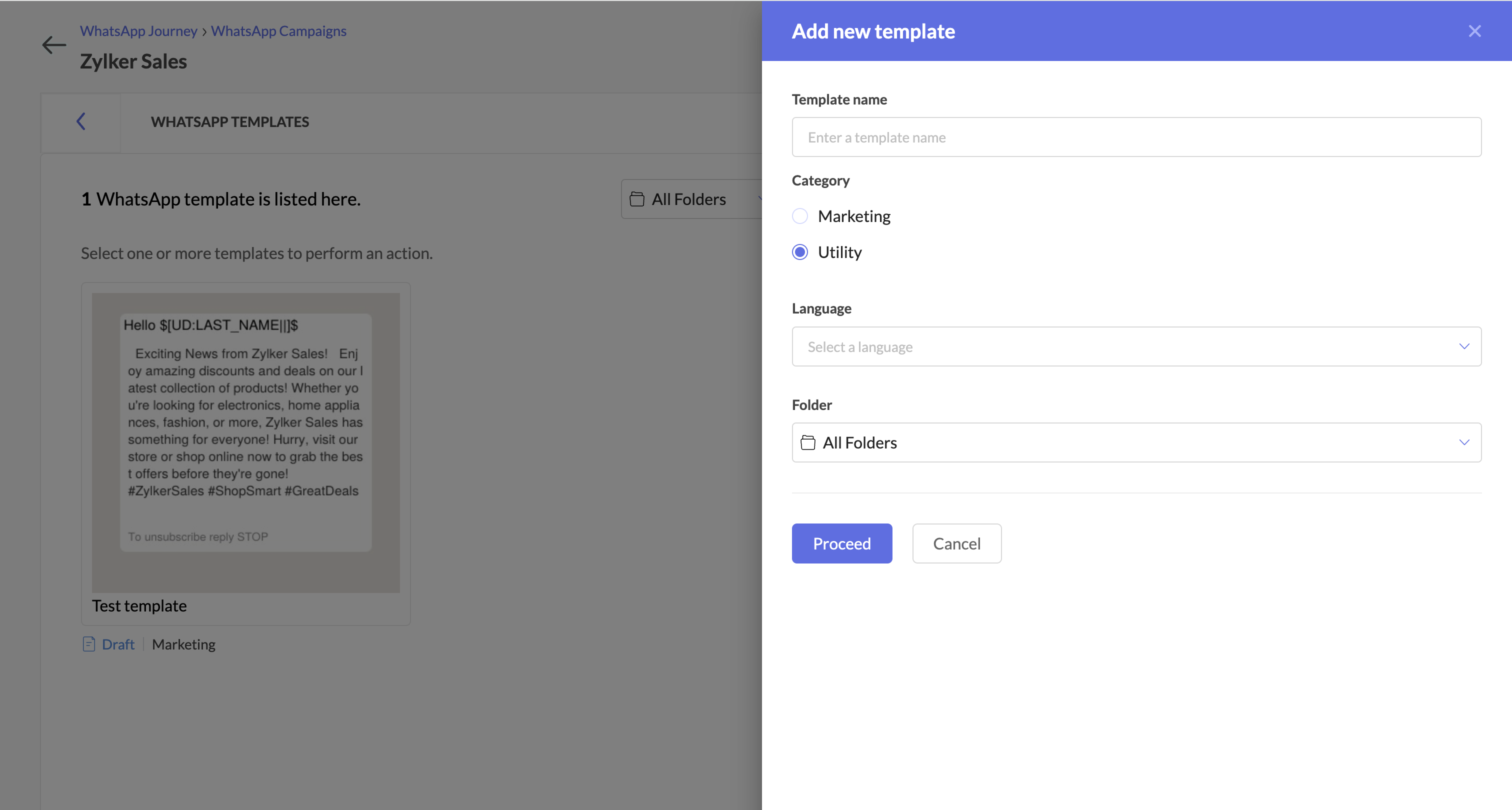
Utility Conversations

We've also added a new feature: utility conversations. Previously, Zoho Marketing Automation only supported promotional messages, offers, and updates. Now, with utility conversations, you can deliver essential, purchase-related information directly through WhatsApp.

This enables you to:
  • Provide timely updates: Send order confirmations and other critical information directly to customers to ensure they stay informed throughout the journey.

  • Streamline transactions: Use automated payment reminders and transactional messages to simplify the buying process and reduce friction.

  • Gather valuable feedback: Easily collect customer feedback through surveys to foster continuous improvement and increase customer satisfaction.


Note: Utility conversations have a distinct pricing structure compared to marketing conversations. You can visit our pricing page to calculate these costs accurately. Additionally, utility conversations will be included only in Professional and Enterprise plans.


With this update, we expect our users to get more out of Zoho Marketing Automation and enhance their brands' reputations with timely campaigns. We're always here to help marketers at every step in their marketing endeavor with Zoho Marketing Automation. Please reach out to us at support@zohomarketingautomation.com. We'll be more than happy to provide assistance!


    • Sticky Posts

    • Marketer’s Space - Automating CRM Actions with Journeys – Part 2

      Hello marketers! Welcome back to another post in Marketer’s Space. In our previous post, we explored how CRM actions in Journeys help marketing and sales teams work together by nurturing CRM leads and pushing only engaged prospects back to sales. If you
    • Introducing automation and utility conversations in WhatsApp marketing

      We’re excited to announce the addition of two new features to our WhatsApp integration: Automation and Utility conversations. These enhancements will allow you to streamline your marketing efforts and engage with your customers more effectively by automating
    • Tip of the week 02 - The art of 'seeing' your leads

      What's the last page that your lead visited before signing up for your brand? What was the page that first convinced your lead to explore more about you? Where are your leads coming in from? Well, these are some perennial questions today's marketers live upon. And, knowing the answers to these questions is crucial, considering the vitality of leads in every business. In the journey of finding lead opportunities, it's important to understand that every detail about a lead is useful. While the channels
    • Zoho Marketing Automation Update: Topics, Contacts, and List Management

      At Zoho Marketing Automation, our highest priority is making it easier for you to use our product to accomplish your business goals. With that in mind, we are updating three of our pivotal features: Topic, Contacts, and List Management.   These existing
    • Important: Zoho MarketingHub is now Zoho Marketing Automation

      Hello Everyone,   We hope you all are doing well. We'd like to notify you that we have rebranded Zoho MarketingHub to Zoho Marketing Automation. We'll discontinue using the term "MarketingHub" from May 26, 2021. However, there will be no changes in the
    • Recent Topics

    • Employee Appraisal Applicability - Why is Date of Joining Hard-Coded?

      In the new (to me, at least) Performance Appraisal Cycle wizard, it's possible to set criteria to determine for whom the appraisal process should apply. This makes sense on its face. However, one MUST use the Date of Joining criterion as a filter. Why
    • Spotlight series #6: The Show app for Android TV has a new look!

      Hello everyone! We are delighted to introduce our revamped and redesigned Show app for Android TV.  Smart TVs are exploding in popularity. Android TV alone has over 110 million active monthly devices. Zoho Show, as part of a constant effort to improve
    • Ask the Experts 26: Brighten every customer interaction with Zoho Desk all year long

      Hello everyone, Greetings and welcome to Ask the Experts 26. As we wrap up 2025, we are excited to invite you to the 26th episode of our Ask the Expert series. 🎄The Merry Metrics Edition = Best of Zoho Desk [Best Practices + Holiday Automation + Year-End
    • Pricing calculator

      Alright, so I'm trying to create a pricing calculator/pricing report generator to use in a cabinet shop. I did all the logic and such, and the calculator works. I have a few other things that I would need it to be able to do though, I'll do my best to
    • Bug Details

      In the Bug detail the milestoneid is missing
    • Group by Owner/ Owner Kanban /Group by Custom Field

      Hi, We are missing the option of viewing Tasks grouped by their owner, as it is an essential function for us to manage our employees' working tasks. We find it hard to inspect what are the tasks that our employees are working on.  We are seeking an option
    • Stop completed task lists from disappearing?

      Is there any way to stop projects from making tasks lists disappear when all the tasks in the list are completed? That's one of those little things where we're constantly fighting the product. For instance we have some projects which are ongoing - no start and end date. We use Kanban view to show the various task lists. We don't want the kanban list to disappear every time the items on it happen to be closed out. Thanks
    • Change of Blog Author

      Hi, I am creating the blog post on behalf of my colleague. When I publish the post, it is showing my name as author of the post which is not intended and needs to be changed to my colleague's name. How can I change the name of the author in the blogs?? Thanks, Ramanan
    • Allow customers to choose meeting venue and meeting duration on booking page

      My business primarily involves one-to-one meetings with my clients. Given the hybrid-work world we now find ourselves in, these meetings can take several forms (which I think of as the meeting "venue"): In-person Zoom Phone call I currently handle these
    • Booking outside of scheduled availability

      Is there a way for staff (such as the secretary) to book appointments outside of the scheduled availability? Right now to do this special hours must be set each time. There should be a quicker way. Am I missing something?
    • Operation Questions.

      Hello, I hope you are well. To explain a little, we are a company that sells services and products with a technical team responsible for installation and maintenance. Zoho FSM can be useful for the technical team, namely for the technical coordinator
    • Direct Access and Better Search for Zoho Quartz Recordings

      Hi Zoho Team, We would like to request a few enhancements to improve how Zoho Quartz recordings are accessed and managed after being submitted to Zoho Support. Current Limitation: After submitting a Quartz recording, the related Zoho Support ticket displays
    • Update date & time when a cell is edited

      Hi All, I am desiring to have a cell update with the current date and time when another cell is edited. Any ideas?  Thank you
    • Add "Groups" to "Share With" on Reports & All Entries

      Hi, On Forms we can share Publicly, with Specific Users And/Or Specific Groups or All Users. With Reports and All Entries we lack the "Groups" option, please add this as with many users this saves a lot of work. Thanks Dan
    • Add Pause / Resume Option to Zoho Quartz Recordings

      Hi Zoho Team, We would like to request an enhancement to Zoho Quartz recordings: the ability to pause and resume an ongoing recording. Current Limitation: At the moment, when recording an issue with Zoho Quartz, the recording continues even when we are
    • Custom Fields Not Showing Up in Invoice PDF Template Document Information

      I have added 2 custom fields under Sales > Invoices > Manage Custom Fields. They are set to show in all PDFs. However when I am editing my Invoice PDF template, i do not see the custom fields under Document Information.
    • Tracking Non-Inventory Items

      We have several business locations and currently use zoho inventory to track retail items (sales and purchase orders). We were hoping to use zoho inventory to track our non-inventory items as well (toilet paper, paper towels, etc). I understand that we
    • Can I use a Standalone CRM Function as the Callback URL For Async Export Data API?

      I am creating an export job using this API https://www.zoho.com/analytics/api/v2/bulk-api/export-data-async/create-export/view-id.html There is a "callbackUrl" key in the CONFIG object. I tried copying the URL for a standalone function in CRM which can
    • ZOHO Books

      Hi there, Why after I upgrade my Zoho invoice > Books then i wanted to add plugin which i cannot do. Please advise.
    • How is Your eCommerce Experience w/Zoho Inventory?

      First off, I'm SUPER grateful for the advent of Zoho Inventory and now the Zoho Commerce Suite. Overall, Inventory is a great product, especially for customers without an eCommerce presence. For eCommerce companies (especially those shipping more than ~10 packages/day), however, there are certain drawbacks that keep my clients from moving over to Zoho Inventory: Cons: 1. Invoice + Package Creation from Shopify/Other eCommerce Integrations: Zoho Inventory makes the somewhat perplexing decision to
    • Error AS101 when adding new email alias

      Hi, I am trying to add apple@(mydomain).com The error AS101 is shown while I try to add the alias.
    • Simplify Mass Replies with Predefined Templates and Snippets

      Hello everyone, We are happy to introduce a new enhancement to Mass Reply that helps agents respond to customers quickly and consistently. With the addition of Email Templates and Snippets in the reply window, agents can use predefined messages while
    • Mapping custom fields from one module to another

      I have a custom field, "Subscription Period" that appears as a required field in every Opportunity (Potential). I want that field to appear on any Quotes derived from that Opportunity (and have created a custom field of the same name in Quotes for that
    • Passing the CRM

      Hi, I am hoping someone can help. I have a zoho form that has a CRM lookup field. I was hoping to send this to my publicly to clients via a text message and the form then attaches the signed form back to the custom module. This work absolutely fine when
    • The Social Wall: November 2025

      We’re nearing the end of the year, and the holiday season is officially kicking in! It’s that time when sales peak and your social media game needs to be stronger than ever. We’re back with exciting new updates across AI, analytics, and the mobile app
    • Item name special charaters <>

      Im trying to input speical characters such as < and > into item name and item description but comes up with following error: Invalid value passed for Item Name and Invalid value passed for Item Description How do i allow speical characters?
    • How to update Multi File upload field

      Assume that i have a multi file upload field,how can i update the same field again?
    • Customer Address Not on Standard Invoice when Address is on Contact Record

      Hi,  I entered the customer billing and shipping address in Zoho CRM. I created an invoice in Zoho Books with the same customer contact. The contact is correctly in Zoho Books with the billing and shipping address. The invoice for the customer does not
    • Apply partial payments to invoices from the Banking Module

      We need this! Why is this not possible?
    • Welcome to the Zoho Show Community Forums page!

      Hello everyone, The Zoho Show community is a place for you to discuss and share anything and everything related to Zoho Show Presentations, our online presentation software. It includes users from all over the globe and all walks of life. Our community helps answer your Zoho Show questions with responses from other knowledgeable community members to give you the best experience creating and designing exciting presentations. Along the way, you'll meet recognized experts from our software team and
    • Regarding the integration of Apollo.io with Zoho crm.

      I have been seeing for the last 3 months that your Apollo.io beta version is available in Zoho Flow, and this application has not gone live yet. We requested this 2 months ago, but you guys said that 'we are working on it,' and when we search on Google
    • How can I convert an existing contact into a lead?

      I imported many contacts into ZOHO CRM. In order to select a few of them as leads, I want to mark or convert a few hundred as Leads. Who can I do that?
    • Introducing Dedicated Modules for Plans, Addons, and Coupons in Zoho Billing

      We’ve enhanced the way you manage Plans, Addons, and Coupons in Zoho Billing. Previously, all three grouped together under Subscription Items. Now, each one has its own dedicated module, giving you a cleaner and more intuitive experience. This update
    • Price book functionality enhancement

      A common use of price books is to create a price book for a given customer level or contract with a specific company. Given that this is done at a company/customer level it would be great to see a way to associate a price book to a given customer and
    • Tracking Emails sent through Outlook

      All of our sales team have their Outlook 365 accounts setup with IMAP integration. We're trying to track their email activity that occurs outside the CRM. I can see the email exchanges between the sales people and the clients in the contact module. But
    • Contact data removes Account data when creating a quote

      Hi, Our customer has address fields in their quote layout which should be the address of the Account. They prefill the information, adding the account name - the address data is populated as per what is in the account - great. However when they then add
    • Important update about notification security in Business Messaging SDK

      As part of our ongoing effort to strengthen the security of notification data, we have enhanced how notifications are processed and protected in our applications. These improvements ensure that all notification related data follows the most up-to-date
    • 年内最後のユーザー向けイベント:5名限定! 課題解決型ワークショップイベント Zoho ワークアウト開催のお知らせ (12/18)

      ユーザーの皆さま、こんにちは。コミュニティチームの中野です。 12月開催のZoho ワークアウトについてお知らせします。 今回はZoomにて、オンライン開催します。 参加登録はこちら(無料) https://us02web.zoom.us/meeting/register/QHn6kJAcRs-znJ1l5jk0ww ━━━━━━━━━━━━━━━━━━━━━━━━ Zoho ワークアウトとは? Zoho ユーザー同士で交流しながら、サービスに関する疑問や不明点の解消を目的とした「Zoho ワークアウト」を開催します。
    • Sync Zoho Marketing Automation with Zoho Forms

      I can't find a section where the integration between Zoho Marketing Automation and Zoho form is explained. And how form subscription works with opt-in and consents.
    • What is the difference between Zoho Campaigns and marketing hub?

      Zoho Campaigns is a permission-based email marketing tool for sending marketing emails and mass emails. Marketing Automation is a multichannel marketing automation tool that caters to organizations looking for tools to engage their users across multiple
    • Next Page