Tip#67: 3 easy ways to add drop-down options
Tip#67: 3 easy ways to add drop-down options


Adding drop-down fields to a form makes it easier to select a value from a predefined list of values. There are 3 easy ways to add the drop-down options to fields.
 
To add a drop-down field to a form, navigate to  and select   Orchestration   from the menu. Choose the Orchestration in which you would like to add the dropdown field. You'll land in Step 1: Create Form. Drag and drop the Drop-down field from the New Fields tray onto the right panel.
 
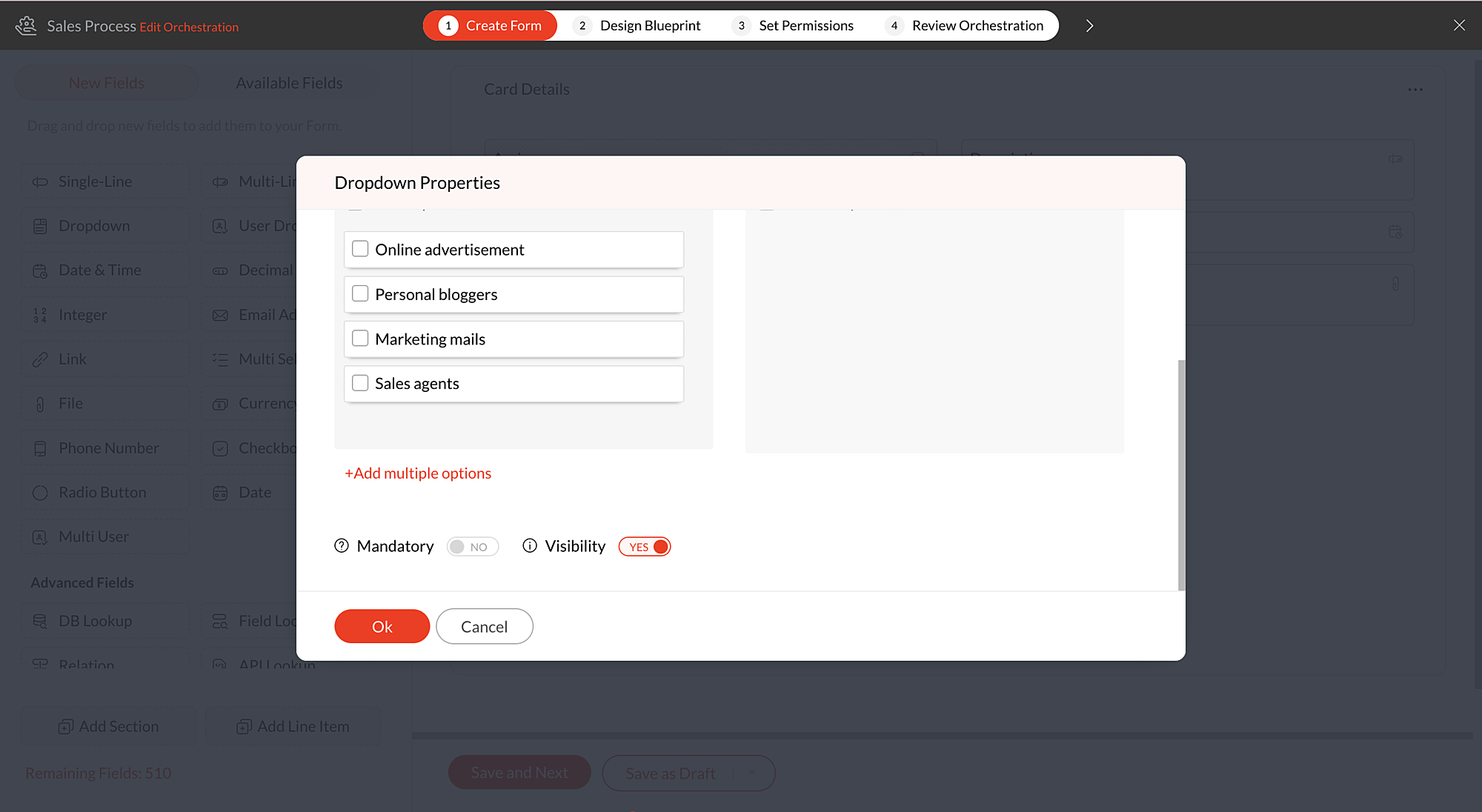
You'll now be in Drop-down Properties pop-up. Scroll down and click  +Add multiple options to view the below options:
  • Quick options
  • Import from file
  • Add manually

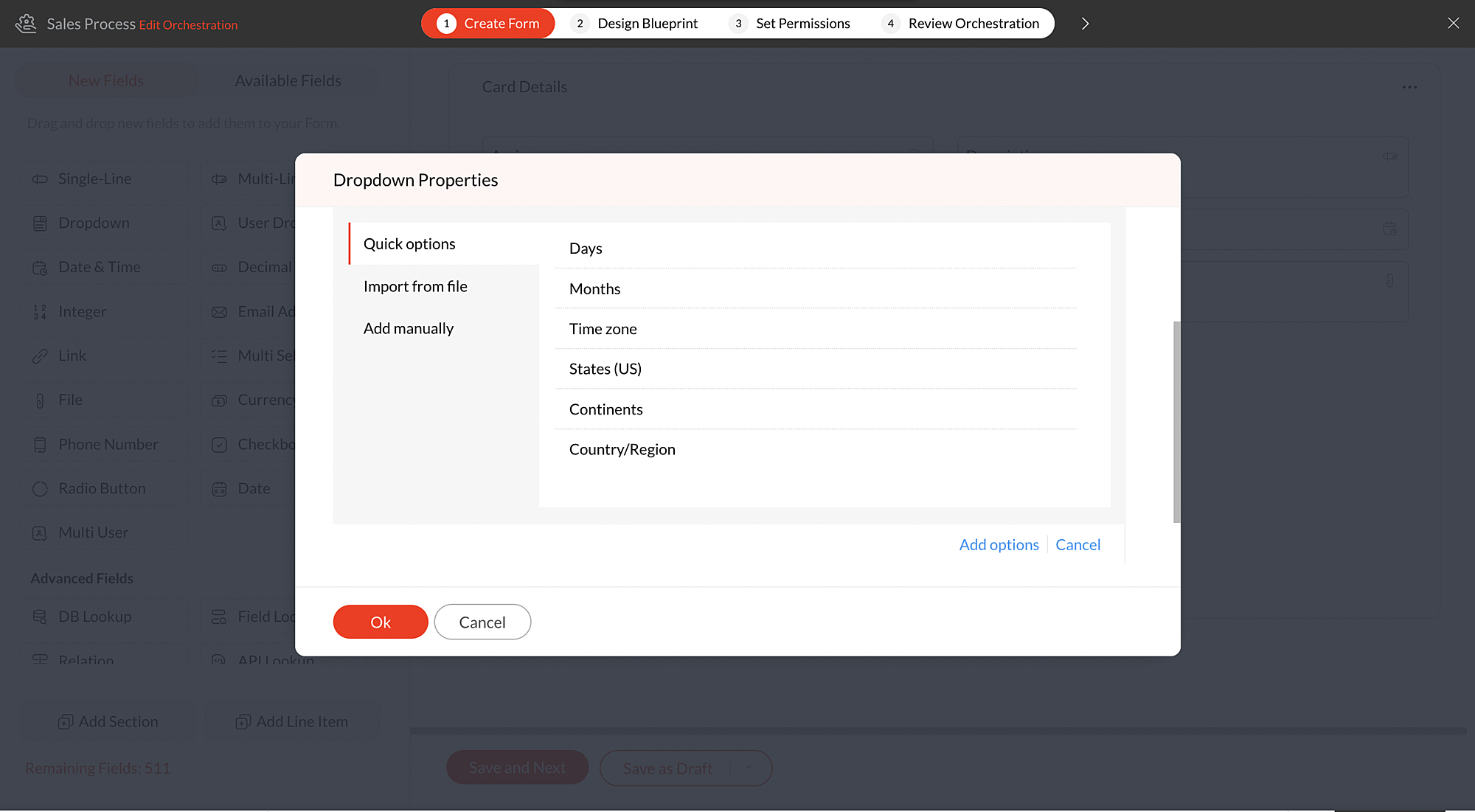
Quick options 

There are a certain set of default dropdown options available in Qntrl. Using these default choices like Days, Months, Time zone, States (US), Continents, and Countries, you can quickly add the required options to the dropdown fields.
 
For instance, if you would like to add drop-down options as Countries, click +Add Multiple options and choose Countries, under Quick options. Select the Countries that need to be listed and click Add options.

All the countries selected by the user will be added to the drop-down list. After adding the default options, you can also add more options manually if required by clicking the + icon under Options in the Drop-down Properties pop-up.

Import from file 

You can also import a .txt or .csv file to populate the drop-down list.The options must be typed line by line, and the file must be less than 2 MB in size.
 
For example, you have maintained a list of local hub offices  of your organization in a file and you would like them to be added as drop-down options in a form. You can simply import the file containing the list and update the drop-down.
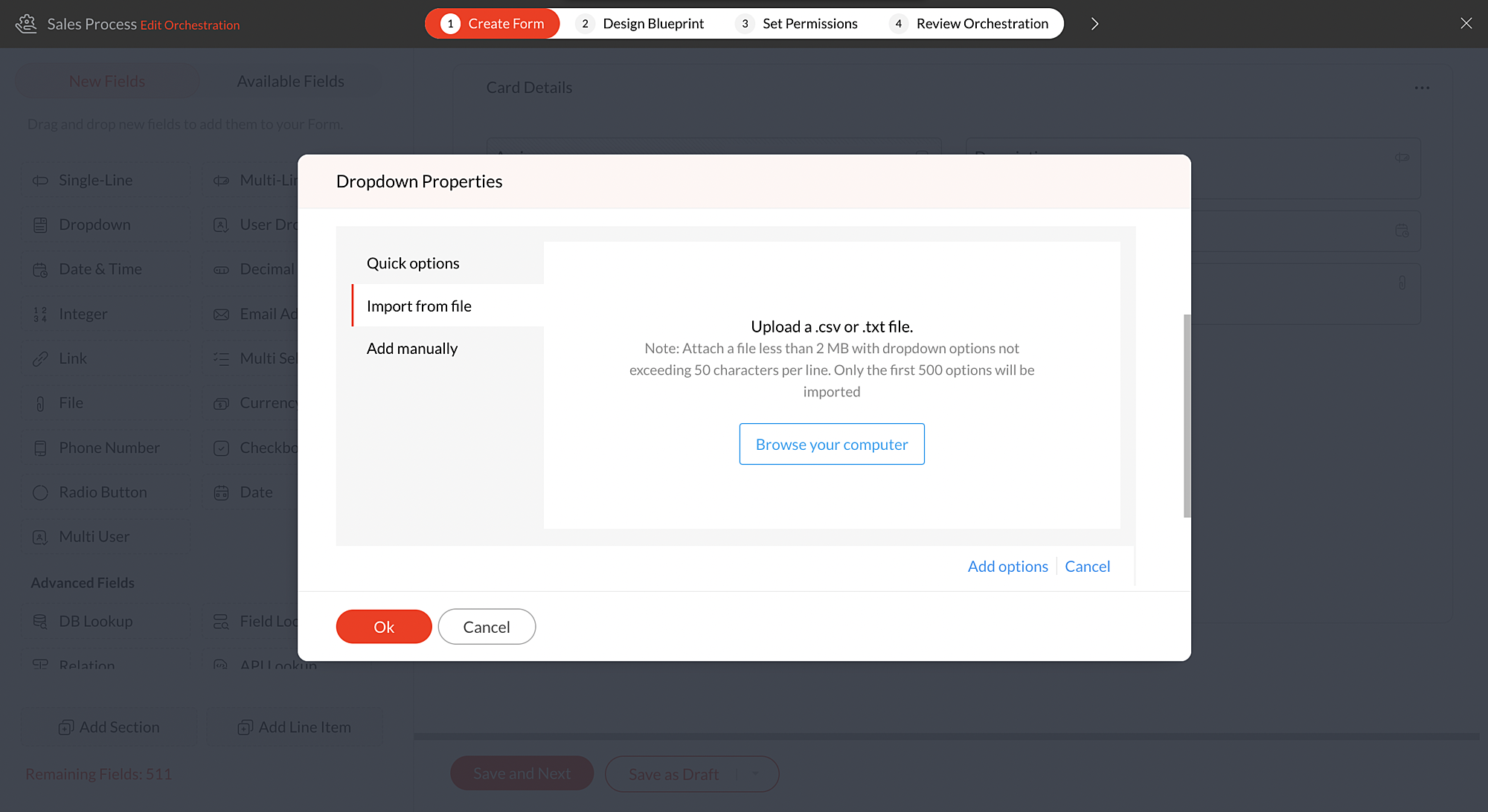


Note: You can add up to 500 options in the drop-down. To add more than 500 options, please drop an email to support@qntrl.com

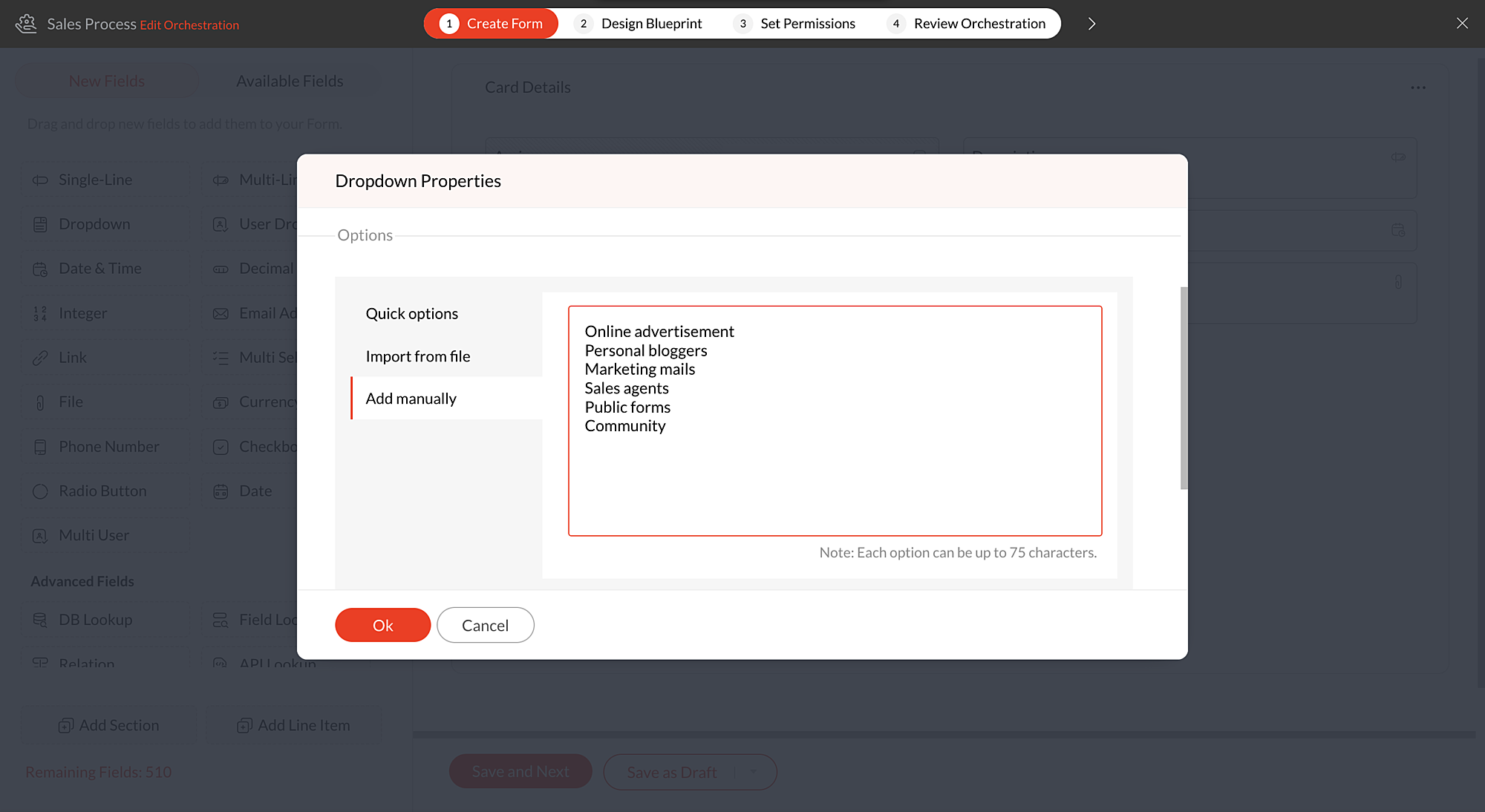
Add manually  

With this option, you can write all the options at once instead of adding them one by one.
 
List down all the options to be added in drop-down one by one and click Add options and they will be added to the drop-down.
 
For instance, if you have more number of drop-down options to be added to the field, clicking the green tick after adding each option will be time-consuming. In such cases, you can write the options one by one and add them all at once.


Know more about drop-down fields from this help document.
 
We hope this update is helpful to you. If you have any questions or suggestions, please leave a comment below or email us at support@qntrl.com.


                          Help resources:   Qntrl KB |   Tutorials |   Short Help Videos |   How-to videos

    • Sticky Posts

    • Tip #21: Increase user engagement using dynamic email content and attachments in Orchestly

      Businesses often send out bulk emails like weekly newsletters, monthly event updates, promotional emails, surveys, beta access emails, product reviews, seasonal greetings, and so on. Even as the gist of these emails remain constant for all recipients, personalizations capture the audience’s attention and help brands connect with them.   Orchestly’s email templates allows you to draft and send dynamic emails with personalized content and attachments to internal and external users. Email templates
    • Qntrl's 2023 year in review

      This year has been all about analyzing our customer feedback and building a resilient and solution-driven product from it. As a result of this work, we're happy to announce that a whole new version of Qntrl is getting ready for release soon. This new
    • Tip #61: 5 different ways to create Cards in Qntrl

      Qntrl supports an array of features that covers everything required for business orchestration, from process automation to business advancement. Cards, being the elemental feature of Qntrl, record all the details of a particular task from the beginning
    • Tip #17: Stay informed of significant business impact using Orchestly

      With remote working becoming the new norm, leaders across sectors need to stay updated of their business performance in the market to aid business decisions. Instead of awaiting virtual meetings from sales and finance heads to put forth the business status, organization leaders can themselves dig into the system to keep an eye on their revenue generating customers or set up notifications to monitor major updates.   Orchestly recognizes such requirements and provides adaptable solutions for all business
    • Onboard faster with Orchestly's Tutorials

      We are actively rolling out new learning materials to assist our customers onboard at ease and automate their processes effortlessly. On that front, we recently launched Tutorials for Orchestly.   Tutorial is a step-by-step guide to help users familiarize the concepts of Orchestly and automate simple processes right from scratch. We’ve documented 3 such business processes viz. Order Manufacturing, Product Implementation, and Change Management.   We're looking forward to document more customer-centric
    • Recent Topics

    • Export your notes from Notebook!

      Dear users, The long awaited feature is now live. Yes, you can now export your notes from Notebook app in bulk. But the feature has just started with web app alone for now. You can try the export feature as mentioned below: Go to our web app, https://notebook.zoho.com Go to 'Settings' > 'Export' Now, select the format: You can select either ZNote or HTML Once done, you can use the same to import or can have this a local backup of your notes. Note: Export for other platforms are in development and
    • Prepopulating Fields

      Hello, I have a form (Assets) with 2 lookup fields: Client (from Clients) Site (from Client Sites) I modified the code (highlighted in red below), so the Site dropdown shows the list of sites related to the Client. must have Client_Site ( type = picklist
    • Unable to sort as Descending order

      Trying to change the sort order for a lookup field (checkboxes) from Ascending to Descending and keep getting an error in Deluge that the order must be Ascending Did anyone ran into this? Thanks Eyal
    • Export Invoices to XML file

      Namaste! ZOHO suite of Apps is awesome and we as Partner, would like to use and implement the app´s from the Financial suite like ZOHO Invoice, but, in Portugal, we can only use certified Invoice Software and for this reason, we need to develop/customize on top of ZOHO Invoice to create an XML file with specific information and after this, go to the government and certified the software. As soon as we have for example, ZOHO CRM integrated with ZOHO Invoice up and running, our business opportunities
    • Can I change the format of the buttons in the email templates?

      Hi all! We have been working hard trying to brand our email templates, and have some way to go yet. One of the things we can't seem to edit is the green ${Cases.CUSTOMER_PORTAL_BUTTON} button and the font of the View Ticket text. Is there any way of doing
    • issue with deluge script

      i used chat gpt to build this script and I am getting 2 errors which I cannot figure out how to fix: void monthly_sales_order_generation() { try { // ---------------- CONFIG ------------------- analytics_url_1 = "https://analytics.zoho.com/api/<workspaceID>/report/<reportID1>/data";
    • Introducing LinkedIn Apply Connect for Zoho Recruit

      Attract up to 3x more qualified candidates and hire more efficiently with LinkedIn Apply Connect. Let candidates fill-in job applications without any redirections, gain deeper insights with applicant highlights within Zoho Recruit, and keep candidates
    • Recruit paid support?

      Hi all, Could anyone who has paid support package advise if it provides value for money with regards to support response times? Exploring the idea as unfortunately when we have faced issues with Recruit it has been a 7+ day timescale from reporting to
    • Introducing Dedicated Modules for Plans, Addons, and Coupons in Zoho Billing

      We’ve enhanced the way you manage Plans, Addons, and Coupons in Zoho Billing. Previously, all three grouped together under Subscription Items. Now, each one has its own dedicated module, giving you a cleaner and more intuitive experience. This update
    • Ticket Status email

      Good day, This was discussed in the past, but it would be helpful if we could have the system assign a custom response to a status. We have various statuses for tickets, e.g. "closed due to no response", or "Pending Status", it would be helpful for the
    • Customer ticket creation via Microsoft Teams

      Hi all, I'm looking to see if someone could point me in the right direction. I'd love to make it so my customers/ end users can make tickets, see responses and respond within microsoft teams. As Admin and an Agent i've installed the zoho assist app within
    • Holidays

      Hi; For defining Holidays, you need to add logic to handle the year as well as the month & day. We need to be able to enter Holidays for the next year. I need to add a holiday for January 2, 2017, but I can't until January 1st, which is a Sunday and we
    • Can I use a Standalone CRM Function as the Callback URL For Async Export Data API?

      I am creating an export job using this API https://www.zoho.com/analytics/api/v2/bulk-api/export-data-async/create-export/view-id.html There is a "callbackUrl" key in the CONFIG object. I tried copying the URL for a standalone function in CRM which can
    • Future Orders - Due Date

      Hi In my role, I can receive tickets where the work required is requested months in advance. Using a Future Orders option, which I believe was setup under the On Hold status type, hides the Due Date, in all views/ticket etc. Whilst I understand the reasoning
    • Introducing Withdrawal Reasons for Offers

      We’re excited to introduce a new enhancement to the Offer module that brings more clarity and accountability to every withdrawn offer. The Withdrawal Reason update ensures that each withdrawal — manual or automatic — is backed by a clear explanation,
    • Zoho Creator customer portal users

      Hi, I'm in a Zoho One subscription with our company. I'm running a project now that involves creating a Zoho Creater application and using the Zoho Creator Customer Portal.  At most we need 25 customer portal users. In our Zoho One plan we only get 3
    • GPS tracking only or Check out facility

      Dear Team, Zoho CRM is quite robust CRM but till date i was waiting for the feature of having GPS tracking of Sales employees which is a common demand by all customers for thier field sales executives. We cover them by saying that CRM provides Checkin
    • HTML Tags added to Reports with Notes

      Recently Zoho added the ability to markup text within notes. That way, users can change font size, colors, etc. It's a great change. However, since the change, reports that include a column for "Note Content" are printing HTML tags within the report.
    • In App Auto Refresh/Update Features

      Hi,    I am trying to use Zoho Creator for Restaurant management. While using the android apps, I reliased the apps would not auto refresh if there is new entries i.e new kitchen order ticket (KOT) from other users.   The apps does received notification but would not auto refresh, users required to refresh the apps manually in order to see the new KOT in the apps.    I am wondering why this features is not implemented? Or is this feature being considered to be implemented in the future? With the
    • Appraisals on Employee Information Profile

      Is it possible to show completed appraisals on each employee's "Employee Information" page? I would presume at the bottom - similar to the "Related Lists" concept in Zoho CRM. Obviously view access would be limited to employee and appropriate other roles
    • AI Interview Insights: Turn Recorded Interviews into Quick Transcripts & Summaries

      Evaluating interviews shouldn’t require replaying long recordings or taking manual notes. With AI Interview Insights, you can now review complete transcripts and AI-generated summaries of your One-way (Recorded) interviews right inside Zoho Recruit. This
    • Kaizen #220: Actions API - Webhooks APIs - Part 2

      Hello all!! Welcome back to the follow-up Kaizen post of Kaizen #219: Actions API - Webhooks APIs - Part 1. In the previous week, we covered how to configure a basic Webhook and how to include Headers, Body, and URL Parameters using both the POST Webhook
    • Standard Payment Term is not pulled from account to quotation

      Hey Team There seems to be something off. I do have "Net 30" as my default payment term in Zoho Books for my customers. If, from the customer overview or quote section, I create a new Quotation, the payment terms field stays blank and doesn't get the
    • Request for Auto PO - Min–Max based Automated Purchase Feature

      Dear Zoho POS Team, I’m writing to request a feature enhancement that would significantly streamline inventory management for businesses using Zoho POS — particularly supermarkets, FMCG retail, and multi-store operations like ours. Feature Requested:
    • Canva Integration

      Hello! As many marketing departments are streamlining their teams, many have begun utilizing Canva for all design mockups and approvals prior to its integration into Marketing automation software. While Zoho Social has this integration already accomplished,
    • Manage your invoices from Bigin's mobile app (iOS)

      Hello everyone! We're happy to announce that users can now integrate Zoho Books with the latest version of Bigin's iOS app. Zoho Books can be integrated with Bigin only via the web application. Users can view the Zoho Books tab in the detail pages of
    • HubSpot CRM to Zoho Creator Integration

      I'm trying to create an integration between HubSpot CRM and Zoho Creator with HubSpot being the push source (if a contact is created or updated in HubSpot, it pushes the information to Zoho Creator). I have two questions: 1- Is it best to use Zoho Flow
    • Systematic SPF alignment issues with Zoho subdomains

      Analysis Period: August 19 - September 1, 2025 PROBLEM SUMMARY Multiple Zoho services are causing systematic SPF authentication failures in DMARC reports from major email providers (Google, Microsoft, Zoho). While emails are successfully delivered due
    • Accessibility controls and multilingual captcha authorization for Help Center users ​

      Hello everyone, As part of our ongoing effort to improve user experience, we are excited about the accessibility controls and predefined accessibility personas added in the Help Center, similar to what is already available in Zoho Desk. Help Center users
    • Gain control over record sharing with portal users through our new enhancement: criteria-based data exposure

      Dear Customers, We hope you're well! Portals is a self-service avenue through which your clients can access and manage their direct and related data in Zoho CRM. This empowers them to be more independent and enables them to experience a sense of transparency
    • Zoho Sign + Zoho CRM : la solution pour simplifier vos accords de vente

      La conclusion d’un contrat de vente nécessite de nombreuses étapes : préparation de documents, validations successives et collecte des signatures. Les équipes commerciales passent souvent par plusieurs cycles de collaboration et de révision, tout en assurant
    • Zoho Desk Limitations

      Good day, all, I would like to know whether others share my frustration with some of Zoho's limitations. Don't get me wrong, I like Desk (and I also have a subscription for Analytics), I have been with them for close to 10 years, and unfortunately, I
    • Item/service subtotal

      Just discovered & really pleased that we can drag to re-order the line items in Sales orders & Invoices, a very nice feature which doesn't seem to be documented? It would be nice to be able to insert a subtotal as a line item to complete this great feature
    • Converting Sales Order to Purchase Order

      Hi All, Firstly, this code works to convert a sales order(SO) to a purchase order (PO) via a button, however I am running into an issue when I convert the SO where the values from the line items are not pulled across from the SO to the PO. The ones in
    • how to Solve Conflict Invoices in Zoho POS

      Hello Team, I am facing a repeated issue in Zoho POS while saving a sale that contains service-based items. My products are intentionally created as Service (Non-Inventory) items because I do not want to track stock for them. However, every time I try
    • All new Address Field in Zoho CRM: maintain structured and accurate address inputs

      The address field will be available exclusively for IN DC users. We'll keep you updated on the DC-specific rollout soon. It's currently available for all new sign-ups and for existing Zoho CRM orgs which are in the Professional edition. Latest update
    • Copy, Paste, Highlighted text

      when i copy paste text it gets highlighted. Fix this.  WTF is with this black highlight ? Fix copy pasting. Some people pay for using this mail service. 
    • Pricing Strategies: #6 Common Mistakes while Configuring Pricing

      "Why does this month's billing feel messy again?" That was the exact line Priya muttered while staring at the spreadsheet full of edited pricing, one-off discounts and mismatched subscription details. Her business was growing, but the pricing machine
    • Publish to LinkedIn via API

      Hi, Is it possible to publish a job opening to LinkedIn (paid job slots) if creating a job opening via api / deluge function? Or is the user required to manually publish via the job boards process? Many Thanks Adrian
    • FSM - Associating and selecting Contacts based on Service Addresses

      Hi FSM team, I've come across an FSM limitation I wanted to share for improvement. I'm currently configuring FSM for a client who provides heating system install and maintenance services. The are often sub contracted by building management companies to
    • Next Page