Advanced statistics for LinkedIn page, posts and monitor @mentions in Zoho Social

Advanced statistics for LinkedIn page, posts and monitor @mentions in Zoho Social

Hello everyone,
 
We've made enhancements to the Monitor, Reports tabs, and Post Stats for the LinkedIn channel in Zoho Social, so we wanted to briefly share some information about the updates.

Monitor LinkedIn mentions 

LinkedIn is one of the most popular social media platforms with over 830 million members from 200 different countries. As it's where businesses, customers, and partners share their ideas and collaborate with your brand—whether about an event, awards and recognitions, or reviews from product analysts or customers—it's essential to know everything that's happening and to engage with your audience, thereby boosting your brand's reputation.
 
With numerous posts everyday, though, it can get complicated to stay on top of all the interactions every time someone mentions your brand there.
 
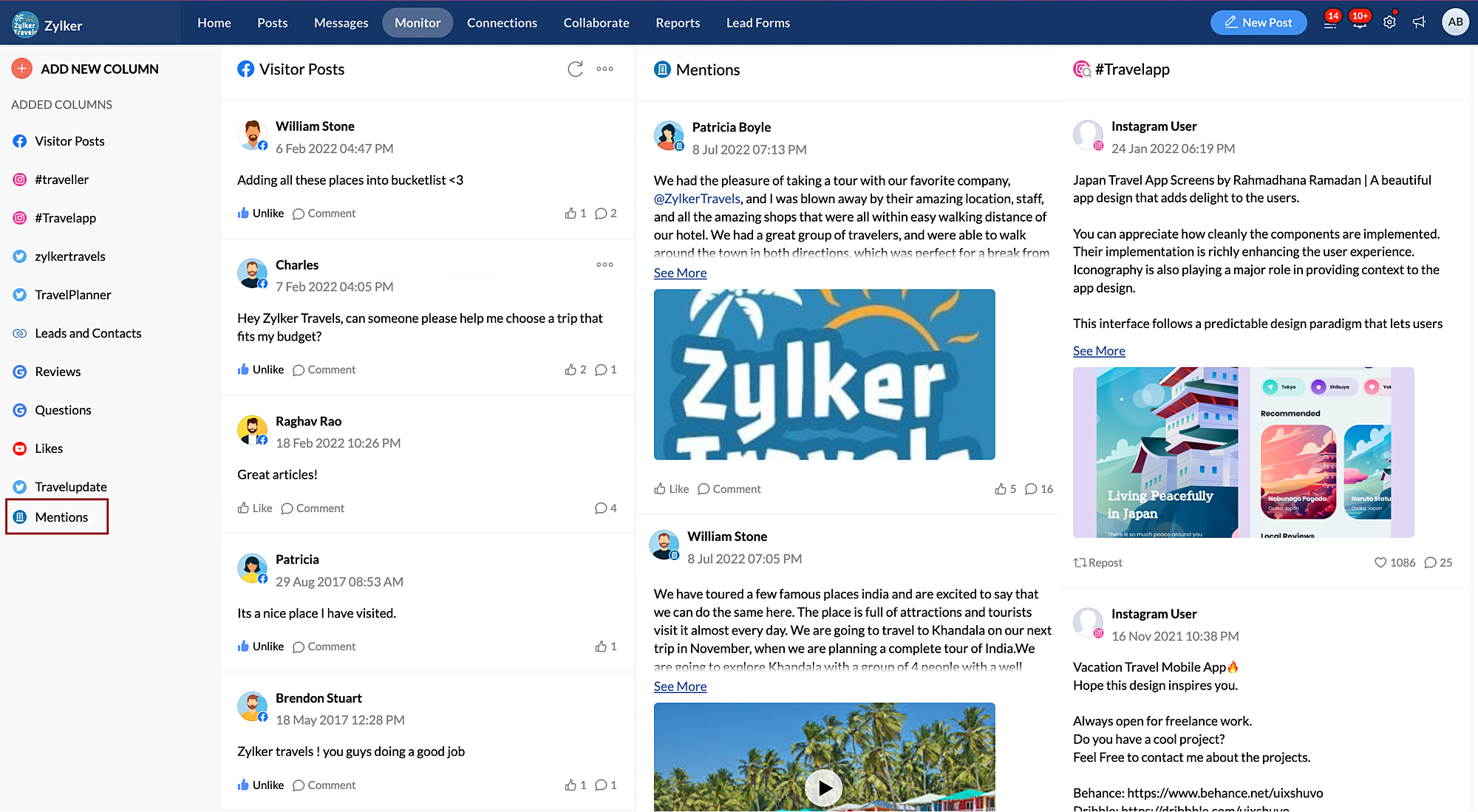
To tackle this, you can now track every time someone mentions your brand on LinkedIn from the Monitor tab in Zoho Social. You can view the complete post and add a like or comment right without leaving the tab. 

View performance reports for LinkedIn 

When you have a LinkedIn page, it's important to understand how the audience engages with your content. The Reports tab in Zoho Social lets you monitor various analytics on your audience, posts and engagement, and the performance of your page.
 
Regarding that last point, we've now introduced various in-depth analytics on page performance.
 
The new analytics in the Performance tab include:
  • Page Views vs Unique Views
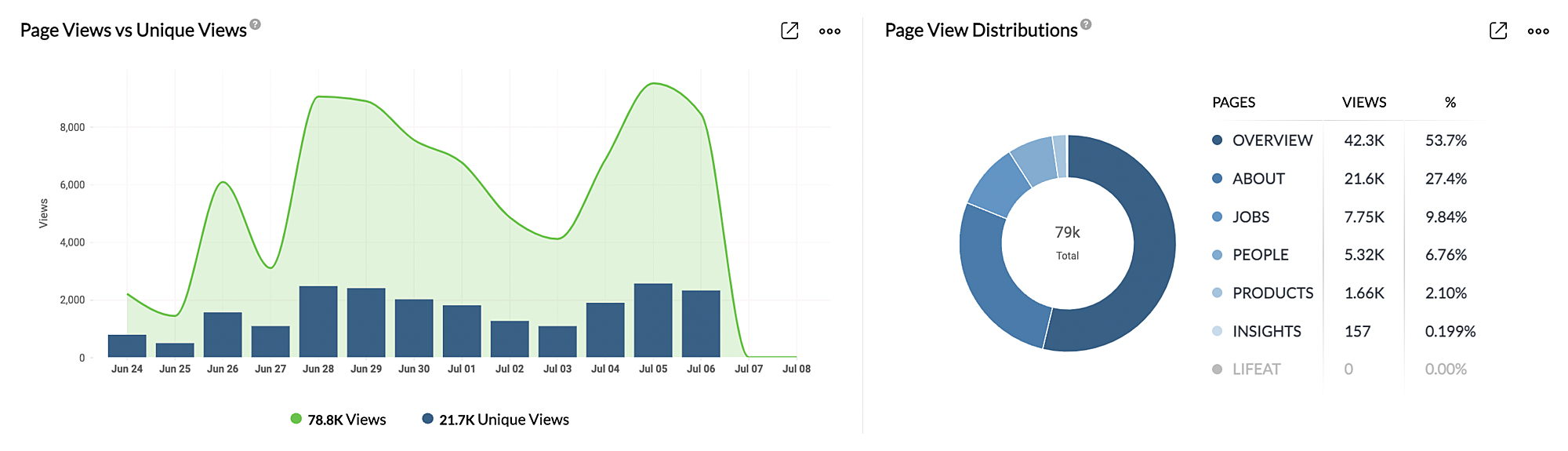
    See the total number of views on your page and number of unique visitors.
  • Page View Distributions
    The table displays the total number of views on the different tabs that are part of your LinkedIn company page, such as overview, about, jobs, people, products, and more. 
  • Page Views by Country
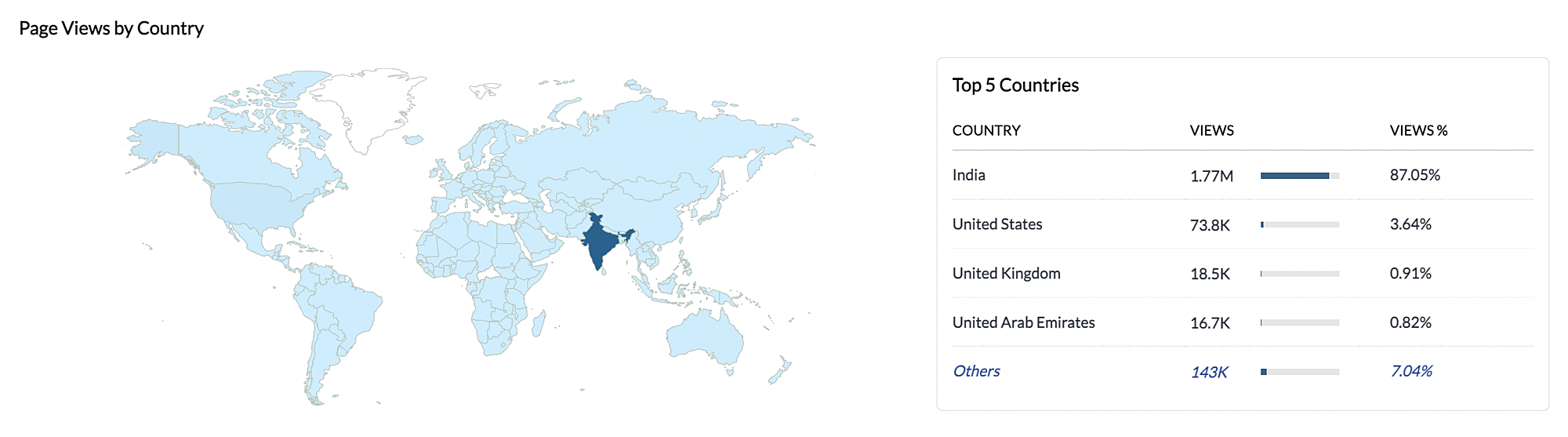
    The map denotes the number of views on your page from different geographical locations. 
  • Page View by Industry, Job Function, Seniority Level, and Company Size
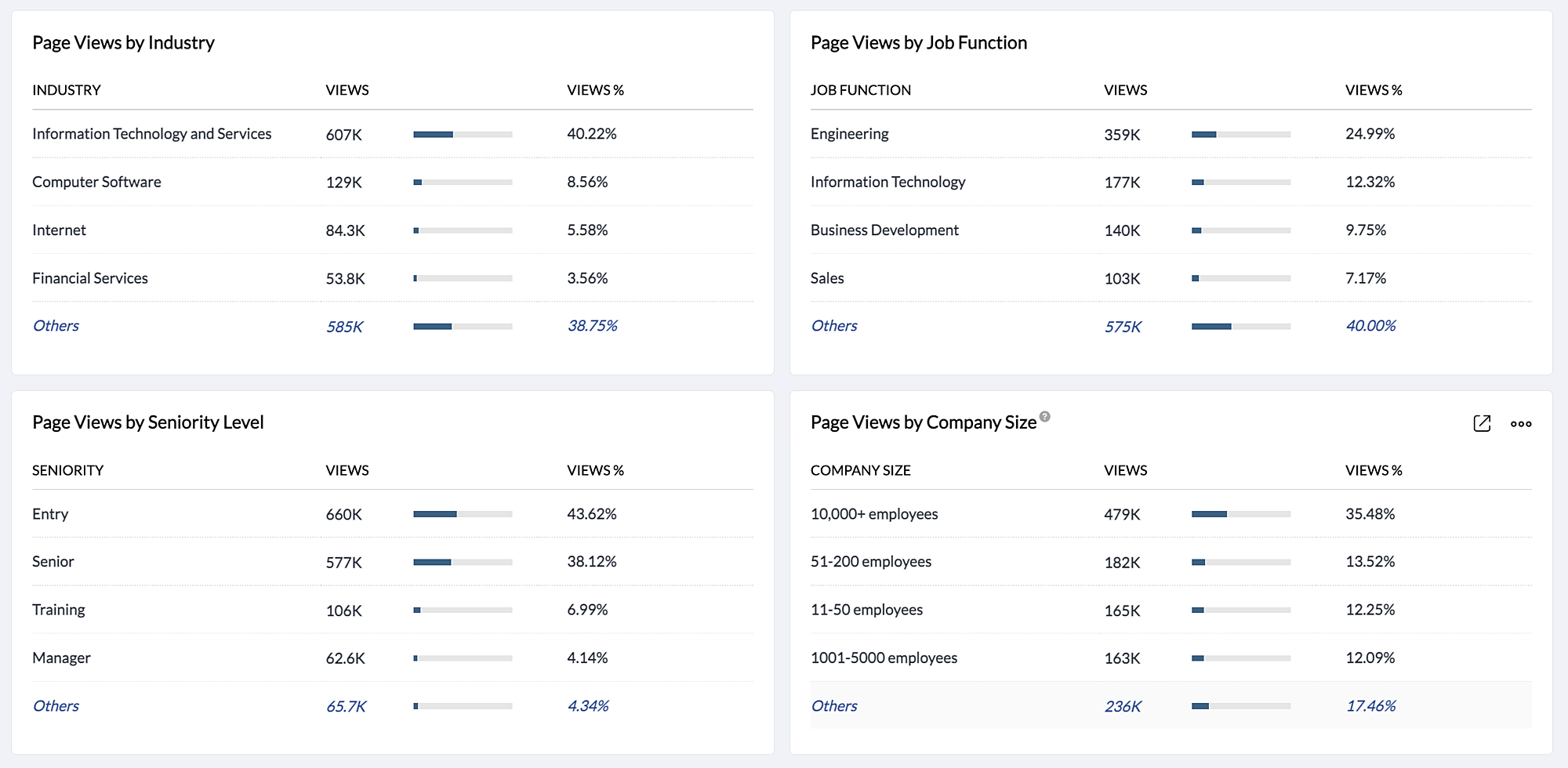
    Here you can see the total number of views on your page categorized based on industry such as information technology and services, and marketing and advertising; job functions such as engineering, sales, and business development; seniority level such as partner, VP, and manager; and, lastly, based on the number of employees in the company. 
  • Career Page Clicks on Mobile vs Web and distribution
    This displays the total number of clicks on the career page from mobile and web browsers, as well as the number of clicks on different tabs on the career page. 
New analytics in the Posts and Engagement tab include:
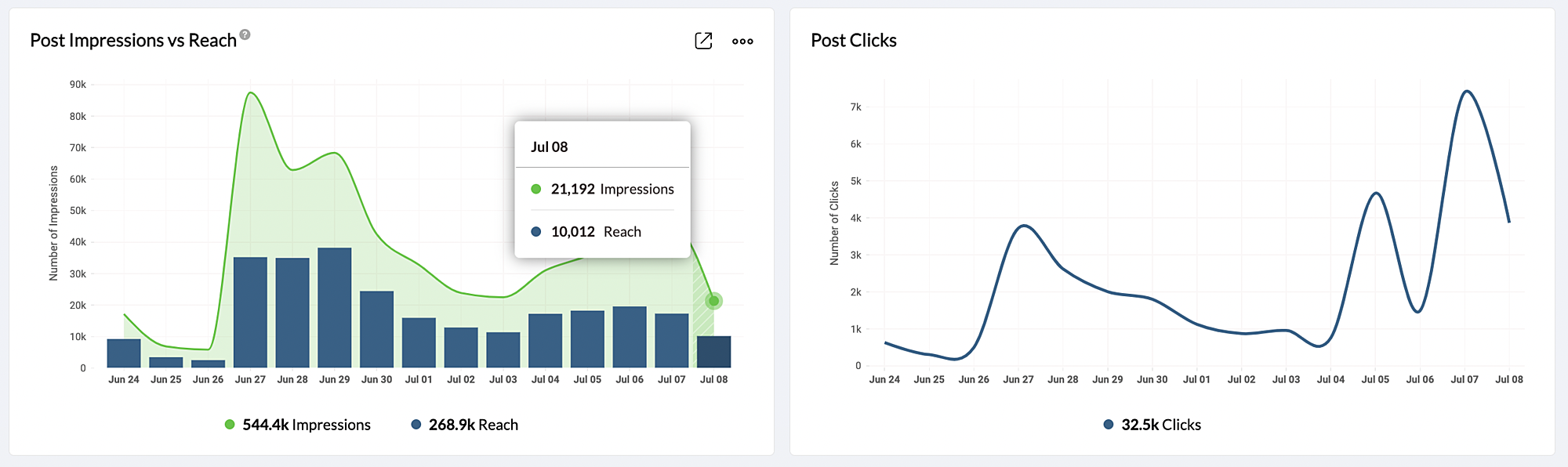
  • Post Impressions vs Reach
    This graph displays the total number of views on the post and the number of people who viewed the post in your LinkedIn page.
  • Post Clicks
    See the total number of clicks on your post. 
New analytics in the Summary tab include:
  • Performance Summary
    Here you can view the overall summary of the LinkedIn page such as page views, unique views, and the number of clicks in the career page. 

Post stats for Videos  

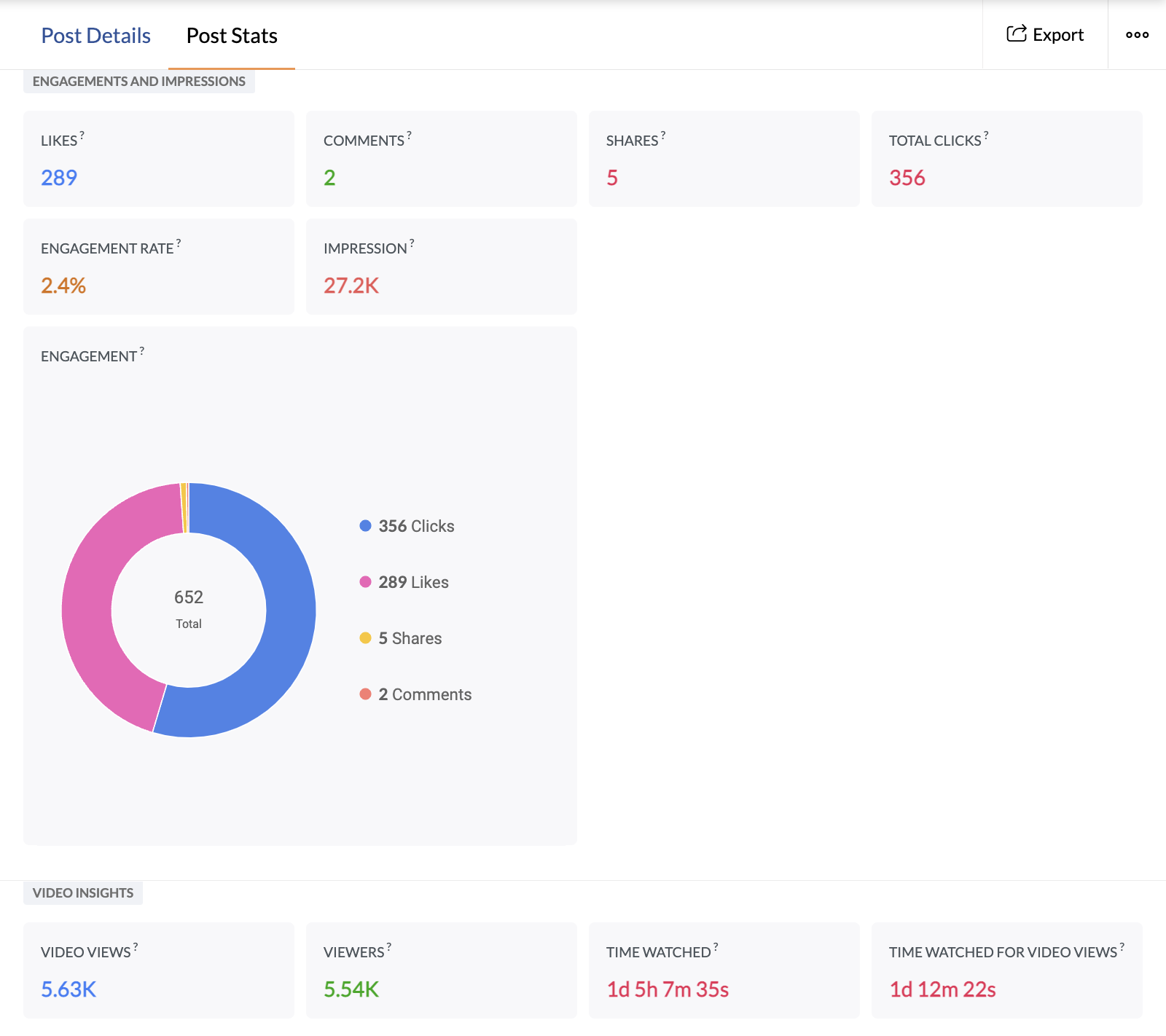
From the Post Stats tab, you can view detailed statistics on likes, comments, shares, the engagement rate, and so on. Apart from this, if the posts consist of a video, you'll also be able to see analytics specific to the video, such as video views, number of unique views, and the total duration watched in milliseconds. 

We hope you find this information useful. Try it out and let us know your valuable feedback.

    • Sticky Posts

    • Introducing Inbox in Zoho Social

      Hey everyone, We are excited to introduce the Inbox in Zoho Social to help manage all social media interactions from Facebook, Instagram, X (formerly Twitter), Google Business Profile and YouTube for your brand in one place. You can track and assign them
    • A decade together - Thank you for being a part of the journey with Zoho Social!

      A decade ago, we started Zoho Social with a simple vision: to make social media management easier, smarter, and more impactful for your business. What began as a small idea has grown to a powerful platform that helps businesses across the globe reach
    • Advanced statistics for LinkedIn page, posts and monitor @mentions in Zoho Social

      Hello everyone,   We've made enhancements to the Monitor, Reports tabs, and Post Stats for the LinkedIn channel in Zoho Social, so we wanted to briefly share some information about the updates. Monitor LinkedIn mentions  LinkedIn is one of the most popular
    • Introducing advanced statistics for all your social media posts

      When you're publishing on social media, it's important to understand how the audience engages with your content. This insight helps you come up with ideas for different types of content and also identify the social media channel that's most effective
    • It's here! A Publishing Calendar to give you better view and more control over your posts.

      Hello!   Just a couple of days back my colleague Vishal announced that you can now do more on Twitter with the Advanced Search Filters, along with a bunch of other cool stuff. I hope you got a chance to check it out.  In fact, I'm itching to you tell you all about the latest updates we have lined up, but I'd rather give you doses of excitement every week to last until the very end. ;) Alright, I hear you. That's enough tease for the day.  Here we go! Introducing... an all-new Publishing Calendar,
    • Recent Topics

    • Tip of the Week #75– Manage your social media messages from a single shared inbox.

      Are you tired of jumping between apps or browser tabs to reply to your business's Facebook and Instagram DMs? Handling customer messages on social media might seem simple, but switching between multiple platforms can easily lead to lost messages, duplicate
    • Zoho Map integration tasks have changed - you need to "Locate all instances of Zoho Map integration tasks in your Deluge scripts by searching for the v1 marker... before 16 January 2026"

      The Zoho Map deluge integration task has been changed (as at 21 October 2025) to provide a more structured, JSON-like response. This change affects all three Zoho Map integration tasks (Geocode, Reverse Geocode, and Distance Between). More details can
    • Zoho CRM Portal User Timeline History Unavailable

      Hi Support Team, We have noticed a feature limitation in the Zoho CRM portal. We created a portal for our vendors to edit records directly, but when vendors make updates, the Modified Time and Date fields are not being updated. Additionally, these updates
    • Using files from Zoho CRM in Gemini/ChatGPT/Claude

      Hi all, I’ve got subscriptions to Gemini and a few other AI tools which I use for tasks like data enrichment, email composition, etc. In our workflow, we often receive various documents from clients — such as process workflows, BRDs/requirement documents
    • Zoho Analytics & Zoho Creator - Modified Time value

      I'm trying to use the Zoho Creator system field 'modified time' in Zoho Analytics, but it's consistently showing 12 hours 'out' In Zoho Creator In Zoho Analytics Is this a constant difference that I just need to correct with a timezone change - or is
    • Zoho CRM - Option to create Follow-Up Task

      When completing a Zoho CRM Task, it would be very helpful if there was an option to "Complete and Create Follow-Up Task" in the pop-up which appears. It could clone the task you are closing and then show it on the screen in edit mode, all the user would
    • How to update custom multi-user field in Zoho Projects?

      I'm trying to update custom multi-user fields in Zoho Projects via a Deluge function in CRM. The code I have so far is below. It works for updating standard project fields and single-line custom fields, but it does not work to update multi-user fields.
    • Portal For Different Apps

      I found some older threads on this but didn't see anything very recent. I'm new to Zoho One so forgive me if my terminology is off a bit. I was hoping set up a single point of entry into Zoho One. So, many of the apps could be found in one single place
    • Calls undetected

      Zoho Voice records indicate my last call ended at 6:00 PM. All incoming and outgoing calls occurred between 6:00 PM and 7:00 PM.
    • Send Zoho Forms Link using Zoho CRM Email Templates

      I have set up Zoho Forms and CRM integration to pre-populate data from Zoho CRM to Zoho Forms. The setup is working fine. I have also created an email template in the Zoho CRM deals module to send Zoho forms links. So when I send an email using that template
    • Ask the Experts 25: Experience the full spectrum of Zoho Desk’s autumn and spring releases for 2025

      Hello Everyone, We’re on the 25th episode of our ATE series! It's a true milestone in our live community interactions! It’s been an amazing journey since we started in October 2018. Zoho Desk has come a long way, evolving with the support of a wonderful
    • Zoho Projects - Project Details on the Project Menu

      Hi Project's team, I've helped may businesses setup and use Zoho Project and one thing I see time and time again is confusion on where to find the Project Details information. I would be much more intuitive if Project Details was on the menu before Dashboard.
    • Introducing WhatsApp integration in Bigin

      Greetings! In today's business landscape, messaging apps play a significant role in customer operations. Customers can engage with businesses, seek support, ask questions, receive personalized recommendations, read reviews, and even make purchases—all
    • Creator HTML page refresh

      Hi, I have added around 5 different html snippets in single creator page. I understand, I can refresh the entire page from page script using Navigational URLs https://help.zoho.com/portal/en/kb/creator/developer-guide/others/url-patterns/articles/navigational-urls
    • Zoho CRM Portal Field Level Permission Issue

      Hi Support Team, I am using the Zoho CRM Portal and configuring field-level editing permissions. However, we are unable to restrict portal users from editing certain fields. We have created a portal and provided View and Edit (Shared Only) access for
    • Zia Conversation Summary: Context at a glance for every customer interaction

      Hello everyone! Every customer conversation tells a story—but in CRM, that story is rarely in one place. A sales rep moving between multiple leads has to reopen long email threads, check call remarks, and revisit meeting notes just to remember what was
    • Zoho Projects - Show Task List as dropdown field on Task records

      Hi Project's Team, I noticed today that there is no field on a task record related to the task list it belongs to. A dropdown would be helpful for quickly moving tasks between lists while in a task. I know that you can go to "Other Actions" and choose
    • Zoho Desk - Custom Module Related List Columns on Tickets

      I have a custom module in Zoho Desk called Asana Tasks, each task has a lookup to a Ticket. On the Ticket I want to see the columns of the Asana Tasks in the related list . Is there a way to do this? Right now it just has the name of the record and I
    • New in Smart Prompt: Record Assistant for contextual assistance, and support for new AI models

      Smart Prompt helps teams stay informed and move faster by providing relevant suggestions where work happens in CRM. With this update, Smart Prompt becomes more adaptable to your organization’s AI preferences. You can now choose which Large Language Model
    • Changing the Default Search Criteria for Finding Duplicates

      Hey everyone, is it possible to adjust the default search criteria for finding and merging duplicate records? Right now, CRM uses some (in my opinion nonsensical) fields as search criteria for duplicate records which do nothing except dilute the results.
    • My followed tickets extension is not working under the All departments view

      Hi. I've installed the My followed tickets extension. However, when I try to open the extension under the all departments view, I get the following message: 'Sorry, this extension is not supported in the All Departments view.' How can I solve this p
    • Ticket Time Entry to Timesheet

      The title just about sums it up. I have searched here and not found anything relevant, but If I overlooked, then please set me straight.  We have staff that do nothing but close tickets in desk all day long. These tickets represent their timesheet. Is there a way to have this information sync or for a tech to go into their timesheet themselves and sync it with their tickets of the same timeframe?? We waste a ton of time doing timesheets and the old "Clock in/Clock out" isnt detailed enough for us!!
    • Calls undetected.

      The call is not showing on the call log.
    • Calls undetected

      Zoho is not reading calls made.
    • Related Lists filter

      I have Contacts showing in our Accounts module. I customized the Contacts module with an Employment Status field, with the following picklist options: "Primary Contact", "Secondary Contact", "Active Staff(not a main contact)", and "No longer employed".
    • Multi-currency and Products

      One of the main reasons I have gone down the Zoho route is because I need multi-currency support.  However, I find that products can only be priced in the home currency, We sell to the US and UK.  However, we maintain different price lists for each. 
    • Archiving Contacts

      How do I archive a list of contacts, or individual contacts?
    • How to add to Subforms via Zapier with Zoho Writer?

      I have the following layout for a Zoho Writer Document. As you can see there is a repeating subform taking in "Items". I am trying to make a Zapier integration with it, and I can see there is 1 field saying: "Items", but it does not specify how I'm supposed
    • Zoho Books | Product updates | November 2025

      Hello users, We’ve rolled out new features and enhancements in Zoho Books. From translating email notification templates to the new transaction locking restrictions, explore the updates designed to enhance your bookkeeping experience. Making Tax Digital
    • Missing information data Zoho inventory

      there some missing data in Zoho inventory connection. pick list stock counts bin location we have requested it via mail and the support team doesn’t gove feedback. has anyone achieve to get these info or to ask other ya les
    • Calendar Events Issues

      Not able to view scheduled events on my calendar
    • Extensions 101 webinar series: Build, integrate, and monetize with extensions

      Attention developers! Are you ready to take your extension development skills to the next level? We're excited to bring back the Extensions 101 webinar series with an expanded lineup of Zoho products and an introduction to more platform features. Last
    • Custom Related List Inside Zoho Books

      Hello, We can create the Related list inside the zoho books by the deluge code, I am sharing the reference code Please have a look may be it will help you. //..........Get Org Details organizationID = organization.get("organization_id"); Recordid = cm_g_a_data.get("module_record_id");
    • Where are recordings stored?

      I have hosted a couple of test meeting, used the "record" button to start and stop the recording but I am unable to find where are those recordings saved?  Can anybody help? Thanks
    • Zoho Desk's integration with Microsoft PowerBI delivers advanced analytics insights

      Hello everyone, Gaining advanced insights through reports and dashboards is one of the critical requirements of every business. In addition to key metrics tracked in Zoho Desk, such as agent performance, SLA adherence, and ticket lifecycle, businesses
    • Create static subforms in Zoho CRM: streamline data entry with pre-defined values

      Last modified on (9 July, 2025): This feature was available in early access and is currently being rolled out to customers in phases. Currently available for users in the the AU, CA, and SA DCs. It will be enabled for the remaining DCs in the next couple
    • IMAP error message in Zoho mail

      I cannot send emails today. Everything fine for years until today. Get a message: "You are yet to enable IMAP for your account. Please contact your administrator". Does anyone know how to correct this?
    • Enhancements to Zoho Map integration tasks

      Hello everyone, We're excited to announce enhancements to the Zoho Map integration tasks in Deluge, which will boost its performance. This post will walk you through the upcoming changes, explain why we're making them, and detail the steps you need to
    • IMAP stopped working today

      Hello! I've been a paid customer for more than 10 years, IMAP was always working fine. But today this is the error I've got on my iPhone: I've tried toggling the IMAP for my account (Mail -> Settings -> Mail accounts) off and on again, but that did not
    • Duplicating report but custom layout does not

      Dear Zoho Creator, I need to duplicate a report into 10 copies, but unfortunately the custom layout (detail view) doesn’t copy along with it. I tried exporting and importing the custom layout, but the field mappings are incorrect. I believe everyone are
    • Next Page