Announcing Zoho Social : Because Social Media should be part of your marketing strategy, not something you do in isolation
We believe social media should be an integral part of a business’ sales & marketing, outreach and customer support strategy, instead of something you do in isolation. With that in mind, we’re excited to announce our first-ever Social Media Marketing product – Zoho Social.
We’ve built Zoho Social with a clear objective – to help you grow your social media presence with actionable insights focused on content and engagement.
Great content goes a long way to building a brand presence. But how do you know what’s working for your brand so that you can do more of it? Be it increasing your reach by publishing content, monitoring popular social media networks for brand mentions and keywords or getting actionable insights, Zoho Social has you covered.
Create & Publish awesome content
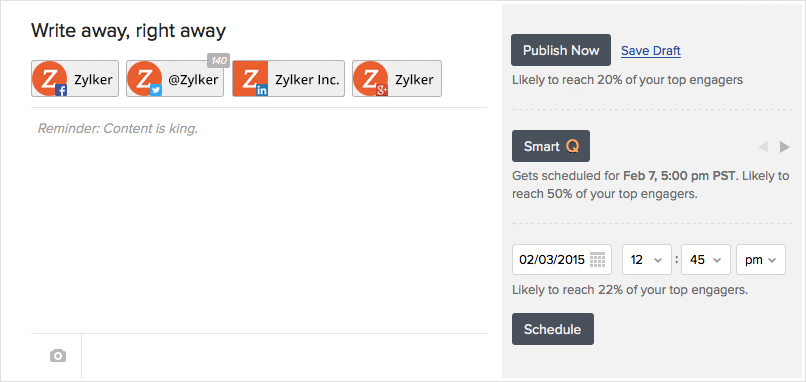
Zoho Social helps you with pre-publishing insights based on the engagement in previous posts and activity of your audience. It even goes a step ahead and shows you the percentage of your audience that’s likely to see your post now, suggests next best time to post and lets you schedule a post to go out at the same time of the day in different time-zones (say, 9am this Monday in Spain and 9am for U.S. Pacific Time).
Listen and Engage actively
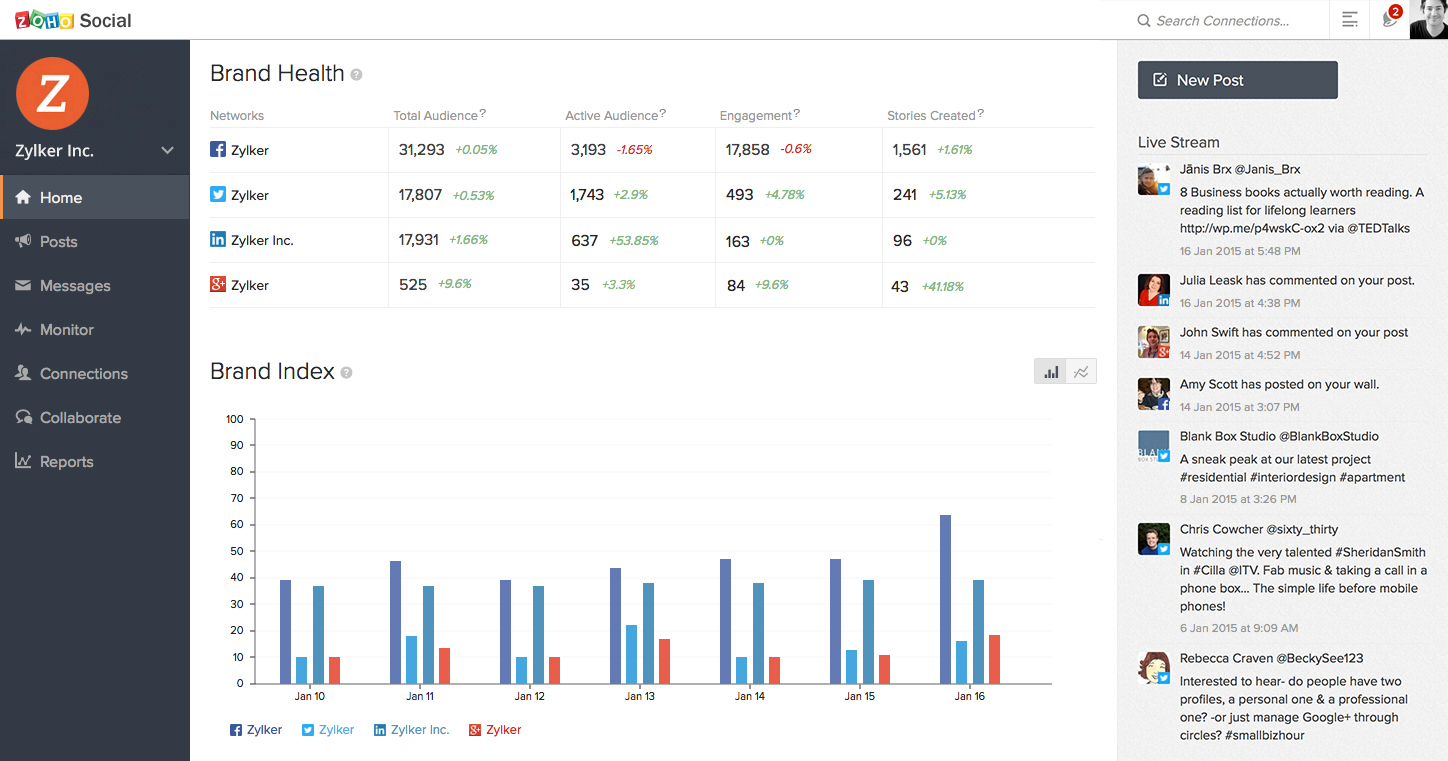
We’ve previously talked about how listening is the first step to social media marketing. Zoho Social has a real-time monitoring dashboard to help you listen to what’s being said about your brand or a keyword you wish to track; and respond when you need to. There are instant notifications to make sure you do not miss any relevant conversation and can react faster.
Measure and Analyze performance
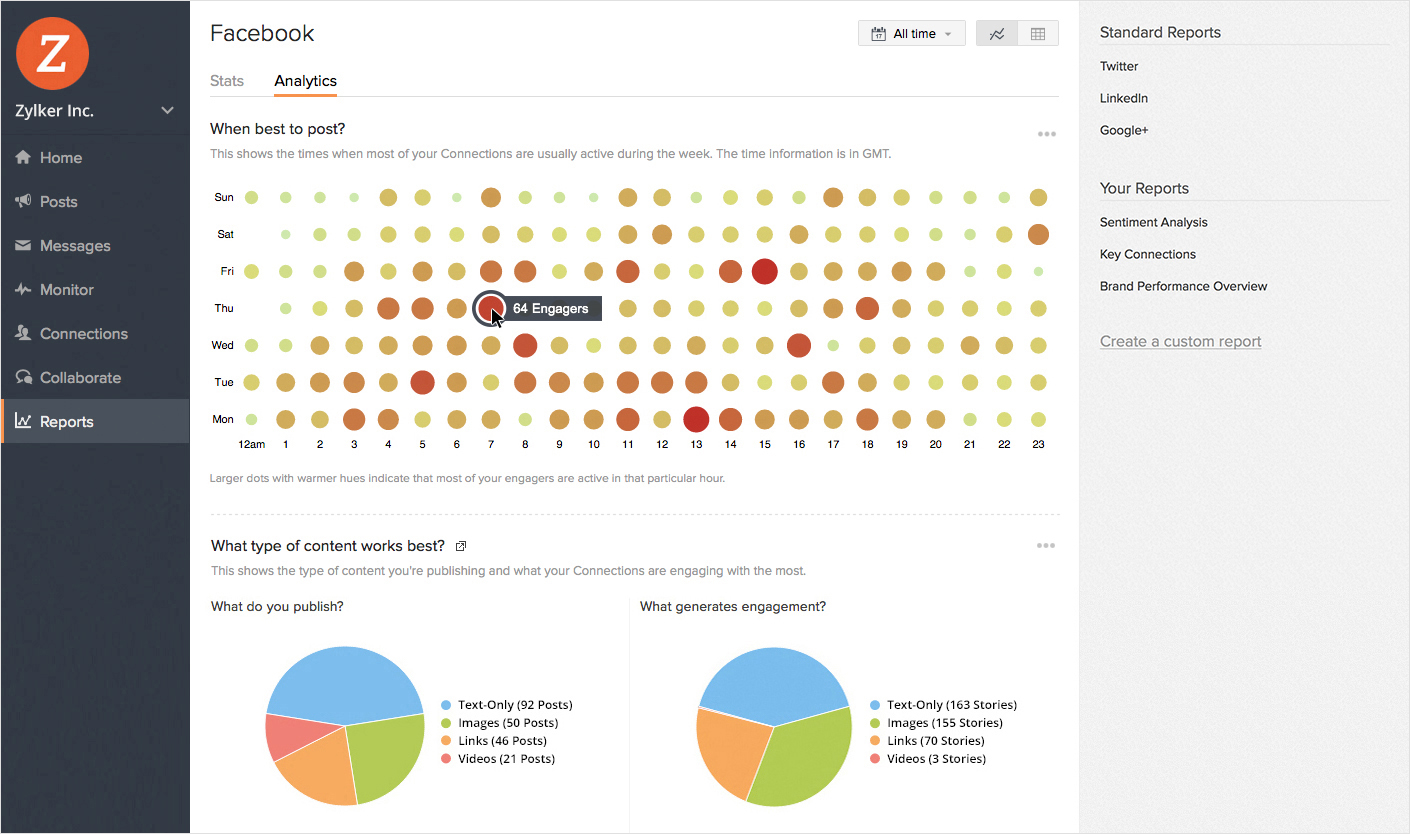
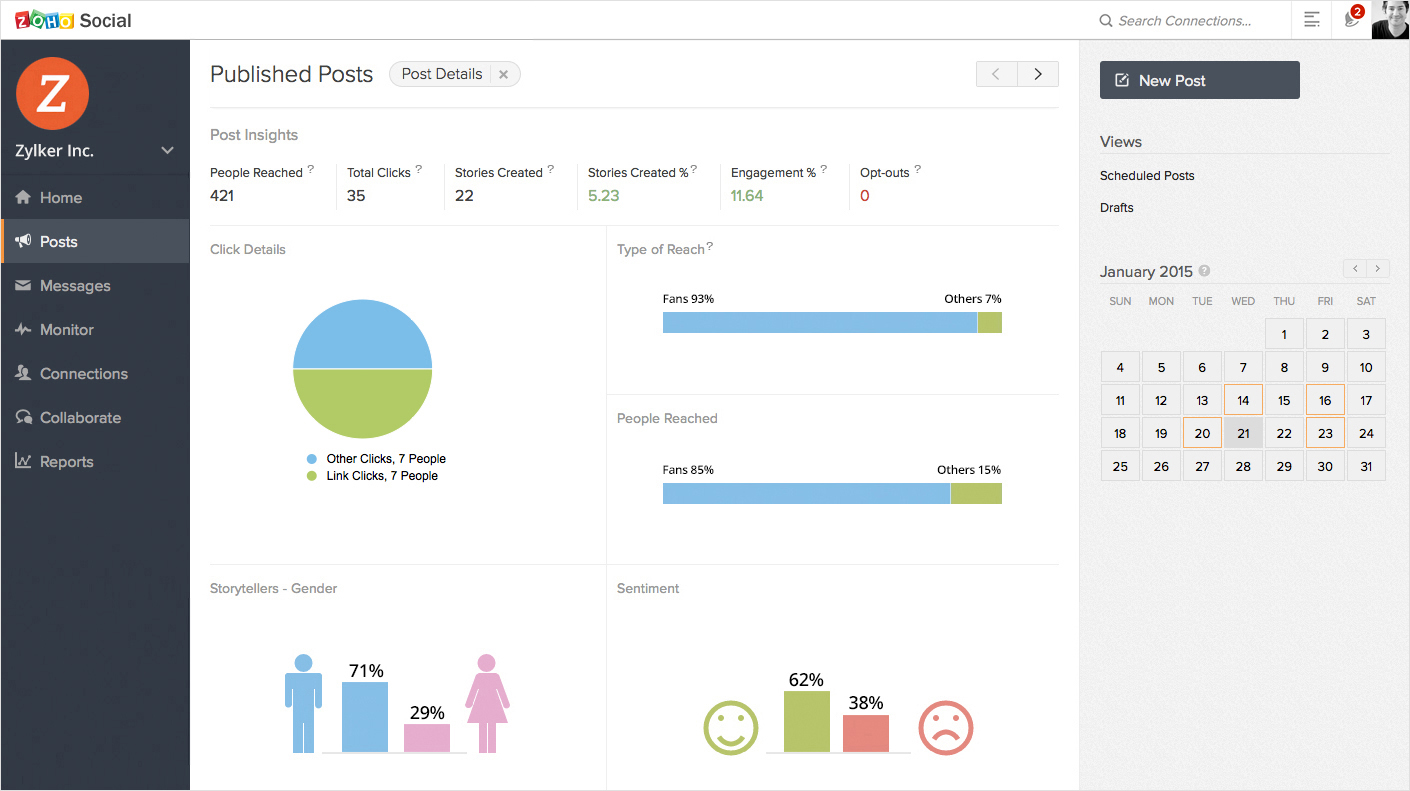
While numbers aren’t everything that you must focus on, they definitely help you track and improve your social media performance. Within Zoho Social, we’ve included numbers as a value add, around publishing and listening features. But for the data-crazy souls, we have a dedicated Reports tab to take a glance at social-network-specific stats or dive deep into the analytics to understand more about your audience and how they engage with your content. That’s not all; you can also create customized reports that focus on the numbers that matter most to your business.
Co-create and Collaborate effectively
Social media doesn’t work in silos. There are times when you need to work with other members of your team to co-create content, discuss reports, come up with a response to a post or a plan to engage with influencers of your brand. Zoho Social has collaboration built in for each of these scenarios so that you can team up and deliver the best.
And of course we understand that social media marketing needs to be “always-on”. Our mobile apps let you manage your social media presence while you’re on the go. You can also save a content idea as a draft, even when you’re not connected to the internet, and we’ll sync it back once you’re online. Isn’t that cool?
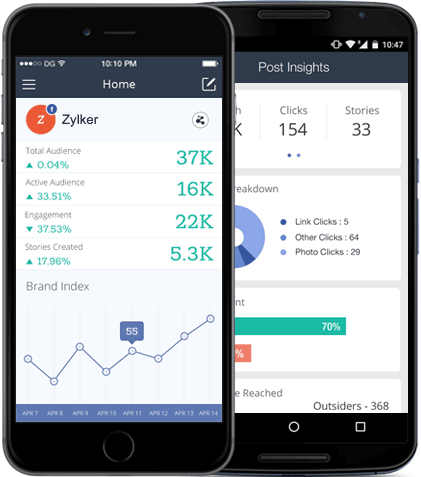
These are just some of the ways in which Zoho Social can help you with social media marketing. We have a solid product roadmap so you can expect a lot more in the time to come. To start with, give it a spin, and tell us what you think about it.
Original post on the Zoho Blog.
Topic Participants
Praval Singh
lise lorquet
Jill Mullins
Daniel Berdal
TribalYell
Sticky Posts
Introducing Inbox in Zoho Social
Hey everyone, We are excited to introduce the Inbox in Zoho Social to help manage all social media interactions from Facebook, Instagram, X (formerly Twitter), Google Business Profile and YouTube for your brand in one place. You can track and assign themA decade together - Thank you for being a part of the journey with Zoho Social!
A decade ago, we started Zoho Social with a simple vision: to make social media management easier, smarter, and more impactful for your business. What began as a small idea has grown to a powerful platform that helps businesses across the globe reachAdvanced statistics for LinkedIn page, posts and monitor @mentions in Zoho Social
Hello everyone, We've made enhancements to the Monitor, Reports tabs, and Post Stats for the LinkedIn channel in Zoho Social, so we wanted to briefly share some information about the updates. Monitor LinkedIn mentions LinkedIn is one of the most popularIntroducing advanced statistics for all your social media posts
When you're publishing on social media, it's important to understand how the audience engages with your content. This insight helps you come up with ideas for different types of content and also identify the social media channel that's most effectiveIt's here! A Publishing Calendar to give you better view and more control over your posts.
Hello! Just a couple of days back my colleague Vishal announced that you can now do more on Twitter with the Advanced Search Filters, along with a bunch of other cool stuff. I hope you got a chance to check it out. In fact, I'm itching to you tell you all about the latest updates we have lined up, but I'd rather give you doses of excitement every week to last until the very end. ;) Alright, I hear you. That's enough tease for the day. Here we go! Introducing... an all-new Publishing Calendar,
Recent Topics
Are static links available
I'm still using Zoho Meeting in trial mode. My previous webinar software provided a static link, and I made the mistaken assumption that I could send out my link and start a meeting later. Mass confusion, but my fault. With a paid version do you get aWhy is Zoho Meeting quality so poor?
I've just moved from Office 365 to Zoho Workplace and have been generally really positive about the new platform -- nicely integrated, nice GUI, good and easy-to-understand control and customisation, and at a reasonable price. However, what is going onHow to print a label from zoho creator app?
Hello, I would like to print a label from zoho creator app record similar to attached one. Size 74mm x 102mm. I tried record template. It leaves plenty of space around the content and also I couldn't set the height of the page. So it is not printing properly. Could someone please direct me to right direction for this requirement?Integration between "Zoho Sprints Stories" and "Zoho Projects Tasks/Subtasks"
We have two separate teams in our organization using Zoho for project management: The Development team uses Zoho Sprints and follows Agile/Scrum methodology. The Infrastructure team uses Zoho Projects for traditional task-based project management. InWhere can we specify custom CSS in Zoho Forms custom theme ?
I'm using a form with a dark theme. The OTP popup window is unreadable, because for some reason, the OTP popup background fixes color to white, but still takes the font color specified in the custom theme. This ends up as white on white for me, renderingTeam Gamification
Would love to motivate, engage and encourage our team with our social media posts. Would like to include Gamification features of Social Media in Zoho Social or Marketing Automation. And also bring in Social Advocacy tools/tracking/management to these,Sync Data from MA to CRM
Currently, it's a one-way sync of data from the CRM to MA. I believe we should have the ability to select fields to sync from MA to the CRM. The lead score is a perfect example of this. In an ideal world we would be able to impact the lead score of aUpdate CRM record action
Currently, MA only offers a "Push Data" action to push data to a CRM module. This action is built to cover the need to both create a new record and update an existing record. Because it has been implemented this way all required fields on the CRM modulePro Lite Upgrade - Quick Access Tray
Hello, I was going to upgrade to Pro Lite but the Quick Access Tray feature isn't available for Windows. Of the four features not available for Windows, the QAT is what I'm most interested in. Are there plans to add this feature for Windows anytime soon?Boost your CRM communication with new font types, sizes, and default reply-to options while composing emails
Hello Everyone, We’re excited to introduce a series of impactful enhancements to the email composer settings in Zoho CRM. These updates enable you to personalize and optimize your customer interactions with greater efficiency. So what's new? Add customFeature Enhancement Request – Text Formatting Options in Item Description (Zoho Books/Quotes Module)
Dear Zoho Development Team, Greetings from Radiant360 Integrated Technical Services LLC. We would like to bring to your attention a functional limitation we've encountered within the Item Table / Quote Description section of Zoho Books (and Zoho CRM Quotes).3 year sick leave cycle
How do you set up a sick leave cycle for South Africa? In SA the sick works like this for the first 6 months you get 0.83 paid sick days a month, then after 6 months you sick leave balance is reset to 30 days that can be used over a 36 month cycle. ThisWorkDrive and CRM not in sync
1/ There is a CRM file upload field with WorkDrive file set as the source: 2/ Then the file is renamed in WorkDrive (outside CRM): 3/ The File in CRM is not synced after the change in WorkDrive; the file name (reference) in CRM record is not updated (hereIs Zoho Communityspaces now part of Zoho One?
Is Zoho Communityspaces now part of Zoho One?Bigin’s 2025 Evolution: Highlights from 2025 and What’s Ahead in 2026
Dear Biginners, Wishing you a very happy New Year! As we stand at the cusp of endless possibilities in 2026, we would like to take a moment to reflect on what we achieved together in 2025. Your continued support, thoughtful feedback, and kind words ofSend Supervisor Rule Emails Within Ticket Context in Zoho Desk
Dear Zoho Desk Team, I hope this message finds you well. Currently, emails sent via Supervisor Rules in Zoho Desk are sent outside of the ticket context. As a result, if a client replies to such emails, their response creates a new ticket instead of appendingZoho Desk - Change Time Zone for all users and set default for new user
Hi, Is there a way to set a default time zone so that when user creates an account via the Zoho Desk invitation, they don't need to select the time zone via the hundreds of choice? And, for already created users, can we edit the incorrect time zone selected by the user at the account creation ? Thanks ! FredAllow Manual Popup Canvas Size Control
Hello Zoho PageSense Team, We hope you're doing well. We would like to request an enhancement to the PageSense popup editor regarding popup sizing. Current Limitation: Currently, the size (width and height) of a popup is strictly controlled by the selectedWhy does Zoho’s diff viewer highlight parts of unchanged lines?
Hi everyone, I’ve noticed something odd in the Zoho editor’s diff view. When I delete a single line, the diff doesn’t just mark that line as removed. Instead, it highlights parts of the next line as if they changed, even though they are identical. Example:Automating Employee Birthday Notifications in Zoho Cliq
Have you ever missed a birthday and felt like the office Grinch? Fear not, the Cliq Developer Platform has got your back! With Zoho Cliq's Schedulers, you can be the office party-cipant who never forgets a single cake, balloon, or awkward rendition ofAdd deluge function to shorten URLs
Zoho Social contains a nice feature to shorten URLs using zurl.co. It would be really helpful to have similar functionality in a Deluge call please, either as an inbuilt function or a standard integration. My Creator app sends an email with a personalisedform data load issue when saving as duplicate record is made
Hello. I have a form with a lookup when a value is selected the data from the corresponding record is filled into all of the fields in the form. But the form is loaded in such a state that if any value is changed it will take all of the values pre loadedInvoice template, how to change the text under "Notes" and "Terms and Conditions"
In "Invoice templates", there are two text/info sections at the bottom:"Notes" and "Terms and Conditions". It is possible to change the names of these two headings, but how is it possible to change/alter the text under it. As a standard it says "Thank you for your business" under Notes - I need to change it into something different- How? Thank you.Recurring Tasks and Reminders in Projects
Recurring tasks are tasks that are created once, and then recreated automatically after a designated time period. For example, the invoice for your billable tasks is due every week. You can set that task to recreate itself every week. Also, the futureUnable to remove the “Automatically Assigned” territory from existing records
Hello Zoho Community Team, We are currently using Territory Management in Zoho CRM and have encountered an issue with automatically assigned territories on Account records. Once any account is created the territory is assigned automatically, the AutomaticallyImproved Functionality PO Bill SO Invoice
Hello, I need to enter over 100 items, it's frustrating to scroll a few item rows and wait for more to load, then scroll again. It would be nice to have buttons that scroll to the top or bottom with one click. Furthermore, these items I'm adding are VATWishes for 2026
Hello, and a happy new year 2026! Let's hope it's better for everyone. I'd like to share some thoughts on Zoho One and what could be useful in the short, medium, and long term. Some things are already there, but not applied to Zoho One. Others seem likeHow to Integrate Zoho Books with Xero (No Native Connection Available)
Hi everyone, I’m currently facing an issue with integrating Zoho Books invoices with Xero, as I’ve noticed Zoho does not provide a native integration with Xero at this time. I would like to ask: What are the common or recommended solutions for syncingZohoSalesIQ.Chat cannot send messages
Chat cannot send messages. Our app implements the customer service chat window functionality by integrating the Mobilisten SDK. Recently, we encountered an issue: after successful SDK initialization and visitor registration, when the `startWithQuestion`Markup instead of discount??
Is it possible to have the discount field on an invoice or estimate be a markup instead? It's the very same functionality that I am looking for - to be able to markup an individual item by either a $ or a % and have that cost added (instead of subtracted) to the item cost. Currently, I use the tax feature to accomplish this, but it's very awkward to have "Markup 15%" listed after the subtotal. Plus, if I want to markup items at different rates, I end up with several "markup" lines in the totalsPlan switch
I thought I pressed the Free button, but after they set up the account, I see that I am on a Premium trial. Is this usual? How do I get onto the Free version?'Tax registration date'?
The second question in setting up is 'Tax registration date'. My first question: which tax? My second question: why do you need the registration date?What if we don't have an ABN?
Australian business. Setting up. We have no ABN. It's not compulsory. Field not allowed to be blank. What to do?Keeping track of project expenses
I have talked to a few support techs and it is very hard for me to believe that Zoho's project accounting software can't keep accounts for my projects. I must not understand what they're saying. We get a contract to build something. So the project revenueLinking Multi-UOM Barcodes to Products in Zoho Books
Greetings, I'm using Zoho Books for retail shop and I'm running into a bit of a challenge with products that have multiple Units of Measurement (UOMs) and corresponding barcodes. For example, I sell cigarettes both as individual packets and in cartonsHow to change "from" email address when invoicing.
HELP! I'm new to Zoho Books and when I first set it up used a different email address than I currently want to use. I've tried to go to settings and change the default email address but when I generate an invoice it still shows the old email address (although I can't find it anywhere else). I really need to get this changed before I can use the program. Any help would be appreciated.Critical Issue: Tickets Opened for Zoho Support via the Zoho Help Portal Were Not Processed
Hi everyone, We want to bring to your attention a serious issue we’ve experienced with the Zoho support Help Portal. For more than a week, tickets submitted directly via the Help Portal were not being handled at all. At the same time no alert was postedHide/Show Subform Fields On User Input
Hello, Are there any future updates in Hide/Show Subform Fields "On User Input"?Cloning Item With Images Or The Option With Images
Hello, when I clone an item, I expect the images to carry over to the cloned item, however this is not the case in Inventory. Please make it possible for the images to get cloned or at least can we get a pop up asking if we want to clone the images asCustom validation in CRM schema
Validation rules in CRM layouts work nicely, good docs by @Kiran Karthik P https://help.zoho.com/portal/en/kb/crm/customize-crm-account/validation-rules/articles/create-validation-rules I'd prefer validating data input 'closer to the schema'Next Page