Announcing Zoho Social : Because Social Media should be part of your marketing strategy, not something you do in isolation
We believe social media should be an integral part of a business’ sales & marketing, outreach and customer support strategy, instead of something you do in isolation. With that in mind, we’re excited to announce our first-ever Social Media Marketing product – Zoho Social.
We’ve built Zoho Social with a clear objective – to help you grow your social media presence with actionable insights focused on content and engagement.
Great content goes a long way to building a brand presence. But how do you know what’s working for your brand so that you can do more of it? Be it increasing your reach by publishing content, monitoring popular social media networks for brand mentions and keywords or getting actionable insights, Zoho Social has you covered.
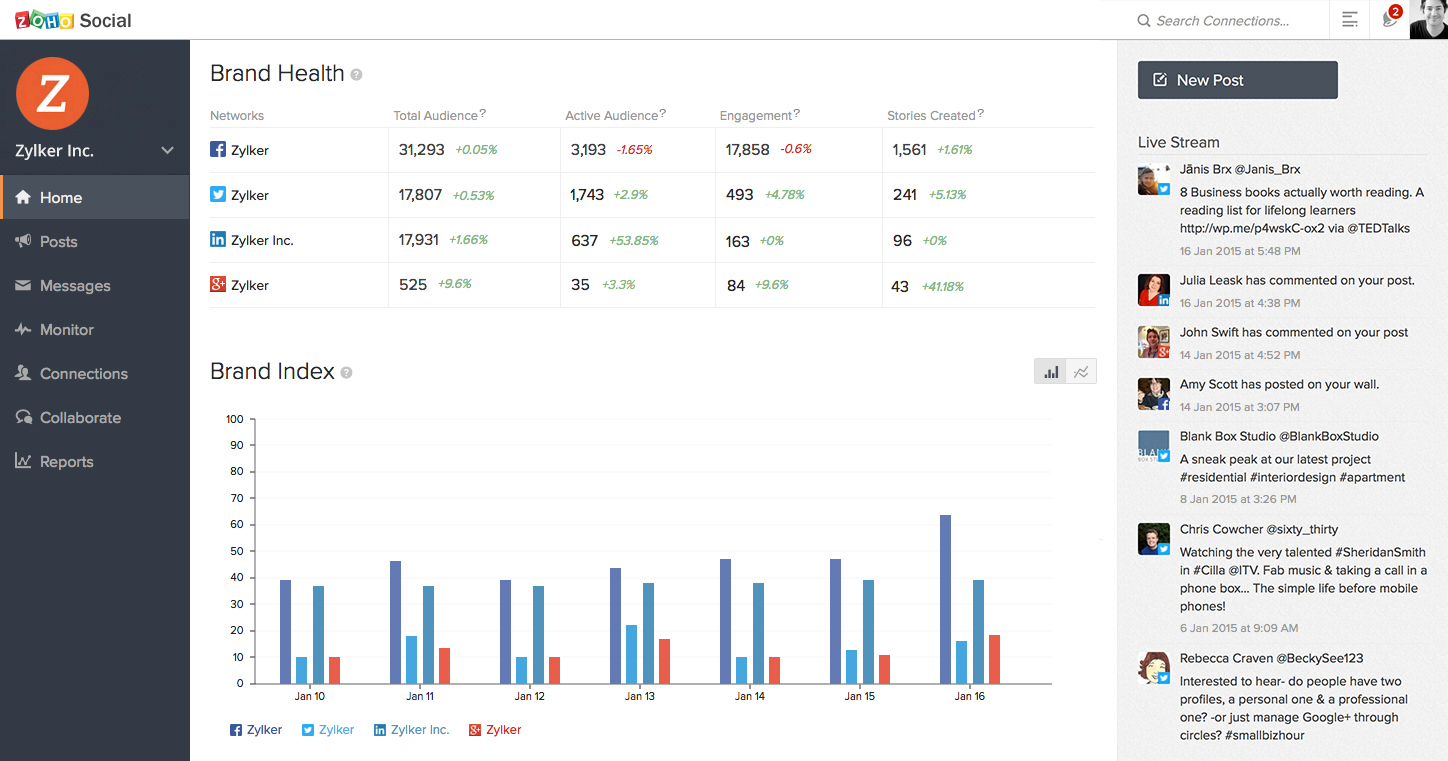
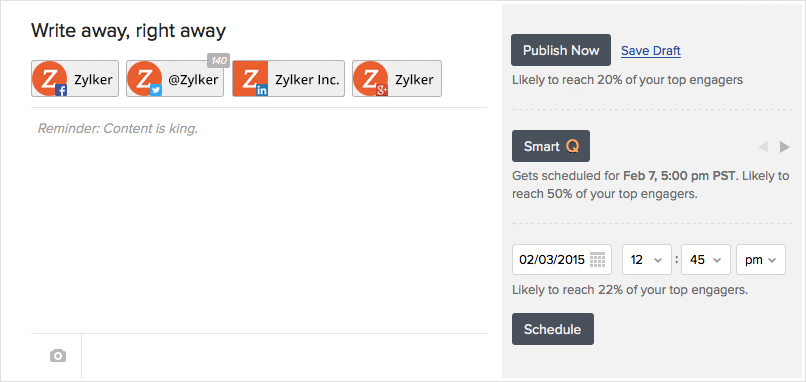
Create & Publish awesome content
Zoho Social helps you with pre-publishing insights based on the engagement in previous posts and activity of your audience. It even goes a step ahead and shows you the percentage of your audience that’s likely to see your post now, suggests next best time to post and lets you schedule a post to go out at the same time of the day in different time-zones (say, 9am this Monday in Spain and 9am for U.S. Pacific Time).
Listen and Engage actively
We’ve previously talked about how listening is the first step to social media marketing. Zoho Social has a real-time monitoring dashboard to help you listen to what’s being said about your brand or a keyword you wish to track; and respond when you need to. There are instant notifications to make sure you do not miss any relevant conversation and can react faster.
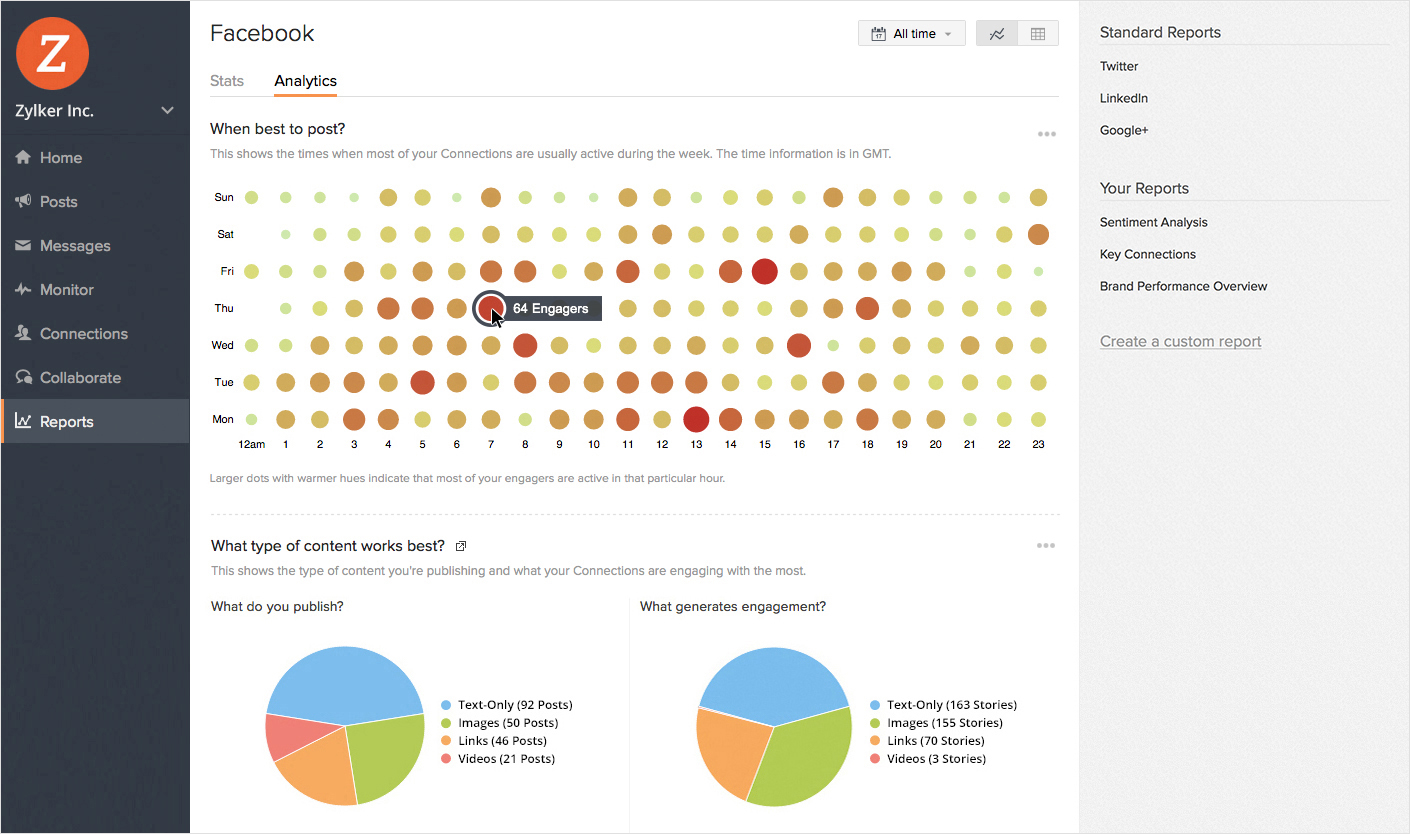
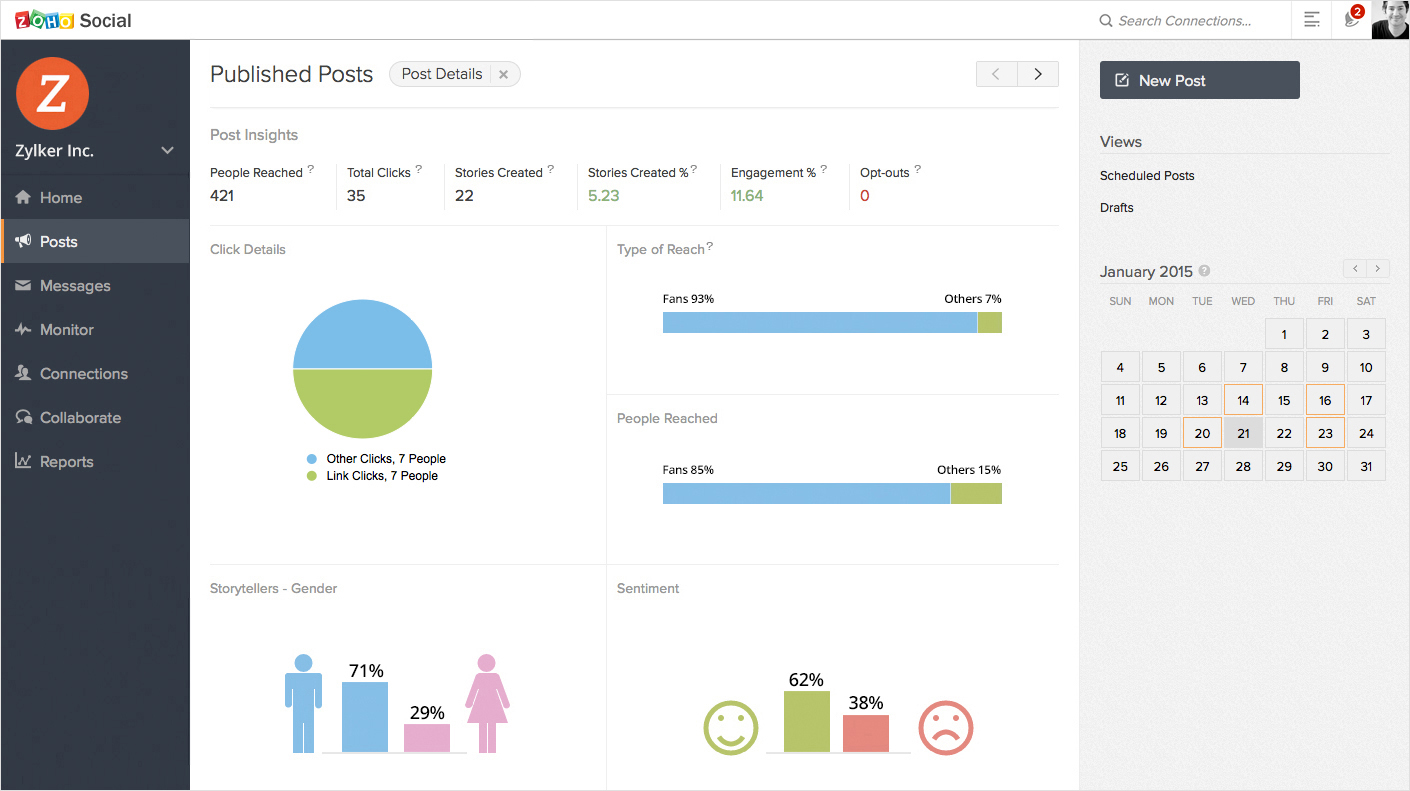
Measure and Analyze performance
While numbers aren’t everything that you must focus on, they definitely help you track and improve your social media performance. Within Zoho Social, we’ve included numbers as a value add, around publishing and listening features. But for the data-crazy souls, we have a dedicated Reports tab to take a glance at social-network-specific stats or dive deep into the analytics to understand more about your audience and how they engage with your content. That’s not all; you can also create customized reports that focus on the numbers that matter most to your business.
Co-create and Collaborate effectively
Social media doesn’t work in silos. There are times when you need to work with other members of your team to co-create content, discuss reports, come up with a response to a post or a plan to engage with influencers of your brand. Zoho Social has collaboration built in for each of these scenarios so that you can team up and deliver the best.
And of course we understand that social media marketing needs to be “always-on”. Our mobile apps let you manage your social media presence while you’re on the go. You can also save a content idea as a draft, even when you’re not connected to the internet, and we’ll sync it back once you’re online. Isn’t that cool?
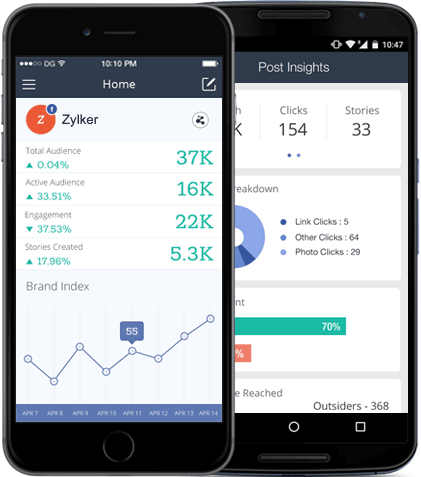
These are just some of the ways in which Zoho Social can help you with social media marketing. We have a solid product roadmap so you can expect a lot more in the time to come. To start with, give it a spin, and tell us what you think about it.
Original post on the Zoho Blog.
Topic Participants
Praval Singh
lise lorquet
Jill Mullins
Daniel Berdal
TribalYell
Sticky Posts
Introducing Inbox in Zoho Social
Hey everyone, We are excited to introduce the Inbox in Zoho Social to help manage all social media interactions from Facebook, Instagram, X (formerly Twitter), Google Business Profile and YouTube for your brand in one place. You can track and assign themA decade together - Thank you for being a part of the journey with Zoho Social!
A decade ago, we started Zoho Social with a simple vision: to make social media management easier, smarter, and more impactful for your business. What began as a small idea has grown to a powerful platform that helps businesses across the globe reachAdvanced statistics for LinkedIn page, posts and monitor @mentions in Zoho Social
Hello everyone, We've made enhancements to the Monitor, Reports tabs, and Post Stats for the LinkedIn channel in Zoho Social, so we wanted to briefly share some information about the updates. Monitor LinkedIn mentions LinkedIn is one of the most popularIntroducing advanced statistics for all your social media posts
When you're publishing on social media, it's important to understand how the audience engages with your content. This insight helps you come up with ideas for different types of content and also identify the social media channel that's most effectiveIt's here! A Publishing Calendar to give you better view and more control over your posts.
Hello! Just a couple of days back my colleague Vishal announced that you can now do more on Twitter with the Advanced Search Filters, along with a bunch of other cool stuff. I hope you got a chance to check it out. In fact, I'm itching to you tell you all about the latest updates we have lined up, but I'd rather give you doses of excitement every week to last until the very end. ;) Alright, I hear you. That's enough tease for the day. Here we go! Introducing... an all-new Publishing Calendar,
Recent Topics
Zoho Calender
a) does the clanender in zoho project allow you to see the name of the event in the celnder view, it currently says either "Task (1) or "Milestoen (1)" b) Alternatively does the calender in Zoho project integrate with zoho calender?Matching ZOHO Payments in Banking
Our company has recently integrated ZOHO Payments into our system. This seemed really convenient at first because our customers could pay their account balance by clicking on a link imbedded in the emailed invoice. Unfortunately, we can't figure out howNew Enhancements to Zoho CRM and Zoho Creator Integration
Hello Everyone, We’ve rolled out enhancements to the Zoho Creator and Zoho CRM integration to align with recent updates made to the Zoho Creator platform. With enhancements to both the UI and functionality, This update also tightens access control byWork Type - Limitation
Hello, I'm setting up work types and have noticed, a limitation on the parts area to 10 lines. Can this be increased to 20 or greater? In addition to this, when I attempt to add the work type to a work order, the correct labour hours doesn't flow through.Locked out of MFA due to changing phones
I have been locked out of my Zoho Books account since i changed my mobile phone over. I can get the OTP through the ZOHO Books software but i cant confirm using my phone app as nothing appears to authorise. I need to know how to register/set up my newEmails sent through Bigin are not posting in IMAP Sent folder
I have set up my email to work from within Bigin using IMAP. I am using IMAP so I can sync my email across multiple devices - phone / laptop / desktop / iPad / etc. I want all my emails to populate my email client (outlook & iphone email) whether orTurning the page for Zoho SalesIQ: 2025 to 2026
As we wrap up 2025, we would like to take a moment to reflect on what we set out to achieve this year, what we’ve delivered, and where we’re headed next. What we focused on in 2025 This year was all about strengthening the core of engagement and AI, makingTemporary Outage in Zoho Cliq Affecting US Users – July 23, 2025
We experienced a service disruption in Zoho Cliq that impacted core functionality for users in the US region. The issue occurred between Jul 23, 2025, 06:54:00 PM IST and 07:13:13 PM IST, lasting approximately 19 minutes. To restore service stability,Zoho Cliq not working on airplanes
Hi, My team and I have been having this constant issue of cliq not working when connected to an airplane's wifi. Is there a reason for this? We have tried on different Airlines and it doesn't work on any of them. We need assistance here since we are constantlyCreate an Eye-Catching Announcement Widget for Your Help Center
Hello Everyone! In this week’s edition, let’s explore how to keep your customers updated with exciting news in the Help Center. See how ZylkerMobile wowed their customers by bringing updates right to their portal. ZylkerMobile, the renowned brand forCustomer Management: #6 Common Mistakes in Customer Handling
Managing customers doesn't usually fall apart overnight. More often, slight gaps in the process slowly become bigger problems. Incidents like missed follow-ups, billing confusion, and unhappy customers will lead to revenue loss. Many businesses don'tZoho Desk iOS app update: UI enhancement of picklist and multi picklist fields
Hello everyone! We have enhanced the UI of the picklist and multiselect picklist fields on the Zoho Desk iOS app to provide a more refined, efficient, and user-friendly experience. We have now supported an option to Search within the picklist and multiselectZoho Desk iOS app update: Revamped scribbles with Apple pencil kit
Hello everyone! We’re excited to introduce a revamped Scribble experience, rebuilt from the ground up using Apple PencilKit for smooth strokes, proper scaling, and seamless image uploads. Please update the app to the latest version directly from the AppZoho Desk Android app update: Norwegian language support
Hello everyone! In the most recent Android version of the Zoho Desk app update, we have brought in support to access the app in Norwegian language. We have introduced the Norwegian language on the IM module of the Zoho Desk app as well. Please updatePayment Vouchers
Is there any Payment Vouchers in Zoho? How can we create payment for non-trade vendors, i.e. professional fees, rent, and payment to commissioner income tax?When I click on PDF/PRINT it makes the invoice half size
When I click PDF / Print for my invoice in Zoho Books, the generated PDF appears at half size — everything is scaled down, including the logo, text, and layout. The content does not fill the page as it should. Could someone advise what causes Zoho BooksSearch by contain letter in a column
Hello, everyone I need a filter function that searches by letter in a cell, and it should be a macro. To clarify further, if I have a column with several names and I chose a search cell and what I want is search by a single letter, for example, "a" thenEnrich your contact and company details automatically using the Data Enrichment topping
Greetings, I hope you're all doing well. We're happy to announce the latest topping we've added to Bigin: The Data Enrichment topping, powered by WebAmigo. This topping helps you automatically enhance your contact and company records in Bigin. By leveragingCan add a colum to the left of the item in Zoho Books?
I would need to add a column to the left of the item column in Books. When i create custom fields, i can only display them to the right of the item.Verifying Zoho Mail Functionality After Switching DNS from Cloudflare to Hosting Provider
I initially configured my domain's (https://roblaxmod.com/) email with Zoho Mail while using Cloudflare to manage my DNS records (MX, SPF, etc.). All services were working correctly. Recently, I have removed my site from Cloudflare and switched my domain'sAI Bot and Advanced Automation for WhatsApp
Most small businesses "live" on WhatsApp, and while Bigin’s current integration is helpful, users need more automation to keep up with volume. We are requesting features based on our customer Feedbacks AI Bot: For auto-replying to FAQs. Keyword Triggers:2025 Ask the Experts sessions wrap-up : Key highlights from the experts
Here is a rewind journey of our Ask the Experts (ATE) Sessions, where we brought you expert insights and practical best practices together in one place. This recap highlights the key takeaways, learnings, and best practices from all these sessions soHow to disable the edit option in subform
How to disable the edit option in subformMove record from one custom module to another custom module
Is it possible to create a button or custom field that will transfer a record from one custom module to another? I already have the 'Leads' module used for the Sr. Sales department, once the deal is closed they convert it to the 'Accounts' module. I would like to create a 'Convert' button for a custom module ('Locations') for the department that finds locations for each account. Once the location is secured, I want to move the record to another custom module called 'Secured Locations'. It's basicallyNotes Not Saving
Hello, My notes are continuously not saving. I make sure to save them, I know the process to save them. It is not operator error. I go back into a Leads profile a while later and do not see the previous notes that I have made. I then have to go back and do unnecessary research that would have been in the notes in the first place. Not a good experience and it is frustrating. Slows me down and makes me do unnecessary work. Please resolve. As a quick heads up, deleting cookies is not a fixPrefill form with CRM/Campaigns
I created a form in zForms and created prefill fields. I added this to the CRM and selected the fields so when sending from the CRM, the form works great. However, I want to use the same form in Campaigns and I want it to pull the data from CRM (whichTriggering a campaign automation from a Form
I used Forms to create a lead form that is accessed by a button on my website. The field information flows into the CRM. However, I am trying to figure out how to use Campaign automations to start a workflow (series of campaign emails) that is triggeredEmployee Appraisal Applicability - Why is Date of Joining Hard-Coded?
In the new (to me, at least) Performance Appraisal Cycle wizard, it's possible to set criteria to determine for whom the appraisal process should apply. This makes sense on its face. However, one MUST use the Date of Joining criterion as a filter. WhyFormula fields
Zoho People now supports formula fields. This post illustrates it. Formula fields are fields whose value is calculated instead of being entered by the user. Using this, number, decimal and date manipulations can be done. The value of this field could be numeric or date depending on the output of the formula. In date manipulations, the result will be given in milliseconds, which you can format as per you need. The operators we support are +, - , *, /. Formula fields get recalculated automaticallyZobot operator information
I am working on a zobot that calls a plug to send data to our API. I want the response data from that API to be shown only to the operator and not the customer. I have tried writing this data out to the visitorCity field but nothing gets updated on theCopy paste from word document deletes random spaces
Hello Dear Zoho Team, When copying from a word document into Notebook, often I face a problem of the program deleting random spaces between words, the document become terribly faulty, eventhough it is perfect in its original source document (and withoutIs it possible to use module field filters via URL parameters?
It would be really convenient if I could quickly link to a filter. For reference, this is the filter functionality I'm referring to: https://help.zoho.com/portal/en/kb/crm/customize-crm-account/advanced-filters/articles/advanced-filters For example: MyTransitioning FESCO Bill Project to Zoho Sheets and Integration Options
Hello Zoho Support, I'm considering transitioning my FESCO bill project from Google Sheets to Zoho Sheets and wanted to know if there are integration options to seamlessly migrate our existing work. You can view our platform here, any guidance would beCredit card
Coming from another software, is it possible here to typically have credit card payment off, but independently per customer, click a box (possibly on the invoice when I go to to send) allowing that 1 allowed customer credit card payment, NOT ALL of myLightbox Pop-up form
I would like to embed my form using the lightbox pop up. I don't want it to load automatically. I want it to load when some clicks the button. I can see this option, however when I use the "show pop-up launch button" on the website, the button automaticallyLightbox Pop-up form
I would like to embed my form using the lightbox pop up. I don't want it to load automatically. I want it to load when some clicks the button. I can see this option, however when I use the "show pop-up launch button" on the website, the button automaticallyConnecting Portals from different Zoho apps
Hi, I note that Zoho has functionality for customer portals for several of the Zoho apps, like CRM, Projects, Desk etc. Is there any way to connect these portals? It would be great if we could give our customers access to a portal in which they couldCustomer Management: #5 Never Let the Customer Slip
When Rahul started Knight's Watch Consulting, his focus was simple: deliver good work and keep clients happy. He offered one-time consulting projects, monthly advisory retainers and usage-based support for growing clients. Business was steady, and customersDeluge date time issue
The deluge function info zoho.currentdate.toString("MMM/YYYY") returns Dec 2026 instead of 2025Zoho Projects Android and iOS app update: Mobile device permission based on user profiles
Hello everyone! We have brought in support for mobile device permissions based on the user profiles which are configured in organization level. Administrators can now configure the permissions on the web app(projects.zoho.com) by following the steps mentionedNext Page