Automate a CRM workflow with Zoho Cliq

Imagine having a virtual assistant that provides rapid updates to your team through Zoho Cliq, helping you stay on top of your sales processes. After returning from a client meeting filled with updates and action items, managing this information together can feel overwhelming, especially when juggling multiple roles and responsibilities.
Business benefits
- Notification of deal closures: Ensures the sales team is promptly informed when a deal is closed to celebrate wins, update forecasts, and maintain team morale.
- Product and development feedback: Quickly communicate client requests or demo glitches to the product and development teams to enhance product offerings and resolve issues.
- Managerial updates: Keep managers in the loop with meeting outcomes to strategize the next steps or escalate issues.
- Syncing with the team: Link CRM updates directly to team chat channels to ensure all team members are updated about lead statuses. This reduces the need for multiple app switches, enhances real-time collaboration, coordinates efforts, and aligns strategies.
Let's examine an example of Zoho CRM workflow automation for a new lead created with a Zoho Cliq bot.
Step 1 : Bot creation
- Navigate to the top right corner of your profile, click on it, and select "Bots and Tools".
- To create a new bot, click on "Create Bot" on the right under the "Bots" section.
- Provide a name and description for the bot, then enable channel configuration settings during setup.
Step 2 : Bot webhook URL retrieval
- Webhook tokens are listed under the Bots & Tools section along with all the other internal tools. When navigated to the webhook tokens module, you will be required to authenticate using 2FA, verify your identity, and click Continue.
- After authentication, you can create, edit, and manage your Webhook Tokens as needed.
- Generate a webhook token and retrieve the bot's webhook URL as specified below.
ⓘ Learn more about webhook tokens in Zoho Cliq
Step 3 : Configuration of CRM workflow rule
Workflow rules in Zoho CRM are actions (email notifications, tasks, and field updates) executed when certain specified conditions are met. These rules automate sending email notifications, assigning tasks, and updating specific fields of a record when a rule is triggered.
ⓘ Learn more about configuring workflow rules in Zoho CRM
Similarly, you can set up and configure new workflow rules for events like the update of a lead status or the assignment of a lead to any sales representative (Lead owner ).

Step 4 : Setting up bot incoming webhook handler
- Go back to Cliq and find the bot you created under the "Bots and Tools" section. Then, access the bot's incoming webhook handler.

- The incoming webhook handler is designed to allow third-party services, such as Zoho CRM, to post messages directly to your bot.
- Copy and paste the below code and click "Save".
Pre-requisites:
To post an alert to the channel, you need the unique names of both the channel and the bot, as we are using zoho.cliq.postToChannelAsBot deluge task in the code below. Follow the steps to retrieve these names.
How to obtain or locate the channel unique name in Cliq?
- Navigate to the top right corner of the preferred channel and locate the three dots. Click it.
- In the menu that appears, select "Channel info" and a pop-up will open, displaying detailed channel information. Hover over the "Connectors" section and click it.
- Under "API Parameters," you will find the channel unique name.
How to obtain or locate the bot unique name in Cliq?
- Navigate to "Bots & Tools", and under the bots section, select the bot you prefer.
- Copy the API endpoint URL. The bot's unique name is located after "bots/" and before the next slash "/".
- Example:
- URL: https://cliq.zoho.com/company/2345678/api/v2/bots/crmupdatesincliq/message
- The bot unique name in the above example is crmupdatesincliq
- info params;
- eventType = params.get("event-type");
- leadName = params.get("Lead Name");
- company = params.get("Company");
- leadStatus = params.get("Lead Status");
- title = params.get("Title");
- email = params.get("Email");
- phone = params.get("Phone");
- leadSource = params.get("Lead Source");
- industry = params.get("Industry");
- leadId = params.get("Lead ID");
- if(eventType.equalsIgnoreCase("Lead Created"))
- {
- response = {"text":"🎯Heads up! A new lead has been successfully added to your list. Prepare to engage and convert!","card":{"title":"🚀 New Lead Added!","thumbnail":"https://i.imgur.com/jDagRms.png","theme":"modern-inline"},"slides":{{"type":"text","title":"Lead Details :","data":"🏆 Lead Name : " + leadName + "\n💼 Company : " + company + "\n⏱️ Lead Status : *" + leadStatus + "*"},{"type":"label","title":"","data":{{"📧 *Email*":email},{"☎️ *Phone*":phone},{"🏢 *Industry*":industry},{"📣 *Lead Source*":leadSource}}}}};
- // Use zoho.cliq.postToChannelAsBot(${channel_unique_name}, ${bot_unique_name}, response);
- zoho.cliq.postToChannelAsBot("clientleadupdates","crmupdatesincliq",response);
- }
- if(eventType.equalsIgnoreCase("Lead Assigned"))
- {
- leadOwner = params.get("Lead Owner");
- response = {"text":"🚀📈Promising prospect assigned to " + leadOwner + ". Opportunity awaits!","card":{"title":"🎯 New lead generated","thumbnail":"https://i.imgur.com/UisAlKn.png","theme":"modern-inline"},"slides":{{"type":"text","title":"Lead Details :","data":"🏆 Lead Name : " + leadName + "\n💼 Company : " + company + "\n⏱️ Lead Status : *" + leadStatus + "*"}}};
- zoho.cliq.postToChannelAsBot("clientleadupdates","crmupdatesincliq",response);
- }
- if(eventType.equalsIgnoreCase("Lead Status Updated"))
- {
- response = {"text":"✅💼 Great news! Lead status is now Qualified. Ready to engage!","card":{"title":"✅ Lead qualified","thumbnail":"https://i.imgur.com/d2jhClm.png","theme":"modern-inline"},"slides":{{"type":"text","title":"Lead Details :","data":"🏆 Lead Name : " + leadName + "\n💼 Company : " + company + "\n⏱️ Lead Status : *" + leadStatus + "*"}}};
- zoho.cliq.postToChannelAsBot("clientleadupdates","crmupdatesincliq",response);
- }
- return Map();
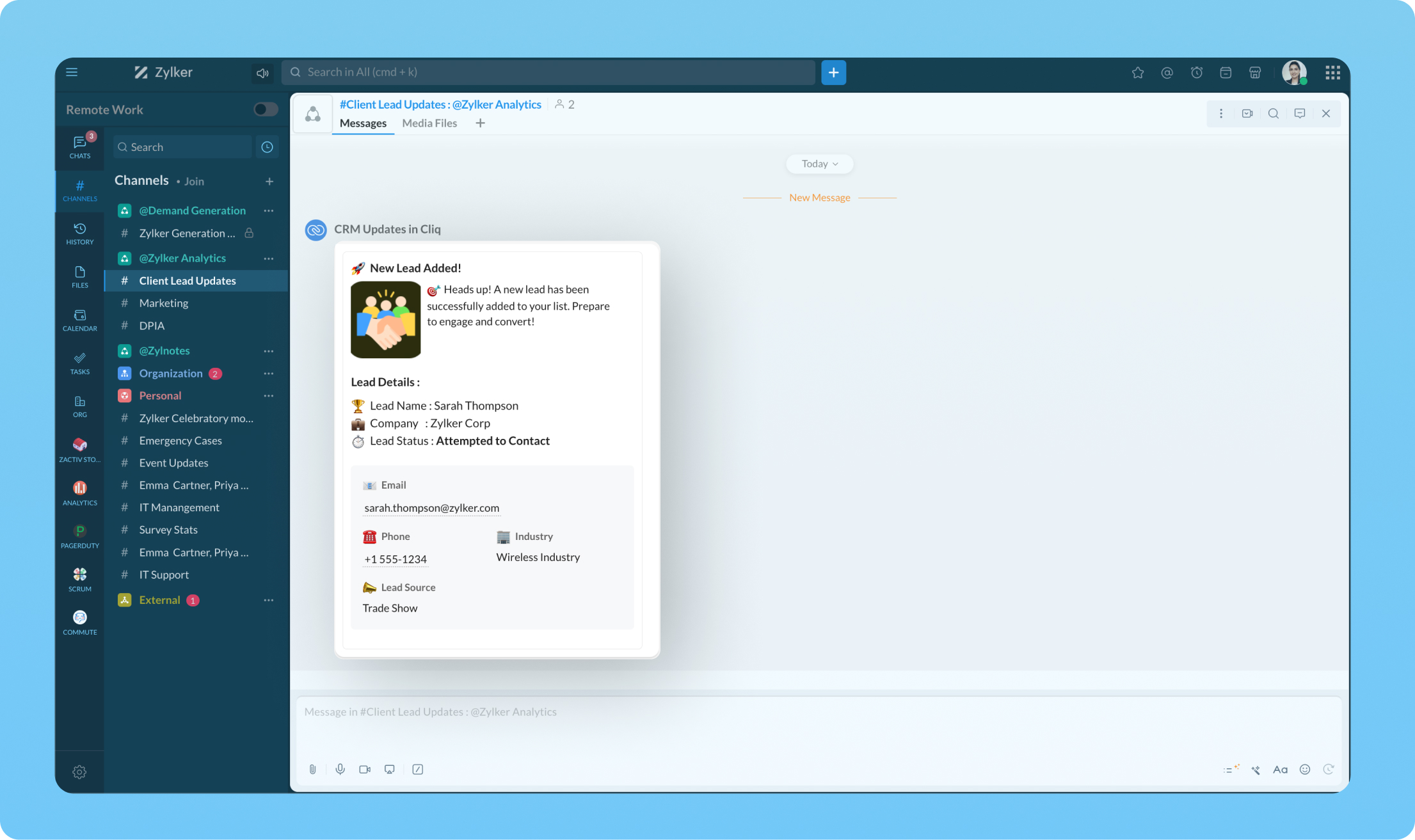
Transform your workflow experience with ease! Imagine having the ability to set up custom automation that sends instant messages to your team channels whenever a deal is sealed or a new lead steps on board.
We're here to help, so don't hesitate to reach out to support@zohocliq.com with any questions or if you need assistance in crafting even more tailored workflows.
Topic Participants
Harsha SS
Sticky Posts
Automating Employee Birthday Notifications in Zoho Cliq
Have you ever missed a birthday and felt like the office Grinch? Fear not, the Cliq Developer Platform has got your back! With Zoho Cliq's Schedulers, you can be the office party-cipant who never forgets a single cake, balloon, or awkward rendition ofCustomer payment alerts in Zoho Cliq
For businesses that depend on cash flow, payment updates are essential for operational decision-making and go beyond simple accounting entries. The sales team needs to be notified when invoices are cleared so that upcoming orders can be released. In contrast,Accelerate Github code reviews with Zoho Cliq Platform's link handlers
Code reviews are critical, and they can get buried in conversations or lost when using multiple tools. With the Cliq Platform's link handlers, let's transform shared Github pull request links into interactive, real-time code reviews on channels. ShareApp Spotlight : PagerDuty for Zoho Cliq
App Spotlight brings you hand-picked apps to enhance the power of your Zoho apps and tools. Visit the Zoho Marketplace to explore all of our apps, integrations, and extensions. In today's fast-paced world, seizing every moment is essential for operationalAutomate your status with Cliq Schedulers
Imagine enjoying your favorite homemade meal during a peaceful lunch break, when suddenly there's a PING! A notification pops up and ruins your moment of zen. Even worse, you might be in a vital product development sprint, only to be derailed by a "quick
Recent Topics
Different Company Name for billing & shipping address
We are using Zoho Books & Inventory for our Logistics and started to realize soon, that Zoho is not offering a dedicated field for a shipping address company name .. when we are creating carrier shipping labels, the Billing Address company name gets alwaysWhat's New in Zoho Inventory | Q2 2025
Hello Customers, The second quarter have been exciting months for Zoho Inventory! We’ve introduced impactful new features and enhancements to help you manage inventory operations with even greater precision and control. While we have many more excitingMake Packages from multiple sales order of a single customer
Our customers sends orders to us very frequently, some times what customer wants is to ship items from 5 to 6 sales orders in a single shipment. it will be very nice if, zoho can implement this function, in which we can select items from other sales orders of the customer.Print a price list or price book
Hi Community. Am I right in concluding that Zoho has no functionality to print a price list from either Zoho CRM, Zoho Inventory or Zoho Books? I won't get stuck on the fact that Zoho doesn't sync price books between Zoho CRM and Books/Inventory (moreStart Workflow from Deluge Script
I have developed a customized process from our CRM that leverages a deluge script to create a statement of work document. Once the document has been created via the merge and store function, I would like the ability to start a workdrive review & approveShow Custom Button in Portal Listview Canvas
I have created a custom button that shows in a list view of deals (internally I can see it). I have permissions to allow this button on the portal. But it is not displaying in the canvas list? Before I do too much leg work, is this function allowed?Zoho Sites "pages" management page
I have 80 plus pages on zoho sites. When I go to the "pages" link to view and edit pages, They are not in any kind of order, so I spend lots of time searching for pages when I need to edit or create new. How can I change the view order of all my pagesAI feature in Zoho Desk suggesting answers based on past ticket threads
Hi I would like to suggest something that would be very useful : instead of suggesting answers based on the Knowledge Base, I think it would be great if Zia could analyze the history of all customer and agents threads, to suggest answers in new tickets.Advanced Customization of the Help Center using JavaScript
Hello everyone, The Help Center in Zoho Desk can be customized by using HTML and CSS to provide structure and enhance the page's appearance—but what if you want to add interactive and dynamic elements? You can add these effects with JavaScript, a programmingIntroducing Zoho POS for the Kingdom of Saudi Arabia
Hey everyone, We are excited to kick-start December with a completely personalized edition of POS for retail businesses in Saudi Arabia to help run your operations with ease. It offers four different subscription plans—Free, Standard, Professional, andUnveiling Zoho Sites 2.0 - A new dimension in website building
Dear Zoho Sites Users, We are thrilled to announce the launch of Zoho Sites 2.0 today! This refresh represents a significant step forward in the capabilities of Zoho Sites and is crucial for creating a lasting and positive impact on our customers' businesses.Subform edits don't appear in parent record timeline?
Is it possible to have subform edits (like add row/delete row) appear in the Timeline for parent records? A user can edit a record, only edit the subform, and it doesn't appear in the timeline. Is there a workaround or way that we can show when a userScript Editor not an option
I am trying to apply a script to a sheet and Script Editor is not an option. I don't want to go outside Sheets to do this (like Creator) if it can be done inside Sheets.Zoho CRM - Writing Assistant Tone
Hi Zoho CRM Team, Text in my emails often gets underlined in yellow because I tend to use a more informal tone with my client's, like using "I'm" instead of "I am". Is there some way for me to tell the system that this is my preferred writing tone, soNot able to link email text.
Kindly check Zoho Sites. I am unable to turn a text into a email link. The save button does not work. Kindly try yourself to see it not responding to save.Migrate data from old to new account
Hy, Have one Old Zoho Notebook Account with Data , want to migrate that whole Data to New Zoho Notebook Account which is in Zoho One . Is that possible ? If Yes then how?Zoho Analytics Regex Support
When can we expect full regex support in Zoho Analytics SQL such as REGEXP_REPLACE? Sometimes I need to clean the data and using regex functions is the easiest way to achieve this.Add Custom Reports To Dashboard or Home Tab
Hi there, I think it would be great to be able to add our custom reports to the Home Tab or Dashboards. Thanks! ChadPricing Strategies: #1 Nuances in Pricing
When Clara first opened her digital printing shop, pricing was simple. She sold handmade greeting cards, planners, business cards, and other physical items at fixed label prices, individually and in bulk. One SKU, one price, one bill, and that's all it[Free Webinar] Learning Table Series – Education Management in Zoho Creator
Hello Everyone! We’re excited to invite you to another edition of Learning Table Series, where we showcase how Zoho Creator empowers industries with innovative and automated solutions. About the Learning Table Series The Learning Table Series is a free,CRM x WorkDrive: File storage for new CRM signups is now powered by WorkDrive
Availability Editions: All DCs: All Release plan: Released for new signups in all DCs. It will be enabled for existing users in a phased manner in the upcoming months. Help documentation: Documents in Zoho CRM Manage folders in Documents tab Manage filesMove attachments from one module to another with Deluge
I have created a button that works just like the convert button for my custom modules. I would like this custom function to move any attachments in this record to the new module. I can't seem to find any documentation on how this can be accomplished.Help in function code
Hi, could someone look at the code below and tell me what 's wrong with it? After a deal creation or edition the code should find the related Account, than all open Deals for that Account and copy the field Total_Open_Deals from the Account record toAutomation Series: Auto-update Phase Status
Hello Folks! You can auto-update your phase's status based on status of underlying tasks using custom functions. In this series, we will showcase how to create and run custom functions, using Deluge, with ease. Follow the steps below and automate yourhow to add subform over sigma in the CRM
my new module don't have any subform available any way to add this from sigma or from the crmZoho Projects - Project Details on the Project Menu
Hi Project's team, I've helped may businesses setup and use Zoho Project and one thing I see time and time again is confusion on where to find the Project Details information. I would be much more intuitive if Project Details was on the menu before Dashboard.Zoho Projects - Add Feed to Project Tabs
Hi Projects Team, I'm working on a lightweight communications requirement for one of my customers in relation to communicating with their client users via Zoho Projects. I noticed that the Feed is only available in the Collaboration section, but you canFlow - Fetch info from drop down in another module
I am running into a road block which I thought would be a simple task. My goal - The account is assigned to a "route" which can be selected from a drop down menu and adds a tag to the account accordingly (easy enough). Now when I create a task for thisShow unsubscribed contacts ?
Hello, I would like to display the unsubscribed contacts. Unfortunately, I do not have this subscription type as described in the documentation (https://help.zoho.com/portal/en/kb/marketing-automation-2-0/user-guide/contacts/contact-management/articles/subscription-type-24-1-2024#Subscription_Type_field.)Zoho Developer Community Hackathon 2025 is LIVE!
Hey developers! It’s that time of the year again — the Zoho Developer Community Hackathon 2025 is officially open for registrations! If you’ve been waiting for a chance to stretch your skills, try something new, or finally bring that idea to life, thisConverted Leads Not Showing in Lead Reports
Converted leads are not showing in the Lead reports. How can I make converted leads visible in the report,Text widgets in dashboards
Having a text widget in a dashboard would help immensely. It would allow adding links to related documents, relevant CRM views, etc. It would allow adding explanations of the data displayed in the other widgets, about how to interpret them or about filtering.[Webinar] Zoho Writer for content creators and publishing houses
Managing multiple drafts, edits, and client reviews doesn't have to slow you down. Join our upcoming webinar to see how Zoho Writer helps content creators and publishing houses create, edit, and publish seamlessly—all in one place. You'll learn how to:Adding Reports to Portals
Is there a way to add Reports to portals so only the user can see report templates relevant to them?How to assign one Manual to multiple Spaces?
Hello, I have two spaces, one called tech knowledge and the other one called HR knowledge. I have a manual that is called HR tech. I want to assign this manual to HR knowledge and tech knowledge. How should I do that?How can I assign courses to Spaces?
How can I make courses show up here in this space?:When will Zoho Learn be able to support SCORM files on the mobile app?
When I click the SCORM content, I just get a message saying it's not possible yet. Yet implies that it will be coming soon. All I'm asking for is a realistic timeline so I know whether or not to invest my time in using it. If it will be soon, then I willAnnouncing new features in Trident for Windows (v.1.35.6.0)
Hello Community! Trident for Windows just got better with an update that makes working with your emails even more efficient. Let’s dive into what’s new! Work with PST files more efficiently. You can now do more than just view mounted PST files. You canMarketing Tip #9: Track your traffic sources
Not all marketing channels work equally well. Knowing whether your visitors come from Google, Instagram, or email helps you focus on what actually drives sales. Try this today: Check your Zoho Commerce reports or connect Zoho PageSense to see your topGoogle Analytics import data inaccurate (as of October 11, 2025)
We have Zoho Analytics connected to GA4 to import daily event data. This has been running without issue for a couple of years. However, a month ago we started noticing discrepancies. All data until October 10 lines up perfectly - October 11 onward isNext Page