Commandes client

Commandes client


La commande client est un document commercial qui précise la vente de biens ou de services et détaille les spécificités de la vente, notamment le prix, la qualité des biens ou des services fournis ainsi que l'adresse, la date de livraison prévue, les conditions de paiement, de vente et de livraison. Elle vous permet de savoir si vos produits sont en stock ou en rupture , afin d'aider votre service achats à faire des prévisions.
Voici quelques-unes des façons dont votre entreprise peut bénéficier de l'optimisation du processus de commande client:
  • Réduire le risque d'erreur humaine
  • Gardez vos commandes en ordre
  • Améliorer le suivi des stocks

Gestion de commandes client dans Zoho Inventory 

Créer une commande client

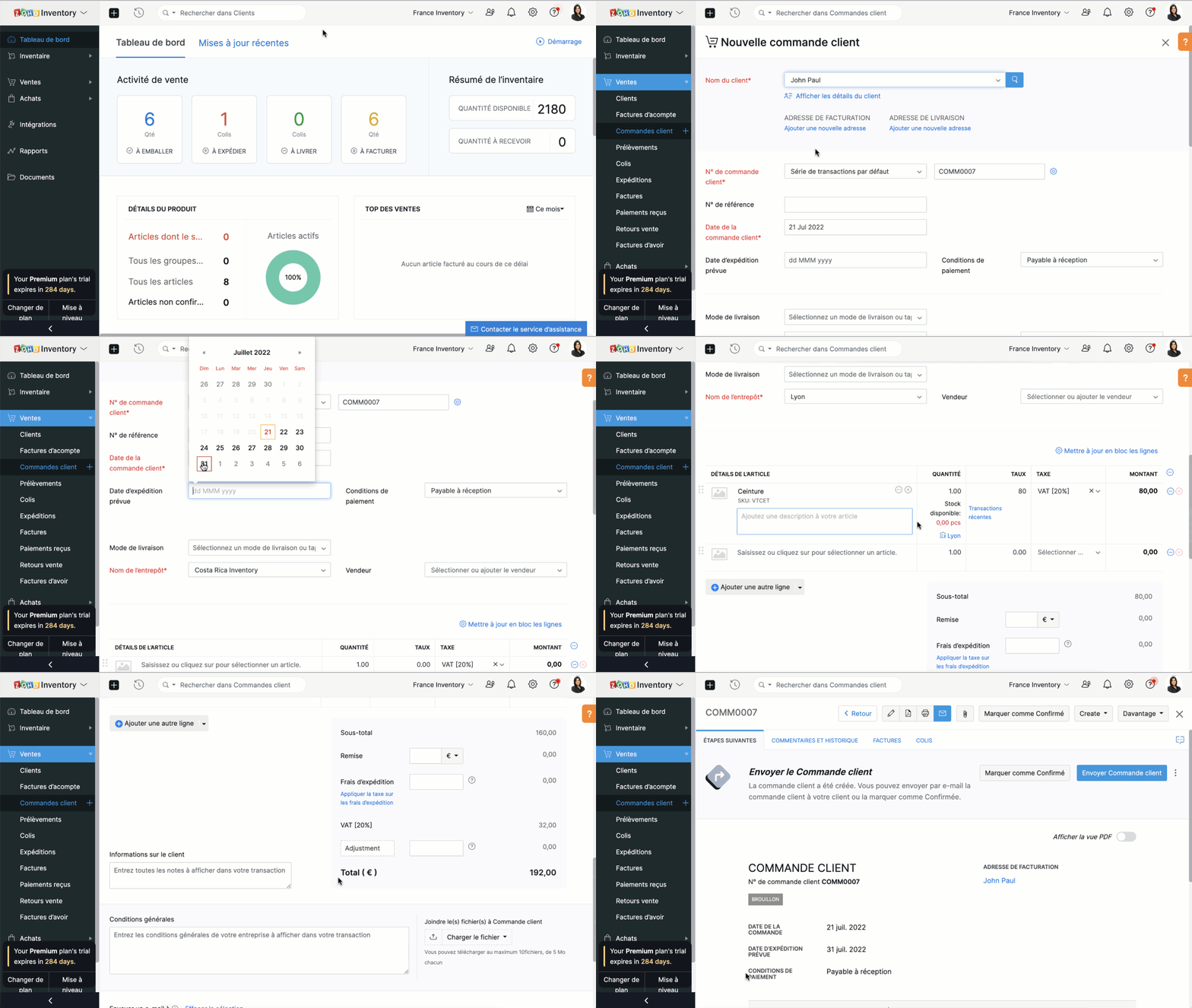
  • Sélectionnez l'onglet "Commandes client" sous "ventes"
  • Cliquez sur "+nouveau" et saisissez les détails du client. Dans le champs "Nom du client", vous pouvez soit sélectionner un client dans la liste déroulante, soit ajouter un nouveau client.
  • Le N° de commande est généré par défaut. Si vous souhaitez le saisir manuellement , cliquez sur l'icône "Paramètres" à côté de l'onglet et une fenêtre s'affichera pour vous permettre de choisir entre la génération automatique et la saisie manuelle.
  • Saisissez les autres informations comme la date d'expédition, le mode de livraison, les conditions de paiement, le nom de l’entrepôt. Ajoutez un produit ou un service à partir de votre inventaire. Vous pouvez également cliquer sur l'option "Ajouter des articles en vrac" pour ajouter plusieurs articles à la fois à votre commande client.
  • Saisissez la quantité, le taux et la taxe applicable à partir de la liste déroulante. La liste déroulante des taxes affiche uniquement celles que vous avez créées dans l'onglet "Paramètres", sous la section "Taxes".
  • Saisissez le taux de remise, les frais d'expédition et les modifications, si applicable.
  • Vous pouvez ensuite choisir d' sur "Enregistrer comme brouillon" ou "Enregistrer et envoyer"


Créer une commande à partir du module "Clients"

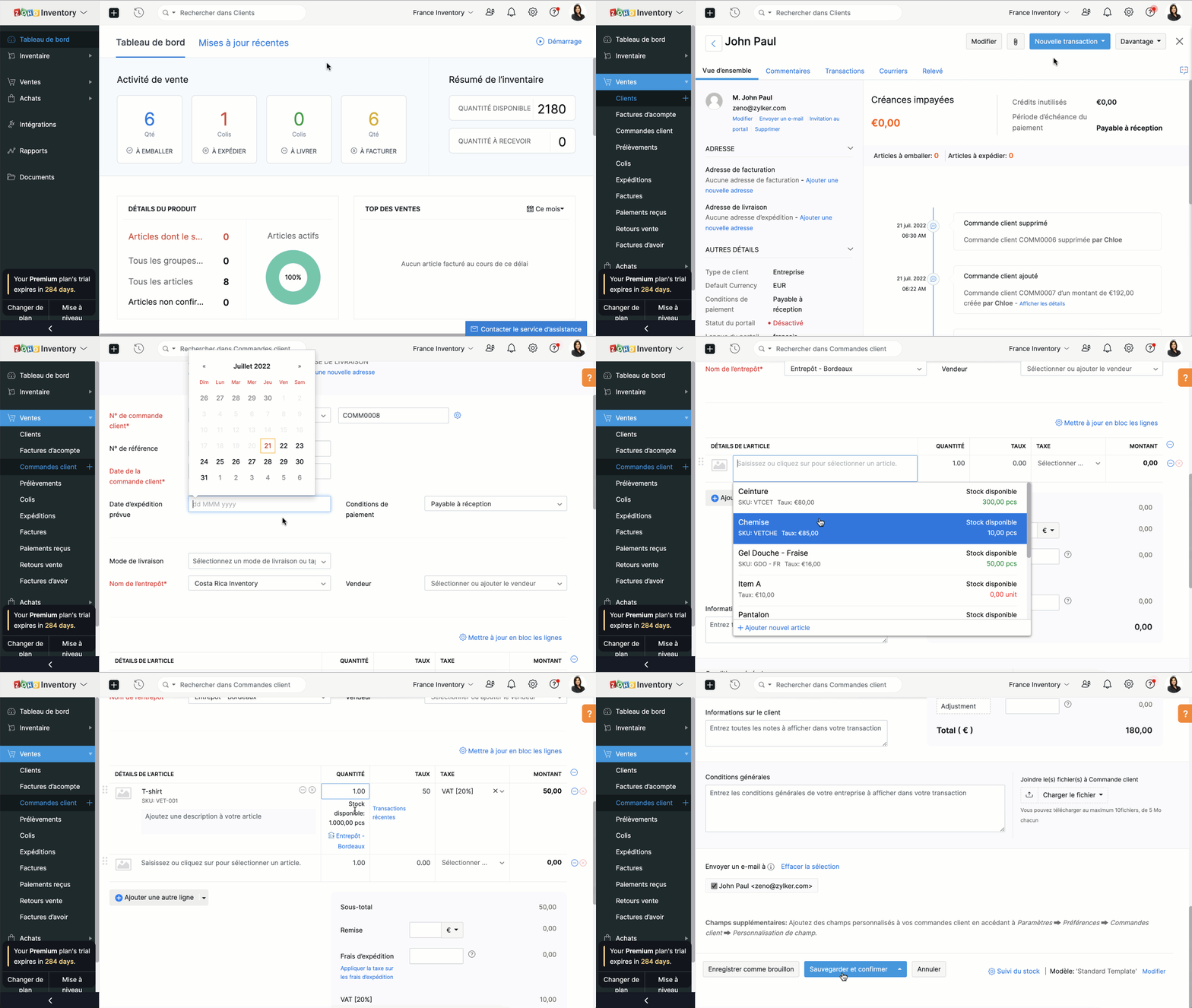
  • Passez à l'onglet "Clients" et sélectionnez un client pour lequel vous souhaitez créer une commande.
  • Cliquez sur le bouton "Nouvelle transaction" et sélectionnez "Commande client", une nouvelle fenêtre apparaît pour créer une nouvelle commande client.
  • Vous pouvez maintenant suivre le parcours ci-dessus.

Fermer une commande client

En fonction de vos préférences, vous pouvez choisir que le statut de votre commande client soit automatiquement défini comme clôturé. Les critères sont les suivants:
  • Lorsqu'une facture est créée
  • Lorsqu’une expédition est effectuée
  • Lorsque l’expédition est traitée et que la facture est créée
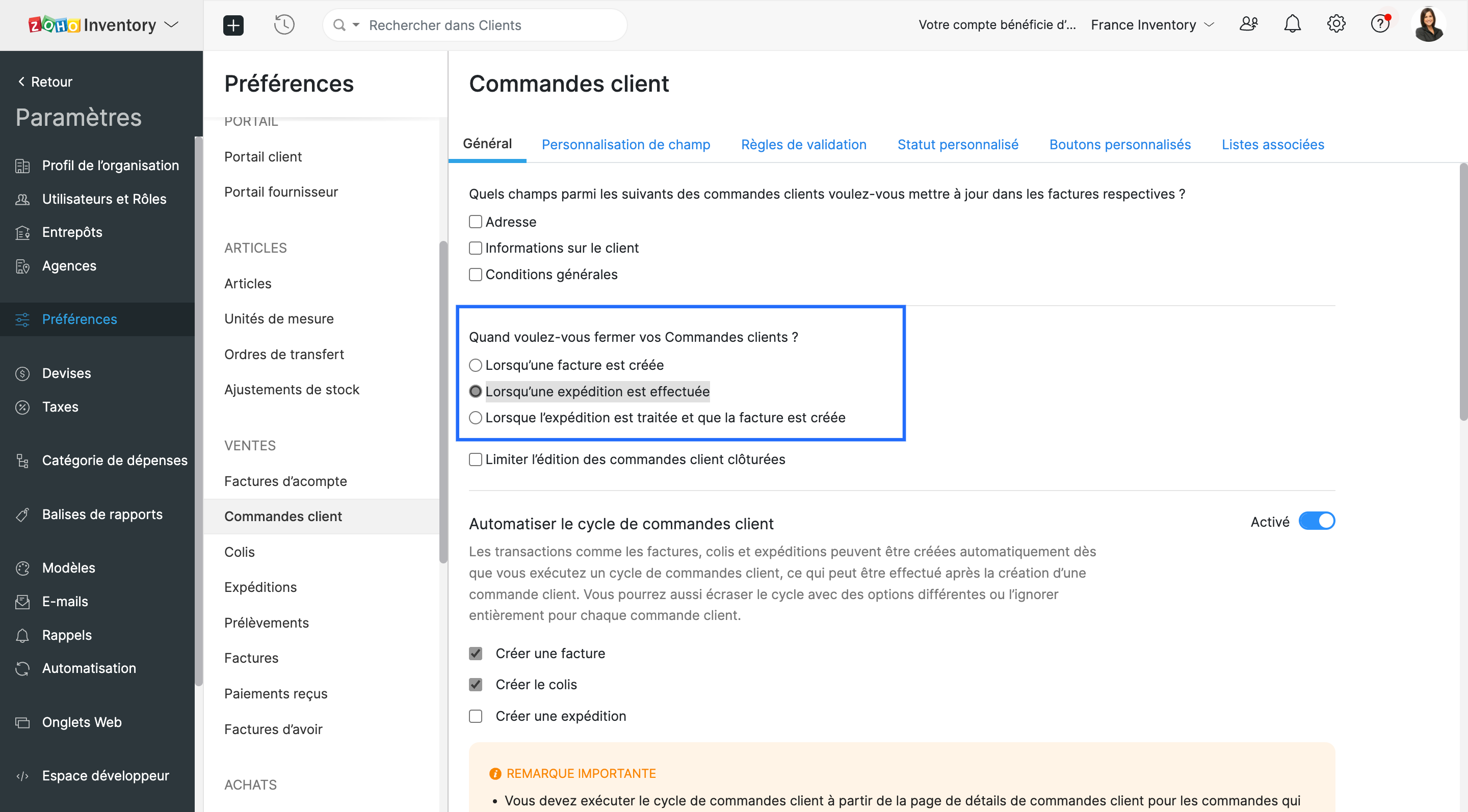

  • Vous pouvez choisir l'un ou l'autre. Lorsque les critères sont satisfaits, le statut de la commande client est défini comme fermé.

Envoyer une commande à votre client

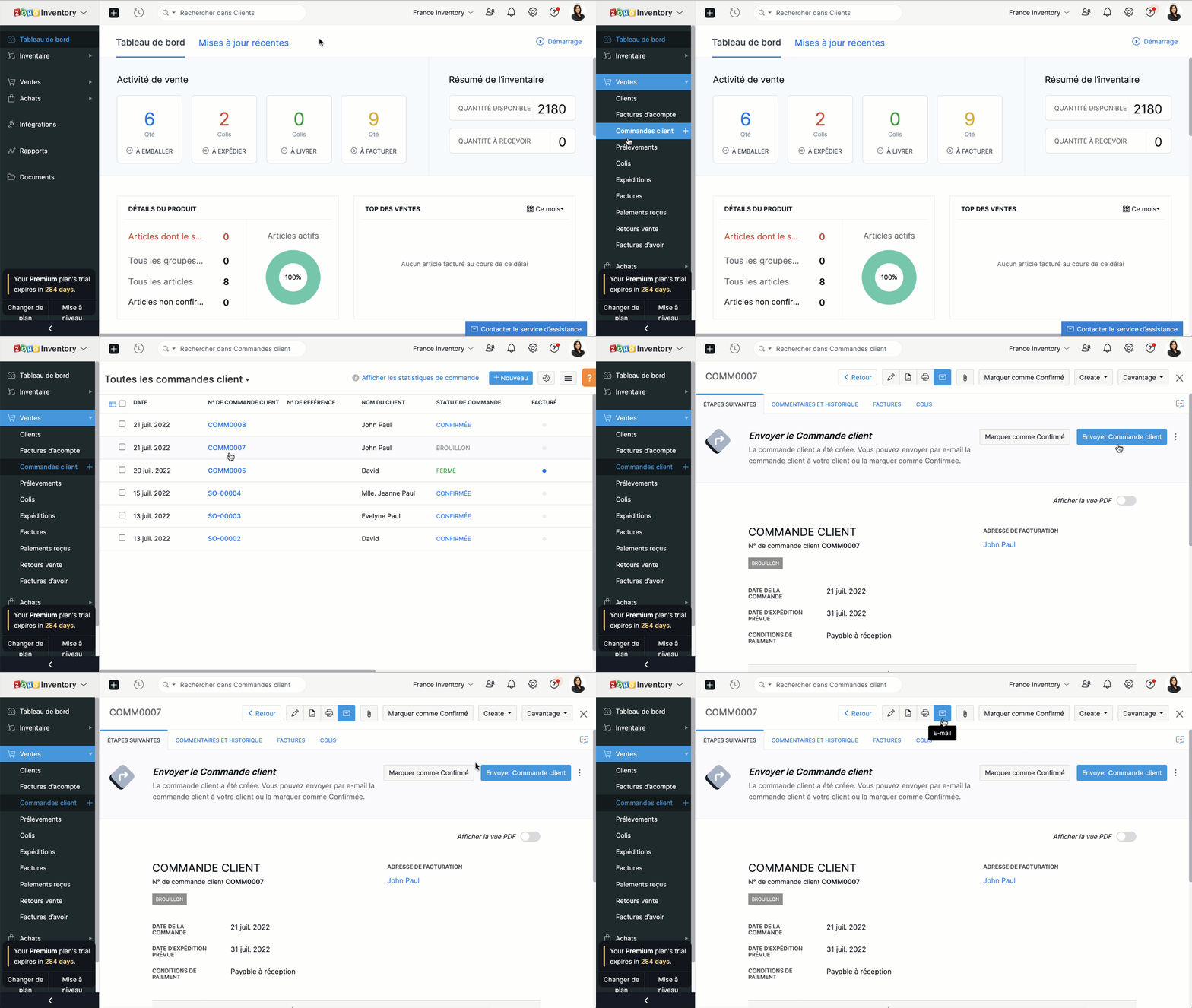
Vous pouvez soit envoyer la commande client au moment où vous la créez en cliquant sur "Enregistrer et envoyer", soit l'envoyer plus tard depuis le bouton "E-mail" situé en haut de la fenêtre.


Fusionner les commandes client.

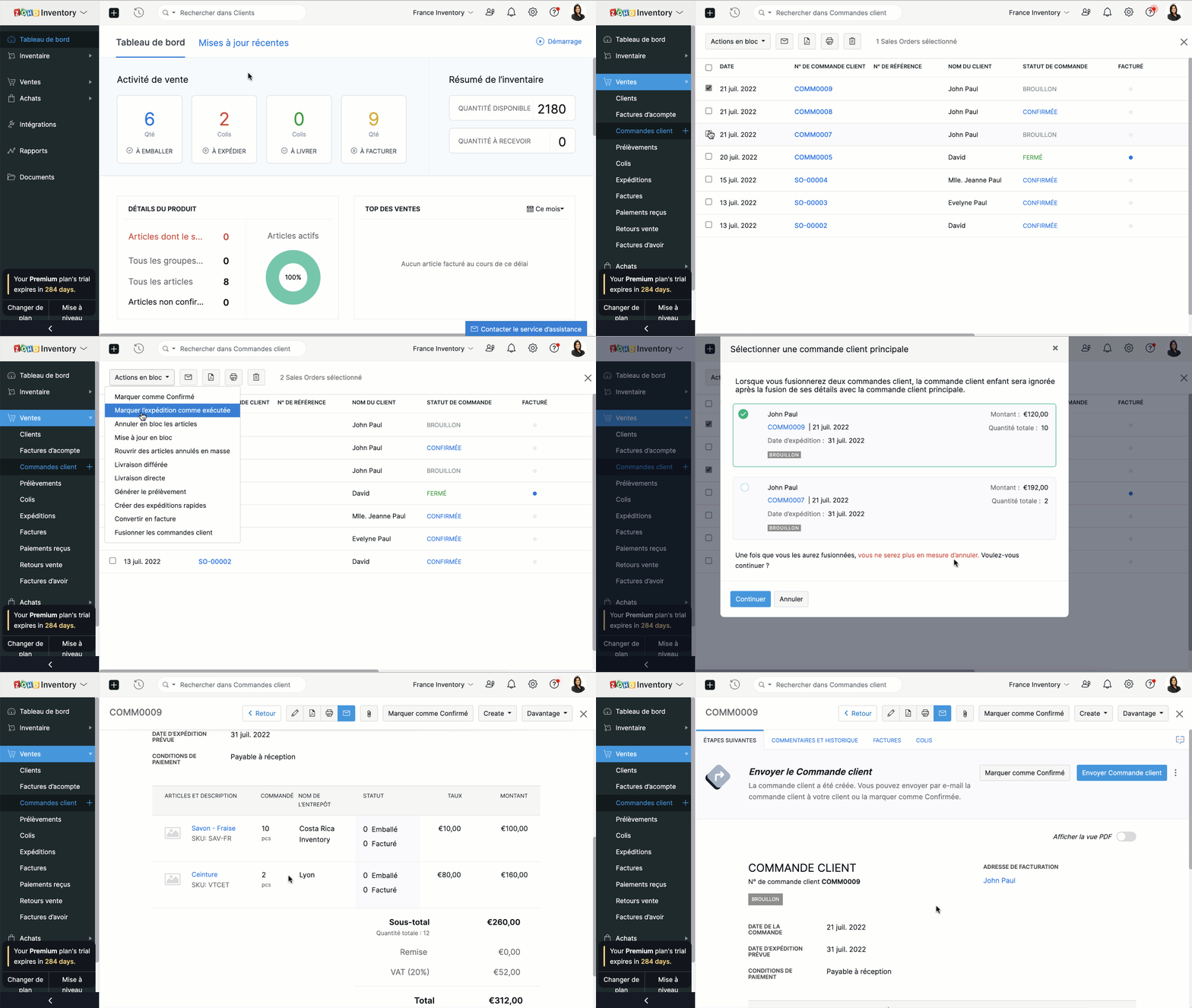
Si vous recevez deux commandes d'un même client, vous pouvez en regrouper les détails dans un seul document. Ainsi, vous pourrez préparer, expédier et facturer une seule commande au lieu de deux.
  • Accédez au module "Commandes clients" depuis le panneau à gauche.
  • Sélectionnez deux commandes clients à fusionner.
  • Cliquez sur "Actions en bloc" et sélectionnez "Fusionner les commandes client".

Conditions préalables :

  • Vous ne pouvez fusionner que deux commandes clients à la fois.
  • Les deux commandes clients doivent être adressées au même client avec la même adresse de facturation et de livraison.
  • Les deux commandes clients doivent avoir le même statut (statut Brouillon ou Confirmé uniquement) sans forfaits ou factures associés.
  • Vous ne pouvez pas fusionner de commandes client de marketplace.

Créer des factures à partir de commandes clients

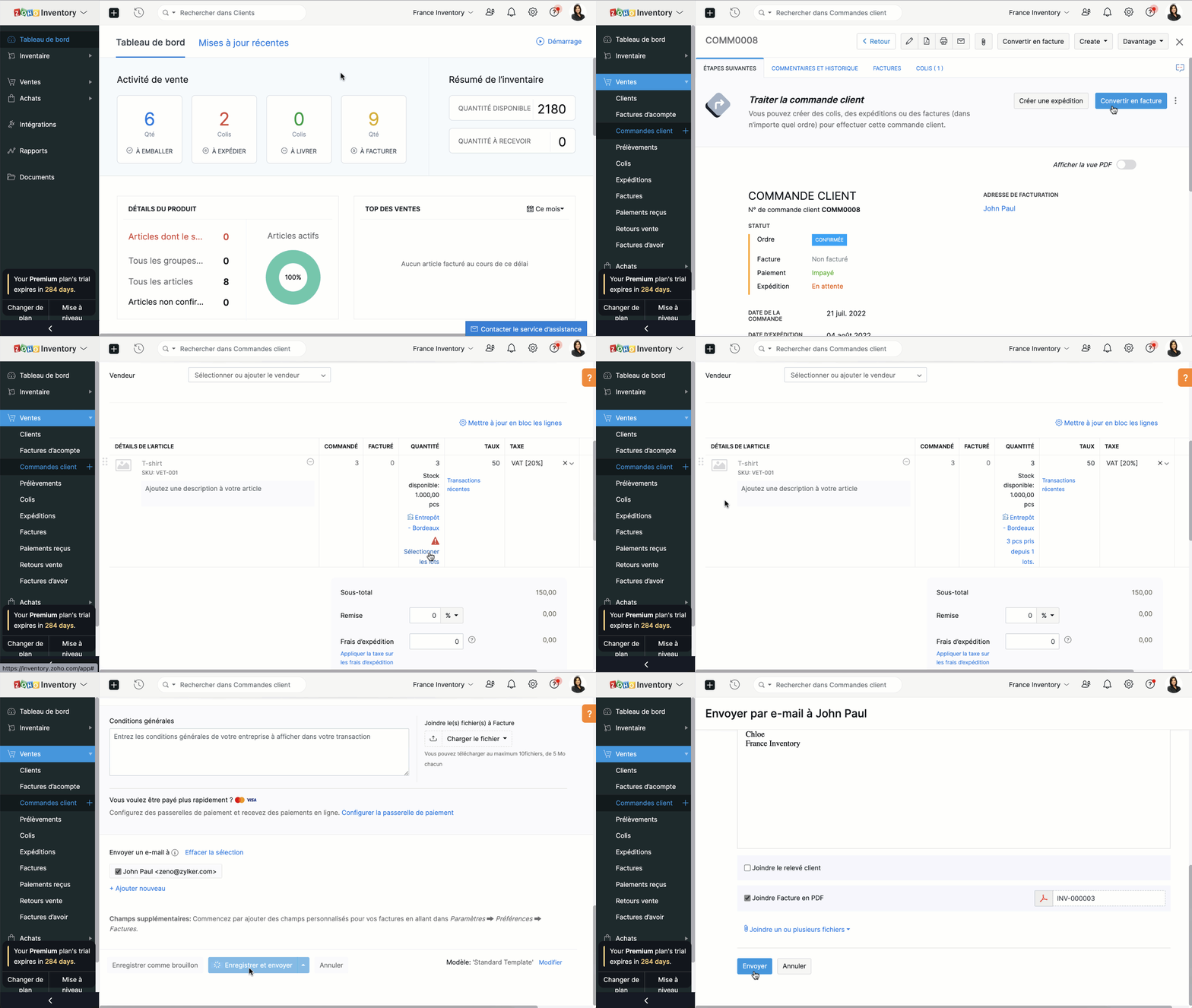
  • Depuis le panneau à gauche, sélectionnez une commande client que vous voulez convertir en facture.
  • Vous pouvez directement convertir en facture depuis l'onglet "Convertir en facture" soit depuis l'onglet "Facture".
  • Vous serez dirigé vers la page de création de la facture. Par défaut, tous les détails fournis dans la commande client seront remplis automatiquement.
  • En fonction des besoins, vous pouvez soit choisir de facturer partiellement la commande client et cliquer sur "Enregistrer", soit envoyer la facture immédiatement à vos clients en cliquant sur "Enregistrer et envoyer".


Merci
L'équipe Zoho France

    • Sticky Posts

    • Collaboration sans faille avec Zoho One

      Bonjour à tous, Dans cet article nous allons voir comment Zoho One permet une collaboration à différents niveaux .       La façon dont nous travaillons évolue. À mesure que les entreprises se mondialisent, la plupart des activités sont menées en équipe.
    • Recent Topics

    • Filter contacts based on selected category in Zoho Desk ticket

      Hello community, I’m setting up the Tickets module in Zoho Desk and I need help implementing the following: When a category is selected in a ticket, I want the Contact field to be filtered so that it only displays contacts that are related to that category.
    • Mapping a new Ticket in Zoho Desk to an Account or Deal in Zoho CRM manually

      Is there any way for me to map an existing ticket in Zoho desk to an account or Deal within Zoho CRM? Sometimes people use different email to put in a ticket than the one that we have in the CRM, but it's still the same person. We would like to be able
    • Introducing Multi-Asset Support in Work Orders, Estimates, and Service Appointments

      We’re excited to announce a highly requested enhancement in Zoho FSM — you can now associate multiple assets with Work Orders, Estimates, and Service Appointments. This update brings more clarity, flexibility, and control to your field service operations,
    • Assign Income to Project Without Invoice

      Hello, Fairly new user here so apologies if there is a really obvious solution here that I am just missing... I have hundreds of small deposits into a bank account that I want to assign to a project but do not want to have to create an invoice every time
    • Tracking Non-Inventory Items

      We have several business locations and currently use zoho inventory to track retail items (sales and purchase orders). We were hoping to use zoho inventory to track our non-inventory items as well (toilet paper, paper towels, etc). I understand that we
    • Profile Page View Customization

      I need to change the fields, sections from the profile view of an emplyoyee.
    • Zoho Desk Android app update: Filter, Sort and Saved filters Enhancements

      Hello everyone! We are excited to introduce the below features on the Android version Zoho Desk mobile app: 1. Filter & Sort support has been introduced for the Contacts and Accounts modules. 2. Sort options is now available in Custom Modules as well.
    • Zoho CRM Meetings Module Issues

      We have a use-case that is very common in today's world, but won't work in Zoho CRM. We have an SDR (Sales Development Rep) who makes many calls per day to Leads and Contacts, and schedules meetings for our primary Sales Reps. He does this by logging
    • How to filter Packages in zoho inventory api

      Hi Team, I want to perform some tasks in a schedular on the packages which are in "Shipped" state. I tried to use filter_by in my api call but in return I get response as {"code":-1,"message":"Given filter is not configured"} My Api request is as follows
    • Accessing shared mailboxes through Trident (Windows)

      Hi, I have a created a couple of shared mailboxes. The mailboxes are showing up on the browser based Zoho workplace, but I cannot seem to figure out how to access my shared inboxes through Trident (Windows). Am I missing something or is this feature not
    • Can I re-send the Customer Satisfaction Survey after a ticket closure?

      Hello, Some customers does not answer the survey right after closure, is it possible to re-send after a few days or weeks? Best Regards!
    • Feature Request: Ability to set Default Custom Filters and apply them via URL/Deluge

      I've discovered a significant gap in how Zoho Creator handles Custom Filters for reports, and I'm hoping the Zoho team can address this in a future update. This limitation has been raised before and continues to be requested, but remains unresolved. The
    • Closing the Loop: Why Lookup Asymmetry is Harming Data Integrity in Creator

      TL;DR: Lookup fields allow users to add new related records inline via the "+" icon, but there's no equivalent ability to edit an existing related record without navigating away and losing form context. Adding a native "Edit" icon—with automatic User
    • Syncing with Google calendar, Tasks and Events

      Is it possible to sync Zoho CRM calendar, task and events with Google Calendar's tasks and events. With the increasing adoption by many major tool suppliers to sync seamlessly with Google's offerings (for instance I use the excellent Any.do task planning
    • filtering lookup field options based on information in another module.

      In our CRM system. We have the standard Accounts and Deals modules. We would like to introduce the ability to classify Accounts by Sector. Our desired functionality is to have a global list of all sectors that an Account can select, with the ability to
    • Really want the field "Company" in the activities module!

      Hi team! Something we are really missing is able to see the field Company when working in the activities module. We have a lot of tasks and need to see what company it's related to. It's really annoying to not be able to see it.🙈 Thx!
    • Cliq iOS can't see shared screen

      Hello, I had this morning a video call with a colleague. She is using Cliq Desktop MacOS and wanted to share her screen with me. I'm on iPad. I noticed, while she shared her screen, I could only see her video, but not the shared screen... Does Cliq iOS is able to display shared screen, or is it somewhere else to be found ? Regards
    • Service op locatie organiseren met Zoho FSM: waar lopen organisaties tegenaan?

      Bij organisaties met service teams op locatie merken we vaak dat de complexiteit niet zozeer in de planning zelf zit, maar in wat er rond die planning gebeurt. Denk aan opvolging na interventies, consistente servicerapporten, en het bijhouden van installaties
    • Workflow Down/Bug

      We have a workflow that sends an email to one of our internal departments 10 minutes after a record is created in a custom module. The workflow actually works correctly. However, we have now noticed that on January 8, between 3:55 p.m. and 4:33 p.m.,
    • Introducing Assemblies and Kits in Zoho Inventory

      Hello customers, We’re excited to share a major revamp to Zoho Inventory that brings both clarity and flexibility to your inventory management experience! Presenting Assemblies and Kits We’re thrilled to introduce Assemblies and Kits, which replaces the
    • Automate pushing Zoho CRM backups into Zoho WorkDrive

      Through our Zoho One subscription we have both Zoho CRM and Zoho WorkDrive. We have regular backups setup in Zoho CRM. Once the backup is created, we are notified. Since we want to keep these backups for more than 7 days, we manually download them. They
    • Does the ability exist to make tax on the customer profile mandatory?

      I am reaching out to inquire about the possibility of making the "Customer Tax" field mandatory when creating a new customer in Zoho. We want to ensure that all customers have their tax information recorded to maintain compliance with our internal processes.
    • CRM gets location smart with the all new Map View: visualize records, locate records within any radius, and more

      Hello all, We've introduced a new way to work with location data in Zoho CRM: the Map View. Instead of scrolling through endless lists, your records now appear as pins on a map. Built on top of the all-new address field and powered by Mappls (MapMyIndia),
    • How to apply customized Zoho Crm Home Page to all users?

      I have tried to study manuals and play with Zoho CRM but haven't found a way how to apply customized Zoho CRM Home Page as a (default) home page for other CRM users.. How that can be done, if possible? - kipi Moderation Update: Currently, each user has
    • Send Whatsapp with API including custom placeholders

      Is is possible to initiate a session on whatsapp IM channel with a template that includes params (placeholders) that are passed on the API call? This is very usefull to send a Utility message for a transactional notification including an order number
    • IMAP mail after specify date

      Hi My customer's mail server is on premise and mail storage is very huge. So It never finish sync. and finally stop sync. Cloud CRM have a option like zoho mail sync mail after some date.
    • email association with CRM

      Why is it 2024 (almost 2025) and Zoho has not figured out how to integrate email with CRM? It is so inconsistent at associating emails within CRM. I am an attorney. I have clients and work with other attorneys. Attorney John Doe is associated with multiple
    • Fix the speed

      It takes ages to load on every step even though my dataset is quite small.
    • Credit Note for Shipped and Fatoora pushed invoices

      We have shipped a Sales Order and created an Invoice. The Invoice is also pushed to Fatoora Now we need to create a credit note for the invoice When we try it, it says we need to create a Sales Return in the Zoho Books, we have already created a Sales
    • Whatsapp Connection Status still "Pending" after migration

      Hello, I migrated my WhatsApp API to Zoho from another provider a day ago. So far the connection status is still “Pending”. There is a problem? How long does it usually take?
    • FSM - Timesheet entires for Internal Work

      Hi FSM Team, Several of my clients have asked how they can manage internal timesheets within Zoho FSM. Since their technicians already spend most of their day working in FSM, it would be ideal if they could log all working hours directly in the FSM app.
    • Add a way of clearing fields values in Flow actions

      It would be great if there was an option to set a field as Null when creating flows. I had an instance today where I just wanted to clear a long integer field in the CRM based on an action in Projects but I had to write a custom function. It would be
    • Role Management

      I am creating an analytics dashboard for a company that will be utilized by its various departments such as Finance, Marketing, and HR. My goal is to design the dashboard with separate tabs for each department. Additionally, I plan to implement role-based
    • Link Contacts to Billed Accounts

      Hello, I want to do a survey on all my customers of 2025. For that I want to select all contacts linked to accounts who where billed in 2025. How to I create this link to I can then use Zoho Survey with this database of contacts?
    • Highlight a candidate who is "off limits"

      Hello: Is there a way to highlight a candidate who is "off limits"?  I would like to have the ability to make certain candidate and / or Client records highlighted in RED or something like that.   This would be used for example when we may have placed a candidate somewhere and we want everyone in our company to quickly and easily see that they are off limits.  The same would apply when we want to put a client or former client off limits so no one recruits out of there. How can this be done? Cheers,
    • Announcing new features in Trident for Windows (v.1.37.5.0)

      Hello Community! Trident for Windows just received a major update, with a range of capabilities that strengthen email security and enhance communication. This update focuses on making your mailbox safer and your overall email experience more reliable.
    • Early Payment Discount customize Text

      Hi, I’m currently using Zoho Books and am trying to customize the standard “Early Payment Discount” message that appears in the PDF invoice template. I’ve reviewed the documentation here: https://www.zoho.com/books/help/invoice/early-payment-discount.html
    • Automatic Matching from Bank Statements / Feeds

      Is it possible to have transactions from a feed or bank statement automatically match when certain criteria are met? My use case, which is pretty broadly applicable, is e-commerce transactions for merchant services accounts (clearing accounts). In these
    • Deprecation of SMS-based multi-factor authentication (MFA) mode

      Overview of SMS-based OTP MFA mode The SMS-based OTP MFA method involves the delivery of a one-time password to a user's mobile phone via SMS. The user receives the OTP on their mobile phone and enters it to sign into their account. SMS-based OTPs offer
    • How to Customize Task Creation to Send a Custom Alert Using JavaScript in Zoho CRM?

      Hello Zoho CRM Community, I’m looking to customize Zoho CRM to send a custom alert whenever a task is created. I understand that Zoho CRM supports client scripts using JavaScript, and I would like to leverage this feature to implement the alert functionality.
    • Next Page