Create stunning presentations with the Pexels add-on for Zoho Show.
Create stunning presentations with the Pexels add-on for Zoho Show.


Visuals are a highly effective way to express your ideas and convey your message to your audience. Even if the presenter lacks public speaking skills, the right visuals can compensate by communicating the content effectively. Appropriate visuals increase the perceived credibility of your message, while making a slide show easier for the audience to comprehend and retain. 


With the Pexels add-on for Zoho Show, you can access almost 3.2 million images and videos from right within your Show account. Create visually impressive presentations with these high-quality, royalty-free images.
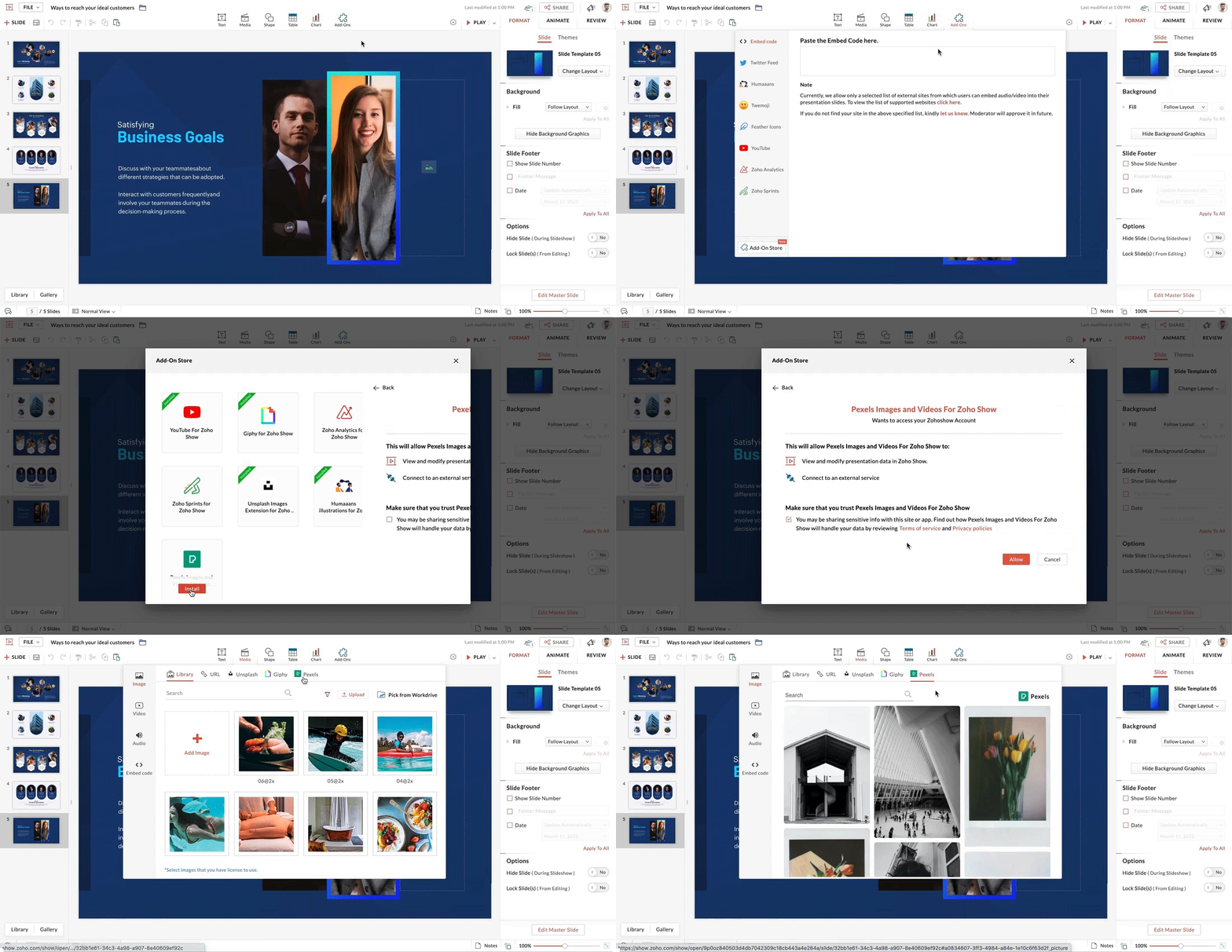


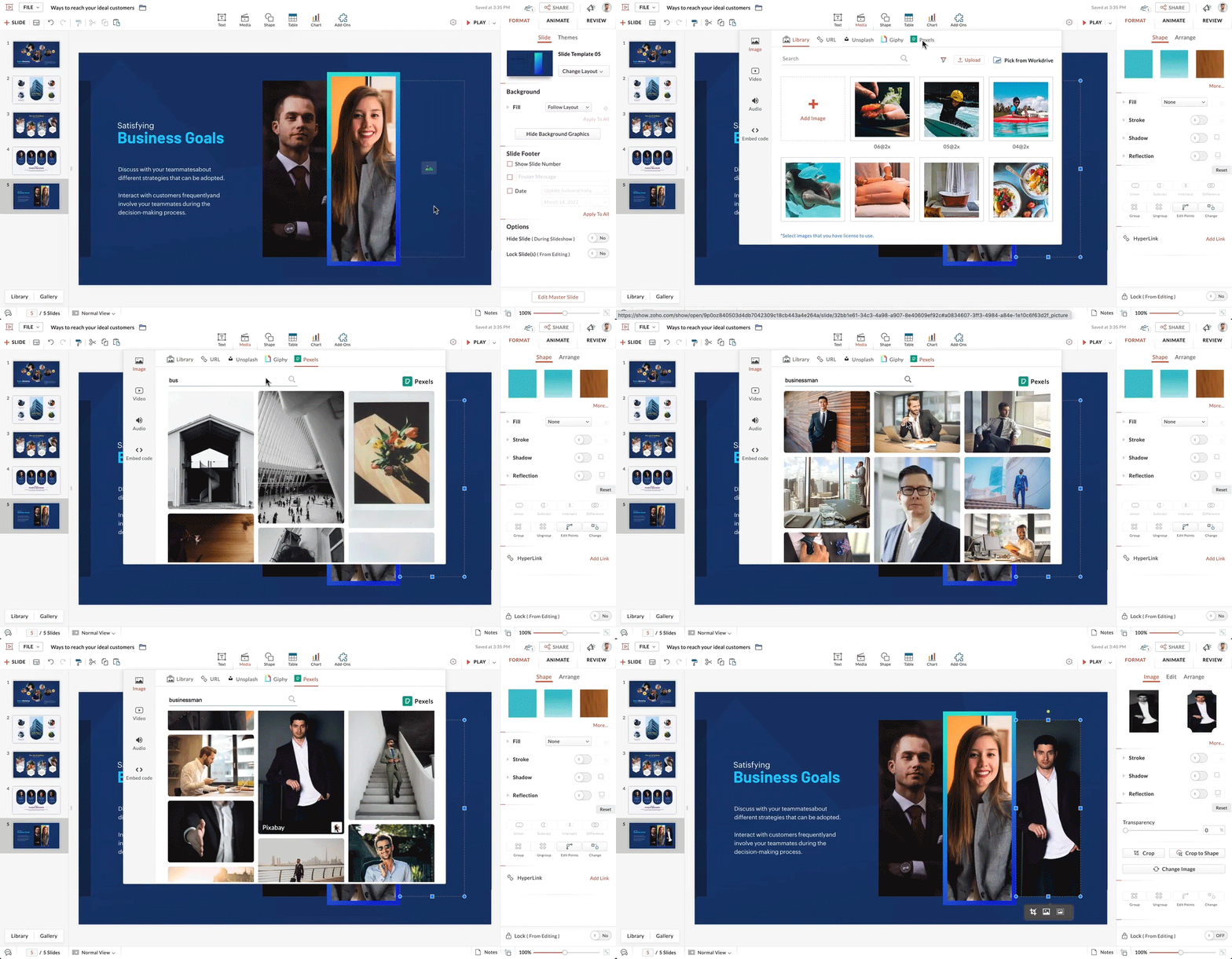
To add images:
  1. Open your slide. 
  2. From the top bar, select Media.
  3. Within Media, choose Image, then Pexels.
  4. Enter a keyword to search for appropriate images.
  5. Click the + icon in the bottom-right corner of the selected image to add it to your slide.
  6. You can now customize the image according to your preference.

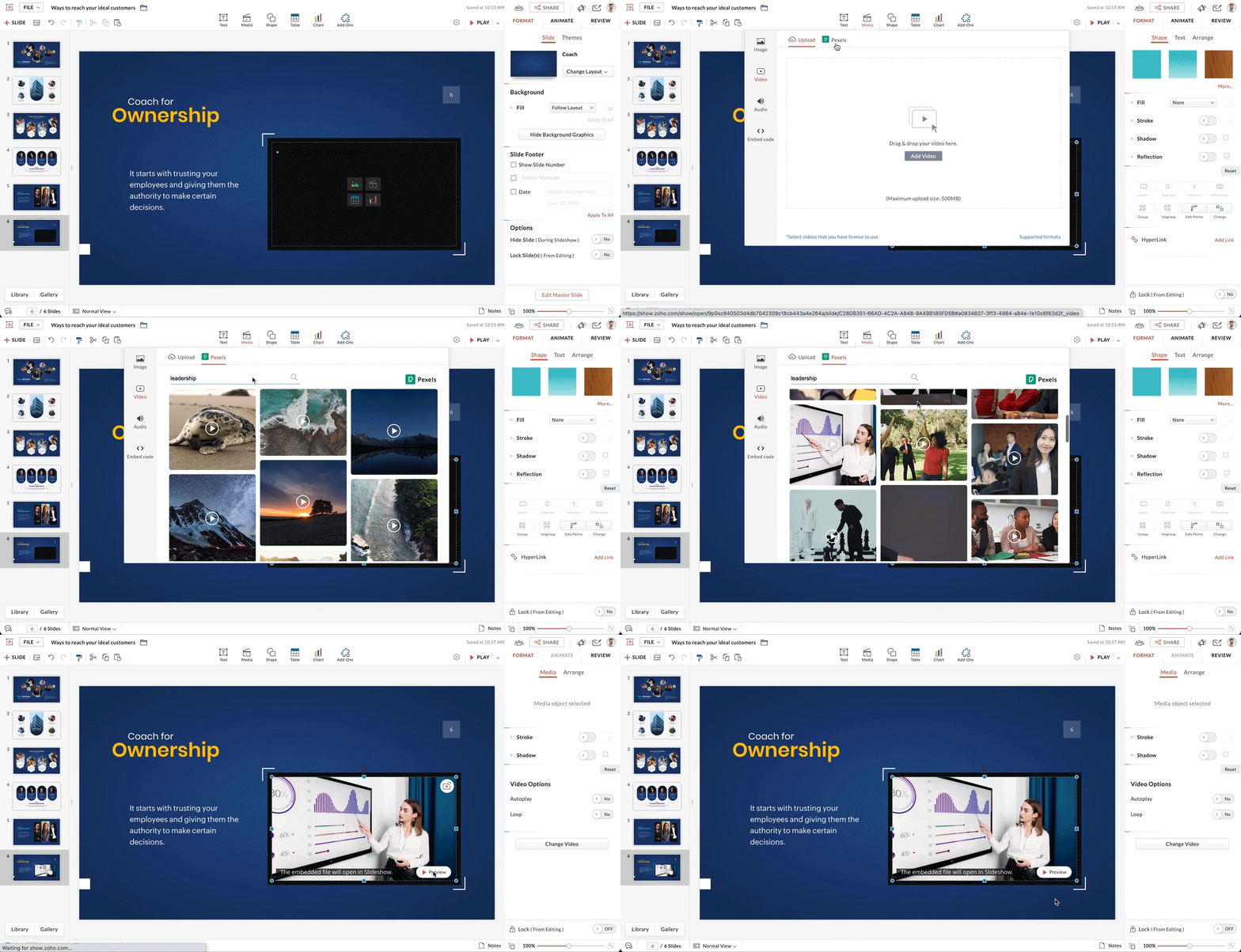
To add videos:
  1. Select your slide 
  2. From the top of the page, select Media.
  3. Within Media, choose Video, then Pexels.
  4. Enter a keyword to search for appropriate videos.
  5. Click the + icon in the bottom-right corner of the selected video to add it to your slide.
  6. You can now customize the video to your preference.

We hope you found this update helpful. 

Watch this space for more exciting product updates. 


    • Sticky Posts

    • Introducing Zoho Show extension in Your Chrome Browser

      Hi everyone, Over the years, Chrome's feature-rich support extensions have grown to offer additional ways to easily access your favorite tools from anywhere. Today, Zoho Show is excited to announce our integration with Google Chrome as an extension app to help build and access presentations directly from your browser.   Zoho Show for Google Chrome is a free extension that allows you to dive straight into drafting your presentation material. Simply install the Show extension from the Chrome Web Store
    • Take your presentations anywhere with the Zoho Show app for iOS

      We're excited to announce the launch of the Show app for iOS. Our new presentation app gives you the power to view and present slideshows on your iPhone and iPad devices wherever and whenever you want.   The Show iOS app has a host of features that will make your presentations engaging and dynamic: Access all your presentations with a single tap Sign in to your Zoho Show account to view your slides and deliver presentations on-the-go. The app stores all the presentations you've created in the My
    • Introducing All New Zoho Show - Create and Design Stunning Presentations.

      Hello,   Whether you're a first-time presenter or an expert looking to make a lasting impression, Zoho Show is the tool for you. Whatever your expertise, the All New Zoho Show's contextual user interface lets you create all kinds of slides, from plain text on a simple background to complex presentations with animations, tweets, charts, media files, and lots more.   The UI doesn't leave you to figure everything out yourself, but presents something you can easily use. It's clear, obvious, and intuitive.
    • Three smart ways to share your presentation with Zoho Show.

      "What is the best way to share a presentation?", a lingering question that is asked after every live session or a meeting. Sharing presentations can be time consuming. It can be done, either by attaching the file to an email or by saving it in a pen drive. But what happens when your file size is large or your team is spread across the globe? Zoho Show lets you share your presentations both internally and externally without worrying about the file size. You can share your slides as a link and decide
    • Convey Your Ideas and Convince Your Audience with Zoho Show

      Visual presentations are highly impactful and it is a no-brainer that your audience gets attracted to them. The use of images and videos help you reach your objectives by emphasizing your ideas more effectively.  According to the psychologist Jerome Bruner of New York University, "people only remember 10% of what they hear and 20% of what they read, but about 80% of what they see and do." For example, if the above data on its own, was presented visually, there is an 80% chance that the information
    • Recent Topics

    • Cliq iOS can't see shared screen

      Hello, I had this morning a video call with a colleague. She is using Cliq Desktop MacOS and wanted to share her screen with me. I'm on iPad. I noticed, while she shared her screen, I could only see her video, but not the shared screen... Does Cliq iOS is able to display shared screen, or is it somewhere else to be found ? Regards
    • Incoming email replies not automatically associating with Deals/Opportunities - Is this possible in Zoho CRM?

      Hello Zoho Community, I'm running a travel agency (B2B and B2C) and we've been struggling with what seems like a basic functionality that we cannot get to work properly. Our use case: We send emails to suppliers (hotels, transportation companies) and
    • Writing SQL Queries - After Comma Auto Suggesting Column

      When writing SQL Queries, does anyone else get super annoyed that after you type a comma and try to return to a new line it is automatically suggest a new column, so hitting return just inputs this suggested column instead of going to a new line? Anyone
    • Desk API that can search Merged Tickets

      Is there any method that can still search a ticket that was already merged? zoho.desk.searchRecords - doesn't explicitly mention
    • Issue with "Send Email" from Quotes not loading Email Template data

      Hi everyone, I'm currently experiencing an issue when using the "Send Email" option from a Quote record in Zoho CRM. What’s happening: When I go to the Quotes module and select a record, then click Send Email, the attached file (Quote) correctly pulls
    • Suggestions for Improved Table Management and Dashboard Filter Controls in Zoho Analytics

      Dear Zoho Analytics Community, I hope you are doing well. I would like to share a few suggestions based on issues I am currently experiencing while working with visualizations and dashboards. Firstly, when I create a new visualization using the Sales-Order
    • Introducing Rollup summary in Zoho CRM

      ------------------------------------------Moderated on 5th July'23---------------------------------------------- Rollup summary is now available for all organizations in all the DCs. Hello All, We hope you're well! We're here with an exciting update that
    • Zoho Projects and CRM Integration in Analytics

      Hi Team, In Zoho CRM, I’ve integrated CRM with Zoho Projects and associated a project within the CRM. The integration is visible under the Deals module. However, I’m unable to find this data in Zoho Analytics. Does anyone know where this information is
    • All new Address Field in Zoho CRM: maintain structured and accurate address inputs

      Availability Update: 29 September 2025: It's currently available for all new sign-ups and for existing Zoho CRM orgs which are in the Professional edition exclusively for IN DC users. 2 March 2026: Available to users in all DCs except US and EU DC. 24
    • Darshan Hiranandani : How many participants can join a Zoho Meeting at once?

      Hi everyone, I'm Darshan Hiranandani, trying to find out the maximum number of participants that can join a Zoho Meeting at once. Has anyone here used Zoho Meeting for larger groups and can share their experience or knowledge about the participant limit?
    • Cursor lands on disabled fields when tabbing through forms

      As of yesterday, form behavior has changed w/ regard to disabled fields. Previously when tabbing through a form the cursor would skip over disable fields (as would typically be desired). But now the cursor is landing on all disabled fields, in all of
    • Permission query

      we have two permission settings i.e 'user permission ' & 'portal user permission' and both have the same setting that we enable for our users, Now those who have access to user permission can see a button on the pivot table, "regenerate" but those who
    • Zoho Forms sheet prefil

      I've been using zoho sheet prefill for a week and it was working perfectly, as soon as i deleted the particular sheet and replaced it with another one no matter what I do it cant find the record and i get this message. Could you please assist me to resolve
    • Zoho FSM API Delete Record

      Hi FSM Team, It would be great if you could delete a record via API. Thank you,
    • "Create Deal" button should default to the currently selected layout/pipeline

      When viewing Deals in Kanban or List view with a specific layout and pipeline selected, clicking "Create Deal" should default to that same layout — not the profile's default layout. Currently it always opens the default layout regardless of context, requiring
    • Zoho mail admin panel not opening

    • Dynamic Questions in Zoho Forms

      Is it possible to add dynamic questions (like displaying a user’s name) in Zoho Forms? I know this is possible in surveys, but can we implement similar functionality in Zoho Forms?
    • How to add "All Open AND Overdue" back to the Home Page Task Component?

      Hi everyone, I’m looking for a way to restore the Tasks component dropdown list on the Zoho CRM Home Page. Since the recent update to the Task area in my Home Page Classic View, the dropdown options (e.g., My Next 7 Days + Overdue) are too restrictive
    • Canvas: is it possible to have a fixed header?

      Hello. Does Canvas provide the option to have a fixed header, similar to the standard view? It would also be interesting for other parts of the interface, like the header or sidebar of the tab section. Thanks!
    • Duplicate Leads Concerns with Round Robin and Lead Approval Process

      It is great to have the Duplicate Lead Approval Process, there are a few issues with the process that I would greatly appreciate taken consideration in enhancing. It appears that A Lead comes in Lead owner assigned by the Round Robin Check for Duplicate,
    • Removing Related Modules Lookup Fields Assignment / Relationship

      Issue: When creating a related list, I accidently selected module itself creating a circle reference. See attached. Situation: I wish to relating a custom module called "Phone Calls" to Leads and Contacts. Outcome: 1) I either want to remove the this
    • Zoho LandingPage pricing update: Essentials plan is now fully free!

      Hello Everyone, We have updated the Zoho LandingPage pricing structure. The Essentials plan, previously priced at $9 per month for 1,000 visitors, is now fully free, and the visitor limit has been increased to 5,000. With this change, users can start
    • Zoho Surveys

      Dear Zoho Support Team, I hope this message finds you well. I am writing to inquire about the availability and documentation for the Zoho Survey API. Background: I am currently working on a project that requires programmatic access to survey data and
    • ZOHO.CRM.UI.Record.open not working properly

      I have a Zoho CRM Widget and in it I have a block where it will open the blocks Meeting like below block.addEventListener("click", () => { ZOHO.CRM.UI.Record.open({ Entity: "Events", RecordID: meeting.id }).catch(err => { console.error("Open record failed:",
    • Zoho Survey – Page Skip Logic Not Working

      Hi everyone, I'm experiencing an issue with the page skip logic in Zoho Survey. Last week, it was working fine, and I haven’t changed anything in the settings. However, today the skip logic is not working at all. I also tried testing it with different
    • Introducing a smarter, faster, and more flexible charting experience

      Hello Zoho Sheet users, We're delighted to share the latest news about a major update to charts in Zoho Sheet! The new version supports dynamic data ranges, granular styling options, faster loading, and other interesting enhancements that allow you to
    • Built-in Date Functions in Zoho Analytics Query Tables

      I have a doubt about whether Zoho Analytics Query Tables provide built-in functions for start date, end date, and the current month
    • Zoho Form URL displays incorrect name

      Hi, I have a form I created called "Design Request form". It displays this way everywhere I look. However, in the URL, it shows up as "DesignJobRequestFormFINAL011325PROOFV1B" and I'm not sure why. I can't find where to fix this. Does anyone have any
    • Introducing Radio Buttons and Numeric Range Sliders in Zoho CRM

      Release update: Currently out for CN, JP, AU and CA DCs (Free and standard editions). For other DCs, this will be released by mid-March. Hello everyone, We are pleased to share with you that Zoho CRM's Layout Editor now includes two new field formats—
    • Is there a way to update all the start and end dates of tasks of a project after a calendar change?

      Hi! Here's my situation. I've built a complete project planning. All its tasks have start dates and due dates. After completing the planning, I've realized that the project calendar was not the right one. So I changed the project calendar. I now have
    • Finding rhythm through poetry

      Poetry has long been a powerful form of expression, discovery, and reflection. For many, it is a way to pen down their thoughts and experiences. The "poetic license" allows writers to shape their words with rhythm and flow. This year, on World Poetry
    • Zoho Desk Ticket SLA Level

      Hello, we have 2 levels of SLA escalation for our Tickets. Is there a way to display on the ticket information the level of SLA escalation the ticket currently on? I am aware that we can see in the ticket history the level of escalation that has been
    • Allow Font Size 11 in Editors...

      That is basic functionality...
    • 【まだ間に合う!】Zoho ユーザー交流会 | AI活用・CRM・Analytics の事例を聞いて、ユーザー同士で交流しよう!

      ユーザーの皆さま、こんにちは。コミュニティチームの藤澤です。 3月27日(金)に東京、新橋で開催する「東京 Zoho ユーザー交流会 NEXUS」へのお申し込みがまだの方は、この機会にぜひお申し込みください!(参加無料) ーーーーーーーーーーーーーーーーーーーーーーーーーーーーーーーーーーーー イベントの詳細はこちらから▷▷ https://www.zohomeetups.com/tokyo2026vol1#/?affl=communityforumpost3 ーーーーーーーーーーーーーーーーーーーーーーーーーーーーーーーーーーーー
    • Where is the scheduled report in New UI?

      Hi Team, Seems there is not such a field in New UI, hence I have to switch to old UI to handle request..
    • Building a Simple Raspberry Pi + Keypad IoT PoC with Zoho Flow

      I want to share a simple IoT PoC I recently built that connects a Raspberry Pi to Zoho Flow and Zoho Creator. The goal was to send PIN input data from a hardware keypad to Zoho and trigger a servo and buzzer for visual/audible feedback. This can serve
    • Zoho Zoom extension for CRM

      When meetings are booked through Zoho using the Zoom extension, the Zoom link in the invite is a host start link that contains an expiring ZAK token. The invite should instead use a standard attendee join link or a non-expiring host link - why is this
    • Enable integration of CRM CPQ functionality for ZohoOne customers using Zoho Finance application

      Hi there. I can't believe I'm needing to launch this idea as I would have thought this was a little obvious. Following a number of conversations with the technical team it's become evident that the CPQ functionality within CRM cannot integrate with Zoho
    • What's New in Zoho Billing | January 2026

      Excited about the latest enhancements in Zoho Billing? Our January updates bring an intelligent AI assistant, smarter subscription management, and improved tax compliance, saving you time and reducing manual work. Dive into the details below to see how
    • Is there a way to sell in a practical method multiple subscriptions of the same product? i.e. domain names

      In evaluating Zoho Billing, a hurdle to adopting it is that Zoho Billing does not seem designed to support businesses that sell multiple subscriptions of the same product. In our case, we need to sell and manage several domain names per client. Am I right
    • Next Page