Building extensions #1: Creating and testing extensions for Zoho Finance Suite applications
Hello developers!
We're excited to announce a new series called "Building extensions" to assist developers in creating efficient extensions for Zoho Finance Suite products. We'll support and guide you through the process of creating an extension and using the features offered in the developer portal.
What are extensions?
Extensions are installable plugins or add-ons that help enhance the existing functionality of your Zoho product or seamlessly integrate and interact with third-party applications for data transmission.
How can you build extensions?
Zoho offers a developer platform called Zoho Developer that allows you to build different types of applications. Sigma is a platform offered within Zoho Developer that is specifically designed for creating extensions for various Zoho products. Throughout this series, we'll look at how to create and develop extensions for the Zoho Finance Suite applications using Sigma.
Get to know all about extensions and building them further in detail.
Sigma extension support
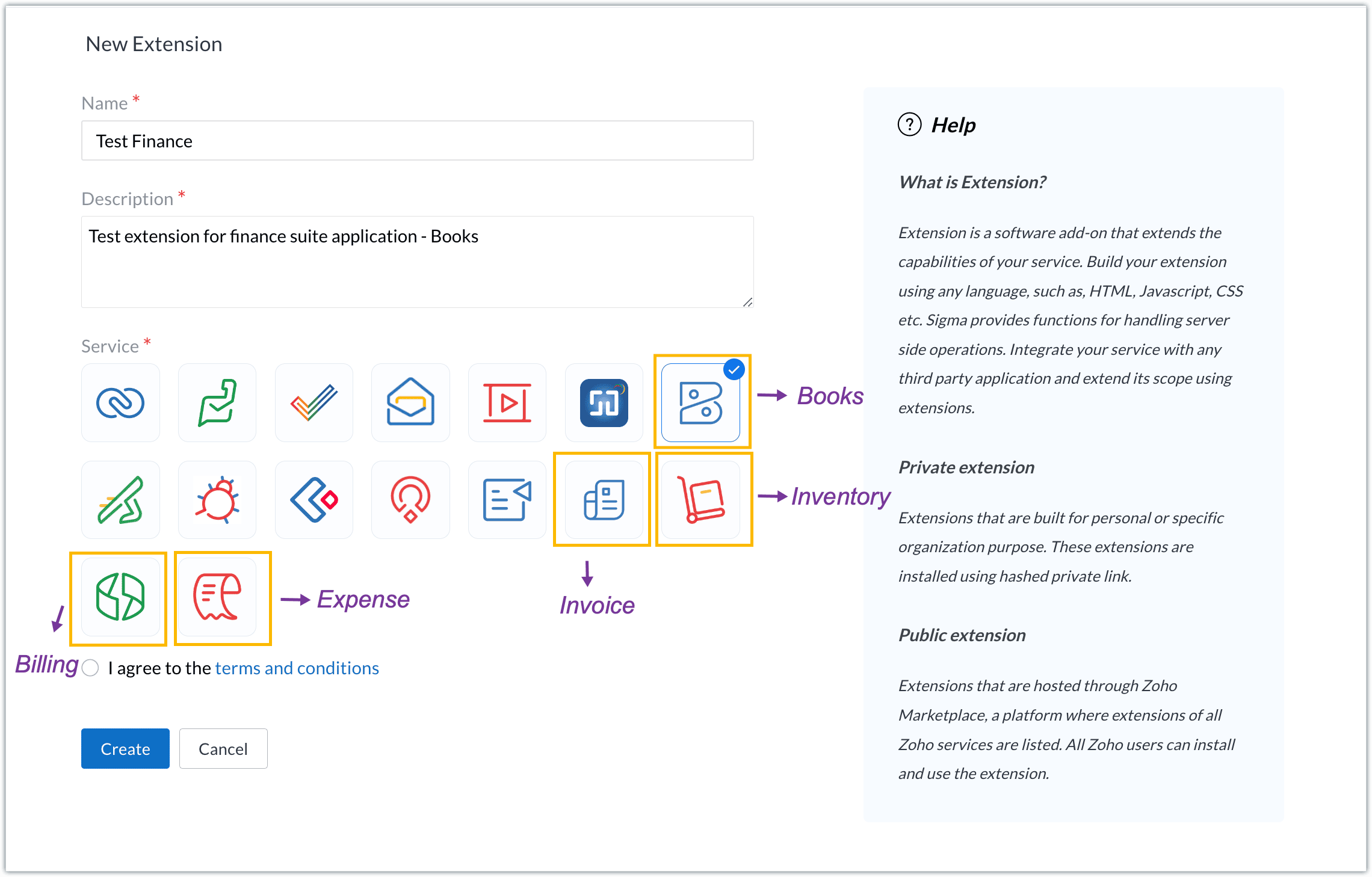
The Zoho Finance Suite consists of seven applications: Zoho Books, Zoho Inventory, Zoho Expense, Zoho Invoice, Zoho Billing, Zoho Checkout, and Zoho Payroll. Currently, the Sigma platform supports creating and building extensions for these five Zoho Finance applications:
- Zoho Books
- Zoho Inventory
- Zoho Expense
- Zoho Invoice
- Zoho Billing
Creating an extension
- Log in or sign up at developer.zoho.com.
- Go to Sigma and access your workspace.
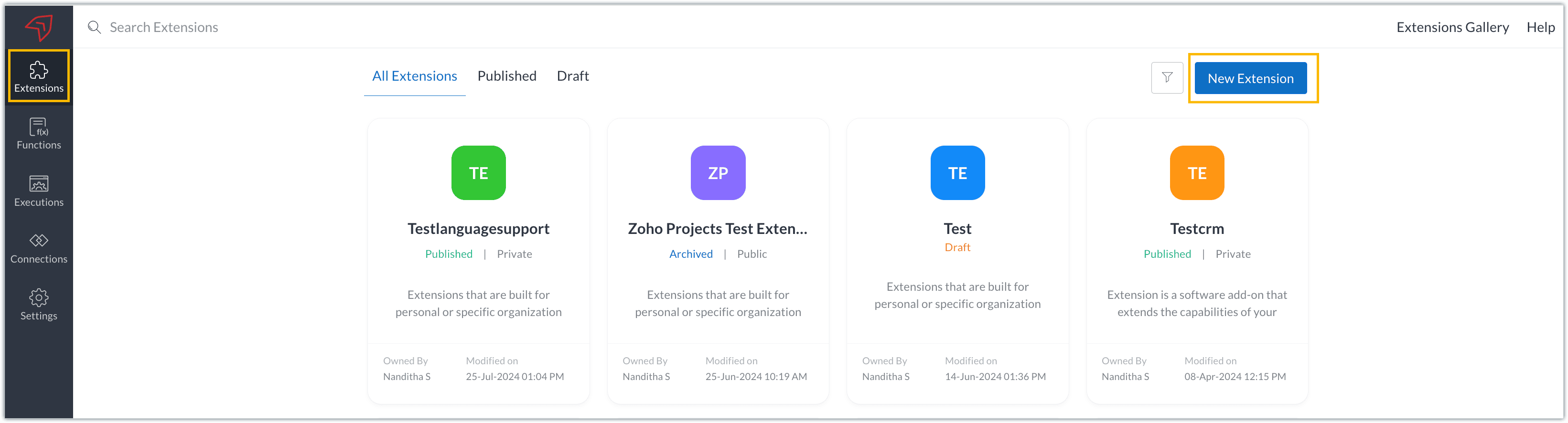
- Once you enter your workspace, you'll be taken to the Extensions section in Sigma.
- Click the New Extension button to start building an extension.
- Enter a name and description for the extension and choose the service you want to build the extension for. As mentioned earlier, Sigma offers support for Zoho Books, Zoho Invoice, Zoho Inventory, Zoho Billing, and Zoho Expense.
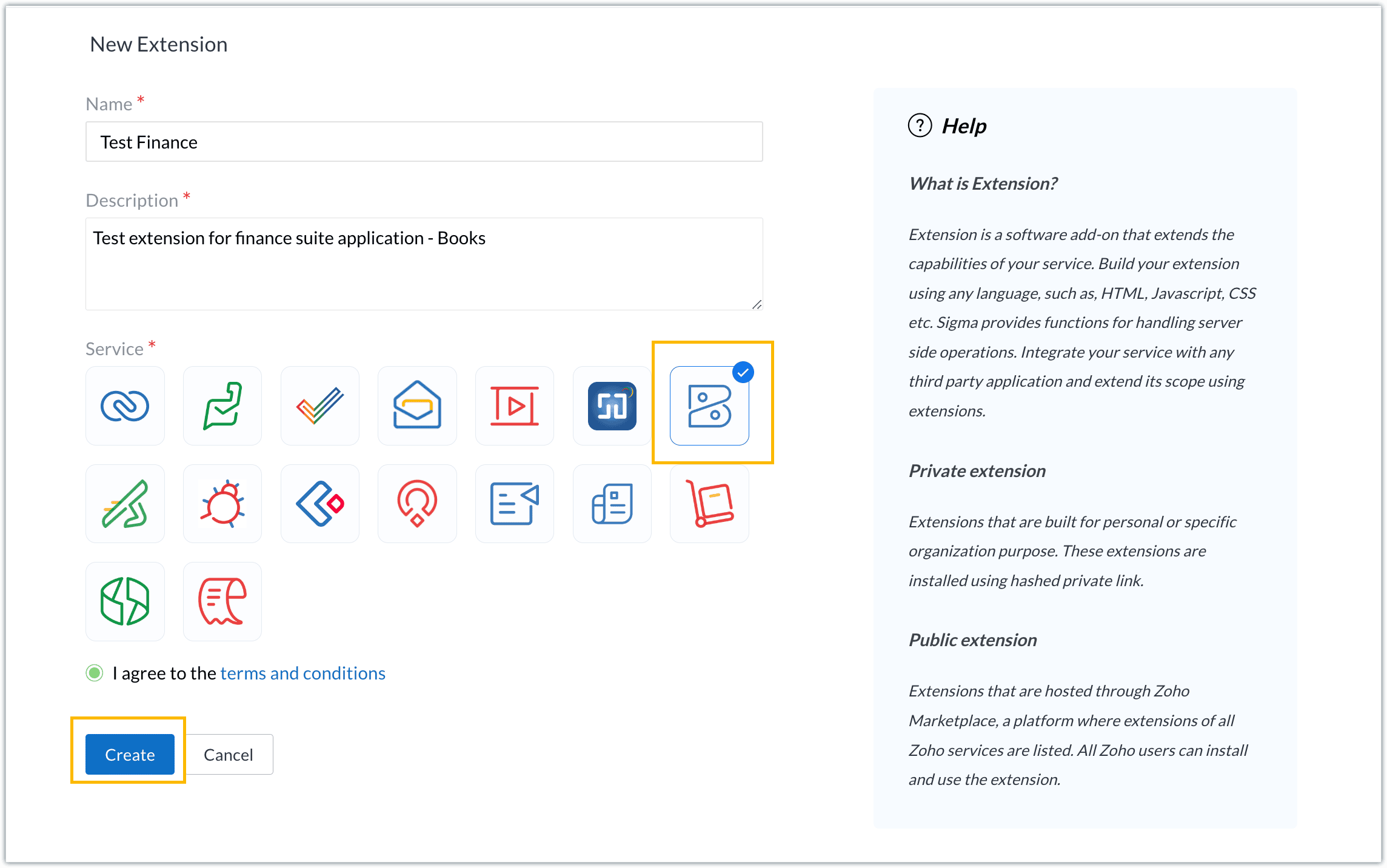
- For our demo, let's choose the service as Zoho Books. Accept the terms and conditions, and then click Create.
- The extension is successfully created. You can click the Extension Details icon to see an overview of the extension.
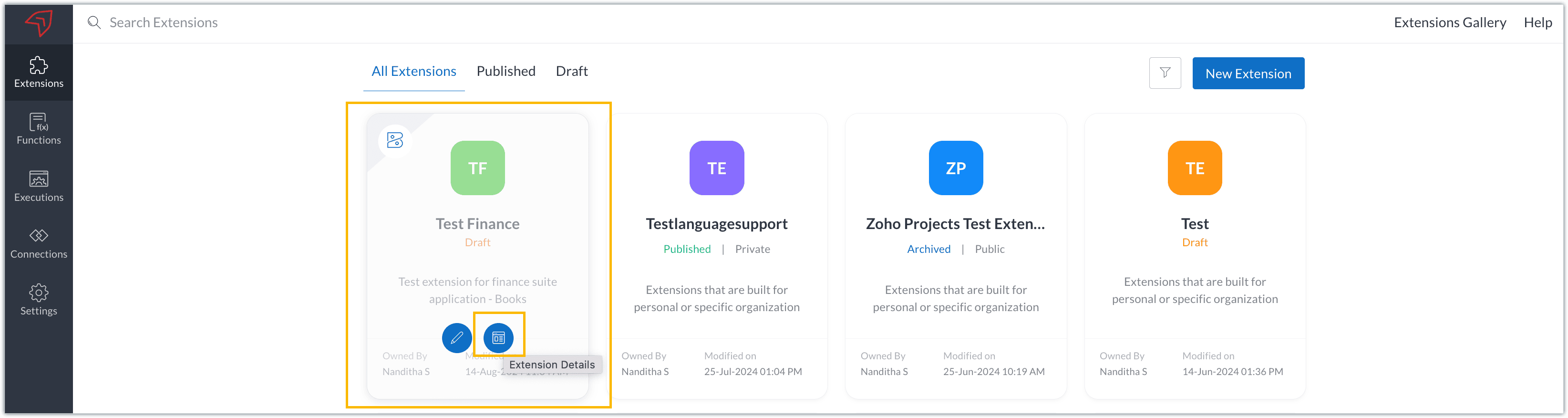
The extension details page shows the general details of the extension, such as creation date, creation time, and version, and allows you to associate developers with the extension.
- Click the Edit Extension icon to start developing the extension.
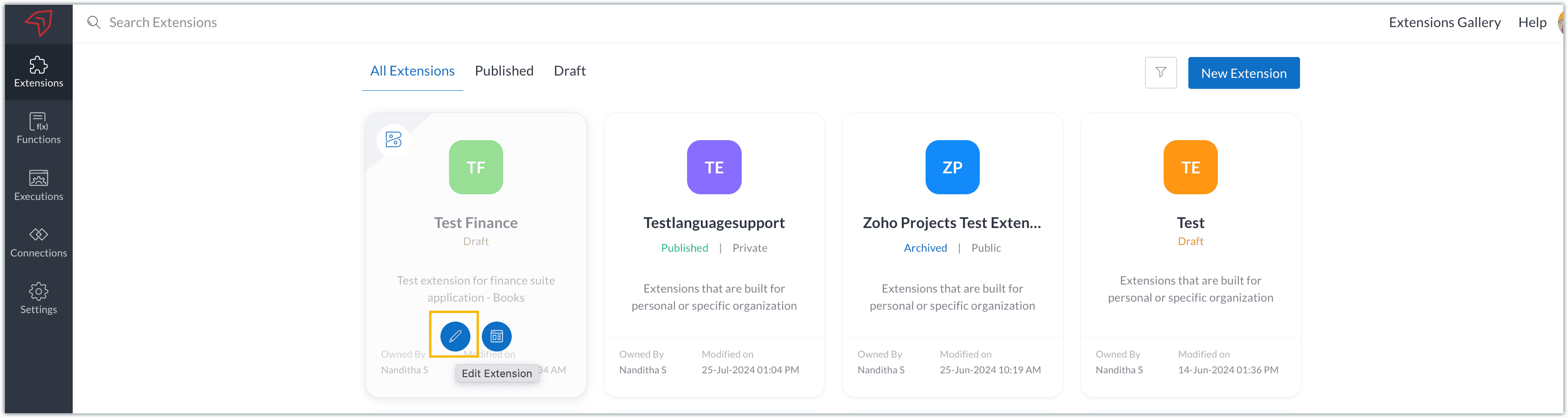
- The Zoho Books Developer Portal opens with the options and native features available to customize, curate, and develop your extension.
Zoho Books Developer Portal sections
The developer portal has four different sections to help customize and build your extension.
Learn: This section lists the native Zoho Books capabilities that can be used to create and develop extensions. Clicking the Set up Now button next to each feature will take you to the feature's development setup page.

Build: This is the development setup section, which includes customization, automation, and components like connections, widgets, schedules, webhooks, and signals. You can customize your extension preferences, establish connections to integrate with other applications, and design custom interfaces to enhance user experience.

Configure: This section assists with handling your extension's required configurations, whether they are generic settings or customizations required from the user. You can add global fields, which can be incorporated as either variables that store static data or through custom widgets that retrieve user inputs. You can also define functionalities that happen during installation and uninstallation.

Publish: Once the extension has been built and configured, you can use this section to publish it for either private or public use. In both cases, the Zoho Books team will review the extension; for public extensions listed on Zoho Marketplace, the Zoho Marketplace approval team will also review them. You can share your privately published extension with other users using the Shared List option.

We will explore more about each of these sections and their features in upcoming posts.
Testing an extension
The Zoho Books Developer Portal offers a dedicated testing environment for each extension, allowing you to test and validate it before publishing.
As a developer, you can use the Test Your Extension option in the top right corner of the portal to access your extension's sandbox environment.

This will redirect you to the sandbox testing environment for the extension you're developing, which is similar to Zoho Books and contains relevant modules to test with.

You can populate necessary data and test your extension functionality. Once everything is validated, you can go ahead and publish your extension for private or public use.
For support or questions related to Zoho Finance Suite extension development, you can email developer@zohofinance.com.
We hope you found this guide useful. Keep following this space for more information!
Topic Participants
Nanditha Somasundaram Somasundaram
Sticky Posts
Building extensions #5: Creating custom connections for extensions
In our previous post, we discussed the significance of connections, identified their types, developed a predefined connection, and demonstrated how it can be integrated with Zoho Books using an example. In this post, we'll walk through the process ofBuilding extensions #4: Integrating Zoho Books with applications using connections
In our last post, we looked at an overview of the key features available for creating a Zoho Books extension, including connections. In this post, we'll go over connections in depth, including their types and applications. What are connections? "Connections"Building extensions #3: Fundamental features of a Zoho Books extension
In our earlier posts, we covered how to create, test, and publish an extension for Zoho Finance suite applications. Moving forward, we'll look specifically at instances relating to one of the products from the Zoho Finance suite: Zoho Books. In this post,Building extensions #2: Publishing an extension
Hello developers, Welcome to our next post about building extensions for Zoho Finance Suite applications. In our previous post, we looked at extensions, their purpose, and how to create and test them. To recap, extensions are installable plugins or add-onsBuilding extensions #1: Creating and testing extensions for Zoho Finance Suite applications
Hello developers! We're excited to announce a new series called "Building extensions" to assist developers in creating efficient extensions for Zoho Finance Suite products. We'll support and guide you through the process of creating an extension and using
Recent Topics
WorkDrive Desktop Sync Is Being Deprecated: Move to WorkDrive TrueSync for a Smarter Experience
Hi everyone, We are excited to share a better, smarter way to access and manage your files directly from your computer! We’re transitioning from our legacy Desktop Sync app to WorkDrive TrueSync, designed to give you faster performance,greater flexibility,Automating CRM backup storage?
Hi there, We've recently set up automatic backups for our Zoho CRM account. We were hoping that the backup functionality would not require any manual work on our end, but it seems that we are always required to download the backups ourselves, store them,Account for Cryptocurrency Holdings in Zoho Books/Custom Currencies?
Hello, I've recently started using Zoho to run my small business and I've really been enjoying all of its features. However, I've been struggling to find a way to account for cryptocurrencies in Zoho Books. My company mines a Cryptocurrency token calledCNIL - Suivi de Pixel
Bonjour à tous, À la suite de la nouvelle recommandation de la CNIL sur les pixels de suivi dans les e-mails, savez-vous si Zoho Campaigns permet : de conditionner le suivi des ouvertures au consentement de chaque contact ; de proposer un lien permettant#21 The Customer Sent Part of It Back
Ravi delivered 200 trays to a customer and raised an invoice for the full order. Two days later, the customer returned 60 trays. The customer had also paid an advance against the invoice. Ravi now needs to account for the returned items, adjust the amountZoho Assist Feature Update: November 2026
Screen Analyzer Zoho Assist’s Screen Analyzer, part of Answer Bot, helps technicians troubleshoot faster during live sessions. Capture the full remote screen or a specific portion, and it instantly analyzes the snapshot to detect errors and issues. ItZoho Assist Feature Update: October 2026
H.265 support for Native Viewer and Mobile Viewer H.265 (HEVC) delivers sharper screen sharing at lower bandwidth than H.264. Already live in the Web Viewer, the codec is now available for the Windows Native Viewer and Mobile Viewers too. Support is inTrident Missing
No way you guys get so close to having trident complete for over a year then just kill it off. Wow just wowSheet co-edit: no live presence — also on Collaborate demo?
Two Sheet co-edit sessions open OK (same document_id, document.edit: true), but there’s no real-time collaboration: no cell highlights, Group Chat → Users stays empty. Writer co-edit works on the same Office Integrator setup. We see the same on the officialUnable to delete domains from Zoho Campaigns
This error occurs while deleting a domain "This domain cannot be deleted because we've found $1sender addresses associated to it." But I have no more sender addresses of this domain anymore. I can't delete the domain.Feature Request: Fully customizable record layouts in Zoho FSM (movable sections and custom subform tables)
Hi Zoho FSM Team and Community, We’d like to suggest a feature that we think would help many FSM users: full control over the layout of record detail pages, starting with the Work Order view. Current situation When you open a Work Order, its sectionsKB Articles from Zoho Learn - Import as .md
I love the concept of being able to use articles from Zoho Learn as knowledge base articles for Zia Agents. This will absolutely help with proper documentation and organization of company processes and SOPs. This was a great concept. However, even whenWhy don't Zia agents support file uploads?
I am trying to build a Zia Agent that allows uploading of a PDF file and uses the GLM5 model to process it and extract information. But agents.zoho.com has no way to enable file uploads on the agent. Additionally, GLM5 based agents keep outputting theirBuilding Toppings #10 - Using signals to build real-time notifications between Bigin and Zoho Desk
Hello Biginners! In our previous post, we covered Bigin Variables and Widgets. In this post, we'll explore another component: Signals. To show how Signals work, we will build a real-time use case integrating Bigin and Zoho Desk. It connects Zoho DeskCliq iOS can't see shared screen
Hello, I had this morning a video call with a colleague. She is using Cliq Desktop MacOS and wanted to share her screen with me. I'm on iPad. I noticed, while she shared her screen, I could only see her video, but not the shared screen... Does Cliq iOS is able to display shared screen, or is it somewhere else to be found ? Regards¡Gracias por acompañarnos en los Workshops de Zoho España!
Los pasados 3 y 4 de noviembre celebramos una nueva edición de los Workshops de Zoho España en el Hotel NH Las Ventas de Madrid. Dos jornadas de formación práctica, demostraciones en directo y encuentros con expertos de Zoho en las que compartimos conocimientos,Mass Update Option for Changing Work Order Owner
Hello FSM Team/Mr. Abid, We would like to inquire if there is an option to mass update or bulk change the Owner of Work Orders in Zoho FSM. Current Situation: At the moment, the Owner of a Work Order can only be changed individually, which becomes time-consumingNever miss a follow-up with personal reminder agent | Zoho Cliq AI Use Case #03
A task mentioned mid-conversation rarely survives the conversation. Someone asks you to follow up, you say you will, and by the time you remember, the message is three hundred lines back, buried under two meetings and a dozen other threads. Personal TaskCalendar won't load
I run into this problem about once a week, where I try to open my Zoho calendar in a web browser, and it just gets stuck, waiting forever to load (see attached screenshot). I'm usually using Edge or Duck-Duck-Go browser. Sometimes it loads just fine,Change 'default' project dashboard
Is it possible to change the default project dashboard for all projects? Both in layout and in what widgets are shown? We have a lot of (short-running) projects and I want to quickly see the tasks and milestones when I open a Project, but I don't want to change the layout for all my projects manually. Thanks, MennoMultiple subscription plan line items in Zoho Billing quotes
I run an IT company and sell a lot of licences. A client might have multiple subscription plans including software licences in different categories. A client might have Microsoft licences, antivirus licences, web hosting and maintenance package services.[ZohoDesk] Improve Status View with a new editeble kanban view
A kanban view with more information about the ticket and the contact who created the ticket would be valueble. I would like to edit the fields with the ones i like to see at one glance. Like in CRM where you can edit the canvas view, i would like to editLive connection to DS files in Zoho Creator / ChatGPT
As an idea, we are using ChatGPT to build with Zoho Creator (outside of Zia), which is works brilliantly to assist write deluge, provide test suggesitons etc. Currently we are uploading the DS files which are very point in time, it would be great to haveUnable to integrate Whatsapp Messaging into Zoho CRM - Business Messaging
Hello, I want to set up Business Messaging in our Zoho CRM and am struggling to set it up. I have logged into the account and our facebook business page, our business shows in the dropdown for WhatsApp Business Account but does not for WhatsApp BusinessFiles in Teamspaces: keep your team's documents where the work happens
Release Note: This feature is available for all accounts across all DCs Hello Everyone, A Teamspace is built around a specific team and a shared objective, and it holds the modules and projects that team works with every day. The document that team dependsScript to access a CBPX file from zoho crm
Hello everyone, I'm planning to write a script in Python or Java in Zoho CRM functions, to access a CBPX file. Is it possible to write this script in the dev console of Zoho? What are the best practices to do this ? Would you have references in the ZohoCalculate hours
Is there any chance that the the "formula" will have the ability to do calculation using the "time" field in the future? Our company has a form set up for tracking hours worked and we use 2 time fields currently. One for the clock-in time, and one for the clock-out time. It's great for keeping that record, but if there were a way to calculate the hours to show on the report would be awesome. Previously we had used JotForm and their calculator had that ability, but it seems that Zoho doesn't acceptIntroducing parent-child ticketing in Zoho Desk [Early access]
Hello Zoho Desk users! We have introduced the parent-child ticketing system to help customer service teams ensure efficient resolution of issues involving multiple, related tickets. You can now combine repetitive and interconnected tickets into parent-childZoho Books | Product Updates | November 2026
Hello users, As the year winds down, we've introduced several enhancements to make compliance, inventory management, and everyday bookkeeping easier in Zoho Books. This month's updates include an improved TDS experience, a new way to exchange transactionsZoho Writer workflows now support custom stages, parallel reviews, and external approvers
Hello everyone, Zoho Writer now lets you build your own approval chains. The pre-built workflows also get new review modes, completion criteria, and external approver support. What’s new Custom workflows: Design review and approval processes from scratch,Expanding sales, marketing, and support capabilities in Zoho CRM Plus 3.0
Hey everyone, It's been more than 10 years since we launched Zoho CRM Plus back in 2014. This is quite a milestone, and we've come a long way in empowering you with everything you need to offer an exceptional customer experience. On that note, we expandedErase function in Zoho PDF editor does not truly redact
Using the "erase" function in the Zoho PDF editor online does not redact the text underneath when opening the file in Adobe. When I used the erase function to whiteout the areas I didn't want to be seen, I opened the supposed redacted files in Adobe.Error creating an XML file
I am creating an xml as string in the function Employee.generatePartA_XML_String, and then I want to save it as a file to the field "Part_A_XML", but I get the response: {"code":3700,"message":"Unable to upload a file. Please check and try again."} HowThunderbird cannot authenticate Zoho on android
I keep getting a message from Thunderbird on Android that it could not authenticate for my account, dadashton@zoho.com., and to update my server settings. Now the settings are exactly the same for my other devices (1 Windows, 1 Mac and 2 Linux) Can anybodyMailchimp Integration
Hello, I am needing some help. Does anybody have a recommended source for information on the Zoho-Mailchimp integration. We are working on a system to import large amounts of records into Zoho that will sync into Mailchimp for us to run a mail campaign out of. Let me explain what the process we are trying to implement - any information or advice is appreciated. Import record data base into Zoho Leads module --> use Lead source to ID records that are part of this mail campaign Zoho Leads (specific[Free webinar] Zoho Creator meets AI with MCP | Creator Tech Connect (November 2026)
Hello everyone, We are excited to invite you to another edition of the Creator Tech Connect webinar. About Creator Tech Connect The Creator Tech Connect series is a free monthly webinar consisting of purely technical sessions, where we dive deep intoInvalid Client - Client ID passed does not exist
I tried connecting the Zoho campaign with the "Uncanny Automator". It shows an error " Invalid Client - Client ID passed does not exist". There is no option to add manual API. URL: https://accounts.zoho.eu/oauth/v2/auth?response_type=code&client_id=1000.MSFIUOA1G8YBK7IFRL9Z0NINM6DW9C&scope=ZohoCampaigns.contact.ALL&redirect_uri=https%3A%2F%2Fapi.automatorplugin.com%2Fv2%2Fzoho-campaigns&prompt=consent&access_type=offlineField of Lookup - 5 Field Association Limit.
This query relates to the post at: https://help.zoho.com/portal/en/community/topic/introducing-the-field-of-lookup-in-crm-public-early-access-2023 My simple (and common) scenario: I select an account / customer lookup and want their address pulled intoTask status - completed - other options
I have a dumb question I know i can make custom statuses for the tasks - but is there anyway to make additional "completed" statuses like for instance if i have a task "call back customer" and i leave a vm for them to call back marking it "completed -#20 I've Sent It and It's Wrong
Meera spots a mistake in an invoice just four minutes after sending it. She has billed a photoshoot at the half-day rate instead of the full-day rate. Her first thought is to delete the invoice and start again. But is deleting the right thing to do? ItNext Page