CRM gets location smart with the all new Map View: visualize records, locate records within any radius, and more

CRM gets location smart with the all new Map View: visualize records, locate records within any radius, and more

Hello all,

We've introduced a new way to work with location data in Zoho CRM: the Map View. Instead of scrolling through endless lists, your records now appear as pins on a map.

Built on top of the all-new address field and powered by Mappls (MapMyIndia), the Map View turns your records into an interactive map for smarter planning, faster visits, and better field execution.

Why Map View?

Until now, even if addresses were stored in Zoho CRM, users had to search through lists manually or run broad filters to find location insights. There was no quick way to spot nearby leads, contacts, or other opportunities while traveling, or to plan visits efficiently.

Map View solves this by plotting records on an interactive map based on the coordinates available in the address field. You can zoom in, filter for records within a radius, sort by distance, and launch navigation—all without leaving the module.


You can enable Map View via Setup > Modules and Fields > Preferences

Once enabled, Map View appears in the module's view selector.

What will this update offer?

1. Create, plot, and manage records with geographic coordinates
Map View plots every record with coordinates as a pin on the map. A quick glance shows you exactly where your customers, leads, or deals are. 

Records without coordinates appear in the left pane, ready for updates.

You can add or correct coordinates in multiple ways, each designed to save time and improve accuracy:

  • Type with auto-suggestions
    Start entering an address and select from the suggestions provided. The system captures the complete address along with the coordinates in your address field, reducing the occurrence of typos and misplaced pins.
  • Drop a pin on the map
    In cases when the exact address is unclear or unavailable, you can mark the correct spot directly, ensuring the record reflects the actual location without manual entry.
  • Import pre-mapped data
    When large sets of records already contain latitude and longitude, importing them ensures pins are placed correctly at scale, avoiding the need for future manual updates.
  • Update through APIs
    Integrations can keep coordinates in sync with external systems. This prevents mismatches and ensures map data remains reliable over time.

You can also move a pin to update only the geo-coordinates instead of the entire address. 

These controls keep both the visual map and the address field aligned, and reduce the need for users to manually rearrange pins later.

2. Apply nearby filters and sort by distance

Custom views and smart filters now include a "nearby" condition that helps narrow down records based on proximity. You can instantly focus on the records that matter most.

Simply choose your reference location and then set a radius (preset or custom).

You can choose the reference point in different ways:

  • Current device location
    Use your live position to see which records are closest while you're on the move—say, when you're traveling between meetings and client visits. This makes it easy to fit in additional visits without backtracking.
  • Typed address
    Enter a specific location to filter around. This is useful for planning ahead from the office or targeting records near a branch, warehouse, or event venue.
  • Point on the map
    Select any location directly on the map and set a radius. This provides flexibility in targeting areas without formal street addresses, like localities or industrial zones.

When a nearby filter is applied, a radius circle appears on the map, and a distance column is added in the list view. You can also choose to display this distance on map pin cards. These details help prioritize visits, deliveries, or follow-ups based on how far records are from your chosen point.

3. Customize the view for quick decisions

You can decide which fields are shown both in the left pane and on the map pins. This ensures the most useful information is always visible at a glance.

  • Left pane highlights
    Along with the primary field, you can choose two additional fields. This makes it easier to scan records in the list to spot deal value, industry, or upcoming activities without opening each record.
  • Map pin card details
    Each pin can display one field from the layout. Showing a critical value directly on the map—such as deal size—helps you decide which locations to prioritize during a route.
  • Clustering records at the same address
    If you have multiple records at the same address—like clients from the same company or businesses located at the same IT park—they'll be clustered into a single pin. Upon clicking on the clustered pin, you can see the list of available contacts (or records). 

New map view in mobile apps

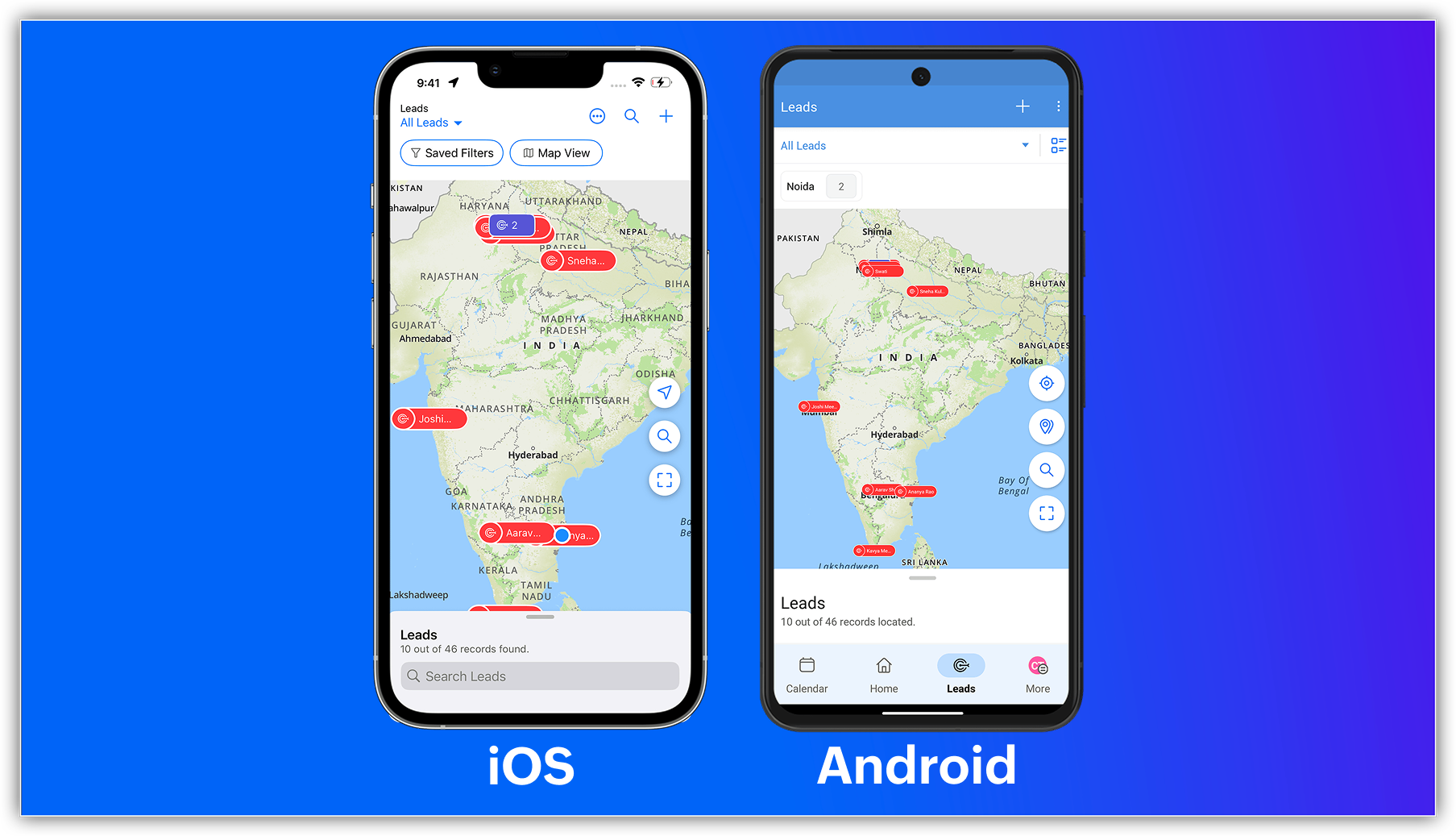
The capabilities of Zoho CRM's all-new address field and map view aren't just limited to your web app; they're now supported in the mobile app as well.

Previously, you could use the Near Me mobile feature in the map view, which uses Google Maps (Android and iOS) or Apple Maps (iOS) to show records within a 100 KM radius of your current location or a custom location.


With the latest enhancements, you can now access the Mappls-powered map view in Zoho CRM's mobile app. Simply enable the map view and address suggestions for the address field in the web app, and turn on the in-app map view from the app's map settings.


Once enabled, you can:

    • View your record's location as a pin on the map.
    • Group pins (available for Android).
    • See location suggestions while searching.
Alert

Feature availability and limits

    • Editions supported: All paid editions.
    • Modules supported: Any module with at least one address field.
    • Availability: Only the IN DC. 
That's all for this enhancement. Please share your feedback in the comments below.


Thanks,
Nizamuddin
NotesP.S. Map View is currently available for users in the IN DC.

    • Recent Topics

    • Frustrated with Zoho Assist QuickSUpport

      Trialling Zoho Assist and I have a variety of clients. A lot are computer illiterate. Some have poor vision. The current support sessions are using apps which have desktop icons for the appropriate apps. I either connect on demand then the client approves
    • Zoho ERP | Product updates | July 2026

      Hello users, We're back with another round of updates to help you streamline your operations. This month's release brings new features and enhancements designed to help you work more efficiently. Read on to discover everything that's new in Zoho ERP this
    • Automate Backups

      This is a feature request. Consider adding an auto backup feature. Where when you turn it on, it will auto backup on the 15-day schedule. For additional consideration, allow for the export of module data via API calls. Thank you for your consideration.
    • Shared Snippets Everyone

      Hi, Now that the Shared Snippets have been released and I think will be the most used feature implemented in 2023 :) Creating and Using Snippets in Ticket Responses - Online Help | Zoho Desk Maintain consistency in ticket responses with shared snippets
    • Multi-currency and Products

      One of the main reasons I have gone down the Zoho route is because I need multi-currency support. However, I find that products can only be priced in the home currency, We sell to the US and UK. However, we maintain different price lists for each. There
    • Horrible download speed

      Using a trial of Zoho Assist and downloading a 316 MB file on a 500/500 fibre connection to a remote computer on the same network took 7 mins to complete. On AnyDesk it took 1 min or so.
    • Remove "Subject" as a required field on quotations

      Not sure why, but Zoho has made 'Subject' a system defined required field. I'm not entirely sure why subject would be required as a key field (i.e. you cannot deactivate it or change it from required). It doesn't make much sense on many product quotations,
    • Displaying only unread tickets in ticket view

      Hello, I was wondering if someone might be able to help me with this one. We use filters to display our ticket list, typically using a saved filter which displays the tickets which are overdue or due today. What I'd really like is another filter that
    • Best way to setup Inventory bin tracking for products with multiple boxes/crates

      Hi - we need some advice from the community on setting up Items in the Inventory for products with multiple crates. We have large products in our warehouse where the product is delivered as two large (double pallet) crates. We've setup the Items for these
    • Zoho Books | Product updates | August 2026

      Hello users, July has been an exciting month for Zoho Books! This month, we're excited to introduce HTML PDF Templates, Placeholders as Pills, expanded approval workflows for Sales Returns and Journals, and significant compliance updates across the India,
    • Tip #83- Give Customers a Faster Way to Reach You with the Quick Support Plugin – 'Insider Insights'

      Hello Zoho Assist Community! Think about the last time a customer needed urgent support. They emailed in, waited for a response, got a session link, couldn't find it in their inbox, called back, and by the time the session actually started, a good chunk
    • Can't find field from ZCRM for a trigger

      Hello, Currently I am revamping our CRM system and we have created second layouts from to try out new processes while not disrupting the old one. Moreover, we want to use different layouts for different processes. The issue is that when creating the ZCRM
    • Discount Per Item / Option Removed

      Hi, I was using Zoho Books for three years now and very saticfied. Now, as we try to add an invoice, we founds that the discount option per item was takn away, and a discount from total was implemented. However, we have cases when we add a diffrent discount to each item. Was this option removed permanently? Thanks, 
    • Any Possible to change the challan type in Delivery challan ?

      Hello Team, We need to add the more values in challan type in delivery challan module in Zoho Books.So how to add additional values in challan type field. Please find following snap for your reference. Thanks in Advance, Thisai Moorthy.
    • Show when an invoice has been viewed

      It would be nice to know if/when a customer has viewed an invoice. This would mean not having PDF attachments and just have the link to the invoice. My previous invoicing solution had this feature and I did not realize how much I used it until it was gone. Would this be possible, or this already available and I am just missing it?
    • Customer image field

      I created a custom image field for estimates, and it works as expected. The only issue I have is that I want to be able to place the custom image field in the estimate invoice. Is there a way I can do that, the field does not give the option to display
    • Zoho Books | Product updates | March 2026

      Hello users, We’ve rolled out new features and enhancements in Zoho Books. From Advanced Reporting Tags to the ability to mark projects as completed, explore the latest updates designed to improve your bookkeeping experience. Introducing Advanced Reporting
    • Separator line

      Is there a way i can insert a line in an invoice or quote without showing qty or prices? e.g. Options I Item description qty and price Option II Item description qty and price Thanks
    • All new Address Field in Zoho CRM: maintain structured and accurate address inputs

      Availability Update: 29 September 2025: It's currently available for all new sign-ups and for existing Zoho CRM orgs which are in the Professional edition exclusively for IN DC users. 2 March 2026: Available to users in all DCs except US and EU DC. 24
    • BCC Drop Box Centralisation

      Hi Team, For the last few years, I have had a question related to the Zoho CRM BCC Dropbox feature. Although BCC Dropbox is very useful for tracking customer email communication, I have always wondered why its configuration is managed at the individual
    • Kiosk Page Refresh

      We have a Kiosk running from a button in contacts to update values and also add related lists, which works great, but when the kiosk is finished the page does not refresh to show the changes. Is there a way to force the contact to refresh/update when
    • CRM Integration - Option to Sync Reporting Tags

      It would be nice to be able to sync reporting tags in Zoho Finance to a custom field in Zoho CRM. My use case is for a Customer in Finance to an Account in CRM (and vice-versa, of course), but I'm sure it's pretty obvious that this could also be used
    • Join the Zoho Desk Virtual Classroom Training (VCRT)

      Hello everyone, Have you heard about Zoho's Virtual Classroom Training (VCRT)? Zoho Desk's Virtual Classroom Training offers end-to-end training for Zoho Desk users. Join the VCRT and get hands-on guidance for setting up Zoho Desk and getting your business
    • Make Rich Text fields available in Canva Print Views

      Everything is on the title. I don't really understand why this is not already possible as Rich Text Fields are available in Canva Detailed Views for example.
    • Zoho CRM Approval Process based on Field Update

      Hello, In current structure, Zoho CRM send records to approval based on record creation and edit.  I think, it should be to set approval process trigger based on any field update in record. When the user update any field, the record can assign to approval
    • Where do I edit the "Welcome to [portal name]" message

      I am looking for a way to edit the "Welcome to" part of the message that is seen on the landing page (ex: https://help.zoho.com/portal/en/home). When I use the French interface, it doesn't make sense... I want to change it from "Bienvenue chez" to" Bienvenue au". Thanks!
    • Approve records efficiently: Useful enhancements to My Jobs module and Approval process in Zoho CRM

      Dear Customers, As you might know, approval process is a process automation tool that allows you to automate approvals in your organization and My Jobs is where you approve requests from a single point of view. Here's how you'd go about it: You’d add
    • Filter isn't

      The ability to filter the history of a given flow to a specific status however it would be great to have the ability to filter to a status that isn't something for example if i want to find all history that isn't complete.
    • Introducing the Store Locator widget

      Hello everyone! Your website is often the first place customers visit before deciding where to shop. But when they can't quickly find the nearest store, check business hours, or get directions, many leave your website and search elsewhere. Every extra
    • Important updates to your connectors

      Hello everyone, Greeting from Zoho Creator! We're excited to announce that we'll be rolling out significant backend updates to Zoho Creator's built-in connectors to enhance security by following the latest frameworks. The existing version of some of the
    • Important updates to your Salesforce integrations in Zoho Creator

      Hello everyone, We're writing to inform you of an important change regarding Salesforce integrations in Zoho Creator. Salesforce has introduced new security requirements for third-party platforms that connect with their services via APIs. To comply with
    • Password Policy in Zoho Mail: Set password rules to keep your organization secure

      Weak or repetitive passwords are one of the most common causes of unauthorized account access in organizations. Zoho Mail's Password Policy feature allows administrators to define and enforce specific password requirements for all users in the organization,
    • What is Workqueue and how to hide it?

      Hi, My CRM suddenly have this "Workqueue", may I ask how to set the permission of this tab?
    • Zoho Community Digest - July 2026| Part 4

      Hi everyone, and welcome back! We're closing out July with a strong final week, from a major LinkedIn integration in Zoho Recruit to AI-powered forecasting in Zoho Analytics. There are also a few heads-ups worth noting, including API changes in Zoho CRM
    • Zoho CRM Community Digest - July 2026| Part 2

      Hello everyone! The second half of July brought five CRM updates, including a heads-up for developers on API changes coming in October, one Quick Win on keeping your attribution data intact through lead conversion, two Dev's Corner threads worth bookmarking,
    • Keeping project teams in the know with Zoho Cliq

      Project management is all about processes, data flow, and maintaining order. But communicating appropriate information at crucial times to stakeholders is as important as the moving parts of a project. Zoho Cliq can facilitate effective communication
    • Enable Credit Note creation for Sales Returns BEFORE receiving goods

      Currently, it is not possible to issue a Credit Note linked to a Sales Return until the goods have been officially marked as "received" in the system. In our business, we often need to issue a credit note to our clients immediately upon the initiation
    • Getting Internal Server Error message when filing for MTD

      I am trying to file for the MTD submission, and after I filled in all the information and click (Fetch Obligation) this message "Internal Server Error [500]" pops up. I have been trying for awhile and its still the same. What shall I do as today is deadline
    • No access to change view permission for team members

      Hi, I want team members to be able to update the percentage progress on their goals at mid year. Currently they cannot edit this, they can only update the comments against the goals. The ability to add view permission to goal progress for team members
    • Turn your Zoho One Home into your workspace with Dashboard 2.0

      When you open Zoho One, you probably don't need to see everything. You need to see what matters to you. A sales manager may want to track pipeline and revenue. An HR manager may want to monitor employee information. A business leader may want a quick
    • Next Page