Customer Satisfaction (CSAT) Report

Customer Satisfaction (CSAT) Report

From data to decisions: A deep dive into ticketing system reports


The customer satisfaction (CSAT) report helps teams understand how customers feel about their support experience, identify service gaps, and continuously improve the help desk. It turns post‑interaction feedback into actionable insights that lead, and agents can all use.

What is the customer satisfaction report?

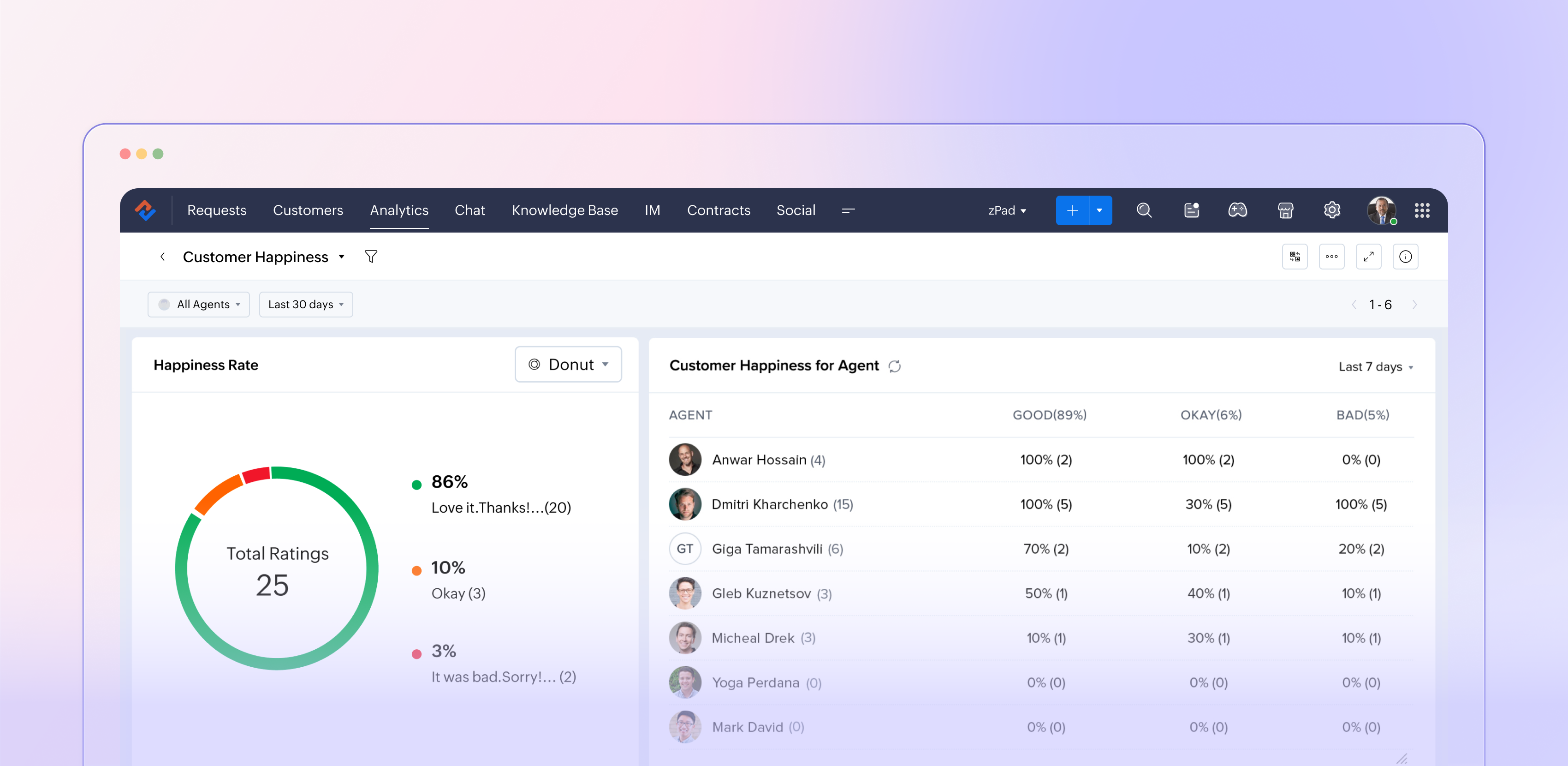
The customer satisfaction report in Zoho Desk (typically powered by the Customer Happiness Rating feature and corresponding surveys) aggregates customer feedback captured after ticket responses or closures. It translates that input into metrics such as positive, negative, and neutral ratings, trends over time, and performance by agents, departments, and channels. This data helps support managers move from guesswork to data‑driven decisions about service quality.

Why customer satisfaction reporting matters

Customer satisfaction reporting is more than just a supplemental dashboard; it plays a crucial role in companies' efforts to shape customers' overall perception of the brand. It indicates whether your support truly addresses customer problems in a way that matters, rather than simply measuring ticket closure. 

This reporting acts as an early indicator of potential churn by highlighting dissatisfied customers and recurring issues. Additionally, it supports the case for investments in training, staffing, and tools by relying on data rather than personal opinions. When utilized effectively, customer satisfaction reports create a link between everyday support activities and long-lasting customer loyalty.

How Zoho Desk captures customer satisfaction  

Zoho Desk lets you initiate a straightforward rating or survey at key moments during the support experience, such as after an agent responds or when a ticket is closed. Customers can quickly express their satisfaction using options such as "Happy / Neutral / Unhappy" and may also leave a comment if they wish. When gathered on a larger scale, these micro-interactions become fundamental to the customer satisfaction report. 

Since this feedback is linked to specific tickets, it allows for in-depth analysis, revealing which agents or teams consistently impress customers, identifying the types of issues or communication channels (such as email, chat, phone, or social media) that lead to dissatisfaction, and observing how satisfaction levels fluctuate with changes in SLAs, new processes, or feature launches. This integration of feedback with contextual information transforms a simple survey into a valuable layer of strategic insights.

Key metrics

  • Overall satisfaction score: Your high‑level health metric, usually expressed as a percentage or rating based on all collected responses for a chosen period.
  • Rating distribution: The Split between positive, neutral, and negative responses helps you see whether a high score is built on many “okay” experiences or truly delighted customers.
  • Trends over time: How satisfaction moves week‑over‑week or month‑over‑month, especially before and after significant changes like feature releases or holiday seasons.
  • Agent and team performance: Side‑by‑side comparisons showing which agents or departments win the most positive feedback and where coaching is needed.
  • Channel performance: Satisfaction by email, chat, phone, and other channels, so you can align staffing and training with where the experience is weakest.

Turning report insights into action  

The real value of the customer satisfaction report comes from what your team does with it. 

Close the loop with customers

Use low ratings and negative comments as triggers for follow‑ups, callbacks, or escalations. This not only recovers at‑risk relationships but also shows customers that their feedback matters.

Coach and celebrate agents

Highlight agents with consistently high satisfaction scores in team meetings and use their interactions as best‑practice examples. For those struggling, use the report to identify patterns across issue types, channels, or time slots, and create targeted coaching plans.

Fix process and product issues

Look for recurring themes in comments linked to low ratings: confusing policies, slow approvals, missing macros, or product bugs. Feed these patterns into internal improvement projects or backlogs so the same pain points don’t repeat.

Experiment and measure

Treat your support process like a product. When you change an SLA, tweak a template, or introduce a new self‑service flow, watch the satisfaction report over the following weeks. If scores move up, standardize the change; if they drop, roll back or refine.

The bottom line

We recommend you use it in a continuous‑improvement loop; Zoho Desk’s customer satisfaction report becomes more than a static KPI board. It becomes a living feedback engine that keeps your support experience aligned with what customers actually feel and expect.


Please stay tuned for more in the Desk Reports series.


Regards,


Kavya Rao

The Zoho Desk Team


    • Recent Topics

    • Zoho Mail iOS app updates - Shared Mailboxes, Calendly Integration and other enhancements

      Hello everyone! We're excited to announce the features and enhancements available for the Zoho Mail iOS app. Shared Mailboxes and Calendly integration are now available in the Zoho Mail iOS app, along with a few other enhancements. Let's dive into the
    • Zoho Extensions 101: Building extensions for Zoho People

      Hello developers! Welcome to our new video series on building extensions for Zoho People! If you're new to extension development or looking for guidance on building extensions for Zoho People, you're in the right place. We've curated a series of videos
    • Tags on individual ticket comments and replies, with color coding and a filter

      In Zoho Desk you can tag a ticket, but you can’t tag the individual comments and replies inside it. For teams with long, structured ticket threads, that’s a big gap. The problem Our tickets can easily reach 50+ comments and replies. Many of them are specific,
    • Merge Tickets Directly from Contact Page in Zoho Desk

      Dear Zoho Desk Support Team, We are writing to request a new feature that would allow users to easily merge tickets directly from the contact page in Zoho Desk. Currently, the only option to merge tickets is from the Tickets list view page, which can
    • GrassHopper VOIP Integration

      Does Zoho Plan to integrate with Grasshopper to allow the Telephony hookup in Zoho Desk?  If not, Can this be passed along for consideration 
    • Sharing View Only Portal

      Im looking at Youtube videos on how to share a view only link to my projects. Everyone has the screen with Manage Users. I don't have it. Is that an old version or new version? I can't see how to send a view only link to clients. There is a Profiles and
    • How Do I Refund a Customer Directly to Their Credit Card?

      Hi, I use books to auto-charge my customers credit card. But when I create a credit note there doesn't seem to be a way to directly refund the amount back to their credit card. Is the only way to refund a credit note by doing it "offline" - or manually-
    • Enhancement Request – Allow cashiers to collect payments and partial payments for outstanding credit invoices directly from Zoho POS Billing App

      We are testing Zoho POS for a retail business with multiple physical stores and have identified an important limitation in the cashier workflow. When a sale is completed using Credit Sale, Zoho POS correctly creates an unpaid invoice and the outstanding
    • How Can I Collect Payments for Credit Sales Directly from Zoho POS Billing App?

      We are currently testing Zoho POS for a retail business and have encountered an issue with collecting payments on outstanding invoices from customers who purchase on credit. When we process a Credit Sale, Zoho POS correctly creates an Unpaid Invoice.
    • Zoho POS Mobile Sales Price Conflicts & Pricing Discrepancies

      We are seeing recurring Zoho POS Mobile conflicts tied to the Sales Price field, even though drivers are not manually changing item pricing. We have also noticed small price differences between POS transactions and Books, sometimes only a few cents. Devices
    • Creator -Dynamic addition of Customer Portal User Licenses

      Hi, We have a Creator App for B2C about to get released. We are experiencing the Portal User license challenge. Unable to predict the number of users who will download and Subscribe. When a User is about Subscribe and the portal licenses does not exists,
    • Reminder Settings - Time Tracker

      On the time tracker in Reminder Settings I created a reminder according to the Zoho manual. But a manager asked me to change the message that goes in the email. Is it possible to change the message? I didn't find that in the Zoho manual. Another question: I configured to receive the reminder everyone who logged in less than 40 hours. Does Zoho consider less than 40 hours of the current week or the whole month? Another situation, I put it so that I and another specific user would receive the notification,
    • New in Cadences: WhatsApp follow-ups, upgraded limits, and options for add-ons

      Hello everyone, We're rolling out two key updates to help you engage better and scale smarter with Cadences in Zoho CRM. Reach customers on WhatsApp, directly from Cadences Previously, Cadences have enabled you to automate follow-ups through emails, calls,
    • Specific ListView Canvas on Canvas Home Page Always Loads Most Recent ListView, Not the One Specified

      I had mentioned this to ZOHO, but I mainly wanted to see if others in the Community are also facing this problem. I created a Canvas ListView for a Custom Module, and then created a Canvas Home page (technically on a tab item, but I'm not sure if that
    • This user is not allowed to add in Zoho. Please contact support-as@zohocorp.com for further details

      Hello, I am the Super Administrator of the Zoho Mail organization for carrytrail.com. The domain has already been verified, but when I try to create the user. I receive the following error: “This user is not allowed to add in Zoho. Please contact support-as@zohocorp.com
    • Tip #92 – Organize your support operations with Departments – ‘Insider Insights’

      Hello Zoho Assist Community! As a support team grows, so does the complexity. Different customers, different products, technicians spread across regions, and each group needing its own way of working. When everyone operates from a single shared space,
    • Introducing Zoho Office Desktop

      Hi users, We are excited to announce Zoho Office Desktop, a single app to install, update, and open Zoho Writer, Sheet, Show, and PDF Editor on Windows and macOS. It includes: One home for every app: Choose the apps you want, and a guided installation
    • How Can You Find Broken Internal Links Without Checking Every Page Manually?

      Broken internal links are a common technical SEO issue. They can send visitors to missing pages, interrupt navigation, and make website maintenance more difficult. On a large website, checking every link manually is simply not practical. So, how can you
    • Zoho Writer for Android: Q2 2026 updates

      Hi users, We are excited to announce the Q2 2026 updates for Zoho Writer for Android. This includes: Formatting parity with the web app: Choose from multiple ordered and unordered list styles, adjust line spacing, apply your custom paragraph styles, change
    • ZohoBooks - "Account transactions" report doesn't have any "Desciptions"

      Hi, I'd like to push for this to be included in ZohoBooks: In a "account transactions" report all the numbers are right, but I'd really like to see the "Description" as part of this report, i.e. the line-item-description as I would see it in the bank statement. Essentially all you see is a list of numbers adding up to the total. It is very difficult to see if things are right without being able to see what exactly each transaction refers to. Going into each transaction one-by-one is not a workable
    • Zoho Projects | Q3 Updates

      Hello everyone, Here's a roundup of everything we released from July to September. We have added some new features as well as improved some of the existing ones. Project Financials Finance Integration Integrate your Project with Zoho Books, Zoho Invoice,
    • Meet your customers on Arattai, from inside Zoho CRM

      Hello everyone, Your customers reach you on the apps they already use. Zoho CRM now supports one more: our very own Arattai! When someone messages your Arattai Business number, the conversation arrives in the Messages module in CRM, right beside your
    • Running Balance

      Please add automatically Running balance in ledger view. Taking lot of time, every time to add manually
    • MAKING ENTRY TIME MORE USER FRIENDLY AND FASTER O PREVENT TAB TIME

      I AM CURIOUS TO KNOW IF WE CAN MAKE IT MORE USER FRIENDLY WHILE MAKING BILLS , I MAJORLY USE OVER DESKTOP SO I AM SUGGESTING TO REMOVE TAB TIME WHILE ENTERING BILL OR MAKING INVOICE DIRECT JUMP TO ONLY REGULAR PARTS OF THE BILL . YOURS RAKESH 782866
    • Unable to export reports despite enabled report export permissions

      Hi Zoho Community, We are unable to export reports in Zoho CRM. When attempting an export, we receive the following error: “Cannot Export Report — You do not have permission to export one or more modules used in this report. Please contact your administrator.”
    • Add Payment Information (like Bank details)

      I am using the Free plan of Zoho Books. I need to add the bank details/ UPI details on the invoice. How can I do that. I have added the details in the Bank Section.
    • account access nahi kar pa raha hoo

      hello sir/maddam, mera naam Indrasen Lodhi hai meri zoho mail id "indrasenlodhi@zohomail.in" hai. main iska authenticator app bhul gaya hu, mere pass bachup code bhi nahi hai. kripya meri madad kijiye.
    • Keep Sensitive Customer Data Private with Field Masking in Zoho CRM

      Hello CRM community, Customer records in your CRM are often accessible across multiple teams, but not every team needs visibility into every field. A non-sales team, for instance, has no real need to see a contact's mobile number, and a support agent
    • E-invoicing setup not completed in Zoho Books

      My status on the EmaraTax portal appears as linked with Zoho. However, when I try to complete the setup on the E-invoicing tab in Zoho Books settings, I receive an error saying: "E-Invoicing could not be enabled as the FTA portal is currently unreachable.
    • Notes - Reaction Buttons

      Using the native notes option within CRM is fine, it works and the RTF features are great, however, would it be possible - if there isnt already something in place, where we can add a reactions button, similar to teams/whatsapp to show that its been read
    • Generate a link for Zoho Sign we can copy and use in a separate email

      Please consider adding functionality that would all a user to copy a reminder link so that we can include it in a personalized email instead of sending a Zoho reminder. Or, allow us to customize the reminder email. Use Case: We have clients we need to
    • Need help with importing expenses

      I'm using the template downloaded from the application. When I try to import my expenses, I get the message: Duplicate entry in the Expense Date column. Ensure it contains unique values. None of the rows will import. There are duplicate dates, but they
    • #12 Bringing In A Second Pair Of Hands

      Meera's studio became a two-person business in month five. Adding the second person took ten minutes. Working out why Meera herself was showing up as Staff took considerably longer. The Usual Way To Do This Covered in our published General FAQ, with the
    • How can I add a Custom Field (or Customer_name) to a picklist?

      Our workflow is Shopify-->SO -->Picklist-->Package-->Shipment. We would like to have the Picklist template to include a custom field "Customer_Notes" (we have created this field already). This way we get alerted when a customer has notes on their account.
    • Header Line in Quote product rows

      I believe this is an essential feature that Zoho should provide us, when adding products we want the ability to add titles for our product, in quotes: The Solution/Category Title Product1 Product2..... and then it would show the sub-total of that title 
    • 👍 Zoho CRM's Notes now gets Reactions and a new look

      Moderation update: Currently available in the following DC's CA, AU, CN, UAE, JP, SA - All Editions EU - Free, Standard and Professional Hello everyone, Notes help users capture important updates, collaborate with teammates, and maintain context for records.
    • Add @Mention Notifications in Zoho Cliq for Zoho Project Mentions

      Hello Zoho Projects Team, We hope you are doing well. We would like to submit a feature request regarding "Projects Bot" Cliq bot notifications for @mentions inside Zoho Projects comments (Tasks and Issues). Current Behavior: At the moment, when someone
    • Can't connect to POP and SMTP over VPN

      I use Thunderbird to access Zoho Mail via POP and SMTP. I have configured an app-specific password for Thunderbird to use. Everything is properly configured and works correctly — until I enable my VPN. I'm using a paid commercial VPN service (Mullvad).
    • Outgoing Mail Blocked – Suspicious Login Activity (Need Clarification and Solution)

      Hello, I’m currently facing an issue where my Zoho Mail account has been blocked due to “suspicious login activity,” and outgoing emails are restricted. Here are the details shown: Block type: Outgoing mail blocked Reason: Suspicious login activity A
    • Online Payment Fees

      We don't take many online credit card payments so the merchant service provider (PayPal) charges us the 2.9% fee for processing the amount. I would like the ability for the fee to be automatically added to the total amount for "ease of payment". We'd
    • Next Page