Deliver timely updates across your organization

Deliver timely updates across your organization

Keeping your organization informed goes beyond sending emails or sharing links. It requires ensuring that the right information reaches users at the right time, without being missed.

Whether it's communicating policy changes, maintenance schedules, webinar/training details, or important organizational updates, a centralized and visible communication method is essential.

What are Announcements? 

The Announcements feature in the Zoho Mail Admin Console allows administrators to create and broadcast organization-wide messages directly to users. These announcements are displayed prominently within the interface, ensuring visibility without relying solely on email communication.

Admins can create, format, and schedule announcements while controlling their visibility and duration — all from a centralized location in the Admin Console.

 Key use cases 

  • Organization-wide updates: Communicate policy changes, new feature rollouts, or internal news to all users in a single action.
  • Maintenance notifications: Inform users about planned downtime or scheduled maintenance windows well in advance.
  • Event communication: Share details about company events, meetings, webinars, or deadlines to ensure broad visibility and participation.
  • Policy reminders: Reinforce security practices, compliance requirements, or acceptable-use policies at regular intervals.

 Why it matters for admins 

  • Centralized communication: Deliver messages to the entire organization or specific group of users, without relying on multiple channels or manual follow-ups.
  • High visibility: Announcements appear directly within the user interface, increasing the likelihood that critical updates are seen.
  • Time-saving management: Create, edit, and manage all announcements from a single console, reducing repetitive communication efforts.
  • Controlled delivery: Schedule announcements and define their expiry period to align with the relevance of the message.

Steps to access Announcements in Zoho Mail Admin Console 

Follow the below steps to create an Announcement.

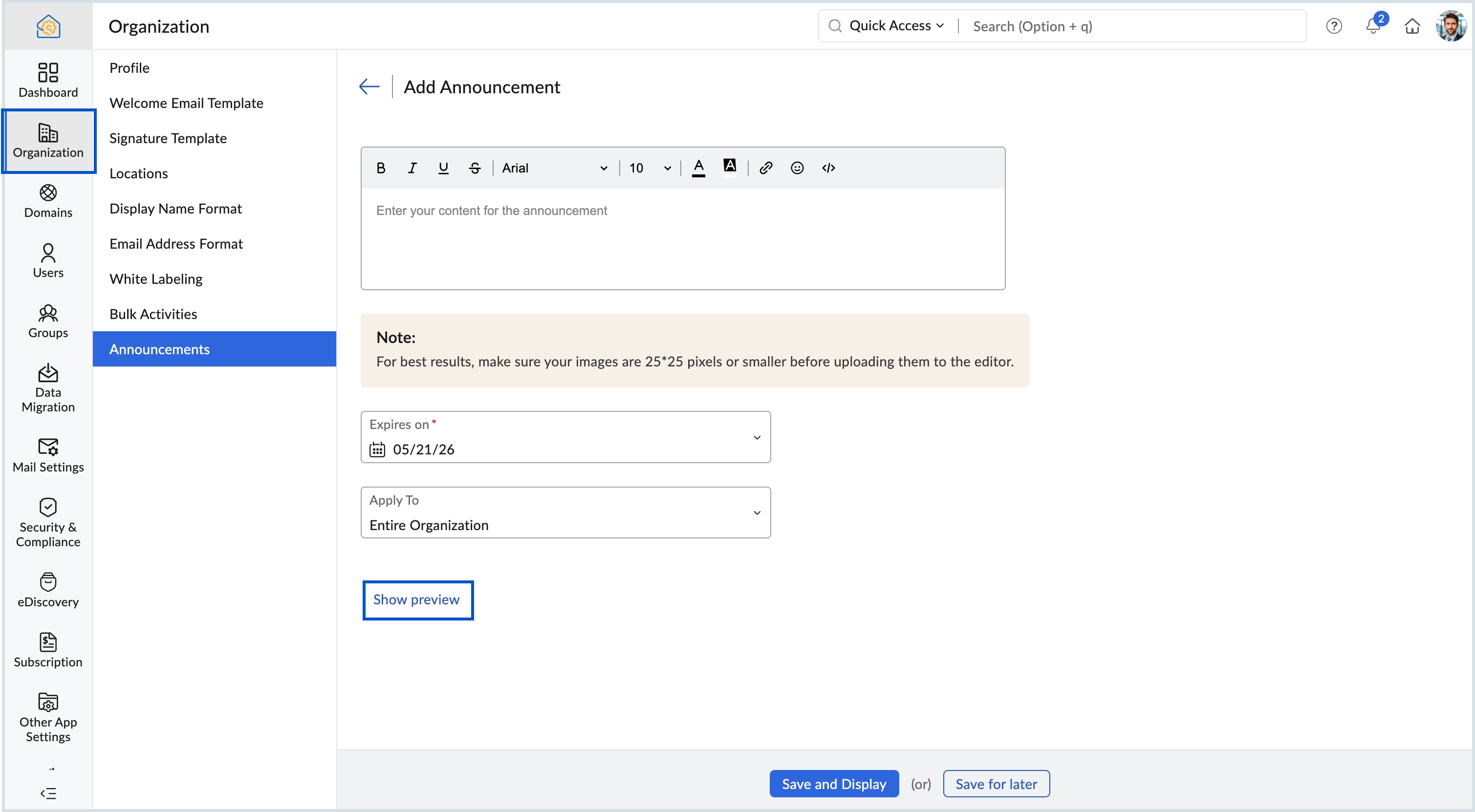
  1. Log in to Zoho Mail Admin Console and select Organization on the left menu.

  2. Navigate to Announcements and click Add.

  3. Enter the message in the Content area and apply the desired formatting for the message.

  4. Set an Expiry date for the announcement.

  5. Choose either Entire Organization or Selected Groups in the Apply To drop-down.

  6. Click Show preview to view how the announcement will appear for users.


Using Announcements effectively helps admins maintain clear, consistent, and timely communication, ensuring that users stay informed about important organizational updates.


    • Sticky Posts

    • Domain Disclaimer: A standardized footer for your entire organization

      Every email sent from an organization represents its identity externally. Most teams require consistent line of text at the bottom of outgoing messages. It can be a confidentiality notice, a legal statement, a compliance requirement, or a uniform sign-off.
    • Catch-All Address: A safety net for misdirected emails

      Email is often the first point of contact with an organization. In many cases, a simple typo in a recipient's address can quietly turn into a missed message—a customer query never reaches support, a partner’s reply goes unnoticed, and the sender has no
    • Preferred Name and Email Formats: Bring consistency to user identity

      A user's display name and email address are often the first identifiers that colleagues, partners, and customers see. Maintaining a consistent format across the organization helps reinforce a professional identity and avoids the confusion that comes from
    • Deliver timely updates across your organization

      Keeping your organization informed goes beyond sending emails or sharing links. It requires ensuring that the right information reaches users at the right time, without being missed. Whether it's communicating policy changes, maintenance schedules, webinar/training
    • Organize your workforce efficiently with Locations in the Admin Console

      Keeping your organization structured becomes increasingly important as teams expand across different offices or regions. For administrators, having clear visibility into where users are based can simplify user management and improve operational clarity.
    • Recent Topics

    • Mirror Component in Zoho CRM: Access real-time related data without leaving your record

      Hi everyone, This feature is now available for the JP, CA, SA, UAE, and AU DCs. We're excited to bring to you Zoho CRM's mirror component, which presents relevant data on a record's details page and keeps everything users need in one place without having
    • Automated entries past the current month in a calendar report

      Hi all, I have an automation problem. I have a form which on successfull entry adds either 5 or 10 more of these entries with a slight change so our customers can see it throug a calendar report on the webiste. The entry put in manually shows up perfectly
    • Problem: New Email Consistently Failing to Sync/Display in Inbox

      Recently, I have noticed that my Zoho Email inbox does not indicate I've received a new email, until I go to *another* folder and then return to the inbox. Only then will new emails be displayed. This has happened 100% of the time, during the past few
    • Upcoming Webinar: Landing page optimization strategies you need in 2026

      If users are visiting your landing page but not converting, your page is trying to tell you something. The key is knowing what to optimize. Sometimes a landing page doesn’t need a complete redesign. A better CTA, fewer form fields, clearer messaging,
    • Nueva edición de Meetups de Español Zoho Community - Junio 2026

      ¡Vuelven los Meetups de Español Zoho Community a España! ¿Te gustaría convertir más visitas y clics a tu página web en clientes de tu empresa? Esto es muy sencillo gracias a las soluciones de software de Zoho, como bien sabéis. Y es por ello que estamos
    • How to make the birthday date field available without the year?

      Hello, I wonder if I can have the date of birthday field without the year. A lot of people dont like to say the year they were born. 
    • Marketing Tip #33: Build trust with behind-the-scenes content

      Customers are more likely to trust a brand when they can see the people, process, and care behind it. Behind-the-scenes content adds that human layer to your business. It shows that there’s a real team behind the store packing orders, checking quality,
    • Marketing Tip #9: Track your traffic sources

      Not all marketing channels work equally well. Knowing whether your visitors come from Google, Instagram, or email helps you focus on what actually drives sales. Try this today: Check your Zoho Commerce reports or connect Zoho PageSense to see your top
    • Remove ####,####.## Placeholder from Number & Decimal Fields in Zoho Creator

      Just wanted to share a small UI workaround I used in Zoho Creator. By default, Number and Decimal fields show placeholders like: ####,####.## Sometimes this doesn’t look clean, especially for read-only calculated fields in custom UI designs. I was able
    • Default ticket template in helpcenter

      Hello, I have a web form and a ticket template created. How can I make that my default ticket template? If an user clicks New ticket or create a ticket, I want that template to be the default one. Thank you for the time and info.
    • Whatsapp Limitation Questions

      Good day, I would like to find out about the functionality or possibility of all the below points within the Zoho/WhatsApp integration. Will WhatsApp buttons ever be possible in the future? Will WhatsApp Re-directs to different users be possible based
    • Adding a custom formula field from sub-forms

      I have used my 5 Aggregated Sum fields in the subform. I have another column I want to add a summary of. This can be in a separate section/field. The formula field won't pull in information from the sub-form. How do I pull information from the sub-form
    • Custom Buttons & Links Now Supported in Portals

      We’ve just made portals in Zoho Recruit more powerful and customizable than ever! You can now bring the power of Custom Buttons and Links to your Candidate, Client, Vendor, and Custom Portals, enabling portal users to take direct action without recruiter
    • Mastering Zia Match Scores | Let's Talk Recruit

      Feeling overwhelmed by hundreds of resumes for every job? You’re not alone! Welcome back to Let’s Talk Recruit, where we break down Zoho Recruit’s features and hiring best practices into simple, actionable insights for recruiters. Imagine having an assistant
    • New feature: Usage dashboard in Zoho Sign

      Hello! Zoho Sign's new usage dashboard lets organization administrators monitor product adoption across teams, identify unused plan features, and view the environmental impact of every envelope. The dashboard includes six panels: Envelopes sent, Feature
    • Creator List not showing

      I've edited a list in creator, but when I open it in the live version the list is completely different. Anyone know why this is happening? Edit Version: Live Version:
    • Recurring Invoices not generating – "Next Invoice Date" has passed despite "Active" status

      Hi everyone, We are currently experiencing an issue in Zoho Books where our recurring invoice profiles are not generating invoices/drafts as scheduled. The Problem: As shown in the attached screenshot, the "Next Invoice Date" (Nächstes Rechnungsdatum)
    • Introducing the New Zoho Assist Quick Support Plugin

      We are thrilled to announce the new Zoho Assist Quick Support Plugin, the upgraded and enhanced version of the Zoho Assist Customer Plugin. This new plugin allows organizations and IT administrators to deploy it directly onto their customers’ devices,
    • Native QuickBooks integration for Zoho CRM: Connecting sales and finance

      Greetings, I hope all of you are doing well. We're excited to announce Zoho CRM's integration with QuickBooks Web, which is designed to synchronize your CRM data with your QuickBooks accounting records and bridge the gap between sales and finance. This
    • Account Reconciliation via API

      I am suggesting that the Zoho Books team considers making it possible to do an Account Reconciliation via API. The use case I have in mind is specific, but also fairly common: merchant services clearing accounts. Currently, the only way to reconcile an
    • Edit a previous reconciliation

      I realized that during my March bank reconciliation, I chose the wrong check to reconcile (they were for the same amount on the same date, I just chose the wrong check to reconcile). So now, the incorrect check is showing as un-reconciled. Is there any way I can edit a previous reconciliation (this is 7 months ago) so I can adjust the check that was reconciled? The amounts are exactly the same and it won't change my ending balance.
    • All new Address Field in Zoho CRM: maintain structured and accurate address inputs

      Availability Update: 29 September 2025: It's currently available for all new sign-ups and for existing Zoho CRM orgs which are in the Professional edition exclusively for IN DC users. 2 March 2026: Available to users in all DCs except US and EU DC. 24
    • When will Zoho Trident come to Linux?

      It already is implemented for MacOS, which is *nix based operating system. When will it be ported to Linux?
    • 普段使っているAI、Zohoと繋げてもっと便利にしませんか?【Zoho MCP】

      みなさんこんにちは、ゾーホージャパンの岸本です。 ChatGPTなどのAI、普段から使っていますか? 最近は「AIを使う」だけでなく、 普段利用している業務ツールとAIを繋げて活用するケースが増えてきています。 そこで6月のコミュニティイベントでは、Zoho社員セッションでZoho MCPを取り上げようと思います。 【Zoho MCPって?】 Zoho MCPは、AIとSaaSアプリケーションを連携するための仕組みです。 ----------- MCPプロトコルをサポートしているLLM(一例):
    • Zoho Commerce and Third-party shipping (MachShip) API integration

      We are implementing a third-party shipping (MachShip) API integration for our Zoho Commerce store and have made significant progress. However, we need guidance on a specific technical challenge. Current Challenge: We need to get the customer input to
    • Need help to evaluate if Commerce is good for me

      Hi, I just want to quickly check if Zoho Commerce can fulfill my needs. Here is what I am looking for: - Multi-vendor plateform : We will be 3-4 different farms that will offer similar products (ex. tomatoes) to few selected customers (retaurants). All
    • Zoho Commerce + MCP + Claude

      Hi everyone, I wanted to share a really impressive experience I had with Zoho Commerce + MCP + Claude. I created an MCP server using Zoho MCP Server and connected my Claude instance to my store built with Zoho Commerce. For safety, I enabled only product
    • UK payroll entries

      Hey guys, Nett payroll payments are imported direct into the bank, using an external payroll system (will be glad for Zoho to have a UK payroll app) At present I have monthly recurring bills for HMRC which are auto entered & paid when due. This seems
    • auto add as member the contact owner

      is there a way that i can make a zoho flow that will add the owner of the contact as a member of the chat after the round robin assignment?
    • Get Files Associated to Data Template via API

      I have a data template with multiple files associated to it, and trying to write a Deluge script that will fetch files associated with this data template. I created the script below based on the WorkDrive API documentation, one request uses the data templates
    • Zoho Book - Banking Module - Cash Credit account

      I have a CC account with a bank. I initially added the account as a 'Bank Account' under the banking module in Zoho Books. However, this CC Bank Account is showing as an asset instead of a liability. I have added the account as a credit card account but
    • How to change column headings in pivot table?

      Hi, Is there a way to rename the column headers of a pivot table? Now some the columns are named with value labels: 'SUM of .....'. We would like to rename those headers. As of now we couldn't find any direct solution to adjust the headers, besides copying and reformat. We want to avoid these extra steps. Best, Tiemen
    • Remove Zoho Header from Portals

      I have a portal page with custom domain. But when I print directly from a webpage, the Zoho CRM header shows. It kind of kills the branding aspect. Is there a way to get rid of this?
    • Please design a better spam filter

      Hi Team, While I love Zoho Mail for all the awesome features you have designed - this is the one you need to do a lot of work on - Spam Filter. Your spam categorization seems to be very inefficient - any email containing brand images or a tracking pixel
    • Host not reachable when sending

      For few partner that I send regular emails now got error and they don't receive emails Temporary failure fam-xxx.hr/185.xx.xx.xxx Host not reachable. Have more than 20 mails in https://mailadmin.zoho.eu/cpanel/home.do#mailSettings/retryEmail please
    • IP flagged as abusive

      I'm getting the error that 136.143.188.15 is listed as abusive. I've checked with mxtoolbox.com and it is indeed in the list
    • App passwords stop working

      Some of my app passwords appear to stop working after awhile. Seems to happen every 6 months or so. Just had to change one again for the second time in a year. Is this a bug or a feature? Or perhaps changes are being made on the back end on occasion that
    • Duplicate entries for contacts birthdays

      Good morning I have recently started to use my Zoho calendar and noticed that there are multiple birthday events showing for some of my contacts. I have checked my contacts and there were duplicates for some contacts which I have now rectified but the
    • Zoho IMAP Access to mail doesn't sync messages

      As stated in the topic - I have company account email address setup, and it has ( as in the picutre ) ActiveSync and Imap access enabled. However the messages does not show up while logged in in Zoho Mail however when I log in in thunderbird everything
    • Cliq iOS can't see shared screen

      Hello, I had this morning a video call with a colleague. She is using Cliq Desktop MacOS and wanted to share her screen with me. I'm on iPad. I noticed, while she shared her screen, I could only see her video, but not the shared screen... Does Cliq iOS is able to display shared screen, or is it somewhere else to be found ? Regards
    • Next Page