Handling identifiers during an import

Handling identifiers during an import

Importing your data

When importing data into an application, it is crucial to prevent data loss or duplication. These types of errors can hinder the development of a clean and well-organised database, which is essential for effective data management and security.


Zoho Desk provides robust functionality for importing your data. The system intelligently automates the mapping of modules and fields to reduce the risk of data loss and maintain data integrity. Users have the advantage of verifying the field mappings in advance, thus adding an extra layer of security to the import process.
 
This capability is essential not only for clarity but also in mitigating the challenges associated with user adoption. For instance, clients can be accurately mapped to the Contact name field, while company names can seamlessly align with the Account name field. This approach to data management helps maintain an organised database, thereby enhancing productivity and user trust in the system. 

Related knowledge base article: Importing data into Zoho Desk.
Info
Prerequisites
  • Users can upload a .csv file or a .zip file containing multiple .csv files. 
  • The .zip file must be named, for example, Contacts.zip, Accounts.zip, etc.

Working with the Identifier Field
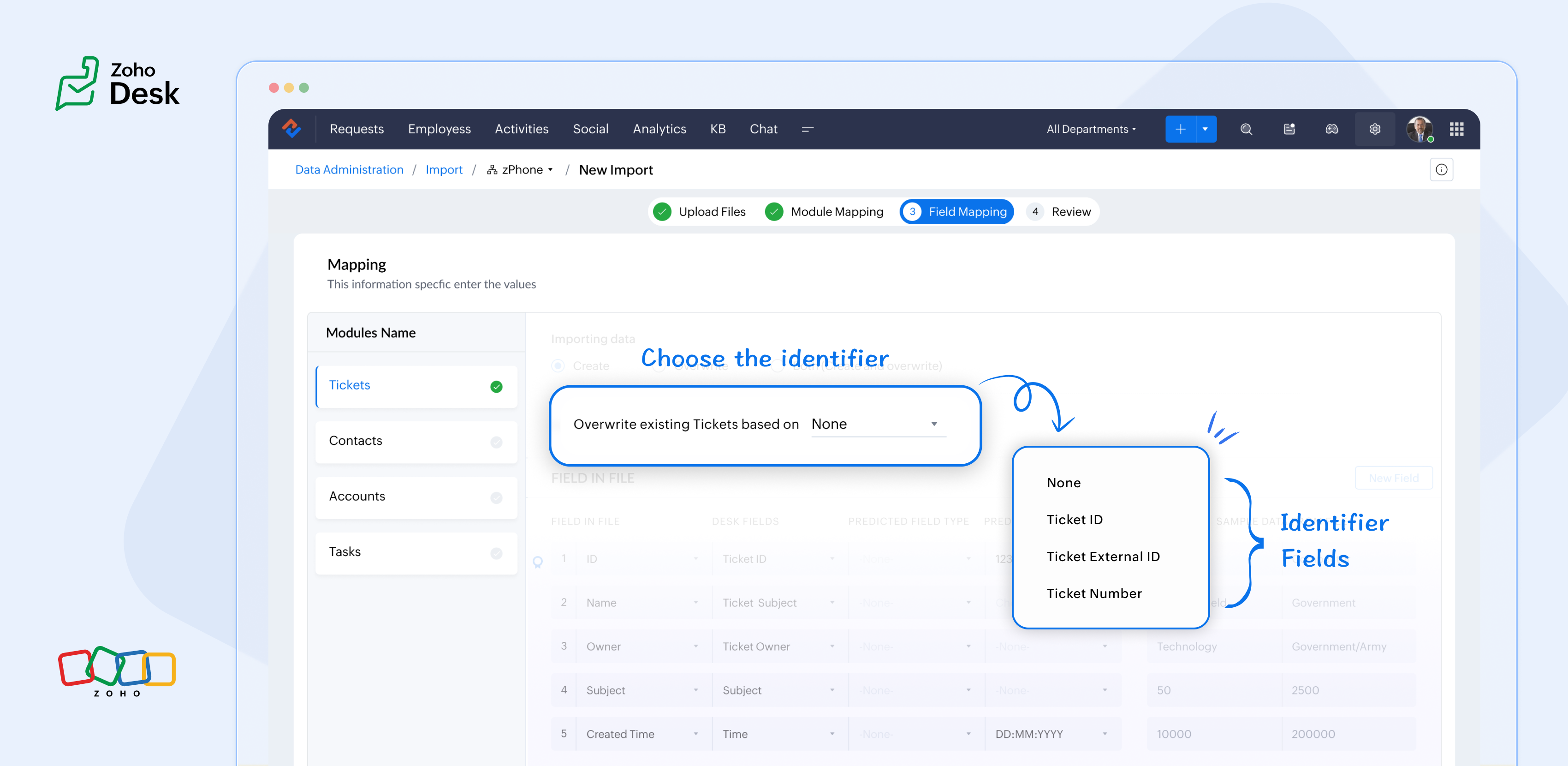
When importing data into Zoho Desk, the Identifier Field is essential because it helps identify existing records and avoid duplicate entries. 


What are the Identifier Fields?  

Identifier fields are fields used to find and match existing records when importing data into the product. They also help link related records, like connecting a contact’s name with their email address.

Each module supports different unique identifier fields for identification, as described in the table below:


Module

Unique Identifier Fields

Accounts

Account ID 

Account External ID

Account Name

Contacts

Contact ID

Contact External ID 

Last Name

First Name

Email

Phone Number

Mobile

Tickets

Ticket ID

Ticket External ID

Ticket Number

Products

Product ID

Product External ID

Product Name

Tasks

TaskId

Task External ID

Calls

Call ID

Call External ID

Events

Event ID

Event External ID

Article Translation

Translation: External ID

Translation ID

Custom Modules

Record External ID

Custom Module Name


Idea

Points to remember:

  • While these fields help find matching records.
  • So, if multiple records match the value, the first matching record will be selected automatically.
  • This can lead to unexpected matches or data being updated in the wrong record if you're not careful.

For your understanding:

Some users expressed a preference for matching Contacts by Last Name instead of Email, highlighting the importance of flexibility in their workflow. Furthermore, some additional users approached matching through the use of a custom field, emphasising the need for tailored solutions to fit their unique requirements. Moreover, users requested that the functionality be enhanced by updating existing records with the relevant entity's Zoho Desk ID, aiming to streamline their processes and improve data accuracy.

Commonly used identifier fields:

  • Find By is used to identify an existing record during the import process.
  • Map By is utilized to link a child record to a parent record, for instance, by linking a Contact to a Ticket.


You can now select specific fields for matching, providing enhanced control and customization during bulk processes or integrations. This functionality enables more precise data handling, ensuring that the information aligns with your specific requirements. By tailoring the matching criteria, you can streamline processes, ultimately leading to enhanced efficiency and better outcomes for your team. This flexibility enables you to harness the full potential of your data.

Import Systems

Let's start by preparing the CSV file.

A sample tickets module CSV file is given below,


External ID

Subject

Contact Email

Contact Name

About

101

Hitman

rohit@bcci.com

Sharma

Rohit Sharma's journey from a gifted schoolboy to an international icon and fierce competitor reflects resilience, elegance, and remarkable leadership.

102

King Kohli

virat@bcci.com

Virat

Virat Kohli is a world-renowned Indian cricketer known for his aggressive batting, unmatched consistency, and passionate leadership across all forms of the game.

103

Lambu Ishanth

ishanth@bcci.com

Sharma

Ishant Sharma is a tall and experienced Indian fast bowler known for his 300 test wickets and key performances in overseas conditions.


Then choose the appropriate Find By identifier field.

The Find By field is selected from a predefined set of fields specific to each module. It is used to determine whether a record already exists in Zoho Desk.


When using the import tool, the system searches the Desk portal for a record (e.g., a ticket) that matches the value mapped to the selected Find By field. This prevents duplicate records by identifying existing entries based on the chosen field.  


  • Once the file is uploaded, you need to choose a Find By Field — for instance, Ticket External ID.
  • Whichever Find By field we choose must correspond to the relevant column in the CSV file. Since we've selected the Ticket External ID, the Case External ID column in your file should be mapped to the Ticket External IDfield.
QuoteIf the chosen operation is to 'create new records while avoiding duplicates', and there is no existing ticket with the External ID 101, the import tool will generate a new ticket using the mapped fields. To associate the ticket to the correct Contact, the import tool utilizes the Map By field feature.

Finally, choose the appropriate Map By field.

The Map By field enables users to link imported records to their corresponding dependent records, such as associating a ticket with a specific contact. This functionality ensures that when you import ticket data, the import tool actively searches for a matching Contact in Zoho Desk based on the value defined in the selected Map By field.


For instance, during the field mapping process, you can specifically choose to map the Ticket to a Contact using criteria such as the Contact's email ID. This approach enhances the accuracy of data integration by ensuring that each ticket is correctly associated with the relevant Contact, thereby improving data integrity and streamlining the support process. This meticulous mapping not only minimizes the chances of errors but also facilitates a more organized and efficient ticket management system, ultimately leading to improved customer experiences and satisfaction.


Idea

Map by identifier field functionality

The tool efficiently searches for contacts associated with the provided email address.    


Search: When a user submits a ticket, the system initiates a search for contacts associated with the specified email address.   


Match found: If a single match is identified, the ticket is seamlessly associated with that Contact, ensuring that all relevant customer information is readily accessible for support agents.   


Multiple Matches: If numerous contacts are found with the same email address, the system will prioritize and use the first match. This helps streamline the ticketing process while maintaining clarity in customer support.   


No Match Found: If no matches are found within the system, the ticket will not be created. This prevents unnecessary duplication and ensures that support agents are only working with valid, existing customer records. 

In summary, the strategic use of Custom Unique Fields and External ID fields as identifiers, along with the potential for composite identifiers, positions support teams to operate more effectively and improve overall customer interactions.

Significant improvements in user experience 

Transparent process and status tracking 

We’ve implemented a straightforward, step-by-step process for data imports, complete with real-time status updates for each stage. This transparency enables users to monitor import progress and understand the current state of the process.

Unique identifiers for entity mapping 

New fields have been introduced to help users identify if a parent entity already exists when importing related child entities. For example, users can seamlessly map a contact to an existing account in Zoho Desk, streamlining the import process while minimizing the risk of duplicate entries.

Enhanced error handling and log accessibility

We’ve made significant improvements in error handling by allowing users to download detailed error logs directly from the history page in the event of import failures. This enhancement provides users with greater insight into any issues, facilitating faster troubleshooting and resolution.

Support for custom modules

The import UI has been revamped to support custom modules, providing users with greater flexibility and customization options. This enables a more personalized and efficient data import experience.

Takeaway

For instance, a large corporation merging client data from multiple legacy systems into Zoho Desk modules will benefit significantly from automatic field mapping, ensuring that contact and account names are accurately aligned. This attention to detail not only improves the user experience but also enhances overall data integrity during the merging process.
 
Please stay tuned for more Desk updates.
 
Cheers,
 
Kavya Rao
The Zoho Desk Team
    • Sticky Posts

    • Zoho Desk Partners with Microsoft's M365 Copilot for seamless customer service experiences

      Hello Zoho Desk users, We are happy to announce that Zoho Desk has partnered with Microsoft's M365 to empower customer service teams with enhanced capabilities and seamless experiences for agents. Microsoft announced their partnership during their keynote
    • WhatsApp pricing changes: Pay per message starting July 1, 2025

      Starting July 1, 2025, WhatsApp is shifting from conversation-based pricing to per-message billing. That means every business-initiated message you send will count. Not just the first one in a 24-hour window. Pricing updates on the WhatsApp Business Platform
    • Live Webinar - Work smarter with Zoho Desk and Zoho Workplace integration

      Hello customers! Zoho Desk and Zoho Workplace are coming together for a webinar on 14th May, 2024. Zoho Workplace is a suite of productivity apps for email, chat, docs, calls, and more at one single place. Zoho Desk is closely integrated with a few tools
    • Apple iOS 17 and iPadOS 17 updates for Zoho Desk users

      Hello Zoho Desk users! Apple recently announced the release of iOS 17 and iPad OS 17. These latest OS updates will help you stay productive and efficient, through interactive and seamless user experiences. Zoho Desk has incorporated the updates to help
    • Zoho Desk Cheat Sheet For The Year-End

      Check out these Zoho Desk best practices to end this year on a high and have a great one ahead! #1 Set Business (Holiday) Hours - If you have limited working hours, please make sure you restrict your business hours or set them as holidays for the coming days. Let your customers know when you will, and won't, be available. #2 Update the Annual Holiday List - Check the holidays for the new year and update the holiday schedule. Usually, holidays from the current year will be carried over for the next
    • Recent Topics

    • Custom Fonts in Zoho CRM Template Builder

      Hi, I am currently creating a new template for our quotes using the Zoho CRM template builder. However, I noticed that there is no option to add custom fonts to the template builder. It would greatly enhance the flexibility and branding capabilities if
    • TrueSync regularly filling up my local disk

      Seems that WorkDrive's TrueSync randomly starts filling up my local hard drive space. None of the folders have been set as "Make Offline" but still it seems to randomly start making file offline. The settings of the app is so minimal and is of no real
    • How to print a label from zoho creator app?

      Hello, I would like to print a label from zoho creator app record similar to attached one. Size 74mm x 102mm. I tried record template. It leaves plenty of space around the content and also I couldn't set the height of the page. So it is not printing properly. Could someone please direct me to right direction for this requirement?
    • Integration between "Zoho Sprints Stories" and "Zoho Projects Tasks/Subtasks"

      We have two separate teams in our organization using Zoho for project management: The Development team uses Zoho Sprints and follows Agile/Scrum methodology. The Infrastructure team uses Zoho Projects for traditional task-based project management. In
    • Where can we specify custom CSS in Zoho Forms custom theme ?

      I'm using a form with a dark theme. The OTP popup window is unreadable, because for some reason, the OTP popup background fixes color to white, but still takes the font color specified in the custom theme. This ends up as white on white for me, rendering
    • Team Gamification

      Would love to motivate, engage and encourage our team with our social media posts. Would like to include Gamification features of Social Media in Zoho Social or Marketing Automation. And also bring in Social Advocacy tools/tracking/management to these,
    • Sync Data from MA to CRM

      Currently, it's a one-way sync of data from the CRM to MA. I believe we should have the ability to select fields to sync from MA to the CRM. The lead score is a perfect example of this. In an ideal world we would be able to impact the lead score of a
    • Update CRM record action

      Currently, MA only offers a "Push Data" action to push data to a CRM module. This action is built to cover the need to both create a new record and update an existing record. Because it has been implemented this way all required fields on the CRM module
    • Pro Lite Upgrade - Quick Access Tray

      Hello, I was going to upgrade to Pro Lite but the Quick Access Tray feature isn't available for Windows. Of the four features not available for Windows, the QAT is what I'm most interested in. Are there plans to add this feature for Windows anytime soon?
    • Boost your CRM communication with new font types, sizes, and default reply-to options while composing emails

      Hello Everyone, We’re excited to introduce a series of impactful enhancements to the email composer settings in Zoho CRM. These updates enable you to personalize and optimize your customer interactions with greater efficiency. So what's new? Add custom
    • Notes badge as a quick action in the list view

      Hello all, We are introducing the Notes badge in the list view of all modules as a quick action you can perform for each record, in addition to the existing Activity badge. With this enhancement, users will have quick visibility into the notes associated
    • Webtabs for Mobile App

      We let our users strictly use CRM and use webtabs to integrate other applications like Zoho Desk. We need these webtabs in the mobile app as well. Otherwise our approach of using CRM as an entry point for our system does not work anymore. Update: It would
    • 3 year sick leave cycle

      How do you set up a sick leave cycle for South Africa? In SA the sick works like this for the first 6 months you get 0.83 paid sick days a month, then after 6 months you sick leave balance is reset to 30 days that can be used over a 36 month cycle.  This
    • WorkDrive and CRM not in sync

      1/ There is a CRM file upload field with WorkDrive file set as the source: 2/ Then the file is renamed in WorkDrive (outside CRM): 3/ The File in CRM is not synced after the change in WorkDrive; the file name (reference) in CRM record is not updated (here
    • Introducing Connected Records to bring business context to every aspect of your work in Zoho CRM for Everyone

      Hello Everyone, We are excited to unveil phase one of a powerful enhancement to CRM for Everyone - Connected Records, available only in CRM's Nextgen UI. With CRM for Everyone, businesses can onboard all customer-facing teams onto the CRM platform to
    • Is Zoho Communityspaces now part of Zoho One?

      Is Zoho Communityspaces now part of Zoho One?
    • How to update "Lead Status" to more than 100 records

      Hello Zoho CRM, How do I update "Lead Status" to more than 100 records at once? To give you a background, these leads were uploaded or Imported at once but the lead status record was incorrectly chosen. So since there was a way to quickly add records in the system no matter how many they are, we are also wondering if there is a quicker way to update these records to the correct "Lead Status". I hope our concern makes sense and that there will be a fix for it. All the best, Jonathan
    • Bigin’s 2025 Evolution: Highlights from 2025 and What’s Ahead in 2026

      Dear Biginners, Wishing you a very happy New Year! As we stand at the cusp of endless possibilities in 2026, we would like to take a moment to reflect on what we achieved together in 2025. Your continued support, thoughtful feedback, and kind words of
    • Send Supervisor Rule Emails Within Ticket Context in Zoho Desk

      Dear Zoho Desk Team, I hope this message finds you well. Currently, emails sent via Supervisor Rules in Zoho Desk are sent outside of the ticket context. As a result, if a client replies to such emails, their response creates a new ticket instead of appending
    • Zoho Desk - Change Time Zone for all users and set default for new user

      Hi,   Is there a way to set a default time zone so that when user creates an account via the Zoho Desk invitation, they don't need to select the time zone via the hundreds of choice?   And, for already created users, can we edit the incorrect time zone selected by the user at the account creation ?   Thanks ! Fred
    • Introducing WhatsApp integration in Bigin

      Greetings! In today's business landscape, messaging apps play a significant role in customer operations. Customers can engage with businesses, seek support, ask questions, receive personalized recommendations, read reviews, and even make purchases—all
    • Allow Manual Popup Canvas Size Control

      Hello Zoho PageSense Team, We hope you're doing well. We would like to request an enhancement to the PageSense popup editor regarding popup sizing. Current Limitation: Currently, the size (width and height) of a popup is strictly controlled by the selected
    • Why does Zoho’s diff viewer highlight parts of unchanged lines?

      Hi everyone, I’ve noticed something odd in the Zoho editor’s diff view. When I delete a single line, the diff doesn’t just mark that line as removed. Instead, it highlights parts of the next line as if they changed, even though they are identical. Example:
    • All new Address Field in Zoho CRM: maintain structured and accurate address inputs

      The address field will be available exclusively for IN DC users. We'll keep you updated on the DC-specific rollout soon. It's currently available for all new sign-ups and for existing Zoho CRM orgs which are in the Professional edition. Latest update
    • CRM x WorkDrive: File storage for new CRM signups is now powered by WorkDrive

      Availability Editions: All DCs: All Release plan: Released for new signups in all DCs. It will be enabled for existing users in a phased manner in the upcoming months. Help documentation: Documents in Zoho CRM Manage folders in Documents tab Manage files
    • Wrapping up 2025 on a high note: CRM Release Highlights of the year

      Dear Customers, 2025 was an eventful year for us at Zoho CRM. We’ve had releases of all sizes and impact, and we are excited to look back, break it down, and rediscover them with you! Before we rewind—we’d like to take a minute and sincerely thank you
    • Passing the CRM

      Hi, I am hoping someone can help. I have a zoho form that has a CRM lookup field. I was hoping to send this to my publicly to clients via a text message and the form then attaches the signed form back to the custom module. This work absolutely fine when
    • Automating Employee Birthday Notifications in Zoho Cliq

      Have you ever missed a birthday and felt like the office Grinch? Fear not, the Cliq Developer Platform has got your back! With Zoho Cliq's Schedulers, you can be the office party-cipant who never forgets a single cake, balloon, or awkward rendition of
    • Drop Down Value

      Hi, May I know why Zoho Flow treat this drop down as number and not as string. If so, how can I fetch the right value for filtering. This field is from Creator, in Creator upon checking by default it is a string since it's not a lookup field.
    • Create PO from an invoice

      We are a hardware and software sales company which receives orders over the internet. We drop ship most of our products from a warehouse outside of our company. Our orders get sync'd into Zoho from our store via onesaas as invoices. It would be great
    • SMS to customers from within Bigin

      Hi All, Is there anyone else crying out for Bigin SMS capability to send an SMS to customers directly from the Bigin interface? We have inbuilt telephony already with call recordings which works well. What's lacking is the ability to send and receive
    • Zoho Survey reminder settings are extremely confusing

      Hi, I just want to set 3 reminders, one week apart from the first email out. Your form is too confusing and I don't understand. Can you simplify and be more specific regarding the language used on the form ?
    • Add deluge function to shorten URLs

      Zoho Social contains a nice feature to shorten URLs using zurl.co. It would be really helpful to have similar functionality in a Deluge call please, either as an inbuilt function or a standard integration. My Creator app sends an email with a personalised
    • form data load issue when saving as duplicate record is made

      Hello. I have a form with a lookup when a value is selected the data from the corresponding record is filled into all of the fields in the form. But the form is loaded in such a state that if any value is changed it will take all of the values pre loaded
    • Recurring Tasks and Reminders in Projects

      Recurring tasks are tasks that are created once, and then recreated automatically after a designated time period. For example, the invoice for your billable tasks is due every week. You can set that task to recreate itself every week. Also, the future
    • Unable to remove the “Automatically Assigned” territory from existing records

      Hello Zoho Community Team, We are currently using Territory Management in Zoho CRM and have encountered an issue with automatically assigned territories on Account records. Once any account is created the territory is assigned automatically, the Automatically
    • Track online, in-office, and client location meetings separately with the new meeting venue option

      Hello everyone! We’re excited to announce meeting enhancements in Zoho CRM that bring more clarity and structure to how meetings are categorized. You can now specify the meeting venue to clearly indicate whether a meeting is being held online, at the
    • Google Fonts Integration in Pagesense Popup Editor

      Hello Zoho Pagesense Team, We hope you're doing well. We’d like to submit a feature request to enhance Zoho Pagesense’s popup editor with Google Fonts support. Current Limitation: Currently, Pagesense offers a limited set of default fonts. Google Fonts
    • Improved Contact Sync flow in Google Integration with Zoho CRM

      Hello Everyone, Your contact sync in Google integration just got revamped! We have redesigned the sync process to give users more control over what data flows into Google and ensure that this data flows effortlessly between Zoho CRM and Google. With this
    • CRM Canvas - Upload Attachments

      I am in the process of changing my screens to Canvas.  On one screen, I have tabs with related lists, one of which is attachments.  There doesn't appear to be a way to upload documents though.  Am I missing something really obvious?  Does anyone have
    • Next Page