Improved Email Management: More control over outgoing email delivery in Zoho Creator

Improved Email Management: More control over outgoing email delivery in Zoho Creator

Hello everyone,
Managing how your Zoho Creator applications send emails just got a whole lot more powerful. We've completely revamped the Email Management feature to give you greater flexibility, better deliverability, and deeper control over your outgoing email setup. 

What's new?

The revamped Email Management feature introduces a centralized hub under Operations where you can configure and manage multiple outgoing email channels. You can now choose the channel that best fits your organization's infrastructure and requirements.

Here's a quick look at what's available:
Creator built in - This is the default channel, ready to use with no setup. You can also authenticate your domain using SPF and DKIM records to send emails from your own domain address, improving deliverability and strengthening sender trust.

ZeptoMail - This is Zoho's dedicated transactional email service, built for reliability and scale. Unlike general-purpose email services, ZeptoMail is designed exclusively for transactional emails. It comes with delivery monitoring, email activity tracking, webhook support, bounce address management, and detailed logs, giving you complete visibility into your email flow. 

Microsoft Outlook - Route your outgoing emails directly through Microsoft's email service using OAuth 2.0 authorization. Simply register your application in the Microsoft Azure portal and connect it to Creator using your Client ID and Client Secret.

Gmail - Route outgoing emails through Google's email service using OAuth 2.0. Register your app in Google Cloud Console and connect it to Creator in just a few steps.

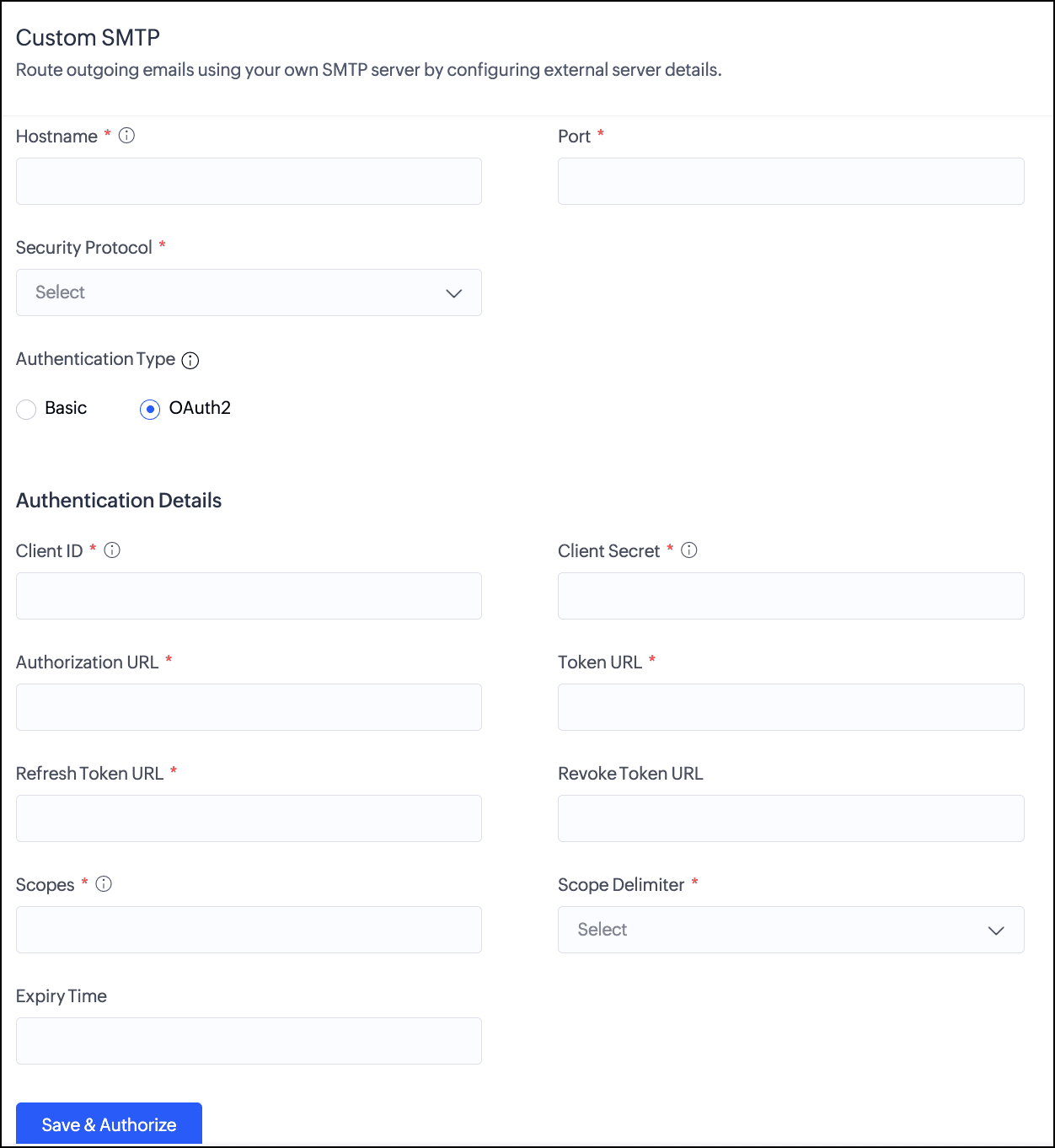
Custom SMTP - Connect any third-party email service or your own email infrastructure using the SMTP protocol. Creator supports basic authentication and OAuth 2.0. This gives you maximum compatibility with virtually any email provider.


Notes
Note: Multiple channels can be configured, but only one can be active at a time, through which all outgoing emails are routed. Only the super admin can configure and manage email channels.

Why this matters

Different organizations have different email infrastructure needs. Whether you're a growing business looking to strengthen your sender identity, a team already invested in Microsoft or Google's ecosystem, or an enterprise with specific operational and governance requirements around email routing, the revamped Email Management gives you the flexibility to align Zoho Creator's email delivery with how your organization already works.

Use cases

Improved email delivery visibility
For organizations sending a high volume of transactional emails, understanding what happens after an email is sent is just as important as sending it. With channels like ZeptoMail that offer delivery monitoring, activity tracking, and detailed logs, admins can now get clear visibility into email delivery status, making it easier to identify patterns, track engagement, and take timely action when issues arise.

Using your existing email service provider
Organizations that already use a specific email service provider can now connect it directly to Zoho Creator using custom SMTP. This means your Creator applications can send emails through the same provider your organization already relies on, without requiring a change to your existing email setup.

How to get started

  1. Navigate to Operations in the left pane.
  2. Select Email Management under Applications.
  3. Choose the channel that suits your setup and click Configure.
  4. Follow the setup steps for your chosen channel and activate it when ready.
For a detailed walkthrough, visit the Understanding Email Management and Managing Outgoing Email Channels help documentation.

Things to know

  1. Applicable for C6 users.
  2. The email channels are available only in paid plans.
  3. Creator built-in channel is available in Free plan.
  4. Domain authentication requires a paid plan.
  5. Only super admins can configure and manage email channels.
As always, feel free to share your questions or feedback in the comments below.

We'll be back soon with more exciting updates!

Regards,
The Zoho Creator Team

    • Sticky Posts

    • Zoho Creator + LLMs using Zoho MCP: Bring contextual AI into your apps

      Hello everyone, We're excited to share that Zoho Creator can now be integrated with leading AI models(like Claude) using Zoho MCP. As you know, Zoho Creator has been a pioneering low-code platform with a razor-sharp focus on making it easy to build business
    • Introducing Zoho Creator's 2025 Release Projection 2

      Hello Creators! I'm Prakash, from the Creator product management team, and today I'm delighted to unveil our next set of features as part of Release Projection 2 for 2025. With thoughtful analysis and planning, we've curated powerful new capabilities
    • Zoho Creator - 2023 Release Projection 1

      Hello everyone! A very Happy New Year to you and your family. Hope you're all good and having a great time using Zoho Creator to make your lives easier and your businesses prosper. 2022 was an action-packed year for us at Creator, and we hope to continue
    • Zoho Creator User Group meetups in a city near you! - Oct - Nov, 2023

      Greetings from the Zoho Creator team! We're hosting a series of Zoho Creator meetups in various cities across the globe, and we'd love to meet you there! Our meetups are a great opportunity to network with industry peers, exchange ideas and best practices,
    • Zoho Creator - 2023 Release Projection 2

      Hello everyone! Time truly flies when you're having an incredible journey, and today we mark the completion of an eventful and action-packed six months. It feels like just yesterday when we embarked on this adventure together with the launch of our new
    • Recent Topics

    • Out of Stock items showing in Commerce

      I have over 6000 items and most are not in stock, but all items are showing up in Commerce whether they are inventory or not. What option or feature can you use to hide items in Commerce at zero or negative quantities? I currently am using Commerce for
    • Is there a way to show contact emails in the Account?

      I know I can see the emails I have sent and received on a Contact detail view, but I want to be able to see all the emails that have been sent and received between all an Accounts Contacts on the Account Detail view. That way when I see the Account detail
    • Creating Email template that attaches file uploaded in specific field.

      If there's a way to do this using Zoho CRM's built-in features, then this has eluded me! I'm looking to create a workflow that automatically sends an email upon execution, and that email includes an attachment uploaded in a specific field. Email templates
    • What's New in Zoho Billing | July 2026

      July brings a new set of updates to Zoho Billing to make your billing operations more efficient. These include a redesigned checkout experience, expanded Hosted Payment Page capabilities, compliance improvements, enhanced reporting, and more. Enhancements
    • Zoho CRM Community Digest - July 2026 | Part 1

      Hello everyone, July is here! The first two weeks brought six CRM updates ranging from privacy-ready webforms to a significantly more powerful Layout Rules engine, two community wins worth a look (a dashboard workaround for spotting leads with no activities,
    • What is a realistic turnaround time for account review for ZeptoMail?

      On signing up it said 2-3 business days. I am on business-day 6 and have had zero contact of any kind. No follow-up questions, no approval or decline. Attempts to "leave a message" or use the "Contact Us" form have just vanished without a trace. It still
    • Zoho CRM - Email/Message icon for Deal List View

      Hi Team, My idea is to include a message icon at the start of the row of Deals when an unread message has been received. This would really help highlight the Deals where urgent action is required. Thanks for considering this request. Regards, Ashley
    • Email notification for followers

      Is there a way to enable email notification for followers of a support ticket? ie: Ticket #123 is owned by Agent#1, Agent#2 adds themselves as a follower. Whenever ticket #123 receives an email from the customer, Agent#1 receives an email. Agent#2 would
    • Introducing parent-child ticketing in Zoho Desk [Early access]

      Hello Zoho Desk users! We have introduced the parent-child ticketing system to help customer service teams ensure efficient resolution of issues involving multiple, related tickets. You can now combine repetitive and interconnected tickets into parent-child
    • Desk Contact Name > split to First and Last name

      I am new to Zoho and while setting up the Desk and Help Center, I saw that new tickets created or submitted from the Help Center used the Contact Name field. This would create a new Contact but put the person's name in the Last Name field only. The First
    • Vendor payment unexpectedly routed through Prepaid Expenses instead of Accounts Payable

      Hello, We are investigating an unexpected accounting behavior in Zoho Books. We created vendor bills and vendor payments for two suppliers using what appears to be the same workflow, but the journal entries are different. Vendor 1 – UZ Store (works correctly)
    • Line Spacing

      I am new to zoho writer - when I create a new document or either open an existing document - everything is double spaced. I tried changing the line spacing to single but still nothing happens do you know what I can do to change this double spacing format?  
    • LinkedIn RSC is now live in Zoho Recruit

      LinkedIn Recruiter System Connect (RSC) is here. Your Zoho Recruit data (candidates, jobs, notes, stage updates, resume attachments, and more) now syncs with LinkedIn in real time. Note: LinkedIn RSC is included with your LinkedIn Recruiter Corporate
    • Managing Shopify Payout Balances in Zoho Books

      I am recording my Shopify orders as Invoices and once Shopify credits my bank account I reconcile the payout to the specific invoices and create a new transaction to account for the Shopify Merchant Fee. That is fairly straightforward to me. How should
    • Charging for WhatsApp replies starting in October 2026

      Meta has announced that it will charge for reply messages on WhatsApp starting October 1, 2026, and the free 24-hour window will no longer exist. How will Zoho SalesIQ handle this billing? https://developers.facebook.com/documentation/business-messa
    • Upcoming Change: Increased character limits for module and field labels

      To provide greater flexibility in customizing your CRM, we are increasing the maximum character limits for module labels and field labels in Zoho CRM. What's changing? Label Current Limit New Limit Module Label 25 characters 50 characters Subform Module
    • SPAM (and some other) folders missing on three of my Zoho Mail accounts

      I have four email accounts with Zoho Mail. Three days ago, the Spam folder on three of these accounts vanished. It is gone on the Windows and Linux desktops as well as the web-based and Android versions, and I have tried it on multiple machines. The only
    • Using data from multiple sheets

      I am looking for a way to automate the process of taking multiple Zoho sheets and collating the data into one combined sheet (such that no duplicates occur). Currently I can only think of importing all the sheets into Excel and then running a macro to perform the task. Is there a simpler way offered by Zoho?
    • Cliq iOS can't see shared screen

      Hello, I had this morning a video call with a colleague. She is using Cliq Desktop MacOS and wanted to share her screen with me. I'm on iPad. I noticed, while she shared her screen, I could only see her video, but not the shared screen... Does Cliq iOS is able to display shared screen, or is it somewhere else to be found ? Regards
    • Error 1011 saving website personalisation — blocking all changes (corrupted "home_page.content" field)

      When trying to save changes under Settings → Brands → MY COMPANY → Website → Personalisation → Messenger, I receive the following error: "Either the request parameters are invalid or absent" upon checking on the developer console of the browser I get
    • All new Address Field in Zoho CRM: maintain structured and accurate address inputs

      Availability Update: 29 September 2025: It's currently available for all new sign-ups and for existing Zoho CRM orgs which are in the Professional edition exclusively for IN DC users. 2 March 2026: Available to users in all DCs except US and EU DC. 24
    • CRM x WorkDrive: We're rolling out the WorkDrive-powered file storage experience for existing users

      Release plan: Gradual rollout to customers without file storage add-ons, in this order: 1. Standalone CRM 2. CRM Plus and Zoho One DCs: All | Editions: All Available now for: - Standalone CRM accounts in Free and Standard editions without file storage
    • HR Helpdesk Cases

      We have Zoho One Enterprise. I'm trying to find HR Helpdesk Cases, but my UI does not match the documentation. I'm not sure how to move forward.
    • Tip #7 - Siri shortcuts in Zoho CRM

      Hello Everyone, Here is a tip about the 'Siri Shortcuts' feature and how it works in the iOS version of the Zoho CRM mobile app. What are Siri shortcuts? Siri Shortcuts are quick actions across your apps on iOS. They can perform an action automatically
    • Automatic Department and Employee Sync Between Zoho One and Zoho People

      Dear Zoho Support, I'm writing to propose a valuable feature request that would streamline data management and improve user experience within the Zoho ecosystem: automatic synchronization between departments and employees in Zoho One and Zoho People.
    • Nothing triggers a Journey

      I have been on the phone with Zoho support and they claim their development team needs to investigate more. However, I've found this is a pretty standard answer after a call takes any amount of time. After that, it's days and even weeks before it actually
    • Manually Backorder Sales Order and/or Change Sales Order Status

      Is there an option to manually 'backorder' a sales order, or otherwise change it's status?  In some cases, we receive orders for products that are out of stock, but we already have issued POs to our suppliers for replenishment.   Ex- we created a PO on
    • Backorder process review - Automating Removal of Sales Order from "On Hold" When PO is Received

      Hello Zoho Inventory Team, Currently, sales orders in On Hold status are released only when the bill for the purchase order is created. In our workflow, it would be much more efficient if the sales order could automatically move out of On Hold as soon
    • Kaizen #254 - Building a Temporal Lead Score Decay System in Zoho CRM

      Hello, CRM Wizards! Welcome to a fresh week of Kaizen. In this post, we will build a temporal lead score decay system that works alongside your existing scoring rules by introducing percentage-based score decay driven solely by customer inactivity. By
    • Metadata API Access to Functions

      I think it would be incredibly helpful to have api access to every function's code. Our team primarily uses deluge functions to update fields across modules according to business logic. I would like to create a visual dependancy model for our CRM, but
    • API actions/approvals endpoint returns UNAPPROVABLE despite user having full permissions and being the assigned approver

      Hi Team, We are trying to programmatically approve a record via the CRM API but consistently receive an UNAPPROVABLE error, even though the same user can approve the record without issue from the UI. Endpoint called: POST https://www.zohoapis.com/crm/v6/{module}/{record_id}/actions/approvals
    • Get a realistic picture of your revenue with Forecast Adjustments in Zoho CRM

      #crm25q1 Dear Customers, We hope you're doing well! Today, we're here with an important enhancement for business decision makers: forecast adjustments. Let's get straight to it! With technology on the rise and CX at its core, businesses are constantly
    • I am not able to check in and checkout in zoho people even location access allowed

      This issue i am facing in mackbook air m1, I allowed location in chrome browser and i also tried in safari but getting similar issue. Please have a look ASAP.
    • WhatsApp Vendors Module

      Hello, so WhatsApp works with the below, mainly with the customer side modules. Can we get functionality on the vendor side modules, i.e., PO, Bills, Vendor Credits, Payments Made, Purchase Received? WhatsApp is often the preferred method of communication
    • Upload ticket attachments via Drag-&-Drop

      Hello, if you want to upload a file to the ticket attachment you need to click the button and use the file browser to select and upload the desired file. In many cases, it would be much more efficient if you could simply drag the file to the browser window...
    • Elevate your Radar experience: Best practices part 3

      In the Spotlight: Zoho Desk's Radar app Customer support requires human intelligence combined with emotional intelligence. How about these coupled with contextual intelligence? These elevate the customer support experience. When providing support through
    • Migrating my email from GMAIL to ZOHO MAIL..........

      I am a long time GMAIL user and I really only understand how they operate, but after reviewing your tutorials and forums online, it is quite unbelievable how much more and how much more streamlined ZOHO mail is, not to mention ZOHO's wonderful, more advanced capabilities. I do have several questions about transitioning over to ZOHO.  Primarily, where is the best place to start, what do I do first? And how hard is it actually to move all my business and personal accounts over here?  When I sign up
    • Unable to send message;Reason:553 Relaying disallowed. Invalid Domain

      Hi, Now when I try to reply to an email, I see the Unable to send message;Reason:553 Relaying disallowed. Invalid Domain voicemessagedownloader.com error. I tested sending an email when I set it up in the past and it worked. I have checked the Zoho Organization
    • RFID Scanner/Adapter Solution for barcode scanning

      Hello, We will be trialing using barcode scanning for item verification during our picking process. Using a phone or a tablet is awkward and uncomfortable. Are there any Zoho compatible RFID scanners, or an RFID device/adapter that will connect with a
    • Approval Process not retriggering after rejection when stage is manually changed back

      We have an Approval Process on the Opportunities module that triggers when Stage is changed to Negotiation (Execute on: Edit Only). On rejection, a field update action reverts Stage back to Proposal. The issue: after rejection, AE can manually changes
    • Next Page